Ready to learn about Vishing? Let’s play Vishing Vigilante. The term vishing is short for Voice Phishing which is basically a scam carried out over the phone. Vishing calls are often cash driven. The attacker wants to trick you into gaining access to your money. Scammers may also take advantage of your desire to be helpful, create a sense of urgency, or stir strong emotions like fear and curiosity. It’s easy to impersonate someone over the phone, but here’s the thing; you’re always in control because you can always disconnect. A scammer may try to manipulate you by trying to scare you. They might claim that you have overdue taxes and will be arrested unless you pay them immediately. Scammers may try to excite you by claiming you have won a prize or a vacation, and to claim it you just need to pay a small fee. They may tug at your heart strings by claiming to be a charity that needs your donations. Pretty low right. So the next time you receive a strange phone call, ask yourself if it could be a vishing attack and remember you can always disconnect. When it comes to cybersecurity we all need to level up.
Threat actors can use generative AI to write malware and more skilled cybercriminals could exfiltrate information from or inject contaminated data into the large language models (LLMs) that train GenAI.
Recent quantum computing and AI advancements are expected to challenge established cryptographic algorithms.
Today, enterprises block 18.5% of all AI transactions, a 577% increase from April to January, for a total of more than 2.6 billion blocked transactions.
Some of the most popular AI tools are also the most blocked. Indeed, ChatGPT holds the distinction of being both the most-used and most-blocked AI application.
Of the people who clicked on fraudulent links from supposed tax services, 68% lost money. Among those, 29% lost more than $2,500, and 17% lost more than $10,000.
9% of Americans feel confident in their ability to spot deepfake videos or recognize AI-generated audio, such as fake renditions of IRS agents.
HiddenLayer | AI Threat Landscape Report 2024 | March 2024
98% of companies surveyed view some of their AI models as vital for business success, and 77% have experienced breaches in their AI systems over the past year.
61% of IT leaders acknowledge shadow AI, solutions that are not officially known or under the control of the IT department, as a problem within their organizations.
Researchers revealed the extensive use of AI in modern businesses, noting an average of 1,689 AI models actively used by companies. This has made AI security a top priority, with 94% of IT leaders dedicating funds to safeguard their AI in 2024.
Code42 | Annual Data Exposure Report 2024 | March 2024
Since 2021, there has been a 28% average increase in monthly insider-driven data exposure, loss, leak, and theft events.
While 99% of companies have data protection solutions in place, 78% of cybersecurity leaders admit they’ve still had sensitive data breached, leaked, or exposed.
More than 95% of respondents believe dynamic content through Large Language Models (LLMs) makes detecting phishing attempts more challenging.
Phishing will remain the top social engineering threat to businesses throughout 2024, surpassing other threats like business email compromise, vishing, smishing or baiting.
88% of cybersecurity professionals believe that AI will significantly impact their jobs, now or in the near future, and 35% have already witnessed its effects.
75% of respondents are moderately to extremely concerned that AI will be used for cyberattacks or other malicious activities.
The survey revealed that 12% of respondents said their organizations had blocked all access to generative AI tools in the workplace.
Cisco | Cisco 2024 Data Privacy Benchmark Study | February 2024
63% have established limitations on what data can be entered, 61% have limits on which employees can use GenAI tools, and 27% said their organization had banned GenAI applications altogether for the time being.
Despite the costs and requirements privacy laws may impose on organizations, 80% of respondents said privacy laws have positively impacted them, and only 6% said the impact has been negative.
91% of organizations recognize they need to do more to reassure their customers that their data was being used only for intended and legitimate purposes in AI.
More details of and a proof-of-concept exploit for an unauthenticated OS command injection vulnerability (CVE-2024-2389) in Flowmon, Progress Software’s network monitoring/analysis and security solution, have been published.
The critical vulnerability has been disclosed and patched by Progress earlier this month. “Currently, we have not received any reports that this vulnerability has been exploited, and we are not aware of any direct impacts on customers,” the company says in an advisory that was last updated on Friday.
According to Progress Software, more than 1,500 organizations from all over the world use Flowmon for network monitoring and anomaly detection. Sega, TDK, and Kia are on the list.
About CVE-2024-2389
CVE-2024-2389 is command injection vulnerability affecting Flowmon versions 11.x and 12.x, but not versions 10.x and lower.
“Unauthenticated, remote attackers can gain access to the web interface of Flowmon to issue a carefully crafted API command that will allow arbitrary system commands to be executed without authentication,” the company explained.
The vulnerability was discovered and reported to Progress by David Yesland, a penetration tester at Rhino Security Labs, who detailed the discovery in a blog post published on Tuesday.
He noted that once the vulnerability is exploited and command execution is achieved, “the application runs as the ‘flowmon’ user so command will be executed as this user. The flowmon user can run several commands with sudo and several of the commands can be abused to obtain a root shell.”
Rhino Security Labs published a PoC exploit and has created a module that will soon be merged into Metasploit.
Firemon customers are advised to upgrade to one of the patched versions – v12.3.5 or 11.1.14 – as soon as possible, and to then upgrade all Flowmon modules.
A malware campaign has been exploiting the updating mechanism of the eScan antivirus to distribute backdoors and cryptocurrency miners.
Avast researchers discovered and analyzed a malware campaign that exploited the update mechanism of the eScan antivirus to distribute backdoors and crypto miners.
Threat actors employed two different types of backdoors and targeted large corporate networks
The researchers believe the campaign could be attributed to North Korea-linked AP Kimsuky. The final payload distributed by GuptiMiner was also XMRig.
“GuptiMiner is a highly sophisticated threat that uses an interesting infection chain along with a couple of techniques that include performing DNS requests to the attacker’s DNS servers, performing sideloading, extracting payloads from innocent-looking images, signing its payloads with a custom trusted root anchor certification authority, among others.” reads the analysis published by Avast.“The main objective of GuptiMiner is to distribute backdoors within big corporate networks.”
The threat actors behind this campaign exploited a vulnerability in the update mechanism of the Indian antivirus provider eScan that allowed them to carry out a man-in-the-middle attack to distribute the malware. Avast already reported the issue to eScan and the India CERT. eScan acknowledged the flaw and addressed it on July 31, 2023. The issue in the update mechanism was present for at least five years.
The infection process begins when eScan requests an update from the update server. However, the attackers carry out a MitM attack and replace the legitimate update package with a malicious one. Subsequently, eScan unpacks and installs the package, which results in the sideloading of a DLL by eScan’s clean binaries. This DLL facilitates the continuation of the process, leading to the execution of multiple shellcodes and intermediary PE loaders.
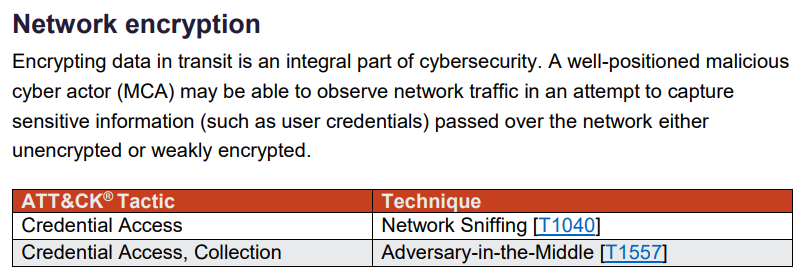
The researchers noticed that the downloaded package file is replaced with a malware-laced one on the wire because the process doesn’t use an HTTPS connection.
Below the infection chain described by Avast:
The eScan updater triggers the update
The downloaded package file is replaced with a malicious one on the wire because of a missing HTTPS encryption (MitM is performed)
A malicious package updll62.dlz is downloaded and unpacked by eScan updater
The contents of the package contain a malicious DLL (usually called version.dll) that is sideloaded by eScan. Because of the sideloading, the DLL runs with the same privileges as the source process – eScan – and it is loaded next time eScan runs, usually after a system restart
If a mutex is not present in the system (depends on the version, e.g. Mutex_ONLY_ME_V1), the malware searches for services.exe process and injects its next stage into the first one it can find
Cleanup is performed, removing the update package
GuptiMiner operates its own DNS servers to provide legitimate destination domain addresses of C2 servers through DNS TXT responses.
GuptiMiner connects directly to malicious DNS servers, bypassing the DNS network entirely. This use of the DNS protocol resembles telnet and is not considered DNS spoofing, which typically occurs within the DNS network. Although the servers requested by GuptiMiner exist, it’s likely an evasion tactic.
In the second-stage the shellcode from the PNG file extracts and executes the Gzip loader. This loader is a simple PE that decompresses another shellcode using Gzip and executes it in a separate thread that kiads the Stage 3 malware Puppeteer.
Puppeteer orchestrates the core functionality of the malware, including the cryptocurrency mining as well as the backdoor deployment.
Surprisingly, the ultimate payload disseminated by GuptiMiner can be also XMRig, which was somewhat unexpected given the level of sophistication of this campaign.
The researchers speculate that using the miner could be a diversionary tactic.
“During our research, we’ve also found an information stealer which holds a rather similar PDB path as was used across the whole GuptiMiner campaign.” concludes the report. “What is truly interesting, however, is that this information stealer might come from Kimsuky operations.”
Some notable colleges and universities renowned for their cybersecurity programs and courses include:
Carnegie Mellon University (USA)
Information Networking Institute (INI)
The Information Networking Institute (INI) at Carnegie Mellon University (CMU) educates and develops engineers through technical, interdisciplinary master’s degree programs in information networking, security and mobile and IoT engineering that incorporate business and policy perspectives.
Institute for Information Security & Privacy (IISP)
The Georgia Institute of Technology’s Institute for Information Security & Privacy (IISP) is a research institution dedicated to advancing cybersecurity and privacy technologies. Established within Georgia Tech, the IISP serves as a focal point for interdisciplinary research, education, and collaboration in the field of information security and privacy.
MIT Department of Electrical Engineering and Computer Science
A joint venture between the Schwarzman College of Computing and the School of Engineering, EECS is grounded in three overlapping sub-units: electrical engineering (EE), computer science (CS), and artificial intelligence and decision-making (AI+D).
Cyber Policy Center and Computer Science Department
The Cyber Policy Center brings together researchers across the Stanford campus to solve the biggest issues in cybersecurity, governance and the future of work.
An independent subsidiary of SANS, the SANS Technology Institute offers graduate programs (master’s degree and graduate certificates) that develop technically-adept leaders and undergraduate programs (bachelor’s degree and undergraduate certificate) for people who want to enter the cybersecurity field.
The School of Information is a graduate research and education community committed to expanding access to information and to improving its usability, reliability, and credibility while preserving security and privacy. This requires the insights of scholars from diverse fields — information and computer science, design, social sciences, management, law, and policy.
The Department of Computer Science and Technology (formerly known as the Computer Laboratory) is the academic department within the University of Cambridge that encompasses computer science, along with many aspects of technology, engineering and mathematics.
The Global Cyber Security Capacity Centre (GCSCC) is an international centre for research on efficient and effective cybersecurity capacity-building, promoting an increase in the scale, pace, quality and impact of cybersecurity capacity-building initiatives across the world.
In this article, we’ll identify some first steps you can take to establish your cloud security strategy. We’ll do so by discussing the cloud security impact of individual, concrete actions featured within the CIS Critical Security Controls (CIS Controls) and the CIS Benchmarks.
Data protection and application security: The foundation of a cloud security strategy
When you’re working with Controls v8 and the CIS Controls Cloud Companion Guide, you need to lay a foundation on which you can build your unique cloud security efforts. Toward that end, you can tailor the Controls in the context of a specific Information Technology/Operational Technology (IT/OT) map.
To help you make an impact at the beginning of your cloud security journey, we recommend you focus on two Controls in particular: CIS Control 3 – Data Protection and CIS Control 16 – Application Security.
Cloud Data Security with CIS Control 3
The purpose of CIS Control 3 is to help you create processes for protecting your data in the cloud. Consumers don’t always know that they’re responsible for cloud data security, which means they might not have adequate controls in place. For instance, without proper visibility, cloud consumers might be unaware that they’re leaking their data for weeks, months, or even years.
CIS Control 3 walks you through how to close this gap by identifying, classifying, securely handling, retaining, and disposing of your cloud-based data, as shown in the screenshot below.
A screenshot of CIS Control 3: Data Protection
Cloud Application Security with CIS Control 16
In addition to protecting your cloud-based data, you need to manage your cloud application security in accordance with CIS Control 16. Your responsibility in this area applies to applications developed by your in-house teams and acquired from external product vendors.
To prevent, detect, and remediate vulnerabilities in your cloud-based applications, you need a comprehensive program that brings together people, processes, and technology. Continuous Vulnerability Management, as discussed in CIS Control 7, sits at the heart of this program. You can then expand your security efforts by using supply chain risk management for externally acquired software and a secure software development life cycle (SDLC) for applications produced in house.
Want to learn more about the CIS Benchmarks? Check out our video below.
Using the CIS Amazon Web Services Foundations Benchmark v3.0.0 as an example, here are two recommendations you can implement to protect your data in the cloud.
Hardening your cloud-based assets with MFA, lack of public access
With CIS Controls 3 and 16 as your foundation, you can build upon your progress by hardening your accounts and workloads in the cloud with the security recommendations of the CIS Benchmarks, which map back to the Controls.
Set up MFA for the ‘root’ user account
The ‘root’ user account is the most privileged user in your AWS account. In the event of a compromise, a cyber threat actor (CTA) could use your ‘root’ user account to access sensitive data stored in your AWS environment.
To address this threat, you need to safeguard your ‘root’ user account. You can do so by implementing Recommendation 1.5, which advises you to set up multi-factor authentication (MFA) using a dedicated device that’s managed by your company. Do not use a personal device to protect your ‘root’ user account with MFA, as this could increase the risk of account lockout if the device owner leaves the company, changes their number, or loses their device.
Block public access on your S3 buckets
Amazon Simple Storage Service (S3) enables you to store objects in your AWS environment using a web interface. The issue is that not everyone configures their S3 buckets securely. By default, S3 buckets don’t allow public access upon their creation. However, an Identity and Access Management (IAM) principal with sufficient permissions could enable public access to your S3 buckets. In doing so, they could inadvertently expose your buckets and their respective objects.
You can mitigate this risk by implementing Recommendation 2.1.4. This guideline consists of ensuring that you’ve configured S3 buckets to “Block public access” in both your individual bucket settings and in your AWS account settings. That way, you’ll block the public from accessing any of your S3 buckets and its contained objects connected to your AWS account.
Streamlining your use of cloud security best practices
The Controls and Benchmarks recommendations discussed above will help you take the first steps in implementing your cloud security strategy. From here, you can save time securely configuring your technologies using the CIS Hardened Images, virtual machine images (VMIs) that are pre-hardened to the security recommendations of the Benchmarks.
There are a variety of Python security tools are using in the cybersecurity industries and python is one of the widely used programming languages to develop penetration testing tools.
For anyone who is involved in vulnerability research, reverse engineering or pen-testing, Cyber Security News suggests trying out mastering in Python For Hacking From Scratch.
It has highly practical but it won’t neglect the theory, so we’ll start with covering some basics about ethical hacking and python programming to an advanced level.
The listed tools are written in Python, others are just Python bindings for existing C libraries and some of the most powerful tools pentest frameworks, Bluetooth smashers, web application vulnerability scanners, war dialers, etc. Here you can also find 1000s of hacking tools.
Best Python Security Tools for Pentesters
Python Course & Papers
Hacking with Python – Learn to Create your own Hacking Tools
Mastering in Python Programming For Hacking From Scratch
Forensic Fuzzing Tools: generate fuzzed files, fuzzed file systems, and file systems containing fuzzed files in order to test the robustness of forensics tools and examination systems
Windows IPC Fuzzing Tools: tools used to fuzz applications that use Windows Interprocess Communication mechanisms
WSBang: perform automated security testing of SOAP based web services
Construct: library for parsing and building of data structures (binary or textual). Define your data structures in a declarative manner
python-poppler-qt4: Python binding for the Poppler PDF library, including Qt4 support
Misc
InlineEgg: A Python security tools toolbox of classes for writing small assembly programs in Python
Exomind: framework for building decorated graphs and developing open-source intelligence modules and ideas, centered on social network services, search engines and instant messaging
RevHosts: enumerate virtual hosts for a given IP address
In a groundbreaking move, the U.S. Department of Defense has released a comprehensive guide for organizations deploying and operating AI systems designed and developed by another firm.
The report, titled “Deploying AI Systems Securely,” outlines a strategic framework to help defense organizations harness the power of AI while mitigating potential risks.
The report was authored by the U.S. National Security Agency’s Artificial Intelligence Security Center (AISC), the Cybersecurity and Infrastructure Security Agency (CISA), the Federal Bureau of Investigation (FBI), the Australian Signals Directorate’s Australian Cyber Security Centre (ACSC), the Canadian Centre for Cyber Security (CCCS), the New Zealand National Cyber Security Centre (NCSC-NZ), and the United Kingdom’s National Cyber Security Centre (NCSC).
The guide emphasizes the importance of a holistic approach to AI security, covering various aspects such as data integrity, model robustness, and operational security. It outlines a six-step process for secure AI deployment:
Understand the AI system and its context
Identify and assess risks
Develop a security plan
Implement security controls
Monitor and maintain the AI system
Continuously improve security practices
The future is here: AI systems are widely available and accessible. But with new systems come new risks. Along with partners, we’re releasing a new set of best practices to help your org stay secure. Read “Deploying AI Systems Securely” now: https://t.co/2FzgkeRVfUpic.twitter.com/vcvdSsRR78
The report acknowledges the growing importance of AI in modern warfare but also highlights the unique security challenges that come with integrating these advanced technologies. “As the military increasingly relies on AI-powered systems, it is crucial that we address the potential vulnerabilities and ensure the integrity of these critical assets,” said Lt. Gen. Jane Doe, the report’s lead author.
Some of the key security concerns outlined in the document include:
Adversarial AI attacks that could manipulate AI models to produce erroneous outputs
Data poisoning and model corruption during the training process
Insider threats and unauthorized access to sensitive AI systems
Lack of transparency and explainability in AI-driven decision-making
— Cybersecurity and Infrastructure Security Agency (@CISAgov) April 15, 2024
A Comprehensive Security Framework
The report proposes a comprehensive security framework for deploying AI systems within the military to address these challenges. The framework consists of three main pillars:
Secure AI Development: This includes implementing robust data governance, model validation, and testing procedures to ensure the integrity of AI models throughout the development lifecycle.
Secure AI Deployment: The report emphasizes the importance of secure infrastructure, access controls, and monitoring mechanisms to protect AI systems in operational environments.
Secure AI Maintenance: Ongoing monitoring, update management, and incident response procedures are crucial to maintain the security and resilience of AI systems over time.
Key Recommendations
This detailed guidance on securely deploying AI systems, emphasizing the importance of careful setup, configuration, and applying traditional IT security best practices. Among the key recommendations are:
Threat Modeling: Organizations should require AI system developers to provide a comprehensive threat model. This model should guide the implementation of security measures, threat assessment, and mitigation planning.
Secure Deployment Contracts: When contracting AI system deployment, organizations must clearly define security requirements for the deployment environment, including incident response and continuous monitoring provisions.
Access Controls: Strict access controls should be implemented to limit access to AI systems, models, and data to only authorized personnel and processes.
Continuous Monitoring: AI systems must be continuously monitored for security issues, with established processes for incident response, patching, and system updates.
Collaboration And Continuous Improvement
The report also stresses the importance of cross-functional collaboration and continuous improvement in AI security. “Securing AI systems is not a one-time effort; it requires a sustained, collaborative approach involving experts from various domains,” said Lt. Gen. Doe.
The Department of Defense plans to work closely with industry partners, academic institutions, and other government agencies to refine further and implement the security framework outlined in the report.
Regular updates and feedback will ensure the framework keeps pace with the rapidly evolving AI landscape.
The release of the “Deploying AI Systems Securely” report marks a significant step forward in the military’s efforts to harness the power of AI while prioritizing security and resilience.
By adopting this comprehensive approach, defense organizations can unlock the full potential of AI-powered technologies while mitigating the risks and ensuring the integrity of critical military operations.
As Russia’s invasion of Ukraine enters its third year, the formidable Sandworm (aka FROZENBARENTS, APT44) cyber threat group remains highly active and increasingly integrated with Russian conventional military operations in support of Moscow’s war aims.
However, Sandworm’s disruptive operations now span globally across Russian political, military, and economic interests.
With 2024 seeing record participation in national elections, the group’s history of attempting to interfere in democratic processes elevates potential near-term threats.
Recently, cybersecurity researchers at Google’s Threat Intelligence team unveiled that Russian APT44 is the most notorious cyber sabotage group globally.
Russian APT44 Most NotoriousGang
The operationally mature APT44 (Sandworm) which is sponsored by Russian military intelligence infrastructure, carries out the full range of spying, warfare, and influencing operations – something that is quite unique to state groups who often specialize.
APT44’s spectrum of operations (Source – Google Cloud)
Russia’s “information confrontation” cyber warfare doctrine necessitates these abilities.
In pursuit of this, APT44 has actively sought to create several initiatives that would end up giving Russia an upper hand during times of war, Mandiant said.
During the early stages of the invasion, it ran a fierce campaign with wiper malware against Ukrainian critical infrastructure, sometimes aligned with kinetic strikes.
As the war proceeded, APT44 switched its interest towards intelligence gathering and launched campaigns to extract data from captured devices that could be used as intelligence sources for Russian forces at the front line.
The group’s changing strategy illustrates flexibility in support of Moscow’s military goals.
APT44’s wartime disruptive activity (Source – Google Cloud)
As an arm of Russian military intelligence, APT44’s sabotage operations extend beyond military objectives to support the Kremlin’s broader national interests like political signaling, crisis response, and preserving perceived global reputation.
This has resulted in historically consequential attacks like disrupting Ukraine’s power grid in 2015-2016, the global NotPetya strike on Ukraine’s Constitution Day 2017, and the disruption of the 2018 Pyeongchang Olympics opening ceremony over Russia’s doping ban.
With high capabilities, risk tolerance, and a far-reaching mandate backing Russian foreign policy across governments, civil society, and critical infrastructure globally, APT44 presents a severe, persistent threat wherever Russian interests intersect.
Its aggressive cyber offense increases new attack concepts, likely lowering barriers for other state and non-state actors, a risk Russia itself appears concerned about based on observed defensive exercises.
APT44 is a well-known Russian-based advanced persistent threat group constituting a critical and growing international cyber threat.
For ten years, this group has been at the forefront when it comes to conducting cyber-attacks that are aimed at promoting the nationalist agenda of Russia, which focuses mainly on elections, sports events, and geopolitics.
The Ukraine war still continues, but APT44 has not shifted its concentration from the region as it may further the Kremlin’s global strategic goals, consequently perhaps impacting political dynamics, elections, and matters surrounding Russian neighboring countries.
Cloud computing and the use of mobile devices challenged the concept of a perimeter-based security model. The change in thinking started with the Jericho Forum in 2007 releasing the Jericho Forum Commandments for a de-perimiterised world where it’s assumed a network perimeter doesn’t exist.
John Kindervag, from Forrester Research, then came up with the term “zero trust” in 2010 and developed the phrase “never trust, always verify” . He identified zero trust as a model that removes implicit trust within a system boundary and continuously evaluates the risks by applying mitigations to business transactions and data flows at every step of their journey. The phrase “assume breach” is also often associated with zero trust and comes from the phrase “assume compromise” used by the US Department of Defense in the 1990’s.
The approach requires a combination of technologies, processes, practices, and cultural changes to be successfully implemented. It involves a fundamental shift in the way organizations approach cybersecurity. Traditional “castle and moat” security models assumed, after data passed through the perimeter, that everything inside a system could be implicitly trusted.
Zero trust basics
The zero-trust model assumes that all business transactions and data flows, whether originating from inside or outside the network, are potentially malicious. Every interaction in a business transaction or data flow must be continuously validated to ensure that only authorized users and devices can access sensitive business data. In effect, it moves the perimeter from the system boundary to the point at which identification, authentication, and authorization take place, resulting in identity becoming the new perimeter. The whole concept often gets simplified down to the “never trust, always verify” principle, but it’s more than that.
Zero-trust architecture requires a cultural shift that emphasizes the importance of security rather than just compliance throughout an organization. This means that implementing a zero-trust architecture involves not only the deployment of specific technologies but also the development of processes and practices that promote a data security first mindset across the organization, building on the data centric security approach we discussed earlier.
When architecting and developing security for a system, an architect should follow a set of principles, tenets, or simply a way of thinking to apply zero trust. Zero trust isn’t an end-to-end method, and a comprehensive approach requires integration with other architectural thinking techniques.
Security analysis of web applications is, first of all, a search and investigation of cases of incorrect functioning of program code and vulnerabilities. Those who choose a penetration tester’s profession should keep in mind that it requires continuous learning and the ability to use a library of resources for self-education. A common situation is that while you are studying vulnerabilities in one framework, a dozen new reports are published. To quickly understand the potential vulnerabilities associated with previously unknown technologies, you need to be well-versed in the sources of information. When working in a team on an actual pentest project, there is usually no time for a thoughtful search. So, if your skills are combined with a strong foundational education, you are looking at promising career opportunities.
Your initial understanding of the subject can be developed through cybersecurity analysis courses at the university. These courses can also help you decide if this career path is right for you. It is good to receive foundational training in software development and networking, including web applications, while you are at university. Afterward, you can gain hands-on experience by practicing infrastructure penetration testing.
Usually, your initial attempts to secure a job as a web penetration tester might reveal gaps in your knowledge. Seeking employment at companies like VentureDive, where the work could help fill these educational gaps and offer valuable experience, is a smart approach. For instance, you could start as a technical support specialist in information security at a large company. After about two to four months, you might go for your first interview for a security analyst position, during which you could identify any weak points you might still have. With a few more months of work under the guidance of a mentor and diving into training materials, you could successfully land a position as a penetration tester.
Choosing where to work in the future is not as straightforward as it may appear. In a large, well-known company, you will be surrounded by a high level of expertise and likely assigned a mentor. However, the opportunity to find truly interesting vulnerabilities in real projects might be limited. This is because such organizations often have costly services, and their clients are usually not willing to skimp on development and security. Consequently, you will be working with quality products that have undergone thorough security testing, reducing the likelihood of encountering situations that provide valuable experience.
In a small company, you should not expect to find a mentor, a high level of expertise, or an impressive salary. However, these companies often get orders to pentest applications with many vulnerabilities, providing invaluable experience for those new to the profession. With this experience under your belt, you could eventually transition to a larger company.
Mastering Interview Techniques
Given that we cannot cover everything, let’s go over the essential knowledge and skills you need to analyze vulnerabilities in web applications.
A pentester needs to understand how applications function on the network level, which includes knowing about TCP handshakes, domain names, IPs, proxies, etc. It is also important to grasp the basics of how HTTP and HTTPS protocols work. Being prepared to answer questions like “What is the difference between HTTP methods?” “When should PATCH be used as opposed to POST?” and “How do HTTP 0.9/1.1 differ from HTTP/2?” is a part of this foundational knowledge.
Vulnerabilities are not always tucked away in a web application’s code; sometimes, they are embedded in its architecture, like within the web server itself. Often, a pentester might not have a direct view of the application’s architecture but can infer how it functions. Therefore, having knowledge in this area is incredibly useful.
As vulnerabilities become more complex, it is important to grasp the basics. This foundational understanding allows you to tackle more complex issues as they arise.
Developing the ability to search for answers to your questions using open sources is vital, even if you have someone to ask. Always start by seeking out information and attempting to solve problems on your own before seeking help.
Being able to write and read code in various languages, including PHP, Python, JavaScript, Java, and C#, is essential. When it comes to analyzing web applications, you will encounter different approaches, such as white box, gray box, and black box testing. For example, if you are doing white box testing and have access to the application’s source code, having development experience is a big plus. Additionally, the ability to write automation scripts and tailor third-party tools to fit your needs is a valuable skill.
Pentest projects frequently require examining the application from the outside in. You need the ability to scan the network and identify vulnerable services to ensure no obvious security flaws are overlooked.
In your work, you will often need to theoretically explain the nature of a vulnerability. This requires understanding basic concepts, such as how databases operate, the properties of information, and what constitutes vulnerability and exploitation. Essential skills also include system administration for both Windows and Linux.
Simply studying a vast number of vulnerabilities will turn you into a top-tier professional because it does not cultivate the skill of discovering them. During actual pentest projects, the toughest part is often identifying vulnerabilities. It is advised to search for vulnerable applications and analyze them without peeking at the technology stack or hints about the vulnerabilities. This practice offers foundational experience and insights into how things operate in an actual project.
For those lacking a basic education in security analysis, paid penetration testing courses are an option to consider. Unfortunately, the better courses tend to be expensive, and it is difficult to recommend any budget-friendly options that are truly effective. It is crucial to realize that these courses will not turn you into an expert overnight, as some might claim, but they will provide you with a solid understanding of the profession.
Factor Analysis of Information Risk (FAIR), a powerful methodology for assessing and quantifying information risks. Here’s a comprehensive overview:
1. What Is FAIR? a. FAIR, short for Factor Analysis of Information Risk, is a quantitative risk quantification methodology designed to help businesses evaluate information risks. b. It stands out as the only international standard quantitative model framework that addresses both operational risk and information security. c. Mature organizations that utilize Integrated Risk Management (IRM) solutions significantly benefit from FAIR.
2. Objective of FAIR: a. The primary goal of FAIR is to support existing frameworks and enhance risk management strategies within organizations. b. Unlike cybersecurity frameworks (such as NIST CSF), FAIR is not a standalone framework. Instead, it complements other industry-standard frameworks like NIST, ISO 2700x, and more. c. As organizations shift from a compliance-based approach to a risk-based approach, they need a quantitative risk methodology to support this transition.
3. How FAIR Differs from Legacy Risk Quantification Methods: a. FAIR is not a black-box approach like traditional penetration testing. Instead, it operates as a “glass-box” method. b. Legacy methods focus on penetration testing without internal knowledge of the target system. While they identify vulnerabilities, they cannot provide the financial impact of risks. c. In contrast, FAIR translates an organization’s loss exposure into financial terms, enabling better communication between technical teams and non-technical leaders. d. FAIR provides insights into how metrics were derived, allowing Chief Information Security Officers (CISOs) to present detailed information to board members and executives.
4. Benefits of FAIR: a. Financial Context: FAIR expresses risks in dollars and cents, making it easier for decision-makers to understand. b. Risk Gap Identification: FAIR helps organizations efficiently allocate resources to address risk gaps. c. Threat Level Scaling: Unlike other frameworks, FAIR scales threat levels effectively. d. Board Engagement: FAIR fosters interest in cybersecurity among board members and non-technical leaders.
5. Drawbacks of FAIR: a. Complexity: FAIR lacks specific, well-defined documentation of its methods. b. Complementary Methodology: FAIR is not an independent risk assessment tool; it complements other frameworks. c. Probability-Based: While FAIR’s probabilities are not baseless, they may not be entirely accurate due to the unique nature of cyber-attacks and their impact.
In summary, FAIR revolutionizes risk analysis by providing a quantitative, financially oriented perspective on information risk. It bridges the gap between technical and non-technical stakeholders, enabling better risk management decisions.
Apple has updated its documentation related to its warning system for mercenary spyware threats, now specifying that it alerts users when they may have been individually targeted by such attacks.
The revision points out companies like NSO Group, known for developing surveillance tools like Pegasus, which state actors often use for targeted attacks on individuals such as journalists, activists, politicians and diplomats.
In a blog post published on Wednesday, Apple highlighted the global and sophisticated nature of these attacks, which are costly and complex.
The update marks a shift in the wording from informing and assisting users targeted by state-sponsored attackers to specifically addressing mercenary spyware threats.
“It’s really important to recognize that mercenary spyware, unlike others, is deliberately designed with advanced capabilities, including zero-day exploits, complex obfuscation techniques, and self-destruct mechanisms, making it highly effective and hard to detect,” explained Krishna Vishnubhotla, vice president of product strategy at Zimperium.
According to recent reports, Apple sent threat notifications to iPhone users in 92 countries, coinciding with the support page revision.
While Apple began sending threat notifications in November 2021, it refrained from attributing the attacks or notifications to any particular threat actor or region.
This development now aligns with global efforts to counter the misuse of commercial spyware, as evidenced by a coalition of countries, including the US, working to develop safeguards against invasive surveillance technology.
Moreover, a recent report by Google’s Threat Analysis Group (TAG) and Mandiant shed light on the exploitation of zero-day vulnerabilities in 2023, with commercial surveillance vendors being responsible for a significant portion of these exploits.
These vulnerabilities targeted web browsers and mobile devices, underscoring the increasing reliance of threat actors on zero days for evasion and persistence.
For more than a decade, DuckDuckGo has rallied against Google’s extensive online tracking. Now the privacy-focused web search and browser company has another target in its sights: the sprawling, messy web of data brokers that collect and sell your data every single day.
Today, DuckDuckGo is launching a new browser-based tool that automatically scans data broker websites for your name and address and requests that they be removed. Gabriel Weinberg, the company’s founder and CEO, says the personal-information-removal product is the first of its kind where users don’t have to submit any of their details to the tool’s owners. The service will make the requests for information to be removed and then continually check if new records have been added, Weinberg says. “We’ve been doing it to automate it completely end-to-end, so you don’t have to do anything.
The personal-information removal is part of DuckDuckGo’s first subscription service, called Privacy Pro, and is bundled with the firm’s first VPN and an identity-theft-restoration service. Weinberg says the subscription offering, which is initially available only in the US for $9.99 per month or $99.99 per year, is part of an effort to add to the privacy-focused tools it provides within its web browser and search engine. “There’s only so much we can do in that browsing loop, there’s things happening outside of that, and a big one is data brokers, selling information scraped from different places,” Weinberg says.
DuckDuckGo’s personal-information-removal tool—for now, at least—is taking the privacy fight to people-search websites, which allow you to look up names, addresses, and some details of family members. However, Weinberg says DuckDuckGo has created it so the company isn’t gathering details about you, and it is built on technology from Removaly, which the company acquired in 2022.
Ahead of its launch, the company demonstrated how the system works and some of the engineering efforts that went into its creation. On the surface, the removal tool is straightforward: You access it through the company’s browser and enter some information about yourself, such as your name, year of birth, and any addresses. It then scans 53 data broker websites for results linked to you and requests those results to be wiped. (All 53 data brokers included have opt-out schemes that allow people to make requests.) A dashboard shows updates about what has been removed and when it will next scan those websites again, in case new records have been added.
Under the hood, things are more complex. Greg Fiorentino, a product director at DuckDuckGo, says when you enter your personal data into the system, it’s all saved in an encrypted database on your computer (the tool doesn’t work on mobile), and the company isn’t sent this information. “It doesn’t go to DuckDuckGo servers at all,” he says.
For each of the data brokers’ websites, Fiorentino says, DuckDuckGo looked at its URL structure: For instance, search results may include the name, location, and other personal information that are queried. When the personal information tool looks for you on these websites, it constructs a URL with the details you have entered.
“Each of the 53 sites we cover has a slightly different structure,” Fiorentino says. “We have a template URL string that we substitute the data in from the user to search. There are lots of different nuances and things that we need to be able to handle to actually match the data correctly.”
During testing, the company says, it found most people have between 15 and 30 records on the data broker sites it checks, although the highest was around 150. Weinberg says he added six addresses to be removed from websites. “I found hits on old stuff, and even in the current address, which I really tried to hide a bit from getting spam at, it’s still out there somehow,” Weinberg says. “It’s really hard to avoid your information getting out there.”
Once the scan for records has been completed, the DuckDuckGo system, using a similar deconstruction of each of the data broker websites, will then automatically make requests for the records to be removed, the team working on the product say. Fiorentino says some opt-outs will happen within hours, whereas others can take weeks to remove the data. The product director says that in the future, the tool may be able to remove data from more websites, and the company is looking at potentially including more sensitive data in the opt-outs, such as financial information.
Various personal-information-removal services exist on the web, and they can vary in what they remove from websites or the services they provide. Not all are trustworthy. Recently, Mozilla, the creator of the Firefox browser, stopped working with identity protection service Onerep after investigative journalist Brian Krebs revealed that the founder of Onerep also founded dozens of people-search websites in recent years.
DuckDuckGo’s subscription service marks the first time the company has started charging for a product—its browser and search engine are free to use, and the firm makes its money from contextual ads. Weinberg says that, because subscriptions are purchased through Apple’s App Store, Google Play, or with payment provider Stripe, details about who subscribes are not transferred to DuckDuckGo’s servers. A random ID is created for each user when they sign up, so people don’t have to create an account or hand DuckDuckGo their payment information. The company says it doesn’t have access to people’s Apple IDs or Google account details.
For its identity-theft-restoration service, DuckDuckGo says it is working with identity protection service Iris, which uses trained staff to help with fraudulent banking activity, document replacement, emergency travel, and more. DuckDuckGo says no information is shared between it and Iris.
Weinberg says that while the company’s main focus is providing free and easy-to-use privacy tools to people, running a VPN and the removal tool requires a different business model. “It just takes a lot of bandwidth,” he says of the VPN.
Broadly, the VPN industry, which allows people to hide their web traffic from internet providers and avoid geographic restrictions on streaming, has historically been full of companies with questionable records when it comes to privacy and people’s data. Free VPNs have long been a privacy nightmare.
DuckDuckGo says its VPN, which it built in-house and which uses the WireGuard protocol, does not store any logs of people’s activities and can be used on up to five devices at once. “We don’t have any record of website visits, DNS requests, IP addresses connected, or session lengths,” the company says in its documentation. The VPN runs through its browser, with 13 location options at launch, but shields all internet traffic passing through your phone or computer.
The company says it is conducting a third-party audit of the VPN to allow its claims to be scrutinized, and it will publish the full audit once it’s complete. “We really wanted to do something in the VPN space for a long time, we just didn’t have the resources and people to do it,” Weinberg says. “We looked at partnering in different places. If we have to completely trust a partner versus building something where we can make it anonymous, we decided we would want to do it ourselves.”
Two new techniques uncovered in SharePoint enable malicious actors to bypass traditional security measures and exfiltrate sensitive data without triggering standard detection mechanisms.
Illicit file downloads can be disguised as harmless activities, making it difficult for cybersecurity defenses to detect them. To accomplish this, the system’s features are manipulated in various ways.
Security researchers from Varonis Threat Labs discovered two SharePoint techniques.
Open-In-App Method
The first technique dubbed the “Open in App Method,” takes advantage of the SharePoint feature, which allows users to open documents directly in their associated applications.
While this feature is designed for user convenience, it has inadvertently created a loophole for data breaches.
Attackers can use this feature’s underlying code to access and download files, leaving behind only an access event in the file’s audit log.
This subtle footprint can easily be overlooked, as it does not resemble a typical download event.
The exploitation of this method can be carried out manually or automated through a PowerShell script.
When automated, the script can rapidly exfiltrate many files, significantly amplifying the potential damage.
The script leverages the SharePoint client object model (CSOM) to fetch files from the cloud and save them to a local computer, avoiding creating a download log entry.
SkyDriveSync User-Agent
The second technique involves the manipulation of the User-Agent string for Microsoft SkyDriveSync, now known as OneDrive, Varonis said.
By masquerading as the sync client, attackers can download files or even entire SharePoint sites.
These downloads are mislabeled as file synchronization events rather than actual downloads, thus slipping past security measures that are designed to detect and log file downloads.
This method is particularly insidious because it can be used to exfiltrate data on a massive scale, and the sync disguise makes it even harder for security tools to distinguish between legitimate and malicious activities.
The use of this technique suggests a sophisticated understanding of SharePoint and OneDrive’s synchronization mechanisms, which could be exploited to systematically drain data from an organization without raising alarms.
Microsoft’s Response And Security Patch Backlog
Upon discovery, Varonis researchers promptly reported these vulnerabilities to Microsoft in November 2023. Microsoft has acknowledged the issue and categorized these vulnerabilities as “moderate” security risks.
They have been added to Microsoft’s patch backlog program, indicating that a fix is in the pipeline but may not be immediately available.
The discovery of these techniques underscores the risks associated with SharePoint and OneDrive, especially when permissions are misconfigured or overly permissive.
Organizations relying on these services for file sharing and collaboration must be vigilant and proactive in managing access rights to minimize the risk of unauthorized data access.
To combat these vulnerabilities, organizations are advised to implement additional detection strategies.
Monitoring for unusual patterns of access events, especially those that could indicate the use of the “Open in App Method,” is crucial.
Similarly, keeping an eye on sync activities and verifying that they match expected user behavior can help identify misuse of the SkyDriveSync User-Agent technique.
Furthermore, organizations should prioritize the review and tightening of permissions across their SharePoint and OneDrive environments.
Regular audits and updates to security policies can help prevent threat actors from exploiting such vulnerabilities in the first place.
Google announced support for a V8 Sandbox in the Chrome web browser to protect users from exploits triggering memory corruption issues.
Google has announced support for what’s called a V8 Sandbox in the Chrome web browser. The company included the V8 Sandbox in Chrome’s Vulnerability Reward Program (VRP). Chrome 123 is a sort of “beta” release for the sandbox designed to mitigate memory corruption issues in the Javascript engine.
The V8 Sandbox is designed to prevent memory corruption issues that would impact other areas of memory in the process.
Almost every Chrome exploits observed in the wild between 2021 and 2023 triggered a memory corruption issue in a Chrome renderer process that was exploited for remote code execution (RCE). The majority of these issues (60%) impacted the V8 Javascript engine.
“V8 vulnerabilities are rarely “classic” memory corruption bugs (use-after-frees, out-of-bounds accesses, etc.) but instead subtle logic issues which can in turn be exploited to corrupt memory. As such, existing memory safety solutions are, for the most part, not applicable to V8.” reads the announcement. “In particular, neither switching to a memory safe language, such as Rust, nor using current or future hardware memory safety features, such as memory tagging, can help with the security challenges faced by V8 today.”
The researchers highlighted that a common thread among nearly all V8 vulnerabilities is that the eventual memory corruption occurs within the V8 heap. This is primarily because the compiler and runtime predominantly deal with V8 HeapObject instances.
To mitigate such vulnerabilities the researchers devised a technique to isolate V8’s (heap) memory to prevent memory corruption from spreading to other parts of the process’ memory.
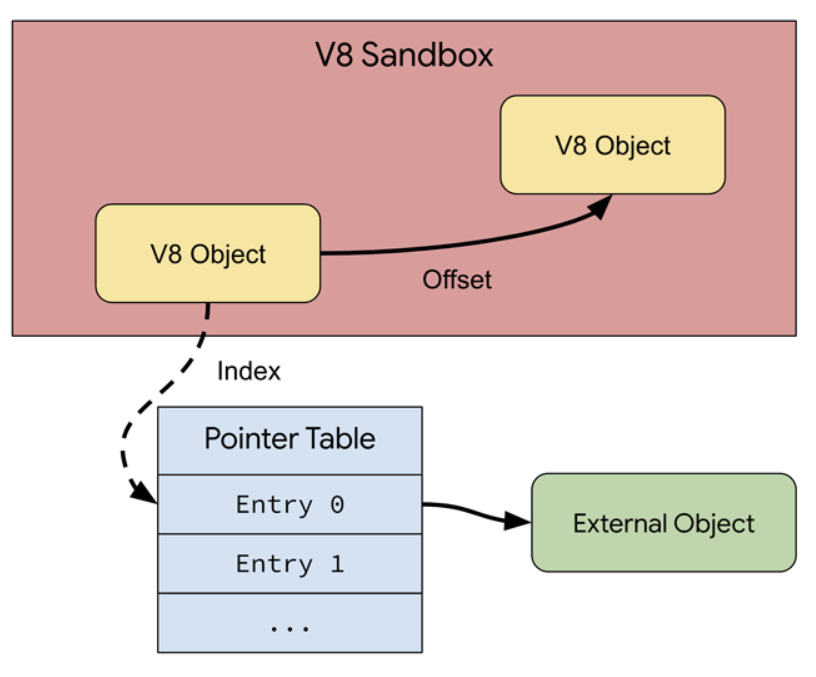
“The sandbox limits the impact of typical V8 vulnerabilities by restricting the code executed by V8 to a subset of the process’ virtual address space (“the sandbox”), thereby isolating it from the rest of the process. This works purely in software (with options for hardware support, see the respective design document linked below) by effectively converting raw pointers either into offsets from the base of the sandbox or into indices into out-of-sandbox pointer tables. In principle, these mechanisms are very similar to the userland/kernel separation used by modern operating systems (e.g. the unix file descriptor table).” states Google. “The sandbox assumes that an attacker can arbitrarily and concurrently modify any memory inside the sandbox address space as this primitive can be constructed from typical V8 vulnerabilities. Further, it is assumed that an attacker will be able to read memory outside of the sandbox, for example through hardware side channels. The sandbox then aims to protect the rest of the process from such an attacker. As such, any corruption of memory outside of the sandbox address space is considered a sandbox violation.”
Software-based sandbox replaces data types that can access out-of-sandbox memory with “sandbox-compatible” alternatives.
In the software-based sandbox, only the V8 heap is enclosed within the sandbox. As a result, the overall structure is similar to the sandboxing model employed by WebAssembly.
The researchers state that the majority of the overhead generated by the sandbox primarily arises from the pointer table indirection for external objects. A minor overhead is related to the use of offsets instead of raw pointers, primarily involving a shift+add operation, anyway this is quite inexpensive. The sandbox’s overhead is approximately 1% or less on standard workloads, as determined by measurements using the Speedometer and JetStream benchmark suites. Consequently, the V8 Sandbox can be activated by default on compatible platforms.
“The V8 Sandbox must be enabled/disabled at build time using the v8_enable_sandbox build flag. It is (for technical reasons) not possible to enable/disable the sandbox at runtime. The V8 Sandbox requires a 64-bit system as it needs to reserve a large amount of virtual address space, currently one terabyte.” concludes the announcement.
“The V8 Sandbox has already been enabled by default on 64-bit (specifically x64 and arm64) versions of Chrome on Android, ChromeOS, Linux, macOS, and Windows for roughly the last two years.”
The open-source XZ Utils compression utility has been backdoored by a skilled threat actor who tried to get the malicious packages included in mainstream Linux distributions, to allow them unfettered, covert SSH access to Linux systems around the world.
“The author intentionally obfuscated the backdoor in distribution tarballs, intended for Linux distributions to use for building their packages. When the xz build system is instructed to create an RPM or DEB for the x86-64 architecture using gcc and gnu linker, the backdoor is included in the liblzma as part of the build process. This backdoor is then shipped as part of the binary within the RPM or DEB,” the Open Source Security Foundation succinctly explained.
The backdoor was discovered by Andres Freund, a software engineer at Microsoft, and its existence was publicly revealed a little over a week ago. Stable versions of a few Linux distros have been affected but widespread compromise has been avoided.
Become a trusted persona in the open-source ecosystem (they made commits on other projects, as well).
How to detect the XZ Utils backdoor?
Triggering/using the backdoor requires authentication via a private SSH key owned by the attacker, so exploitation – if it ever happens – will be limited. The fact that the vulnerable library versions haven’t ended up in many production systems is a huge blessing.
That said, a number of scripts and tools have been released allowing users to check for the presence of the backdoor.
Freund’s post on the OSS mailing list includes a script to detect vulnerable SSH binaries on systems, which has then been repurposed and extended to also check whether a system uses a backdoored version of the liblzma library.
Binarly, a firmware security firm, has set up an online scanner that allows users to analyze any binary for the backdoor implant.
“Such a complex and professionally designed comprehensive implantation framework is not developed for a one-shot operation. It could already be deployed elsewhere or partially reused in other operations. That’s exactly why we started focusing on more generic detection for this complex backdoor,” they noted.
Late last week, Bitdefender released another scanner, that must be deployed on systems that need testing. (Since the scanner requires root privileges to be effective, the company has released the source code.)
It can search for all infected liblzma libraries, even if they are not used by the Secure Shell Daemon application (sshd), as well as for a unique byte sequence injected by the backdoor during library compilation.
Elastic Security Labs researchers have published their analysis of the backdoor, as well as YARA signatures, detection rules, and osquery queries that Linux admins can use to find vulnerable liblzma libraries and identify potentially suspicious sshd behavior.
2024 has already seen dozens of local governments slammed by ransomware incidents and cyberattacks, limiting services for millions of people across the United States.
The latest high-profile incident involves New York City, which was forced to take a city payroll website offline and remove it from public view after dealing with a phishing incident.
The incident was first reported by Politico, which spoke to city workers who complained of the New York City Automated Personnel System, Employee Self Service (NYCAPS/ESS) being offline right as many tried to file their taxes.
New York City’s Office of Technology and Innovation and told Recorded Future News that NYC Cyber Command “was made aware of a smishing campaign targeting NYCAPS users.” Smishing is essentially phishing via text messages instead of emails.
“NYC Cyber Command has been advising and working with FISA-OPA and DCAS to implement enhancements to security measures,” the office said. “City employees have been advised to remain vigilant and confirm the legitimacy of any NYCAPS and payroll-related communications and activity.”
A city official reiterated that the NYCAPS website is still online and accessible to all employees through the city’s secure internal network.
The smishing campaign allegedly involved messages sent to city workers asking them to activate multi-factor authentication, with a link to a phishing domain.
Shashi Prakash, CTO at security firm Bolster.AI, told Recorded Future News that his team saw the domain “essnyc{.}online” the day it was registered. Other researchers said the domain was registered in Lithuania.
Prakash explained that his team’s data shows it has been live since December 9 and shared a screenshot of the page, which looks exactly like the NYCAPS website.
“There is one additional domain cityofanaheim{.}online on the same infrastructure which does make it look like they were targeting other cities,” Prakash said.
Keeper Security’s Teresa Rothaar said more than 80 percent of breaches happen because of weak or stolen passwords, credentials and secrets, much of which is acquired through the kind of phishing and smishing attacks New York City is currently dealing with.
To make matters worse, the New York City attackers clearly knew that multi-factor authentication is a critical layer of security and played on that concept while trying to steal credentials.
“Often, innocent people who are not trained on phishing prevention will focus on the ‘pinstripes’ of the email or illegitimate site, meaning the aesthetics that they are familiar with, such as the logo or colors of their banking site,” she said.
“Cybercriminals spend a lot of time making ‘lookalike’ sites appear authentic so that users are tricked into entering login credentials. Employees should always err on the side of caution and assume that all of their work-related (and even personal) passwords have been compromised – especially if they reuse the same passwords across accounts (a big no-no, and this situation illustrates why).”
Countrywide problem
The campaign targeting New York City is one of many specifically going after city, county and state-level governments across the United States.
Just in the last week, the cities of Birmingham, Alabama, and East Baton Rouge, Louisiana, have announced security incidents affecting public services. Jackson County in Missouri was forced to declare a state of emergency after discovering a ransomware attack last month.
On Thursday, the Florida Department of Juvenile Justice in Tallahassee admitted to local news outlets that it was dealing with a cyberattack that forced some systems offline.
Florida’s Hernando County similarly announced a cyberattack on Thursday, warning that while 911, police and EMS systems were still operational, several other government services would be down for an unknown amount of time. Local news outlets reported that the FBI is involved in the response to the incident.
Rebecca Moody, head of data research at Comparitech, has been looking into ransomware attacks on U.S. government offices and said she has found 18 confirmed ransomware attacks so far this year.
Other researchers have tracked at least 25 ransomware attacks on U.S. government offices.
While several states have banned government organizations from paying ransoms to groups, the offices continue to be ripe targets for ransomware gangs and hackers. Washington County in Pennsylvania recently revealed that it paid a $350,000 ransom to hackers following a January ransomware attack.
James Turgal, who spent 22 years working at the FBI, told Recorded Future News that attacks against state, local and tribal governments have accelerated over the last year.
“From the threat actors’ point of view, these municipalities are a target-rich environment with an abundant source of victims. By my estimation, with just around 95,000 soft targets nationwide, there are 40,000 cities, towns and municipalities, approximately 50,000 special government districts nationwide, and then the additional tribal governments that round out the numbers,” he said.
“There needs to be a sense of urgency on the part of state and local governments and municipalities to get ahead of the threat, as these local entities have the most direct impact on our citizens, and a cyber focused disruption can be potentially life-threatening when considering the health and public safety services our local governments control.”









.webp)
.webp)