Jan 30 2023

HOW TO EASILY SPOOF MAC ADDRESS AUTOMATICALLY AND BE MORE ANONYMOUS

Category: Anonymous,Information Privacy,Information Security — DISC @ 9:44 am

WHY CHANGE THE MAC ADDRESS?

The MAC address is (should be) unique to each network interface. By the way, if the device has several network interfaces, then each of them has its own MAC address. For example, laptops have at least two network interfaces: wired and Wi-Fi – each of them has an MAC address. Desktop computers are usually the same. When we talk about “changing  MAC addresses”, we need to understand that there are several of these addresses. By the way, each port has its own unique MAC address, if the device supports wireless networks, then each wireless interface (2.4 GHz and 5 GHz) also has its own MAC address.

So, since the MAC address must be unique, it allows you to uniquely identify the network device. And since this network device is part of your computer, this allows you to uniquely identify your computer. Moreover, the MAC address (also called a hardware, physical address) does not change when the operating system changes.

In short, the replacement of the MAC address is needed so that it is not possible to track and identify the device by the MAC address. But there is a more important reason (than paranoia) to learn about MAC addresses and about methods from substitution, or prohibiting changes in your system. Based on MAC addresses, user identification can be performed when connected via the Intercepting Portal. A few words about the Intercepting Portal. Captive Portal). This is a way to force the user to comply with certain conditions for providing Internet access. You can most often encounter examples of Intercepting Portals in public places that provide Internet access services via Wi-Fi to an indefinite circle of people, but who want to identify the user and / or allow access only to persons with credentials. For example, at the airport you may need to confirm your phone number via SMS to access the free Wi-Fi network. The hotel will provide you with a username and password for accessing the Internet via Wi-Fi – this ensures that only hotel customers can use Wi-Fi services. 

Due to the features of the Intercepting Portal, user identification is based on MAC addresses. And starting with NetworkManager 1.4.0 (a popular program for managing network connections on Linux), an automatic MAC-address spoofing is now present. And in case of incorrect settings, you may encounter an Internet access problem running through the Intercepting Portal. There are also problems with customized filtering by MAC on the router.

Well, for pentesting experts , of course, there are reasons to change the MAC address: for example, to pretend to be another user, and take advantage of its open access to the magical world of the Internet, or to increase anonymity.

Who can see my MAC address?

The MAC address is used to transfer data on a local network. That is, it is not transmitted when connecting to websites and when accessing the global network. Although there are exceptions: some vulnerabilities allow a person who is not on your local network to find out your MAC address.

If you connect to the router via the local network, then the router knows your MAC address, but if you open the site on the Internet, the site owner cannot find out your MAC address. 
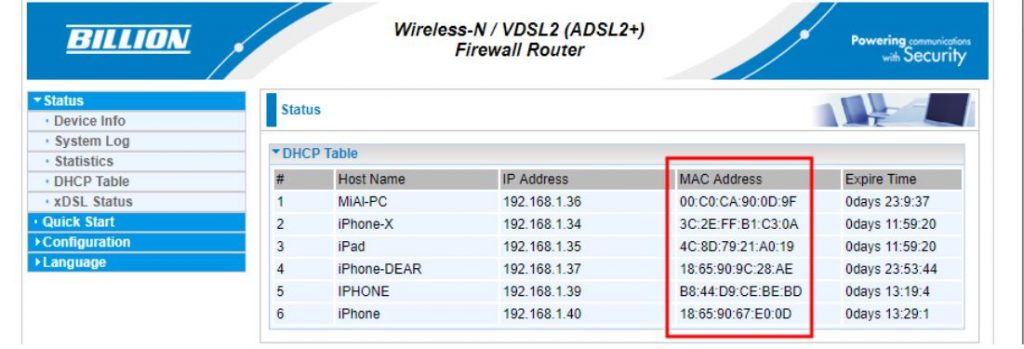
All devices located on the local network can see each other’s MAC addresses (there are many scanners that can get this data). An example of a local network scan made using arp-scan. A slightly different situation with wireless network interfaces. If you are connected to an access point (router), then all the rules of the local network work: the router and other devices can find out your MAC address. But also any person who is within the reach of your Wi-Fi signal (from the phone, laptop) can find out your MAC address.
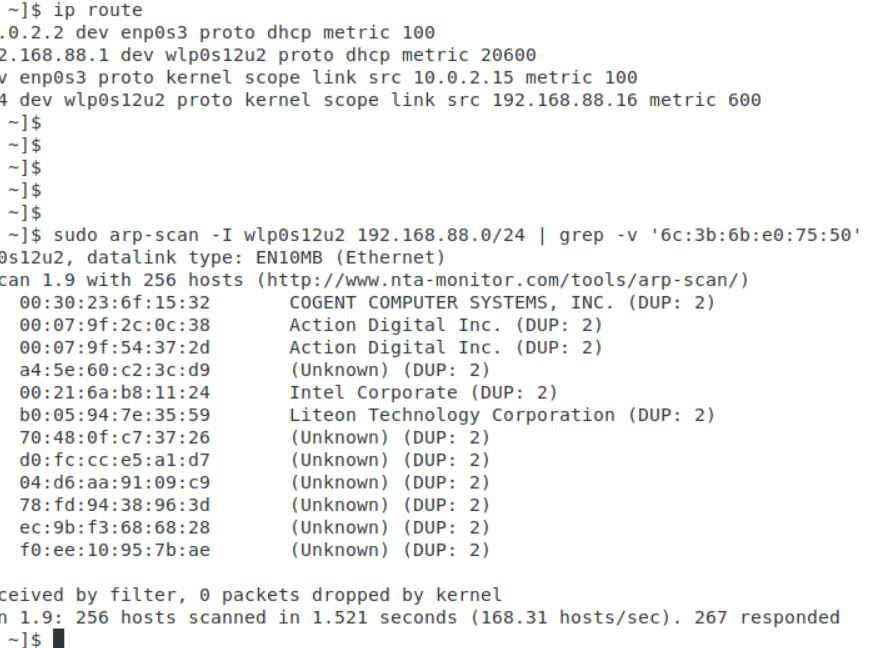
SPOOFING MAC ADDRESSES IN NETWORKMANAGER

NetworkManager may reassign MAC installed by other programs

Starting with NetworkManager 1.4.0, this program supports MAC spoofing, and has many different options.

So that we can understand them, we need to understand some concepts

First, network adapters are :

  • wired (ethernet);
  • wireless (wifi).

For each group, MAC rules are customized separately.

Secondly, a wireless adapter can be in two states:

  • scanning (search, not connected to the network) – is set using the property wifi.scan-rand-mac-address, default set to yes, which means that during scanning it sets an arbitrary MAC address. Another acceptable value is no;
  • connected to the network – installed using the property wifi.cloned-mac-address, the default value is preserve.

For wired interface (installed by property ethernet.cloned-mac-address) and the wireless interface in the connection state (installed by the property wifi.cloned-mac-address) the following values are available (regimes):

  • clearly specified MAC address (t.e. you can write the desired value that will be assigned to the network interface)
  • permanent: use the MAC address sewn into the device
  • preserve: do not change the device’s MAC address after activation (for example, if the MAC has been changed by another program, the current address will be used)
  • random: generate a random variable for each connection
  • stable: similar to random – i.e. for each connection to generate a random variable, NO when connecting to the same network, the same value will be generated
  • NULL / not installed: This is the default value that allows you to roll back to global settings by default. If global settings are not set, then NetworkManager rolls back to the value preserve.

If you are trying to change the MAC in other ways and you are failing, it is entirely possible that NetworkManager, which changes the MAC in its own rules, is to blame. Since most Linux distributions with a NetworkManager graphical interface are installed and running by default, to solve your problem, you must first understand how NetworkManager works and by what rules.

NETWORKMANAGER CONFIGURATION FILES

NetworkManager settings, including settings related to MAC, can be done in a file /etc/NetworkManager/NetworkManager.conf or adding an additional file with the extension . . . .conf to the directory /etc/NetworkManager/conf.d 

The second option is highly recommended, since when updating NetworkManager usually replaces the main one . . . . . . . . . .conf file and if you made changes to /etc/NetworkManager/NetworkManager.conf, then the settings you made will be overwritten.

HOW TO MAKE KALI LINUX REPLACE WITH EACH CONNECTION

If you want the MAC address to be replaced with each connection, but the same MAC is used in the connection to the same network, then the file /etc/NetworkManager/conf.d/mac.conf:

1sudo gedit /etc/NetworkManager/conf.d/mac.conf

Add lines :

123[connection]ethernet.cloned-mac-address=stablewifi.cloned-mac-address=stable

Lines with ethernet.cloned-mac-address & wifi.cloned-mac-address can be added individually or together.

Check the current values :

1ip link

Restart the service :

1sudo systemctl restart NetworkManager

We will make connections to wired and wireless networks. Now check the values of MAC again 
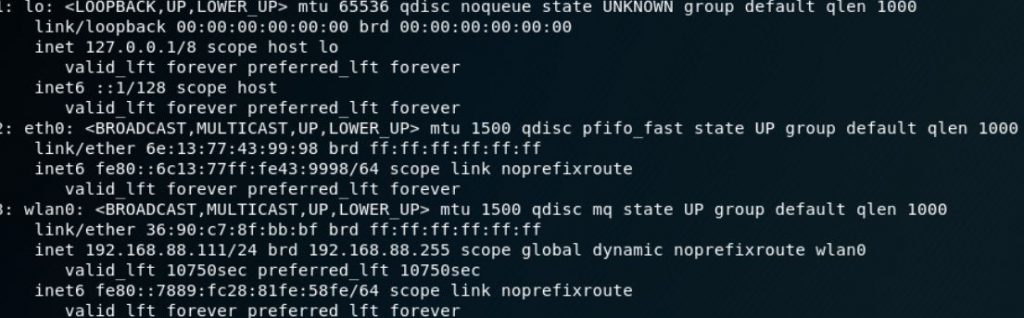
As you can see, MAC is replaced for both the wired and wireless interfaces.

As already mentioned, the same addresses will be generated for the same networks, if you want different MACs each time even for the same networks, then the lines should look like this:

123[connection]ethernet.cloned-mac-address=randomwifi.cloned-mac-address=random

HOW TO CONFIGURE AUTOMATIC MAC SPOOFING IN UBUNTU AND LINUX MINT

Ubuntu and Linux Mint use NetworkManager versions that support automatic MAC configuration. However, if you connect a Wi-Fi card to Ubuntu or Linux Mint, you will see a real MAC. This is due to the fact that in the file /etc/NetworkManager/NetworkManager.conf indicated not to spoof :
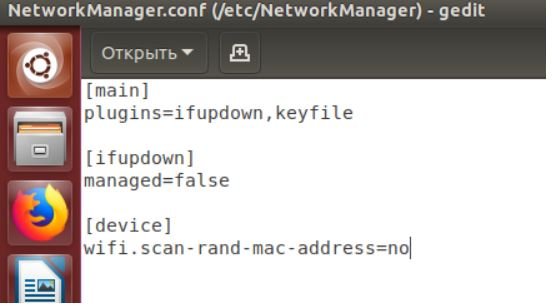
To change this, open the file :

1sudo gedit /etc/NetworkManager/NetworkManager.conf

And delete the lines :

12[device]wifi.scan-rand-mac-address=no

or comment on them to make it happen :

12#[device]#wifi.scan-rand-mac-address=no

or change no on yes:

12[device]wifi.scan-rand-mac-address=yes

And restart NetworkManager :

1sudo systemctl restart NetworkManager

Similarly, you can add lines to replace MAC (these settings create a new address for each connection, but when connecting to the same networks, the same address is used):

123[connection]ethernet.cloned-mac-address=stablewifi.cloned-mac-address=stable

OTHER WAYS TO CHANGE THE MAC ADDRESS

CHANGE MAC USING IPROUTE2

We will use the program ip, which is included in the package iproute2.

Let’s start by checking the current MAC address with the command :

1ip link show interface_name

Where Interface_name – This is the name of a particular network interface that you want to see. If you do not know the name, or want to see all the interfaces, then the command can be started like this :

1ip link show

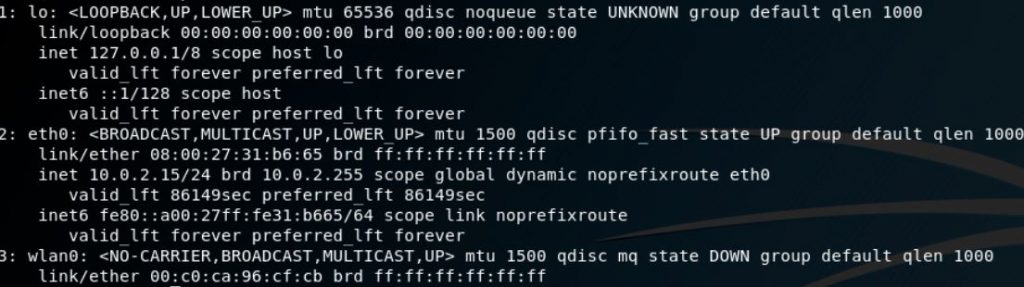
At the moment, we are interested in the part that follows after link / ether“and represents a 6-byte number. It will look something like this :

1link/ether 00:c0:ca:96:cf:cb

The first step for spoofing MAC addresses is to transfer the interface to a state down. This is done by the team

1sudo ip link set dev interface_name down

Where Interface_name replaces the real name. In my case, this wlan0, then the real team looks like this:

1sudo ip link set dev wlan0 down

Next, we go directly to the MAC spoofing. You can use any hexadecimal value, but some networks may be configured not to assign IP addresses to customers whose MAC address does not match any known vendor (producer). In these cases, so that you can successfully connect to the network, use the MAC prefix of any real vendor (first three bytes) and use arbitrary values for the next three bytes.

To change the MAC, we need to run the command :

1sudo ip link set dev interface_name address XX:XX:XX:XX:XX:XX

Where XX: XX: XX: XX: XX: XX – This is the desired new MAC .

For example, I want to set the hardware address EC: 9B: F3: 68: 68: 28 for my adapter, then the team looks like this:

1sudo ip link set dev wlan0 address EC:9B:F3:68:68:28

In the last step, we return the interface to the state up. This can be done by a team of the form :

1sudo ip link set dev interface_name up

For my system, a real team:

1sudo ip link set dev wlan0 up

If you want to check if the MAC is really changed, just run the command again:

1ip link show interface_name

Value after “link / ether“should be the one you installed.

CHANGE MAC WITH MACCHANGER

Another method uses macchanger (also known as the GNU MAC Changer). This program offers various functions, such as changing the address so that it matches a particular manufacturer, or its complete randomization.

Set macchanger – it is usually present in official repositories, and in Kali Linux it is installed by default.

At the time of the change of the MAC, the device should not be used (be connected in any way, or have status up). To transfer the interface to a state down:

1sudo ip link set dev interface_name down

For spoofing, you need to specify the name of the interface, and replace in each next command wlan0 in the name of the interface that you want to change the MAC.

To find out the values of MAC, execute the command with the option -s:

1sudo macchanger -s wlan0

Something like:

12Current MAC:   00:c0:ca:96:cf:cb (ALFA, INC.)Permanent MAC: 00:c0:ca:96:cf:cb (ALFA, INC.)

The “Current MAC” line means the address at the moment, and “Permanent MAC” means a constant (real) address.

For spoofing the MAC address to a completely arbitrary address (option -r):

1sudo macchanger -r wlan0

About the following will be displayed :

123Current MAC:   00:c0:ca:96:cf:cb (ALFA, INC.)Permanent MAC: 00:c0:ca:96:cf:cb (ALFA, INC.)New MAC:    be:f7:5a:e7:12:c2 (unknown)

The first two lines are already explained, the line “New MAC” means a new address.

For randomization, only bytes that determine the uniqueness of the device, the current MAC address (i.e.e. if you check the MAC address, it will register as from the same vendor) run the command (option -e):

1sudo macchanger -e wlan0

To set the MAC address to a specific value, execute (option -m):

1sudo macchanger -m XX:XX:XX:XX:XX:XX wlan0

Here XX: XX: XX: XX: XX: XX – This is the MAC you want to change to.

Finally, to return the MAC address to the original, constant value prescribed in the iron (option -p):

1sudo macchanger -p wlan0

CONCLUSION

NetworkManager currently provides a wealth of MAC spoofing capabilities, including a change to a random address, or to a specific one. A feature of NetworkManager is the separation of “scanning” and “connected” modes, i.e. you may not see that the settings made have already entered into force until you connect to any network.

If after the change of MAC you have problems with connecting (you cannot connect to networks – wired or wireless), this means that there is a ban on connecting with MAC from an unknown vendor (producer). In this case, you need to use the first three octets (bytes) of any real vendor, the remaining three octets can be arbitrary says pentesting experts.

The Art of Mac Malware: The Guide to Analyzing Malicious Software

Tags: ANONYMOUS, Mac Malware, SPOOF MAC ADDRESS


Jan 28 2023

PlugX Malware Sneaks Onto Windows PCs Through USB Devices

Category: Malware,Windows Security — DISC @ 9:29 am

PlugX malware has been around for almost a decade and has been used by multiple actors of Chinese nexus and several other cybercrime groups.

The Palo Alto Networks Unit 42 incident response team has discovered a new variant of PlugX malware that is distributed via removable USB devices and targets Windows PCs. This should not come as a surprise since 95.6% of new malware or their variants in 2022 targeted Windows.

According to Unit 42 researchers, the new variant was detected when carrying out an incident response post a Black Basta ransomware attack. The researchers uncovered several malware samples and tools on the victims’ devices. This includes the Brute Ratel C4 red-teaming tool, GootLoader malware, and an old PlugX sample.

PlugX malware has been around for almost a decade and has been used by multiple actors of Chinese nexus and several other cybercrime groups. The malware was previously used in many high-profile cyberattacks, such as the 2015 U.S. Government Office of Personnel Management (OPM) breach.

The same backdoor was also used in the 2018 malware attack on the Android devices of minority groups in China. Most recently, in November 2022, researchers linked Google Drive phishing scams to the group infamously known for using PlugX malware.

Scope of Infection

The new variant stood out among other malware because it could infect any attached removable USB device, e.g., floppy, flash, thumb drives, and any system the removable device was plugged into later.

So far, no evidence connects the PlugX backdoor or Gootkit to the Black Basta ransomware group, and researchers believe another actor could have deployed it. Moreover, researchers noted that the malware could copy all Adobe PDF and Microsoft Word documents from the host and places them in a hidden folder on the USB device. The malware itself creates this folder.

PlugX Malware Being Distributed through Removable USB Devices

Malware Analysis

Unit 42 researchers Jen Miller-Osborn and Mike Harbison explained in their blog post that this variant of PlugX malware is a wormable, second-stage implant. It infects USB devices and stays concealed from the Windows operating file system. The user would not suspect that their USB device is being exploited to exfiltrate data from networks. 

PlugX’s USB variant is different because it uses a specific Unicode character called non-breaking space/ U+00A0 to hide files in a USB device plugged into a workstation. This character prevents the Windows OS from rendering the directory name instead of leaving an anonymous folder in Explorer.

Furthermore, the malware can hide actor files in a removable USB device through a novel technique, which even works on the latest Windows OS. 

The malware is designed to infect the host and copy the malicious code on any removable device connected to the host by hiding it in a recycle bin folder. Since MS Windows OS by default doesn’t show hidden files, the malicious files in recycle bin aren’t displayed, but, surprisingly, it isn’t shown even with the settings enabled. These malicious files can be viewed/downloaded only on a Unix-like OS or through mounting the USB device in a forensic tool.

Mastering Windows Security and Hardening: Secure and protect your Windows environment from intruders, malware attacks, and other cyber threats

InfoSec books | InfoSec tools | InfoSec services

Tags: PlugX Malware


Jan 27 2023

New Python Malware Targeting Windows Devices

Category: Malware,Python — DISC @ 10:26 am

The malware features also include file transfer, keylogging, stealing passwords stored in the browser, clipboard data stealing, cookies exfiltration and more.

Threat analysis firm Securonix’s cybersecurity researchers have discovered a new malware dubbed PY#RATION allowing attackers to steal sensitive files and log keystrokes from impacted devices.

Malware Distribution Technique

The malware is distributed through a conventional phishing mechanism in which the email contains a password-protected ZIP archive. When it is unpacked, two shortcut image files appear, titled front.jpg.lkn and back.jpg.lnk. When launched, these files display the front and back of a driver’s license that doesn’t exist.

New Python Malware Targeting Windows Devices
Images used in the scam (Credit: Securonix)

With this, the malicious code is also executed, leading to two new files being downloaded from the internet. These files are titled front.txt and back.txt, later renamed to .bat docs and executed. The malware disguises itself as Cortana virtual assistant to ensure persistence on the system.

What is PY#RATION

PY#RATION is a Python-based malware that displays a RAT (remote access trojan) like behaviour to sustain control over the affected host. The malware has various capabilities and functionalities, such as keylogging and data exfiltration.

However, the unique aspect is that it uses WebSocket for exfiltration and C2 communication, and evades detection from network security solutions and antivirus programs. Leveraging Python’s built-in Socket.IO framework that facilitates client and server WebSocket communications, the malware pulls data and gets commands over a single TCP connection through open ports simultaneously.

Moreover, according to a blog post published by Securonix, the attackers use the same C2 address, which the IPVoid checking system is yet to block. Researchers believe this malware is still under active development as they have detected multiple versions since August 2022. The malware receives instructions from the operations through WebSocket and obtains sensitive data.

Potential Dangers

This Python RAT is packed into an executable that uses automated packers such as ‘pyinstaller’ and ‘py2exe’ to convert Python code into Windows executables. This helps inflate payload size (The first detected version 1.0 being 14MB and the last detected version 1.6.0 being 32 MB containing 1000+ lines and additional code).

New Python Malware Targeting Windows Devices
Infection chain of the PY#RATION python malware (Credit: Securonix)

Researchers claim that the latest version of the payload remains undetected by all except for one antivirus engine listed on VirusTotal.

The malware features include file transfer to and from the C2 server, network enumeration, shell command execution, keylogging, stealing passwords stored in the browser, host enumeration, clipboard data stealing, and cookies exfiltration. Who’s behind this campaign, the distribution volume, and campaign objectives are still unclear.

Python for Cybersecurity: Using Python for Cyber Offense and Defense


InfoSec books
 | InfoSec tools | InfoSec services

Tags: Python Malware


Jan 26 2023

Cloud Pentesting Cheatsheet

Category: Cheat Sheet,Cloud computing,Pen Test — DISC @ 12:09 pm

Cloud Pentesting for Noobs. An introduction to peneration testing… | by Jon  Helmus | Medium

Checkout our previous posts on Cheat Sheet

InfoSec books | InfoSec tools | InfoSec services

Tags: cheat sheet, Cloud Pentesting


Jan 26 2023

ENISA gives out toolbox for creating security awareness programs

Category: Security Awareness,Security Tools — DISC @ 9:33 am

The European Union Agency for Cybersecurity (ENISA) has made available Awareness Raising in a Box (AR-in-a-BOX), a “do it yourself” toolbox to help organizations in their quest to create and implement a custom security awareness raising program

security awareness toolbox

The package includes:

  • A guideline on how to build an internal cyber-awareness raising program tailored to employees’ needs
  • A guideline on creating an awareness campaign targeted at external stakeholders
  • A how-to guide on how to select the appropriate tools and channels to best reach the target audience and tips for effective communication in social media
  • Instructions on selecting the right metrics and developing key performance indicators (KPIs) to evaluate the effectiveness of a program or campaign
  • A guide for the development of a communication strategy
  • An awareness raising game, in different versions and styles, for a generic audience and for an audience in the energy sector. It also comes with a guide on how it should be played
  • An awareness raising quiz to test comprehension and retention of key information (e.g., how to create good passwords)

Why security awareness matters

People have become cyber-attackers’ primary attack vector, which means that programs for raising cyber awareness are crucial for an organization’s cybersecurity strategy. The goal of these programs is to promote good cybersecurity practices of employees, managers and executives and improve their cybersecurity behavior.

A lot of advice can be found online on how to upgrade your security awareness efforts and engage your employees with better cybersecurity training, but sometimes organizations don’t know where to start.

AR-in-a-BOX can help them wrap their head around the task and push them towards realization.

“AR-in-a-Box is offered by ENISA to public bodies, operators of essential services, large private companies as well as small and medium ones (SMEs). [It] is dynamic and will be regularly updated and enriched,” the agency noted.

ENISA has previously published helpful materials for cybersecurity awareness campaigns aimed at electricity operators and the healthcare sector.

Checkout our previous posts on Security Awareness

DISC InfoSec

#InfoSecTools and #InfoSectraining

#InfoSecLatestTitles

#InfoSecServices

Follow DISC #InfoSec blog

Ask DISC an InfoSec & compliance related question

Tags: free cybersecurity tools, Security Awareness


Jan 26 2023

Wireshark 4.0.3 Released – What’s New!

Category: Network security — DISC @ 9:16 am

The Wireshark Team has recently unveiled the latest iteration of their widely-utilized packet analyzer, Wireshark 4.0.3. 

This version boasts a multitude of improvements, including new features and updates, as well as the resolution of various bugs to ensure a smooth and efficient user experience.

The Wireshark packet analyzer is a free and open-source application that is available for all major platforms. In addition to troubleshooting networks, Wireshark can be used to analyze network traffic, develop software or communications protocols, and can even be used for educational purposes in the cybersecurity field.

Wireshark supports a wide range of network protocols, and with Wireshark, a security professional can see the details of network packets in real-time, including the:- 

Wireshark 4.0.3
  • Source IP addresses
  • Destination IP addresses
  • Port numbers
  • Packet sizes

Many organizations utilize this tool on a regular basis as part of their daily business operations so that they can monitor the day-to-day tasks of their businesses.

Wireshark 4.0.3 Platform Support

Wireshark 4.0.3 packet analyzer is available for all major platforms and operating systems, and below we have given you a list of them in case you need them:-

  • Windows
  • Linux
  • macOS
  • BSD

What’s New?

The 32-bit Windows packages for Wireshark 4.0 and later can’t be downloaded from the official Wireshark website, and cannot be installed on your computer. Currently, Qt 5.12.2 is the version shipped with Windows installers as the standard version.

There are several new fixes for the multitude of vulnerabilities and bugs that have been added to this new version. However, here below we have mentioned new things added to this version:-

  • Vulnerability Fixes
  • Bug Fixes
  • Updated Protocol Support

Vulnerabilities Fixed

Here below we have mentioned the vulnerabilities that have been fixed in this new version:-

Bugs fixed

Here below we have mentioned the bugs that have been fixed in this new version:-

  • Qt: After modifying the coloring rules, the coloring rule applied to the first packet reflects the coloring rules previously in effect.
  • The help file doesn’t display for extcap interfaces.
  • For USB traffic on XHC20 interface destination is always given as Host.
  • Wireshark Expert Info – cannot deselect the limit to display the filter tick box.
  • Wrong pointer conversion in get_data_source_tvb_by_name()
  • A wrong number of bits skipped while decoding an empty UTF8String on UPER packet.
  • Crash when analyzing protobuf packets.
  • Uninitialized values in various dissectors.
  • String (GeoIP country/city) ordering doesn’t work in Endpoints.
  • Wireshark crashes with an assertion failure on stray minus in filter.
  • IO Graph: Add new graph only works until the 10th graph.
  • Fuzz job crash output: fuzz-2022-12-30-11007.pcap.
  • Q.850 – error in label for cause 0x7F.
  • Uninitialized values in CoAP and RTPS dissectors.
  • Screenshots in AppStream metainfo.xml file not available.

Updated Protocol Support

Listed below are all the updated protocol support that is supported by the current version:-

  • ASTERIX
  • BEEP
  • BGP
  • BPv6
  • CoAP
  • EAP
  • GNW
  • GSM A-bis P-GSL
  • iSCSI
  • ISUP
  • LwM2M-TLV
  • MBIM
  • NBAP
  • NFS
  • OBD-II
  • OPUS
  • ProtoBuf
  • RLC
  • ROHC
  • RTPS
  • Telnet
  • TIPC
  • USB

It is absolutely crucial that users upgrade their current version of Wireshark to the newly released 4.0.3 version as soon as possible. 

The Wireshark team has put a great effort into adding new features and fixing bugs to improve the overall user experience. Failure to update will result in missing out on the many enhancements and refinements this version has to offer.

In addition, if you are interested in getting the latest version of the application, you may click this link.

Wireshark Cheat Sheet

Explore latest WireShark Titles

InfoSec books | InfoSec tools | InfoSec services

Tags: wireshark


Jan 26 2023

GoTo admits: Customer cloud backups stolen together with decryption key

Category: Cloud computing — DISC @ 12:11 am

GoTo is a well-known brand that owns a range of products, including technologies for teleconferencing and webinars, remote access, and password management.

If you’ve ever used GoTo Webinar (online meetings and seminars), GoToMyPC (connect and control someone else’s computer for management and support), or LastPass (a password manangement service), you’ve used a product from the GoTo stable.

You’ve probably not forgotten the big cybersecurity story over the 2022 Christmas holiday season, when LastPass admitted that it had suffered a breach that was much more serious than it had first thought.

The company first reported, back in August 2022, that crooks had stolen proprietary source code, following a break-in into the LastPass development network, but not customer data.

But the data grabbed in that source code robbery turned out to include enough information for attackers to follow up with a break-in at a LastPass cloud storage service, where customer data was indeed stolen, ironically including encrypted password vaults.

Now, unfortunately, it’s parent company GoTo’s turn to admit to a breach of its own – and this one also involves a development network break-in.

Security incident

On 2022-11-30, GoTo informed customers that it had suffered “a security incident”, summarising the situation as follows:

Based on the investigation to date, we have detected unusual activity within our development environment and third-party cloud storage service. The third-party cloud storage service is currently shared by both GoTo and its affiliate, LastPass.

This story, so briefly told at the time, sounds curiously similar to the one that unfolded from August 2022 to December 2022 at LastPass: development network breached; customer storage breached; investigation ongoing.

Nevertheless, we have to assume, given that the statement explicitly notes that the cloud service was shared between LastPass and GoTo, while implying that the development network mentioned here wasn’t, that this breach didn’t start months earlier in LastPass’s development system.

The suggestion seems to be that, in the GoTo breach, the development network and cloud service intrusions happened at the same time, as though this was a single break-in that yielded two targets right away, unlike the LastPass scenario, where the cloud breach was a later consequence of the first.

Incident update

Two months later, GoTo has come back with an update, and the news isn’t great:

[A] threat actor exfiltrated encrypted backups from a third-party cloud storage service related to the following products: Central, Pro, join.me, Hamachi, and RemotelyAnywhere. We also have evidence that a threat actor exfiltrated an encryption key for a portion of the encrypted backups. The affected information, which varies by product, may include account usernames, salted and hashed passwords, a portion of Multi-Factor Authentication (MFA) settings, as well as some product settings and licensing information.

The company also noted that although MFA settings for some Rescue and GoToMyPC customers were stolen, their encrypted databases were not.

Two things are confusingly unclear here: firstly, why were MFA settings stored encrypted for one set of customers, but not for others; and secondly, what do the words “MFA settings” encompass anyway?

Several possible important “MFA settings” come to mind, including one or more of:

  • Phone numbers used for sending 2FA codes.
  • Starting seeds for app-based 2FA code sequences.
  • Stored recovery codes for use in emergencies.

SIM swaps and starting seeds

Security of AWS CloudHSM Backups (AWS Whitepaper)

Tags: cloud backup, cloud security, Decryption Key


Jan 25 2023

Top FinTech API Security Challenges

Category: API security — DISC @ 10:52 am

A recent report reveals that the number of attacks on financial service APIs and web applications worldwide increased by 257%.  

There are more APIs in use than ever, and the average FinTech company takes advantage of hundreds if not thousands of connections in their daily operations.

APIs have become a critical component of fintech but also open new vulnerabilities. 48% of financial service company states that API security remains the top concern of their API utilization.

So, what are the top FinTech API security challenges?

API Security Challenges

Impacts Of API Attacks on Fintech

API attacks on fintech companies can severely affect the financial industry and the customers who rely on these services. These attacks are becoming increasingly frequent as fintech companies grow in popularity and usage. 

API attacks can have serious consequences, including financial loss and damage to a company’s reputation. These attacks can steal sensitive information like login credentials or financial data. This data can be used for identity theft, financial fraud, and other criminal activities, causing significant financial losses for the affected customers. 

They can also be used to disrupt services or conduct fraudulent transactions. Additionally, service disruptions can lead to lost business, damage to reputation, and loss of customer trust.

API attacks can also have a ripple effect throughout the financial industry. If a major fintech company is compromised, it can cause mistrust and uncertainty among other financial institutions. This can lead to increased scrutiny and regulations for the entire industry.

Fintech companies must take proactive measures to secure their APIs and protect their customers’ data. This includes implementing robust authentication and authorization mechanisms, encryption for sensitive data, and regularly testing and updating security measures.

Additionally, having an incident response plan to address and mitigate potential breaches quickly is crucial in preserving customer trust and minimizing damage to the company’s reputation.

OWASP Top 10 API Security Risks

OWASP API Top 10 isn’t necessarily FinTech-specific. But with API usage exploding in every industry, it’s worth taking some time to understand the risks they’ve identified. After all, many modern companies would not exist without APIs.

  • Broken object-level authorization
  • Broken user authentication
  • Excessive data exposure
  • Lack of resources to rate limiting
  • Broken function-level authorization
  • Mass assignment
  • Security misconfiguration
  • Injection
  • Improper assets management
  • Insufficient logging and monitoring

What are the Challenges of Protecting APIs?

Explosive increase in API utilization

There has been a significant increase in the use of APIs in fintech in recent years. APIs allow fintech companies to easily integrate with other systems and services, such as banking platforms, payment processors, and data providers. This enables fintech companies to build new products and services quickly and easily and offer their customers a more comprehensive range of features. 

As many APIs are integrated into third-party systems, it can be challenging to monitor for potential vulnerabilities.

Connections Create New Vulnerabilities & Risks

Most applications are made up of multiple services connected through APIs. This interconnectivity can inadvertently create new risks and vulnerabilities.

As interconnected services increase, the complexity of securing API connections also increases. Each connection represents a potential vulnerability that malicious actors could exploit. Additionally, as more services are connected, the attack surface for potential vulnerabilities also increases. 

Data Exposure

FinTech companies handle sensitive financial information, making them prime targets for cyber attacks.

Tracking and monitoring for potential security threats can make it more difficult as more data is exposed through APIs. It can be difficult to track exactly,

  • What needs to be protected and how?
  • Where are APIs exposing data?
  • Is the exposure necessary?

The larger the amount of data and the more diverse the sources, the harder it can be to identify and respond to security incidents. 

Furthermore, the increased use of cloud and third-party services can complicate tracking, as it can be challenging to determine where data is being stored and how it is being used.

Data exposure can also be a moving target based on API updates. For maximum security, you must always remain mindful of changes.

Rapid Development

An API in FinTech is perfect for rapid innovation and development. New updates, features, and functionality can be rolled out quickly and smoothly.

APIs are constantly changing. And because of that, app developers need to roll out multiple updates yearly.

This creates a challenge for the security team because they need to be able to keep pace with changes and know what security structures need to include.

Developers Can’t Catch Everything

It’s difficult, if not impossible, to catch all possible vulnerabilities before deployment. Despite the care taken during the development process, it’s unrealistic to think that developers would be aware of everything that could go wrong.

Developers also need to move quickly. Because there are always new features to add and innovations to make, security can be an afterthought for better or worse.

Traditional Security Isn’t Enough

Most FinTech companies have sophisticated runtime security stacks already. These feature multiple layers of security tools. But these solutions simply aren’t enough when it comes to API vulnerabilities.

Traditional approaches to FinTech API security, such as basic authentication, do not provide adequate protection. Because they rely on static, easily compromised credentials and do not consider the dynamic nature of API usage.

Traditional approaches often rely on static rules and signatures, which can be easily bypassed by attackers who know how to evade them.

Additionally, these approaches do not provide visibility into API activity, making detecting and responding to threats difficult.

For API security, it is necessary to use more modern security techniques specifically designed for this purpose.

Lack of skills

Appdome says lack of skills was one of the top two challenges in an organization’s API strategy. Many organizations do not specialize in app security. And there are many factors to consider: development framework, OS, security features, and more.

API security should be a top priority for fintech. They could be turbulent if you don’t know how to navigate the waters ahead. Your best bet is to find a partner to assist you in setting up the necessary security infrastructures. The peace of mind with it will be well worth the investment.

API Protection with AppTrana

AppTrana API protection is a comprehensive security solution that provides advanced protection for your APIs.

One of its key features is API discovery, which allows you to automatically identify all the APIs within your organization and track their usage. This helps you to understand how your APIs are being used and identify any potential security risks.

Another important feature of AppTrana is its positive security model, which allows only known and trusted traffic to access your APIs. 

AppTrana also includes rate limiting, a technique used to control the number of requests that can be made to an API within a certain period. This helps prevent malicious actors from overwhelming your APIs with many requests, which can cause them to become unresponsive or crash.

In addition to these features, AppTrana provides real-time monitoring and reporting, so you can quickly identify and respond to any security incidents. This includes detailed logs of all API activity and alerts for suspicious activity, such as excessive rate limiting or bot fingerprinting.

Checkout our previous posts on API Security

InfoSec books | InfoSec tools | InfoSec services

Tags: API Security, Fintech


Jan 25 2023

Everyone Wants Your Email Address. Think Twice Before Sharing It

Category: Email Security,Information Security — DISC @ 10:12 am

Your email address has become a digital bread crumb for companies to link your activity across sites. Here’s how you can limit this.

When you browse the web, an increasing number of sites and apps are asking for a piece of basic information that you probably hand over without hesitation: your email address.

It may seem harmless, but when you enter your email, you’re sharing a lot more than just that. I’m hoping this column, which includes some workarounds, persuades you to think twice before handing over your email address.

First, it helps to know why companies want email addresses. To advertisers, web publishers and app makers, your email is important not just for contacting you. It acts as a digital bread crumb for companies to link your activity across sites and apps to serve you relevant ads.

If this all sounds familiar, that’s because it is.

For decades, the digital advertising industry relied on invisible trackers planted inside websites and apps to follow our activities and then serve us targeted ads. There have been sweeping changes to this system in the past few years, including Apple’s release of a software feature in 2021 allowing iPhone users to block apps from tracking them and Google’s decision to prevent websites from using cookies, which follow people’s activities across sites, in its Chrome browser by 2024.

Advertisers, web publishers and app makers now try to track people through other means — and one simple method is by asking for an email address.

Imagine if an employee of a brick-and-mortar store asked for your name before you entered. An email address can be even more revealing, though, because it can be linked to other data, including where you went to school, the make and model of the car you drive, and your ethnicity.

  • Dig deeper into the moment.

“I can take your email address and find data you may not have even realized you’ve given to a brand,” said Michael Priem, the chief executive of Modern Impact, an advertising firm in Minneapolis. “The amount of data that is out there on us as consumers is literally shocking.”

Advertising tech is continuing to evolve, so it helps to understand what exactly you’re sharing when you enter in an email address. From there, you can decide what to do.

For many years, the digital ad industry has compiled a profile on you based on the sites you visit on the web. Information about you used to be collected in covert ways, including the aforementioned cookies and invisible trackers planted inside apps. Now that more companies are blocking the use of those methods, new ad targeting techniques have emerged.

One technology that is gaining traction is an advertising framework called Unified ID 2.0, or UID 2.0, which was developed by the Trade Desk, an ad-technology company in Ventura, Calif.

Say, for example, you are shopping on a sneaker website using UID 2.0 when a prompt pops up and asks you to share your email address and agree to receive relevant advertising. Once you enter your email, UID 2.0 transforms it into a token composed of a string of digits and characters. That token travels with your email address when you use it to log in to a sports streaming app on your TV that uses UID 2.0. Advertisers can link the two accounts together based on the token, and they can target you with sneaker ads on the sports streaming app because they know you visited the sneaker website.

Since your email address is not revealed to the advertiser, UID 2.0 may be seen as a step up for consumers from traditional cookie-based tracking, which gives advertisers access to your detailed browsing history and personal information.

“Websites and apps are increasingly asking for email authentication in part because there needs to be a better way for publishers to monetize their content that’s more privacy-centric than cookies,” Ian Colley, the chief marketing officer of the Trade Desk, said in an email. “The internet is not free, after all.”A New Direction for Tech FixOur tech problems have become more complex, so Brian X. Chen has rebooted his column to focus on the societal implications of the tech we use.Personal Tech Has Changed. So Must Our Coverage of It.Nov. 2, 2022

However, in an analysis, Mozilla, the nonprofit that makes the Firefox web browser, called UID 2.0 a “regression in privacy” because it enabled the type of tracking behavior that modern web browsers were designed to prevent.

There are simpler ways for websites and apps to track your web activity through your email address. An email could contain your first and last name, and assuming you’ve used it for some time, data brokers have already compiled a comprehensive profile on your interests based on your browsing activity. A website or an app can upload your email address into an ad broker’s database to match your identity with a profile containing enough insights to serve you targeted ads.

The bottom line is that if you’re wondering why you are continuing to see relevant ads despite the rise of privacy tools that combat digital tracking, it’s largely because you are still sharing your email address.

There are various options for limiting the ability of advertising companies to target you based on your email address:

  • Create a bunch of email addresses. Each time a site or an app asks for your email, you could create a unique address to log in to it, such as, for example, netflixbrianchen@gmail.com for movie-related apps and services. That would make it hard for ad tech companies to compile a profile based on your email handle. And if you receive spam mail to a specific account, that will tell you which company is sharing your data with marketers. This is an extreme approach, because it’s time-consuming to manage so many email addresses and their passwords.
  • Use email-masking tools. Apple and Mozilla offer tools that automatically create email aliases for logging in to an app or a site; emails sent to the aliases are forwarded to your real email address. Apple’s Hide My Email tool, which is part of its iCloud+ subscription service that costs 99 cents a month, will create aliases, but using it will make it more difficult to log in to the accounts from a non-Apple device. Mozilla’s Firefox Relay will generate five email aliases at no cost; beyond that, the program charges 99 cents a month for additional aliases.
  • When possible, opt out. For sites using the UID 2.0 framework for ad targeting, you can opt out by entering your email address at https://transparentadvertising.org. (Not all sites that collect your email address are using UID 2.0, however.)

You could also do nothing. If you enjoy receiving relevant advertising and have no privacy concerns, you can accept that sharing some information about yourself is part of the transaction for receiving content on the internet.

I try to take a cautious but moderate approach. I juggle four email accounts devoted to my main interests — food, travel, fitness and movies. I’ll use the movie-related email address, for example, when I’m logging in to a site to buy movie tickets or stream videos. That way, those sites and apps will know about my movie preferences, but they won’t know everything about me.

Source:

https://www.nytimes.com/2023/01/25/technology/personaltech/email-address-digital-tracking.html

Checkout our previous posts on “Email Security”

The Art of Email Security: Putting Cybersecurity In Simple Terms

InfoSec books | InfoSec tools | InfoSec services

Tags: Email Address


Jan 24 2023

What is XDR, MXDR, DRs & SBOM ? – Cybersecurity Acronyms 2023

Category: Intrusion Detection System,Threat detection — DISC @ 12:32 pm

The field of cybersecurity is rife with acronyms. From AES to VPN, these technical alphabet soup terms have been part of the knowledge of not only cybersecurity experts but also organizations that are planning to buy security solutions or implement security technologies.

Enterprise Strategy Group (ESG) has released its 2023 Technology Spending Intentions Survey, and it includes four terms those concerned with cybersecurity need to be acquainted with. Not all of them are new, but it is advisable to be familiar with them, as they are expected to be important areas of cybersecurity spending in 2023.

XDR – Extended Detection and Response

Extended Detection and Response (XDR) is an approach in cybersecurity characterized by unified and integrated data visibility. It was developed in response to the rapidly evolving nature and increasing volumes of cyber threats by allowing organizations to proactively defend themselves with the full awareness of multiple attack vectors.

Markets and Markets project that the XDR market size will reach $2.4 billion by 2027, expanding at a CAGR of 19.1 percent for the period 2022 to 2027. Other estimates put the CAGR at over 20 percent, reflecting the increased internet in this cybersecurity approach in view of the rapidly evolving nature of the threat landscape.

One of the biggest cybersecurity challenges XDR addresses is the overwhelming amounts of security data organizations have to deal with. Security visibility is all about having information about attack surfaces and security events, which have become massive nowadays because of the number of new devices and technologies. However, the abundance of data can also pose a problem, as it hampers the prompt response to crucial alerts because of inefficient data handling. It is common for organizations to use disjointed tools that generate huge amounts of data including false positives and less important alerts. Organizations have a hard time going over all of the data, prioritizing them, and responding to each and every one of them.

XDR addresses this problem by unifying various disjointed security tools under a common dashboard, which makes it easy to view and analyze data from different sources. Also, XDR enables scalable automated responses to address simple security events, which comprise most of the security alerts. This frees up significant time for human security analysts so they can focus on more important concerns.

MXDR – Managed Detection and Response

MXDR refers to the combination of XDR and Managed Detection and Response (MDR). It is a new term used to encapsulate the setup wherein organizations purchase cybersecurity products that provide advanced functions for them to tinker with while having the advantage of not worrying about settings and the optimal use of available features and functions.

XDR is a cybersecurity product that can be obtained in full from a single vendor. MDR, on the other hand, is a cybersecurity solution managed by a third-party provider. Both have advantages and drawbacks, and organizations are not limited to just one or the other. In 2023, innovative solutions that embody the MXDR concept are set to gain traction or at least have improved awareness among customers.

ESG Research suggests that MXDR will be a popular option and not just a mere concept that brings together the benefits of XDR and MDR. A significant 34 percent of the organizations surveyed by ESG said that if they were to choose an MDR vendor, they would go for one that is primarily focused on XDR.

This is not surprising given that many cybersecurity professionals tend to be keen on being hands-on with the systems they are using. However, the reality is that the cybersecurity skills shortage continues to be a problem. The limited cybersecurity experts overseeing an organization’s security posture do not have the luxury of being too meticulous and involved in all aspects of their security operations. They could use some support from managed services.

DRs

This is not an actual cybersecurity term but a portion common among multiple acronyms like Endpoint Detection and Response (EDR) and Cloud Detection and Response (CDR). Essentially, these are “more DRs.”

While XDR is a reliable approach to defending organizations from various cyber threats, it is not a magical tool capable of addressing all kinds of attacks. It is far from perfect, and there will be instances when organizations would have to employ other solutions to fortify their security posture.

XDR brings together different “detection and response” solutions to achieve more efficient handling of security data and events. It maximizes the real-time functionality of EDR and the network traffic analysis strengths of NDR (Network Detection and Response). However, XDR may not have everything it needs to address emerging threats. There will come a time for new approaches such as Data Detection and Response and Identity Detection and Response to be incorporated into an organization’s security posture

XDR is not a fixed cybersecurity approach. It can continue integrating other DRs the way it did with EDR and NDR. However, its existence does not prevent the rise of other possibly more advanced DR technologies that are more attuned to specific emerging threats in 2023 and beyond.

SBOM

SBOM refers to the Software Bill of Materials. The United States Cybersecurity and Infrastructure Security Agency (CISA) defines this as “a nested inventory, a list of ingredients that make up software components.” It is regarded as a key component in software security and the management of risks in the software supply chain.

SBOM gained prominence when it was mentioned in the 2021 Executive Order of the United States President regarding the need to enhance software supply chain security in response to major cyber attacks that targeted the software supply chain. This was around the time when the SolarWinds attack was made known.

The software bill of materials is not a specific cybersecurity product or technology, but it is a crucial part of the application security and attack surface management discussion. With the surge in open-source software use and cloud-native application development, it becomes more important than ever to pay attention to SBOM to enable community engagement and development.

By now, it should be clear that cybersecurity is best undertaken as a global collaborative endeavor. It would be extremely difficult to secure the software supply chain when there is no transparency of software components. The knowledge of these software components allows everyone to examine and detect potential security issues and resolve them before threat actors get to exploit them.

Some say that the cybersecurity industry is one of the biggest offenders when it comes to introducing gimmicky acronyms and terms. This is not enough reason, though, to ignore or downplay important terms and concepts that address actual problems and bolster the cyber defense.

The field of cybersecurity is rife with acronyms. From AES to VPN, these technical alphabet soup terms have been part of the knowledge of not only cybersecurity experts but also organizations that are planning to buy security solutions or implement security technologies.

Enterprise Strategy Group (ESG) has released its 2023 Technology Spending Intentions Survey, and it includes four terms those concerned with cybersecurity need to be acquainted with. Not all of them are new, but it is advisable to be familiar with them, as they are expected to be important areas of cybersecurity spending in 2023.

67 Cybersecurity Acronyms: How Many Do You Know?

NIST Cybersecurity Acronyms: From SP 500’s, 800’s, NISTIR’s and Whitepapers

InfoSec books | InfoSec tools | InfoSec services

Tags: MXDR, SBOM, XDR


Jan 24 2023

Serious Security: How dEliBeRaTe tYpOs might imProVe DNS security

Category: DNS Attacks — DISC @ 10:41 am

Over the years, we’ve written and spoken on Naked Security many times about the thorny problem of DNS hijacking.

DNS, as you probably know, is short for domain name system, and you’ll often hear it described as the internet’s “telephone directory” or “gazetteer”.

If you’re not familiar with the word gazeteer, it refers to the index at the back of an atlas where you look up, say, Monrovia, Liberia in a convenient alphabetic list, and it says something like 184 - C4. This tells you to turn straight to page 184, and to follow the grid lines down from the letter C at the top of the map, and across from the number 4 on the left. Where the lines meet, you’ll find Monrovia.

For most users, most DNS lookups go out containing a server name, asking for a reply to come back that includes what’s known as its A-record or its AAAA-record.

(A-records are used for 32-bit IPv4 internet numbers, such as 203.0.113.42; AAAA-records are the equivalent answers for a 128-bit IPv6 addresses, such as 2001:db8:15a:d0c::42 – in this article, we’ll just use A-records and IPv4 numbers, but the same security issues apply to the lookup process in both cases.)

Here’s an example, where we’re looking up the imaginary domain name naksec.test via a DNS server that was specially created to track and teach you about DNS traffic.

We’ve used the old-school Linux tool dig, short for domain internet groper, to generate a simple DNS request (dig defaults to looking up A-records) for the server we want:

$ dig +noedns @127.42.42.254 naksec.test

;; QUESTION SECTION:
;naksec.test.			IN	A

;; ANSWER SECTION:
NAKSEC.TEST.		5	IN	A	203.0.113.42

;; Query time: 1 msec
;; SERVER: 127.42.42.254#53(127.42.42.254) (UDP)
;; WHEN: Mon Jan 23 14:38:42 GMT 2023
;; MSG SIZE  rcvd: 56

Here’s how our DNS server dealt with the request, showing a hex dump of the incoming request, and the successful reply that went back:

---> Request from 127.0.0.1:57708 to 127.42.42.254:53
---> 00000000  62 4e 01 20 00 01 00 00  00 00 00 00 06 6e 61 6b  |bN. .........nak|
     00000010  73 65 63 04 74 65 73 74  00 00 01 00 01           |sec.test.....   |

DNS lookup: A-record for naksec.test ==> A=203.0.113.42

<--- Reply from 127.42.42.254:53 to 127.0.0.1:57708
<--- 00000000  62 4e 84 b0 00 01 00 01  00 00 00 00 06 6e 61 6b  |bN...........nak|
     00000010  73 65 63 04 74 65 73 74  00 00 01 00 01 06 4e 41  |sec.test......NA|
     00000020  4b 53 45 43 04 54 45 53  54 00 00 01 00 01 00 00  |KSEC.TEST.......|
     00000030  00 05 00 04 cb 00 71 2a                           |......q*        |

Note that, for performance reasons, most DNS requests use UDP, the user datagram protocol, which works on a send-and-hope basis: you fire off a UDP packet at the server you want to talk to, and then wait to see if a reply comes back.

This makes UDP much simpler and faster than its big cousin TCP, the transmission control protocol, which, as its name suggests, automatically takes care of lots of details that UDP doesn’t.

Notably, TCP deals with detecting data gets lost and asking foir it again; ensuring that any chunks of data arrive in the right order; and providing a single network connection that, once set up, can be used for sending and receiving at the same time.

UDP doesn’t have the concept of a “connection”, so that requests and replies essentially travel independently:

  • A DNS request arrives at the DNS server in a UDP packet of its own.
  • The DNS server keeps a record of which computer sent that particular packet.
  • The server sets about finding an answer to send back, or deciding that there isn’t one.
  • The server sends a reply to the original sender, using a second UDP packet.

From the level of the operating system or the network, those two UDP packets above are independent, standalone transmissions – they aren’t tied together as part of the same digital connection.

It’s up to the server to remember which client to send each reply to; and it’s up to the client to figure out which replies relate to which requests it originally sent out.

How can you be sure?

Learning CoreDNS: Configuring DNS for Cloud Native Environments

InfoSec books | InfoSec tools | InfoSec services

Tags: DNS flaw, DNS Security


Jan 23 2023

Windows event log analysis and incident response guide

Category: Log Management,Security logs,Windows Security — DISC @ 6:00 pm

Microsoft Log Parser Toolkit: A Complete Toolkit for Microsoft’s Undocumented Log Analysis Tool

Windows Security Monitoring: Scenarios and Patterns

Malware Forensics Field Guide for Windows Systems

Infosec books | InfoSec tools | InfoSec services

Tags: Windows Event Log


Jan 23 2023

Learn Python and Learn it Well

Category: Information Security,Python — DISC @ 12:49 pm

Recommended source for more information

Checkout more titles for Learning Python Programming…

InfoSec books | InfoSec tools | InfoSec services

Tags: Python


Jan 23 2023

10 Best Free Firewall Software – 2023

Category: Firewall,next generation firewall — DISC @ 10:27 am

In this article, we have done a depth analysis and listed your top 10 best Free Firewall software that provided extended security to protect your system from bad actors.

Generally, every computer is connected to the internet and is susceptible to being the victim of a hacker or an unwanted attack.

The whole procedure, which is used generally, consists of mopping the network in search of a connected computer or laptop.

Then the attacker simply looks for the security “hole” simply to gain access to the data present on the computer or laptop.

10 Best Free Firewall Software 2020

All these threats could even become greater if the computer permanently remains connected to the internet.

If the PC is connected without permanent supervision, then undoubtedly it will become a gold mine for the attackers or hackers.

Hence, to protect us from intruders, we have in our favor a fantastic tool which is known as Firewall.

Frequently Asked Questions Related to Best Free Firewall Software

Q#1 What is a Firewall?

Detailed Answer: Basically, firewalls are tools that can be used to improve the security of computers attached to a network, just like LAN or the Internet.

So, if we think about what a firewall is a first and foremost thing that comes to our mind is that a firewall is a computer software program that restricts illegal and unapproved access to or from a separate or private network.

These are integral elements of a complete security framework for your system or network.

Hence a firewall works as a wall between your computer and the internet. It cleans out all the wicked traffic originating from the outside world, whereas software and hardware-based firewalls are also available.
Apart from software, USB firewall sticks are also available, and they are generally known as Armadillo and USG.

Hence, many people believe that a firewall is a device that is established on the network, and it checks the traffic that crosses within the network section.

However, apart from all these things you can also have a host-based firewall that can be administered on the computer systems themselves, along with ICF (Internet Connection Firewall). 

Fundamentally, the work of both firewalls is identical: to stop the intervention and present a robust process of access control policy.

Well, we can define, firewalls are nothing but a system that protects your computer.

Basically, the firewall achieves all these tasks by examining the data packets upon the rules that have been set up.

Hence, if the data packs are in trade with these rules, then they are allowed by the firewalls. If they lose to meet the rules, then the firewall refuses them and blocks them.

Well, in today’s generation, firewalls are serving to defend PCs and other related devices over the world, whether they refer to individual users, huge companies, or the administration.

Q#2 How Firewall Work?

Detailed Answer: Well, after knowing what a firewall is, now you must be thinking about how it works.

Basically, a firewall entirely confines your computer from the internet practicing a “wall of code” that investigates each individual “packet” of data as it appears on both sides of the firewall —that is inbound to or outbound from your device— to conclude whether it should be allowed to cross or gets rejected.

Moreover, firewalls also have further ability to improve security by enabling granular control over what types of system roles and methods have access to networking sources.

Hence, firewalls can utilize various kinds of signs and host situations to enable or disallow traffic.

However, they seem complicated, but firewalls are comparatively easy to install, set up, and work.

Establishing antivirus software as well as an extra firewall is your best opportunity to keep your system malware-free.

Furthermore, firewalls work by controlling the data traffic to allow or accept the ‘good data’ while refusing or blocking the ‘bad or malicious data.’

But, if we get into the details of the features, then the firewall uses one of the three methods or sequences of these to measure the traffic that passes in and out of the network.

Hence, the firewall permits the information to go through if the connection yields a decisive match unless the record of the data or data packet is refused.

Q#3 Types of a Firewall?

Detailed Answer: Following are the three types of firewalls.

  1. Packet-Filtering Firewalls
  2. Circuit-level gateways.
  3. Stateful Inspection Firewalls.

Packet-filtering firewalls: This is one of the original types of firewalls, which simply operates online at junction points where the devices like routers and switches simply do their job.

However, this firewall does not route packets. But it actually compares each packet received with a set of established standards like IP addresses, packet type, port number, etc.

Circuit-level gateways: It simply monitors the TCP link protocols on the network.

As they are simply established between local and remote hosts to determine if the session that is started is legitimate or not. However, apart from all these things, it does not inspect the packages.

Stateful inspection firewalls: It not only examines each packet but also track if that packet is part of an established TCP session.

Moreover, it offers more security than packet filtering or simple circuit-level gateways. And not only that even it also generates a greater impact on network performance.

However, apart from all these things, we have mentioned all the well-known and best free firewall software in 2023.

Best Free Firewall Software and Key Features

Gbhackers on Security

So, now without wasting much time, let’s get started and simply explore the whole list that we have mentioned below.

Best Free Firewall Software

  1. Comodo Free Firewall
  2. GlassWire
  3. Zone Alarm Basic Firewall
  4. TinyWall
  5. Malwarebytes Windows Firewall
  6. OpenDNS
  7. Windows Firewall
  8. Netdefender
  9. AVS Firewall
  10. Agnitum Outpost Firewall

best hardware firewall for home network

Internet Firewall Appliances

Tags: Free Firewall


Jan 23 2023

The U.S. ‘No Fly List’ Found On the Open Internet

Category: Information Security,Open Network — DISC @ 10:13 am

The Ohio-based airline, CommuteAir, responsible for the incident confirmed the legitimacy of the data to the media.

The No Fly List and other sensitive files were discovered by Maia Arson Crimew, a Swiss security researcher and hacker, while searching for Jenkins servers on Shodan.

A Swiss hacker by the name of Maia Arson Crimew discovered an unsecured server run by the Ohio-based airline, CommuteAir, a United Express carrier. The hacker claims they found the server while searching for Jenkins servers on Shodan, a specialized search engine used by cybersecurity researchers to locate exposed servers and misconfigured databases on the Internet.

After a while of skimming through the files, Crimew claimed to have found a file labelled “NoFly.csv,” which turned out to be a legitimate U.S. no-fly, terrorist watch list from 2019.

The 80-MB exposed file, first reported on by the Daily Dot, is a smaller subset of the U.S. government’s Terrorist Screening Database, maintained and used by the DOJ, FBI, and Terrorist Screening Center (TSC).

With over 1.5 million entries, the file contains the first names, last names, and dates of birth of people with suspected or known ties to terrorist organizations.

This should not come as a surprise, since the US (along with China) topped the 2021 list of countries that exposed the most misconfigured databases online.

The leak of the No Fly List should not be a jaw-dropper, as in August 2021, the US government’s secret terrorist watchlist with two million records was exposed online. However, the watchlist was exposed on a misconfigured server hosted on a Bahrain IP address instead of a US one.

As for the latest breach, CommuteAir confirmed the legitimacy of the data, stating that it was a version of the federal no-fly list from approximately four years ago. CommuteAir told the Daily Dot that the unsecured server had been used for testing purposes and was taken offline before the Daily Dot published their article.

They have also reported the data exposure to the Cybersecurity and Infrastructure Security Agency (CISA).CommuteAir further confirms that the server did not expose any customer information, based on an initial investigation. However, the same cannot be said for the safety of the employees’ data.

On the other hand, the hacker, Crimew claims in their report to have found extensive personally identifiable information (PII) about 900 of the crewmates including their full names, addresses, phone numbers, passport numbers, pilot’s license numbers and much more. User credentials to more than 40 Amazon S3 buckets and servers run by CommuteAir were also exposed, said crime.

The U.S. ‘No Fly List’ Found On the Open Internet
Screenshot from the exposed data (Credit: Maia Arson Crimew)

The list contained notable figures such as the Russian arms dealer Victor Bout who was recently freed in exchange for the WNBA star Brittney Griner. Since the list contained over 16 potential aliases for him, many other entries in the list are likely aliases of the same person and the number of individuals is far less than 1.5 million. 

Certain names on the list also belong to suspected members of the IRA, the Irish paramilitary organization. The list contained someone as young as 8 years old, based on their birth date, according to crime. 

The majority of the names, however, appeared to be of Arabic or Middle Eastern descent, along with Hispanic and Anglican-sounding names. The entire dataset is available on the official website of DDoSecrets, upon request.

Although it is rare for this list to be leaked and is considered highly secretive, it is not labelled as a classified document due to the number of agencies and individuals that access it. 

In a statement to the Daily Dot, TSA stated that it was “aware of a potential cybersecurity incident with CommuteAir, and we are investigating in coordination with our federal partners.”

1,001 REASONS YOU MIGHT BE ON THE NO FLY LIST: 1,001 Reasons You Might Be On The No Fly List

Tags: No Fly List, OSINT


Jan 22 2023

Global Cybersecurity Outlook 2023

Category: cyber security,Information Security — DISC @ 3:19 pm

#Geopolitical Instability Means a #Cyber “Catastrophe” is Imminent

Routledge Companion to Global Cyber-Security Strategy

The 2023-2028 Outlook for Cybersecurity in China 

Global Cyber Security Labor Shortage and International Business Risk

The Cyber Threat and Globalization : The Impact on U.S. National and International Security

InfoSec books | InfoSec tools | InfoSec services

Tags: Global Cybersecurity Outlook 2023


Jan 22 2023

Windows 11 is getting ReFS support

Category: File Security,Windows Security — DISC @ 10:16 am

Recent Windows 11 Insider builds include support for ReFS, the Resilient File System. The file system is currently only available in Windows server operating systems, but not in client systems.

Resilient File System is designed to “maximize data availability, scale efficiently to large data sets across diverse workloads, and provide data integrity with resiliency to corruption” according to Microsoft.

ReFS vs NTFS

NTFS, the New Technology File System, is the default file system on client versions of Microsoft’s Windows operating system. It is a proprietary file system introduced in Windows NT 3.1 and also supported on Linux and BSD.

ReFS and NTFS support a wide range of features, but there are major differences between the two file systems as well.

The Resilient File System, for example, supports file and volume sizes of up to 35 petabytes. NTFS, on the other hand, supports a maximum of 256 terabytes. A petabyte equals 1024 terabytes. While most home systems are very far away from reaching these file and volume sizes, it is clear that the 256 terabyte limit will be reached eventually.

ReFS supports the following features exclusively (compared to NTFS):

  • Block clone — aims to convert expensive physical file copy operations to quick logical ones. Reduces workloads, reduces I/O and increases the performance of the operations.
  • Sparse VDL — allows ReFS to zero files rapidly, which reduces the creation time of fixed VHDs significantly.
  • Mirror-accelerated parity (on Storage Spaces Direct) — designed to deliver high performance and capacity efficient storage. ReFS divides volumes, which can have their own drives, into performance and capacity tiers.  Writes occur in the performance tier and data is moved to the capacity tier in real-time.
  • File-level snapshots — creates a new file that contains data and attributes of a source file.

ReFS lacks support for several important features that NTFS supports. Major features that are missing include file system compression and encryption support, support for disk quotas and removable media, or booting.

ReFS support in Windows 11

ReFS support adds a new option to the Windows 11 operating system. It is possible that the file system will only be supported in Enterprise, Education and Workstation editions of Windows 11. On the other hand, a Pro version of Windows 11 was used by the Twitter user who revealed the support information.

Another aspect that needs to be considered is that there is no direct NTFS to ReFS conversion; this makes it very likely that ReFS can only be selected during initial setup of the operating system, but not while it is running.

Windows 11 administrators may enable ReFS on Windows 11 Insider builds using ViVeTool and the ID42189933. It is recommended to create a full system backup before attempting to install Windows 11 on ReFS.

https://www.ghacks.net/2023/01/22/windows-11-is-getting-refs-support/


Resilient File System (ReFS) (wikipedia.org)

Tags: file security, NTFS, ReFS


Jan 21 2023

Is this website Safe : How to Check Website Safety to Avoid Cyber Threats Online

Category: Dark Web,Web Security — DISC @ 9:41 am

is this website safe ? In this digital world, Check website safety is most important concern since there are countless malicious websites available everywhere over the Internet, it is very difficult to find a trustworthy website. We need tobrowse smart and need to make sure the site is not dangerous by using Multiple approaches.

In general, it is good to type the website URL instead of copy-paste or clicking an URL. Also, check to see the website working with HTTP OR HTTPS.

Is this website Safe : How to Check Website Safety to Avoid Cyber Threats Online

Investigating: is this website safe

In order to find, is this website safe , we need to figure it out if the URL received from an unknown source and we would recommend cross-checking the URL before clicking on it. Copy the URL to analyzers that available over the Internet and ensure it’s Integrity. 

If it is a shortened URL you can unshorten itwith the siteand then analyze the actual URL.

Methods to analyze Websites

To check website safety, the first and the most recommended method is to check online page scanners, which uses the latest fingerprinting technology to show web applications are up to date or infected by malware.

Like this number of scanners available

Website reputation check needs to be done to find the trustworthiness of website with WOT .

pis

Ensure SSL is there before making a purchase

In order to check website safety, Ensure the website availability with https before entering the payment card details. We can audit the HTTPS availability with the SSL analyzer URL’s available over the internet.

Also, there is a range of certificates available over the Internet from low assured (domain validation) to the Most trusted Extended validation certificates, you can refer the URL for more details. 

Moreover, we can verify their prompt installation with various popular checkers available

Google Safe Browsing: is this website safe

According to Google, in order to check, is this website Safe, Browsing is a service that Google’s security team built to identify unsafe websites across the web and notify users and webmasters of potential harm.

In this Transparency Report, Google discloses details about the threats we detect and the warnings we show to users.

We share this information to increase awareness about unsafe websites, and we hope to encourage progress toward a safer and more secure web.

Safe Browsing also notifies webmasters when their websites are compromised by malicious actors and helps them diagnose and resolve the problem so that their visitors stay safer.

Safe Browsing protections work across Google products and power safer browsing experiences across the Internet.

Check the Browsing Website have Any unsafe Content or not –   Google Safe Browsing

To Report Malicious websites

Please report the dangerous URL to the services mentioned below. They are arranged in categories which should make it relatively easy to decide which services you should report the site to.

Services which blacklist Dangerous sites

Check the Blacklist IP Address 

There are some awesome tools to Check the website IP Address has been listed in the Global Blacklist Database.

Multirblis a free multiple DNSBL (DNS BlackList aka RBL) lookup and FCrDNS (Forward Confirmed reverse DNS aka iprev) check tool to confirm,  is this website Safe.

Check the Website Safety & Reputation

analyzes a website through multiple blacklist engines and online reputation tools to facilitate the detection of fraudulent and malicious websites. This service helps you identify websites involved in malware incidents, fraudulent activities, and phishing websites.

Important tools for Check the Website Reputation and confirm is this website Safe

Conclusion

Cyber criminals are using various sophisticated techniques to fool online users to drop malware and other cyber threats to cause unbearable damages. so beware of the malicious website, don’t blindly open the website and check the website safety before open it.

Web Application Security: Exploitation and Countermeasures for Modern Web Applications

Checkout our previous posts on Web Security

InfoSec books | InfoSec tools | InfoSec services

Tags: Website Safety


Jan 20 2023

TOP 10 Deep Web Search Engine Alternatives for Google and Bing – 2023

Category: Web Search Engine — DISC @ 10:04 am

A Deep Web Search Engine is an alternative search engine when we need to search for something, then Google or Bing will be the first choice hit in mind suddenly. Here is the deep web search engine list.

But unlike the Deep Web Search Engine, Google and Bing will not give all the Hidden information which is served under the Dark web.

Google has the ability to track each and every move on the Internet while you are searching via Google.

If you don’t want Google to collect your personal information and your online activities you should maintain your Anonymity online.

Deep Web Search Engine

“Deep web” also known as “invisible web”, the term refers to a vast repository of underlying content, such as documents in online databases that general-purposeweb crawlers cannot reach.

The deep web content is estimated at 500 times Bigger than Normal search content, yet has remained mostly untapped due to the limitations of traditional search engines.

Since most personal profiles, public records, and other people-related documents are stored in databases and not on static web pages, most of the higher-quality information about people is simply “invisible” to a regular search engine but we can get it from Deep Search Engine.

Deep Web Search Engine Links

  1. pipl
  2. MyLife
  3. Yippy
  4. Surfwax
  5. Way Back Machine
  6. Google Scholar
  7. DuckDuckgo
  8. Fazzle
  9. not Evil
  10. Start Page
  11. Spokeo
  12. InfoTracer

Why Doesn’t Google Provide Deep Search Engine Results?

Basically, Deep web or Dark Web secret contents Don’t index to provide Results by normal Search Engines such as Google and Bing. all the Deb websites (.onion) are unindexed but few results we can crawl via Deep Web Search Engine.

Google will not provide Search results that don’t index by the world wide web. The content is hidden behind HTML forms.

Regular searches are searched by google and its results re-drive from interconnected servers content publishers are optimizing their content by learning the best search engine optimization training to provide better results for google search users.

When you access the dark web, you’re not surfing the interconnected servers you regularly interact with; instead, everything stays internal on the Tor network, which provides security and privacy to everyone equally.

“According to the researchers, only 4 % of the Internet is visible to the general public and the remaining 96% of Websites and Data’s hidden behind the Deep web”.

The deep web contains many illegal Activities including Drugs, Weapon Dealing, highly sophisticated hacking tools, Illegal Pornography, Government Military secret, and other illegal Actives.

Robots Exclusion:

The robots.txt document, which more often than not lives in the principle catalog of a site, tells seek robots which records and registries, files, and directories should not be indexed.

Henceforth the name “robots Exclusion Files.” If this record is set up, it will hinder certain pages from being listed, which will then be imperceptible to searchers. Blog stages normally offer this component.

Here we go for the interesting Search Engines to get deep search results that probably most People Don’t aware of.

Deep Web Search Engine List

1. pipl

Deep Web Search Engine List
Pipl

Pipl’s query engine helps you find deep web pages that cannot be found on regular search engines.

Unlike other search Engines link Google and Bing, pipl Deep Web Search Engine provides search results retrieved from Deep Web.

Pipl robots are set to interact with searchable databases and extract facts, contact details, and other relevant information from personal profiles, member directories, scientific publications, court records, and numerous other deep-web sources.

According to pipl, they use advanced language analysis and ranking algorithms to bring you the most relevant bits of information about a person in a single, easy-to-read results page.

Access Here

2. MyLife

Deep Web Search Engine Links
myLife

A MyLife Deep Web Search Engine Public Page can list a person’s data including age, past and current places of residence, telephone numbers, email addresses, employment, instruction, photos, relatives, a smaller-than-expected history, and an individual survey segment that urges other Mylife individuals to rate each other.

You can register for this service and get a fair amount of information for free but for $6.95 US Dollars, you can use the service for a month and get full reports and all kinds of juicy information.

Mylife cases to have “more than 225 million Public Pages with data about practically everybody in America, 18 years of age and over.”

According to MyLife, an “Open Page can’t be erased” and “just premium individuals can conceal content on their Public Page and expel the information from the first source.

Access Here

3. Yippy

Deep Web Search Engine
Yippy

Yippy in fact a Metasearch Engine (it gets its outcomes by utilizing other web indexes), I’ve included Yippy here as it has a place with an entryway of devices a web client might be occupied with, for example, such as email, games, videos and so on.

Yippy cases to be a family cordial site and particular of protection(Privacy). Not at all like Google they don’t store your history or look at terms or email which is an or more point, yet the traditionalist family’s well-disposed picture has influenced seek quality.

They assert 5 million “undesirable” sites have been blocked from its index to protect sensitive searchers.

A search for [alxxxol] returns results of alcoholics, and anonymous groups, rather than say, a Wikipedia page on what alcohol is for example.

So Yippy is not good for people looking for information but may be of interest to parents of laptop-owning children.

Access Here

4. Surfwax

Deep Web Search Engine
surfwax

SurfWax Deep Web Search Engine is available as a free and subscription-based service. The search site is bundled with a number of features other than plain search. The features include:

  • “Focus” link to add “focus words” that you can add to the search. The focus words are narrower or broader terms that can be used to expand or narrow your search.
  • “SiteSnaps” highlight ( an amplifying glass symbol to one side of the outcome ) for getting a rundown of the website page and furthermore to recognize what terms the motor considered as pertinent.
  • “ResultStats” highlight to have the measurements on the wellspring of the considerable number of results and the time it took to recover the outcomes.

According to Surfwax, On waves, surf wax helps surfers grip their surfboard; for Web surfing, SurfWax helps you get the best grip on information — providing the “best use” of relevant search results.

Deep Web Search Engine SurfWax’s design/UI was the first to make searching a “visual process,” seamlessly integrating meaning-based search with key knowledge-finding elements for effective association and recall.

Access Here

5. Way Back Machine

Deep Web Search Engine
Way back Machine

The Wayback Machine is a front end to the Internet Archive’s gathering of open Web pages in the Deep Web Search Engine family. It incorporates more than 100 terabytes of date—a colossal gathering with immense stockpiling prerequisites.

The Wayback Machine gives access to this abundance of information through URLs. It is not content accessible—a client has to know the correct URL of a specific Web page, or possibly the Web website, to have the capacity to enter the chronicle.

The Internet Archive allows the public to upload and download digital material to its data cluster, but the bulk of its data is collected automatically by its web crawlers, which work to preserve as much of the public web as possible.

Its web archive, the Deep Web Search Engine Wayback Machine, contains over 150 billion web captures. The Archive also oversees one of the world’s largest book digitization projects.

Access Here

6. Google Scholar

Google Scholar

similar work link Deep Web Search Engine, a Google Scholar allows you to search across a wide range of academic literature. It draws on information from journal publishers, university repositories, and other websites that it has identified as scholarly.

Google Scholar is designed to help you discover scholarly sources that exist on your topic. Once you discover these sources, you’ll want to get your hands on them.

You can configure Google Scholar to allow automatic access to the NCSU Libraries’ subscriptions to journals and databases

Access Here

7. DuckDuckgo

Deep Web Search Engine
DuckDuckgo

This deep web search engine which, like many other deep web search engines on this list, also lets you search the regular web—has a clean and easy-to-use interface, and doesn’t track your discoveries.

The options for topics to search for are endless, and you can even customize it to enhance your experience.

DuckDuckGo Deep Web Search Engine emphasizes returning the best results, rather than the most results, and generates those results from over 400 individual sources, including key crowdsourced sites such as Wikipedia, and other search engines like Bing, Yahoo!, Yandex, and Yummly.

Access Here

8. Fazzle

Fazzle.com is a meta web index Deep Web Search Engine that is accessible in English, French, and Dutch.

Fazzle looks at more than 120 changed web indexes to convey ‘quick exact outcomes’ joined by a see page alongside each posting.

Fazzle’s Deep Web Search Engine query items incorporate Web, Downloads, Images, Videos, Audio, Yellow Pages, White Pages, Shopping, and News.

In this Deep Web Search Engine, Not at all like the greater part of the more well-known meta web indexes available, Fazzle’s outcomes are not covered with supported connections and Fazzle just devotes the #1 spot in the list of items for promoting.

Whatever is left of the query items are assembled from the numerous pursuit lists which Fazzle runs seeks however to decide its “Best Pick” and 20 different outcomes on its SERPS pages.

Access Here

9. not Evil

not Evil

Unlike other Tor search engines (http://hss3uro2hsxfogfq[.]onion), this Deep Web Search Engine not Evil is not for profit. The cost to run not Evil is a contribution to what one hopes are a growing shield against the tyranny of an intolerant majority.

Not Evil is another Deep Web Search Engine in the TOR network. According to its functionality and quality, it is highly competitive with its competitors.

There is no advertising and tracking. Due to thoughtful and continuously updated algorithms of search, it is easy to find the necessary goods, content, or information. Using not Evil, you can save a lot of time and keep total anonymity.

The user interface is highly intuitive. It should be noted that previously this project was widely known as TorSearch.

10. Start Page

Deep Web Search Engine
Start Page

If you’re worried about privacy, Ixquick’s Start Page is one the best search engines available, even if you’re not using Tor.

Unlike other search engines, this Deep Web Search Engine Start Page doesn’t record your IP address, allowing you to keep your search history secret. It’s bothersome that Google knows everything about you.

Access Here

11. Spokeo

Another best Deep Web Search Engine Thanks to 12 billion public records, which are at disposal of Spokeo, reverse phone checks can give the newest data about the most recent phone number owner.

So, after running a search, there will be the location, email addresses, social media profiles, and even additional criminal records at your service.

This website is really simple to use, just fill in the 10-digit phone number in the special line and press “Search”.

You can use Spokeo in case if you want to find a lost family member or friend, check your loved ones, avoid scammers, find more clues about the person, check who is phoning you, find another chance to contact the person and etc.

Access Here

12. InfoTracer

InfoTracer

InfoTracer’s deep web search tool is specialized in finding people and their non-public information in the deep web. Uncovering hidden activity is one of the specializations of InfoTracer.

You can find out if someone keeps a secret social and dating profile or has any other hidden online activity. Another specialization is checking if your information has been leaked in a data breach by looking up leaked records.

Conclusion

The deep web search engine highlighted here are based on the review, privacy, and how efficiently they pull the results that match the query.

There are trillions of GB of data has secretly maintain in a private area which we can access by normal search engine since the content are not indexed at any cost.

The above list of content is best among the best deep web search engines for those who looking for surfing anonymous content on the internet.

These above-mentioned search engines are that give you deep insights and surf deeply to drive deeply and give you no-indexed content.

Free Is Bad: How The Free Web Hurt Privacy, Truth and Democracy…

InfoSec books | InfoSec tools | InfoSec services

Tags: deep web, Search Engine, Top 10, TOP 10 Deep Web Search Engine


Jan 20 2023

SUDO HAS A HIGH-SEVERITY VULNERABILITY THAT LOW-PRIVILEGE ATTACKERS MIGHT EXPLOIT TO GET ROOT ACCESS

Category: Linux Security,Security vulnerabilities — DISC @ 9:47 am

Sudo is one of the most essential, powerful, and often used tools that comes as a core command pre-installed on macOS and practically every other UNIX or Linux-based operating system. It is also one of the programs that comes pre-installed as a core command. A system administrator has the ability to delegate authority to certain users or groups of users through the use of the sudo (su “do”) command, which provides an audit trail of the commands that were executed and the arguments that were passed to those commands. This allows the administrator to give certain users or groups of users the ability to run some or all commands as root or another user.

A new sudo vulnerability was found. It was on sudoedit (sudo -e) flaw. With it, attackers can edit arbitrary files, and therefore machines were at the risk of the pwned and having information steeled.

Researchers Matthieu Barjole and Victor Cutillas of Synacktiv uncovered the weakness, which was given the identifier CVE-2023-22809, in the sudoedit function for Linux. This vulnerability might enable a malicious user with sudoedit access to edit arbitrary files on a system running Linux.

In order to give its users with the ability to pick the editor of their choosing, Sudo makes use of environment variables that are supplied by the user. The contents of these variables provide additional information to the command that is ultimately sent to the sudo edit() function. The latter, on the other hand, is dependent on the existence of the — argument in order to establish the list of files that need to be edited. This list may be changed by the insertion of an additional — argument into one of the approved environment variables, which can then lead to a privilege escalation through the modification of any other file with the rights of the RunAs user. This problem appears after the sudoers policy validation has been completed.
Versions of sudo that came out before 1.8.0 built the argument vector in a different way and are not impacted by this issue. It is strongly suggested that users get their systems up to date with the most recent version.

Checkout our previous posts on topic of Linux Security

InfoSec books | InfoSec tools | InfoSec services

Tags: SUDO vulnerability


« Previous Page — Next Page »