InfoSec and Compliance – With 20 years of blogging experience, DISC InfoSec blog is dedicated to providing trusted insights and practical solutions for professionals and organizations navigating the evolving cybersecurity landscape. From cutting-edge threats to compliance strategies, this blog is your reliable resource for staying informed and secure. Dive into the content, connect with the community, and elevate your InfoSec expertise!
There is a new exploit chain dubbed, OWASSRF that threat actors are actively exploiting to gain arbitrary code execution through Outlook Web Access (OWA) on vulnerable servers that bypasses ProxyNotShell URL rewrite mitigations.
A recent investigation by CrowdStrike Services found that Microsoft Exchange ProxyNotShell vulnerabilities are probably enabled the common entry vector for several Play ransomware intrusions:-
The relevant logs were reviewed by CrowdStrike and no evidence of initial access exploiting CVE-2022-41040 was found.
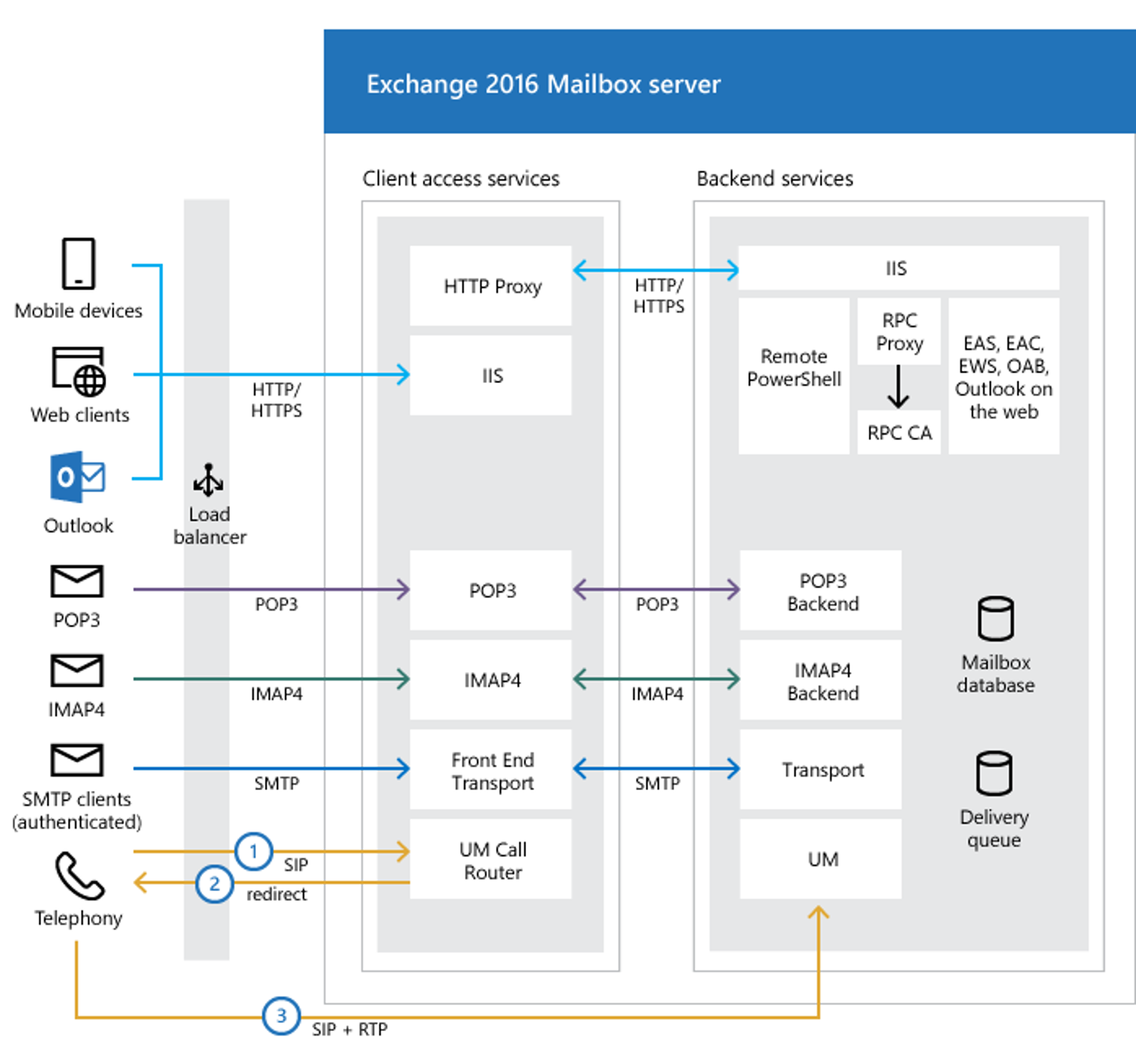
ProxyNotShell and Exchange Architecture Primer
There are two major components that make up a Microsoft Exchange server:-
The frontend
The backend
Exchange Architecture
All client connections are handled by the frontend, which proxies any given request to the backend according to the request. Here in this scenario the specific requests made to the frontend, like URLs, are dealt with by backend services.
Exchange Mailbox Server
A ProxyNotShell attack targets the Remote PowerShell service, which in this case is the backend service that is targeted. It is known this kind of vulnerability is referred to as an SSRF (Server-Side Request Forgery) vulnerability.
The CVE-2022-41082 vulnerability has been exploited by ransomware operators in order to execute arbitrary commands on compromised servers using Remote PowerShell.
OWASSRF PoC exploit leak
POC code for an exploit method based on Play ransomware logging was currently under development by CrowdStrike security researchers.
A recent discovery has shown that an attacker has downloaded all of the tools from an open repository, uploaded them in a MegaUpload link, and made them accessible to the public via the Twitter site.
CrowdStrike researchers replicated the log files generated in recent Play ransomware attacks using a Python script from the leaked toolkit, named poc.py, that was included in the leaked toolkit.
Recommendations from CrowdStrike
Here below we have mentioned all the recommendations offered by CrowdStrike:-
Since the URL rewrite mitigations for ProxyNotShell do not function against this exploit method, organizations should apply the Exchange patches of November 8, 2022.
The KB5019758 patch should be applied as soon as possible, but if this cannot be done, then you should disable OWA until you are able to apply it.
Make sure to disable remote PowerShell for non-administrative users in accordance with Microsoft’s recommendations.
Implement the use of advanced endpoint detection and response (EDR) solutions on each and every endpoint.
Utilize the script developed by CrowdStrike Services to check for signs of exploitation on Exchange servers visible in IIS logs and Remote PowerShell logs.
Take into account application-level controls, such as firewalls for web applications, as well as system-level controls.
Ensure that the X-Forwarded-For header in the HTTP request has been configured to log the true IP address of the external proxy server.
John Jackson has been working in cybersecurity for less than five years, but already has several significant wins under his belt.
After five years as an engineer in the Marine Corps he founded white-hat hacker collective Sakura Samurai, which last year discovered git directories and credential files within United Nations infrastructure that exposed more than 100,000 private employee records.
On a roll, the group soon after publicly disclosed vulnerabilities within the Indian government that allowed them to access personal records, police reports, and other hugely sensitive data, along with session hijacking and arbitrary code execution flaws on finance-related governmental systems.
Jackson’s other notable successes have included the discovery of a vulnerability in the Talkspace mental health app and two serious bugs in Chinese-made TCL brand televisions.
In a follow-up to the first part of our two-part feature on becoming a pen tester, we asked Jackson, now senior offensive security consultant at Trustwave, about his achievements, his love for pen testing, and the skills that would-be penetration testers need to succeed.
Daily Swig: How did you get into pen testing?
John Jackson: My story’s a little non-traditional. I didn’t grow up as a computer nerd. I was actually going to college for philosophy at CU Denver when I got a phone call from a recruiter and he asked me, hey, do you want to be a hacker?
I went through a boot camp and by the time I got to certified ethical hacker level I was actually helping class members learn, because I had done so much self-study on my own as I was just so excited.
I got recruited by TEKsystems as a contractor to go and work for Staples, initially as a cybersecurity engineer, and after the first six months there, they switched me to endpoint detection response. I went from application security engineer to senior applications security engineer for Shutterstock and after that, I went to Trustwave.
I was still hacking on my own time doing ethical hacking, and I established a group at the time called Sakura Samurai.
JJ: There’s not a linear path. When I was getting into it, they [the industry] didn’t have as many certifications as they do now, and they also didn’t have as many materials, but nowadays they have things like Hack the Box, which can be a good way in.
I think there is no definitive skill that makes you a good hacker – it’s not so much a skill but a mindset. It’s endless curiosity.
If you’re not the type of person that likes spending a lot of your free time learning then it’s not the best field for you, because you’re always going to have to improve, and it’s very difficult to improve if you’re not continually learning, and a lot of the time that’s on your own time.
DS: What are your favourite things about your job?
JJ: One of my favourite things is the ability to hack so many different things. I’ve done ATM hacking, I’ve done phishing and social engineering, and then I moved into red teaming where the scope is a lot larger, and you have a lot more control over how you hack the organizations because you emulate advanced persistent threat actors.
Pen testing is amazing because I’m always learning – it really keeps me going and keeps my brain fresh. I don’t get bored because every day is new.
DS: And the worst?
JJ: A lot of non-technical people are sometimes involved in setting up and arranging pen tests and red teams, and sometimes they under-scope the assessments and take a very check-in-the-box approach to pen testing.
I think that that’s bad for everyone involved – it’s bad for the pen testers because you’re limited to such a narrow scope of what you can and can’t do, and it’s bad for security because in reality it’s just not realistic. A criminal hacker is not going to stop and say “you know what, this domain’s out of scope, this technology’s out of scope, I’m not going to mess with that”.
Pen testers are highly technical and sometimes you’re dealing with people that are more salesy or C-level, and you have to explain why it matters – and that can be tough.
DS: What’s the most enjoyable project you’ve ever worked on?
JJ: I think my favourite project was a bank that wanted a red team with a scope of pretty much everything. That was a lot of fun, because I got to use the expertise I had to think outside of the box and use some of their own platforms to abuse their company.
They were blown away because they didn’t expect to see this or that service get abused, so I felt kind of proud doing that. [It felt like] finally someone appreciates that outside of the box thinking.
DS: And the most serious?
JJ: With the UN, with my group Sakura Samurai, we found GitHub credentials. We used the GitHub credentials to download the organization’s internal GitHub code and then, going through the code, we found over 100,000 lines of employee information. It was insane. That was definitely pretty scary.
The Indian government hack was crazy too – that was on another level. We found a lot of vulnerabilities – credentials, remote code execution, you name it. We were just going in and gave them a very extensive report, and actually coordinated it with DC3 [Department of Defense Cyber Crime Center] to help us disclose, because we were so worried about how much we found.
DS: What are your thoughts about bug bounties?
JJ: I’ve got a lot of complaints [about] bug bounty [programs], the biggest one being that you have to sign non-disclosure agreements when you submit these bugs, and sometimes that’s a moral conflict because you’ll discover things that are really bad. I was a blue teamer for half of my career, so when I find these certain types of bugs in bug bounty programs it’s unnerving because I know they’re not going to handle this how they need to handle this, they’re going to try and sweep this under the rug.
I moved towards vulnerability disclosure programs because you give them time to fix it and then you can disclose the bug that you found. I think that all hackers should try some vulnerability disclosure because it really just gives you a chance to get your hands on hacking a lot of things at once and then go through the process.
JJ: Right now, I’m working on another red team engagement. We’re on the internal phase, so the phase of just being inside the organization and looking for security vulnerabilities to see what we can and can’t do, how far we can go.
It’s always exciting. I love doing it, as this just really combines a lot of elements of hacking – network hacking, web hacking, and then the social aspects like what type of technologies do people use, and how can you abuse that internally?
A good example that I can say on record because it’s very obvious is Office 365, using Microsoft products to get more passwords or access to the organization, so that’s what I’m dealing with right now.
DS: What careers could pen testing lead on to?
JJ: I definitely have moved towards red teaming more, which is just a different form of pen testing. But I’d say for me red teaming and pen testing is the end of the line.
You could spend your entire life as a pen tester, absolutely, but I think a lot of people in the different client environments have shifted into a model of wanting pen testers to do more threat emulation – specific goals like ‘steal our credit card data, steal our employee accounts’.
The reality is it’s just endless, and there’s always something bigger you can aspire to. So if you’re a pen tester maybe [the next step is] senior pen tester, if you’re a senior pen tester maybe it’s to go to offensive security consultant, moving into red teaming. I think shifting into red teaming is the end goal for a lot of people.
It has recently been discovered by researchers that Windows has a vulnerability that allows code execution that rivals EternalBlue in terms of potential. It is possible for an attacker to execute malicious code without authentication by exploiting this newly-tracked vulnerability CVE-2022-37958.
It is possible to exploit this vulnerability in a wormable way, which can lead to a chain reaction that can impact other systems that are vulnerable, and a new attack can be launched.
A greater range of network protocols is affected by this vulnerability as opposed to the earlier version, which gave attackers more flexibility.
Successful exploitation of this vulnerability allows any Windows application protocol that accesses the NEGOEX protocol may enable an attacker to remotely execute arbitrary code.
Despite the list of protocols that have been identified, there could be other protocols and standards that are affected as well.
On a target system, there is no user input or authentication required by a victim in order for this vulnerability to succeed. This vulnerability has been classified by Microsoft as “Critical,” with a maximum severity for all categories.
As a result, CVSS 3.1 now has an overall score of 8.1 out of 10. It is important to note that systems with unpatched default configurations are vulnerable to this flaw.
The reclassification was performed by X-Force Red in accordance with its responsible disclosure policy with Microsoft.
Recommendations
For the time being, IBM won’t release the full technical details regarding the vulnerabilities and patches until Q2 2023, in order to give defenders a chance and enough time to apply them.
Security Intelligence recommends that users and administrators apply the patch as soon as possible due to the widespread use of SPNEGO, which ensures that they are protected.
All systems running Windows 7 and newer are compatible with this fix, which is part of the security updates for September 2022.
Moreover, X-Force Red recommends the following additional recommendations:-
Identify which services are exposed to the internet, such as SMB and RDP.
You should continuously monitor your attack surface, including Windows Authentication-enabled servers.
In the event that the patch cannot be applied, set Kerberos or Net-NTLM as the default authentication providers on Windows and remove Negotiate as the default authentication provider.
Microsoft disclosed technical details of a vulnerability in Apple macOS that could be exploited by an attacker to bypass Gatekeeper.
Microsoft has disclosed details of a now-fixed security vulnerability dubbed Achilles (CVE-2022-42821, CVSS score: 5.5) in Apple macOS that could be exploited by threat actors to bypass the Gatekeeper security feature.
The Apple Gatekeeper is designed to protect OS X users by performing a number of checks before allowing an App to run. In fact, you will not be able to execute code that wasn’t signed by an Apple developer, you will not be able to run apps that weren’t downloaded from Apple’s store if the device is not jailbreaked of course.
The flaw was discovered on July 27, 2022, by Jonathan Bar Or from Microsoft, it is a logic issue that was addressed with improved checks.
“On July 27, 2022, Microsoft discovered a vulnerability in macOS that can allow attackers to bypass application execution restrictions imposed by Apple’s Gatekeeper security mechanism, designed to ensure only trusted apps run on Mac devices. We developed a proof-of-concept exploit to demonstrate the vulnerability, which we call “Achilles”.” reads the post published by Microsoft.
Microsoft researchers explained that Gatekeeper bypasses can be used by threat actors to install malware on macOS systems.
The experts pointed out that Apple’s Lockdown Mode introduced in July does not prevent the exploitation of the Achilles bug.
The Achilles vulnerability relies on the Access Control Lists (ACLs) permission model to add extremely restrictive permissions to a downloaded file (i.e., “everyone deny write, writeattr, writeextattr, writesecurity, chown”), to block the Safari browser from setting the quarantine extended attribute.
Below is the POC developed by Microsoft:
Create a fake directory structure with an arbitrary icon and payload.
Create an AppleDouble file with the com.apple.acl.text extended attribute key and a value that represents a restrictive ACL (we chose the equivalent of “everyone deny write,writeattr,writeextattr,writesecurity,chown”). Perform the correct AppleDouble patching if using ditto to generate the AppleDouble file.
Create an archive with the application alongside its AppleDouble file and host it on a web server.
On Friday, Google released a beta version of Client-side encryption (CSE) for Gmail. This newest service is only useful to organisations that can produce their own decryption keys because CSE is designed for organisational use.
Google has now made “end-to-end encryption” available for Gmail on the web, following Meta’s 2016 offer to use it for WhatsApp. However, it only provides client-side encryption (CSE).
Notably, Client-side encryption (Google refers to as E2EE) was already available for users of Google Drive, Google Docs, Sheets, Slides, Google Meet, and Google Calendar (beta).
“We’re expanding customer access to client-side encryption in Gmail on the web. Google Workspace Enterprise plus, Education plus, and Education Standard customers are eligible to apply for the beta until January 20th, 2022”, Google announces.
End-To-End Encryption for Gmail
Sensitive information in the email body and attachments are rendered unreadable by Google servers using client-side encryption in Gmail. Customers retain control of both the identity service used to access encryption keys.
“You can use your own encryption keys to encrypt your organization’s data, in addition to using the default encryption that Google Workspace provides,” explains Google.
“With Google Workspace Client-side encryption (CSE), content encryption is handled in the client’s browser before any data is transmitted or stored in Drive’s cloud-based storage.
“That way, Google servers can’t access your encryption keys and decrypt your data. After you set up CSE, you can choose which users can create client-side encrypted content and share it internally or externally.”
Google Workspace already uses the latest cryptographic standards to encrypt all data at rest and in transit between our facilities. Client-side encryption supports a wide range of data sovereignty and compliance requirements while enhancing the secrecy of your data.
For customers of Google Workspace Enterprise Plus, Education Plus, and Education Standard, Gmail E2EE beta is presently available.
By submitting their Gmail CSE Beta Test Application, which should include the email address, Project ID, and test group domain, they can apply for the beta until January 20, 2023.
Google says this feature will be OFF by default and can be enabled at the domain, OU, and Group levels (Admin console > Security > Access and data control > Client-side encryption).
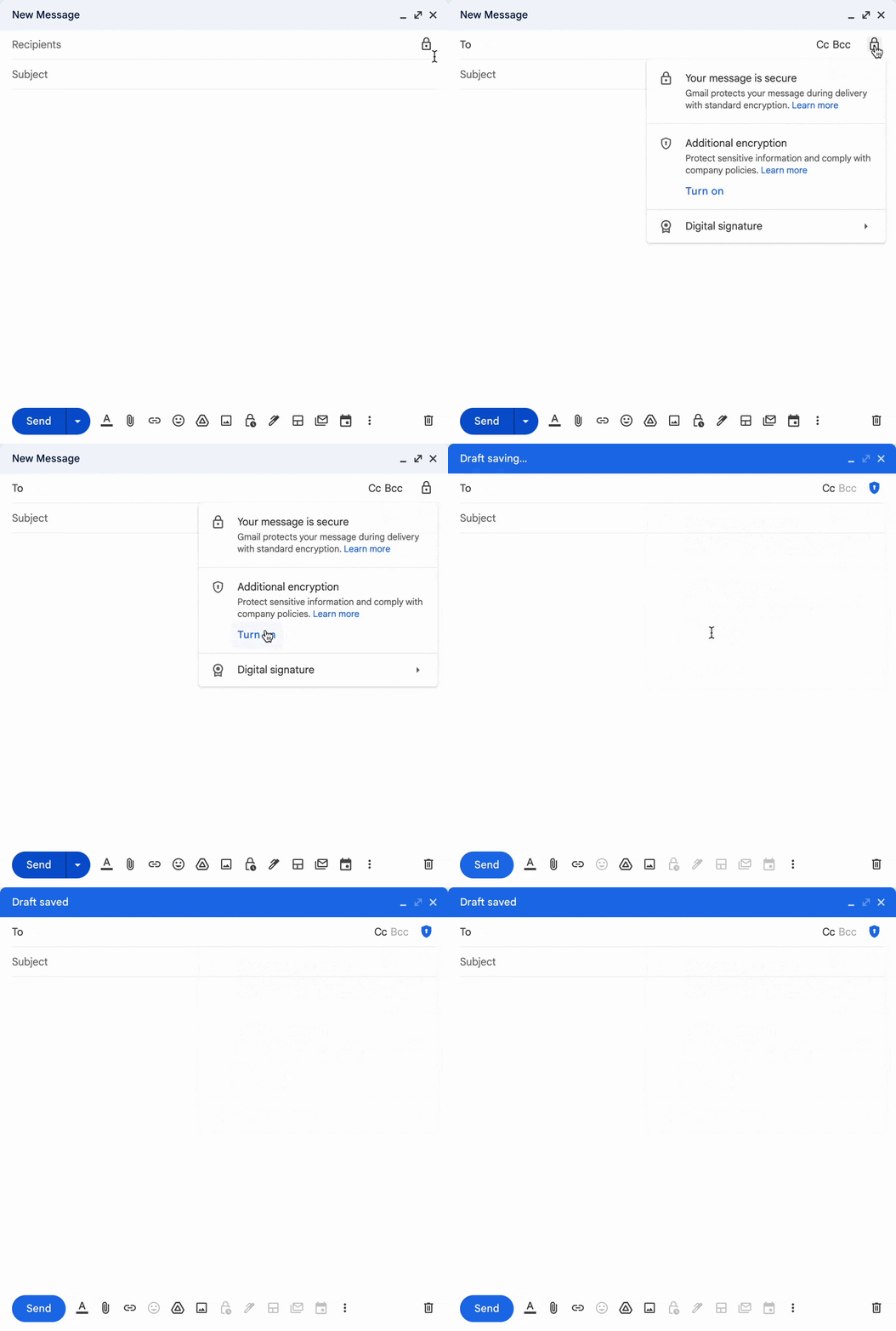
To add client-side encryption to any message, click the lock icon and select additional encryption, compose your message and add attachments as normal.
Also, the feature is not available to Google Workspace Essentials, Business Starter, Business Standard, Business Plus, Enterprise Essentials, Education Fundamentals, Frontline, and Nonprofits, as well as legacy G Suite Basic and Business customers. Also, the service has not yet been rolled out for personal accounts.
Finally, End-to-end encryption is something we take for granted in the modern era when hacking and data leakage is becoming more frequent occurrences.
is this website safe ? In this digital world, Check website safety is most important concern since there are countless malicious websites available everywhere over the Internet, it is very difficult to find a trustworthy website. We need tobrowse smart and need to make sure the site is not dangerous by using Multiple approaches.
In general, it is good to type the website URL instead of copy-paste or clicking an URL. Also, check to see the website working with HTTP OR HTTPS.
Investigating: is this website safe
In order to find, is this website safe , we need to figure it out if the URL received from an unknown source and we would recommend cross-checking the URL before clicking on it. Copy the URL to analyzers that available over the Internet and ensure it’s Integrity.
If it is a shortened URL you can unshorten itwith the siteand then analyze the actual URL.
Methods to analyze Websites
To check website safety, the first and the most recommended method is to check online page scanners, which uses the latest fingerprinting technology to show web applications are up to date or infected by malware.
Website reputation check needs to be done to find the trustworthiness of website with WOT .
Ensure SSL is there before making a purchase
In order to check website safety, Ensure the website availability with https before entering the payment card details. We can audit the HTTPS availability with the SSL analyzer URL’s available over the internet.
Also, there is a range of certificates available over the Internet from low assured (domain validation) to the Most trusted Extended validation certificates, you can refer the URL for more details.
Moreover, we can verify their prompt installation with various popular checkers available
According to Google, in order to check, is this website Safe, Browsing is a service that Google’s security team built to identify unsafe websites across the web and notify users and webmasters of potential harm.
In this Transparency Report, Google discloses details about the threats we detect and the warnings we show to users.
We share this information to increase awareness about unsafe websites, and we hope to encourage progress toward a safer and more secure web.
Safe Browsing also notifies webmasters when their websites are compromised by malicious actors and helps them diagnose and resolve the problem so that their visitors stay safer.
Safe Browsing protections work across Google products and power safer browsing experiences across the Internet.
Check the Browsing Website have Any unsafe Content or not – Google Safe Browsing
To Report Malicious websites
Please report the dangerous URL to the services mentioned below. They are arranged in categories which should make it relatively easy to decide which services you should report the site to.
analyzes a website through multiple blacklist engines and online reputation tools to facilitate the detection of fraudulent and malicious websites. This service helps you identify websites involved in malware incidents, fraudulent activities, and phishing websites.
Important tools for Check the Website Reputation and confirm is this website Safe
Cyber criminals are using various sophisticated techniques to fool online users to drop malware and other cyber threats to cause unbearable damages. so beware of the malicious website, don’t blindly open the website and check the website safety before open it.
Microsoft revised the severity rate for the CVE-2022-37958 flaw which was addressed with Patch Tuesday security updates for September 2022.
Microsoft revised the severity rate for the CVE-2022-37958 vulnerability, the IT giant now rated it as “critical” because it discovered that threat actors can exploit the bug to achieve remote code execution.
The CVE-2022-37958 was originally classified as an information disclosure vulnerability that impacts the SPNEGO Extended Negotiation (NEGOEX) security mechanism.
The SPNEGO Extended Negotiation Security Mechanism (NEGOEX) extends Simple and Protected GSS-API Negotiation Mechanism (SPNEGO) described in [RFC4178].
The SPNEGO Extended Negotiation (NEGOEX) Security Mechanism allows a client and server to negotiate the choice of security mechanism to use.
The issue was initially rated as high severity because the successful exploitation of this issue required an attacker to prepare the target environment to improve exploit reliability.
IBM Security X-Force researcher Valentina Palmiotti demonstrated that this vulnerability is a pre-authentication remote code execution issue that impacts a wide range of protocols. It has the potential to be wormable and can be exploited to achieve remote code execution.
“The vulnerability could allow attackers to remotely execute arbitrary code by accessing the NEGOEX protocol via any Windows application protocol that authenticates, such as Server Message Block (SMB) or Remote Desktop Protocol (RDP), by default.” reads the post published by IBM. “This list of affected protocols is not complete and may exist wherever SPNEGO is in use, including in Simple Message Transport Protocol (SMTP) and Hyper Text Transfer Protocol (HTTP) when SPNEGO authentication negotiation is enabled, such as for use with Kerberos or Net-NTLM authentication.”
Demonstrating CVE-2022-37958 RCE Vuln. Reachable via any Windows application protocol that authenticates. Yes, that means RDP, SMB and many more. Please patch this one, it's serious! https://t.co/ikOrTvQIJspic.twitter.com/bOTmL5Fh2H
Unlike the CVE-2017-0144 flaw triggered by the EternalBlue exploit, which only affected the SMB protocol, the CVE-2022-37958 flaw could potentially affect a wider range of Windows systems due to a larger attack surface of services exposed to the public internet (HTTP, RDP, SMB) or on internal networks. The expert pointed out that this flaw can be exploited without user interaction or authentication.
IBM announced it will release full technical details in Q2 2023 to give time organizations to apply the security updates.
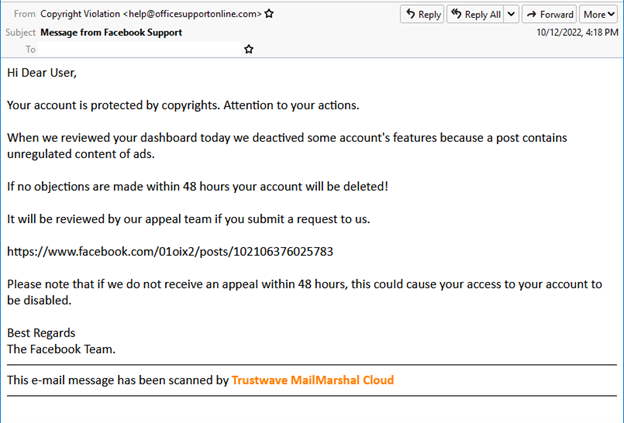
This recent phishing campaign tricks victims by using Facebook posts in its chain of attacks. The emails that were sent to the targets made it appear as though one of the recipients’ Facebook posts violated copyright, and they threatened to remove their accounts if no appeal was made within 48 hours.
Phishing email message
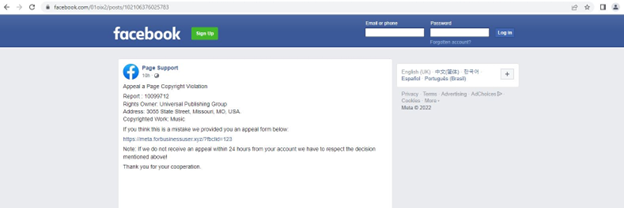
“The content of this Facebook post appears legitimate because it uses a dummy ‘Page Support’ profile with the Facebook logo as its display picture. At first glance, the page looks legitimate, but the link provided in this post leads to an external domain”, according to Trustwave.
Here the Facebook post pretends to be “Page Support,” using a Facebook logo to appear as if the company manages it.
Facebook post masqueraded as a support page
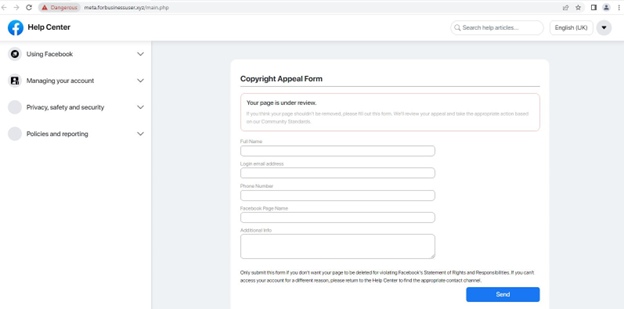
The main phishing URL, hxxps:/meta[.]forbusinessuser[.]xyz/main[.]php, which resembles Facebook’s copyright appeal page, is reached by clicking the link in the post.
Particularly, any data that victims enter into the form after hitting the send button, along with the victim’s client IP and geolocation data will be forwarded to hackers.
Also, threat actors may gather more data to get through fingerprinting protections or security questions while gaining access to the victim’s Facebook account.
The victim is then redirected to the next phishing website, where a false 6-digit one-time password (OTP) request with a timer is displayed.
Phishing page with OTP request
Any code entered by the victim will fail, and if the “Need another way to authenticate?” button is pressed, the site will redirect to the real Facebook site.
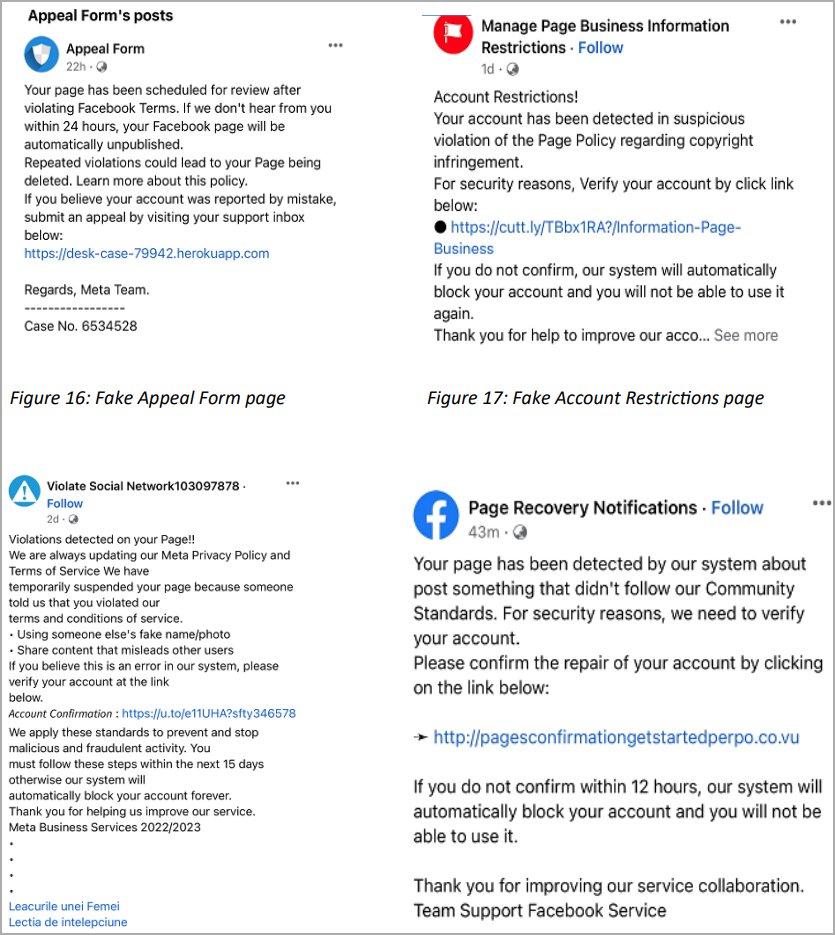
According to Trustwave, multiple Facebook profiles have fake messages that look to be support pages and direct users to phishing websites.
Various Facebook accounts promoting the same fake alerts
Therefore, these fake Facebook ‘Violation’ notifications use real Facebook pages to redirect to external phishing sites. Users are urged to take extreme caution when receiving false violation alerts and to not fall for the initial links’ seeming legitimacy.
This is not the first time threat actors have used drivers signed by Microsoft in their operations, as we know it, and it seems that putting a stop to this practice has not been an easy task for Microsoft.
Evidence suggests that the Cuba ransomware gang used malicious hardware drivers certified by Microsoft’s Windows Hardware Developer Program in an attempted ransomware attack.
Remember when, in 2021, a report surfaced that revealed Microsoft had signed a driver called Netfilter, and later it turned out it contained malware? Well, it has happened again, but on a larger scale.
Sophos X-Ops Rapid Response (RR) recently discovered evidence which proves that threat actors potentially belonging to the Cuba ransomware gang used malicious hardware drivers certified by Microsoft’s Windows Hardware Developer Program in an attempted ransomware attack.
Drivers — the software that allows operating systems and apps to access and communicate with hardware devices — require highly privileged access to the operating system and its data, which is why Windows requires drivers to bear an approved cryptographic signature before allowing the driver to load.
However, cybercriminals have long since found approaches to exploit vulnerabilities found in existing Windows drivers from legitimate software publishers. These hackers make an effort to progressively move up the trust pyramid, using increasingly well-trusted cryptographic keys to digitally sign their drivers.
Sophos along with researchers from Google-owned Mandiant and SentinelOne warned Microsoft about these signed malicious drivers which were being planted into targeted machines using a variant of the BurntCigar loader utility. These two then worked in tandem to kill processes associated with antivirus (AV) and endpoint detection and response (EDR) products.
“Ongoing Microsoft Threat Intelligence Center analysis indicates the signed malicious drivers were likely used to facilitate post-exploitation intrusion activity such as the deployment of ransomware,” Microsoft said in an advisory published as part of its monthly scheduled release of security patches, known as Patch Tuesday.
On left is a valid signature identified by Mandiant – On the right is a valid signature identified by Sophos
Microsoft concluded its investigation by stating that “no compromise has been identified,” and proceeded to suspend the partners’ seller accounts. Moreover, they released Windows security updates to revoke the abused certificates.
Mandiant’s report is available here. In SentinelOne’s blog post, the security firm reported that it had seen several attacks where a threat actor used malicious signed drivers to evade security products which usually trust components signed by Microsoft.
The threat actors were observed to be targeting organisations in the business process outsourcing (BPO), telecommunications, entertainment, transportation, MSSP, financial and cryptocurrency sectors and in some instances, SIM swapping was the end goal.
Code signing overview
Cuba Ransomware group was identified to be involved in gaining $60 million from attacks against 100 organisations globally, according to a joint advisory earlier this month from the US Cybersecurity and Infrastructure Security Agency (CISA) and the FBI.
The advisory also included warnings regarding the ransomware group which has been active since 2019 and continues to attack US entities in critical infrastructure, including financial services, government facilities, healthcare and public health, and critical manufacturing and information technology.
This is not the first time threat actors have used drivers signed by Microsoft in their operations, as we know it, and it seems that putting a stop to this practice has not been an easy task for Microsoft.
The number of internet-facing cameras in the world is growing exponentially. Some of the most popular brands don’t enforce a strong password policy, meaning anyone can peer into their owners’ lives.
When you spy on your neighborhood or your cafe customers, do you wonder if someone is watching Big Brother – you, in this case?
Businesses and homeowners increasingly rely on internet protocol (IP) cameras for surveillance. All too often, this gives them a false sense of security: when in fact, threat actors can not only access and watch your camera feed but exploit the unsecured device to hack into your network.
New research by Cybernews shows an exponential rise in the uptake of internet-facing cameras. After looking at 28 of the most popular manufacturers, our research team found 3.5 million IP cameras exposed to the internet, signifying an eightfold increase since April 2021.
While the default security settings have improved over the review period, some popular brands either offer default passwords or no authentication, meaning anyone can spy on the spies.
What is more, the overwhelming majority of internet-facing cameras are manufactured by Chinese companies. And while cosmetic security measures are in place, security leaders have long warned that technologies produced by Chinese companies can be exploited by China’s government.
Surge in internet-facing cameras
When we last did similar research, we discovered over 400,000 internet-facing cameras online. This time, the Cybernews research team found 3.5 million internet-facing cameras.
Since this is a convenient and cheap tool to surveil anything from a parking lot, a warehouse, your doorstep, or even monitor your child’s sleep using a baby camera, it’s not surprising to see a surge in IP camera usage.
While not surprising, the trend is worrying since internet-connected devices might be vulnerable to attacks – threat actors can gain access to the camera’s live feed, collect sensitive data, and launch further attacks on the network.
It is worrying that all analyzed brands have at least some models that allow users to keep default passwords or have no authentication setup whatsoever.
The reign of a Chinese brand
Most of the public-facing cameras we discovered are manufactured by the Chinese company Hikvision: the Cybernews research team found over 3.37 million of its cameras worldwide.
According to our researchers, they have the necessary security practice in place as they force users to create their unique passwords during an initial setup process. Nevertheless, the global popularity of Hikvision cameras has raised some eyebrows and, as is typical with China-manufactured technology, it and other companies are facing a backlash from Western governments.
Recently, the UK parliament instructed government agencies to cease the deployment of Chinese equipment, including surveillance cameras, on to sensitive sites, saying the technology is produced by companies subject to the National Intelligence Law of the People’s Republic of China.
Hikvision’s website advertised optional demographic profiling facial analysis algorithms, including gender, race, ethnicity, and age. Following an investigation by the Guardian, the ad was removed.
In November, the US Federal Communications Commission banned authorizations for Chinese telecommunications and video surveillance equipment, saying that Huawei, ZTE, Hytera, Hikvision, and Dahua are “deemed to pose a threat to national security.”
Most insecure brands
Most analyzed brands (96.44% of the discovered cameras) force users to set passwords or generate unique default passwords on the newest models and firmware versions. While this is a good trend, it doesn’t mean that all the cameras are safe since the lion’s share of these cameras is probably comprised of older models or those operating with outdated firmware using default or weak passwords.
Anyhow, this is a fundamental shift in the trend since last year, when we found that only 5.25% of analyzed cameras asked users to set their passwords.
As of today, 3.56% (127,000) of all analyzed cameras recommend changing the default password but do not enforce it. Sometimes, they don’t even mention it in the initial setup process, with the recommendation being on a blog post instead.
Even more concerning is that over 21,000 cameras did not have any authentication setup, allowing anyone to access them, leaving owners at risk of cyberattack.
According to the research, most public-facing cameras that might be using default credentials are operational in the United States, where we identified over 458,000 such devices.
Germany, which took second place in our research last year, covering over 50,000 cameras, didn’t even make it into the top 10 countries this time.
The second most affected country is Vietnam, with nearly 365,000 cameras, followed by the UK (nearly 250,000).
Visual here: Top 10 Countries with the most internet-connected cameras that could be using default credentials:
If you want to know how to secure your IP camera give a look at the original post published on CyberNews:
More good news: We know how ransomware “gangs” work and, for the most part, what they’re after.
Ransomware is opportunistic and the barriers to entry for operators are relatively low as the tools, infrastructure, and access that enables these attacks have proliferated across various online illicit communities through the ransomware-as-a-service (RaaS) model. Ransomware affiliates can rent the malware and be paid a commission from the victim’s extortion fee.
Initial access brokers—i.e. threat actors who sell ransomware operators and affiliates access into victim networks—are constantly scanning the internet for vulnerable systems. Leaked credentials from breaches and other cyber incidents can lead to brute force or credential stuffing attacks. Employees need to constantly be aware of increasingly sophisticated social engineering schemes. Threat actors can use any of these mechanisms to breach systems, escalate privileges, move laterally, and ideally take actions on objectives, dropping that malware on a victim’s network and encrypting all of their files.
But one of the most effective ways to stop a ransomware attack is to deny them access in the first place; without access, there is no attack. The adversary only needs one route of access, and yet the defender has to be aware and prevent all entry points into a network. Various types of intelligence can illuminate risk across the pre-attack chain—and help organizations monitor and defend their attack surfaces before they’re targeted by attackers.
Vulnerability intelligence
The best vulnerability intelligence should be robust and actionable. For instance, with vulnerability intelligence that includes exploit availability, attack type, impact, disclosure patterns, and other characteristics, vulnerability management teams predict the likelihood that a vulnerability could be used in a ransomware attack.
With this information in hand, vulnerability management teams, who are often under-resourced, can prioritize patching and preemptively defend against vulnerabilities that could lead to a ransomware attack.
Threat intelligence
Having a deep and active understanding of the illicit online communities where ransomware groups operate can also help inform methodology, and prevent compromise. Organizations must be able to monitor for, and be alerted to, stolen login credentials before they reach criminal actors. This intelligence can mitigate account takeover and break the chain leading to brute force or credential stuffing attacks.
Technical intelligence
When cyber threat actors successfully infiltrate your network, the subsequent attack is not always immediate; sometimes, they will install tools that can help them further invade and seek access to the most valuable data. Technical intelligence helps security teams detect indicators of compromise, or IOCs, and the presence of Cobalt Strike beacons, which can unknowingly be present in your systems and later help a ransomer carry out an attack.
Prevention through preparedness
In order to help employees and executives understand various ransomware-related risks, organizations should seek to implement tabletop exercises designed by companies with expertise preparing for, and responding to, a ransomware event. These simulated scenarios should cover how to spot (and report) social engineering schemes like phishing attacks, which lure employees to click on links or interact with harmful attachments that could allow ransomware malware to be deployed on company devices.
By spending time building out and rehearsing a response plan prior to an attack scenario, your team will be equipped with informed decision-making during a ransomware-related emergency. But rest assured: It’s best to have the right intelligence at-hand, including the data, expert insights, and tools that can help to prevent an attack in the first place and keep your organization running without interruption.
In a recent find, security researcher Jeremiah Fowler and the Website Planet research team discovered an open and unprotected database that contained 9,098,506 records of credit card transactions.
What’s worse, the trove of personal and financial was left exposed on a misconfigured server without any password or security authentication.
The owner of the database was identified as Cornerstone Payment Systems, a credit card processing company based in California. Upon being informed, they took swift action to restrict public access the very same day, thanking the researchers for reporting the exposure.
Cybercrimes related to credit and financial data are especially dangerous because access to data such as partial credit card numbers, account or transaction information, names, contacts, and donation comments allow threat actors to establish a target profile.
These criminals are then able to launch highly targeted phishing campaigns or social engineering attacks. It is estimated that 98% of cyber attacks involve some form of social engineering.
The Exposed Data
In this data leak, the Personally Identifiable Information (PII) included merchants, users, and customer names, partial credit card numbers, type of card, expiration date, physical addresses, and email addresses, security or access tokens, phone numbers, and more.
Furthermore, information regarding the transaction was also included such as donation details, recurring payments, and comments. The donation details had the dollar amount and what the donation was for such as payments for goods or services, and any other transaction.
Additionally, electronic check payment data included bank names and check numbers. The notes also had authorization tokens and if the payment was declined, or accepted, and reasons for the decision.
Cybercriminals would be able to use such information to reach out to customers while pretending to be legitimate merchants or organizations. This sensitive information warrants that criminals can build a relationship of trust with their victims to obtain additional payment information or a Social Security Number (SSN) or other information for nefarious purposes.
Screenshot 1 shows transaction records from an anonymous donor – Screenshot 2 shows transaction records including personal data (Provided to Hackread.com by Website Planet)
Moreover, according to Website Planet’s blog post, since many of the transactions in this database were made for donations or recurring payments to religious organizations, charity campaigns, or nonprofit groups, the criminals could target victims based on their beliefs or the causes that they support.
Many of the transaction comments the researchers saw were for religious, pro-life/anti-abortion, anti-COVID mandates, and other conservative or religious causes. It is not uncommon for hacktivists to take a vigilante stance and attack targeted individuals.
Therefore, it is essential for organizations that collect and store PII to use encryption and take other security measures to protect their sensitive data online. It is also just as necessary for the potentially affected individuals to be notified and advised to practice extra caution in all their online interactions.
A global survey from recruitment firm Marlin Hawk that polled 470 CISOs at organizations with more than 10,000 employees found nearly half (45%) have been in their current role for two years or less.
James Larkin, managing partner for Marlin Hawk, said that rate is slightly lower than the previous year when the same survey found 53% of CISOs had been in their positions for less than two years.
Overall, the survey found that current turnover rates are at 18% on a year-over-year basis. Approximately 62% of CISOs were hired from another company, compared to 38% that were promoted from within, the survey also found.
However, only 12% of CISOs are reporting directly to the CEO, while the rest report to other technology leadership roles, the survey revealed. It also found that more than a third of CISOs (36%) that have a graduate degree also received a higher degree in business administration or management, a 10% decline from the previous year. A total of 61% have higher degrees in another STEM field, the survey found.
Finally, the survey showed only 13% of the respondents are female, while only 20% are non-white.
The role of the CISO continues to expand—and with it the level of stress—as cyberattacks continue to increase in volume and sophistication, noted Larkin. It’s not clear whether or how much stress levels are contributing to CISO turnover rates, but it is one of the few 24/7 roles within any IT organization, added Larkin.
The role of the CISO has also come under more scrutiny in the wake of the conviction of former Uber CISO Joe Sullivan on charges of obstruction. Most CISOs view their role as defending the corporation but, in general, Larkin noted that most of them would err on the side of transparency when it comes to managing cybersecurity.
The one certain thing is that CISOs are more valued than ever. A PwC survey of 722 C-level executives found that 40% of business leaders ranked cybersecurity as the number-one most serious risk their organizations faced. In addition, 58% of corporate directors said they would benefit most from enhanced reporting around cybersecurity and technology.
As a result, nearly half of respondents (49%) said they were increasing investments in cybersecurity and privacy, while more than three-quarters (79%) said they were revising or enhancing cybersecurity risk management.
As a result, CISOs generally have more access to resources despite an uncertain economy. The issue is determining how best to apply those resources given the myriad platforms that are emerging to enhance cybersecurity. Of course, given the chronic shortage of cybersecurity talent, the biggest challenge may simply be finding someone who has enough expertise to manage those platforms.
In the meantime, most of the training CISOs and other cybersecurity professionals receive will continue to be on the job. CISOs, unlike other C-level roles that have time available for more structured training, don’t have that luxury.
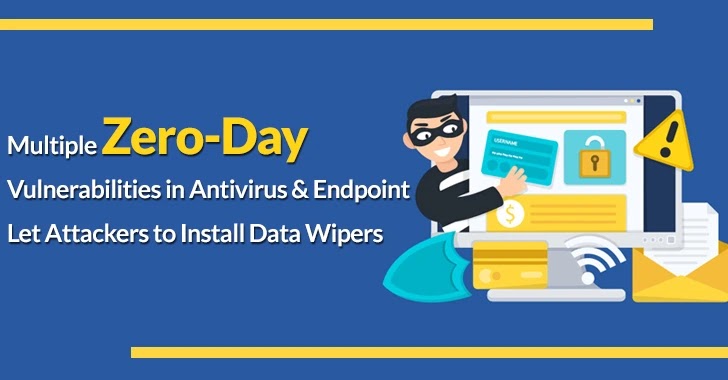
Aikido is the wiper tool that has been developed by the Or Yair of SafeBreach Labs, and the purpose of this wiper is to defeat the opponent by using their own power against them.
As a consequence, this wiper can be run without being given privileges. In addition, it is also capable of wiping almost every file on a computer, including the system files, in order to make it completely unbootable and unusable.
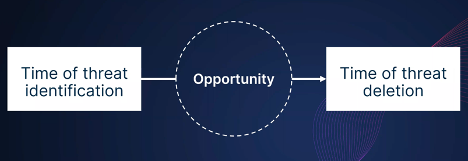
EDRs are responsible for deleting malicious files in two main ways, depending on the following contexts:-
Time of threat identification
Time of threat deletion
Window Opportunity (Safebreach)
As soon as a malicious file is detected and the user attempts to delete it, the Aikido wiper takes advantage of a moment of opportunity.
This wiper makes use of a feature in Windows allowing users to create junction point links (symlinks) regardless of the privileges of the users’ accounts, which is abused by this wiper.
A user who does not have the required permissions to delete system files (.sys) will not be able to delete those files according to Yair. By creating a decoy directory, he was able to trick the security product to delete the file instead of preventing it from being deleted.
Likewise, he placed a string inside the group that resembled the path intended for deletion, for example, as follows:-
C:\temp\Windows\System32\drivers vs C:\Windows\System32\drivers
Qualities of the Aikido Wiper
Here below we have mentioned all the general qualities of the Aikido Wiper:-
Fully Undetectable
Makes the System Unbootable
Wipes Important Data
Runs as an Unprivileged User
Deletes the Quarantine Directory
Product analysis and response from the vendor
It was found that six out of 11 security products tested by Or Yair were vulnerable to this exploit. In short, over 50% of the products in this category that is tested are vulnerable.
Here below we have mentioned the vulnerable ones:-
Defender
Defender for Endpoint
SentinelOne EDR
TrendMicro Apex One
Avast Antivirus
AVG Antivirus
Here below we have mentioned the products that are not vulnerable:-
Palo Alto XDR
Cylance
CrowdStrike
McAfee
BitDefender
Between the months of July and August of this year, all the vulnerabilities have been reported to all the vendors that have been affected. There was no arbitrary file deletion achieved by the researcher in the case of Microsoft Defender and Microsoft Defender for Endpoint products.
In order to cope with the vulnerabilities, three of the vendors have issued the following CVEs:-
This exploit was also addressed by three of the software vendors by releasing updated versions of their software to address it:-
Microsoft Malware Protection Engine: 1.1.19700.2
TrendMicro Apex One: Hotfix 23573 & Patch_b11136
Avast & AVG Antivirus: 22.10
This type of vulnerability should be proactively tested by all EDR and antivirus vendors to ensure that their products are protected from similar attacks in the future.
For organizations using EDR and AV products, the researcher strongly recommends that they consult with their vendors for updates and patches immediately.
The coming new year is a good moment for chief information security officers to reflect upon what they’ve learned this year and how to apply this knowledge going forward.
“If companies are not going to learn these lessons and mature their security practices, we will see increased scrutiny in audits and third-party risk assessments, and this may have a financial, reputational, operational, or even compliance impact on their business,” says Sohail Iqbal, CISO at Veracode.
1. Don’t wait for a geopolitical conflict to boost your security
2. The population of threat actors has exploded, and their services have become dirt cheap
3. Untrained employees can cost a company millions of dollars
4. Governments are legislating more aggressively for cybersecurity
5. Organizations should keep better track of open-source software
6. More effort should be put into identifying vulnerabilities
7. Companies need to do more to protect against supply chain attacks
8. Zero trust should be a core philosophy
9. Cyber liability insurance requirements might continue to increase
10. The “shift-left” approach to software testing is dated
11. Using the wrong tool for the wrong asset will not fix the problem
12. Organizationsneed help understanding their complete application architectures
Experts from Industrial and IoT cybersecurity company Claroty developed a generic method for bypassing the web application firewalls (WAF) of a variety of leading manufacturers.
Following a study of the wireless device management platform from Cambium Networks, Claroty’s researchers identified the technique. They found a SQL injection flaw that might allow unauthorized access to private data such as session cookies, tokens, SSH keys, and password hashes.
Reports stated that the vulnerability could be exploited against the on-premises version, but the Amazon Web Services (AWS) WAF prohibited all attempts to do so against the cloud version by flagging the SQL injection payload as malicious.
“This is a dangerous bypass, especially as more organizations continue to migrate more business and functionality to the cloud,” Noam Moshe, a vulnerability researcher at Claroty, wrote in a company blog post.
“IoT and OT processes that are monitored and managed from the cloud may also be impacted by this issue, and organizations should ensure they’re running updated versions of security tools in order to block these bypass attempts.”
Later finding revealed that the WAF could be bypassed by abusing the JSON data-sharing format. All of the significant SQL engines support JSON syntax and it is turned on by default.
“Using JSON syntax, it is possible to craft new SQLi payloads. These payloads, since they are not commonly known, could be used to fly under the radar and bypass many security tools.” Claroty reports.
CVE-2022-1361 Improper Neutralization of Special Elements Used In a SQL Command (‘SQL INJECTION’)
Further, a specific Cambium vulnerability the researchers uncovered proved more challenging to exploit (CVE-2022-1361). Moshe says “at the core of the vulnerability is a simple SQL injection vulnerability; however, the actual exploitation process required us to think outside the box and create a whole new SQL technique”.
Hence, they were able to exfiltrate users’ sessions, SSH keys, password hashes, tokens, and verification codes using this vulnerability.
The vulnerability’s main problem was that the developers in this instance did not utilize a prepared statement to attach user-supplied data to a query.
“Instead of using a safe method of appending user parameters into an SQL query and sanitizing the input, they simply appended it to the query directly”, he added
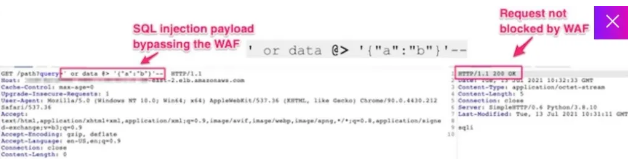
New SQL Injection Payload That Would Bypass the WAF
The WAF did not recognize the new SQL injection payload that Claroty researchers created, but it was still valid for the database engine to parse.
They did this by using JSON syntax. They did this by utilizing the JSON operator “@<” which put the WAF into a loop and let the payload reach the intended database.
Reports say the researchers successfully reproduced the bypass against Imperva, Palo Alto Networks, Cloudflare, and F5 products.
Claroty added support for the technique to the SQLMap open-source exploitation tool.
“We discovered that the leading vendors’ WAFs did not support JSON syntax in their SQL injection inspection process, allowing us to prepend JSON syntax to a SQL statement that blinded a WAF to the malicious code,” the security firm explained.
Hence Claroty says, by adopting this innovative method, attackers might gain access to a backend database and utilize additional flaws and exploits to leak data directly to the server or via the cloud.
Malware attacks are a growing problem in our increasingly digital world. By infiltrating computers and networks, malicious software can cause serious harm to those affected by it.
One of the most common types of malware is ransomware (encryption-based malware), which prevents users from accessing their files until they pay a hefty fee to the cyber attacker. This type of attack has been used to target everything from individuals to large organizations, including government agencies and healthcare providers.
In addition to financial losses, malware attacks can have devastating effects on businesses and individuals. In some cases, sensitive data can be stolen or destroyed as part of an attack. This can lead to identity theft and other forms of fraud, as well as put organizations at risk for long-term damage if confidential information is exposed or compromised.
Research Findings
A recent study by Atlas VPN shows how malware infection is on the rise and the trends in the new malware samples found in the first three quarters of 2022.
According to researchers, 59.58 million samples of new Windows malware were found in the first three quarters of 2022 and these make up 95.6% of all new malware discovered during that time period.
This analysis was based on data by AV-TEST GmbH, an independent organization that evaluates and rates antivirus and supplies services in IT Security and Antivirus Research. The study also includes new malware samples detected in the four quarters of 2021 and the first three quarters of 2022.
Windows, Linux, and Android Malware
Overall, there is a downward trend in the data with the malware samples this year has decreased by 34% as compared to the same period last year. However, the numbers are still exceptionally high.
Following Windows on the list is Linux malware with 1.76 million new malware samples – 2.8% of the total malware threats in 2022.
Android malware takes third place with the first three quarters of 2022 seeing 938,379 new Android malware threats, constituting 1.5% of the total new malware.
Lastly, 8,329 samples of never before seen malware threats aimed at macOS were observed in the same period.
Total Number of Malware
The study also shows that the total number of malware threats found in the first three quarters of 2022 across all operating systems amount to 62.29 million. This is about 228,164 malware threats daily.
If we make a quarter-by-quarter comparison, the first quarter of 2022 saw the most significant number of malware samples – 22.35 million. However, this number dropped by 4% to 21.49 million in the second quarter of this year. Again, it decreased by another 14% to 18.45 million.
The numbers continue to plummet into the fourth quarter of the year with 7.62 million new threats found in October and November – nearly 60% less than at the same time last year.
Protection Against Malware
Malware is a pervasive threat to internet users on both personal and professional networks. It can cause serious damage to computers, networks, and data that can be expensive to fix. Fortunately, there are steps you can take to protect yourself from malware.
The most important step in protecting your network from malware is keeping your anti-malware software up to date. Regularly updating anti-malware programs ensures that they’re able to detect the latest threats and keep them away from your computer or network.
Additionally, be sure not to click on suspicious links or download files from unknown sources as these could contain malicious code that could harm your system.
Another way to stay safe online is by using a secure web browser with built-in security features like pop-up blockers, phishing protection, and ad blockers ((don’t use it on Hackread.com though :0)) for enhanced protection against malicious activities.










![A Hacker's Mind: How the Powerful Bend Society's Rules, and How to Bend them Back by [Bruce Schneier]](https://m.media-amazon.com/images/W/WEBP_402378-T1/images/I/41Yeq54EmfL.jpg)