InfoSec Threats | InfoSec books | InfoSec tools | InfoSec services
InfoSec and Compliance – With 20 years of blogging experience, DISC InfoSec blog is dedicated to providing trusted insights and practical solutions for professionals and organizations navigating the evolving cybersecurity landscape. From cutting-edge threats to compliance strategies, this blog is your reliable resource for staying informed and secure. Dive into the content, connect with the community, and elevate your InfoSec expertise!

Feb 08 2023
Feb 06 2023
pen Source Intelligence (OSINT) tools are an invaluable resource for companies, organizations cybersecurity researchers and students. In this article, we will explore the 15 best OSINT tools that you can use for your investigations and education purposes.
OSINT, or Open Source Intelligence, refers to the practice of gathering information from publicly available sources. In the information and digital age, there are countless tools and resources available for OSINT practitioners to use, making it easier than ever to collect and analyze information. Here are the 15 best OSINT tools that you can use for your investigations:
Maltego is a powerful and sophisticated OSINT tool for gathering data from public sources. Developed by Paterva, Maltego OSINT allows users to quickly uncover relationships between large amounts of disparate data which can then be used to build intelligence profiles.
With Maltego OSINT, users are able to extract information from multiple online sources using simple graphic representations. This includes the ability to map out social networks, capture contact details and business data, track domain names and IP addresses, uncover digital evidence such as documents or images stored on websites, find related news articles and more.
Furthermore, by automating the process of gathering publicly available data in this way, Maltego OSINT enables users to quickly discover hidden connections that would otherwise remain undetected. Visit the official website of Maltego here.
Shodan is a search engine for the Internet of Things (IoT) devices and an OSINT tool that is used to uncover vulnerable and exposed devices connected to the Internet, otherwise known as smart devices.
Shodan was created by John Matherly in 2009 and is considered to be the world’s first computer search engine. Shodan can be used to detect security vulnerabilities on public websites, as well as provide detailed information about each web server it finds.
Shodan has become increasingly popular among cybersecurity and IT security professionals who use it for vulnerability assessment, penetration testing, and network mapping. Shodan also helps them identify insecure services such as misconfigured cloud databases, FTP servers, telnet servers, and SSH servers that are exposed on the internet without authentication or encryption.
Additionally, Shodan provides detailed technical information about each device it finds including IP address, operating system type, open ports, running software programs and associated vulnerabilities. That is why Shoden is a perfect OSINT tool out there. Visit the official website of Shodan here.
TheHarvester is a powerful OSINT tool used to find information related to domains and email addresses. It can be used by security professionals, IT administrators, and hackers alike to collect information from different sources on the internet.
TheHarvester was created as an alternative for doing research on public resources such as search engines, PGP key servers, and social networks. It allows users to quickly gather large amounts of data from sites like Google, Bing, Yahoo!, Dogpile, LinkedIn, Twitter and many more.
All of the gathered data can be exported into several formats such as HTML/XML or even saved as a text file. Additionally, it includes an API that allows users to customize their searches according to their specific needs. Visit the official TheHarvester page on Kali here.
Recon-ng is an OSINT tool used for reconnaissance and data gathering. It is a full-featured web application that can be used to gather subsets of public information related to a target, such as usernames, names, email addresses, domain names and other relevant details.
Recon-ng has been designed to automate the process of gathering intelligence about a given target as quickly and efficiently as possible. The Recon-ng OSINT tool provides users with access to multiple resources such as Google, Bing, Twitter, Shodan and more.
The platform also allows users to interact with each resource using the same interface which simplifies the data-gathering process significantly compared to traditional methods. It enables users to quickly collect comprehensive information on a target without having to manually search multiple online sources or databases. Visit the official Recon-ng page on Kali here.
Spiderfoot is an excellent OSINT tool designed to automate the process of gathering information about a specific target. Spiderfoot enables users to have quick and easy access to a wide range of data sources.
It is capable of collecting information from over 200 sources, such as DNS records, WHOIS information and public resources like Shodan, VirusTotal, Google and others. Spiderfoot can be used for reconnaissance, investigative research and even threat hunting by allowing users to quickly identify potential threats or vulnerabilities in their environment.
The tool works by scanning the internet for publicly available data from various sources based on the user’s input query parameters. The collected data can then be mapped out into an interactive graph with various visual indicators which make it easier to interpret the gathered information.
This feature makes it much easier for security professionals to recognize trends or anomalies within their networks which can help them detect malicious activities or threats early on. Visit the official website of Spiderfoot here.
OSINT Framework is a website and information-gathering tool used by security professionals for investigative purposes. It is a collection of free and publicly available tools that can be used to conduct online investigations.
OSINT Framework provides users with an easy-to-use platform to quickly search, collect and analyze data from various sources such as social media platforms, websites, forums, blogs and more. By using this framework, security professionals are able to gather a wealth of information in order to identify potential threats or anomalies on the web.
The OSINT Framework enables users to access public records and other sources of information quickly and efficiently. It utilizes specialized search engines and databases such as Google Hacking Database (GHDB) as well as several other open-source intelligence tools such as Recon-ng, Maltego and Shodan. Visit the official website of OSINT Framework here.
Foca (Fingerprinting Organizations with Collected Archives) is an OSINT tool used by cybersecurity professionals to collect data from the internet. It can be used to find information on any subject, including people, companies, and other organizations. The tool gathers data from a variety of sources such as social media platforms, websites, and search engines.
The tool helps users to collect information quickly and efficiently by providing them with a set of tools for searching, collecting and analyzing the collected data. It provides users with advanced filtering options that allow them to narrow down their searches and find relevant information easily.
Foca also has features such as keyword analysis which enables users to analyze text-based content or images in order to identify patterns or trends in the collected data. Additionally, it offers other features like automated report generation which allows users to generate reports quickly without having to manually gather all the necessary data themselves. Visit the official GitHub repository of FOCA here.
Metagoofil is a powerful OSINT tool used for gathering publicly available information about a particular target. It is especially useful for penetration testers, security professionals, and researchers who need to collect data from websites in order to perform reconnaissance on their targets.
Metagoofil was developed by Edge Security in 2006 as part of the framework for its security consulting services. This tool can be used to scan websites, search engines, and public document archives such as PDFs and Microsoft Office documents. It then searches for specific keywords related to the target and collects the relevant information from these sources.
With its easy-to-use interface, Metagoofil allows users to quickly find files containing sensitive information such as usernames, passwords, email addresses, IP addresses, etc., which can then be used in further attacks or research projects. Visit the official Metagoofil page on Kali here.
GHunt is a new OSINT tool that lets users extract information from any Google Account using an email. The information that GHunt extracts include:
Visit GHunt’s GitHub repository here.
The Russian counterweight to America’s Google, Yandex has been extremely popular in Russia and offers users the option to search across the internet for thousands of images. This is in addition to its reverse-image functionality which is remarkably similar to Google.
A good option included within is that you could sort images category wise which can make your searches more specific and accurate.
Tip: In my personal experience; Yandex image search results are far more accurate and in-depth than Google Images. Visit Yandex here.
Allowing you to track satellites from afar, N2YO is a great tool for space enthusiasts. It does so by featuring a regularly searched menu of satellites in addition to a database where you could make custom queries along the lines of parameters such as the Space Command ID, launch date, satellite name, and an international designator.
You could also set up custom alerts to know about space station events along with a live stream of the International Space Station(ISS)! Visit the official website of N2YO here.
TinEye is the original reversed image search engine, and all you have to do is submit a proper picture to TinEye to get all the required information, like where it has come from and how it has been used.
Instead of using keyword matching, it uses a variety of approaches to complete its tasks, including picture matching, signature matching, watermark identification, and numerous other databases to match the image.
In conclusion, these 15 OSINT tools are among the best available for conducting investigations using publicly available information. Whether you are a professional investigator or a curious individual, these tools can help you gather and analyze information more efficiently and effectively. Visit the official website of TinEye here.
Have I Been Pwned is an online service that helps people determine if their personal data has been compromised. It works by using email addresses to track data breaches, allowing users to know whether their information has been leaked or stolen due to a hack or other incident.
Have I Been Pwned was created in 2013 by Troy Hunt, a Microsoft Regional Director and security expert. The site provides users with detailed information about the source of any breach affecting their personal data, as well as the types of data that may have been leaked. This allows them to take appropriate steps to protect themselves from future attacks.
Have I Been Pwned or HIBP currently tracks more than 12 billion accounts across over 600 major data breaches, providing one of the most comprehensive databases for checking if your account details have been exposed online. Visit Have I Been Pwned here.
In conclusion, OSINT tools are an invaluable resource for anyone looking to stay ahead of the curve in the world of digital intelligence. The 15 Best OSINT tools outlined in this article provide an excellent overview for any user, from the novice to the professional, to get started. By using these tools and understanding their functions, users can empower themselves to become better researchers and find valuable data more quickly.

Checkout our previous posts on OSINT
OSINT Techniques: Resources for Uncovering Online Information
InfoSec Threats | InfoSec books | InfoSec tools | InfoSec services
Feb 06 2023
Android penetration testing tools are more often used by security industries to test the vulnerabilities in Android applications.
Here you can find the Comprehensive mobile penetration testing tools and resource list that covers Performing Penetration testing Operations in Android Mobiles.
Android is the biggest organized base of any mobile platform and developing fast—every day. Besides, Android is rising as the most extended operating system in this viewpoint because of different reasons.

Following are the online analyzers used to pentest the android applications.
| Appray | Dynamic Analysis Tools for Android and iOS Applications |
| Nowsecure | Complete Mobile Security Testing tool for Android & iOS Tools |
| AppKnox | Efficient Security Testing Tools for Mobile Apps |
| Androwarn | Detects and warn the user about potential malicious behaviors developed by an Android application |
| ApkAnalyser | Virtual Analysis Tools for Android Applications |
| APKInspector | GUI-based Security Analysis |
| DroidLegacy | Pentesting Kit |
| FlowDroid | Static Analysis Tool |
| Android Decompiler | Professional Reverse Engineering Toolkit |
| PSCout | A tool that extracts the permission specification from the Android OS source code using static analysis |
| Amandroid | static analysis framework |
| SmaliSCA | Smali Static Code Analysis |
| CFGScanDroid | Scans and compares CFG against CFG of malicious applications |
| Madrolyzer | extracts actionable data like C&C, phone number etc. |
| SPARTA | verifies (proves) that an app satisfies an information-flow security policy; built on the Checker Framework |
| ConDroid | Performs a combination of symbolic + concrete execution of the app |
| DroidRA | Virtual Analysis |
| RiskInDroid | A tool for calculating the risk of Android apps based on their permissions, with an online demo available. |
| SUPER | Secure, Unified, Powerful, and Extensible Rust Android Analyzer |
| ClassyShark | Standalone binary inspection tool which can browse any Android executable and show important info. |
| QARK | QARK by LinkedIn is for app developers to scan app for security issues |
| AndroBugs | Android vulnerability analysis system |
| Nogotofail | Network security testing tool |
| Devknox | Autocorrect Android Security issues as if it was spell check from your IDE |
| JAADAS | Joint intraprocedural and inter-procedure program analysis tool to find vulnerabilities in Android apps, built on Soot and Scala |
| Androl4b | A Virtual Machine For Assessing Android applications, Reverse Engineering and Malware Analysis |
| Android Malware Analysis Toolkit | (Linux distro) Earlier it use to be an online analyzer |
| Mobile-Security-Framework MobSF | Mobile Security Framework is an intelligent, all-in-one open-source mobile application (Android/iOS) automated pen-testing framework capable of performing static, dynamic analysis, and web API testing. |
| AppUse | custom build for pentesting |
| Cobradroid | custom image for malware analysis |
| Xposed | equivalent of doing Stub based code injection but without any modifications to the binary |
| Inspeckage | Android Package Inspector – dynamic analysis with api hooks, start unexported activities and more. (Xposed Module) |
| Android Hooker | Dynamic Java code instrumentation (requires the Substrate Framework) |
| ProbeDroid | Dynamic Java code instrumentation |
| Android Tamer | Virtual / Live Platform for Android Security Professionals |
| DECAF | Dynamic Executable Code Analysis Framework based on QEMU (DroidScope is now an extension to DECAF) |
| CuckooDroid | Android extension for Cuckoo sandbox |
| Mem | Memory analysis of Android Security (root required) |
| AuditdAndroid | Android port of auditd, not under active development anymore |
| Aurasium | Practical security policy enforcement for Android apps via bytecode rewriting and in-place reference monitor. |
| Appie | Appie is a software package that has been pre-configured to function as an Android Pentesting Environment.It is completely portable and can be carried on USB stick or smartphone.This is a one-stop answer for all the tools needed in Android Application Security Assessment and an awesome alternative to existing virtual machines. |
| StaDynA | A system supporting security app analysis in the presence of dynamic code update features (dynamic class loading and reflection). This tool combines static and dynamic analysis of Android applications in order to reveal the hidden/updated behavior and extend static analysis results with this information. |
| Vezir Project | Virtual Machine for Mobile Application Pentesting and Mobile Malware Analysis |
| MARA | Mobile Application Reverse engineering and Analysis Framework |
| Taintdroid | Requires AOSP compilation |
| Smali/Baksmali | apk decompilation |
| Androguard | powerful, integrates well with other tools |
| Apktool | really useful for compilation/decompilation (uses smali) |
| Android OpenDebug | make any application on device debuggable (using cydia substrate) |
| Dare | .dex to .class converter |
| Dex2Jar | dex to jar converter |
| Enjarify | dex to jar converter from Google |
| Frida | Inject javascript to explore applications and a GUI tool for it |
| Indroid | thread injection kit |
| Jad | Java decompiler |
| JD-GUI | Java decompiler |
| CFR | Java decompiler |
| Krakatau | Java decompiler |
| Procyon | Java decompiler |
| FernFlower | Java decompiler |
| Redexer | apk manipulation |
| IntentFuzzer | |
| Radamsa Fuzzer | |
| Honggfuzz | |
| An Android port of the melkor ELF fuzzer | |
| Media Fuzzing Framework for Android | |
| AndroFuzz |
| FSquaDRA | Android Security tool for detection of repackaged Android applications based on app resources hash comparison. |
| Google play crawler (Java) | searching android applications on GooglePlay, |
| Google play crawler (Python) | browse and download Android apps from Google Play |
| Google play crawler (Node) | get app details and download apps from official Google Play Store |
| Aptoide downloader (Node) | download apps from Aptoide third-party Android market |
| Appland downloader (Node) | download apps from Appland third-party Android market |
| smalihook | Decompiler |
| APK-Downloader | Downloader |
| AXMLPrinter2 | to convert binary XML files to human-readable XML files |
| adb autocomplete | Repo Downloader |
| Dalvik opcodes | Registry |
| Opcodes table for quick reference | Registry |
| ExploitMe Android Labs | for practice |
| GoatDroid | for practice |
| mitmproxy | intercepting proxy |
| dockerfile/androguard | shell environment |
| Android Vulnerability Test Suite | android-vts scans a device for set of vulnerabilities |
| AppMon– | AppMon is an automated framework for monitoring and tampering system API calls of native macOS, iOS and android apps. It is based on Frida. |
ANDROID SECURITY BOOK: 10 Simple Ways Billionaires Secure Their Android Devices
Checkout our previous posts on “Security Tools”
Building a Cybersecurity Toolkit
InfoSec Threats | InfoSec books | InfoSec tools | InfoSec services
Feb 03 2023
Computer Forensics tools are more often used by security industries to test the vulnerabilities in networks and applications by collecting the evidence to find an indicator of compromise and take appropriate mitigation Steps.
Here you can find the Comprehensive Computer Forensics tools list that covers Performing Forensics analysis and responding to incidents in all Environments.
Digitial Forensics analysis includes preservation, collection, Validation, Identification, Analysis, Interpretation, Documentation, and Presentation of digital evidence derived from digital sources for the purpose of facilitating or furthering the reconstruction of events found to be criminal.

There are many relatively new tools available that have been developed in order to recover and dissect the information.
Feb 03 2023
Packers are becoming an increasingly important tool for cybercriminals to use in the commission of illegal acts. On hacker forums, the packer is sometimes referred to as “Crypter” and “FUD.” Its primary function is to make it more difficult for antivirus systems to identify malicious code. Malicious actors are able to disseminate their malware more quickly and with fewer consequences when they use a packer. It doesn’t matter what the payload is, which is one of the primary qualities of a commercial Packer-as-a-Service, which implies that it may be used to pack a variety of different harmful samples. This opens up a lot of opportunities for cybercriminals. Another key quality of the packer is that it is transformational. Because the packer’s wrapper is changed on a frequent basis, it is able to avoid detection by devices designed to enhance security.
According to Checkpoint, TrickGate is an excellent illustration of a robust and resilient packer-as-a-service. It has been able to go under the radar of cyber security researchers for a number of years and is consistently becoming better in a variety of different ways.
Although a lot of very good study was done on the packer itself, TrickGate is a master of disguises and has been given a number of different titles due to the fact that it has so many different characteristics. A number of names have been given to it, including “TrickGate,” “Emotet’s packer,” “new loader,” “Loncom,” and “NSIS-based crypter.”
At the end of 2016, they made our first observation of TrickGate. During that time, it was used to spread the Cerber malware. Since that time, they have been doing ongoing research on TrickGate and have discovered that it is used to propagate many forms of malicious software tools, including ransomware, RATs, information thieves, bankers, and miners. It has come to their attention that a significant number of APT organizations and threat actors often employ TrickGate to wrap their malicious code in order to evade detection by security solutions. Some of the most well-known and top-distribution malware families have been wrapped by TrickGate,
including Cerber, Trickbot, Maze, Emotet, REvil, CoinMiner, Cobalt Strike, DarkVNC, BuerLoader, HawkEye, NetWire, AZORult, Formbook, Remcos, Lokibot, AgentTesla, and many more. TrickGate has also been involved in the wrapping of many other malware.
Feb 02 2023
Becoming verified on well-known platforms such as Instagram, Twitter, or the Apple AppStore has become the standard for determining one’s standing in the current online social scene. As users, we trust verified accounts more than those that aren’t. In the business sector, the situation is exactly the same with third-party OAuth app publishers who have been validated by Microsoft. Unfortuitously, threat actors have noticed the significance of the verified status in the Microsoft environment as well.
Researchers from Proofpoint found a new malicious third-party OAuth app campaign that used the Microsoft “certified publisher” status in order to meet certain of Microsoft’s criteria pertaining to the distribution of OAuth apps. This raised the likelihood that users would be duped into giving authorization when a malicious third-party OAuth app (from this point forward, referred to as a “OAuth app” or a “malicious app”) asks access to data that is available through a user’s account. Researchers found that the malicious applications had extensive delegated rights, such as the ability to read emails, change mailbox settings, and obtain access to files and other data that were associated with the user’s account.
According to Microsoft, a Microsoft account can achieve the status of “publisher verified” or “verified publisher” when the “publisher of the app has verified their identity using their Microsoft Partner Network (MPN) account and has associated this MPN account with their app registration.” Other terms for this achievement include “verified publisher” and “verified publisher.” (Just so there isn’t any misunderstanding, a “certified publisher” has absolutely nothing to do with the desktop program known as Microsoft Publisher, which is available in some levels of Microsoft 365.)
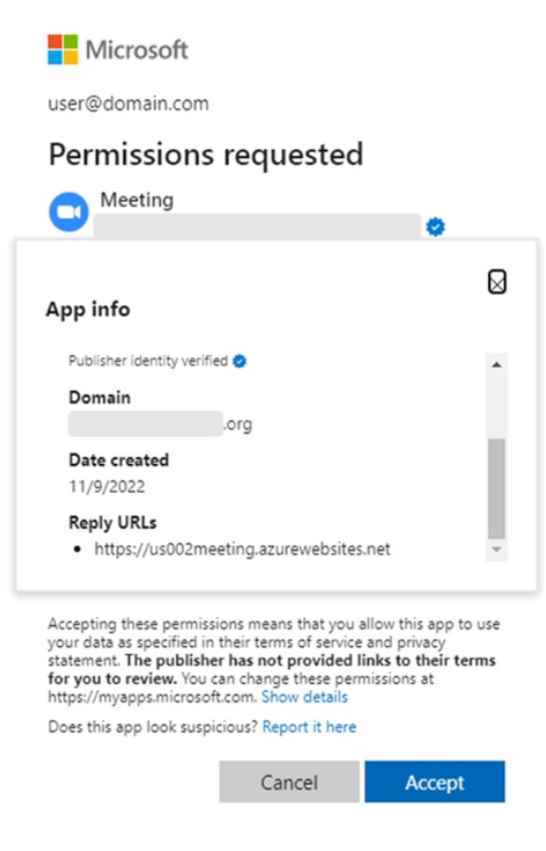
The material provided by Microsoft goes on to provide more clarification, stating that “after the publisher of an app has been confirmed, a blue verified badge displays in the Azure Active Directory (Azure AD) authorization prompt for the app and on other websites.” Note that when Microsoft discusses third-party OAuth applications, it is talking to apps that have been developed by companies that fall into this category. These businesses are referred to as “publishers” in the Microsoft environment.
Researchers were able to identify three malicious applications that were developed by three distinct malicious publishers. The same firms were singled out for attack by these applications, and they are connected to the same malicious infrastructure. Multiple people were seen giving permission to the malicious applications, which put the environment of their firm at risk.
According to the findings of their investigation, the majority of the participants in this campaign seemed to originate from the United Kingdom (UK). Individuals from the finance and marketing departments, as well as high-profile users such as managers and executives, were among those whose accounts were compromised. Beginning on December 6th, 2022, we made our first observation of this particular avatar of malicious third-party OAuth applications. In every instance, the specialized backend infrastructure that supports the applications was only put in place a few days or weeks before December 6th.
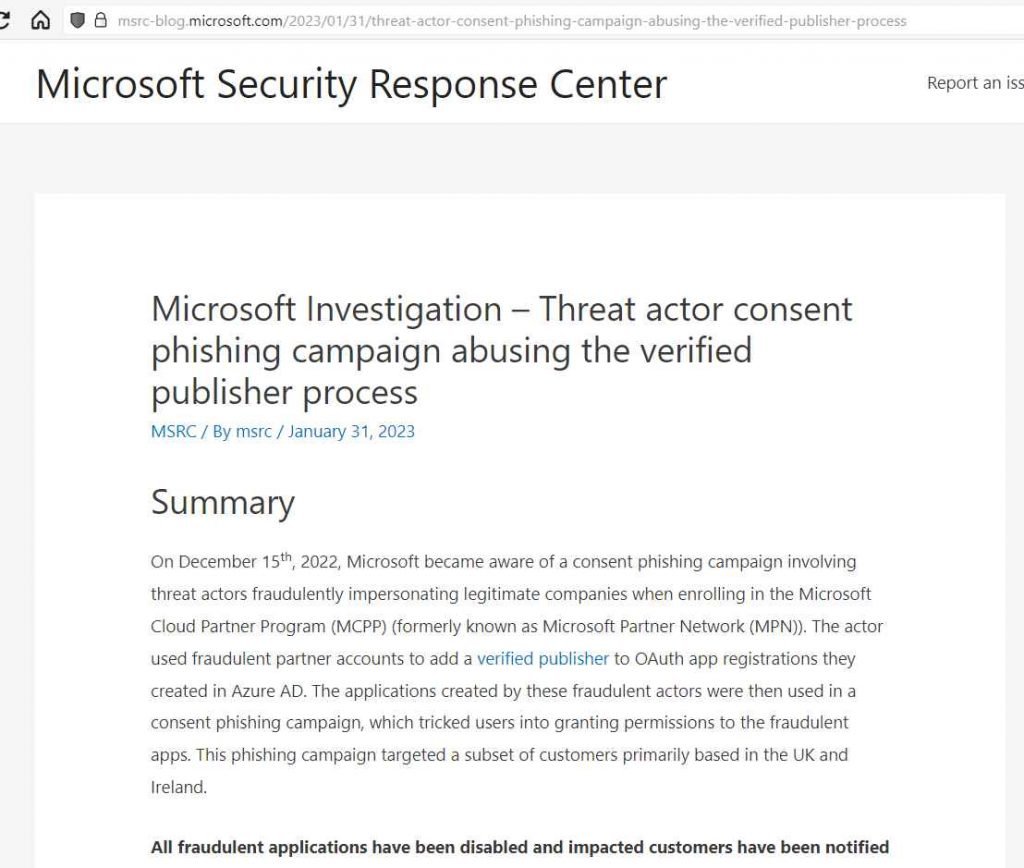
When users give their permission, malicious applications’ default delegated permissions allow threat actors to access and manipulate mailbox resources, calendar events, and meeting invitations that are linked to accounts that have been compromised. This access and manipulation is only possible when users give their consent. After receiving approval, gaining access does not need further action on the part of the user since the permissions also allow “offline access.” The given token, also known as the refresh token, often has a lengthy expiration time that is more than one year. This provided threat actors with access to the data associated with the hacked account as well as the potential to utilize the compromised Microsoft account in later BEC attempts or other types of attacks.
In addition to the possibility of user accounts being hijacked, firms that have been impersonated run the risk of having their brand abused. It is quite difficult for firms in this situation to determine whether or not their reputation is being sullied by one of these assaults. There is no necessary contact that must take place between the entity that is being impersonated and the malicious verified publisher.
Even though an OAuth third-party app has been validated by Microsoft, it is imperative to proceed with extreme care when allowing access to the app. OAuth applications are not reliable and should not be trusted only on the basis of their verified publisher status. End users are likely to become victims of sophisticated social engineering approaches because of the complexity of the assaults that are being carried out.
Jan 31 2023
Jan 31 2023
Microsoft has been strongly encouraging its customers to keep updating their Exchange servers, in addition to taking steps to ensure that the environment remains secured with robust security implementations.
While doing so, users can do the following things:-
The number of attacks against unpatched Exchange servers will not diminish as long as unpatched servers remain unpatched. The unpatched environment of on-premises Exchange provides threat actors with too many opportunities for exfiltrating data and committing other illegal activities.
Numerous security flaws in Exchange Server have been uncovered in the past two years, leading to widespread exploitation in some cases.
Microsoft stresses that their security measures are temporary fixes and may not defend against all attack variations, thus requiring users to update security through provided updates.
Recent years have seen Exchange Server become an advantageous target for attackers due to numerous security vulnerabilities that have been exploited as zero-day attacks to penetrate systems.
Ensure the protection of your Exchange servers from exploits targeting recognized vulnerabilities by installing the latest cumulative update and the most recent security update that is supported.
The cumulative updates are available for:-
The available security update:-
The cumulative updates and security updates for Exchange Server are cumulative, which means that only the most recent one needs to be installed.
It’s crucial to run Health Checker post-update installation to identify any manual tasks required by the admin. Using Health Checker, you can access step-by-step guides and articles that provide you with all the information you need.
Here below we have mentioned all the recommendations offered by Microsoft:-
There is never an end to the amount of security work that needs to be done in order to keep your Exchange environment secure. However, the Exchange Server update process is constantly being reviewed by Microsoft in order to find ways to simplify it and make it more reliable.

Mastering Windows Server 2019: The complete guide for system administrators to install, manage, and deploy new capabilities with Windows Server 2019
Jan 31 2023
According to reports, a group of hackers has launched a massive cyberattack on Israeli chemical companies operating in the occupied territories. The hackers have warned the companies’ engineers and workers to resign their positions before they suffer severe repercussions as a result of the Tel Aviv regime‘s unrelenting violence against Palestinians.
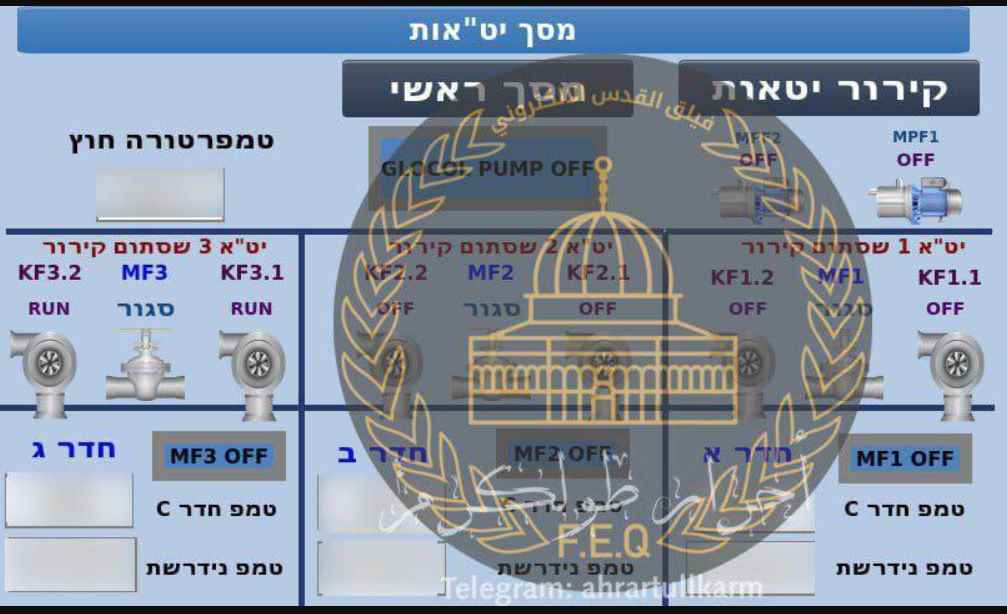
“Our advice to scientists working in the chemical plants is to quit their job, hunt for a new one, and find sanctuary in a location where we are not present,” the message reads. “Leave their employment. Look for a new one.” This is while we have a strong presence anyplace,” the statement sent by the Electronic Quds Force was reported by the Arabic-language television news network RT Arabic.
In addition, the statement said, “We confirm that your job in chemical factories presents a threat to your life; but, we will never hesitate to melt your bodies with chemicals the next time an act of violence is performed against Palestinians.”

Under the guise of apprehending Palestinians whom Tel Aviv considers to be “wanted,” Israeli soldiers virtually daily conduct raids in a variety of localities located inside the territory of the West Bank that is now under Israeli occupation. The raids almost often result in violent clashes between law enforcement and locals.
Israel has significantly stepped up its assaults on Palestinian villages and cities throughout the whole of the territory it occupies during the last several months. As a direct consequence of these assaults, the lives of dozens of Palestinians have been taken, and many more have been taken into custody.
According to the United Nations, 2022 was the deadliest year for Palestinians living in the West Bank in the previous 16 years’ worth of data.
After a group of pro-Palestinian hackers from Bangladesh took the websites of two commercial Israeli ports offline several weeks earlier, the websites of four major ports in the Israeli-occupied territories were taken offline by a massive cyber attack carried out by a group of Iraqi hackers at the end of August of last year.
It was stated by Sabereen News, a Telegram news channel affiliated with the Iraqi Popular Mobilization Units (PMU) or Hashd al-Sha’abi, that a hacking gang calling itself “ALtahrea Team” knocked down the websites of the ports of Jaffa, Haifa, Acre, and Eilat on August 31.
Back on August 8, ALtahrea Team carried out a large cyber assault on hundreds of Israeli websites, one of which was the website of the municipality of the city of Sderot, which is located in the western part of the Negev.
Jan 30 2023
Today, the specialists of the Cyber Security 360 course of the International Institute of Cyber Security (IICS) will show us in detail the use of Fuzz Faster U Fool (ffuf), a free and easy-to-use fuzzing tool, using the command line method for configuration on web servers.
Created by Twitter user @joohoi, cybersecurity professionals around the world have praised ffuf for its advanced capabilities, versatility, and ease of use, making it one of the top choices in fuzzing.
Before keep going, as usual, we remind you that this article was prepared for informational purposes only and does not represent a call to action; IICS is not responsible for the misuse that may occur to the information contained herein.
According to the experts of the Cyber Security 360 course, ffuf runs on a Linux terminal or Windows command prompt. Upgrading from the source code is no more difficult than compiling, except for the inclusion of “-u”.
| 1 | go get -u github.com/ffuf/ffuf |
For this example Kali Linux was used, so you will find ffuf in the apt repositories, which will allow you to install it by running a simple command.
| 1 | apt install ffuf |
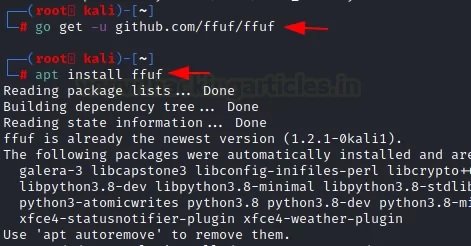
After installing this program, you can use the “-h” option to invoke the help menu.
| 1 | ffuf –h |
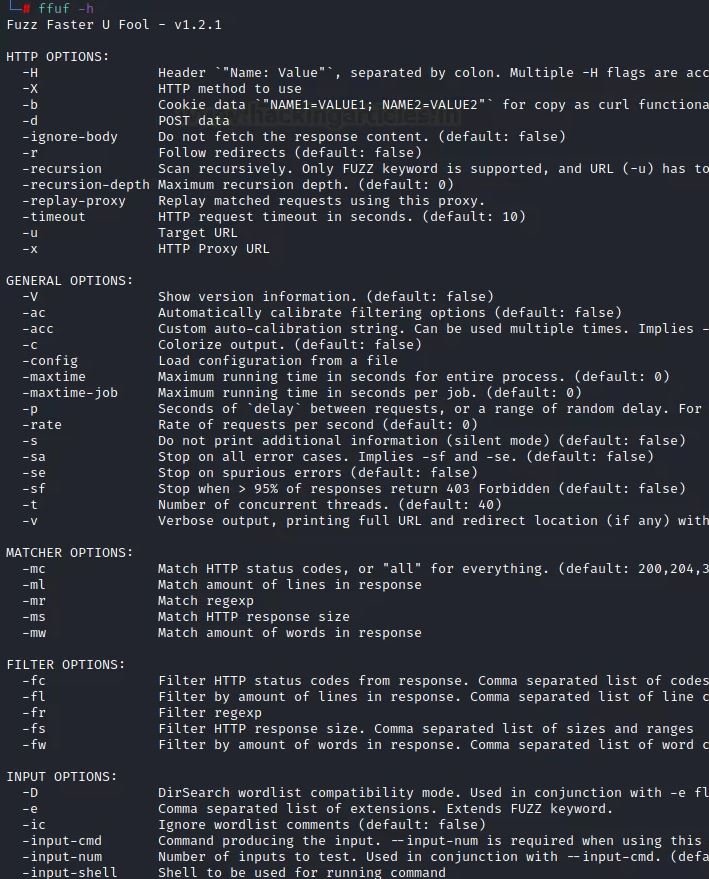
These are parameters that help us provide the data needed for a web search of a URL using word lists.
For a normal attack, use the parameters “-u” for the target URL and “-w” to load the word list.
| 1 | ffuf -u http://testphp.vulnweb.com/FUZZ/ -w dict.txt |
After you run the command, you will need to focus on the results.
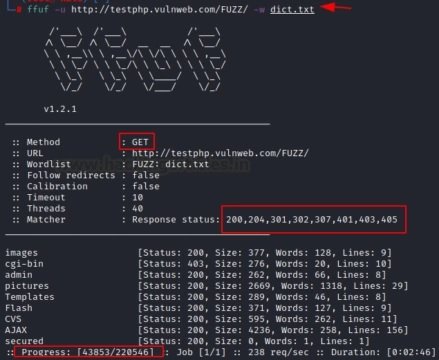
The experts of the Cyber Security 360 course mention that a single list of words is not always enough to get the desired results. In these cases, you can apply multiple word lists at the same time, one of the most attractive functions of ffuf. In this example, we have granted the program access to two dictionaries (txt:W1 and txt:W2), which the tool will run at the same time:
| 1 | ffuf -u https://ignitetechnologies.in/W2/W1/ -w dict.txt:W1 -w dns_dict.txt:W2 |
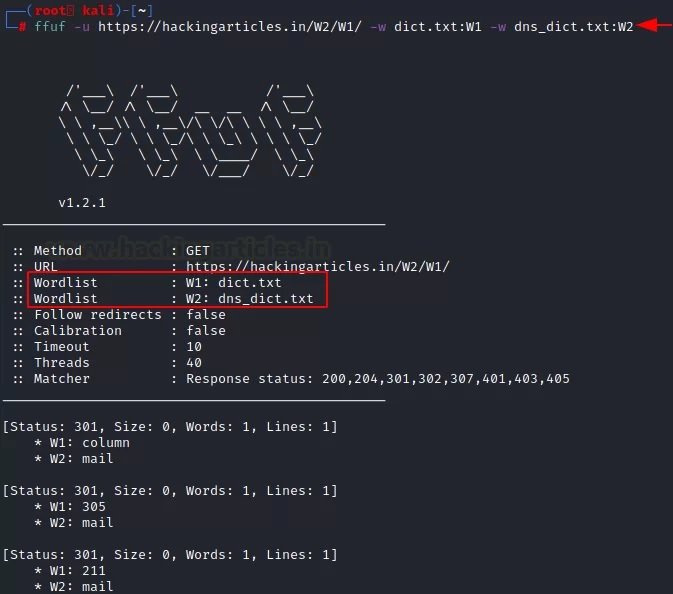
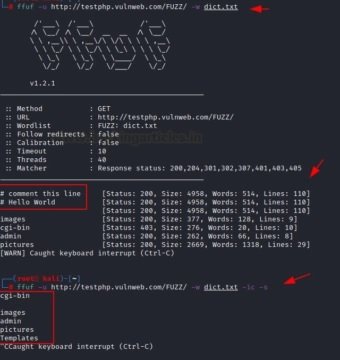
Usually, the default word list has some comments that can affect the accuracy of the results. In this case, we can use the “-ic” parameter to delete the comments. Also, to remove any banners in the tools used, use the “-s” parameter:
| 1 | ffuf -u http://testphp.vulnweb.com/FUZZ/ -w dict.txt |
Here we can notice that some comments are shown in the results if the above command is executed. After using the “-s” and “-ic” parameters, all comments and banners will be removed.
| 1 | ffuf -u http://testphp.vulnweb.com/FUZZ/ -w dict.txt -ic –s |
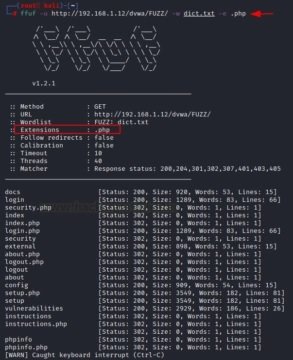
It is also possible to search for a file with a specific extension on a web server using the “-e” option. All you need to do is specify the extension and name of the file along with the parameter in the appropriate command format:
| 1 | ffuf -u http://192.168.1.12/dvwa/FUZZ/ -w dict.txt -e .php |
Burp Suite is a professional platform for monitoring the security of web applications. The “cluster bomb” function allows using multiple payloads, mention the experts of the Cyber Security 360 course. There is a separate payload package for each given location; the attack goes through each payload packet one by one, checking all possible options.
There are several parameters of this tool that make it easy to use the script. For example, the “-request” parameter allows you to use the request in an attack, while “-request-proto” allows you to define the parameter itself, and “-mode” helps you choose the attack mode.
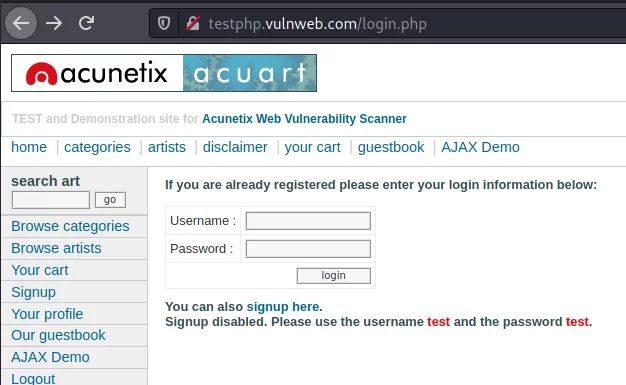
First, random credentials are used on the target URL page and the proxy server is configured to capture the request in interception mode in Burp Suite.
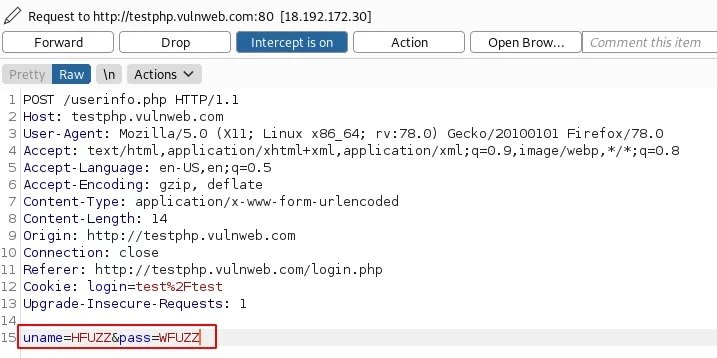
Now, on the Intercept tab, you need to change the credentials provided by adding HFUZZ and WFUZZ. HFUZZ is added before “uname” and WFUZZ before “pass”. Then, you need to copy and paste this query into the text and name according to the purposes of the project. In this case, the file was named as brute.txt.
Later we will move to the main attack mode, where the “-request” parameter contains a “-request-proto” text file that will help you create a prototype of http, and “-mode” will be responsible for the “cluster bomb” attack. The lists of words in question (users.txt and pass.txt) consist of SQL injections. By entering the following command, an attack will be launched:
| 1 | ffuf -request brute.txt -request-proto http -mode clusterbomb -w users.txt:HFUZZ -w pass.txt:WFUZZ -mc 200 |
As you can see from the results of the attack, SQL injections have been successfully found to be effective for this specific purpose.
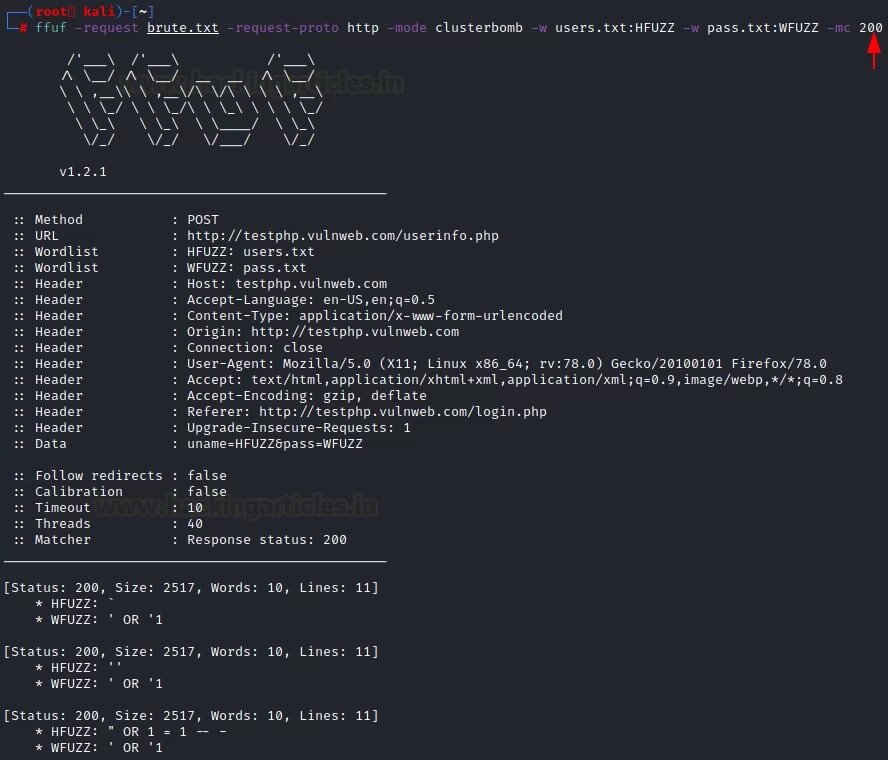
If we want the ffuf to show only the data that is important for web fuzzing, we must pay attention to these parameters. For example, it can be HTTP code, strings, words, size and regular expressions, mention the experts of the Cyber Security 360 course.
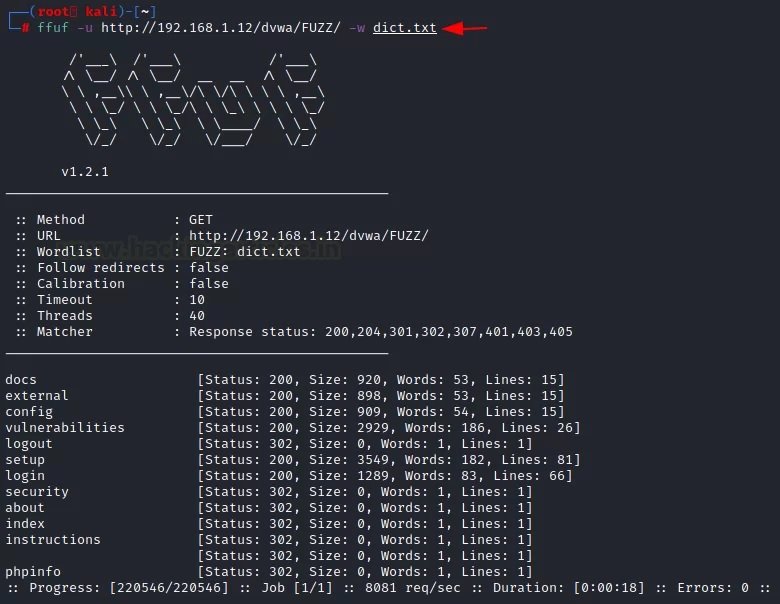
To understand this configuration, you should consider a simple attack on which you will be able to see which HTTP codes appear in the results.
| 1 | ffuf -u http://192.168.1.12/dvwa/FUZZ/ -w dict.txt |
It is clear that the codes 302 HTTP and 200 HTTP were received.
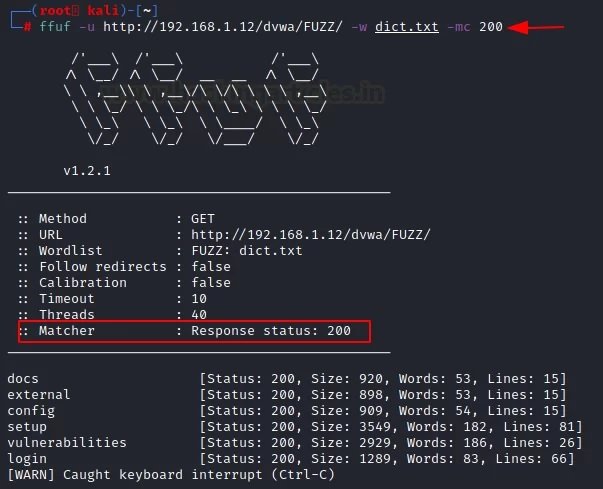
If you want to see specific attacks, such as HTTP code 200, you must use the “-mc” parameter along with a specific number. To verify that this parameter works, you just need to run the following command:
| 1 | ffuf -u http://192.168.1.12/dvwa/FUZZ/ -w dict.txt -mc 200 |
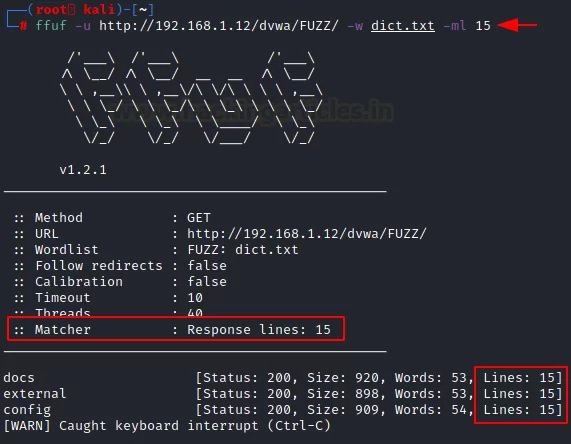
The tool returns results for specific lines in the file using the “-ml” parameter. We can use it by specifying the strings we need.
| 1 | ffuf -u http://192.168.1.12/dvwa/FUZZ/ -w dict.txt -ml 15 |
Similarly, since the above options correspond to a function, you can provide a result with a certain number of words. For this, use the “-mw” parameter along with the number of words you want to see in the results.
| 1 | ffuf -u http://192.168.1.12/dvwa/FUZZ/ -w dict.txt -mw 53 |
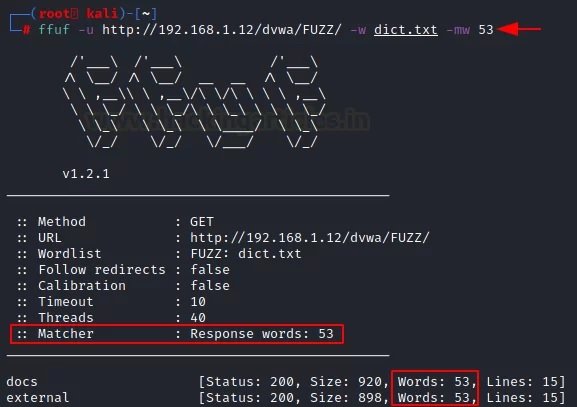
It is also possible to use the “-ms” parameter along with the specific size you want to see in the results.
| 1 | ffuf -u http://192.168.1.12/dvwa/FUZZ/ -w dict.txt -ms 2929 |
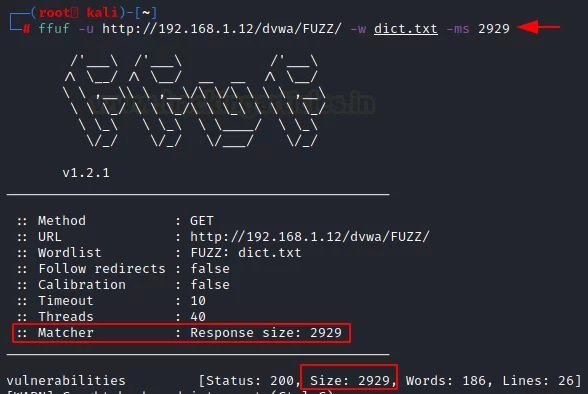
This is the last of all the mapping options available in ffuf. LFI fuzzing will be applied by matching the string to the subsequent “root:x” pattern for this dictionary.
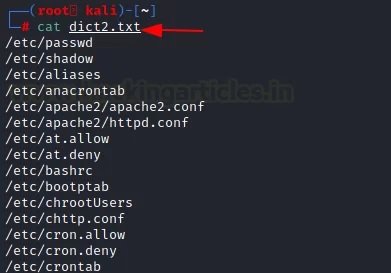
A URL is used that can provide this functionality, and with the “-mr” parameter, the corresponding string “root:x” is defined. This is what a special list of words looks like.
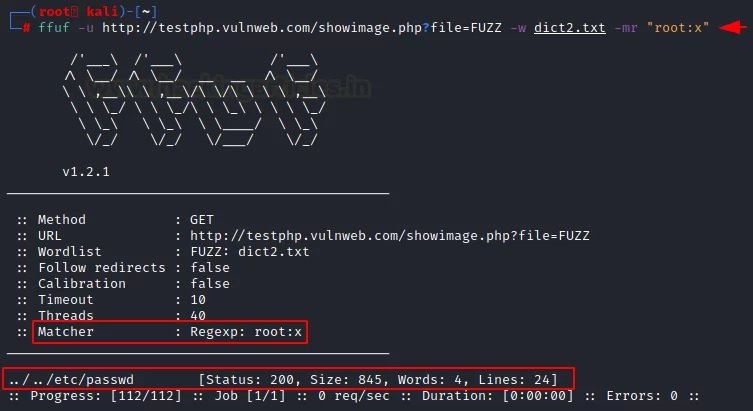
Using this list of words, we enter the following command to add the “-mr” parameter to the attack script:
| 1 | ffuf -u http://testphp.vulnweb.com/showimage.php?file=FUZZ -w dict2.txt -mr "root:x" |
We received the http 200 response for /etc/passwd for this list of words.
Filtering options are the exact opposite of matching parameters. The experts of the Cyber Security 360 course recommend using these options to remove unnecessary elements during web fuzzing. It also applies to HTTP code, strings, words, size, and regular expressions.
The “-fc” parameter requires a specific HTTP status code that the user wants to remove from the results.
| 1 | ffuf -u http://192.168.1.12/dvwa/FUZZ/ -w dict.txt -fc 302 |
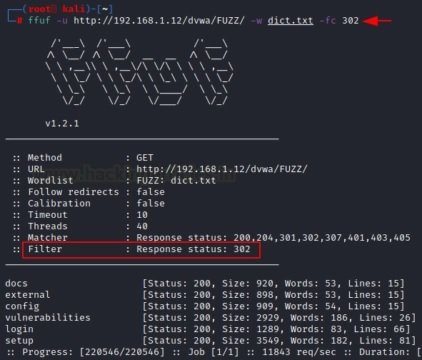
With the help of the “-fl” parameter, it is possible to remove a certain row from the result or filter it from the attack.
| 1 | ffuf -u http://192.168.1.12/dvwa/FUZZ/ -w dict.txt -fl 26 |
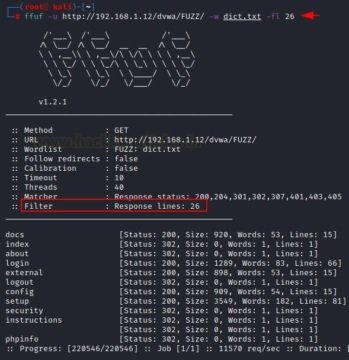
The “-fs” option allows you to filter the specified size described by the user during the attack.
| 1 | ffuf -u http://192.168.1.12/dvwa/FUZZ/ -w dict.txt -fs 2929 |
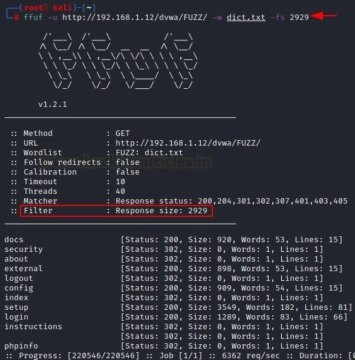
The “-fw” option allows you to filter the number of words of the results that the user wants to receive.
| 1 | ffuf -u http://192.168.1.12/dvwa/FUZZ/ -w dict.txt -fw 83 |
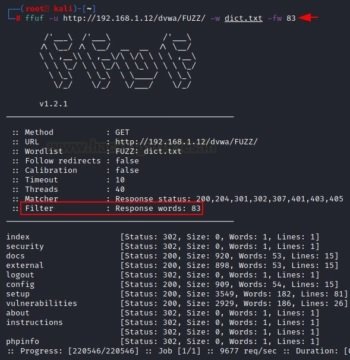
The “-fr” option allows you to delete a specific regular expression. In this case, we will try to exclude the log files from the results.
| 1 | ffuf -u http://192.168.1.12/dvwa/FUZZ/ -w dict.txt -fr "log" |
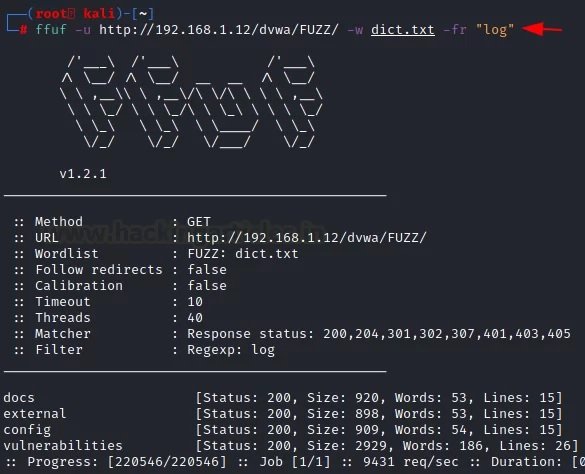
Below are the general parameters of this tool, which are completely related to the web fuzzing process.
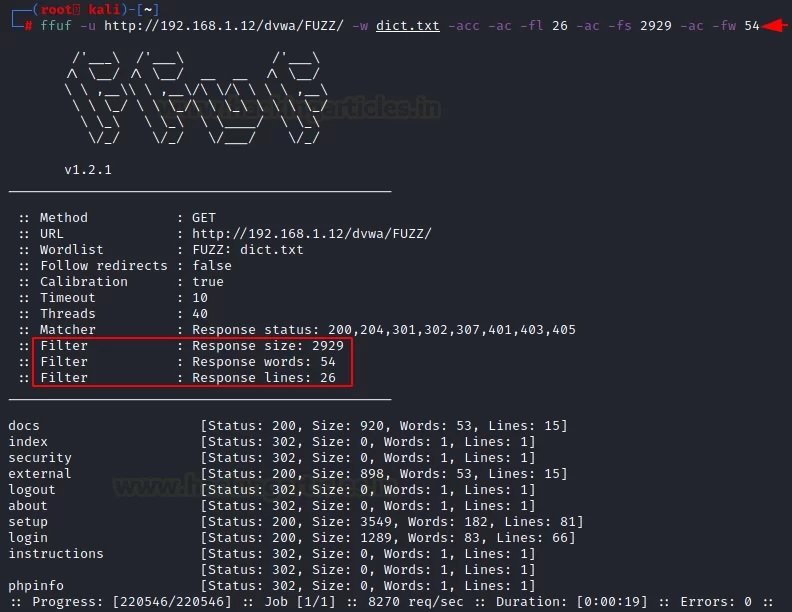
Calibration is the process of providing a measuring instrument with the information it needs to understand the context in which it will be used. When collecting data, calibrating your computer ensures that the process works accurately, mention the experts of the Cyber Security 360 course.
We can adjust this function according to the needs in each case using the “-acc” parameter, which cannot be used without the “-ac” parameter.
| 1 | ffuf -u http://192.168.1.12/dvwa/FUZZ/ -w dict.txt -acc -ac -fl 26 -ac -fs 2929 -ac -fw 54 |
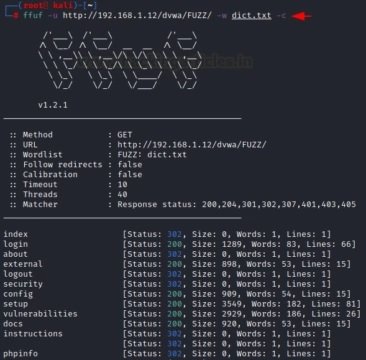
Sometimes color separation helps identify relevant details in the results. The “-c” parameter helps to divide the data into categories.ç
| 1 | ffuf -u http://192.168.1.12/dvwa/FUZZ/ -w dict.txt –c |
If you want to apply fuzzing for a limited period of time, you can use the “-maxtime” parameter. You must enter a command to specify the selected time interval.
| 1 | ffuf -u http://192.168.1.12/dvwa/FUZZ/ -w dict.txt -maxtime 5 |
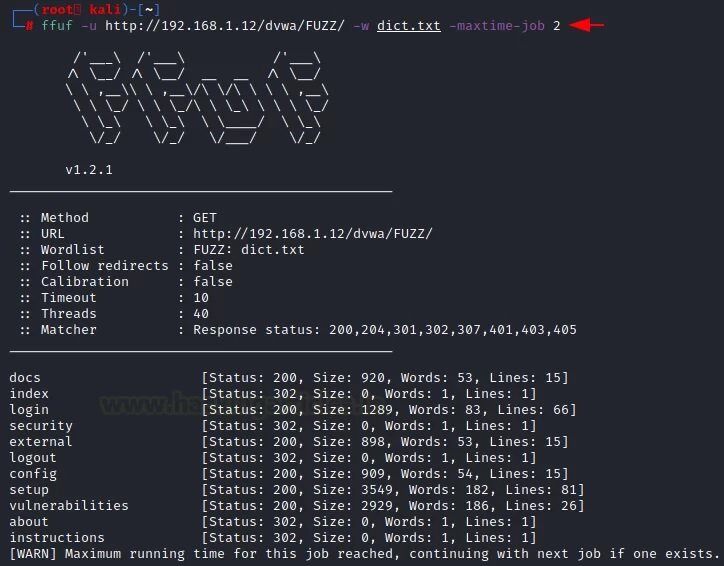
Using the “-max time-job” parameter, the user can set a time limit for a specific job. With this command, you can limit the time it takes to complete a task or query.
| 1 | ffuf -u http://192.168.1.12/dvwa/FUZZ/ -w dict.txt -maxtime-job 2 |
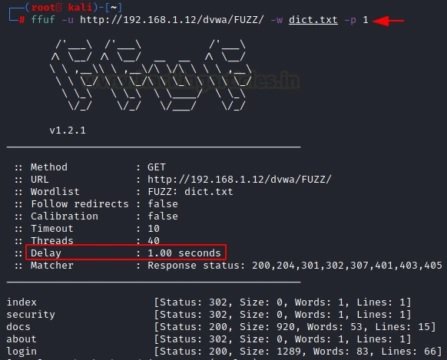
Using the “-p” parameter, the user will add a slight delay for each request offered by the attack. According to the experts of the Cyber Security 360 course, with this feature the consultation becomes more efficient and provides clearer results.
| 1 | ffuf -u http://192.168.1.12/dvwa/FUZZ/ -w dict.txt -p 1 |
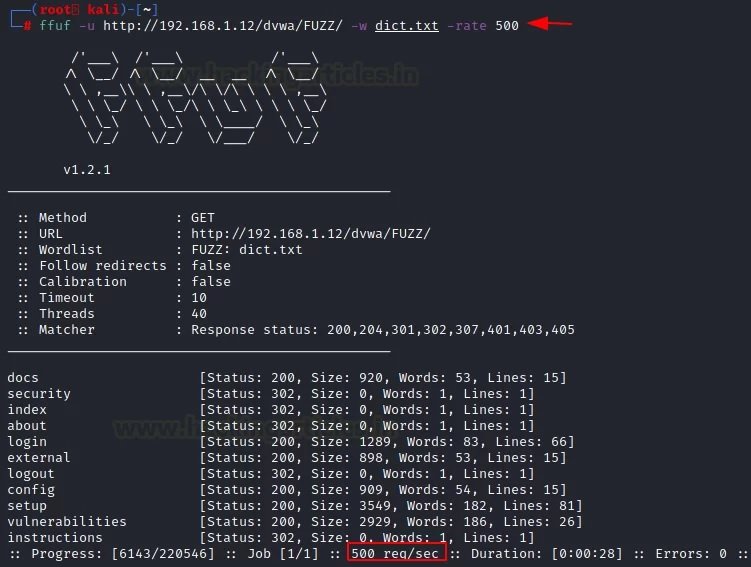
We can select the request speed you need for each of the attacks using the “-rate” parameter. For example, we can create one request per second according to the desired attack.
| 1 | ffuf -u http://192.168.1.12/dvwa/FUZZ/ -w dict.txt -rate 500 |
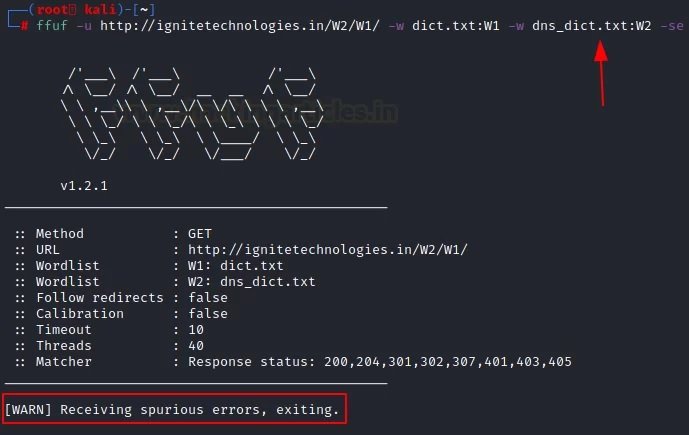
There are three parameters that support the error function. The first parameter is “-se”, a “false error” that says whether the next request is genuine or not. The second “-sf” parameter will stop the attack when more than 95% of the requests are counted as an error. The third parameter is “-sa”, a combination of the above parameters.
In the example shown below, we will use the “-se” parameter:
| 1 | Ffuf -u http://ignitetechnologies.in/W2/W1/ -w dict.txt:W1 -w dns_dict.txt:W2 –se |
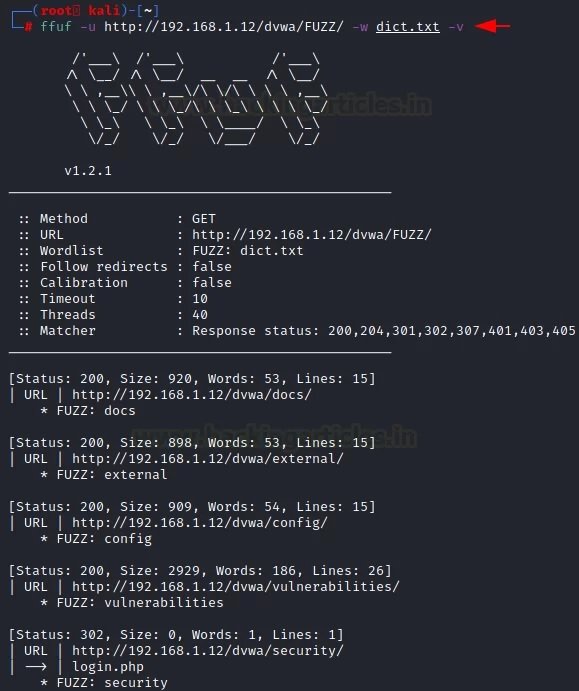
Verbose Mode is a feature used in many operating systems that provide additional information about what the computer does and what drivers and applications it loads when initialized. In programming, this mode provides accurate output for debugging purposes, making it easier to debug the program itself. To access this mode, the “-v” parameter is applied.
| 1 | Ffuf -u http://192.168.1.12/dvwa/FUZZ/ -w dict.txt –v |
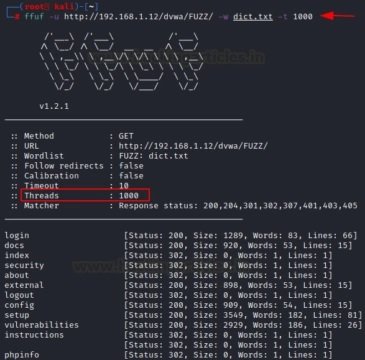
The “-t” parameter is used to speed up or slow down the process. By default, it is set to 40. If you want to speed up the process, you need to increase its value.
| 1 | ffuf -u http://192.168.1.12/dvwa/FUZZ/ -w dict.txt -t 1000 |
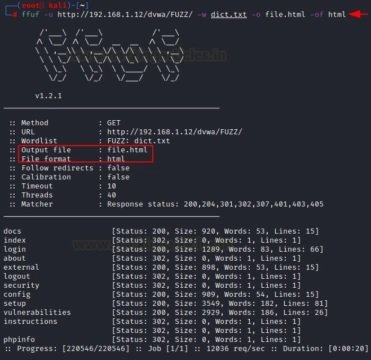
We may save the results of attacks carried out in order to keep records, improve readability and find possible links. Enter the “-o” parameter to save the output, but you must specify its format using the “-of” parameter.
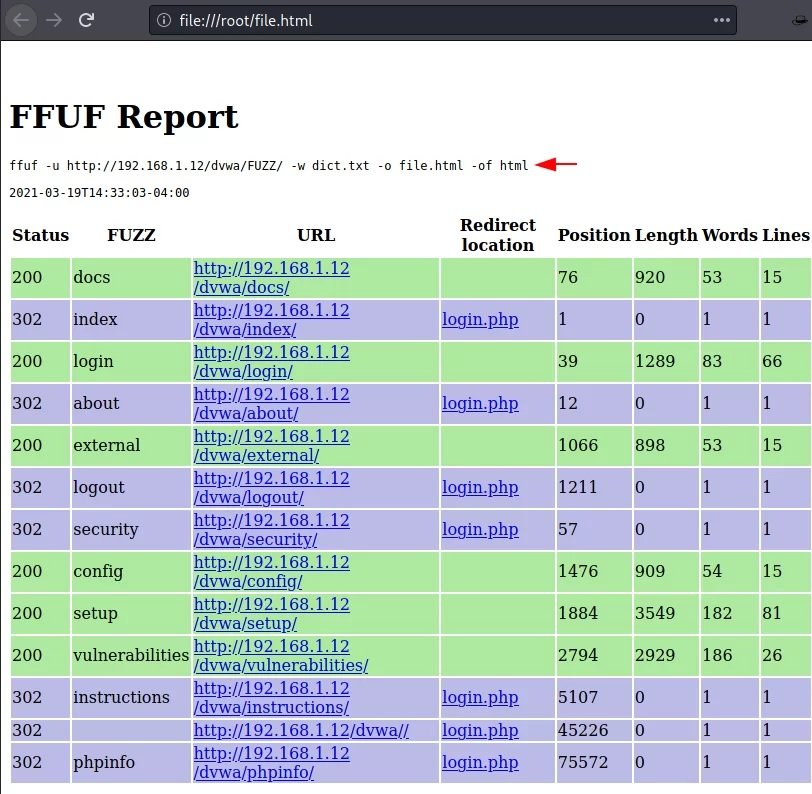
Once the attack is complete, it should be checked whether the file with the output data corresponds to this format or not, mention the experts of the Cyber Security 360 course. As you can see, the file itself refers to HTML.
Similarly, we can create CSV files using the “-of” parameter, where csv are comma-separated values. For example:
| 1 | ffuf -u http://192.168.1.12/dvwa/FUZZ/ -w dict.txt -o file.html -of html |
When the attack is complete, you need to check whether the file with the output data corresponds to this format or not. As you can see, the file itself belongs to the CSV.
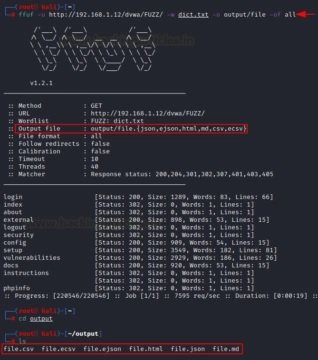
Similarly, if you want to recover data in all formats, use the “-of all” parameter. For example, it can be json, ejson, html, md, csv, ecsv.
| 1 | ffuf -u http://192.168.1.12/dvwa/FUZZ/ -w dict.txt -o output/file -of all |
Now, once the attack is complete, you need to check all the files. We can see that they were saved in various formats.
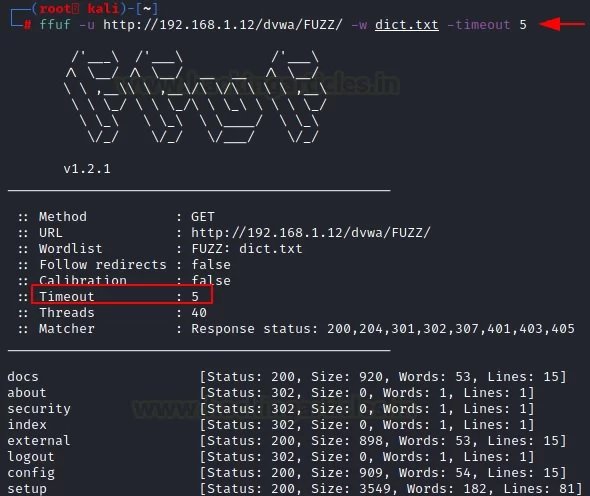
Sometimes the fuzzing process requires details such as an HTTP request, cookies, and an HTTP header, mention the experts of the Cyber Security 360 course.
This feature acts as a deadline for the event to complete. The “-timeout” parameter helps to activate this option.
| 1 | ffuf -u http://192.168.1.12/dvwa/FUZZ/ -w dict.txt -timeout 5 |
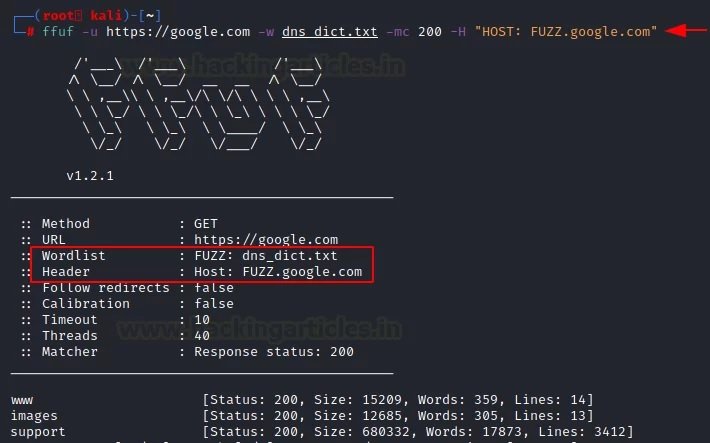
If you want to fuzz out subdomains, you can use the “-H” parameter along with the word list of the domain name.
| 1 | Ffuf -u https://google.com -w dns_dict.txt -mc 200 -H “HOST: FUZZ.google.com” |
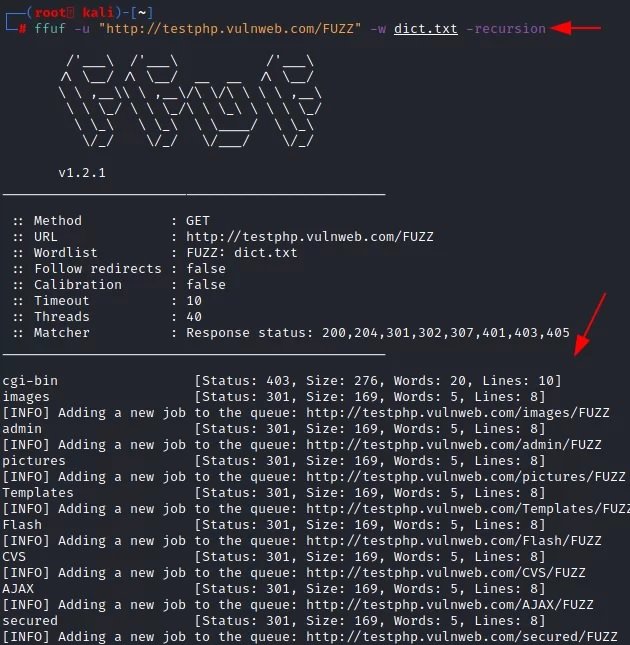
According to the experts of the Cyber Security 360 course, this is a mechanism for reusing objects; if a program requires the user to access a function within another function, this is called a recursive call to the function. Using the “-recursion” parameter, the user can implement this functionality in their attacks.
| 1 | ffuf -u "http://testphp.vulnweb.com/FUZZ/" -dict.txt –recursion |
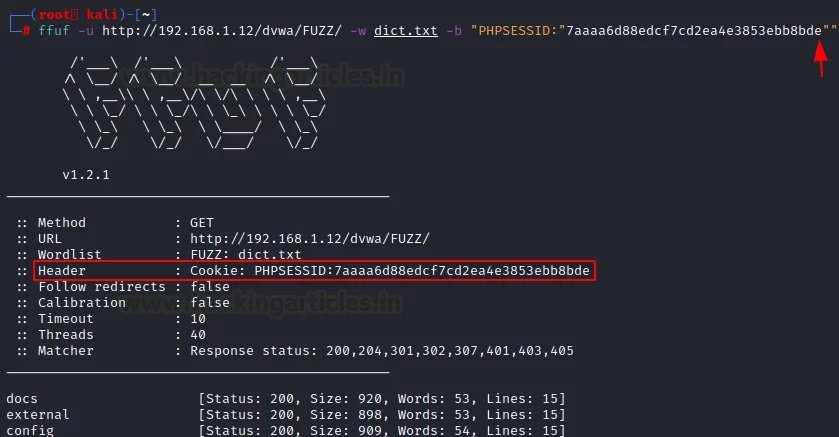
There are times when fuzzing is not effective on a site where authentication is required. In these cases, we may use the “-b” parameter to use session cookies.
| 1 | ffuf -u http://192.168.1.12/dvwa/FUZZ/ -w dict.txt -b "PHPSESSID:"7aaaa6d88edcf7cd2ea4e3853ebb8bde"" |
There are speed limits when using the Intruder feature in the free version of Burp (Community Edition). The attack slowed down a lot, and each new “order” slowed it down even more.
In this case, the user uses the Burp Suite proxy server to get the results and evaluate them. First, you need to install the localhost proxy server on port number 8080.
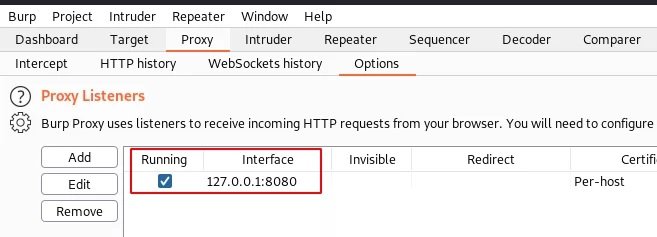
Now let’s use “-replay-proxy”, which helps to get the local proxy server of the host, installed in the previous step on port number 8080.
| 1 | ffuf -u http://192.168.1.12/dvwa/FUZZ/ -w dict.txt -replay-proxy http://127.0.0.1:8080 -v -mc 200 |
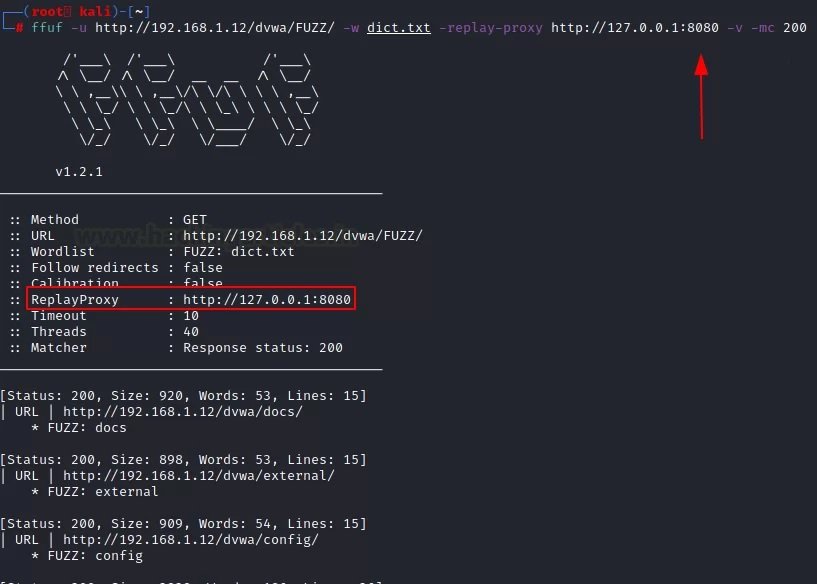
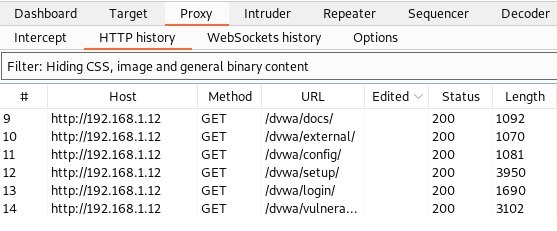
This attack will show results on two platforms. The first platform is in the Kali Linux terminal and the second is in the “HTTP history” tab in Burp Suite. With the help of various methods, you will be able to better understand the target and analyze the results of the attack.
It is common to compare ffuf with other tools such as dirb or dirbuster. While ffuf can be used for deploying brute-force attacks, its real appeal lies in simplicity.
Feel free to access the International Institute of Cyber Security (IICS) websites to learn more about information security risks, malware variants, vulnerabilities, information technologies, and to know more details about the Cyber Security 360 course

Jan 30 2023
The MAC address is (should be) unique to each network interface. By the way, if the device has several network interfaces, then each of them has its own MAC address. For example, laptops have at least two network interfaces: wired and Wi-Fi – each of them has an MAC address. Desktop computers are usually the same. When we talk about “changing MAC addresses”, we need to understand that there are several of these addresses. By the way, each port has its own unique MAC address, if the device supports wireless networks, then each wireless interface (2.4 GHz and 5 GHz) also has its own MAC address.

So, since the MAC address must be unique, it allows you to uniquely identify the network device. And since this network device is part of your computer, this allows you to uniquely identify your computer. Moreover, the MAC address (also called a hardware, physical address) does not change when the operating system changes.
In short, the replacement of the MAC address is needed so that it is not possible to track and identify the device by the MAC address. But there is a more important reason (than paranoia) to learn about MAC addresses and about methods from substitution, or prohibiting changes in your system. Based on MAC addresses, user identification can be performed when connected via the Intercepting Portal. A few words about the Intercepting Portal. Captive Portal). This is a way to force the user to comply with certain conditions for providing Internet access. You can most often encounter examples of Intercepting Portals in public places that provide Internet access services via Wi-Fi to an indefinite circle of people, but who want to identify the user and / or allow access only to persons with credentials. For example, at the airport you may need to confirm your phone number via SMS to access the free Wi-Fi network. The hotel will provide you with a username and password for accessing the Internet via Wi-Fi – this ensures that only hotel customers can use Wi-Fi services.
Due to the features of the Intercepting Portal, user identification is based on MAC addresses. And starting with NetworkManager 1.4.0 (a popular program for managing network connections on Linux), an automatic MAC-address spoofing is now present. And in case of incorrect settings, you may encounter an Internet access problem running through the Intercepting Portal. There are also problems with customized filtering by MAC on the router.
Well, for pentesting experts , of course, there are reasons to change the MAC address: for example, to pretend to be another user, and take advantage of its open access to the magical world of the Internet, or to increase anonymity.
Who can see my MAC address?
The MAC address is used to transfer data on a local network. That is, it is not transmitted when connecting to websites and when accessing the global network. Although there are exceptions: some vulnerabilities allow a person who is not on your local network to find out your MAC address.
If you connect to the router via the local network, then the router knows your MAC address, but if you open the site on the Internet, the site owner cannot find out your MAC address.
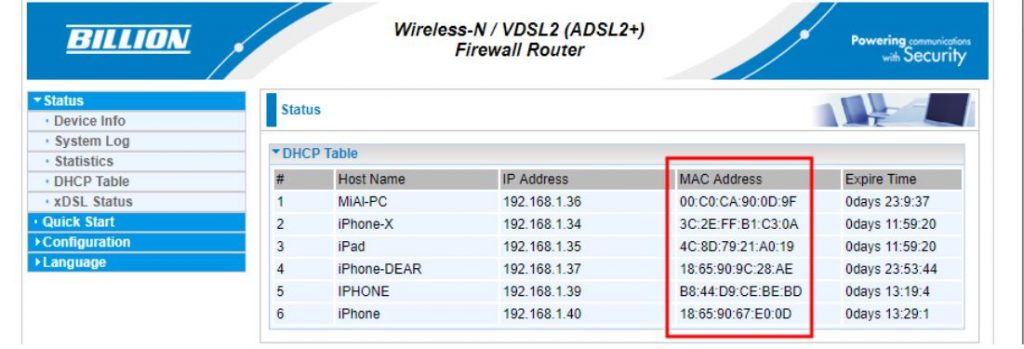
All devices located on the local network can see each other’s MAC addresses (there are many scanners that can get this data). An example of a local network scan made using arp-scan. A slightly different situation with wireless network interfaces. If you are connected to an access point (router), then all the rules of the local network work: the router and other devices can find out your MAC address. But also any person who is within the reach of your Wi-Fi signal (from the phone, laptop) can find out your MAC address.
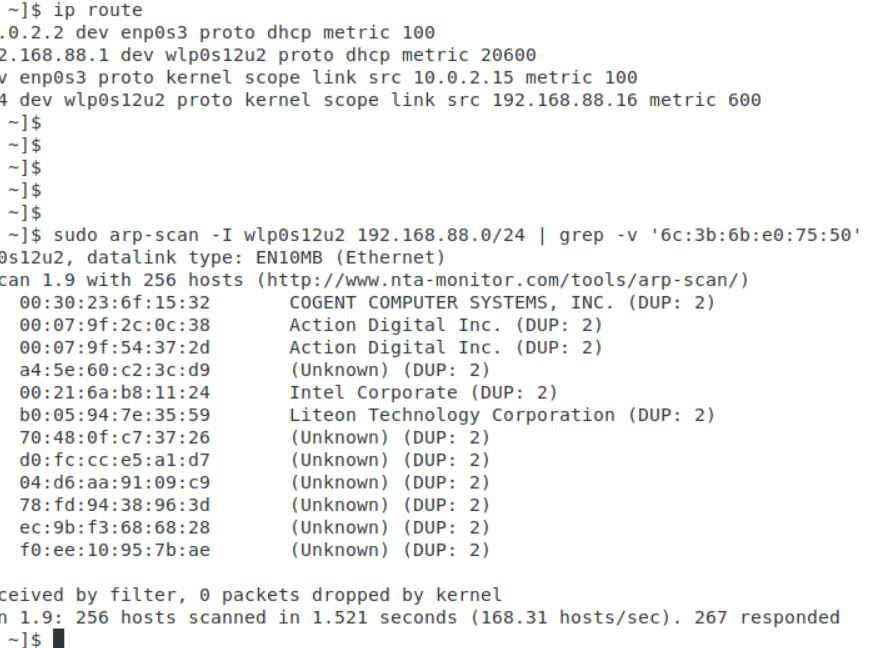
NetworkManager may reassign MAC installed by other programs
Starting with NetworkManager 1.4.0, this program supports MAC spoofing, and has many different options.
So that we can understand them, we need to understand some concepts
First, network adapters are :
For each group, MAC rules are customized separately.
Secondly, a wireless adapter can be in two states:
For wired interface (installed by property ethernet.cloned-mac-address) and the wireless interface in the connection state (installed by the property wifi.cloned-mac-address) the following values are available (regimes):
If you are trying to change the MAC in other ways and you are failing, it is entirely possible that NetworkManager, which changes the MAC in its own rules, is to blame. Since most Linux distributions with a NetworkManager graphical interface are installed and running by default, to solve your problem, you must first understand how NetworkManager works and by what rules.
NetworkManager settings, including settings related to MAC, can be done in a file /etc/NetworkManager/NetworkManager.conf or adding an additional file with the extension . . . .conf to the directory /etc/NetworkManager/conf.d
The second option is highly recommended, since when updating NetworkManager usually replaces the main one . . . . . . . . . .conf file and if you made changes to /etc/NetworkManager/NetworkManager.conf, then the settings you made will be overwritten.
If you want the MAC address to be replaced with each connection, but the same MAC is used in the connection to the same network, then the file /etc/NetworkManager/conf.d/mac.conf:
| 1 | sudo gedit /etc/NetworkManager/conf.d/mac.conf |
Add lines :
| 123 | [connection]ethernet.cloned-mac-address=stablewifi.cloned-mac-address=stable |
Lines with ethernet.cloned-mac-address & wifi.cloned-mac-address can be added individually or together.
Check the current values :
| 1 | ip link |
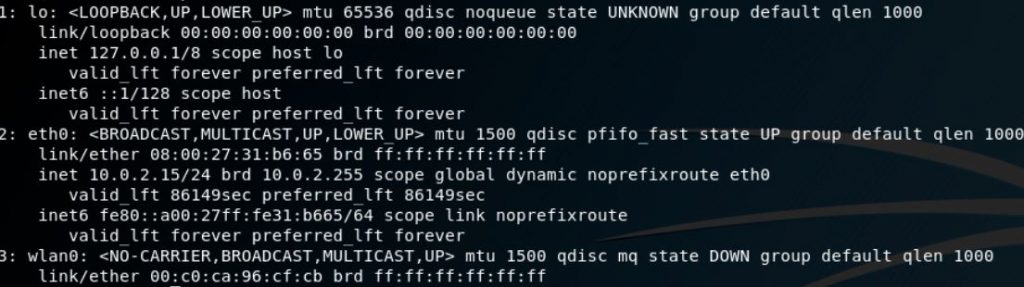
Restart the service :
| 1 | sudo systemctl restart NetworkManager |
We will make connections to wired and wireless networks. Now check the values of MAC again
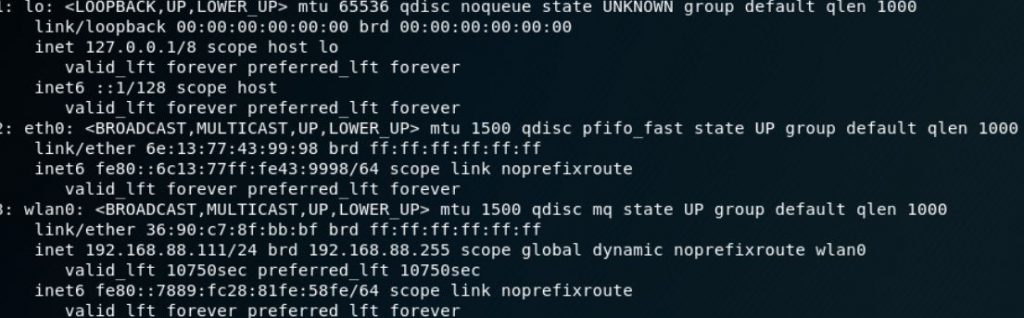
As you can see, MAC is replaced for both the wired and wireless interfaces.
As already mentioned, the same addresses will be generated for the same networks, if you want different MACs each time even for the same networks, then the lines should look like this:
| 123 | [connection]ethernet.cloned-mac-address=randomwifi.cloned-mac-address=random |
Ubuntu and Linux Mint use NetworkManager versions that support automatic MAC configuration. However, if you connect a Wi-Fi card to Ubuntu or Linux Mint, you will see a real MAC. This is due to the fact that in the file /etc/NetworkManager/NetworkManager.conf indicated not to spoof :
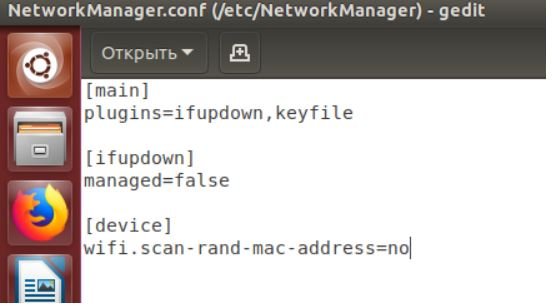
To change this, open the file :
| 1 | sudo gedit /etc/NetworkManager/NetworkManager.conf |
And delete the lines :
| 12 | [device]wifi.scan-rand-mac-address=no |
or comment on them to make it happen :
| 12 | #[device]#wifi.scan-rand-mac-address=no |
or change no on yes:
| 12 | [device]wifi.scan-rand-mac-address=yes |
And restart NetworkManager :
| 1 | sudo systemctl restart NetworkManager |
Similarly, you can add lines to replace MAC (these settings create a new address for each connection, but when connecting to the same networks, the same address is used):
| 123 | [connection]ethernet.cloned-mac-address=stablewifi.cloned-mac-address=stable |
We will use the program ip, which is included in the package iproute2.
Let’s start by checking the current MAC address with the command :
| 1 | ip link show interface_name |
Where Interface_name – This is the name of a particular network interface that you want to see. If you do not know the name, or want to see all the interfaces, then the command can be started like this :
| 1 | ip link show |
At the moment, we are interested in the part that follows after link / ether“and represents a 6-byte number. It will look something like this :
| 1 | link/ether 00:c0:ca:96:cf:cb |
The first step for spoofing MAC addresses is to transfer the interface to a state down. This is done by the team
| 1 | sudo ip link set dev interface_name down |
Where Interface_name replaces the real name. In my case, this wlan0, then the real team looks like this:
| 1 | sudo ip link set dev wlan0 down |
Next, we go directly to the MAC spoofing. You can use any hexadecimal value, but some networks may be configured not to assign IP addresses to customers whose MAC address does not match any known vendor (producer). In these cases, so that you can successfully connect to the network, use the MAC prefix of any real vendor (first three bytes) and use arbitrary values for the next three bytes.
To change the MAC, we need to run the command :
| 1 | sudo ip link set dev interface_name address XX:XX:XX:XX:XX:XX |
Where XX: XX: XX: XX: XX: XX – This is the desired new MAC .
For example, I want to set the hardware address EC: 9B: F3: 68: 68: 28 for my adapter, then the team looks like this:
| 1 | sudo ip link set dev wlan0 address EC:9B:F3:68:68:28 |
In the last step, we return the interface to the state up. This can be done by a team of the form :
| 1 | sudo ip link set dev interface_name up |
For my system, a real team:
| 1 | sudo ip link set dev wlan0 up |
If you want to check if the MAC is really changed, just run the command again:
| 1 | ip link show interface_name |
Value after “link / ether“should be the one you installed.
Another method uses macchanger (also known as the GNU MAC Changer). This program offers various functions, such as changing the address so that it matches a particular manufacturer, or its complete randomization.
Set macchanger – it is usually present in official repositories, and in Kali Linux it is installed by default.
At the time of the change of the MAC, the device should not be used (be connected in any way, or have status up). To transfer the interface to a state down:
| 1 | sudo ip link set dev interface_name down |
For spoofing, you need to specify the name of the interface, and replace in each next command wlan0 in the name of the interface that you want to change the MAC.
To find out the values of MAC, execute the command with the option -s:
| 1 | sudo macchanger -s wlan0 |
Something like:
| 12 | Current MAC: 00:c0:ca:96:cf:cb (ALFA, INC.)Permanent MAC: 00:c0:ca:96:cf:cb (ALFA, INC.) |
The “Current MAC” line means the address at the moment, and “Permanent MAC” means a constant (real) address.
For spoofing the MAC address to a completely arbitrary address (option -r):
| 1 | sudo macchanger -r wlan0 |
About the following will be displayed :
| 123 | Current MAC: 00:c0:ca:96:cf:cb (ALFA, INC.)Permanent MAC: 00:c0:ca:96:cf:cb (ALFA, INC.)New MAC: be:f7:5a:e7:12:c2 (unknown) |
The first two lines are already explained, the line “New MAC” means a new address.
For randomization, only bytes that determine the uniqueness of the device, the current MAC address (i.e.e. if you check the MAC address, it will register as from the same vendor) run the command (option -e):
| 1 | sudo macchanger -e wlan0 |
To set the MAC address to a specific value, execute (option -m):
| 1 | sudo macchanger -m XX:XX:XX:XX:XX:XX wlan0 |
Here XX: XX: XX: XX: XX: XX – This is the MAC you want to change to.
Finally, to return the MAC address to the original, constant value prescribed in the iron (option -p):
| 1 | sudo macchanger -p wlan0 |
NetworkManager currently provides a wealth of MAC spoofing capabilities, including a change to a random address, or to a specific one. A feature of NetworkManager is the separation of “scanning” and “connected” modes, i.e. you may not see that the settings made have already entered into force until you connect to any network.
If after the change of MAC you have problems with connecting (you cannot connect to networks – wired or wireless), this means that there is a ban on connecting with MAC from an unknown vendor (producer). In this case, you need to use the first three octets (bytes) of any real vendor, the remaining three octets can be arbitrary says pentesting experts.
The Art of Mac Malware: The Guide to Analyzing Malicious Software
Jan 28 2023
PlugX malware has been around for almost a decade and has been used by multiple actors of Chinese nexus and several other cybercrime groups.
The Palo Alto Networks Unit 42 incident response team has discovered a new variant of PlugX malware that is distributed via removable USB devices and targets Windows PCs. This should not come as a surprise since 95.6% of new malware or their variants in 2022 targeted Windows.
According to Unit 42 researchers, the new variant was detected when carrying out an incident response post a Black Basta ransomware attack. The researchers uncovered several malware samples and tools on the victims’ devices. This includes the Brute Ratel C4 red-teaming tool, GootLoader malware, and an old PlugX sample.
PlugX malware has been around for almost a decade and has been used by multiple actors of Chinese nexus and several other cybercrime groups. The malware was previously used in many high-profile cyberattacks, such as the 2015 U.S. Government Office of Personnel Management (OPM) breach.
The same backdoor was also used in the 2018 malware attack on the Android devices of minority groups in China. Most recently, in November 2022, researchers linked Google Drive phishing scams to the group infamously known for using PlugX malware.
The new variant stood out among other malware because it could infect any attached removable USB device, e.g., floppy, flash, thumb drives, and any system the removable device was plugged into later.
So far, no evidence connects the PlugX backdoor or Gootkit to the Black Basta ransomware group, and researchers believe another actor could have deployed it. Moreover, researchers noted that the malware could copy all Adobe PDF and Microsoft Word documents from the host and places them in a hidden folder on the USB device. The malware itself creates this folder.

Unit 42 researchers Jen Miller-Osborn and Mike Harbison explained in their blog post that this variant of PlugX malware is a wormable, second-stage implant. It infects USB devices and stays concealed from the Windows operating file system. The user would not suspect that their USB device is being exploited to exfiltrate data from networks.
PlugX’s USB variant is different because it uses a specific Unicode character called non-breaking space/ U+00A0 to hide files in a USB device plugged into a workstation. This character prevents the Windows OS from rendering the directory name instead of leaving an anonymous folder in Explorer.
Furthermore, the malware can hide actor files in a removable USB device through a novel technique, which even works on the latest Windows OS.
The malware is designed to infect the host and copy the malicious code on any removable device connected to the host by hiding it in a recycle bin folder. Since MS Windows OS by default doesn’t show hidden files, the malicious files in recycle bin aren’t displayed, but, surprisingly, it isn’t shown even with the settings enabled. These malicious files can be viewed/downloaded only on a Unix-like OS or through mounting the USB device in a forensic tool.
InfoSec books | InfoSec tools | InfoSec services
Jan 27 2023
The malware features also include file transfer, keylogging, stealing passwords stored in the browser, clipboard data stealing, cookies exfiltration and more.
Threat analysis firm Securonix’s cybersecurity researchers have discovered a new malware dubbed PY#RATION allowing attackers to steal sensitive files and log keystrokes from impacted devices.
The malware is distributed through a conventional phishing mechanism in which the email contains a password-protected ZIP archive. When it is unpacked, two shortcut image files appear, titled front.jpg.lkn and back.jpg.lnk. When launched, these files display the front and back of a driver’s license that doesn’t exist.

With this, the malicious code is also executed, leading to two new files being downloaded from the internet. These files are titled front.txt and back.txt, later renamed to .bat docs and executed. The malware disguises itself as Cortana virtual assistant to ensure persistence on the system.
PY#RATION is a Python-based malware that displays a RAT (remote access trojan) like behaviour to sustain control over the affected host. The malware has various capabilities and functionalities, such as keylogging and data exfiltration.
However, the unique aspect is that it uses WebSocket for exfiltration and C2 communication, and evades detection from network security solutions and antivirus programs. Leveraging Python’s built-in Socket.IO framework that facilitates client and server WebSocket communications, the malware pulls data and gets commands over a single TCP connection through open ports simultaneously.
Moreover, according to a blog post published by Securonix, the attackers use the same C2 address, which the IPVoid checking system is yet to block. Researchers believe this malware is still under active development as they have detected multiple versions since August 2022. The malware receives instructions from the operations through WebSocket and obtains sensitive data.
This Python RAT is packed into an executable that uses automated packers such as ‘pyinstaller’ and ‘py2exe’ to convert Python code into Windows executables. This helps inflate payload size (The first detected version 1.0 being 14MB and the last detected version 1.6.0 being 32 MB containing 1000+ lines and additional code).

Researchers claim that the latest version of the payload remains undetected by all except for one antivirus engine listed on VirusTotal.
The malware features include file transfer to and from the C2 server, network enumeration, shell command execution, keylogging, stealing passwords stored in the browser, host enumeration, clipboard data stealing, and cookies exfiltration. Who’s behind this campaign, the distribution volume, and campaign objectives are still unclear.
Python for Cybersecurity: Using Python for Cyber Offense and Defense
InfoSec books | InfoSec tools | InfoSec services
Jan 26 2023
Jan 26 2023
The European Union Agency for Cybersecurity (ENISA) has made available Awareness Raising in a Box (AR-in-a-BOX), a “do it yourself” toolbox to help organizations in their quest to create and implement a custom security awareness raising program

The package includes:
People have become cyber-attackers’ primary attack vector, which means that programs for raising cyber awareness are crucial for an organization’s cybersecurity strategy. The goal of these programs is to promote good cybersecurity practices of employees, managers and executives and improve their cybersecurity behavior.
A lot of advice can be found online on how to upgrade your security awareness efforts and engage your employees with better cybersecurity training, but sometimes organizations don’t know where to start.
AR-in-a-BOX can help them wrap their head around the task and push them towards realization.
“AR-in-a-Box is offered by ENISA to public bodies, operators of essential services, large private companies as well as small and medium ones (SMEs). [It] is dynamic and will be regularly updated and enriched,” the agency noted.
ENISA has previously published helpful materials for cybersecurity awareness campaigns aimed at electricity operators and the healthcare sector.

Checkout our previous posts on Security Awareness
#InfoSecTools and #InfoSectraining
Ask DISC an InfoSec & compliance related question
Jan 26 2023
The Wireshark Team has recently unveiled the latest iteration of their widely-utilized packet analyzer, Wireshark 4.0.3.
This version boasts a multitude of improvements, including new features and updates, as well as the resolution of various bugs to ensure a smooth and efficient user experience.
The Wireshark packet analyzer is a free and open-source application that is available for all major platforms. In addition to troubleshooting networks, Wireshark can be used to analyze network traffic, develop software or communications protocols, and can even be used for educational purposes in the cybersecurity field.
Wireshark supports a wide range of network protocols, and with Wireshark, a security professional can see the details of network packets in real-time, including the:-

Many organizations utilize this tool on a regular basis as part of their daily business operations so that they can monitor the day-to-day tasks of their businesses.
Wireshark 4.0.3 packet analyzer is available for all major platforms and operating systems, and below we have given you a list of them in case you need them:-
The 32-bit Windows packages for Wireshark 4.0 and later can’t be downloaded from the official Wireshark website, and cannot be installed on your computer. Currently, Qt 5.12.2 is the version shipped with Windows installers as the standard version.
There are several new fixes for the multitude of vulnerabilities and bugs that have been added to this new version. However, here below we have mentioned new things added to this version:-
Here below we have mentioned the vulnerabilities that have been fixed in this new version:-
Here below we have mentioned the bugs that have been fixed in this new version:-
Listed below are all the updated protocol support that is supported by the current version:-
It is absolutely crucial that users upgrade their current version of Wireshark to the newly released 4.0.3 version as soon as possible.
The Wireshark team has put a great effort into adding new features and fixing bugs to improve the overall user experience. Failure to update will result in missing out on the many enhancements and refinements this version has to offer.
In addition, if you are interested in getting the latest version of the application, you may click this link.
Explore latest WireShark Titles
InfoSec books | InfoSec tools | InfoSec services
Jan 26 2023
GoTo is a well-known brand that owns a range of products, including technologies for teleconferencing and webinars, remote access, and password management.
If you’ve ever used GoTo Webinar (online meetings and seminars), GoToMyPC (connect and control someone else’s computer for management and support), or LastPass (a password manangement service), you’ve used a product from the GoTo stable.
You’ve probably not forgotten the big cybersecurity story over the 2022 Christmas holiday season, when LastPass admitted that it had suffered a breach that was much more serious than it had first thought.
The company first reported, back in August 2022, that crooks had stolen proprietary source code, following a break-in into the LastPass development network, but not customer data.
But the data grabbed in that source code robbery turned out to include enough information for attackers to follow up with a break-in at a LastPass cloud storage service, where customer data was indeed stolen, ironically including encrypted password vaults.
Now, unfortunately, it’s parent company GoTo’s turn to admit to a breach of its own – and this one also involves a development network break-in.

On 2022-11-30, GoTo informed customers that it had suffered “a security incident”, summarising the situation as follows:
Based on the investigation to date, we have detected unusual activity within our development environment and third-party cloud storage service. The third-party cloud storage service is currently shared by both GoTo and its affiliate, LastPass.
This story, so briefly told at the time, sounds curiously similar to the one that unfolded from August 2022 to December 2022 at LastPass: development network breached; customer storage breached; investigation ongoing.
Nevertheless, we have to assume, given that the statement explicitly notes that the cloud service was shared between LastPass and GoTo, while implying that the development network mentioned here wasn’t, that this breach didn’t start months earlier in LastPass’s development system.
The suggestion seems to be that, in the GoTo breach, the development network and cloud service intrusions happened at the same time, as though this was a single break-in that yielded two targets right away, unlike the LastPass scenario, where the cloud breach was a later consequence of the first.
Two months later, GoTo has come back with an update, and the news isn’t great:
[A] threat actor exfiltrated encrypted backups from a third-party cloud storage service related to the following products: Central, Pro, join.me, Hamachi, and RemotelyAnywhere. We also have evidence that a threat actor exfiltrated an encryption key for a portion of the encrypted backups. The affected information, which varies by product, may include account usernames, salted and hashed passwords, a portion of Multi-Factor Authentication (MFA) settings, as well as some product settings and licensing information.
The company also noted that although MFA settings for some Rescue and GoToMyPC customers were stolen, their encrypted databases were not.
Two things are confusingly unclear here: firstly, why were MFA settings stored encrypted for one set of customers, but not for others; and secondly, what do the words “MFA settings” encompass anyway?
Several possible important “MFA settings” come to mind, including one or more of:
Security of AWS CloudHSM Backups (AWS Whitepaper)
Jan 25 2023
A recent report reveals that the number of attacks on financial service APIs and web applications worldwide increased by 257%.
There are more APIs in use than ever, and the average FinTech company takes advantage of hundreds if not thousands of connections in their daily operations.
APIs have become a critical component of fintech but also open new vulnerabilities. 48% of financial service company states that API security remains the top concern of their API utilization.
So, what are the top FinTech API security challenges?

API attacks on fintech companies can severely affect the financial industry and the customers who rely on these services. These attacks are becoming increasingly frequent as fintech companies grow in popularity and usage.
API attacks can have serious consequences, including financial loss and damage to a company’s reputation. These attacks can steal sensitive information like login credentials or financial data. This data can be used for identity theft, financial fraud, and other criminal activities, causing significant financial losses for the affected customers.
They can also be used to disrupt services or conduct fraudulent transactions. Additionally, service disruptions can lead to lost business, damage to reputation, and loss of customer trust.
API attacks can also have a ripple effect throughout the financial industry. If a major fintech company is compromised, it can cause mistrust and uncertainty among other financial institutions. This can lead to increased scrutiny and regulations for the entire industry.
Fintech companies must take proactive measures to secure their APIs and protect their customers’ data. This includes implementing robust authentication and authorization mechanisms, encryption for sensitive data, and regularly testing and updating security measures.
Additionally, having an incident response plan to address and mitigate potential breaches quickly is crucial in preserving customer trust and minimizing damage to the company’s reputation.
OWASP API Top 10 isn’t necessarily FinTech-specific. But with API usage exploding in every industry, it’s worth taking some time to understand the risks they’ve identified. After all, many modern companies would not exist without APIs.
Explosive increase in API utilization
There has been a significant increase in the use of APIs in fintech in recent years. APIs allow fintech companies to easily integrate with other systems and services, such as banking platforms, payment processors, and data providers. This enables fintech companies to build new products and services quickly and easily and offer their customers a more comprehensive range of features.
As many APIs are integrated into third-party systems, it can be challenging to monitor for potential vulnerabilities.
Connections Create New Vulnerabilities & Risks
Most applications are made up of multiple services connected through APIs. This interconnectivity can inadvertently create new risks and vulnerabilities.
As interconnected services increase, the complexity of securing API connections also increases. Each connection represents a potential vulnerability that malicious actors could exploit. Additionally, as more services are connected, the attack surface for potential vulnerabilities also increases.
Data Exposure
FinTech companies handle sensitive financial information, making them prime targets for cyber attacks.
Tracking and monitoring for potential security threats can make it more difficult as more data is exposed through APIs. It can be difficult to track exactly,
The larger the amount of data and the more diverse the sources, the harder it can be to identify and respond to security incidents.
Furthermore, the increased use of cloud and third-party services can complicate tracking, as it can be challenging to determine where data is being stored and how it is being used.
Data exposure can also be a moving target based on API updates. For maximum security, you must always remain mindful of changes.
Rapid Development
An API in FinTech is perfect for rapid innovation and development. New updates, features, and functionality can be rolled out quickly and smoothly.
APIs are constantly changing. And because of that, app developers need to roll out multiple updates yearly.
This creates a challenge for the security team because they need to be able to keep pace with changes and know what security structures need to include.
Developers Can’t Catch Everything
It’s difficult, if not impossible, to catch all possible vulnerabilities before deployment. Despite the care taken during the development process, it’s unrealistic to think that developers would be aware of everything that could go wrong.
Developers also need to move quickly. Because there are always new features to add and innovations to make, security can be an afterthought for better or worse.
Traditional Security Isn’t Enough
Most FinTech companies have sophisticated runtime security stacks already. These feature multiple layers of security tools. But these solutions simply aren’t enough when it comes to API vulnerabilities.
Traditional approaches to FinTech API security, such as basic authentication, do not provide adequate protection. Because they rely on static, easily compromised credentials and do not consider the dynamic nature of API usage.
Traditional approaches often rely on static rules and signatures, which can be easily bypassed by attackers who know how to evade them.
Additionally, these approaches do not provide visibility into API activity, making detecting and responding to threats difficult.
For API security, it is necessary to use more modern security techniques specifically designed for this purpose.
Lack of skills
Appdome says lack of skills was one of the top two challenges in an organization’s API strategy. Many organizations do not specialize in app security. And there are many factors to consider: development framework, OS, security features, and more.
API security should be a top priority for fintech. They could be turbulent if you don’t know how to navigate the waters ahead. Your best bet is to find a partner to assist you in setting up the necessary security infrastructures. The peace of mind with it will be well worth the investment.
API Protection with AppTrana
AppTrana API protection is a comprehensive security solution that provides advanced protection for your APIs.
One of its key features is API discovery, which allows you to automatically identify all the APIs within your organization and track their usage. This helps you to understand how your APIs are being used and identify any potential security risks.
Another important feature of AppTrana is its positive security model, which allows only known and trusted traffic to access your APIs.
AppTrana also includes rate limiting, a technique used to control the number of requests that can be made to an API within a certain period. This helps prevent malicious actors from overwhelming your APIs with many requests, which can cause them to become unresponsive or crash.
In addition to these features, AppTrana provides real-time monitoring and reporting, so you can quickly identify and respond to any security incidents. This includes detailed logs of all API activity and alerts for suspicious activity, such as excessive rate limiting or bot fingerprinting.
Checkout our previous posts on API Security

InfoSec books | InfoSec tools | InfoSec services
Jan 25 2023
Your email address has become a digital bread crumb for companies to link your activity across sites. Here’s how you can limit this.

When you browse the web, an increasing number of sites and apps are asking for a piece of basic information that you probably hand over without hesitation: your email address.
It may seem harmless, but when you enter your email, you’re sharing a lot more than just that. I’m hoping this column, which includes some workarounds, persuades you to think twice before handing over your email address.
First, it helps to know why companies want email addresses. To advertisers, web publishers and app makers, your email is important not just for contacting you. It acts as a digital bread crumb for companies to link your activity across sites and apps to serve you relevant ads.
If this all sounds familiar, that’s because it is.
For decades, the digital advertising industry relied on invisible trackers planted inside websites and apps to follow our activities and then serve us targeted ads. There have been sweeping changes to this system in the past few years, including Apple’s release of a software feature in 2021 allowing iPhone users to block apps from tracking them and Google’s decision to prevent websites from using cookies, which follow people’s activities across sites, in its Chrome browser by 2024.
Advertisers, web publishers and app makers now try to track people through other means — and one simple method is by asking for an email address.
Imagine if an employee of a brick-and-mortar store asked for your name before you entered. An email address can be even more revealing, though, because it can be linked to other data, including where you went to school, the make and model of the car you drive, and your ethnicity.
“I can take your email address and find data you may not have even realized you’ve given to a brand,” said Michael Priem, the chief executive of Modern Impact, an advertising firm in Minneapolis. “The amount of data that is out there on us as consumers is literally shocking.”
Advertising tech is continuing to evolve, so it helps to understand what exactly you’re sharing when you enter in an email address. From there, you can decide what to do.
For many years, the digital ad industry has compiled a profile on you based on the sites you visit on the web. Information about you used to be collected in covert ways, including the aforementioned cookies and invisible trackers planted inside apps. Now that more companies are blocking the use of those methods, new ad targeting techniques have emerged.
One technology that is gaining traction is an advertising framework called Unified ID 2.0, or UID 2.0, which was developed by the Trade Desk, an ad-technology company in Ventura, Calif.
Say, for example, you are shopping on a sneaker website using UID 2.0 when a prompt pops up and asks you to share your email address and agree to receive relevant advertising. Once you enter your email, UID 2.0 transforms it into a token composed of a string of digits and characters. That token travels with your email address when you use it to log in to a sports streaming app on your TV that uses UID 2.0. Advertisers can link the two accounts together based on the token, and they can target you with sneaker ads on the sports streaming app because they know you visited the sneaker website.
Since your email address is not revealed to the advertiser, UID 2.0 may be seen as a step up for consumers from traditional cookie-based tracking, which gives advertisers access to your detailed browsing history and personal information.
“Websites and apps are increasingly asking for email authentication in part because there needs to be a better way for publishers to monetize their content that’s more privacy-centric than cookies,” Ian Colley, the chief marketing officer of the Trade Desk, said in an email. “The internet is not free, after all.”A New Direction for Tech FixOur tech problems have become more complex, so Brian X. Chen has rebooted his column to focus on the societal implications of the tech we use.Personal Tech Has Changed. So Must Our Coverage of It.Nov. 2, 2022
However, in an analysis, Mozilla, the nonprofit that makes the Firefox web browser, called UID 2.0 a “regression in privacy” because it enabled the type of tracking behavior that modern web browsers were designed to prevent.
There are simpler ways for websites and apps to track your web activity through your email address. An email could contain your first and last name, and assuming you’ve used it for some time, data brokers have already compiled a comprehensive profile on your interests based on your browsing activity. A website or an app can upload your email address into an ad broker’s database to match your identity with a profile containing enough insights to serve you targeted ads.
The bottom line is that if you’re wondering why you are continuing to see relevant ads despite the rise of privacy tools that combat digital tracking, it’s largely because you are still sharing your email address.
There are various options for limiting the ability of advertising companies to target you based on your email address:
You could also do nothing. If you enjoy receiving relevant advertising and have no privacy concerns, you can accept that sharing some information about yourself is part of the transaction for receiving content on the internet.
I try to take a cautious but moderate approach. I juggle four email accounts devoted to my main interests — food, travel, fitness and movies. I’ll use the movie-related email address, for example, when I’m logging in to a site to buy movie tickets or stream videos. That way, those sites and apps will know about my movie preferences, but they won’t know everything about me.
Source:
Checkout our previous posts on “Email Security”
The Art of Email Security: Putting Cybersecurity In Simple Terms
InfoSec books | InfoSec tools | InfoSec services
Jan 24 2023
The field of cybersecurity is rife with acronyms. From AES to VPN, these technical alphabet soup terms have been part of the knowledge of not only cybersecurity experts but also organizations that are planning to buy security solutions or implement security technologies.
Enterprise Strategy Group (ESG) has released its 2023 Technology Spending Intentions Survey, and it includes four terms those concerned with cybersecurity need to be acquainted with. Not all of them are new, but it is advisable to be familiar with them, as they are expected to be important areas of cybersecurity spending in 2023.

Extended Detection and Response (XDR) is an approach in cybersecurity characterized by unified and integrated data visibility. It was developed in response to the rapidly evolving nature and increasing volumes of cyber threats by allowing organizations to proactively defend themselves with the full awareness of multiple attack vectors.
Markets and Markets project that the XDR market size will reach $2.4 billion by 2027, expanding at a CAGR of 19.1 percent for the period 2022 to 2027. Other estimates put the CAGR at over 20 percent, reflecting the increased internet in this cybersecurity approach in view of the rapidly evolving nature of the threat landscape.
One of the biggest cybersecurity challenges XDR addresses is the overwhelming amounts of security data organizations have to deal with. Security visibility is all about having information about attack surfaces and security events, which have become massive nowadays because of the number of new devices and technologies. However, the abundance of data can also pose a problem, as it hampers the prompt response to crucial alerts because of inefficient data handling. It is common for organizations to use disjointed tools that generate huge amounts of data including false positives and less important alerts. Organizations have a hard time going over all of the data, prioritizing them, and responding to each and every one of them.
XDR addresses this problem by unifying various disjointed security tools under a common dashboard, which makes it easy to view and analyze data from different sources. Also, XDR enables scalable automated responses to address simple security events, which comprise most of the security alerts. This frees up significant time for human security analysts so they can focus on more important concerns.
MXDR refers to the combination of XDR and Managed Detection and Response (MDR). It is a new term used to encapsulate the setup wherein organizations purchase cybersecurity products that provide advanced functions for them to tinker with while having the advantage of not worrying about settings and the optimal use of available features and functions.
XDR is a cybersecurity product that can be obtained in full from a single vendor. MDR, on the other hand, is a cybersecurity solution managed by a third-party provider. Both have advantages and drawbacks, and organizations are not limited to just one or the other. In 2023, innovative solutions that embody the MXDR concept are set to gain traction or at least have improved awareness among customers.
ESG Research suggests that MXDR will be a popular option and not just a mere concept that brings together the benefits of XDR and MDR. A significant 34 percent of the organizations surveyed by ESG said that if they were to choose an MDR vendor, they would go for one that is primarily focused on XDR.
This is not surprising given that many cybersecurity professionals tend to be keen on being hands-on with the systems they are using. However, the reality is that the cybersecurity skills shortage continues to be a problem. The limited cybersecurity experts overseeing an organization’s security posture do not have the luxury of being too meticulous and involved in all aspects of their security operations. They could use some support from managed services.
This is not an actual cybersecurity term but a portion common among multiple acronyms like Endpoint Detection and Response (EDR) and Cloud Detection and Response (CDR). Essentially, these are “more DRs.”
While XDR is a reliable approach to defending organizations from various cyber threats, it is not a magical tool capable of addressing all kinds of attacks. It is far from perfect, and there will be instances when organizations would have to employ other solutions to fortify their security posture.
XDR brings together different “detection and response” solutions to achieve more efficient handling of security data and events. It maximizes the real-time functionality of EDR and the network traffic analysis strengths of NDR (Network Detection and Response). However, XDR may not have everything it needs to address emerging threats. There will come a time for new approaches such as Data Detection and Response and Identity Detection and Response to be incorporated into an organization’s security posture
XDR is not a fixed cybersecurity approach. It can continue integrating other DRs the way it did with EDR and NDR. However, its existence does not prevent the rise of other possibly more advanced DR technologies that are more attuned to specific emerging threats in 2023 and beyond.
SBOM refers to the Software Bill of Materials. The United States Cybersecurity and Infrastructure Security Agency (CISA) defines this as “a nested inventory, a list of ingredients that make up software components.” It is regarded as a key component in software security and the management of risks in the software supply chain.
SBOM gained prominence when it was mentioned in the 2021 Executive Order of the United States President regarding the need to enhance software supply chain security in response to major cyber attacks that targeted the software supply chain. This was around the time when the SolarWinds attack was made known.
The software bill of materials is not a specific cybersecurity product or technology, but it is a crucial part of the application security and attack surface management discussion. With the surge in open-source software use and cloud-native application development, it becomes more important than ever to pay attention to SBOM to enable community engagement and development.
By now, it should be clear that cybersecurity is best undertaken as a global collaborative endeavor. It would be extremely difficult to secure the software supply chain when there is no transparency of software components. The knowledge of these software components allows everyone to examine and detect potential security issues and resolve them before threat actors get to exploit them.
Some say that the cybersecurity industry is one of the biggest offenders when it comes to introducing gimmicky acronyms and terms. This is not enough reason, though, to ignore or downplay important terms and concepts that address actual problems and bolster the cyber defense.
The field of cybersecurity is rife with acronyms. From AES to VPN, these technical alphabet soup terms have been part of the knowledge of not only cybersecurity experts but also organizations that are planning to buy security solutions or implement security technologies.
Enterprise Strategy Group (ESG) has released its 2023 Technology Spending Intentions Survey, and it includes four terms those concerned with cybersecurity need to be acquainted with. Not all of them are new, but it is advisable to be familiar with them, as they are expected to be important areas of cybersecurity spending in 2023.
67 Cybersecurity Acronyms: How Many Do You Know?
NIST Cybersecurity Acronyms: From SP 500’s, 800’s, NISTIR’s and Whitepapers
InfoSec books | InfoSec tools | InfoSec services