InfoSec and Compliance – With 20 years of blogging experience, DISC InfoSec blog is dedicated to providing trusted insights and practical solutions for professionals and organizations navigating the evolving cybersecurity landscape. From cutting-edge threats to compliance strategies, this blog is your reliable resource for staying informed and secure. Dive into the content, connect with the community, and elevate your InfoSec expertise!
Over the years, we’ve written and spoken on Naked Security many times about the thorny problem of DNS hijacking.
DNS, as you probably know, is short for domain name system, and you’ll often hear it described as the internet’s “telephone directory” or “gazetteer”.
If you’re not familiar with the word gazeteer, it refers to the index at the back of an atlas where you look up, say, Monrovia, Liberia in a convenient alphabetic list, and it says something like 184 - C4. This tells you to turn straight to page 184, and to follow the grid lines down from the letter C at the top of the map, and across from the number 4 on the left. Where the lines meet, you’ll find Monrovia.
For most users, most DNS lookups go out containing a server name, asking for a reply to come back that includes what’s known as its A-record or its AAAA-record.
(A-records are used for 32-bit IPv4 internet numbers, such as 203.0.113.42; AAAA-records are the equivalent answers for a 128-bit IPv6 addresses, such as 2001:db8:15a:d0c::42 – in this article, we’ll just use A-records and IPv4 numbers, but the same security issues apply to the lookup process in both cases.)
Here’s an example, where we’re looking up the imaginary domain name naksec.test via a DNS server that was specially created to track and teach you about DNS traffic.
We’ve used the old-school Linux tool dig, short for domain internet groper, to generate a simple DNS request (dig defaults to looking up A-records) for the server we want:
$ dig +noedns @127.42.42.254 naksec.test

;; QUESTION SECTION:
;naksec.test.			IN	A

;; ANSWER SECTION:
NAKSEC.TEST.		5	IN	A	203.0.113.42

;; Query time: 1 msec
;; SERVER: 127.42.42.254#53(127.42.42.254) (UDP)
;; WHEN: Mon Jan 23 14:38:42 GMT 2023
;; MSG SIZE  rcvd: 56
Here’s how our DNS server dealt with the request, showing a hex dump of the incoming request, and the successful reply that went back:
Note that, for performance reasons, most DNS requests use UDP, the user datagram protocol, which works on a send-and-hope basis: you fire off a UDP packet at the server you want to talk to, and then wait to see if a reply comes back.
This makes UDP much simpler and faster than its big cousin TCP, the transmission control protocol, which, as its name suggests, automatically takes care of lots of details that UDP doesn’t.
Notably, TCP deals with detecting data gets lost and asking foir it again; ensuring that any chunks of data arrive in the right order; and providing a single network connection that, once set up, can be used for sending and receiving at the same time.
UDP doesn’t have the concept of a “connection”, so that requests and replies essentially travel independently:
A DNS request arrives at the DNS server in a UDP packet of its own.
The DNS server keeps a record of which computer sent that particular packet.
The server sets about finding an answer to send back, or deciding that there isn’t one.
The server sends a reply to the original sender, using a second UDP packet.
From the level of the operating system or the network, those two UDP packets above are independent, standalone transmissions – they aren’t tied together as part of the same digital connection.
It’s up to the server to remember which client to send each reply to; and it’s up to the client to figure out which replies relate to which requests it originally sent out.
In this article, we have done a depth analysis and listed your top 10 best Free Firewall software that provided extended security to protect your system from bad actors.
Generally, every computer is connected to the internet and is susceptible to being the victim of a hacker or an unwanted attack.
The whole procedure, which is used generally, consists of mopping the network in search of a connected computer or laptop.
Then the attacker simply looks for the security “hole” simply to gain access to the data present on the computer or laptop.
All these threats could even become greater if the computer permanently remains connected to the internet.
If the PC is connected without permanent supervision, then undoubtedly it will become a gold mine for the attackers or hackers.
Hence, to protect us from intruders, we have in our favor a fantastic tool which is known as Firewall.
Frequently Asked Questions Related to Best Free Firewall Software
Q#1What is a Firewall?
DetailedAnswer: Basically, firewalls are tools that can be used to improve the security of computers attached to a network, just like LAN or the Internet.
So, if we think about what a firewall is a first and foremost thing that comes to our mind is that a firewall is a computer software program that restricts illegal and unapproved access to or from a separate or private network.
Hence a firewall works as a wall between your computer and the internet. It cleans out all the wicked traffic originating from the outside world, whereas software and hardware-based firewalls are also available.
Apart from software,USB firewall sticks are also available, and they are generally known as Armadillo and USG.
Hence, many people believe that a firewall is a device that is established on the network, and it checks the traffic that crosses within the network section.
However, apart from all these things you can also have a host-based firewall that can be administered on the computer systems themselves, along with ICF (Internet Connection Firewall).
Fundamentally, the work of both firewalls is identical: to stop the intervention and present a robust process of access control policy.
Well, we can define, firewalls are nothing but a system that protects your computer.
Basically, the firewall achieves all these tasks by examining the data packets upon the rules that have been set up.
Hence, if the data packs are in trade with these rules, then they are allowed by the firewalls. If they lose to meet the rules, then the firewall refuses them and blocks them.
Well, in today’s generation, firewalls are serving to defend PCs and other related devices over the world, whether they refer to individual users, huge companies, or the administration.
Q#2 How Firewall Work?
DetailedAnswer: Well, after knowing what a firewall is, now you must be thinking about how it works.
Basically, a firewall entirely confines your computer from the internet practicing a “wall of code” that investigates each individual “packet” of data as it appears on both sides of the firewall —that is inbound to or outbound from your device— to conclude whether it should be allowed to cross or gets rejected.
Moreover, firewalls also have further ability to improve security by enabling granular control over what types of system roles and methods have access to networking sources.
Hence, firewalls can utilize various kinds of signs and host situations to enable or disallow traffic.
However, they seem complicated, but firewalls are comparatively easy to install, set up, and work.
Establishing antivirus software as well as an extra firewall is your best opportunity to keep your system malware-free.
Furthermore, firewalls work by controlling the data traffic to allow or accept the ‘good data’ while refusing or blocking the ‘bad or malicious data.’
But, if we get into the details of the features, then the firewall uses one of the three methods or sequences of these to measure the traffic that passes in and out of the network.
Hence, the firewall permits the information to go through if the connection yields a decisive match unless the record of the data or data packet is refused.
Q#3 Types of a Firewall?
Detailed Answer: Following are the three types of firewalls.
Packet-Filtering Firewalls
Circuit-level gateways.
Stateful Inspection Firewalls.
Packet-filtering firewalls: This is one of the original types of firewalls, which simply operates online at junction points where the devices like routers and switches simply do their job.
However, this firewall does not route packets. But it actually compares each packet received with a set of established standards like IP addresses, packet type, port number, etc.
Circuit-level gateways: It simply monitors the TCP link protocols on the network.
As they are simply established between local and remote hosts to determine if the session that is started is legitimate or not. However, apart from all these things, it does not inspect the packages.
Stateful inspection firewalls: It not only examines each packet but also track if that packet is part of an established TCP session.
Moreover, it offers more security than packet filtering or simple circuit-level gateways. And not only that even it also generates a greater impact on network performance.
However, apart from all these things, we have mentioned all the well-known and best free firewall software in 2023.
Best Free Firewall Software and Key Features
So, now without wasting much time, let’s get started and simply explore the whole list that we have mentioned below.
The Ohio-based airline, CommuteAir, responsible for the incident confirmed the legitimacy of the data to the media.
The No Fly List and other sensitive files were discovered by Maia Arson Crimew, a Swiss security researcher and hacker, while searching for Jenkins servers on Shodan.
A Swiss hacker by the name of Maia Arson Crimew discovered an unsecured server run by the Ohio-based airline, CommuteAir, a United Express carrier. The hacker claims they found the server while searching for Jenkins servers on Shodan, a specialized search engine used by cybersecurity researchers to locate exposed servers and misconfigured databases on the Internet.
After a while of skimming through the files, Crimew claimed to have found a file labelled “NoFly.csv,” which turned out to be a legitimate U.S. no-fly, terrorist watch list from 2019.
The 80-MB exposed file, first reported on by the Daily Dot, is a smaller subset of the U.S. government’s Terrorist Screening Database, maintained and used by the DOJ, FBI, and Terrorist Screening Center (TSC).
With over 1.5 million entries, the file contains the first names, last names, and dates of birth of people with suspected or known ties to terrorist organizations.
This should not come as a surprise, since the US (along with China) topped the 2021 list of countries that exposed the most misconfigured databases online.
The leak of the No Fly List should not be a jaw-dropper, as in August 2021, the US government’s secret terrorist watchlist with two million records was exposed online. However, the watchlist was exposed on a misconfigured server hosted on a Bahrain IP address instead of a US one.
As for the latest breach, CommuteAir confirmed the legitimacy of the data, stating that it was a version of the federal no-fly list from approximately four years ago. CommuteAir told the Daily Dot that the unsecured server had been used for testing purposes and was taken offline before the Daily Dot published their article.
They have also reported the data exposure to the Cybersecurity and Infrastructure Security Agency (CISA).CommuteAir further confirms that the server did not expose any customer information, based on an initial investigation. However, the same cannot be said for the safety of the employees’ data.
On the other hand, the hacker, Crimew claims in their report to have found extensive personally identifiable information (PII) about 900 of the crewmates including their full names, addresses, phone numbers, passport numbers, pilot’s license numbers and much more. User credentials to more than 40 Amazon S3 buckets and servers run by CommuteAir were also exposed, said crime.
Screenshot from the exposed data (Credit: Maia Arson Crimew)
The list contained notable figures such as the Russian arms dealer Victor Bout who was recently freed in exchange for the WNBA star Brittney Griner. Since the list contained over 16 potential aliases for him, many other entries in the list are likely aliases of the same person and the number of individuals is far less than 1.5 million.
Certain names on the list also belong to suspected members of the IRA, the Irish paramilitary organization. The list contained someone as young as 8 years old, based on their birth date, according to crime.
The majority of the names, however, appeared to be of Arabic or Middle Eastern descent, along with Hispanic and Anglican-sounding names. The entire dataset is available on the official website of DDoSecrets, upon request.
Although it is rare for this list to be leaked and is considered highly secretive, it is not labelled as a classified document due to the number of agencies and individuals that access it.
In a statement to the Daily Dot, TSA stated that it was “aware of a potential cybersecurity incident with CommuteAir, and we are investigating in coordination with our federal partners.”
Recent Windows 11 Insider builds include support for ReFS, the Resilient File System. The file system is currently only available in Windows server operating systems, but not in client systems.
Resilient File System is designed to “maximize data availability, scale efficiently to large data sets across diverse workloads, and provide data integrity with resiliency to corruption” according to Microsoft.
ReFS vs NTFS
NTFS, the New Technology File System, is the default file system on client versions of Microsoft’s Windows operating system. It is a proprietary file system introduced in Windows NT 3.1 and also supported on Linux and BSD.
ReFS and NTFS support a wide range of features, but there are major differences between the two file systems as well.
The Resilient File System, for example, supports file and volume sizes of up to 35 petabytes. NTFS, on the other hand, supports a maximum of 256 terabytes. A petabyte equals 1024 terabytes. While most home systems are very far away from reaching these file and volume sizes, it is clear that the 256 terabyte limit will be reached eventually.
ReFS supports the following features exclusively (compared to NTFS):
Block clone — aims to convert expensive physical file copy operations to quick logical ones. Reduces workloads, reduces I/O and increases the performance of the operations.
Sparse VDL — allows ReFS to zero files rapidly, which reduces the creation time of fixed VHDs significantly.
Mirror-accelerated parity (on Storage Spaces Direct) — designed to deliver high performance and capacity efficient storage. ReFS divides volumes, which can have their own drives, into performance and capacity tiers. Writes occur in the performance tier and data is moved to the capacity tier in real-time.
File-level snapshots — creates a new file that contains data and attributes of a source file.
ReFS lacks support for several important features that NTFS supports. Major features that are missing include file system compression and encryption support, support for disk quotas and removable media, or booting.
ReFS support in Windows 11
ReFS support adds a new option to the Windows 11 operating system. It is possible that the file system will only be supported in Enterprise, Education and Workstation editions of Windows 11. On the other hand, a Pro version of Windows 11 was used by the Twitter user who revealed the support information.
Another aspect that needs to be considered is that there is no direct NTFS to ReFS conversion; this makes it very likely that ReFS can only be selected during initial setup of the operating system, but not while it is running.
Windows 11 administrators may enable ReFS on Windows 11 Insider builds using ViVeTool and the ID42189933. It is recommended to create a full system backup before attempting to install Windows 11 on ReFS.
is this website safe ? In this digital world, Check website safety is most important concern since there are countless malicious websites available everywhere over the Internet, it is very difficult to find a trustworthy website. We need tobrowse smart and need to make sure the site is not dangerous by using Multiple approaches.
In general, it is good to type the website URL instead of copy-paste or clicking an URL. Also, check to see the website working with HTTP OR HTTPS.
Investigating: is this website safe
In order to find, is this website safe , we need to figure it out if the URL received from an unknown source and we would recommend cross-checking the URL before clicking on it. Copy the URL to analyzers that available over the Internet and ensure it’s Integrity.
If it is a shortened URL you can unshorten itwith the siteand then analyze the actual URL.
Methods to analyze Websites
To check website safety, the first and the most recommended method is to check online page scanners, which uses the latest fingerprinting technology to show web applications are up to date or infected by malware.
Website reputation check needs to be done to find the trustworthiness of website with WOT .
Ensure SSL is there before making a purchase
In order to check website safety, Ensure the website availability with https before entering the payment card details. We can audit the HTTPS availability with the SSL analyzer URL’s available over the internet.
Also, there is a range of certificates available over the Internet from low assured (domain validation) to the Most trusted Extended validation certificates, you can refer the URL for more details.
Moreover, we can verify their prompt installation with various popular checkers available
According to Google, in order to check, is this website Safe, Browsing is a service that Google’s security team built to identify unsafe websites across the web and notify users and webmasters of potential harm.
In this Transparency Report, Google discloses details about the threats we detect and the warnings we show to users.
We share this information to increase awareness about unsafe websites, and we hope to encourage progress toward a safer and more secure web.
Safe Browsing also notifies webmasters when their websites are compromised by malicious actors and helps them diagnose and resolve the problem so that their visitors stay safer.
Safe Browsing protections work across Google products and power safer browsing experiences across the Internet.
Check the Browsing Website have Any unsafe Content or not – Google Safe Browsing
To Report Malicious websites
Please report the dangerous URL to the services mentioned below. They are arranged in categories which should make it relatively easy to decide which services you should report the site to.
analyzes a website through multiple blacklist engines and online reputation tools to facilitate the detection of fraudulent and malicious websites. This service helps you identify websites involved in malware incidents, fraudulent activities, and phishing websites.
Important tools for Check the Website Reputation and confirm is this website Safe
Cyber criminals are using various sophisticated techniques to fool online users to drop malware and other cyber threats to cause unbearable damages. so beware of the malicious website, don’t blindly open the website and check the website safety before open it.
A Deep Web Search Engine is an alternative search engine when we need to search for something, then Google or Bing will be the first choice hit in mind suddenly. Here is the deep web search engine list.
But unlike the Deep Web Search Engine, Google and Bing will not give all the Hidden information which is served under the Dark web.
Google has the ability to track each and every move on the Internet while you are searching via Google.
If you don’t want Google to collect your personal information and your online activities you should maintain your Anonymity online.
“Deep web” also known as “invisible web”, the term refers to a vast repository of underlying content, such as documents in online databases that general-purposeweb crawlers cannot reach.
The deep web content is estimated at 500 times Bigger than Normal search content, yet has remained mostly untapped due to the limitations of traditional search engines.
Since most personal profiles, public records, and other people-related documents are stored in databases and not on static web pages, most of the higher-quality information about people is simply “invisible” to a regular search engine but we can get it from Deep Search Engine.
Deep Web Search Engine Links
pipl
MyLife
Yippy
Surfwax
Way Back Machine
Google Scholar
DuckDuckgo
Fazzle
not Evil
Start Page
Spokeo
InfoTracer
Why Doesn’t Google Provide Deep Search Engine Results?
Basically, Deep web or Dark Web secret contents Don’t index to provide Results by normal Search Engines such as Google and Bing. all the Deb websites (.onion) are unindexed but few results we can crawl via Deep Web Search Engine.
Google will not provide Search results that don’t index by the world wide web. The content is hidden behind HTML forms.
Regular searches are searched by google and its results re-drive from interconnected servers content publishers are optimizing their content by learning the best search engine optimization training to provide better results for google search users.
When you access the dark web, you’re not surfing the interconnected servers you regularly interact with; instead, everything stays internal on the Tor network, which provides security and privacy to everyone equally.
“According to the researchers, only 4 % of the Internet is visible to the general public and the remaining 96% of Websites and Data’s hidden behind the Deep web”.
The deep web contains many illegal Activities including Drugs, Weapon Dealing, highly sophisticated hacking tools, Illegal Pornography, Government Military secret, and other illegal Actives.
Robots Exclusion:
The robots.txt document, which more often than not lives in the principle catalog of a site, tells seek robots which records and registries, files, and directories should not be indexed.
Henceforth the name “robots Exclusion Files.” If this record is set up, it will hinder certain pages from being listed, which will then be imperceptible to searchers. Blog stages normally offer this component.
Here we go for the interesting Search Engines to get deep search results that probably most People Don’t aware of.
Deep Web Search Engine List
1. pipl
Pipl
Pipl’s query engine helps you find deep web pages that cannot be found on regular search engines.
Unlike other search Engines link Google and Bing, pipl Deep Web Search Engine provides search results retrieved from Deep Web.
Pipl robots are set to interact with searchable databases and extract facts, contact details, and other relevant information from personal profiles, member directories, scientific publications, court records, and numerous other deep-web sources.
According to pipl, they use advanced language analysis and ranking algorithms to bring you the most relevant bits of information about a person in a single, easy-to-read results page.
A MyLife Deep Web Search Engine Public Page can list a person’s data including age, past and current places of residence, telephone numbers, email addresses, employment, instruction, photos, relatives, a smaller-than-expected history, and an individual survey segment that urges other Mylife individuals to rate each other.
You can register for this service and get a fair amount of information for free but for $6.95 US Dollars, you can use the service for a month and get full reports and all kinds of juicy information.
Mylife cases to have “more than 225 million Public Pages with data about practically everybody in America, 18 years of age and over.”
According to MyLife, an “Open Page can’t be erased” and “just premium individuals can conceal content on their Public Page and expel the information from the first source.
Yippy in fact a Metasearch Engine (it gets its outcomes by utilizing other web indexes), I’ve included Yippy here as it has a place with an entryway of devices a web client might be occupied with, for example, such as email, games, videos and so on.
Yippy cases to be a family cordial site and particular of protection(Privacy). Not at all like Google they don’t store your history or look at terms or email which is an or more point, yet the traditionalist family’s well-disposed picture has influenced seek quality.
They assert 5 million “undesirable” sites have been blocked from its index to protect sensitive searchers.
A search for [alxxxol] returns results of alcoholics, and anonymous groups, rather than say, a Wikipedia page on what alcohol is for example.
So Yippy is not good for people looking for information but may be of interest to parents of laptop-owning children.
SurfWax Deep Web Search Engine is available as a free and subscription-based service. The search site is bundled with a number of features other than plain search. The features include:
“Focus” link to add “focus words” that you can add to the search. The focus words are narrower or broader terms that can be used to expand or narrow your search.
“SiteSnaps” highlight ( an amplifying glass symbol to one side of the outcome ) for getting a rundown of the website page and furthermore to recognize what terms the motor considered as pertinent.
“ResultStats” highlight to have the measurements on the wellspring of the considerable number of results and the time it took to recover the outcomes.
According to Surfwax, On waves, surf wax helps surfers grip their surfboard; for Web surfing, SurfWax helps you get the best grip on information — providing the “best use” of relevant search results.
Deep Web Search Engine SurfWax’s design/UI was the first to make searching a “visual process,” seamlessly integrating meaning-based search with key knowledge-finding elements for effective association and recall.
The Wayback Machine is a front end to the Internet Archive’s gathering of open Web pages in the Deep Web Search Engine family. It incorporates more than 100 terabytes of date—a colossal gathering with immense stockpiling prerequisites.
The Wayback Machine gives access to this abundance of information through URLs. It is not content accessible—a client has to know the correct URL of a specific Web page, or possibly the Web website, to have the capacity to enter the chronicle.
The Internet Archive allows the public to upload and download digital material to its data cluster, but the bulk of its data is collected automatically by its web crawlers, which work to preserve as much of the public web as possible.
Its web archive, the Deep Web Search Engine Wayback Machine, contains over 150 billion web captures. The Archive also oversees one of the world’s largest book digitization projects.
similar work link Deep Web Search Engine, a Google Scholar allows you to search across a wide range of academic literature. It draws on information from journal publishers, university repositories, and other websites that it has identified as scholarly.
Google Scholar is designed to help you discover scholarly sources that exist on your topic. Once you discover these sources, you’ll want to get your hands on them.
You can configure Google Scholar to allow automatic access to the NCSU Libraries’ subscriptions to journals and databases
This deep web search engine which, like many other deep web search engines on this list, also lets you search the regular web—has a clean and easy-to-use interface, and doesn’t track your discoveries.
The options for topics to search for are endless, and you can even customize it to enhance your experience.
DuckDuckGo Deep Web Search Engine emphasizes returning the best results, rather than the most results, and generates those results from over 400 individual sources, including key crowdsourced sites such as Wikipedia, and other search engines like Bing, Yahoo!, Yandex, and Yummly.
Fazzle.com is a meta web index Deep Web Search Engine that is accessible in English, French, and Dutch.
Fazzle looks at more than 120 changed web indexes to convey ‘quick exact outcomes’ joined by a see page alongside each posting.
Fazzle’s Deep Web Search Engine query items incorporate Web, Downloads, Images, Videos, Audio, Yellow Pages, White Pages, Shopping, and News.
In this Deep Web Search Engine, Not at all like the greater part of the more well-known meta web indexes available, Fazzle’s outcomes are not covered with supported connections and Fazzle just devotes the #1 spot in the list of items for promoting.
Whatever is left of the query items are assembled from the numerous pursuit lists which Fazzle runs seeks however to decide its “Best Pick” and 20 different outcomes on its SERPS pages.
Unlike other Tor search engines (http://hss3uro2hsxfogfq[.]onion), this Deep Web Search Engine not Evil is not for profit. The cost to run not Evil is a contribution to what one hopes are a growing shield against the tyranny of an intolerant majority.
Not Evil is another Deep Web Search Engine in the TOR network. According to its functionality and quality, it is highly competitive with its competitors.
There is no advertising and tracking. Due to thoughtful and continuously updated algorithms of search, it is easy to find the necessary goods, content, or information. Using not Evil, you can save a lot of time and keep total anonymity.
The user interface is highly intuitive. It should be noted that previously this project was widely known as TorSearch.
10. Start Page
Start Page
If you’re worried about privacy, Ixquick’s Start Page is one the best search engines available, even if you’re not using Tor.
Unlike other search engines, this Deep Web Search Engine Start Page doesn’t record your IP address, allowing you to keep your search history secret. It’s bothersome that Google knows everything about you.
Another best Deep Web Search Engine Thanks to 12 billion public records, which are at disposal of Spokeo, reverse phone checks can give the newest data about the most recent phone number owner.
So, after running a search, there will be the location, email addresses, social media profiles, and even additional criminal records at your service.
This website is really simple to use, just fill in the 10-digit phone number in the special line and press “Search”.
You can use Spokeo in case if you want to find a lost family member or friend, check your loved ones, avoid scammers, find more clues about the person, check who is phoning you, find another chance to contact the person and etc.
InfoTracer’s deep web search tool is specialized in finding people and their non-public information in the deep web. Uncovering hidden activity is one of the specializations of InfoTracer.
You can find out if someone keeps a secret social and dating profile or has any other hidden online activity. Another specialization is checking if your information has been leaked in a data breach by looking up leaked records.
Conclusion
The deep web search engine highlighted here are based on the review, privacy, and how efficiently they pull the results that match the query.
There are trillions of GB of data has secretly maintain in a private area which we can access by normal search engine since the content are not indexed at any cost.
The above list of content is best among the best deep web search engines for those who looking for surfing anonymous content on the internet.
These above-mentioned search engines are that give you deep insights and surf deeply to drive deeply and give you no-indexed content.
Sudo is one of the most essential, powerful, and often used tools that comes as a core command pre-installed on macOS and practically every other UNIX or Linux-based operating system. It is also one of the programs that comes pre-installed as a core command. A system administrator has the ability to delegate authority to certain users or groups of users through the use of the sudo (su “do”) command, which provides an audit trail of the commands that were executed and the arguments that were passed to those commands. This allows the administrator to give certain users or groups of users the ability to run some or all commands as root or another user.
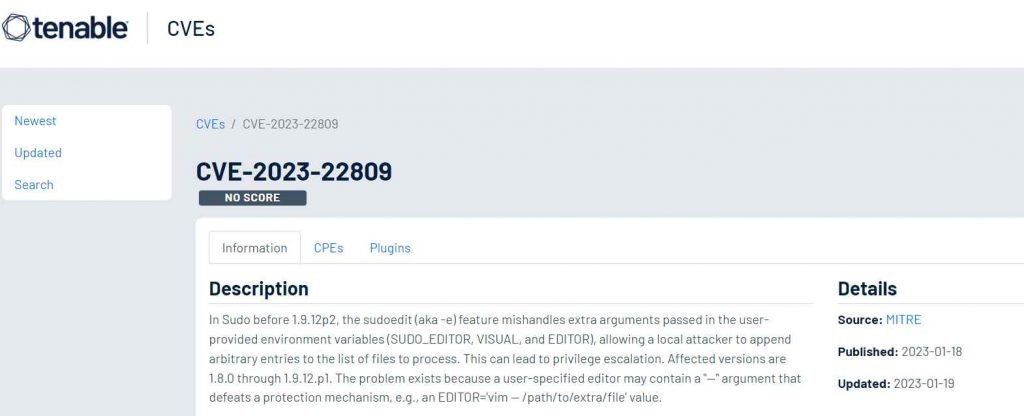
A new sudo vulnerability was found. It was on sudoedit (sudo -e) flaw. With it, attackers can edit arbitrary files, and therefore machines were at the risk of the pwned and having information steeled.
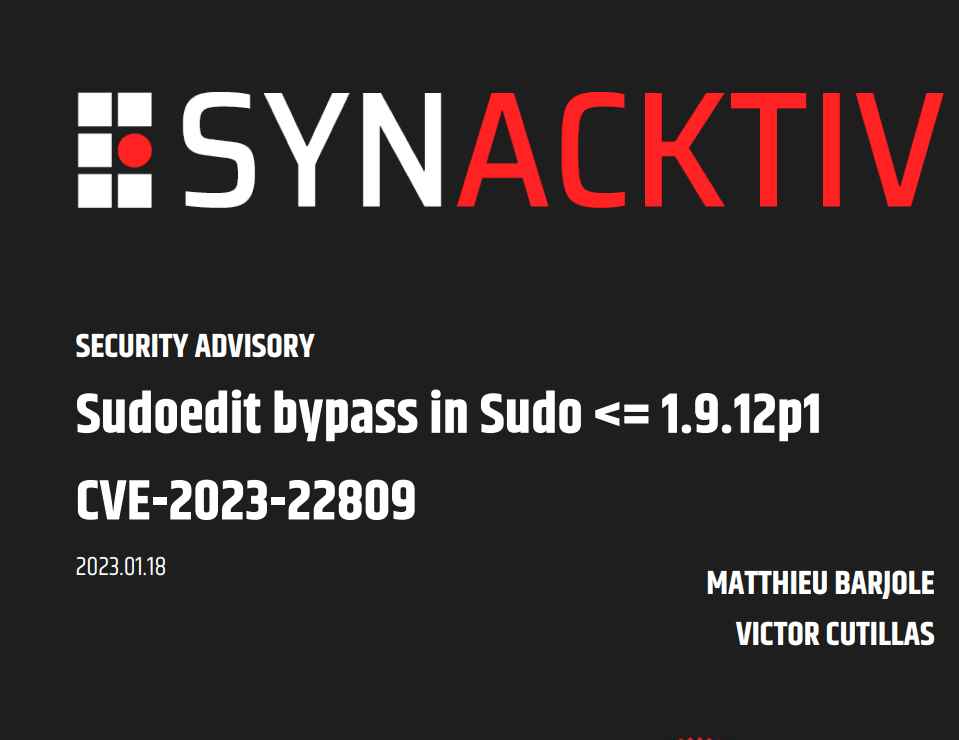
Researchers Matthieu Barjole and Victor Cutillas of Synacktiv uncovered the weakness, which was given the identifier CVE-2023-22809, in the sudoedit function for Linux. This vulnerability might enable a malicious user with sudoedit access to edit arbitrary files on a system running Linux.
In order to give its users with the ability to pick the editor of their choosing, Sudo makes use of environment variables that are supplied by the user. The contents of these variables provide additional information to the command that is ultimately sent to the sudo edit() function. The latter, on the other hand, is dependent on the existence of the — argument in order to establish the list of files that need to be edited. This list may be changed by the insertion of an additional — argument into one of the approved environment variables, which can then lead to a privilege escalation through the modification of any other file with the rights of the RunAs user. This problem appears after the sudoers policy validation has been completed. Versions of sudo that came out before 1.8.0 built the argument vector in a different way and are not impacted by this issue. It is strongly suggested that users get their systems up to date with the most recent version.
On January 11, 2023, presiding United States District Judge William Orrick in San Francisco denied the motion of Joe Sullivan, the former CISO of Uber, for a judgment of acquittal. The conviction arose from Sullivan’s agreement to pay attackers who breached the security of the online ride-sharing service and obtained personal information about thousands of users, drivers and riders. Sullivan, a lawyer and a former federal computer crime prosecutor himself, was convicted in 2022 by a jury of concealing and not reporting the Uber attack and of obstructing a federal investigation into an earlier Uber attack by the Federal Trade Commission by concealing the new breach.
The case centered on the fact that after Sullivan became aware of the breach, he took steps to prevent the breach from being publicly disclosed—noting that “This can’t get out,” and “We need to keep this tightly controlled.” Sullivan also told the incident response team that “This may also play very badly,” based on previous assertions of lack of adequate security at Uber made by the FTC in a then-ongoing civil investigation of Uber. After the breach was known to Uber, the charges alleged that Sullivan negotiated a nondisclosure agreement with the attackers; under Uber’s then-existing bug bounty program, the company would pay $100,000 if they promised to execute a document indicating that they “Did not take or store any data during or through [their] research,” and that they “Delivered to Uber or forensically destroyed all information about and/or analysis of the vulnerabilities,” the attackers discovered. The nondisclosure agreement provided that the attackers certify that they did not take data that, in fact, they had demonstrably taken.
“Corrupt” Obstruction of an FTC Proceeding
It’s important to note the crimes Sullivan was convicted of. First, he was convicted of violating 18 USC 1505, which relates to the obstruction of some governmental proceeding. In Sullivan’s case, the act of obstruction occurred when he did not reveal to the FTC that Uber had suffered a data breach after the completion of the FTC investigation of a previous data breach and when he paid the attacker to ensure that news of the new breach would not leak.
The trial court rejected Sullivan’s claims that to successfully convict him of obstruction, the government would have to prove that there was some “nexus” or connection between the thing concealed (the new breach) and the proceeding that was obstructed (the investigation of the old breach). The court ruled that no such nexus need have been proven, as long as the jury had evidence that (1) the FTC action was an agency proceeding, (2) Sullivan was aware of the proceeding and that (3) he “intentionally endeavored corruptly to influence, obstruct or impede the pending proceeding.” The court found persuasive the fact that Sullivan knew of (and indeed had testified before) the FTC proceeding, expressed his desire that the new breach be kept secret and had the attackers execute an NDA preventing them from disclosing the breach as evidence of Sullivan’s corrupt intent to conceal the breach from the FTC.
The trial court also rejected Sullivan’s claims that, to corruptly obstruct a proceeding by not disclosing something, the government would have to establish an actual legal duty to disclose that thing. The FTC was investigating a prior breach. There was no evidence that Uber or Sullivan obstructed or impeded the FTC’s investigation of that breach or concealed evidence related to that breach. However, in the course of deciding what sanction the FTC wanted to impose on Uber for the other breach (and the adequacy of Uber’s overall security program), Sullivan and Uber knew that the FTC would want to know about the new breach (which represented a lapse of security). That’s why Sullivan wanted to conceal it.
There are a lot of problems with this theory. Imagine negotiating a plea agreement for someone who was caught shoplifting. In the course of negotiating the plea, the defense lawyer learns (through a privileged conversation) that the defendant has shoplifted other items from other stores after the incident but was never caught. Is there a duty to tell the prosecution? No. In fact, it would violate privilege to do so. What if you instructed the client to either return the items or pay for them (and some extra) in return for the merchant agreeing to “settle” the case and not report it to the prosecution? Would that be “corruptly” obstructing the plea negotiations? What if, in a civil lawsuit, a client answers truthfully that he has never been accused of some relevant wrongdoing? Days after the testimony, the deponent is then accused of that wrongdoing. The testimony was truthful at the time, but certainly, the other side would like to know about the new allegations. Are you required to disclose the new allegations? Can you settle the new charges with an NDA to keep the lawyers from learning about them, or would that constitute an obstruction of a judicial proceeding? Would it matter if the allegations in the new cases had some “nexus” to the one under litigation? Would it matter if the old case had been settled? While the use of the term “corruptly” in the jury instructions implies a requirement of proof that it was the specific intent of the defendant to do something the law prohibited (or refrain from doing something that the law required), it’s not clear what Sullivan did that was “corrupt” if there was no affirmative duty to disclose. Would he still be guilty of obstruction if he did not have the attackers execute an NDA but simply did not tell the FTC of the new breach? And what if the breach were just a vulnerability that was not exploited; certainly something the FTC would want to know. It’s not clear how far the court and DOJ would extend this concept.
Misprison of a Felony
The other crime Sullivan was convicted of was “misprison of a felony,” an archaic common law inchoate crime which punishes anyone with knowledge of the commission of a felony who conceals and does not report the same. The elements of that offense, according to the court, was proof that (1) a federal felony was committed (in this case, “intentionally accessing a computer without authorization and thereby obtaining information from a protected computer, or conspiracy to extort money through a threat to impair the confidentiality of information obtained from a protected computer without authorization”); (2) Sullivan had knowledge of the commission of that felony; (3) Sullivan had knowledge that the conduct was a federal felony; (4) Sullivan failed to notify federal authorities and (5) that he did an affirmative act to conceal the crime. For this offense, there did not have to be a legal duty to disclose the felony, just that there was a felony committed.
Unlike the obstruction statute, the misprision statute requires evidence of concealment. The court held that “[t]he $100,000 payment to the hackers and NDA support this, specifically the provision where the hackers promised that they ‘have not and will not disclose anything about the vulnerabilities’ or their conversations with Uber without written permission.”
I don’t doubt that a prime motivation for paying the very high “bounty” to the hackers and having them execute the NDA was to keep quiet the attack and the vulnerabilities that were exploited.
On the other hand, responsible disclosure principles and bug bounty programs themselves often demand secrecy. This would be particularly true for a vulnerability for which no patch existed. Microsoft’s bug bounty program notes:
CONFIDENTIALITY OF SUBMISSIONS/ RESTRICTIONS ON DISCLOSURE Protecting customers is Microsoft’s highest priority. We endeavor to address each Vulnerability report in a timely manner. While we are doing that we require that Bounty Submissions remain confidential and cannot be disclosed to third parties or as part of paper reviews or conference submissions. You can make available high-level descriptions of your research and non-reversible demonstrations after the Vulnerability is fixed. We require that detailed proof-of-concept exploit code and details that would make attacks easier on customers be withheld for 30 days after the Vulnerability is fixed. Microsoft will notify you when the Vulnerability in your Submission is fixed. You may be paid prior to the fix being released and payment should not be taken as notification of fix completion. VIOLATIONS OF THIS SECTION COULD REQUIRE YOU TO RETURN ANY BOUNTIES PAID FOR THAT VULNERABILITY AND DISQUALIFY YOU FROM PARTICIPATING IN THE PROGRAM IN THE FUTURE.
Of course, this compares apples with oranges. The Microsoft program is not a permanent ban on disclosure—just enforcing a responsible disclosure. In addition, the MS program relates to any relevant disclosures—vulnerabilities, attacks, etc., and not just actions which would constitute a “felony.” Does “conceal and not report” mean “conceal and never report”?
But companies have many reasons for not wanting to disclose felonies that have been committed against them. An employee steals from the company and is terminated with an NDA and a non-disparagement agreement. The company does not report the theft. Did they “conceal and not report” a felony? Certainly, or take a sextortion case where attackers obtain access to someone’s sexually explicit files or pictures and threaten to release them if a cryptocurrency payment is not made. The victim pays the ransom to avoid publicizing the fact that the images exist. Did they “conceal and not report” the felony extortion scheme? You betcha. And if payment of a ransom in a ransomware situation is partially motivated by the company’s desire to avoid publicly disclosing the fact that they were hit by ransomware (and partly to get their files back and get back to work), they are subject to prosecution under the misprision statute.
An overwhelming trend since the 1990’s has been to require companies to report—either to the public, to data protection authorities, to law enforcement, to regulators or to third parties by contract—data breaches, incidents and, in some cases, material vulnerabilities. The Sullivan case rests on the principle that, even if there is no duty to report it, you may find yourself in legal trouble if you don’t.
The FBI has recently warned the public about search engine ads pushing malware disguised as legitimate software – an old tactic that has lately resulted in too many malicious ads served to users searching for software, cracked software, drivers – anything that can be downloaded, really – via Google and Bing.
The recent explosion of search engine malvertising
Malware peddlers employ a variety of methods to deliver their wares to unsuspecting users:
Malicious links or attachments served via email and messages, or posts on social media, online forums and IM groups
The latter tactic is particularly good at hitting a wide pool of potential targets, since most internet users also use search engines.
Lately, though, they have been overdoing it – or perhaps it’s just that more people have begun noticing it and talking about it online?
Many documented campaigns
HP threat researcher Patrick Schläpfer says that they have seen “a significant increase in malware distributed through malvertising, with multiple threat actors currently using this technique.”
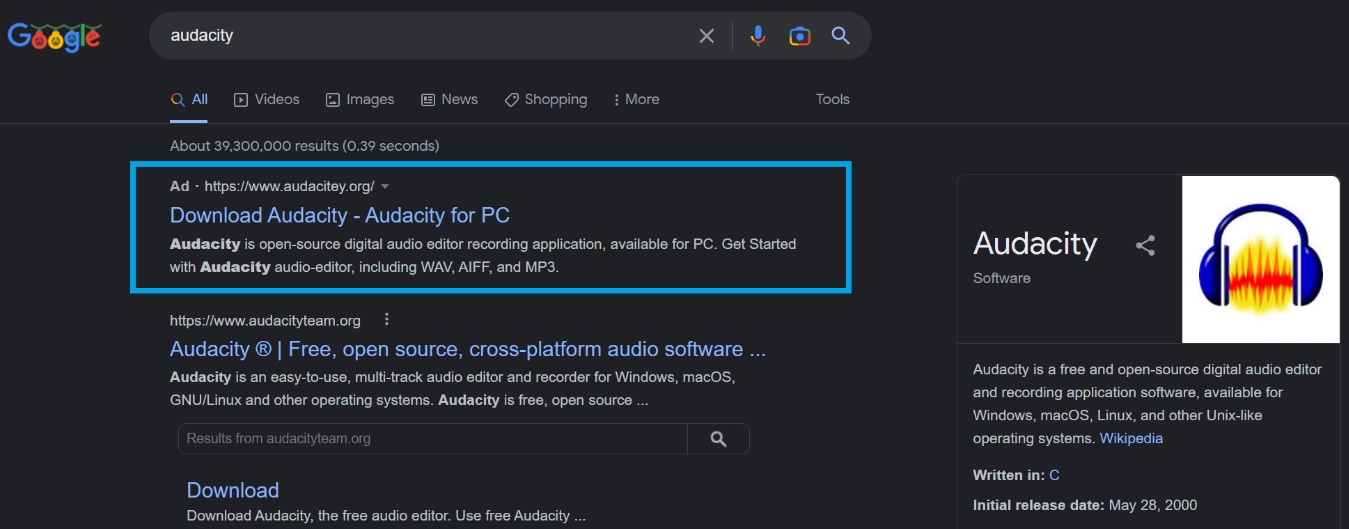
Some of these campaigns have been going on since late last year, and mostly target users searching to download popular software (e.g., Audacity, Blender 3D, GIMP, Notepad++, Microsoft Teams, Discord, Microsoft OneNote, 7zip, OBS, etc.).
The malicious ads often manage to be the first link users see when searching for software on Google, and point to a (usually typosquatting) domain that resembles the original software manufacturer’s page. Clicking on the download link triggers the download of the malicious package from a file-hosting and sharing service (e.g., Dropbox), an app development platform (e.g., Google Firebase), or a code-hosting service (e.g., GitHub).
Protect yourself and your loved ones
While Google and Microsoft are trying to keep their users safe, it’s becoming obvious that they are failing to keep pace with the rapid change of tricks employed by cybercriminals to push those ads.
As some ads are removed and new ones inevitably spring up, we are forced to do what we can to protect themselves.
Just being aware of this danger and knowing about the prevalence of these malicious ads will help. Also, carefully check whether the URL to which the advertisement points is the correct one (e.g., by comparing it with the official domain listed on the software’s Wikipedia page).
If you fail to spot the malicious nature of the ad and the typosquatting site, don’t ignore warnings you might get from Microsoft Defender or another security solution you use.
But the best advice may be to completely avoid clicking on Google and Bing ads – either by recognizing them and avoiding them consciously, or by installing an ad-blocking extension that will stop those ads from being displayed. That latter option is perhaps the best one for less tech-savvy users, to completely remove the temptation of willy-nilly clicking on potentially malicious ads – wherever they might pop up.
Google and Microsoft, on the other hand, may want to ramp up their efforts to block this kind of abuse of their ad network, or risk their reputation being dented and more and more users start using ad blockers.
n recent years, speaking to voice interfaces has become a normal part of our lives. We interact with voice-enabled assistants in our cars, smartphones, smart devices and during telephonic banking. More banks around the globe are using voice biometrics. In banks voice biometrics technology is used to match personal voice patterns and verify the customer’s identity in seconds using just voice. To identify a customer, voice biometrics technology captures a customer’s voice and compares the captured voice characteristics to the characteristics of a previously created voice pattern. If the two match, then the voice biometrics software will confirm that the customer speaking is the same as the customer registered against the voice pattern. Once the customer has created their voice authentication pattern, when they dial the bank, they just type their account, customer ID or card number and repeat the phrase “My voice is my password” or “My voice is my signature.” Then customers can access their telephone banking account, where they can make transactions more securely.
According to the different bank websites, voice biometrics is very secure and like the fingerprint, the voice is unique. But threat actors can use voice biometric spoofing attacks also known as voice cloning or deep fake to break into people’s bank accounts. Using these attacks they use presentation attacks including recorded voice, computer-altered voice and synthetic voice, or voice cloning, to fool voice biometric systems into thinking it hears the real, authorized user and grants access to sensitive information and accounts. In simple words they clone the voice of bank customers by artificially simulating a customer’s voice.
According to Atul Narula, a cyber security expert, today’s AI systems are capable of generating synthetic speech that closely resembles a targeted human voice. In some cases, the difference between the real and fake voice is imperceptible. Threat actors not only target public figures including celebrities, politicians and business leaders, but the reality is they can target anyone who has a bank account. They can use online videos, speeches, conference calls, phone conversations and social media posts to gather the data needed to train a system to clone a voice.
Cyber Criminals are using a new breed of phishing scams that exploit the fact that a victim believes they are talking to someone they trust. Last year, a UK-based CEO was tricked into transferring more than $240,000 based on a phone call that he believed was from his boss. These cyber criminals, armed with voice clones, are using phone calls and voicemail. And the attacks aren’t just threatening businesses. In a new breed of the “grandma scam” cyber criminals are posing as family members who need emergency funds.
Cyber criminals have started using deep fake voices to spread misinformation and fake news. Imagine if somebody publishes a fake voice call of some public figure to sway public opinion or consider how manipulated executive or public figure statements could affect the stock market. Recently some people appeared to be using deepfake technology to imitate some members of the Russian political class, mainly from opposition to Vladimir Putin’s government, to make fake video calls to some representatives of European parliaments.
Deepfakes are also being used to create fake evidence that impacts criminal cases. Or for blackmailing people in cases where manipulated video and audio of people doing or saying things they didn’t do or say.
HOW DEEP FAKE VOICE CLONING IS DONE?
Today, artificial intelligence and deep learning are advancing the quality of synthetic speech. With as little as a few minutes of recorded sample voice, developers can use it to train an AI voice model that can read any text in the target’s voice.
According to Atul Narula, a cyber security expert from International Institute of Cyber Security, there are a variety of AI tools, which enable virtually any voice to be cloned. Some of these are
SV2TTS Real Time Voice Cloning, Resemblyzer and WaveRNN
There are some good free tools like Real Time Voice Cloning, Resemblyzer and WaveRNN which allow voice cloning with pre-trained models. While these can be used to generate speech using arbitrary text from one of a few hundred voices, it can also be fine-tuned to generate speech in an arbitrary voice using arbitrary text.
Resemble.AI
Allows custom AI Generated voices from a speech source. It creates realistic text to speech voices with AI with just 5 minutes of sample voice. You can try it for free.
iSpeech
It is a high quality text to speech and speech recognition tool. You can generate anybody’s voice in 27 languages.
Vera Voice
It uses machine-learning technology to create super realistic voice clones of any person. They claim that they need just an hour of audio data to train neural networks to generate a new voice.
Google’s Tacotron – Wavenet
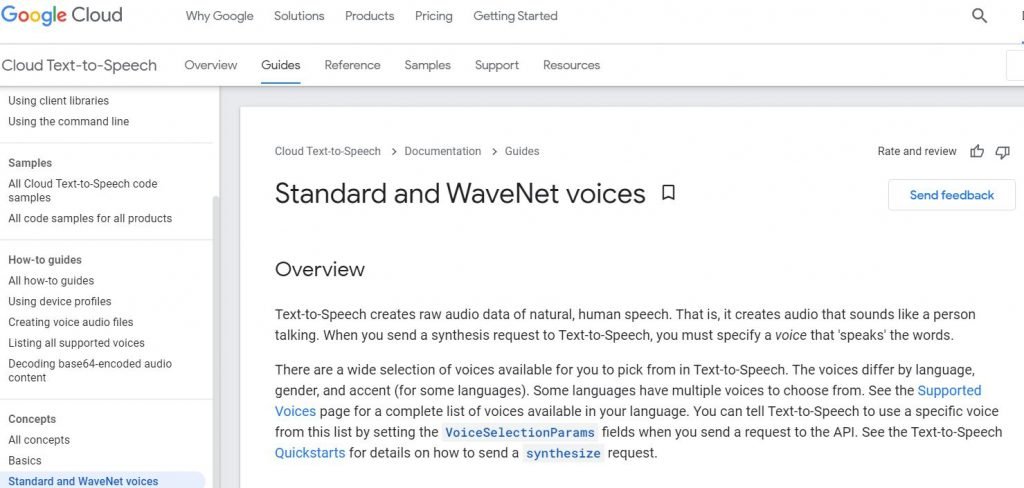
These systems from Google can generate speech which mimics any human voice and which sounds more natural. It needs text and sample voice data to generate a human-like voice.
Although voice samples are difficult to obtain, cyber criminals use social media to obtain them.
It’s important to note that these tools were not created for the purpose of fraud or deception, mentions Atul Narula. But the reality is that business and consumers need to be aware of new threats associated with online AI voice cloning software.
Banks are forcing customers to activate voice biometrics. Banks use different phrases, like “my voice is my password”, or “my voice is my signature”. To verify user identity users have to enter their account number or Customer ID or 16 digit card number and their voice authentication phrase. Account number is kind of public as it is on cheque book and threat actors can ask someone their account number to deposit some amount via social engineering and people will happily give their account number.
There are three scenarios that someone can use to hack into a voice authentication system used by many banks.
In the first scenario Someone calls you to sell something and forces you to use certain words during the call Like: “Yes”, “My Voice”, “Signature”, “Password”, “Username”, “No”, and the name of your bank. And later on creates the phrase using the words and plays the recording during the telephone banking call.
In the second scenario someone calls you and asks you to repeat the entire phrase “my voice is my signature” and later on plays the recording during the telephone banking call.
Third scenario is someone calls you and records a sample of your voice and by using Deep Fake artificial intelligence tools mentioned before generates the complete phrase or the missing words. These tools are not perfect yet but they can generate a voice similar to your voice, and with just a sample of a few minutes they can generate the phrase.
Using these three scenarios, a cyber security expert from International Institute of Cyber Security recorded a call and later on with the help of audio editing software, created the entire phrase. He then played the recorded audio during a telephonic banking call. Using this technique he was easily able to break into banks telephonic banking sessions. He used the same technique for generating the English and Spanish phrases. It seems voice authentication systems are vulnerable to voice cloning attacks and threat actors could break into anybody’s account just by having the account number or customer ID and some social engineering to perform any of the scenarios mentioned before. See the video to see the POC.
IS IT POSSIBLE TO DETECT VOICE CLONING?
Mariano Octavio, a cyber security investigator mentions that voice cloning technology is not an evil technology. It has many positive and exciting use cases like.
Education: Cloning the voices of historical figures offers new opportunities for interactive teaching and dynamic storytelling in museums.
Audiobooks: Celebrity voices can be used to narrate books and historical figures can tell their stories in their own voices.
Assistive Technology: Voice cloning can be used to assist persons with disabilities or health issues that impact their speech.
According to Jitender Narula, a cyber security expert from International Institute of Cyber Security, Voice anti-spoofing, also called voice liveness detection, is a technology capable of distinguishing between live voice and voice that is recorded, manipulated or synthetic.
For advanced voice biometrics, interactive Liveness Detection is used – when a person is asked to say a randomly generated phrase. The current capabilities of neural networks allow bypassing interactive liveness detection.
Experts understand the risks associated with the biometric systems, and are beginning to resort to a multimodal approach – when several types of biometrics are embedded in the identification system. Like facial recognition and voice recognition.
But it seems banks don’t have this technology as voice authentication used by many banks can be hacked as shown in the video.
Atul Narula mentions that there are a lot of risks associated with biometric authentication. Companies & Financial institutions need to focus attention on the development of advanced deep fake detection solutions. On the other hand we should focus on raising awareness and educating consumers of social media about the risk associated with the deepfake technology.
Wireless Penetration testing actively examines the process of Information security Measures which is Placed in WiFi Networks and also analyses the Weakness, technical flows, and Critical wireless Vulnerabilities.
The most important countermeasures we should focus on are Threat Assessment, Data theft Detection, security control auditing, Risk prevention and Detection, information system Management, and Upgrade infrastructure and a Detailed report should be prepared.What is Wireless Penetration Testing?
Wireless Penetration Testing is aimed to test wireless infrastructure to find vulnerabilities in the network. Testing involves both manual testing techniques and automated scans to simulate a real-world attack and identify risks.Why is wireless penetration testing important?
Usage of Wi-Fi access dramatically increased nowadays, and the quality of Wi-Fi security is in question. By using Wi-Fi access thousands of transaction processing every minute. If the network is vulnerable it allows hackers to launch various attacks and intercept the data.
Let’s take a detailed look at the Wireless Penetration TestingChecklist and the steps to be followed.
Framework for Wireless Penetration Testing
Discover the Devices connected with Wireless Networks.
Document all the findings if Wireless Device is Found.
If a wireless Device is found using Wifi Networks, then perform common wifi Attacks and check the devices using WEP Encryption.
If you found WLAN using WEP Encryption then Perform WEP Encryption Pentesting.
Check whether WLAN Using WPA/WPA2 Encryption. If yes then perform WPA/WPA2 pen-testing.
Check Whether WLAN using LEAP Encryption. If yes then perform LEAP Pentesting.
No other Encryption Method was used which I mentioned above, Then Check whether WLAN using unencrypted.
If WLAN is unencrypted then perform common wifi network attacks, check the vulnerability which is placed in the unencrypted method and generate a report.
Before generating a Report make sure no damage has been caused to the pentesting assets.
Wireless Pentesting with WEP Encrypted WLAN
Check the SSID and analyze whether SSID is Visible or Hidden.
Check for networks using WEP encryption.
If you find the SSID as visible mode then try to sniff the traffic and check the packet capturing status.
If the packet has been successfully captured and injected then it’s time to break the WEP key by using a WiFi cracking tool such as Aircrack-ng, or WEPcrack.
If packets are not reliably captured then sniff the traffic again and capture the Packet.
If you find SSID is the Hidden mode, then do Deauthentication for the target client by using some deauthentication tools such as Commview and Airplay-ng.
Once successfully Authenticated with the client and Discovered the SSID is, then again follow the Above Procedure which is already used for discovering SSID in earlier steps.
Check if the Authentication method used is OPN (Open Authentication) or SKA (Shared Key Authentication). If SKA is used, then bypassing mechanism needs to be performed.
Check if the STA (stations/clients) are connected to AP (Access Point) or not. This information is necessary to perform the attack accordingly.
If clients are connected to the AP, an Interactive packet replay or ARP replay attack needs to be performed to gather IV packets which can be then used to crack the WEP key.
If there’s no client connected to the AP, Fragmentation Attack or Korex Chop Chop attack needs to be performed to generate the keystream which will be further used to reply to ARP packets.
10. Once the WEP key is cracked, try to connect to the network using WPA-supplicant and check if the AP is allotting any IP address or not.”EAPOL handshake“.
WirelessPenetration Testing with WPA/WPA2 Encrypted WLAN
Start and Deauthenticate with WPA/WPA2 Protected WLAN client by using WLAN tools Such as Hotspotter, Airsnarf, Karma, etc.
If the Client is Deaauthenticated, then sniff the traffic and check the status of captured EAPOL Handshake.
If the client is not Deauthenticate then do it again.
Check whether the EAPOL handshake is captured or Not.
Once you captured the EAPOL handshake, then perform a PSK Dictionary attack using coWPAtty, Aircrack-ng to gain confidential information.
Add Time-memory trade-off method (Rainbow tables) also known as WPA-PSK Precomputation attack for cracking WPA/2 passphrase. Genpmk can be used to generate pre-computed hashes.
If it’s Failed then Deauthenticate again and try to capture again and redo the above steps.
LEAP Encrypted WLAN
Check and Confirm whether WLAN is protected by LEAP Encryption or not.
De-authenticate the LEAP Protected Client using tools such as karma, hotspotter, etc.
If the client is De authenticated then break the LEAP Encryption using a tool such as asleapto steal the confidential information
If the process dropped then de-authenticate again
Wireless Penetration Testing with Unencrypted WLAN
Check whether SSID is Visible or not
Sniff for IP range if SSID is visible then check the status of MAC Filtering.
If MAC filtering is enabled then spoof the MAC Address by using tools such as SMAC
Try to connect to AP using IP within the discovered range.
If SSID is hidden then discover the SSID using Aircrack-ng and follow the procedure of visible SSID which I Declared above.
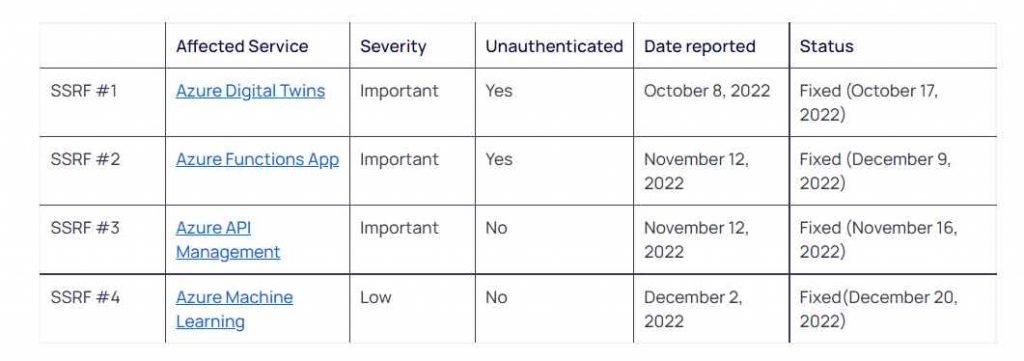
Orca, a business that specializes in cloud security, has disclosed information on four server-side request forgery (SSRF) vulnerabilities that affect several Azure services. Two of these vulnerabilities might have been exploited without the need for authentication.
They were able to attack two vulnerabilities without needing any authentication on the service (Azure Functions and Azure Digital Twins). This gave them the ability to make requests in the name of the server even though it did not own an Azure account.
The vulnerabilities in Azure SSRF that were discovered allowed an attacker to scan local ports, find new services, endpoints, and files. This provided valuable information on potentially vulnerable servers and services to exploit for initial entry, as well as the location of information that could be targeted. SSRF vulnerabilities are particularly dangerous due to the fact that if attackers are able to access the host’s IMDS (Cloud Instance Metadata Service), this exposes detailed information on instances. This information includes the hostname, security group, MAC address, and user-data, and it could potentially allow attackers to retrieve tokens, move to another host, and execute code (RCE).
A server-side request forgery, also known as SSRF, is a web security vulnerability that enables an attacker to abuse a server-side application by making requests to read or update internal resources as well as submit data to external sources. This type of vulnerability is known as a server-side request forgery.
Server-Side Request Forgery (SSRF) attacks often fall into one of these three categories:
Blind SSRF is a sort of SSRF attack that takes place when an attacker is able to influence a server to make requests, but the attacker does not get the answer that the server sends back to them. Because of this, determining whether or not the attack was effective is much more difficult. Semi-Blind SSRF is a form of SSRF attack that is very similar to Blind SSRF. The only difference is that the attacker is able to view part of the answer from the server, such as the response headers or the status code. This may provide the attacker the ability to obtain some limited information about the system they are attacking. Non-Blind SSRF, also known as Full SSRF, is a subtype of SSRF attack that takes place when an attacker has the ability to control a server in order to send requests and get the whole answer from the server. This gives the attacker the ability to learn more about the system they are targeting and gives them the opportunity to perhaps conduct other attacks. The four SSRF vulnerabilities that we found all fall into the third category, which is known as Full SSRF (sometimes referred to as Non-blind SSRF). To give you an idea of how easily these vulnerabilities can be exploited, Non-blind SSRF flaws can be leveraged in a variety of different ways, such as SSRF via XXE, SSRF via SVG file, SSRF via Proxy, SSRF via PDF Rendering, SSRF via vulnerable query string in the URL, and many more. These are just some of the ways that these vulnerabilities can be exploited.
It is essential to keep in mind that each and every SSRF vulnerability may be exploited to get unauthorized access to sensitive information or to launch further attacks against a target. This is the case regardless of the kind of SSRF attack that is being deployed. For this reason, it is essential for businesses to take the necessary precautions to protect their servers and networks against the kinds of attacks described above.
They were not successful in gaining access to any of the IMDS endpoints because Microsoft had implemented a variety of SSRF defenses, one of which was the environment variable known as X-IDENTITY-HEADER. However, even in the event that an attacker was unable to access the IMDS services, there was still a significant amount of potential harm that they might do, as was previously discussed.
After bringing Microsoft’s attention to the security flaws, the company moved quickly to fix them.
From a detailed report – compiled by security researcher Sam Curry – the findings are an alarming indication that in its haste to roll out digital and online features, the automotive industry is doing a sloppy job of securing its online ecosystem. https://lnkd.in/gdAXGjaN
The web applications and APIs of major car manufacturers, telematics (vehicle tracking and logging technology) vendors, and fleet operators were riddled with security holes, security researchers warn.
In a detailed report, security researcher Sam Curry laid out vulnerabilities that run the gamut from information theft to account takeover, remote code execution (RCE), and even hijacking physical commands such as starting and stopping the engines of cars. The findings are an alarming indication that in its haste to roll out digital and online features, the automotive industry is doing a sloppy job of securing its online ecosystem.
From web portals to car locks
Around six months ago, Curry and a few friends stumbled on a vulnerability in the mobile app of a scouter fleet at the University of Maryland, which caused the horns and headlights on all the scooters in the campus to turn on and stay on for 15 minutes. Curry subsequently became interested in doing further investigation along with researchers Neiko Rivera, Brett Buerhaus, Maik Robert, Ian Carroll, Justin Rhinehart, and Shubham Shah.
“We thought it’d be awesome to dump a ton of time into hacking different car companies to see how many ‘horns we could honk’, but it quickly turned into hacking telematics infrastructure and things outside of the telematics APIs,” Curry told The Daily Swig.
The researchers’ findings, detailed on Curry’s blog, highlight an alarming number of critical vulnerabilities across different systems. For example, a poorly configured API endpoint for generating one-time passwords for the web portals of BMW and Rolls Royce potentially enabled attackers to take over the accounts of any employee and contractor, thereby gaining access to sensitive customer and vehicle information.
A misconfiguration in the Mercedes-Benz single sign-on (SSO) system enabled the researchers to gain access to several internal company assets, including private GitHub repositories and internal communication tools. Attackers could pose as employees, allowing them to access sensitive information, send commands to customer vehicles, perform RCE attacks, and use social engineering to escalate their privileges across the Mercedes-Benz infrastructure.
Elsewhere a vulnerability in Kia’s web portal for dealers could have allowed attackers to create a fake session, register an account, associate it with any arbitrary vehicle VIN number, and gain access to lock, unlock, and remote start/stop mechanisms, as well as vehicle locations and vehicle camera feeds.
A poorly implemented SSO functionality in Ferrari’s web applications allowed the researchers to gain unrestricted access to the JavaScript code of several internal applications. The source code contained internal API keys and usage patterns, allowing potential attackers to create and modify users or (worse yet) give themselves super-user permissions. The vulnerabilities effectively allowed attackers to take ownership of Ferrari cars.
Other vulnerabilities granted full remote control over the locks, engine, horn, headlights, and trunk of Hyundai and Genesis vehicles made after 2012. The researchers were also able to obtain full remote access to Honda, Nissan, Infiniti, and Acura vehicles.
Dangerous bug in telematics portal
Curry and his colleagues found a SQL injection vulnerability in the admin portal of Spireon, the parent company of several car telematics and fleet management vendors that collectively service 15 million vehicles. Curry described this as their “most alarming finding” because the vulnerability allowed them to gain administrator access to the company’s platform.
“Using our access, we could access all user accounts, devices (vehicles), and fleets,” he said. “Some of the fleets on the website included ambulances, police cruisers, and large trucks. Using the Spireon access, we could send fully arbitrary commands and update device configurations.”
The researchers found they were able to lock starters, unlock vehicles, track vehicles, and send rogue dispatch addresses to vehicles like police cars and ambulances. The researchers further suspect the security shortcomings made it possible to install backdoors and run arbitrary commands on Spireon devices.
Half-baked
“There were some car companies where you’d own one, then copy the exact same methodology to another car company and get in with the same vulnerability,” Curry said.
The researchers found that some flaws existed across the platforms of several companies, including tons of exposed actuators (vehicle component control), debug endpoints, and administrative functionality for managing vehicles, purchase contracts, and telematic devices.
“From what it seems, car companies really rushed to install these devices,” Curry said. “Currently, these installations mostly have limited functionality so you can only do things like track, unlock, and start the vehicle, but with companies like Tesla and Rivian building more connected vehicles which can actually be controlled remotely, I’m worried that market pressure will force these companies to build half-baked solutions which are open to attack.”
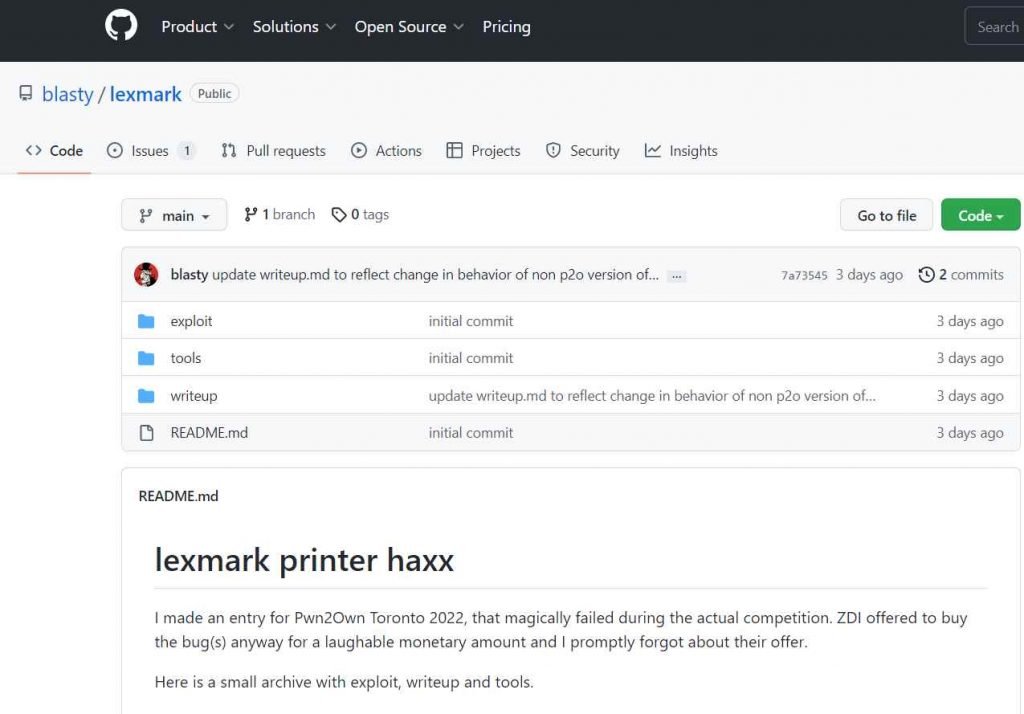
The American corporation Lexmark International, Inc. is a privately owned business that specializes in the production of laser printers and other image goods.
The researcher found that the product is susceptible to two vulnerabilities, either of which can be exploited by an adversary to copy file data from a source path to a destination path or to induce the server-side application to make requests to an unintended location. Both of these vulnerabilities are possible due to the fact that the product is vulnerable to both of these vulnerabilities. According to the specialists, the printer has two vulnerabilities that enable an authorized hacker to upload arbitrary files and run code with elevated privileges. Both of these vulnerabilities may be exploited by a malicious user.
He published the code on Github that had a proof-of-concept (PoC) exploit for each of the four vulnerabilities. These vulnerabilities make it possible for an adversary to seize control of a vulnerable device.
According to the findings of the researcher, an attack may be carried out that compromises the device by exploiting all four of its vulnerabilities simultaneously.
The proof-of-concept attack has been successfully tested against a Lexmark MC3224adwe printer using the most recent version of the firmware, CXLBL.081.225; nevertheless, it is claimed to operate successfully against other printers and photocopiers as well.
The security flaw that was discovered in Lexmark’s printer devices has not been fixed.
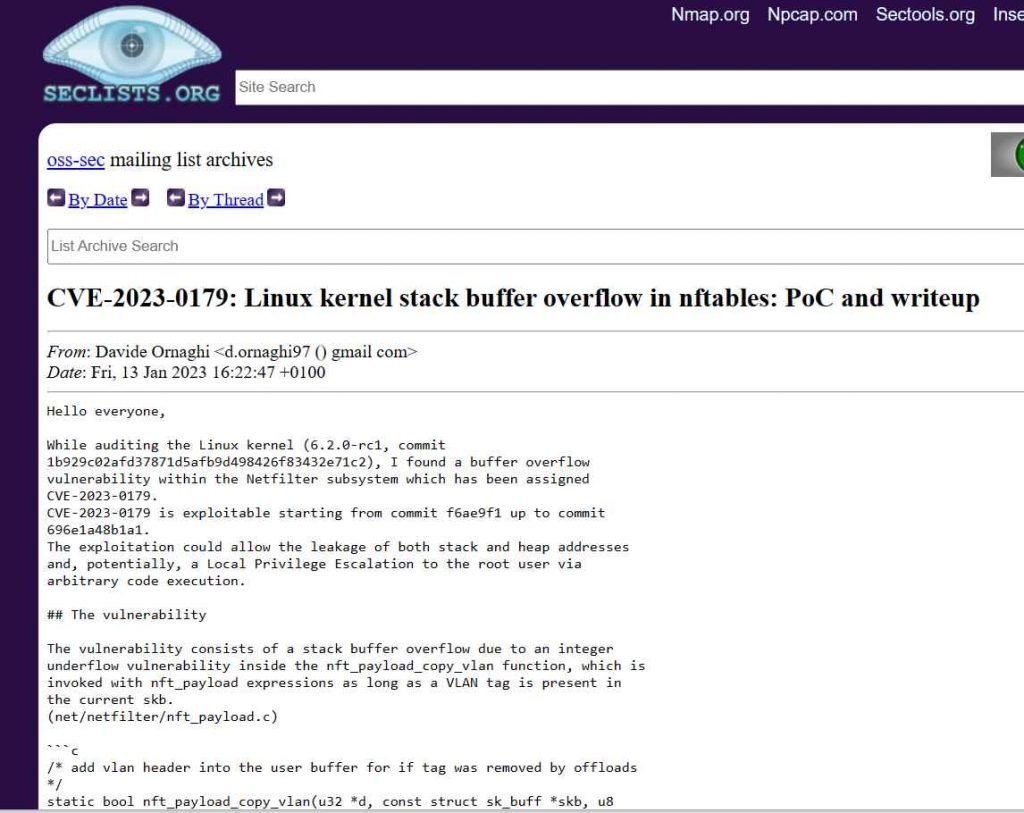
A new privilege escalation vulnerability has been identified in the Linux kernel by researcher Davide Ornaghi. This vulnerability might enable a local attacker to execute code on vulnerable computers with elevated rights if the kernel is installed on those systems. Additionally, Davide published the proof-of-concept and the write-up. The vulnerability, which has been assigned the tracking number CVE-2023-0179, is a stack-based buffer overflow that exists in the Netfilter subsystem. An authorized attacker might exploit this issue to get elevated privileges as root if the attacker executed a program that had been carefully written for the purpose.
The Linux kernel has a framework known as netfilter that enables a variety of networking-related actions to be performed in the form of individualized handlers. This may be accomplished by filtering incoming network packets. Netfilter provides the functionality necessary for directing packets through a network and preventing packets from reaching sensitive locations within a network by offering a variety of functions and operations for packet filtering, network address translation, and port translation. [1] These features allow Netfilter to provide the functionality required for directing packets through a network.
Encrypting an email message ensures that unauthorized parties cannot read it. For any party without proper authorization, the message will appear indecipherable.
For organizations, message confidentiality is crucial to stop potentially sensitive information from reaching prying eyes. Also, they should be able to confirm the integrity of the message and the sender’s identity – without this, spoofed messages can be sent.
The basis of confidential communication over email is that both sender and recipient have secured their respective local systems, by hardening the host OS, employing client security, EDR, XDR and so forth.
Different options have different benefits and challenges
Best-effort opportunistic encryption methods such as Outlook Message Encryption (OME) and various third-party solutions (email encryption gateways, plugins and similar) have the benefit of being easy to use. They can also be transparently integrated into email programs (such as Outlook Message Encryption), and make it easy to contact new people, with no need for prior key exchange – if the message is sent to a user who doesn’t run the same system, a portal for opening the message is typically placed in view.
Additionally, they can often be integrated into the outgoing email server with rules to enforce encryption automatically, depending on set rules such as automated encryption for certain attachments, for example.
There is, however, the possibility of an unauthorized party decrypting the message if they gain access to it first. This poses a real threat as the email communication itself is not guaranteed to be encrypted due to the email delivery process being reliant on STARTTLS and similar opportunistic encryption schemes. This can be mitigated by adding 2FA, such as via SMS PIN code which can help improve security (of course, the recipient’s cell phone number must be known when sending). And in many situations, it is important to also identify the sender’s identity reliably: After all, if anyone can send messages, how can you differentiate a genuine sender from an imposter?
Full encryption methods such as S/MIME and PGP/GPG enable complete confidentiality where only the recipient can decrypt the email message due to the possibility of verifying the sender’s identity. However, several issues arise when using this method. There is a need for key management where keys need to be distributed, swapped, and kept up to date. There is also limited support as the recipient often needs to use the same solution as the sender.
Only a certain subset of contacts typically use this solution, leading to the need to use multiple solutions depending on the recipient(s). This also requires extra effort to determine which solution can be used for the specific recipient and if the solution is secure enough for the material being sent. This can lead to a complicated user interface with different, confusing options like “sign only” or “sign and encrypt”. It becomes quite easy to end up choosing the wrong option, or worse, forgetting to use the encryption at all (since it usually must be selected specifically).
Recently Google started offering option to use S/MIME with Gmail as “E2EE” or “client-side encryption”. This option is currently in beta testing and only available for limited audiences. This however is a significant development as it might result in wider adoption of S/MIME encryption, especially if made available for free Gmail tiers.
The threat model decides
What is the best solution? S/MIME or PGP/GPG may seem like attractive solutions, but challenges in key management and difficulty in training people to use them could lead to poor adoption. Some less secure solutions could be used for most communication, while the more secure solutions, such as S/MIME or GPG/PGP, could be used for other recipients.
The users that need to use the more secure solutions must be instructed on identifying when the more secure method is needed and how to use the solution properly (such as key management and practice sending and receiving encrypted email). Ultimately the demands of the specific organization and use cases determine the solutions that might be needed.