InfoSec and Compliance – With 20 years of blogging experience, DISC InfoSec blog is dedicated to providing trusted insights and practical solutions for professionals and organizations navigating the evolving cybersecurity landscape. From cutting-edge threats to compliance strategies, this blog is your reliable resource for staying informed and secure. Dive into the content, connect with the community, and elevate your InfoSec expertise!
ISO 27001 is a globally recognized standard on information and cyber security. By being compliant with this standard, you are operating in accordance with globally identified best practices. By being ISO 27001 certified, you’re not only operating in accordance with it, but you will also receive a clear stamp as evidence to your customers and other stakeholders that you are working aligned with security best practices.
Common Trap When Pursuing ISO 27001
Often companies who want to pursue ISO 27001 will quickly drop the idea when they start looking into the standard – this is because, often companies fall into the trap of starting with the controls as specified in ISO 270002 . When you only focus on the controls and implementation guidance, it can feel overwhelming and be frustrating as you will notice a lot of the implementation guidance will not make sense to your company and you can be under the impression that you are required to follow all the implementation guidance in order to become compliant or go for the certification.
This is false!
Falling into this trap, you are missing out on the core purpose of the standard. It is not about implementing all the controls and all the guidance you get from the standard – it is about building a functional management system that is aligned with your company context – it is about understanding the issues and risks you as a company are facing, and taking the appropriate measures to protect your assets and information.
How To Go About It The Right Way!
You should always start by focusing on the standard clauses in ISO 27001 that provide clear guidance on how to build a functional management system, when this is done correctly the controls will fall into place in the correct order at the right time in accordance with your company context and the risks that you as a company need to manage.
When people say that small companies should not pursue iso because it is too complex and has too many requirements – the above is the reason why it does not have to be.
All companies should prioritize and have a functional management system on how they secure their own company and the company assets. Protecting your values is a crucial element to stay in business!
Make sure you understand your company, your needs, and please avoid looking at other companies and the measures they have taken to protect themself and think that you have to do the same. Make your management system your own, build it so that it isdesigned to protect your assets. This way, you will have greater success and security will not be something that is forced on your company, it will be a tool to help you work more efficiently and securely.
Summary
To sum it up, ISO 27001 is a great standard to pursue both for small and large organizations.
Make sure you understand the purpose of the standard, and as a result implement a management system that is a perfect fit for your organization for long term success. ISO 27001 done right will result in a more secure and effective company that will again support the main goal of business continuity.
What is BS ISO/IEC 27001:2022 – Expert Commentary about? BS ISO/IEC 27001:2022 is the third edition of this standard. It technically revises, cancels, and replaces the Second Edition – ISO/IEC 27001:2013 (also published as BS EN ISO/IEC 27001:2017). BS ISO/IEC 27001:2022 presents the requirements for an information security management system (ISMS). An ISMS assists an organization to preserve the confidentiality, integrity, and availability of information, in the face of an ever-changing threat landscape, no matter the source of risk. Thus, it deals with threats that can be technological, human, physical and environmental in nature.
The standard requires an organization to adopt a risk management framework to determine the necessary information security controls best suited to their business needs and risk appetite. To help organizations ensure that they have not inadvertently omitted any necessary control, the framework uses a reference set of controls (BS ISO/IEC 27001, Annex A), which also facilitates reliable comparisons to be drawn between organizations. The level of change incorporated into the revised version of the standard is medium.
The main changes compared to the previous edition are: a fully revised reference information security control set (Annex A), which now aligns with ISO/IEC 27002:2022 and alignment with the revised harmonized structure (HS) for management system standards.
Download ISO27000 family of information security standards today!
Forescout Vedere Labs recently highlighted the neglected BGP security aspect – software implementation vulnerabilities.
FRRouting’s BGP message parsing vulnerabilities discovered by Forescout Vedere Labs could enable attackers to trigger a DoS state on susceptible BGP peers.
Major networking vendors depend on software suites that implement BGP, which are widely used online.
What is BGP?
The internet’s primary routing protocol is BGP, and large data centers frequently use BGP for internal traffic routing, while BGP extensions like MP-BGP are extensively implemented for MPLS L3 VPNs.
Organizations should avoid relying solely on their Internet Service Providers (ISPs) to ensure BGP security. It appears that attackers can still exploit easily accessible vulnerabilities in current BGP implementations.
By enabling the exchange of routing and reachability information, BGP facilitates the interaction of autonomous systems (ASes), which are sets of leased IP addresses allocated to organizations by registrars for a specific period.
A BGP failure may make an AS unreachable, as others cannot route packets. A threat actor may abuse a BGP setting to reroute network traffic in an unintentional direction.
Vulnerabilities
An analysis was conducted by security analysts using both manual analysis methods and fuzzing techniques to assess the following seven popular BGP implementations:-
FRRouting (Open-source)
BIRD (Open-source)
OpenBGPd (Open-source)
Mikrotik RouterOS (Closed-source)
Juniper JunOS (Closed-source)
Cisco IOS (Closed-source)
Arista EOS (Closed-source)
Analysts discovered three previously unknown vulnerabilities in Free Range Routing (FRRouting) version 8.4, released November 7th, 2022.
Here below, we have mentioned the complete flaw profile of the detected vulnerabilities:-
Description: Out-of-bounds read when processing a malformed BGP OPEN message with an Extended Optional Parameters Length option. This is a different issue from CVE-2022-40302.
Description: Out-of-bounds read when processing a malformed BGP OPEN message that abruptly ends with the option length octet (or the option length word, in case of OPEN with extended option lengths message).
CVSSv3.1: 6.5
Potential Impact: DoS
In 2016, FRRouting was created by developers from multiple commercial organizations by forking Quagga, another open-source project. FRRouting is now employed by major vendors, including nVidia Cumulus, and utilized by large organizations like:-
PayPal
Yahoo
Dutch National Police
While apart from this, Amazon supports DENT, and Microsoft supports SONiC, which is employed in some routers from Juniper.
In the case of repeated sending of malformed packets, the DoS condition can last indefinitely. Almost 1,000 of the 330,000 internet-enabled hosts with BGP enabled to respond to uninvited BGP OPEN messages.
It should be noted that most of the BGP hosts reside in the following countries:-
China (close to 100,000)
The US (50,000)
The UK (16,000)
A new open-source tool has been released (https://github.com/Forescout/bgp_boofuzzer/) by cybersecurity researchers for organizations to assess the security of their internally used BGP suites. Further, this tool can be used to discover new vulnerabilities in BGP implementations by cybersecurity researchers.
There are several scripts available with the tool to demonstrate how it can be used for testing the vulnerabilities found and testing the concept cases for:-
BGP OPEN
UPDATE
ROTE REFRESH
NOTIFICATION messages
Recommendation
Patching network infrastructure devices frequently is the most effective recommendation to minimize the risks associated with vulnerable BGP implementations like the ones discovered in FRRouting.
Maintaining an updated asset inventory that monitors the networking devices and software versions running on them is crucial to achieving this objective.
US Cybersecurity and Infrastructure Security Agency (CISA) added TP-Link, Apache, and Oracle vulnerabilities to its Known Exploited Vulnerabilities catalog.
CVE-2023-1389 (CVSS score: 8.8) – TP-Link Archer AX-21 Command Injection Vulnerability. The CVE-2023-1389 flaw is an unauthenticated command injection vulnerability that resides in the locale API of the web management interface of the TP-Link Archer AX21 router. The root cause of the problem is the lack of input sanitization in the locale API that manages the router’s language settings. A remote attacker can trigger the issue to inject commands that should be executed on the device.
The vulnerability was first reported to ZDI during the Pwn2Own Toronto 2022 event. Working exploits for LAN and WAN interface accesses were respectively reported by Team Viettel and Qrious Security.
The Zero Day Initiative (ZDI) threat-hunting team recently reported that the Mirai botnet attempting to exploit the CVE-2023-1389 vulnerability (aka ZDI-CAN-19557/ZDI-23-451, CVSS v3: 8.8) in TP-Link Archer AX21 Wi-Fi routers.
Cloud environments rely on identity as the security perimeter, and identities are mushrooming and making “identity sprawl” a serious challenge. Users often have multiple identities that span many resources and devices, while machine identities —used by apps, connected devices and other services—are growing at an accelerated pace.
One way to address the large attack surface and unnecessary risk in the cloud is to implement just-in-time (JIT) privileged access. This approach limits the amount of time an identity is granted privileged access before they are revoked. Even if an attacker compromises credentials, it may only have privileged access temporarily or not at all. This is a critical defense mechanism.
Simply put, JIT grants privileged access only temporarily and revokes it once the related task is completed. JIT builds on a least-privilege framework to include a time factor, so users only have access to those resources they need to carry out their functions, and only while they are performing those functions. That said, excessive privileges should, by default, be eliminated wherever possible.
“Right-sizing permissions” has become a buzzword for security professionals, but it’s a challenge. Enforcing the kind of granular permissions management necessary for good cloud security manually—going back and forth trying to determine which privileges are called for and what are the minimal escalations that can get the job done — can be time-consuming and frustrating for both users and security teams.
Organizations have reason to worry. As the annual Verizon Data Breach Investigations Report notes time and again: credentials can be the weak link in any network. The most recent report noted the use of stolen credentials has grown about 30% in the last five years. Since a large share of breaches can be traced back to credential theft and abuse, limiting the potential scope of account compromise will have an outsized effect on improving security.
How to implement JIT access
Deploying JIT access begins with gaining a clear view of who users are, what privileges they have and what privileges they need, including whether they are human and machine identities. Is the user an engineer or developer, an administrator or security staff? Work can’t stop while a user waits to be validated. This is where automation can provide a workable system to provision temporary privileges and revoke them once they’re not necessary.
A few best practices can help security teams implement automated JIT:
A self-service portal: Security staff get a bad rap as creators of user friction, so any tool that can smooth out workflows is a good thing. A self-service portal can reduce friction by allowing users to request elevated privileges and tracking the approval process. This cuts back on delays and requests that fall through the cracks, while also enabling automated permissions management, which in turn reduces cloud attack surface and leads an audit trail for monitoring activity.
Automate policies for low-risk requests: Simple requests involving low-risk activity, such as work in non-production environments, can be automated with policies that approve requests for a limited time and without human intervention.
Define owners for each step of the process: Automation should not equal relinquishing control of business processes. It needs to be monitored to ensure unintended actions do not occur. Each step of the process —reviewing requests, monitoring implementation, and revoking privileges—must be assigned an owner and more complex and sensitive requests should be reviewed and approved by a human, when necessary.
By implementing JIT, security teams can move closer to achieving a least-privilege model and implementing zero trust security. Automation can make this possible by speeding up the process of granting and revoking permissions as necessary, without creating more work for security teams that are already stretched thin, or friction for users that impacts their agility and efficiency.
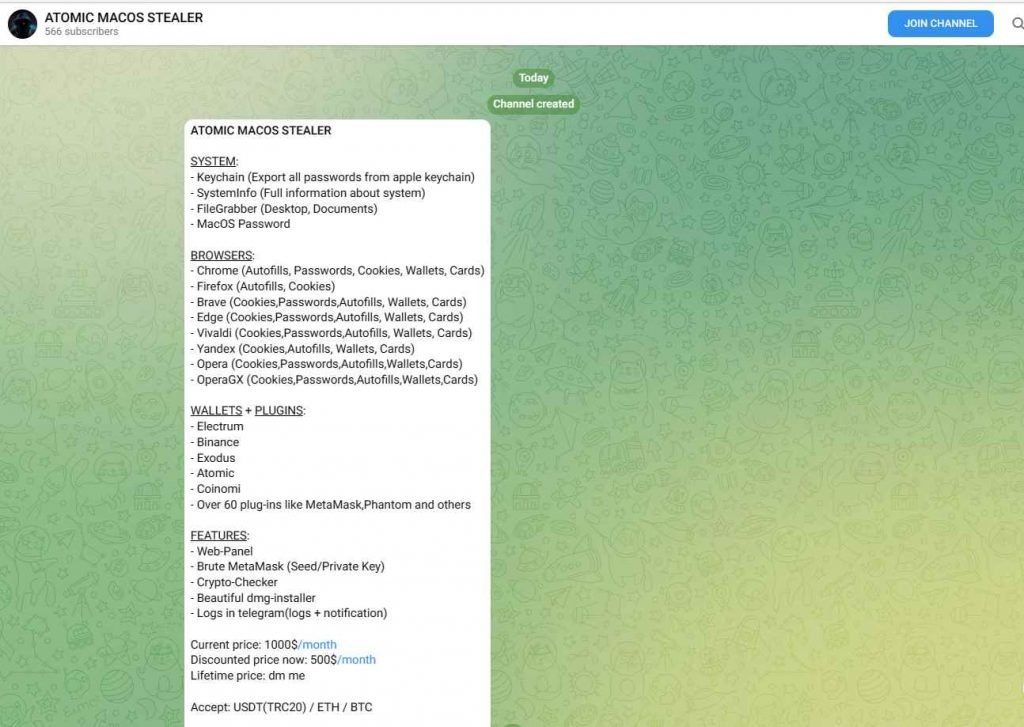
A new piece of malware known as Atomic macOS Stealer (AMOS) was recently discovered by researchers as it was being offered for sale on Telegram. The threat actor who is promoting it charges $1,000 each month and continually updates the virus that they are selling. The Atomic macOS Stealer is capable of stealing a variety of information from the computer of the victim, such as passwords saved in the Keychain, comprehensive system information, files from the victim’s desktop and documents folder, and even the macOS password itself.
One of its many capabilities is the extraction of data from web browsers and cryptocurrency wallets such as Atomic, Binance, Coinomi, Electrum, and Exodus. This is only one of its many functions. When a threat actor purchases the stealer from the creators of the stealer, they are also given a web panel that is pre-configured and ready to use for managing the victims.
In the event that AMOS is installed, it has the potential to compromise a broad range of data, some of which include the passwords for iCloud Keychain, the password for the macOS system, cookies, passwords, and credit card credentials from browsers like as Chrome, Firefox, Brave, Edge, and Opera, among others. Additionally, it has the ability to compromise cryptocurrency wallets such as Atomic, Binance, Exodus, Electrum, MetaMask, and a great number of others.
A web panel, a program called Brute MetaMask, logs in Telegram with alerts, and more features are provided to customers by the malicious party that is offering malware as a service.
The following is the message that the threat actor posted on Telegram while trying to sell the malware:
After the malware has gained access to a user’s information, it places the information into a ZIP file, compresses it, and then sends it to the malicious party via a command and control server URL.
It is imperative that users only download and install software from trusted sources, enable two-factor authentication, review app permissions, and refrain from opening suspicious links received via email or SMS messages as a result of this development, which is another sign that macOS is increasingly becoming a lucrative target beyond nation-state hacking groups to deploy stealer malware. The development is also a sign that macOS is becoming a target for cybercriminals to deploy stealer malware.
To protect against it:
Only applications from the official Apple App Store should be downloaded and installed on your device. Install an antivirus and internet security software package that has a good reputation on your computer. Make sure to use secure passwords, and implement multi-factor authentication whenever it’s possible. When it is feasible to do so, enable the biometric security capabilities of the device, such as fingerprint or face recognition, so that it can be unlocked. Always use caution before clicking on any links that are delivered to you in emails. When enabling any permissions, exercise extreme caution. Make that all of your software, including operating systems and apps, is up to date.
The software known as cPanel is used extensively online as a control panel for web hosting. At the time this blog article was being written, there were precisely 1.4 million exposed cPanel installations on the public internet.
The researchers found a vulnerability known as reflected cross-site scripting, which could be exploited without the need for any authentication. Additionally, the XSS vulnerability could be exploited even if the cPanel management ports (2080, 2082, 2083, and 2086) were not open to the outside world. This was the case regardless of whether or not they were exposed. This means that if your website is hosted by cPanel and runs on ports 80 and 443, it was also susceptible to the cross-site scripting vulnerability.
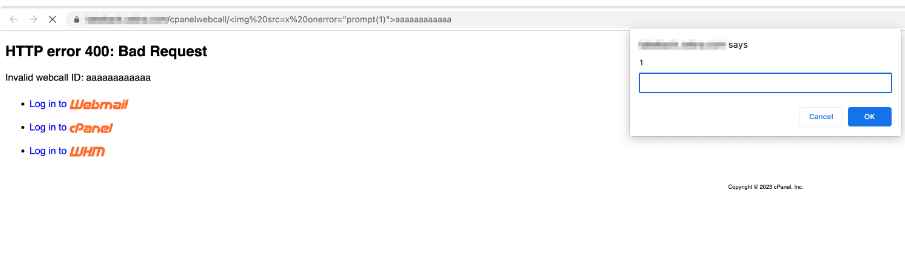
An invalid webcall ID that may include XSS content is at the heart of CVE-2023-29489, the vulnerability that it causes. When this content is displayed on the error page for cpsrvd, it is not appropriately escaped, thus enabling the XSS attack.
At @assetnote, we discovered a reflected cross-site scripting vulnerability in cPanel that affected ~1.2M assets. You can read about our work in reverse engineering cPanel and discovering this here: https://t.co/caweyh5fsE. This has been assigned CVE-2023-29489.
The repercussions of being susceptible to these dangers are quite concerning. Using cPanel with its default configuration allows malicious actors to run arbitrary JavaScript pre-authentication on almost any port on a web server. This is as a result of the proxy rules that enable access to the /cpanelwebcall/ directory even on ports 80 and 443, which were previously inaccessible.
The effect of this vulnerability is that they are able to run arbitrary JavaScript, including scripts that need pre-authentication, on practically every port of a webserver that is using cPanel with its default configuration.
The proxy restrictions are to blame for this situation. Even though it is being proxied to the cPanel administration ports by Apache on ports 80 and 443, they were still able to access the /cpanelwebcall/ directory.
Because of this, an adversary may launch attacks not only against the administrative ports of cPanel but also against the apps that are operating on ports 80 and 443.
An adversary may employ this cross-site scripting attack to take over the cPanel session of a legitimate user if the cPanel administration ports were exposed to the assault in the first place.
After successfully authenticating as a user of cPanel, it is often quite simple to upload a web shell in order to get command execution privileges for oneself.
Proof of Concept
For the purpose of demonstrating the vulnerability, the researchers supplied the following proof of concept URLs:
Please don’t be concerned if you believe that this vulnerability may be affecting your website. Because the majority of cPanel installations on the internet have the auto-update capability activated, it’s possible that you are no longer at risk of being exploited even if you don’t apply a patch. Upgrading to any of the following versions of cPanel or above will eliminate the risk associated with this vulnerability:
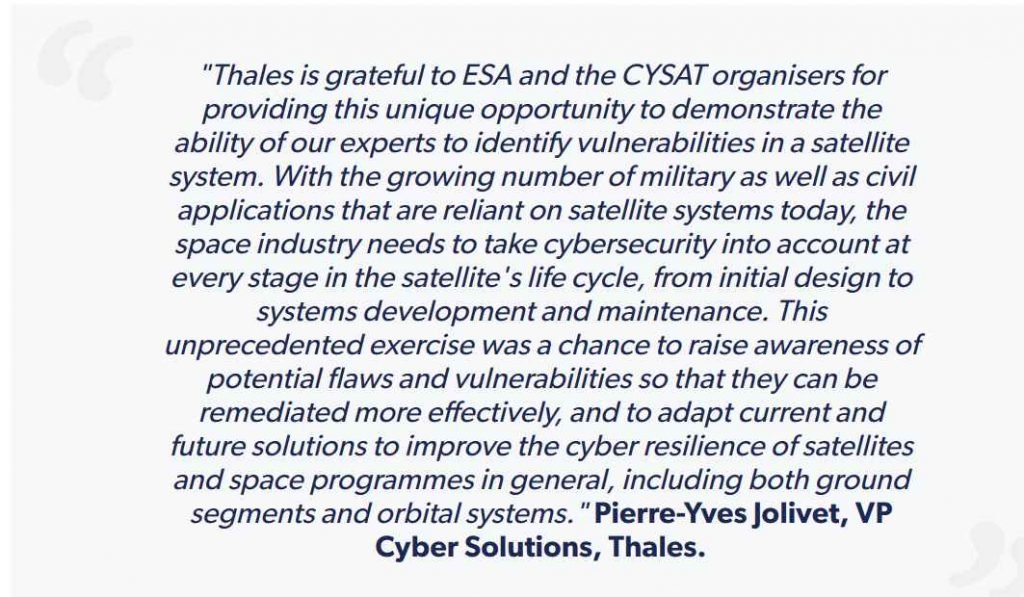
In a presentation that is being called the world’s first ethical satellite hacking exercise, cybersecurity researchers will explain how they took control of a European Space Agency (ESA) satellite this week. The ESA satellite was part of an experiment that was touted as the world’s first ethical satellite hacking exercise. The European Space Agency (ESA) issued a challenge to cybersecurity professionals working in the ecosystem of the space sector, asking them to interfere with the functioning of the OPS-SAT demonstration nanosatellite that the ESA operates. Participants made use of a wide array of ethical hacking approaches in order to seize control of the system that was used to operate the payload’s onboard camera, global positioning system, and attitude control system. Unauthorized access to these systems poses a risk of severe damage to the satellite as well as a loss of command and control over the satellite’s intended purpose. The offensive cybersecurity team at Thales collaborated with the Group’s Information Technology Security Evaluation Facility (ITSEF2) to carry out this one-of-a-kind exercise. The goal of the exercise was to show the need of a high degree of cyber resilience in the very unusual operational environment of space.
Thales, a global defense and aerospace business, was able to successfully take control of a satellite that was being operated by the European Space Agency (ESA) during a test run that the company ran. In order to demonstrate how space systems are susceptible to cyberattacks, the experiment involves breaking into the satellite’s command and control system and sending instructions. Even though the experiments were carried out in a safe and controlled setting, they shed light on the dangers that exist when it comes to the possibility of an evil actor seizing control of a satellite in the real world, which may lead to potentially catastrophic results. Due to the fact that cyber attacks continue to provide a substantial obstacle to space exploration and safety, this event highlights how important it is to ensure the security of space-based infrastructure.
The team of four cybersecurity experts from Thales gained access to the satellite’s onboard system, utilized the conventional access permissions to take control of the satellite’s application environment, and then exploited multiple vulnerabilities in order to install malicious code into the satellite’s systems. This made it feasible to compromise the data that was transmitted back to Earth, in particular by changing the pictures that were collected by the satellite’s camera, as well as to accomplish other goals, such as masking specific geographic regions in the satellite imaging while disguising their operations in order to escape discovery by ESA. The simulation was put on especially for CYSAT in order to assist in determining how a genuine cyberattack may affect civilian networks and the possible fallout from an attack of this kind.
Threat actors are actively taking advantage of critical vulnerabilities present in the PaperCut MF/NG print management software.
This exploitation aims to plant Atera remote management software onto the targeted servers to gain control over them. From more than 70,000 companies globally, it has over 100 million active users.
The vulnerabilities affecting the PaperCut MF/NG print management software are tracked as follows:-
Remote threat actors can exploit these vulnerabilities to gain unauthorized access and execute arbitrary code on PaperCut servers that have been compromised.
These flaws can be exploited without user interaction and are relatively easy to carry out, granting the attacker SYSTEM privileges. Recently, in the Shodan search engine, it has been observed that around 1700 PaperCut servers were exposed to the internet.
PoC Exploit Code
PaperCut MF and PaperCut NG versions 20.1.7, 21.2.11, and 22.0.9, and later releases, have addressed both vulnerabilities.
That’s why security experts strongly advise users to upgrade to any of these patched versions to mitigate the risks associated with these flaws.
Horizon3 has recently released technical information, and a proof-of-concept (PoC) exploit for CVE-2023-27350.
Attackers can leverage this exploit to bypass authentication and execute arbitrary code on PaperCut servers that have not been patched.
By misusing the ‘Scripting’ feature for printers, the RCE exploit enables cybercriminals to achieve remote code execution.
Although Huntress has developed a PoC exploit to illustrate the danger associated with the ongoing attacks, they have not made it publicly available.
Currently, unpatched PaperCut servers are under attack, and the exploit code developed by Horizon3 is expected to be adopted by other threat actors for launching similar attacks in the future.
The CVE-2023-27350 vulnerability has been included in the list of actively exploited vulnerabilities by CISA.
Not only that, but even CISA has directed all federal agencies to secure their systems within the next three weeks, by May 12, 2023, to prevent further exploitation.
To prevent remote exploitation of the PaperCut servers, Huntress urged administrators to immediately implement the necessary security measures that cannot currently patch their PaperCut servers.
During the analysis, experts at Horizon3 identified a JAR that contains the SetupCompleted class in:-
In the SetupCompleted flow, the session of the anonymous user is unintentionally authenticated due to an error in the code.
While this function is triggered only after a user’s password is validated via a login process. In web applications, this type of vulnerability is dubbed:-
Session Puzzling
Huntress revealed that among the Windows machines with PaperCut installed in the customer environments they safeguard, approximately 1,000 were identified.
As per their observation, nearly 900 of those machines were still unpatched, and only one had been patched among the three macOS machines they monitored.
Organizations using PaperCut must ensure they have installed either PaperCut MF or NG versions 20.1.7, 21.2.11, or 22.0.9 to prevent exploitation.
Living without the Internet is hardly imaginable today. However, the anonymity of the internet has led to the flourishing of cyber attacks and malware. Malicious software can cause damage to our devices, steal personal data, and lead to monetary loss. Therefore, protecting your computer from these threats is crucial. This article will outline some methods and resources for protecting your devices from malicious software, and explain why it’s essential to use malware removal at all times.
Tip #1: Keep Your Operating System and Software Up to Date
One of the most crucial things you can do to keep your computer secure is to keep your operating system and software up to date. Security patches are frequently released by software developers to address flaws that hackers could exploit. Failing to update your system and software leaves your computer vulnerable to potential threats.
To ensure that your operating system and software are up to date, it’s important to turn on automatic updates. This will ensure that your system gets updates as soon as they become available. Additionally, you can manually check for updates by accessing the settings for your software or operating system. By doing this, you can be certain that your computer is protected against potential threats.
Tip #2: Use Antivirus and Anti-Malware Software
Antivirus and malware removal software are essential tools for protecting your computer against malicious software such as viruses, spyware, and ransomware. These programs scan your computer on a regular basis for malware and remove it if found. By using antivirus and anti-malware software, you can safeguard your computer from malicious attacks and maintain its security.
When it comes to antivirus and anti-malware software, it’s crucial to choose a reputable and trustworthy option that offers comprehensive protection against various types of malware. With numerous software options available on the market, selecting the right one can be overwhelming. However, by doing some research and selecting the one that meets your needs, you can ensure that your computer remains protected from potential threats.
Tip #3: Use a Firewall
A firewall is a crucial security system that monitors and controls network traffic, both incoming and outgoing. It serves as a barrier between your computer and the internet, blocking unauthorized access. By utilizing a firewall, you can protect your computer from potential cyber attacks and enhance its security.
Most operating systems come with a built-in firewall that you can enable by going to your system’s settings. However, you can further increase your computer’s security by installing a third-party firewall. These firewalls offer additional features and customization options that can help you tailor the protection to your needs. By using a firewall, you can safeguard your computer against potential threats and enhance its overall security.
Tip #4: Use Strong and Unique Passwords
Using strong and unique passwords is crucial in safeguarding your device against potential cyber attacks. Cybercriminals frequently use automated programs to guess passwords and weak passwords are easily guessed, allowing them to gain access to your computer more easily. By using strong and unique passwords, you can significantly enhance your computer’s security.
To create a strong password, use a combination of letters, numbers, and symbols. Avoid using common phrases or words that are easily guessed. Additionally, do not use the same password for multiple accounts, as this can leave you vulnerable if one account is compromised. Consider using a password manager to generate and store strong and unique passwords for all your accounts. By taking these steps, you can ensure that your computer remains protected against potential threats.
Tip #5: Be Wary of Phishing Scams
Phishing scams are a type of social engineering attack that cybercriminals use to trick people into disclosing sensitive information like passwords and credit card numbers. These scams can be sent via email, text messages, or even social media. Falling prey to a phishing scam can lead to significant financial loss and compromise your personal information.
To avoid falling victim to phishing scams, it’s important to be cautious of any suspicious emails or messages. Do not click on any unknown links or download any attachments from suspicious sources. Always check the sender’s email address to ensure that it is from a legitimate source.
If you receive an email that appears to be from your bank or another financial institution, do not provide any sensitive information. Instead, contact the institution directly to confirm the authenticity of the email. By taking these steps, you can protect yourself from phishing scams and keep your personal information secure.
Tip #6: Use Two-Factor Authentication
Two-factor authentication (2FA) is a crucial security measure that adds an extra layer of protection to your online accounts. This security measure requires users to provide two forms of identification before accessing their accounts, making it more difficult for cybercriminals to access your information. Two-factor authentication can prevent unauthorized access to your accounts and protect your sensitive information from being compromised.
Many online services, such as email and social media platforms, offer two-factor authentication as an additional security measure. To enable two-factor authentication, go to your account settings and follow the instructions provided by the service. You can usually choose between receiving a code via text message or using an authentication app. Enabling two-factor authentication can greatly improve the security of your accounts and help keep your personal information safe.
Tip #7: Back Up Your Data Regularly
The best practice to protect your data from cyber attacks is to regularly back it up. If your computer is infected with malware or hacked, you might lose all your data. By backing up your data regularly, you can easily restore your data in the event of a cyber attack.
In conclusion, adhering to the tips and tools mentioned above can not only safeguard your personal or business data but also prevent potential embarrassment and costly fines. Use anti-virus and anti-malware software.
DANGEROUS 0 DAY VULNERABILITY IN GOOGLE CHROME : CVE-2023-2136
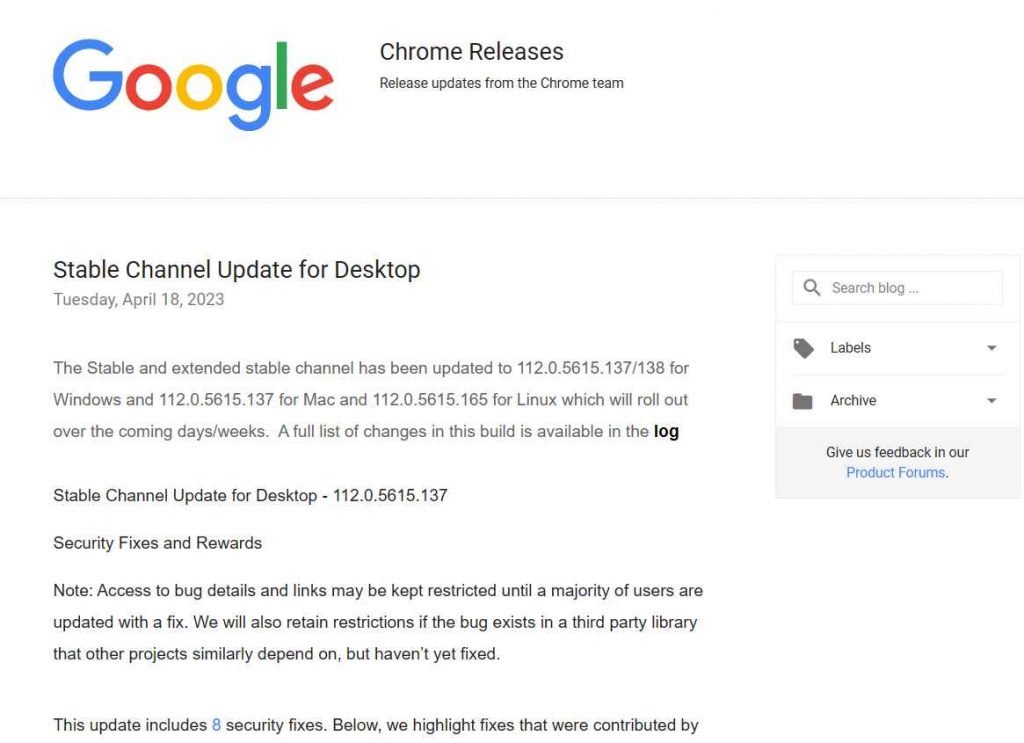
The previous week, Google put out an emergency security fix for its browser, and today, the company rolled out another emergency security update to address a vulnerability that is being exploited in the wild. The update is now available for desktop versions of Google Chrome as well as the Android version of Chrome. Users are encouraged to install updates as soon as they are made available in order to safeguard their devices against prospective attacks that exploit these vulnerabilities.
Google has listed five of the eight security problems that were addressed in the most recent version to Google Chrome. Google says that these issues have been handled. The official Chrome Releases blog has provided documentation of these recent improvements. On the other hand, Google does not make publicly known the security flaws that were found during the company’s own internal investigations.
Out-of-bounds memory access in the Service Worker API is a high-risk vulnerability (CVE-2023-2133).
Out-of-bounds memory access in the Service Worker API is a high-risk vulnerability (CVE-2023-2134).
Use after free in DevTools is a high-risk vulnerability (CVE-2023-2135).
Integer overflow in Skia, a high-risk vulnerability( CVE-2023-2136).
Heap buffer overflow in sqlite, rated as medium severity (CVE-2023-2137).
According to Google’s findings, the security flaw CVE-2023-2136 is being actively exploited in the wild.
A 2D graphics library called Skia, which is frequently used in web browsers, operating systems, and other software applications, has a flaw known as CVE-2023-2136, which is an integer overflow vulnerability. An integer overflow happens when an arithmetic operation results in a number that is more than the maximum limit of the integer type. This causes the value to wrap around and become either much smaller or much bigger than what was meant for it to be. An integer overflow may be avoided by ensuring that the maximum limit of the integer type is not exceeded.
This indicates that threat actors have already started exploiting this vulnerability in order to target systems and breach them. The results of a successful exploit may be somewhat variable, but they almost always involve at least one of the following: unauthorized access to sensitive information; data corruption; or even a total system takeover.
The Chrome Stable channel has been updated to version 112.0.5615.137 for Windows and Mac, and it has been updated to version 112.0.5615.135 for Android; these updates will roll out over the next few days or weeks.
Every day tens of thousands of Spear phishing emails are sent to millions of victims around the world.
Cyber-attacks have different pathways now; they can strike you from inside or outside, with equal damages across your network.
Targeted takedowns could be critical if analyzed and executed with absolute precision.
In this guide. We’ll look at Spear Phishing Attacks, techniques, examples, mitigation procedures, and a few best practices.
What is Spear Phishing?
Spear Phishing is a malicious practice that executes via Email campaigns that hackers research their target audience, understand their likes and dislikes, study their day to day operations, and customize the mail to steal sensitive data and install malware. This type of targeted email campaign deployment to infiltrate their target audience group is called Spear Phishing Attack.
Any anonymous email that drops into your inbox from an unknown sender can be assumed to be phishing Attack. Blasting millions of emails to the database of email id’s with malicious intent is called phishing.
It could be for the deployment of malware, remote code executions and more, however, this phishing may not be rewarding for hackers.
How does Spear Phishing Attack Work?
Spear Phishing is executed in four stages,
Target identification
Studying the target’s behavior
Customizing the message
Blasting emails
Target identification:
The hackers initially identify their target victims by narrowing down their audience based on their motive of the campaign, this could be targeted at corporate in a particular vertical or patients of a healthcare company.
The identification procedure is divided into two stages, the primary and secondary target, primary target will be executives working for an MNC, who will be receiving the blasted emails and the secondary target will be the key ones who will have access to business sensitive information.
These primary targets that have become victims to the spear phishing attack will be manipulated to exploit the secondary targets.
Studying the target’s behavior:
Gathering information about the targeted audience by digging deep into their social media profiles, job sites, portfolios, comments, likes and groups they belong to, and communities they belong to. One way or another the hackers will gain their personal information like email, phone numbers, first name, surname, history of experience, schooling, college, area of expertise and more which they will use to influence their potential targets.
Customizing the message
Hackers will customize their emails and message based on the information collected from these external resources for better open rates and reduced bounce rates. Once a successfully established message is obtained they will proceed for the email blasting procedure.
Blasting emails
After all the research hackers will prepare their attack vector and strategy to ensure the mail gets delivered to the target audience inbox and not into the spam folder.
They will disguise the sender details to be a legitimate one, to ensure the proper delivery of the mail is made and the end user opens it as expected.
After opening the email, the user will click a link or download an attachment-based on the content as it is made accurate.
With all research, the CTR will definitely be high. Thanks to the reliability of the mail crafting procedures the hackers have implemented.
What are 3 types of Spear-phishing emails?
Usually, hackers prefer one of three techniques below to manipulate their target audience.
Impersonation
Personalization
Emotional Response
Impersonation
As the name defines, hackers pretend to be someone else or a legal entity to establish trust and elude with data. This technique is very commonly used by disguising a genuine person or entity in the sender section with an indistinguishable subject line.
Personalization
This technique has an excellent success rate, as the message is very much customized for the recipient so he believes that this email will be of use to him or for his profession in general.
Emotional Response
This technique creates a fear, happiness, shock or surprise to make the end user open the mail and click/download the malicious content as planned.
What is an example of spear phishing?
Examples of Spear Phishing Attacks are very much targeted and often have disastrous outcomes for enterprises, below are few examples for successful spear phishing attacks.
Ubiquite Networks Inc
This Company paid more than USD $40 million in 2015, as a result of spear phishing attack because of a CEO fraud. The emails were impersonated as if they were from senior executives to transfer funds to a third party entity in Hong Kong, which was then found to be some anonymous entity and not a genuine third party.
RSA
RSA is a leading security firm but unfortunately, even they themselves become victim to a targeted spear phishing attack in 2011.
Mails with subject line ‘2011 Recruitment Plan’ were blasted, though most of it was marked as spam one user opened it, leading to the deployment of malware into the infected system and eventually gave remote access to the hackers to infiltrate the computer and network.
Amazon
Amazon is another leader among the fortune 500 companies, targeting this firm will definitely improve your success rates for spear phishing.
In 2015, a mass spear phishing attack was unleashed targeting Amazon customers with a subject line ‘Your Amazon.com order has been dispatched’, followed by a code.
However, unlike the normal emails from Amazon, where you could see the dispatch status directly in the mail or via your Amazon account, in this case, it was mentioned to be available in the attachment.
Few employees become prey to this maneuver and a Locky ransomware was downloaded and installed in the infected systems to encrypt data and demand ransom.
How can you protect yourself from phishing?
Spear phishing prevention is a process that depends on different factors like awareness, tools, education, emotional response and more. Below are the best practices that both organizations and individuals should practice to protect yourself from phishing,
Increasing cyber awareness
Employing cyber tools
Identifying fake emails
Avoiding clicks and attachments
Avoid mails that force urgency
According to a report from Intel 97% of people were unable to identify a phishing mail. The best suggestion to apply spear phishing prevention by creating cyber awareness and improving cyber education. Spear phishing prevention is a process that will depend on a number of factors and their amount of precision.
Increasing cyber awareness:
Organizations and individuals should improve their cyber awareness either themselves or through cyber guidelines. Understanding the attack vectors, their mechanisms, procedures and possible procedures can help the end users and individuals prepare themselves any potential phishing scams and ensure they avoid them all times.
Employing cyber tools
As already mentioned in earlier sections, no tools are good against phishing attacks but properly configured browser policies, email filters, and endpoint configurations can reduce the chances of becoming a victim to phishing scams. GPO policies for stronger passwords and firewall configurations could also help organizations secure their users against phishing mails.
Identifing fake emails
Users can also distinguish between a genuine and fake mail by looking at the subject line, the sender and the relativity. Based on the content of the email this can be re-confirmed. Any unknown senders or purpose of the mail could be a potential phishing scam.
Avoiding clicks and attachments
Not all phishing scams do work when the mail is opened, most is switched ON only when the link in the mail is being clicked or an attachment is being opened. So the users need to ensure they are aware of the links and attachments, perhaps by hovering over the link or looking at the attachment file.
Avoid mails the force urgency
Users should avoid emails that create an urgency; emotional response is what will become prey to these sort of phishing emails. Any emotional mail that create a fear, surprise, shock, or personalized emotional response based on your tax, and health metrics should be avoided.
Spear Phishing Infographic
Organizations need to have few policies and configurations in place to keep phishing mails away from the enterprise network, however when users expose themselves to public networks only a self-analysis and cyber practices can keep them safe against spear phishing attack.
If you guys have ever experienced a phishing email, or do have an example to share, please free to comment below your experiences and message so we will see some real-time information on this threat.
Spear phishing attacks are hard to detect and mitigate, so keep your browsers and firewalls active and updated.
Mykola Srebniuk, Head Of Information Security, MacPaw Vira Tkachenko, CTO, MacPaw
MacPaw has been operating in Kyiv since the start of a full-scale war in Ukraine. This session will outline how the organization prepare its infrastructure for the Russian invasion, how plans were implemented, and the company’s security and Business continuity were ensured. This session will be helpful for businesses in various cases of natural and cyber disasters, from hurricanes and typhoons to cyberattacks.
Cyber Wars gives you the dramatic inside stories of some of the world’s biggest cyber attacks. These are the game-changing hacks that make organisations around the world tremble and leaders stop and consider just how safe they really are. Charles Arthur provides a gripping account of why each hack happened, what techniques were used, what the consequences were and how they could have been prevented.
Cyber attacks are some of the most frightening threats currently facing business leaders, and this book provides a deep insight into understanding how they work and how hackers think as well as giving invaluable advice on staying vigilant and avoiding the security mistakes and oversights that can lead to downfall. No organization is safe, but by understanding the context within which we now live and what the hacks of the future might look like, you can minimize the threat.
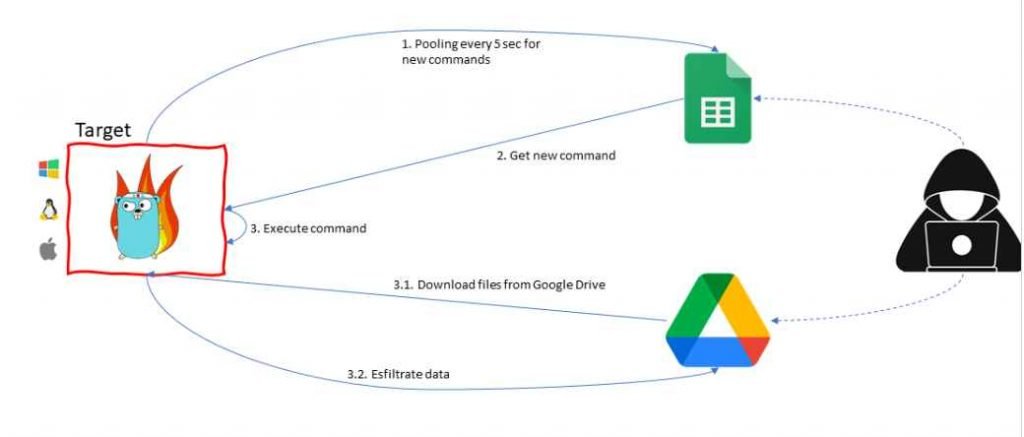
Researchers from Google’s Threat Analysis Group (TAG) presented their findings in the company’s Threat Horizons Report. Their findings showed that the hacking group APT41 was misusing the GC2 red teaming tool in its attacks. GC2, also known as Google Command and Control, is an open-source project that was built specifically for red teaming operations. It was written in the programming language Go. GC2 (Google Command and Control) is an application for Command and Control that enables an adversary to exfiltrate data using Google Drive and execute instructions on the target system using Google Sheet. During Red Teaming operations, this software was constructed in order to give a command and control that does not need any specific set up (such as a custom domain, VPS, CDN, etc.). This was done in order to make the application more accessible.
In addition, the application will only connect with Google domains (*.google.com) in order to make detection more challenging.
In October 2022, the Threat Analysis Group (TAG) of Google was successful in disrupting a campaign that was being run by HOODOO, a Chinese government-backed attacker also known as APT41. This effort was aimed at a Taiwanese media organization, and it consisted of sending phishing emails that included links to a password-protected file that was housed on Drive. The payload was a piece of open source software known as “G oogle Command and Control” (GC2), which was a red teaming tool. The program is written in Go, and it receives instructions from Google Sheets. These orders are used to exfiltrate data to Google Drive, which is presumably done to conceal the malicious behavior. After it has been installed on the victim’s system, the malware will query Google Sheets in order to collect orders from the attacker.
The attacker is able to download more files from Drive onto the target machine using GC2, in addition to exfiltrating data via Drive. HOODOO has previously made use of GC2 in the month of July 2022 in order to target an Italian job search website. These attacks provide light on a few critical patterns in the security landscape posed by threat actors linked with China. First, rather than building its own unique tools, Chinese advanced persistent threat (APT) organizations are increasingly turning to publicly accessible tooling like Cobalt Strike and other “pentest” software that can be purchased or found on sites like Github. This pattern may be seen, for instance, in HOODOO’s implementation of GC2. Second, the number of tools that are created in the Go programming language has been steadily increasing over the last several years. This is most likely attributable to the adaptability of the Go language as well as the ease with which module components may be added or removed. In conclusion, the targeting of Taiwanese media exemplifies the ongoing overlap of public sector threat actors attacking private sector entities with minimal links to the government.
The Google Cybersecurity Action Team (GCAT) and Mandiant conducted research on threat actors’ usage of Google Drive for hosting malware. The research revealed that threat actors store malware in Google Drive as encrypted ZIP files, most likely in an attempt to avoid detection. For instance, in the fourth quarter of 2022, Mandiant discovered a campaign that hosted the URSNIF binary on Google Drive in order to spread the URSNIF malware. URSNIF is a well-known piece of generic intrusion software that has a history of being used as a banking bot. Phishing emails were sent out by threat actors in an attempt to trick potential victims into downloading password-protected ZIP files that included harmful material. This content was subsequently installed on the victims’ computers. The DICELOADER malware, which is another kind of broad intrusion malware that may be used for a variety of objectives, was employed by threat actors in the latter part of the fourth quarter of 2022 to implement an extension of this approach. During this campaign, Mandiant discovered phishing emails that had malicious links to Google Drive. Clicking on these links caused the recipient’s computer to download a ZIP file that included an LNK file. The Trojanized Zoom MSI installer was later downloaded and installed as a result of the LNK file, which ultimately resulted in the infection caused by the DICELOADER. Based on the phishing emails that were discovered by Mandiant, this campaign gave the impression that it was aimed at the financial services industry. The attackers further concealed their destructive purpose from the Google Drive download by removing the malware binary from the downloaded ZIP file and separating the two. Google took a number of measures to put a stop to this behavior at the time, and the company also implemented new investigative skills to improve its ability to identify and thwart future instances of similar malicious usage of Google Drive.
These techniques bring to light the risk that is posed by threat actors using cloud services to host malicious content and their ongoing development of evasion techniques to avoid detection. For example, they have transitioned from using encrypted ZIP files that contained malware to encrypted ZIP files that linked to trojanized legitimate installers. Because this trend is expected to continue, businesses should exercise extreme caution while monitoring downloads, especially from websites that seem to be trustworthy.
Lynis is an open source security auditing tool. Its main goal is to audit and harden Unix and Linux based systems. It scans the system by performing many security control checks. Examples include searching for installed software and determine possible configuration flaws.
Many tests are part of common security guidelines and standards, with on top additional security tests. After the scan, a report will be displayed with all discovered findings. To provide you with initial guidance, a link is shared with the related Lynis control.
Lynis is one of the most trusted automated auditing tool for software patch management, malware scanning and vulnerability detecting in Unix/Linux based systems. This tool is useful for auditors, network and system administrators, security specialists and penetration testers.
Intended audience:
Lynis assists auditors in performing Basel II, GLBA, HIPAA, PCI DSS and SOX (Sarbanes-Oxley) compliance audits.
Security specialists, Penetration Testers, System auditors, System/network managers, Security Engineers.
Lynis is compatible with many Operating Systems, such as:
AIX
Arch Linux
BackTrack Linux
CentOS
Debian, DragonFlyBSD
Fedora Core, FreeBSD
Gentoo
HPUX
Kali, Knoppix
Linux Mint
MacOS X, Mageia, Mandriva
NetBSD
OpenBSD, OpenSolaris, openSUSE, Oracle Linux
PcBSD, PCLinuxOS
Red Hat Enterprise Linux (RHEL) and derivatives
Sabayon, Scientific Linux, Slackware, Solaris 10, SuSE
TrueOS
Ubuntu and derivatives
Lynis can alsobe auditing software such as :
Database servers: MySQL, Oracle, PostgreSQL
Time daemons: dntpd, ntpd, timed
Web servers: Apache, Nginx
Once lynis starts scanning your system, it will perform auditing in a number of categories:
System tools: system binaries
Boot and services: boot loaders, startup services
Kernel: run level, loaded modules, kernel configuration, core dumps
Memory and processes: zombie processes, IO waiting processes
Users, groups and authentication: group IDs, sudoers, PAM configuration, password aging, default mask
Shells
File systems: mount points, /tmp files, root file system
Storage: usb-storage, firewire ohci
NFS
Software: name services: DNS search domain, BIND
Ports and packages: vulnerable/upgradable packages, security repository
Security frameworks: AppArmor, SELinux, security status
Software: file integrity
Software: malware scanners
Home directories: shell history files
How Lynis works:
In this Kali Linux Tutorial , To run it for the first time, it is recommended to use -c paramater. -c parameter means doing all tests to check the systems. If you want to put the Auditor name, just add –auditor parameter there. Here’s some
Once Installed then Start with Auditor or Pentester name .
# lynis -c –auditor “BALAJI”
Figure 1. Initialize
Figure 2. System Tools
Figure 3. Boot & Services and Kernel
Figure 4. Users and Group
Figure 5. Shell and storage
Figure 6. Software, Ports and Packages
Figure 7. Networking and Printer
Figure 8. Email, Firewalls and Web Server
Figure 9. SSH, SNMP and Databases
Figure 10. PHP, Squid Proxy and Logging
Figure 11. Inetd, Banner and Cron
Figure 12. Accounting, NTP and Cryptography
Figure 13. Virtualization, Security Frameworks and File Integrity
Figure 14. Malware Scanners, System Tool and Home directory
Figure 15. Kernel Hardening
Figure 16. Hardening, Custom Tests and Result
Figure 17. Hardening Index
Run Lynis with Custom Tests
Your system may not need to run all the tests. If your server not running a web server, you don’t need to test it. For this purpose, we can use –tests parameter. The syntax is :
# lynis –tests “Test-IDs”
there are more than 100 tests that we can do. Here are some list of Lynis Tests-ID.
[04:57:04] Reason to skip: Test not in list of tests to perform
KRNL-5770 (Checking active kernel modules)
KRNL-5788 (Checking availability new kernel)
KRNL-5820 (Checking core dumps configuration)
Below is a sample command to run Check uptime of system and Checking core dumps configuration tests. If you want to add more tests, just add more Test-ID separated by space.
# ./lynis –tests “BOOT-5202 KRNL-5820”
To get more Tests-IDs, you can find it inside /var/log/lynis.log. Here’s a trick how to do it.
1. First, we need to run lynis with -c (check-all) parameter.
# ./lynis -c -Q
2. Then look at inside /var/log/lynis.log file. Use cat command and combine it with grep. Let say you want to search Test-ID which related to Kernel. Use keyword KRNL to find it.
# cat /var/log/lynis.log | grep KRNL
Below is a complete keywords of Test-IDs that available in Lynis.
If you feel that put a lot of Test-IDs is painful, you can use –test-category parameter. With this option, Lynis will run Test-IDs which are included inside a specific category. For example, you want to run Firewall and Kernel tests. Then you can do this :
# ./lynis –tests-category “firewalls kernel”
Run Lynis as Cronjob
Since security needs consistency, you can automate Lynis to run periodically. Let’s say you want to run it every month to see if there is any improvement since the last Lynis run. To do this, we can run Lynis as a cronjob. Here’s a sample cronjob to run it every month.
cd /usr/local/lynis ./lynis -c –auditor “${AUDITOR}” –cronjob > ${REPORT}
mv /var/log/lynis-report.dat ${DATA}
# End
Save the script into /etc/cron.monthly/lynis. Don’t forget to add related paths (/usr/local/lynis and /var/log/lynis), otherwise the script will not work properly.
Whether you’re a large or small business, network security is something you can’t ignore.
Threat actors can and will, infiltrate businesses of any size wreaking havoc on computer systems, maliciously encrypting data, and in some cases completely destroying a company’s ability to stay in business.
While the latter situation isn’t that common, there have been several recent instances where poor network security has led to significant security breaches.
A similar attack led to a breach of CISCO’s systems, and Activision ended up being hacked after an SMS phishing attack, which reportedly led to a significant data breach of Activision’s IP and employee data.
These breaches signal the need for better network security practices, and they also show how single security measures are not enough.
All of the breaches mentioned above happened because of a weakness in each company’s MFA practices, but they could’ve been mitigated by other security measures including zero trust granular access rules.
Organizations of all sizes need a network security strategy with modern, cloud-based tools and technologies to stay secure:
Single Sign-On (SSO) with Multi-Factor Authentication (MFA)
Before we even get to network security, organizations should deploy a Single Sign-On (SSO) identity provider with Multi-Factor Authentication (MFA) support.
SSO allows users to access multiple applications using one login.
This makes it easier for users to integrate network security practices into their daily routine without much friction, while the IT team has a much easier time keeping everyone organized.
MFA, meanwhile, adds an extra layer of security by requiring users to provide two or more pieces of evidence to prove their identity.
This is typically a username and password, followed by a one-time code, or biometric authentication such as a fingerprint or facial recognition.
Under an MFA scheme, you can require just a second authentication factor or multiple depending on the level of security you need and your threat model.
SSO with MFA also reduces the risk of password-related security incidents, such as password theft or reuse.
It also makes it harder for hackers to access your network since they have to not only steal the password but somehow obtain the second or even third factor to finally break in.
But as we mentioned at the beginning of this article there are ways to get around MFA security measures, so how do you make sure that doesn’t happen?
It starts with training and clearly defined policies that convey to employees that IT teams and outside security contractors will never ask them for their MFA security codes.
Second, you can increase the difficulty of MFA for higher privileged accounts such as a number-based challenge that requires the user to see both sets of numbers to correctly answer the MFA challenge.
Biometric measures can also be effective as long as employees understand they should never authorize an MFA request they didn’t initiate.
Zero Trust Network Access (ZTNA)
One of the biggest and most important strategies in modern network security is the deployment of Zero Trust Network Access. ZTNA assumes that all network traffic is untrusted, even if it originates from inside the network itself.
ZTNA requires that users prove their identity, and then meet specific security requirements before accessing network resources.
This includes granular access rules that can be user- or group-specific. Then context-based verification allows organizations to limit access to resources based on specific criteria, such as device posture, location of the user requesting access, and time of day.
These contexts are also continually verified to ensure that a user’s security posture doesn’t suddenly change, which can be an indication of malicious activity.
Device posture is an important part of context since it demands that user devices meet certain security requirements before accessing resources.
This can be criteria such as the presence of a specific antivirus suite, a custom security certificate, and a minimum operating system version, among others.
When you put it all together Zero Trust Network Access reduces the risk of unauthorized access to sensitive data and resources.
This is a far better approach than the legacy-based VPN and firewall. Under the old model, you would log in with a VPN, and then once you had access to company resources that was it.
There were limited access rules about who could see what and no context-based requirements with continuous verification.
That meant that once a hacker gained access to a system they had an easier time achieving lateral movement (moving from one server or resource to another).
After lateral movement, hackers would often obtain higher privileged account credentials ultimately gaining access to employee and customer data, or sensitive trade secrets.
ZTNA provides better control over network access, which enables organizations to detect and respond to security incidents more effectively.
Malware Protection
Malware is one of the biggest and most common threats to network security.
It can infect computers and networks leading to damage to computer systems, malicious data encryption (ransomware), and data exfiltration.
Malware protection solutions are designed to detect and prevent malware from infecting your network via the most common vehicle for infiltration: the Internet.
While you can get infected through malicious USB keys and drives, the most common way is through a malicious website or downloading a malicious file from the Internet.
Malware protection guards against these threats by analyzing web traffic to identify and block malware.
This usually includes a number of techniques such as signature-based detection, behavior-based detection, and virtual code emulation, to identify and block malware.
Putting together a proper malware protection solution can prevent everything from known malware infections to zero-day exploits and advanced persistent threats (APTs).
Web Filtering
Web filtering is a security mechanism that blocks access to malicious websites and content.
This is a list-based solution that blocks known malicious websites, and it can also be used to prevent employees from venturing into problematic areas of the Internet that may violate company policies, break local laws, or simply be time-wasting distractions.
The focus, however, is to reduce the risk of employees accessing malicious websites and content, which can lead to malware infections, data breaches, and other forms of cyber threats.
Web Filtering can also reduce the workload for IT teams if they no longer have to deal with issues related to web usage.
Compliance
Although not directly part of network security, compliance is a key consideration when looking at tools and technologies to keep your network secure.
Many companies are responsible for maintaining records for their customers including private information such as health data, credit card data, addresses, and more.
Holding onto information like this as a necessary part of your business only increases the need for solid network security as the consequences of a breach are that much greater.
That’s why Zero Trust Network Access and other modern tools are so important.
Under a traditional perimeter-based approach hackers will have an easier time obtaining sensitive information after a successful breach.
Choosing the Right Solution
Now that we understand what tools you need, how do you choose the right network security solution for your organization?
First, you need to anticipate growth and increased demand for your network security needs.
Opt for solutions that can scale with your business, as well as offer the flexibility to adapt to new threats, and regulatory requirements. Quite often cloud-based platforms are the best choice when it comes to flexibility.
Cost is another important issue; network security investment isn’t just about upfront costs.
There can be many ongoing expenses, especially for hardware-based solutions that require regular maintenance, updates, and support.
And don’t forget about potential hidden costs such as additional licensing fees for certain features or upgrades after your initial service contract expires–it pays (literally) to do your due diligence to discover any potential hidden costs.
If your team is too small to allow for a full-time security expert then consider alternatives such as managed service providers (MSPs).
These specialized organizations offer a wide range of fully managed IT services. By outsourcing some or all of your network security functions to an MSP, your organization can benefit from the expertise and resources of a dedicated security team.
MSPs typically offer 24/7 monitoring and support, threat intelligence, and access to the latest security technologies, ensuring that your organization’s network is continuously protected.
Suppose you have pre-existing systems that cannot be replaced or are crucial for your business. In that case, you should also consider solutions that offer seamless compatibility with those systems.
Some common pre-existing hardware includes a data center firewall or possibly SD-Wan appliances.
By considering issues such as scalability, compliance, the total cost of ownership, and legacy integration, you can make an informed decision and select the most suitable network security solution for your organization.
Perimeter 81 Checks All the Boxes
Putting together all of these essential network security features and tools is easy with Perimeter 81.
This cloud-based, converged network security solution provides comprehensive network security focusing on ease of use, lightning-fast deployment, and easy scalability.
Most importantly, however, Perimeter 81 allows you to use ZTNA, Malware Protection, and Web Filtering from a single management console for easier all-around management.
If your ZTNA needs are simpler than most you can also use Perimeter 81’sFirewall as a Service to protect on-prem and cloud-based resources.
While you can permit access to all services to everyone in the company using the firewall, that is not recommended as granular access control is simple to implement with Perimeter 81 even for those with seemingly basic requirements.
A comprehensive network security strategy is critical for all organizations that want to protect their network and data from cyber threats.
This checklist allows organizations to build a robust and effective network security strategy that meets their specific needs and requirements.
Hackers were able to acquire access to individuals’ personal information after Hyundai announced a data breach that affected vehicle owners in Italy and France as well as those who had scheduled test drives with the automaker. According to Troy Hunt, the author of the website “HaveIBeenPwned,” the event has caused the personal data of clients to become public.
The letter also makes it clear that the individual who hacked into Hyundai’s database did not take any financial information or identifying numbers. It is unknown how many Hyundai customers have been impacted by this event, how long the network attack lasted, or what additional nations may be at risk. Customers of a South Korean automobile manufacturer are being cautioned to be wary of unsolicited e-mails and SMS messages that pretend to come from the company. These communications might be efforts at phishing or social engineering. In response to the incident, Hyundai claims it has enlisted the help of information technology specialists, who have taken the affected systems down while new security measures are put into place. In February of 2023, the business released emergency software patches for a number of car models that had been compromised by a simple hack with a USB cable, which had made it possible for criminals to take the vehicles.
On the other hand, the Japanese automaker Toyota has admitted that there may have been a breach of consumer data due to security flaws at its operations in Italy. Throughout the course of more than one and a half years, up until this past March, Toyota Italy carelessly disclosed confidential information. In particular, it divulged confidential information on its Salesforce Marketing Cloud and Mapbox APIs. Threat actors might utilize this information to their advantage to acquire access to the telephone numbers and email addresses of Toyota customers and then use those details to start phishing attacks on those customers. According to the findings of the research team at Cybernews, the organization exposed credentials to the Salesforce Marketing Cloud, which is a supplier of software and services related to digital marketing automation and analytics. Threat actors might get access to phone numbers and email addresses, as well as customer monitoring information, as well as the contents of email, SMS, and push-notification messages by abusing the data. Moreover, Toyota Italy exposed the application programming interface (API) tokens for the software business Mapbox. These tokens were used to access map data. Although while the data is not as sensitive as the credentials for the Salesforce Marketing Cloud, it is still possible for threat actors to misuse it in order to query a large number of queries and drive up Toyota’s API use costs.
Toyota is not the only automaker that has lately put itself as well as its consumers in Italy in a vulnerable position. In January of this year, the Indian branch of Toyota Motor announced a data breach, claiming that it was possible that the personal information of some of its customers had been exposed.
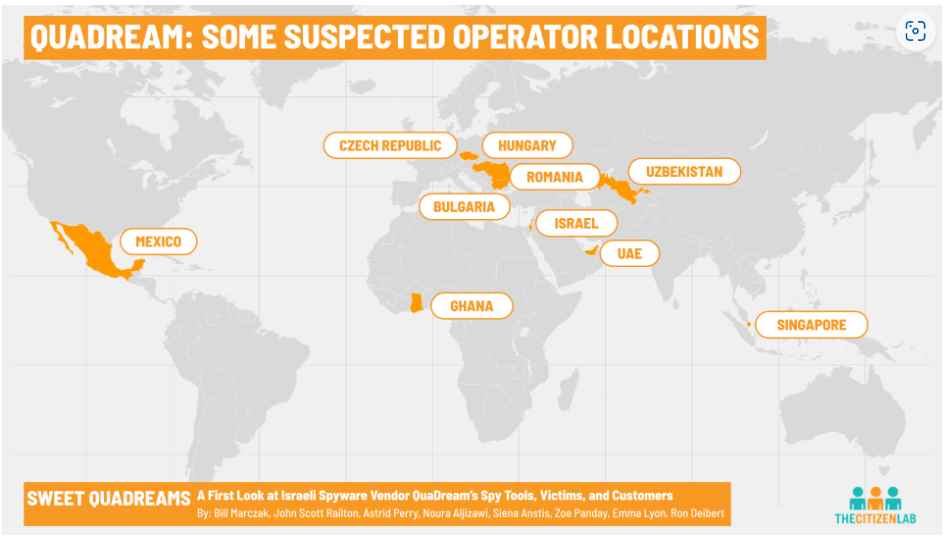
Security researchers have uncovered fresh malware with hacking capabilities comparable to those of Pegasus, which was developed by NSO Group. The software, which is sold by an Israeli firm named QuaDream, has previously been used by customers to target journalists, political opposition leaders, and an employee of an NGO. The company that makes and sells the spyware is called QuaDream.
NEW REPORT: SWEET QUADREAMS: A first look at #spyware vendor QuaDream’s spy tools, victims and customers. We identified traces of suspected exploit deployed against iOS versions 14.4 and 14.4.2 and possibly other versions as zero-day vulnerability. https://t.co/u7jcxJpu9H
The malware was spread to the victims’ phones when the operators of the spyware, who are thought to be government customers, sent them an invitation to an iCloud calendar. The cyberattacks took place between the years 2019 and 2021, and the term “Reign” is given to the hacking program that was used.
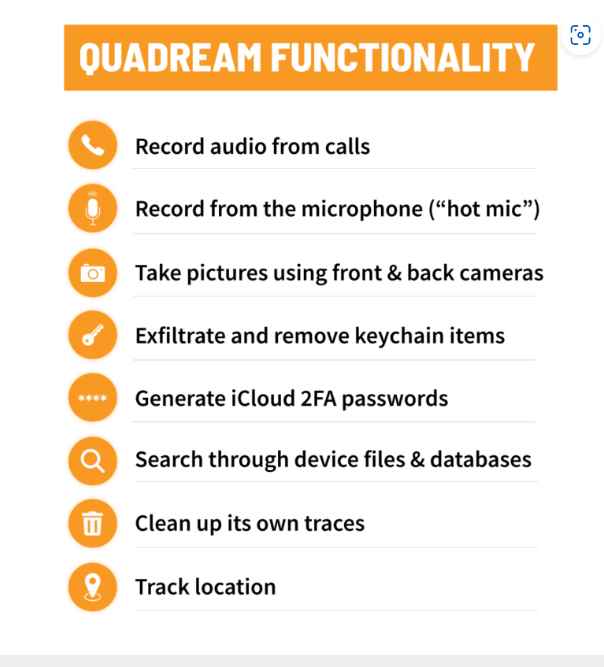
A phone that has been infected with Reign can, similar to a phone that has been infected with Pegasus, record conversations that are taking place near the phone, read messages that are stored on encrypted apps, listen to phone conversations, track the location of a user, and generate two-factor authentication codes on an iPhone in order to break into a user’s iCloud account.
Apple, which has been marketing its security measures as being among the finest in the world, has taken yet another hit as a result of the recent disclosures. It would seem that Reign poses an unprecedented and significant danger to the security of the company’s mobile phones.
The spyware that was built by QuaDream attacks iPhones by having the operators of the malware, who are believed to be government customers, issue an invitation to an iCloud calendar to the mobile users of the iPhones. Since the calendar invites were issued for events that had been recorded in the past, the targets of the hacking were not made aware of them because they were sent for activities that had already occurred.
Since users of the mobile phone are not required to click on any malicious link or do any action in order to get infected, these kind of attacks are referred to as “zero-click” attacks.
When a device is infected with spyware, it is able to record conversations that are taking place nearby by taking control of the recorder on the device, reading messages sent via encrypted applications, listening in on phone calls, and monitoring the position of the user.
The malware may also produce two-factor authentication tokens on an iPhone in order to enter a user’s iCloud account. This enables the spyware operator to exfiltrate data straight from the user’s iCloud, which is a significant advantage. In contrast to NSO Group, QuaDream maintains a modest profile among the general population. The firm does not have a website and does not provide any additional contact information on its page. The email address of Israeli attorney Vibeke Dank was included on the QuaDream business registration form; however, she did not respond to a letter asking for her opinion.
Citizen Lab did not name the individuals who were discovered to have been targeted by clients while they were using Reign. However, the organization did say that more than five victims were located in North America, Central Asia, south-east Asia, Europe, and the Middle East. These victims were described as journalists, political opposition figures, and an employee of an NGO. In addition, Citizen Lab said that it was able to identify operator sites for the malware in the countries of Bulgaria, the Czech Republic, Hungary, Ghana, Israel, Mexico, Romania, Singapore, the United Arab Emirates, and Uzbekistan.
In a security report that was published in December 2022 by Meta, the corporation that owns Facebook, the name of the firm was mentioned briefly. The report defined QuaDream as being an Israeli-based startup that was created by former NSO personnel.
At the time, Meta stated that it had removed 250 accounts on Facebook and Instagram that were linked to QuaDream. The company believed that the accounts were being used to test the capabilities of the spyware maker using fake accounts. These capabilities included exfiltrating data such as text messages, images, video files, and audio files.
The discovery of Reign underscores the continuous spread of very powerful hacking tools, even as NSO Group, the developer of one of the world’s most sophisticated cyberweapons, has received intensive investigation and been banned by the Biden administration, likely limiting its access to new clients. NSO Group is the maker of one of the most advanced cyberweapons in the world.
Better to have USB data protection and not need it, than need it and not be prepared.
A selection of PortaPow USB condoms, also known as data blockers
There are three things that I make sure I do when I’m out and about. I seek out the best coffee I can find. I make sure I use a VPN when using public Wi-Fi, and I always make sure I use a USB data blocker, otherwise known as a USB condom, whenever I use a third-party charger (such as those you find in coffee shops).
A USB condom is a small dongle that adds a layer of protection between your device and the charging point you’re attaching it to.
Remember, USB isn’t just a charging protocol, it also allows data to flow back and forth, and while most of the time this data flow is safe, it is possible to create a malicious charging port that can do bad things, such as plant malware on your device or steal your data.
Shockproof Carrying Case Hard Protective EVA Case Impact Resistant Travel 12000mAh Bank Pouch Bag USB Cable Organizer Earbuds Pocket Accessory Smooth Coating Zipper Wallet Rose Gold
Apple Fixes Zero Day vulnerabilities for iOS And MacOS devices.
Apple recently released a security update for its iOS and MacOS devices, and fixing zero-day vulnerabilities that could allow cyber attackers to access users’ devices.
The iOS and iPadOS, version 15.7.5, addresses a vulnerability in the iOSurfaceAccelerator and WebKit engine that could allow an app and website to execute arbitrary code with kernel privileges processing maliciously.
Apple notes that this vulnerability has been actively exploited in the wild, making it especially important for users to update their devices as soon as possible.
Meanwhile, the MacOS update, including macOS Big Sur 11.7.6 and macOS Monterey 12.6.5, addressed with improved input validation.
macOS Big Sur 11.7.6
CVE-2023-28206
Impact: An app may be able to execute arbitrary code with kernel privileges. Apple is aware of a report that this issue may have been actively exploited. Description: An out-of-bounds write issue was addressed with improved input validation.
iOS 15.7.5 and iPadOS 15.7.5
CVE-2023-28206
IOSurfaceAccelerator
Available for: iPhone 6s (all models), iPhone 7 (all models), iPhone SE (1st generation), iPad Air 2, iPad mini (4th generation), and iPod touch (7th generation) Impact: An app may be able to execute arbitrary code with kernel privileges. Apple is aware of a report that this issue may have been actively exploited. Description: An out-of-bounds write issue was addressed with improved input validation.
WebKit
CVE-2023-28205
Available for: iPhone 6s (all models), iPhone 7 (all models), iPhone SE (1st generation), iPad Air 2, iPad mini (4th generation), and iPod touch (7th generation)
Impact: Processing maliciously crafted web content may lead to arbitrary code execution. Apple is aware of a report that this issue may have been actively exploited.
Description: A use after free issue was addressed with improved memory management.
WebKit Bugzilla: 254797
macOS Monterey 12.6.5
CVE-2023-28206
Impact: An app may be able to execute arbitrary code with kernel privileges. Apple is aware of a report that this issue may have been actively exploited.
Description: An out-of-bounds write issue was addressed with improved input validation.
Keeping your software up to date is one of the most important things you can do to maintain your Apple product’s security.
The latest version of iOS and iPadOS is 16.4.1.
The latest version of macOS is 13.3.1.
The latest version of tvOS is 16.4.
The latest version of watchOS is 9.4.
Note that after a software update is installed for iOS, iPadOS, tvOS, and watchOS, it cannot be downgraded to the previous version.
As always, Apple is urging all users to update their devices to the latest iOS and MacOS as soon as possible to ensure they are protected against these critical security vulnerabilities. Users can download the updates to the iOS device Settings app, and the Software Update section of the System Preferences app on their MacOS device.