InfoSec and Compliance – With 20 years of blogging experience, DISC InfoSec blog is dedicated to providing trusted insights and practical solutions for professionals and organizations navigating the evolving cybersecurity landscape. From cutting-edge threats to compliance strategies, this blog is your reliable resource for staying informed and secure. Dive into the content, connect with the community, and elevate your InfoSec expertise!
The Worok threat infects victims’ computers with information-stealing malware by concealing malware within PNG images with the help of the Steganography technique, which makes it very difficult to detect by malware scanners.
The finding has substantiated one of the most crucial links in the chain of infection of the threat actor as claimed by the experts at Avast. These malicious PNG images are used by threat actors to conceal a payload that facilitates information theft under the guise of being an image.
In the past couple of months, ESET has been revealing details of attacks that Worok has been launching against several high-profile companies and local government agencies in the following regions:-
Middle East
Southeast Asia
South Africa
There are tactical overlaps between Worok and a Chinese threat actor known as TA428 that is believed to be sharing similar tactics.
Compromise Chain
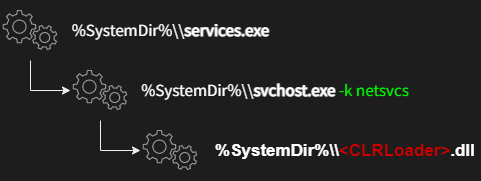
Steganography is a technique that hides scripts within PNG images, such as the compromise series of Worok, which utilizes a C++-based loader which is known as “CLRLoad.”
As of right now, we do not know what vector was used in the initial attack. As part of certain intrusions, the malware was also deployed on Microsoft Exchange Server by exploiting the ProxyShell vulnerability.
A custom malicious kit was then deployed by the attackers using publicly available exploit tools that were available for free. Therefore, the final compromise chain can be summarized as follows:-
First, CLRLoader is implemented, where simple code is implemented to load the PNGLoader, which is the second stage in the process.
In order to decode the malicious code possessed within the image, the PNGLoad comes in two different variants. While doing so, they launch either the following payloads:-
PowerShell script
.NET C#-based
It has been difficult for PowerShell to find the script and they have recently discovered a new malware called DropboxControl, which is spyware that steals information from the system. Provide the threat actor with the ability to upload, download, and run commands contained in specific files.
Malware in PNG Files
When a viewer of an image is opened to view the steganographic code within it, it appears as if the image file is normal.
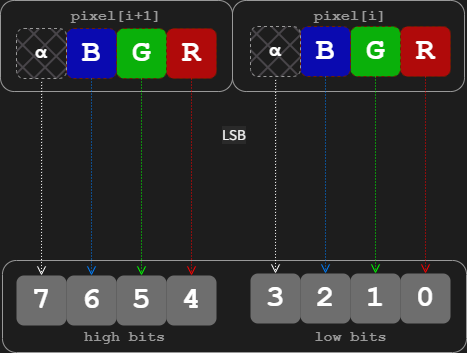
An image was encoded in a way that allows malicious code to be embedded in the least significant bits of each pixel in the image using a technique known as “least significant bit” (LSB) encoding.
No matter how the third-stage implant is deployed, it is clear that Worok has intelligence-gathering objectives that go beyond simply harvesting files of interest.
Worok attacks have been prompted by tools that are not circulating in the wild. Therefore, it’s likely that these tools are used by the group themselves exclusively to conduct attacks.
Indicators of Compromise
PNG file with steganographically embedded C# payload
Here are eight top security threats that IT is likely to see in 2023.
Top 8 security threats for next year
1. Malware
Malware is malicious software that is injected into networks and systems with the intention of causing disruption to computers, servers, workstations and networks. Malware can extract confidential information, deny service and gain access to systems.
IT departments use security software and firewalls to monitor and intercept malware before it gains entry to networks and systems, but malware bad actors continue to evolve ways to elude these defenses. That makes maintaining current updates to security software and firewalls essential.
2. Ransomware
Ransomware is a type of malware. It blocks access to a system or threatens to publish proprietary information. Ransomware perpetrators demand that their victim companies pay them cash ransoms to unlock systems or return information.
So far in 2022, ransomware attacks on companies are 33% higher than they were in 2021. Many companies agree to pay ransoms to get their systems back, only to be hit again by the same ransomware perpetrators.
Ransomware attacks are costly. They can damage company reputations. Many times ransomware can enter a corporate network through a channel that is open with a vendor or a supplier that has weaker security on its network.
One step companies can take is to audit the security measures that their suppliers and vendors use to ensure that the end-to-end supply chain is secure.
3. Phishing
Almost everyone has received a suspicious email, or worse yet, an email that appears to be legitimate and from a trusted party but isn’t. This email trickery is known as phishing.
Phishing is a major threat to companies because it is easy for unsuspecting employees to open bogus emails and unleash viruses. Employee training on how to recognize phony emails, report them and never open them can really help. IT should team with HR to ensure that sound email habits are taught.
4. IoT
In 2020, 61% of companies were using IoT, and this percentage only continues to increase. With the expansion of IoT, security risks also grow. IoT vendors are notorious for implementing little to no security on their devices. IT can combat this threat by vetting IoT vendors upfront in the RFP process for security and by resetting IoT security defaults on devices so they conform to corporate standards.
If your organization is looking for more guidance on IoT security, the experts at TechRepublic Premium have put together an ebook for IT leaders that is filled with what to look out for and strategies to deal with threats.
5. Internal employees
Disgruntled employees can sabotage networks or make off with intellectual property and proprietary information, and employees who practice poor security habits can inadvertently share passwords and leave equipment unprotected. This is why there has been an uptick in the number of companies that use social engineering audits to check how well employee security policies and procedures are working. In 2023, social engineering audits will continue to be used so IT can check the robustness of its workforce security policies and practices.
6. Data poisoning
An IBM 2022 study found that 35% of companies were using AI in their business and 42% were exploring it. Artificial intelligence is going to open up new possibilities for companies in every industry. Unfortunately, the bad actors know this, too.
Cases of data poisoning in AI systems have started to appear. In a data poisoning, a malicious actor finds a way to inject corrupted data into an AI system that will skew the results of an AI inquiry, potentially returning an AI result to company decision makers that is false.
Data poisoning is a new attack vector into corporate systems. One way to protect against it is to continuously monitor your AI results. If you suddenly see a system trending significantly away from what it has revealed in the past, it’s time to look at the integrity of the data.
7. New technology
Organizations are adopting new technology like biometrics. These technologies yield enormous benefits, but they also introduce new security risks since IT has limited experience with them. One step IT can take is to carefully vet each new technology and its vendors before signing a purchase agreement.
8. Multi-layer security
How much security is enough? If you’ve firewalled your network, installed security monitoring and interception software, secured your servers, issued multi-factor identification sign-ons to employees and implemented data encryption, but you forgot to lock physical facilities containing servers or to install the latest security updates on smartphones, are you covered?
There are many layers of security that IT must batten down and monitor. IT can tighten up security by creating a checklist for every security breach point in a workflow.
Social engineering – also known as human hacking – is an expression that encompasses a number of methods and vectors attackers use to manipulate targets into giving away or providing access to sensitive information, or generally performing actions that are against their best interest.
To effectively perform social engineering attacks, attackers exploit vulnerabilities in how humans react to specific situations.
The most important thing to keep in mind is that the overwhelming majority of humans have exploitable traits (to a lesser or higher degree), which means that anybody and everybody can be manipulated by social engineers.
This Help Net Security video talks about what social engineering is, how can it be performed, and how can you fight against it.
Data-deletion service’s patent covers removing personal information such as geolocation, biometrics, and phone records from a vehicle by using a user-computing device
— Privacy4Cars, the first privacy-tech company focused on solving the privacy and security issues posed by vehicle data to protect consumers and automotive businesses, announced today that it has secured a new patent, further expanding its patent coverage for removing privacy information from a vehicle by using a user computing device. This patent grant marks the fourth patent that the U.S. Patent & Trademark Office has awarded to Privacy4Cars in the past three years and provides further evidence that the company is the leading innovator in the vehicle data privacy and security field.
Since its launch in 2018, Privacy4Cars has emerged as the industry standard across auto finance companies (including captives, national and regional banks, auto lenders, and credit unions), fleets and fleet management companies, and franchised and independent dealerships. Many of today’s top companies in the automotive space — including the three largest OEM’s captives — have adopted the data-deletion service powered by the Privacy4Cars platform, and a growing number of industry associations have begun speaking out about the need to clear personal information from cars, and tapping Privacy4Cars as a resource to educate members.
“Used vehicles are akin to large, unencrypted hard drives full of consumers’ sensitive Personal Information, including identifiers, geolocation, biometrics, and phone records,” said Andrea Amico, CEO and founder of Privacy4Cars. “This creates service, reputation, and increasingly major regulatory challenges, including the obligations companies face under the new Safeguards Rule (coming into effect on Dec. 9, 2022) and a host of existing and new state laws. At the same time, federal and local agencies are increasingly concerned about the personal information vehicles capture and store — which is driving more and more auto businesses to look for reliable solutions to simply and effectively delete data from vehicles while creating by design detailed compliance logs that prove their efforts,” he continued. “This new patent demonstrates Privacy4Cars’ commitment to meet the growing compliance and service needs of our partners. Privacy4Cars has established itself as the clear leader in the vehicle privacy space and companies increasingly recognize the superior efficiency, effectiveness, and compliance outcomes our proprietary solution offers, making Privacy4Cars the only obvious choice”.
Privacy4Cars’ newly awarded U.S. Patent No. 11,494,514 expands the scope of patent protection for the vehicle data privacy and security innovations of Privacy4Cars’ U.S. Patent No. 11,256,827, U.S. Patent No. 11,157,648 and U.S. Patent No. 11,113,415. The new patent covers the use of a user computing device to remove privacy information from a vehicle and to create feedback about the information removal activity, including deletion logs for use in legal compliance applications.
Privacy4Cars is currently available in the US, Canada, UK, EU, Middle East, India, and Australia, and plans to further expand its geographical reach to address the growing number of countries that have comprehensive privacy and data security laws. Privacy4Cars is available to consumers as a free-to-download app, and to businesses as a subscription service. Businesses can use Privacy4Cars’ stand-alone app or choose to integrate Privacy4Cars’ Software Development Kit to easily embed its patented data deletion solution as a feature inside their own apps.
For more information about Privacy4Cars, please visit: https://privacy4cars.com.ABOUT PRIVACY4CARS
Privacy4Cars is the first and only technology company focused on identifying and resolving data privacy issues across the automotive ecosystem. Our mission, Driving Privacy, means offering a suite of services to expand protections for individuals and companies alike, by focusing on privacy, safety, security, and compliance. Privacy4Cars’ patented solution helps users quickly and confidently clear vehicle users’ personal information (phone numbers, call logs, location history, garage door codes, and more) while building compliance records. For more information, please visit: https://privacy4cars.com/
A new version of ISO 27001 was published this week, introducing several significant changes in the way organisations are expected to manage information security.
The Standard was last revised almost a decade ago (although a new iteration of the supplementary standard ISO 27002 was published in February 2022), meaning that the release of ISO 27001:2022 has been much needed and highly anticipated.
What’s changing?
The good news for organisations is that ISO 27001:2022 doesn’t drastically overhaul their compliance requirements. There are new requirements on planned changes and how your organisation should deal with them, as well as a greater focus on how you must deal with the needs and expectations of interested parties.
Annex A of ISO 27001 now refers to the updated information security controls in ISO 27002:2022, and the Standard requires organisations to document and monitor objectives.
It also aligns its terminology with that used across other ISO management system standards.
Another notable aspect of its terminology is that ISO 27002:2022 no longer refers to itself as a “code of practice”. This better reflects its purpose as a reference set of information security controls.
However, the most significant changes with the 2022 version of ISO 27002 are in its structure. It is no longer divided into 14 control categories, and is instead split into four ‘themes’: organisational, people, physical and technological.
Meanwhile, although the 2022 version of ISO 27002 is significantly longer than its predecessor, the total number of controls has decreased from 114 to 93.
This is because many of its controls have been reordered and merged. Only 35 controls are unchanged, while 11 completely new requirements have been added. These are:
Threat intelligence
Information security for use of cloud services
ICT readiness for business continuity
Physical security monitoring
Configuration management
Information deletion
Data masking
Data leakage prevention
Monitoring activities
Web filtering
Secure coding
The new and amended controls are also categorised according to five types of ‘attribute’: control type, operational capabilities, security domains, cybersecurity concepts and information security properties.
This change is intended to make it easier to highlight and view all controls of a certain type, such as all preventive controls, or all controls related to confidentiality.
How will this affect organisations implementing ISO 27001?
The introduction of ISO 27001:2022 won’t have an immediate effect on organisations that are currently certified to ISO 27001:2013 or are in the process of achieving certification.
For the time being, organisations should continue to follow the 2013 version of the Standard. This means, for example, that the SoA (Statement of Applicability) should refer to the controls listed in Annex A of ISO 27001:2013, while the 2022 version of the Standard should be used only as a reference.
Indeed, the reason that the updated version is being published now is to give organisations time to familiarise themselves with the new controls before embarking on an implementation project.
The controls listed in ISO 27002:2022 can be considered an alternative control set that you will have to compare with the existing Annex A – just as you would with any other alternative control set.
ISO 27002:2022 has an annex that compares its controls with the 2013 iteration of the Standard, so this should be relatively straightforward.
What next?
There is a three-year transition period for certified organisations to revise their management system to conform to a new version of a standard, so there will be plenty of time to make the necessary changes.
However, it’s never wise to put off the planning process until the last minute. Implementation will take several months, and it’s worth knowing what’s expected of you as soon as possible.
You can begin by reading the Standard for yourself. You can purchase a digital copy of ISO 27001:2022 from our website, and we recommend comparing the updated version to the 2013 edition and your current compliance practices to determine what adjustments you’ll have to make.
If you’re unsure how to proceed, our team of experts are here to help. Having led the world’s first ISO 27001 certification project, we understand what it takes to implement the Standard.
Speak to one of our experts for more information on how we can support you.
A bug bounty hunter called David Schütz has just published a detailed report describing how he crossed swords with Google for several months over what he considered a dangerous Android security hole.
According to Schütz, he stumbled on a total Android lockscreen bypass bug entirely by accident in June 2022, under real-life conditions that could easily have happened to anyone.
In other words, it was reasonable to assume that other people might find out about the flaw without deliberately setting out to look for bugs, making its discovery and public disclosure (or private abuse) as a zero-day hole much more likely than usual.
Unfortunately, it didn’t get patched until November 2022, which is why he’s only disclosed it now.
A serenditious battery outage
Simply put, he found the bug because he forgot to turn off or to charge his phone before setting off on a lengthy journey, leaving the device to run low on juice unnoticed while he was on the road.
According to Schütz, he was rushing to send some messages after getting home (we’re guessing he’d been on a plane) with the tiny amount of power still left in the battery…
…when the phone died.
We’ve all been there, scrabbling for a charger or a backup battery pack to get the phone rebooted to let people know we have arrived safely, are waiting at baggage reclaim, have reached the train station, expect to get home in 45 minutes, could stop at the shops if anyone urgently needs anything, or whatever we’ve got to say.
And we’ve all struggled with passwords and PINs when we’re in a rush, especially if they’re codes that we rarely use and never developed “muscle memory” for typing in.
In Schütz’s case, it was the humble PIN on his SIM card that stumped him, and because SIM PINs can be as short as four digits, they’re protected by a hardware lockout that limits you to three guesses at most. (We’ve been there, done that, locked ourselves out.)
After that, you need to enter a 10-digit “master PIN” known as the PUK, short for personal unblocking key, which is usually printed inside the packaging in which the SIM gets sold, which makes it largely tamper-proof.
And to protect against PUK guessing attacks, the SIM automatically fries itself after 10 wrong attempts, and needs to be replaced, which typically means fronting up to a mobile phone shop with identification.
What did I do with that packaging?
Fortunately, because he wouldn’t have found the bug without it, Schütz located the original SIM packaging stashed somewhere in a cupboard, scratched off the protective strip that obscures the PUK, and typed it in.
At this point, given that he was in the process of starting up the phone after it ran out of power, he should have seen the phone’s lockscreen demanding him to type in the phone’s unlock code…
…but, instead, he realised he was at the wrong sort of lockscreen, because it was offering him a chance to unlock the device using only his fingerprint.
That’s only supposed to happen if your phone locks while in regular use, and isn’t supposed to happen after a power-off-and-reboot, when a full passcode reauthentication (or one of those swipe-to-unlock “pattern codes”) should be enforced.
Is there really a “lock” in your lockscreen?
As you probably know from the many times we’ve written about lockscreen bugs over the years on Naked Security, the problem with the word “lock” in lockscreen is that it’s simply not a good metaphor to represent just how complex the code is that manages the process of “locking” and “unlocking” modern phones.
A modern mobile lockscreen is a bit like a house front door that has a decent quality deadbolt lock fitted…
…but also has a letterbox (mail slot), glass panels to let in light, a cat flap, a loidable spring lock that you’ve learned to rely on because the deadbolt is a bit of a hassle, and an external wireless doorbell/security camera that’s easy to steal even though it contains your Wi-Fi password in plaintext and the last 60 minutes of video footage it recorded.
Oh, and, in some cases, even a secure-looking front door will have the keys “hidden” under the doormat anyway, which is pretty much the situation that Schütz found himself in on his Android phone.
A map of twisty passageways
Modern phone lockscreens aren’t so much about locking your phone as restricting your apps to limited modes of operation.
This typically leaves you, and your apps, with lockscreen access to a plentiful array of “special case” features, such as activating the camera without unlokcking, or popping up a curated set of notification mesaages or email subject lines where anyone could see them without the passcode.
What Schütz had come across, in a perfectly unexceptionable sequence of operations, was a fault in what’s known in the jargon as the lockscreen state machine.
A state machine is a sort of graph, or map, of the conditions that a program can be in, along with the legal ways that the program can move from one state to another, such as a network connection switching from “listening” to “connected”, and then from “connected” to “verified”, or a phone screen switching from “locked” either to “unlockable with fingerprint” or to “unlockable but only with a passcode”.
As you can imagine, state machines for complex tasks quickly get complicated themselves, and the map of different legal paths from one state to another can end up full of twists, and turns…
…and, sometimes, exotic secret passageways that no one noticed during testing.
Indeed, Schütz was able to parlay his inadvertent PUK discovery into a generic lockscreen bypass by which anyone who picked up (or stole, or otherwise had brief access to) a locked Android device could trick it into the unlocked state armed with nothing more than a new SIM card of their own and a paper clip.
In case you’re wondering, the paper clip is to eject the SIM already in the phone so that you can insert the new SIM and trick the phone into the “I need to request the PIN for this new SIM for security reasons” state. Schütz admits that when he went to Google’s offices to demonstrate the hack, no one had a proper SIM ejector, so they first tried a needle, with which Schütz managed to stab himself, before succeeding with a borrowed earring. We suspect that poking the needle in point first didn’t work (it’s hard to hit the ejector pin with a tiny point) so he decided to risk using it point outwards while “being really careful”, thus turning a hacking attempt into a literal hack. (We’ve been there, done that, pronged ourselves in the fingertip.)
Gaming the system with a new SIM
Given that the attacker knows both the PIN and the PUK of the new SIM, they can deliberately get the PIN wrong three times and then immediately get the PUK right, thus deliberately forcing the lockscreen state machine into the insecure condition that Schütz discovered accidentally.
With the right timing, Schütz found that he could not only land on the fingerprint unlock page when it wasn’t supposed to appear, but also trick the phone into accepting the successful PUK unlock as a signal to dismiss the fingerprint screen and “validate” the entire unlock process as if he’d typed in the phone’s full lock code.
Unlock bypass!
Unfortunately, much of Schütz’s article describes the length of time that Google took to react to and to fix this vulnerability, even after the company’s own engineers had decided that the bug was indeed repeatable and exploitable.
As Schütz himself put it:
This was the most impactful vulnerability that I have found yet, and it crossed a line for me where I really started to worry about the fix timeline and even just about keeping it as a “secret” myself. I might be overreacting, but I mean not so long ago the FBI was fighting with Apple for almost the same thing.
Disclosure delays
Given Google’s attitude to bug disclosures, with its own Project Zero team notoriously firm about the need to set strict disclosure times and stickto them, you might have expected the company to stick to its 90-days-plus-14-extra-in-special-cases rules.
But, according to Schütz, Google couldn’t manage it in this case.
Apparently, he’d agreed a date in October 2022 by which he planned to disclose the bug publicly, as he’s now done, which seems like plenty of time for a bug he discovered back in June 2022.
But Google missed that October deadline.
The patch for the flaw, designated bug number CVE-2022-20465, finally appeared in Android’s November 2022 security patches, dated 2022-11-05, with Google describing the fix as: “Do not dismiss keyguard after SIM PUK unlock.”
In technical terms, the bug was what’s known a race condition, where the part of the operating system that was watching the PUK entry process to keep track of the “is it safe to unlock the SIM now?” state ended up producing a success signal that trumped the code that was simultaneously keeping track of “is is safe to unlock the entire device?”
Still, Schütz is now significantly richer thanks to Google’s bug bounty payout (his report makes it clear he was hoping for $100,000, but he had to settle for $70,000 in the end).
And he did hold off on disclosing the bug after the 15 October 2022 deadline, accepting that discretion is the sometimes better part of valour, saying:
I [was] too scared to actually put out the live bug and since the fix was less than a month away, it was not really worth it anyway. I decided to wait for the fix.
What to do?
Check that your Android is up to date: go to Settings > Security > Security update > Check for update.
Note that when we visited the Security update screen, having not used our Pixel phone for a while, Android boldly proclaimed Your system is up to date, showing that it had checked automatically a minute or so earlier, but still told us we were on the October 5, 2022 security update.
We forced a new update check manually and were immediately told Preparing system update…, followed by a short download, a lengthy preparatory stage, and then a reboot request.
After rebooting we haad reached the November 5, 2022 patch level.
We then went back and did one more Check for update to confirm that there were no fixes still outstanding.
Vulnerability management has always been as much art as science. However, the rapid changes in both IT networks and the external threat landscape over the last decade have made it exponentially more difficult to identify and remediate the vulnerabilities with the greatest potential impact on the enterprise.
With a record of 18,378 vulnerabilities reported by the National Vulnerability Database in 2021 and an influx of new attack techniques targeting increasingly complex and distributed environments, how can CISOs know where to start?
Why has maintaining network visibility become such a challenge?
Heavy investments into digital transformation and cloud migration have rendered significant, foundational changes to the enterprise IT environment. Gartner predicts end-user spending on public cloud services will reach almost 600 billion in 2023, up from an estimated $494.7 billion this year and $410.9 in 2021.
Long gone are the days when security teams could concern themselves only with connections to and from the data center; now they must establish effective visibility and control of a sprawling, complex network that includes multiple public clouds, SaaS services, legacy infrastructure, the home networks of remote users, etc. Corporate assets are no longer limited to servers, workstations, and a few printers; teams must now secure virtual machines on premise and in the cloud, IoT devices, mobile devices, microservices, cloud data stores, and much more – making visibility and monitoring infinitely more complex and challenging.
In many cases, security investments have not kept up with the rapid increase in network scope and complexity. In other cases, agile processes have outpaced security controls. This results in security teams struggling to achieve effective visibility and control of their networks, resulting in misconfigurations, compliance violations, unnecessary risk, and improperly prioritized vulnerabilities that provide threat actors with easy attack paths.
Adversaries are specifically targeting these blind spots and security gaps to breach the network and evade detection.
What are the most common mistakes being made in attempting to keep up with threats?
With the average cost of a data breach climbing to $4.35 million in 2022, CISOs and their teams are under extraordinary pressure to reduce cyber risk as much as possible. But many are hindered by a lack of comprehensive visibility or pressure to deliver agility beyond what can be delivered without compromising security. One of the most common issues we encounter is an inability to accurately prioritize vulnerabilities based on the actual risk they pose to the enterprise. With thousands of vulnerabilities discovered every year, determining which vulnerabilities need to be patched and which can be accepted as incremental risk is a critical process.
The Common Vulnerability Scoring System (CVSS) has become a useful guidepost, providing security teams with generalized information for each vulnerability. Prioritizing the vulnerabilities with the highest CVSS score may seem like a logical and productive approach. However, every CISO should recognize that CVSS scores alone are not an accurate way to measure the risk a vulnerability poses to their individual enterprise.
To accurately measure risk, more contextual information is required. Security teams need to understand how a vulnerability relates to their specific environment. While high-profile threats like Heartbleed may seem like an obvious priority, a less public vulnerability with a lower CVSS score exposed to the Internet in the DMZ may expose the enterprise to greater actual risk.
These challenges are exacerbated by the fact that IT and security teams often lose track of assets and applications as ownership is pushed to new enterprise teams and the cloud makes it easier than ever for anyone in the enterprise to spin up new resources. As a result, many enterprises are riddled with assets that are unmonitored and remain dangerously behind on security updates.
Why context is critical
With resources like the National Vulnerability Database at their fingertips, no CISO lacks for data on vulnerabilities. In fact, most enterprises do not lack for contextual data either. Enterprise security, IT, and GRC stacks provide a continuous stream of data which can be leveraged in vulnerability management processes. However, these raw streams of data must be carefully curated and combined with vulnerability information to be turned into actionable context – and it is this in this process where many enterprises falter.
Unfortunately, most enterprises do not have the resources to patch every vulnerability. In some circumstances, there may be a business case for not patching a vulnerability immediately, or at all. Context from information sources across the enterprise enables standardized risk decisions to be made, allowing CISOs to allocate their limited resources where they will have the greatest impact on the security of the enterprise.
Making the most of limited resources with automation
There was a time when a seasoned security professional could instinctively assess the contextual risk of a threat based on their experience and familiarity with the organisation’s infrastructure. However, this approach cannot scale with the rapid expansion of the enterprise network and the growing number of vulnerabilities that must be managed. Even before the ongoing global security skills shortage, no organization had the resources to manually aggregate and correlate thousands of fragments of data to create actionable context.
In today’s constantly evolving threat landscape, automation offers the best chance for keeping up with vulnerabilities and threats. An automated approach can pull relevant data from the security, IT, and GRC stacks and correlate it into contextualized information which can be used as the basis for automated or manual risk decisions.
Nearly a third of CISOs or IT security leaders in the United States and the United Kingdom are considering leaving their current role, according to research by BlackFog.
Of those considering leaving their current role, a third of those would do so within the next six months, according to the survey, which polled more than 500 IT security leaders.
The report also found that, among the top issues security pros have with their current role, the lack of work-life balance is the most troublesome—cited by three in 10 survey respondents.
More than a quarter (27%) of respondents said that too much time was spent on firefighting rather than focusing on strategic issues.
Twenty percent said they felt that keeping their teams’ skill levels in line with new frameworks and models such as zero-trust was a “serious challenge”, while 43% of respondents said they found it difficult to keep pace with the newest innovations in the cybersecurity market.
Using Automation to Ease the Pressure
Phil Neray, vice president of cyber defense strategy at CardinalOps, a detection posture management company, said both CISOs and security operations center (SOC) personnel take pride in being cybersecurity defenders for their organizations and both groups feel the pain of information overload and constantly being on call to respond to the latest emergencies.
“What needs to change? The CISO’s peers in the business need to understand that cybersecurity risk is a top business risk, not just an IT issue, and they need to allocate higher budgets to support a higher level of staffing in the SOC,” he said.
In addition, Neray said by investing in more automation for the SOC, CISOs and their teams will be freed from performing mundane tasks.
“This way, they can direct their human creativity and innovation toward proactive activities like threat hunting and remediating gaps in their defensive posture, rather than always being reactive,” he explained.
Darren Guccione, CEO and co-founder at Keeper Security, a provider of zero-trust and zero-knowledge cybersecurity software, added that there is “absolutely no denying” that being a CISO is one of the most difficult and demanding roles in any company.
“The board of directors and fellow business leaders must support their CISO’s priorities and needs, particularly when they’re faced with a cyberattack or data breach,” he said. “Without that support, talented CISOs won’t stick around as there are plenty of other job opportunities awaiting them.”
Indeed, the BlackFog report noted recruiting is a challenge globally and with stiff competition to attract the best talent, organizations need to address the well-being and work-life balance issues that have persisted across the industry.
Acknowledging CISO Burnout
Sounil Yu, CISO at JupiterOne, a provider of cybersecurity asset management and governance solutions, noted that CISOs face an uncommonly high risk of burnout due to the nature of security work.
“Burnout is more common than most realize,” he said. “Acknowledging burnout risks is an important way to be supportive and to let team members know that they are not alone.”
Yu pointed out that CISOs cannot personally shoulder the burden of mitigating burnout.
“Instead, CISOs should educate their company’s board and fellow executive leaders on security burnout risks and collaborate with HR to improve resources such as employee resource programs, flexible working arrangements and systems of reward and recognition,” he said.
John Bambenek, principal threat hunter at Netenrich, a security and operations analytics SaaS company, said CISOs are facing the same burnout risk as cybersecurity professionals with one key difference–the CISO is the designated ‘throat to choke’ when things go awry.
“One of the biggest changes to be made in the C-suite to improve the situation for security leaders would be focusing on freeing the CISO to work on strategic issues,” he says. “Constant firefighting burns out everyone up and down the ladder. You can handle that with line staff with job rotation, but the CISO needs to have the resources to make their life better overall.”
Bambenek added that mandatory PTO that involves someone else tending to the fires while the CISO is gone would help, too.
“PTO where you are still on call isn’t PTO,” he noted. “It’s just working from home.”
He explained that organizations that are well-funded should have emerging technology labs where they can explore both new technology and new security tools to help address the challenges CISOs are facing.
“A big part of this problem is threats evolve with rapid changes in technology—security is playing catch-up behind both,” Bambenek said.
CrowdStrike achieved 99% detection coverage by conclusively reporting 75 of the 76 adversary techniques during the MITRE ATT&CK evaluation.
Leveraging the power of the CrowdStrike Falcon® platform with integrated threat intelligence and patented tooling, the CrowdStrike Falcon® Complete and CrowdStrike® Falcon OverWatch™ managed threat hunting teams identified the adversary and associated tradecraft within minutes.
Closed-book evaluations such as this provide the most realistic reflection of how a security vendor would perform in a customer environment. CrowdStrike’s combination of market-leading technology and elite human expertise led the evaluation, which is the gold standard in managed detection and response testing.
MITRE does not rank or rate participants; the following is CrowdStrike’s analysis of the results provided by MITRE Engenuity.
Researchers at Zimperium zLabs recently identified a new Chrome browser botnet called ‘Cloud9’ that is intent on stealing the following information using malicious extensions:-
This method is becoming increasingly attractive for malware developers to target web browsers as they contain the most valuable information about a user.
In the course of everyday activities, we can find out a lot about ourselves through our keystrokes or session cookies. A breach of security or a violation of privacy can be caused by having access to such information.
Cloud9 botnet is a RAT that affects all Chromium-based web browsers, which are popular among consumers like Chrome and Microsoft Edge. Moreover, threat actors could exploit this RAT to remotely execute arbitrary commands.
Technical Analysis
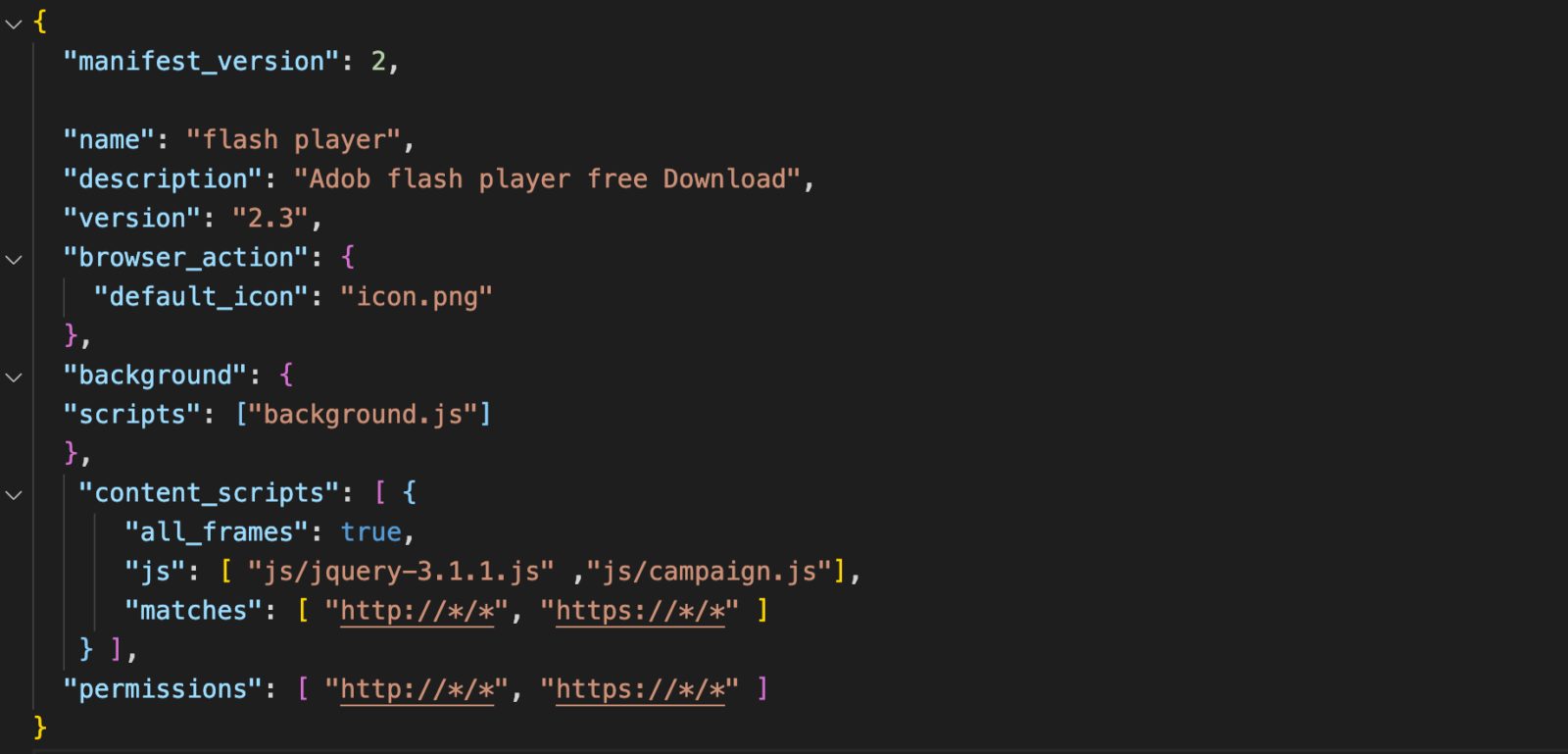
The official Chrome web store doesn’t host this malicious Chrome extension, so it cannot be downloaded from there.
The distribution channel of this malware relies on communities that are operated by threat actors, wherein the malware will be hidden by users of the tool before it gets delivered to the victims by the tool itself.
In terms of the Javascript files that make up the extension, there are only three. While the primary functionality of the extension can be located in a file called “campaign.js” which contains most of its functionality.
According to the report, During the initialization of campaign.js, the window.navigator API is used to identify the system’s operating system. Once the target has been identified, a Javascript file is injected into the victim’s computer system as a method to mine cryptocurrency using the resources of the victim’s computer system.
Next, for further proceedings, it injects another script known as cthulhu.js which comprises a full-chain exploit for the following flaws:-
CVE-2019-11708 (Firefox)
CVE-2019-9810 (Firefox)
CVE-2014-6332 (Internet Explorer)
CVE-2016-0189 (Internet Explorer)
CVE-2016-7200 (Edge)
As soon as the vulnerabilities are exploited, Windows malware is automatically installed on the host machine and executed. This gives attackers even more opportunities to compromise systems and carry out even more severe malware attacks.
While one of the sophisticated inclusion of this malware is “Clipper,” a module that keeps scanning the clipboard of the system for copied data like:-
Passwords
Credit cards details
In addition to injecting ads into webpages silently, Cloud9 is also capable of generating revenue for its operators by generating ad impressions.
nformation Security Risks assisted Business models for banking & financial services(BFS) institutions have evolved from being a monolithic banking entity to multi-tiered service entity.
What this means to BFS companies is that they need to be more updated and relevant with regards to technology & the quality of all services provided to their clients. The most opted methodology to do that today is by means of outsourcing services to vendors & 3rd parties.
Though outsourcing is cost beneficial to companies, this approach comes with its own set of drawbacks. It is judicious to say that every outsourcing enterprise should be aware of the risks that vendors bring to the table.
Though vendors bring in a lot of operational Information Security Risks depending on the business engagement, a methodology to manage only the 3rd party Information Security Risks are discussed here.
Just to provide a sense of the impact that vendor Information Security Risks brings to organizations, below are some of the facts from surveys conducted by Big 4 consulting companies like PwC & Deloitte.
“The Number of data breaches attributed to 3rd party vendors has increased by 22% since 2015”- Source PwC
According to Deloitte “94.3% of executives have low to moderate confidence in their third-party risks management tools & technology, and 88.6% have low to moderate confidence in the quality of the underlying Information Security Risks management process” .
We know the problem now, how do you begin resolving it??
A perfect place to begin is with the sourcing team and /or procurement team depending on how your organization is set up. In an ideal world, these teams are expected to have an inventory of all vendors, 3rd parties & Partners of your organization.
Once we have this inventory in place, the IT vendor risk management (IT- VRM) team needs to segregate the IT vendors from the non-IT ones. This is a onetime activity. For future needs, it is recommended to have the sourcing team segregate vendors basis on their business engagement (IT vs Non-IT).
Understanding your Vendors & the Information Security Risks they carry:
One of the simplest & efficient way to understand your vendors is by having a scoping checklist, that details the vendor business with your organization, kind of data touchpoints & exchanges, kind of Information Security Risks that your organization is exposed by this outsourced business.
This information is usually available with the vendor manager representing your organization in the vendor relationships.
Below is the list of Information Security Risks pointers (not limited to) that you might want to consider asking your vendor manager.
Regulatory risk – Does this relationship affect your regulatory posture? What is the penalty associated with such regulatory non-compliance?
Reputational risk– Does this service impact your clients & the reputation you hold with them?
Financial risk– Any financial Information Security Risks associated with business engagement?
Information security risks – what data are shared as part of the business engagement with the vendor? how secure is the vendor with regards to protecting your organization data?
Resiliency risks – Does the vendor introduce any single point of failures to your business practices?
For understanding the level of assessment to be performed with the vendor, you will need to understand the vendor’s business operating model.
Below is an indicative list of themes that you might want to discuss with vendor manager to understand the scope of the vendor assessment.
Data attributes shared & received with the vendor, volume of data & frequency
Mode of communication/interfaces with a vendor – Mail, remote connection to vendor network, the remote connection from vendor to your internal network, data upload only, data download only, vendors are brought on-site & connect from your offices to provide services
Services provided – Data center services, Application provider, Cloud service provider, Data processing services, & many others.
Well-known cybersecurity researcher Fabian Bräunlein has featured not once but twice before on Naked Security for his work in researching the pros and cons of Apple’s AirTag products.
In 2021, he dug into the protocol devised by Apple for keeping tags on tags and found that the cryprography was good, making it hard for anyone to keep tabs on you via an AirTag that you owned.
Even though the system relies on other people calling home with the current location of AirTags in their vicinity, neither they nor Apple can tell whose AirTag they’ve reported on.
But Bräunlein figured out a way that you could, in theory at least, use this anonymous calling home feature as a sort-of free, very low-bandwidth, community-assisted data reporting service, using public keys for data signalling:
He also looked at AirTags from the opposite direction, namely how likely it is that you’d spot an AirTag that someone had deliberately hidden in your belongings, say in your rucksack, so that they could track you under cover of tracking themselves:
Indeed, the issue of “AirTag stalking” hit the news in June 2022 when an Indiana woman was arrested for running over and killing a man in whose car she later admitted to planting an AirTag in order to keep track of his comings and goings.
In that tragic case, which took place outside a bar, she could probably have guessed were he was anyway, but law enforcement staff were nevertheless obliged to bring the AirTag into their investigations.
When security scans reveal more than they should
Now, Bräunlein is back with another worthwhile warning, this time about the danger of cloud-based security lookup services that give you a free (or paid) opinion about cybersecurity data you may have collected.
Many Naked Security readers will be familiar with services such as Google’s Virus Total, where you can upload suspicious files to see what static virus scanning tools (including Sophos, as it happens) make of it.
Sadly, lots of people use Virus Total to gauge how good a security product might be at blocking a threat in real life when its primary purpose is to disambiguate threat naming, to provide a simple and reliable way for people to share suspicious files, and to assist with prompt and secure sample sharing across the industry. (You only have to upload the file once.)
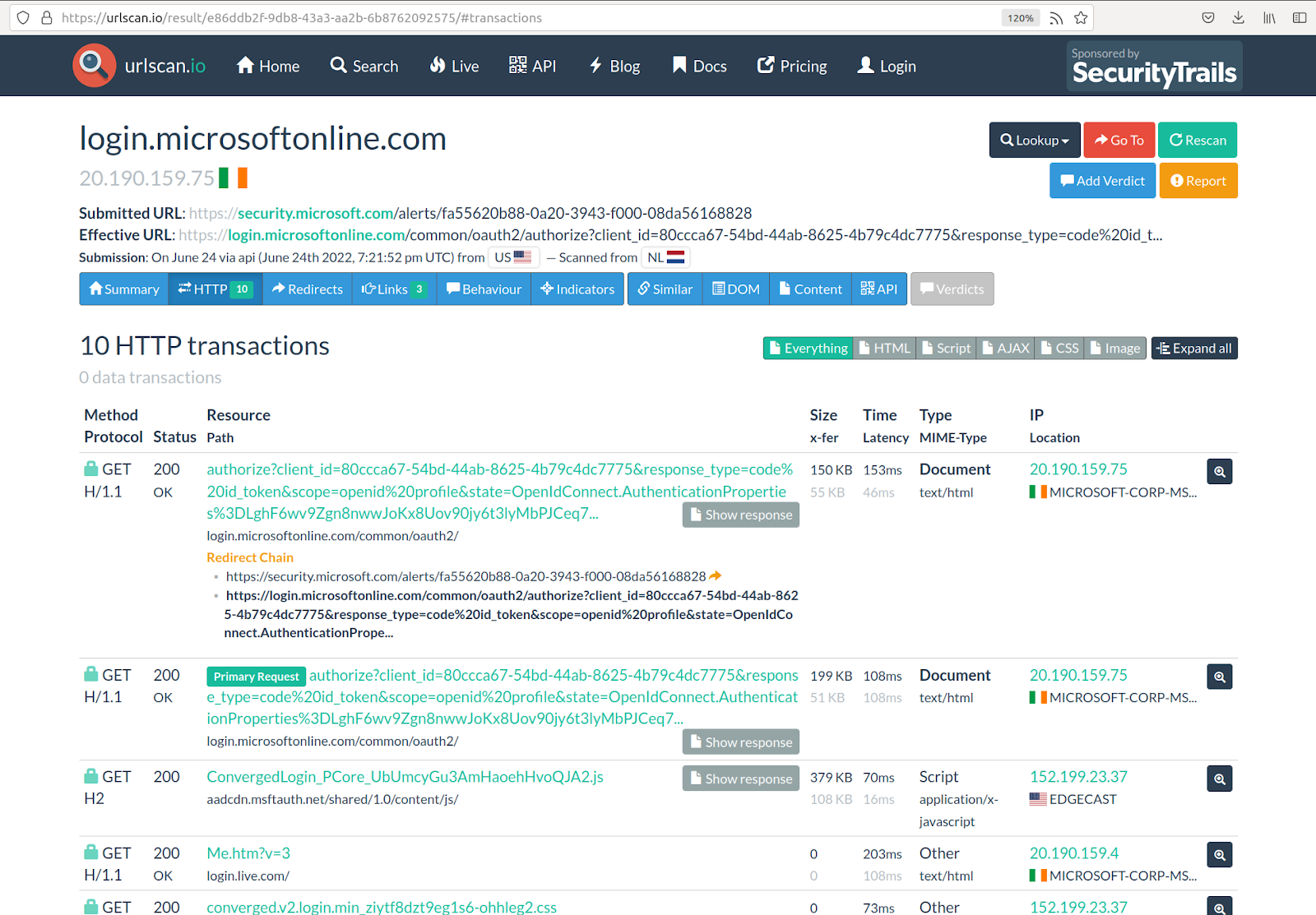
This new report by Bräunlein looks at a similar sort of public service, this time urlscan.io, which aims to provide a public query-and-reporting tool for suspicious URLs.
The idea is simple… anyone who’s worried about a URL they just received, for example in what they think is a phishing email, can submit the domain name or URL, either manually via the website, or automatically via a web-based interface, and get back a bunch of data about it.
Like this, checking to see what the site (and the community at large) think of the URL http://example.com/whatalotoftextthisis:
You can probably see where Fabian Bräunlein went with this if you realise that you, or indeed anyone else with the time to keep an eye on things, may be able to retrieve the URL you just looked up.
Recently, the Forgepoint team announced a new alliance with global banking leader Santander to increase cyber investment worldwide, specifically in Europe, Israel, and Latin America. Santander will also be the primary investor in Forgepoint’s next fund, slated for 2023, with a nearly $300 million goal.
This was the perfect reason to connect with Alberto Yépez, the co-founder and Managing Director of Forgepoint Capital. In this Help Net Security interview, the former Trident Capital leader offers insight into innovation in the cybersecurity market, M&A activity, pitching to VCs, and more.
When you look at today’s cybersecurity industry landscape, what drives innovation?
Innovation is always driven by a need. What does the market need right now? What do customers need? How can the ecosystem adapt to serve those needs? Innovation provides solutions that expedite answers to problems, and successful businesses are built when they do this.
Today’s rapidly changing macro environment combined with the demands of an evolving threat landscape makes this the perfect time for company building. Now, businesses that did not satisfy needs will no longer survive, while those that do will thrive.
The cybersecurity market is prone to mergers and acquisitions. How will this impact the future of the market?
While we may see a wave of consolidation, which is expected given the amount of venture financing committed to cybersecurity in the last few years, organizations now face the decision to either raise more funding in a challenging environment as valuations normalize or seek an acquisition, as growth investors shift away due to market conditions.
Public and larger private companies will continue to buy startups that are innovative and leading-edge, filling gaps in their current offerings to offer wider, more integrated solutions. These companies provide new capabilities that address new threats and give them access to high-growth market segments while helping them stay relevant.
Ultimately, M&A activity will have a positive impact on the industry because large enterprise customers benefit from integrated solutions that reduce the total cost of ownership of these solutions. Customers also benefit from these integrated services as they help meet critical enterprise needs and ease the strain caused by the global shortage of cybersecurity professionals.
Company founders spend a lot of time preparing their pitch, but it can take a long time to get VC, even with massively successful products. What advice would you give to those getting ready to talk to VCs?
I advise founders to take a long-term mindset and remember that fundraising is a people-driven industry. While initial timelines may achieve certain funding goals, securing funding means building real relationships and creating a network of trusted partners. Taking the time to do this well will have an immediate impact upon your success.
In a competitive fundraising environment, VCs have to make quick decisions. To do that, we depend on both our own experience, as well as the experiences of our network and our close connections who we can rely on to provide strong counsel. An introduction to a startup from a trusted friend with relevant expertise and background is one of the most productive relationship builders – for both sides.
These trusted relationships will open the right doors for founders, then it’s all about how you tell your story to the VC. The clarity and direction of your thinking can tell a lot about the company’s market position and opportunity you’re out to tackle, as well as your future priorities. Here, introspection and self-awareness shine.
Having a people-driven mindset is helpful because it has multiple natural side benefits. Networking requires us to build relationships with individuals beyond the short-term, casting a net that can include VCs as well as future startup customers or potential hires. Networking with VCs may also suggest you meet with others and while these introductions may not be directly about fundraising, they can help you get exposure to potential customers, team members, and advisors for input on your tech, business, and model. This leads to opportunities to learn and refine your approach from diverse perspectives.
What do you value most in an entrepreneur you want to invest in?
The traits that I find most important in entrepreneurs are subject matter expertise and the know-how to execute. Prior experience as an entrepreneur with a track record of building commercial offerings successfully commercialized and adopted by customers will allow for deep domain knowledge of the sector that they’re working in, which is very important when scaling organizations. In my experience, serial entrepreneurs typically have a leg up compared to first-timers.
That being said, all of this doesn’t matter if an entrepreneur doesn’t know how to lead. The ability to recruit and retain high quality talent, and then continuing to work with them to grow as the organization expands is a very important trait that is paramount to the success of any organization.
What advice would you give to European and Israeli companies trying to get funding in the US?
Forgepoint partners with emerging companies from Croatia to Mexico, Madrid to Tel Aviv, and has been actively tracking thousands of companies worldwide. It is abundantly clear that the cyber ecosystems across Europe, Latin America and Israel have an incredibly rich talent pool, strong demand signal and robust capital accessibility – and that cybersecurity is a growing, global problem.
While the current macro environment is challenging, organizations looking to get funding in the US will succeed if their product and complete offering solve a demonstrated need in the market. When it comes down to it, it’s all about five fundamentals:
Large market opportunity
Differentiated offerings that are hard to replicate
Sound go-to-market strategy
Ensuring the right team is in place
Product market fit as demonstrated by early customer traction
Israeli and European companies trying to get funding in the US should be able to clearly speak to these fundamentals, demonstrating how they’ll incorporate the US into their go-to-market and growth plans as they partner with investors, form channel alliances, and further develop their businesses. Thinking this through can be enormously helpful in identifying which VCs to approach – which will bring value and help augment your business.
Researchers from Positive Security uncovered a website scanner called “Urlscan” that unintentionally leaking sensitive URLs and data due to misconfiguration.
It appears that a third party accidentally leaked the GitHub Pages URLs, and this incident happened while a metadata analysis was being conducted.
“This information could be used by spammers to collect email addresses and other personal information,” Bräunlein, Co Founder Positive security said. “It could be used by cyber criminals to take over accounts and run believable phishing campaigns.”
The URLscan.io service is described as a sandbox for the web and has been referred to as a web scanner. Several security solutions integrate with its API in order to make their solutions more secure and feature-rich.
The idea behind it is to allow users to identify possible malicious websites with ease and confidence using a simple, straightforward tool. A wide range of open-source projects and enterprise customers are supported by the engine.
Sensitive data can be mined
It was discovered that users who enabled Github Pages as a hosting method for a private repository leaked the name of the repository. There does not seem to have been any public official acknowledgment of this breach as of yet.
There is a possibility that an anonymous user could easily search for and retrieve a vast amount and variety of sensitive data within the API integration.
This is because the API is equipped with several varieties of security tools that run scans on incoming emails and conduct Urlscans on every link that is received.
Several types of information are provided with each scan result that is returned by the service, including:-
Password reset links
Unsubscribe links
Account creation URLs
API keys
Information about Telegram bots
DocuSign signing requests
Amazon gift delivery links
Shared Google Drive links
Dropbox file transfers
Invite links to SharePoint
Invite links to Discord
Government Zoom invites
PayPal invoices
Paypal money claim requests
Links to Cisco Webex meeting recordings
Package tracking links
It has been noted that some API integrations use generic Python requests that use the python-requests/2.X.Y module. This would lead to scans being mistakenly submitted as public if user agents ignored account visibility settings.
Some of the biggest barriers to cloud adoption are security concerns: data loss or leakage, and the associated legal and regulatory concerns with storing and processing data off-premises.
In the last 18 months, 79% of companies have experienced at least one cloud data breach; even more alarmingly, 43% have reported 10 or more breaches in that time. Despite the clear advantages of cloud infrastructure, one of the main challenges that often gets overlooked is the need to: (1) trust that the infrastructure will be secure enough against threats and (2) that the chosen cloud provider won’t purposefully or inadvertently access the data processing on their infrastructure. When dealing with highly sensitive/confidential data (such as banking information or healthcare patient data), this becomes a major concern and a barrier to further cloud adoption.
Traditional approaches for protecting data have relied upon implementing access controls and policies and encrypting data at rest and in transit, but none are able to prevent the threat in its entirety because a fundamental challenge remains: keeping data encrypted when in use, while it is being processed. Confidential computing – projected to be a $54B market by 2026 – is emerging as a way to remove the need for trusting infrastructure and service providers by keeping data protected/encrypted even when in use.
Confidential computing technology uses hardware-based techniques to create isolated environments called enclaves (also known as Trusted Execution Environments or TEEs).
Code and data within enclaves are inaccessible by other applications, users, or processes colocated on the system. The enclave keeps the data encrypted even when in use – while in memory and during computation. With a secure enclave environment, multiple parties can collaborate on analytics and AI use cases without compromising the confidentiality of their individual data and exposing it to other parties.
According to a recent survey, using secure enclaves in the enterprise setting is attractive for implementing safeguards for the following scenarios:
Protect against insider threats. Data in the cloud is accessible to the database administrators of the cloud applications or infrastructure via direct access to the database, application logs, and device memory
Prevent platform software (i.e., a platform hypervisor) from accessing data
Protect data from adjacent workloads in a multitenant/user environment
Protect the integrity of crowdsourced ML models
Confidential data sharing and multi-party collaboration
If these scenarios apply to you and your business, but you’re unsure what you’ll need to know to get started, here are five questions to ask your CISO:
1. Will I need to deploy specialized hardware to keep our data protected?
Confidential computing technology is now available on all major cloud providers. This obviates the need to procure and maintain specialized hardware yourselves. Even though confidential computing and secure enclaves are still in the “emerging technology bucket,” organizations can easily adopt confidential computing through cloud vendors and ISVs. The cloud providers see the benefit of secure enclaves and their future potential as a transformative technology, and so have bought in.
2. Will we need to rewrite applications to use secure enclaves?
Some confidential computing technologies, such as Intel SGX, require application modifications before they can run within enclaves. Other technologies, such as Confidential VMs, provide more flexibility and can run unmodified applications.
But, from a security perspective, this has the downside of having to trust the entire software stack within the VM. So, depending on the use case and requirements, one technology may be preferable over the other. In addition, proper adoption of confidential computing requires orchestrating management of the other constituent technologies, such as remote attestation.
The enclave adoption process can be complex and engineering teams will have to take time to build these capabilities to get their applications up and running. While bandwidth may be tight at times, the ROI is worth it in the long run. A growing ISV ecosystem can also help in the seamless adoption of confidential computing for a rich variety of use cases.
3. Can I use secure enclaves to improve data collaboration with other teams?
Before data can be shared with other teams, organizations typically need to follow a cumbersome governance process to restrict access to sensitive data, eliminate data sets or mask specific data fields, and prevent any level of data sharing.
Integrating secure enclaves provides an opportunity for organizations to increase both productivity and security measures. Multiple data owners can individually encrypt their entire data (including PII), pool it together, and analyze the collective data set within enclaves. Done effectively, multi-party collaboration can drive faster business results by enabling new and higher-quality insights.
4. Will I need to add additional security expertise to the team?
Implementing confidential computing workflows can be difficult to do directly without using existing tools and software. One needs to make sure that confidential data is protected throughout its lifecycle. This can have a variety of moving parts – from integrating with existing key management systems to managing secure enclave infrastructure, rewriting applications, deploying code securely and verifiably to the enclaves, and keeping confidential data encrypted in storage and in transit in/out of the enclaves. However, there is a rich emerging ISV ecosystem of software that alleviates the complexities of confidential computing for a rich variety of use cases, making it easy to use and adopt by non-experts.
5. Will I need to lock myself into a single cloud?
The top CPU vendors all introduced secure enclave and confidential computing solutions in recent years. These were adopted by the leading cloud vendors, some of which now offer solutions based on the same underlying technology. Microsoft Azure and Google Cloud Platform, for example, offer solutions based on AMD’s SEV technology. As software solutions running on top of these cloud platforms evolve, application vendors will introduce cross-platform solutions powered by the common hardware layers.
Conclusion
Businesses considering adopting cloud technology can better do so with secure enclaves. By asking your CISO these five questions, businesses can move into the future, understand what implementing secure enclaves will look like, better secure their data, and create a more efficient analytics process.
This ongoing shift to the cloud will increase efficiency for companies and reduce human error – especially knowing 57% of businesses will move their workloads to the cloud before the end of the year. When secure enclaves are implemented properly, the crucial component of ensuring security is not sacrificed. All businesses working with data should consider integrating confidential computing into their models to allow for analytics and AI on encrypted data.
Healthcare organizations are increasingly using apps for telehealth and beyond. These apps have a significant impact on how they operate. They also have access to lots of sensitive information, such as EMR.
As a result, we have seen an uptick in healthcare application threats globally. The top threat risks in healthcare industry includes ransomware, DDoS and automated attacks.
Healthcare data breaches are the costliest across the globe. They cost healthcare organizations USD 9.23 million on average. The figure is more than twice the pan-industry average of USD 4.24 million. Managing AppSec risks is crucial to healthcare organizations.
How to Reduce Risks of Healthcare Application Threats?
Ongoing Risk Assessments
This is the first, most critical step in risk management in healthcare. It lays the foundation for a robust AppSec program. Risk assessments help you identify, analyze and rank your apps’ risks.
Risk assessments involve the following:
Identifying app vulnerabilities
Evaluating the exploitability of each vulnerability
Identifying application threats
Analysing attack probability
Analysing the potential impact of application threats on mission-critical assets
Allocating resources based on the criticality of risks
Defining ways to keep risks within tolerance levels
This way, you can ensure your mission-critical assets are always available and secure.
Compliance frameworks like HIPAA mandate that these assessments be done once a year. But that isn’t enough. You need to keep assessing and managing risks regularly. Only then can you harden your app security posture.
Establish and Update Security Policies
Clearly defined app security policies are critical to averting application threat risks. These policies should incorporate security, industry, legal and regulatory best practices. The AppSec policies should define security strategies, processes, tools, and procedures. They should define the following:
Incident response and disaster recovery plans
Role-based, strict access controls
Zero trust authentication and password policies
Backup and storage
Data privacy and security policies
AppSec should define processes for users to report suspicious activities. AppSec policies should include proper communication plans too.
Further, you must regularly update these security policies. The policies should reflect the latest best practices and the latest risk posture.
Identify and Secure Threat Entry Points
How do application threats become successful attacks? Attackers keep looking for exploitable entry points. These entry points are vulnerabilities, misconfigurations, and security gaps. They exploit entry points that aren’t secure when they find them. They can then
Introduce malware
Create backdoors
Steal data
Make services unavailable to patients/ employees
So, you need to be proactive in finding and securing entry points. And do so before attackers find them. To this end, you must put in place a vulnerability management program.
Inventory all your healthcare app-related assets. This process should be automated. It should automatically identify all endpoints, APIs, components, third-party services, etc. Make sure to include all assets for crawling by your scanning and next-gen WAF tools.
Deploy an automated scanner to keep identifying known flaws. This way, you can prevent the inaccuracies and inefficiencies of manual scanning. Perform pen-testing and security audits regularly to identify
Unknown vulnerabilities
Logical flaws
Zero-day application threats
Understand the exploitability of flaws
Strength of security defenses
You can rank these flaws based on the level of risks involved. Then, you can remediate through permanent fixes or instant virtual patching. Leverage fully managed security solutions to manage your vulnerabilities better.
Centralized Visibility into Security Posture
You must have real-time visibility into your app security posture. This will help you take immediate action to prevent application threats.
Ensure Your Vendors Prioritize Security
You may use several third-party apps, APIs, and services. It is key that you carefully vet vendors before onboarding services. Why? Your apps will be at risk if they don’t take security seriously. Make sure they take steps to monitor and avert application threats.
You must also ensure vendors are compliant. To this end, you should keep monitoring and auditing them.
Keep Educating All Users
Human errors are top vulnerabilities enabling cyber attacks in healthcare. That is why continuous education of all users is a must. Users include patients/ customers, employees, and partners who use your apps.
All users must know the app security dos and don’ts. They should know what to click and what not to. They must be able to make smart decisions. They must know whom to report to or what action to take when observing unusual activities.
Invest in Reliable Security Solutions
Invest in reliable, fully managed security solutions like AppTrana. AppTrana includes comprehensive security solutions backed by industry expertise in managing your healthcare security risks.
The Way Forward Cyber-attacks on healthcare are becoming more lethal, complex, and severe. Take proactive action to minimize your application threat risk.
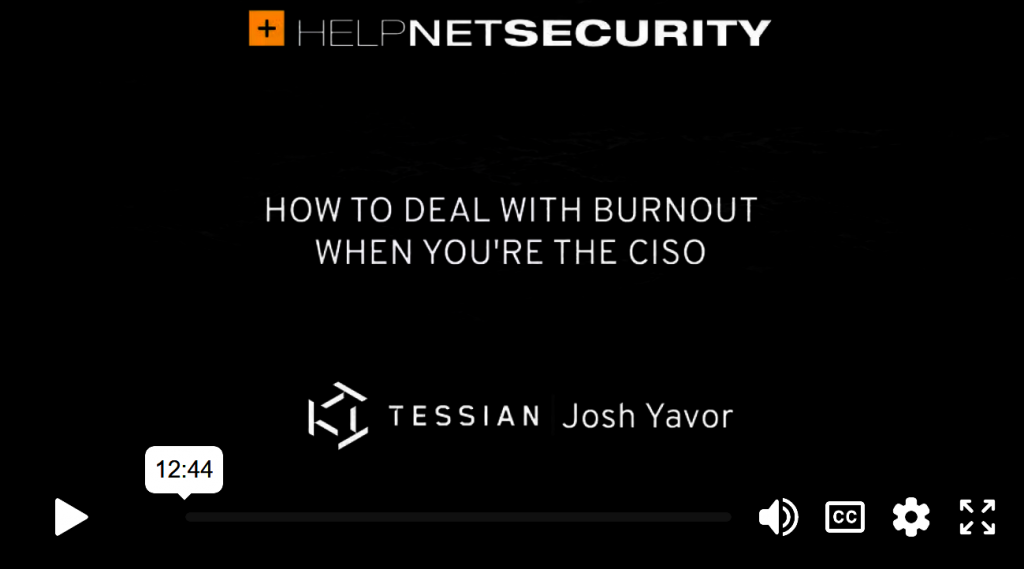
CISOs are working overtime and can’t always switch off from work, according to a recent Tessian report.
Recent headlines have shown that security stakes have never been higher, and it’s likely this high level of pressure that’s causing 18% of security leaders to work 25 extra hours a week. That’s double the amount of overtime that they worked in 2021. While many are hopping on the “quiet-quitting” trend, CISOs have the opposite problem.
In this Help Net Security video, Josh Yavor, CISO at Tessian, offers a personal perspective on dealing with burnout as a CISO.
A security flaw in the Galaxy Store allows attackers to trigger remote code execution on affected smartphones.
The now patched vulnerability, which affects Galaxy Store version 4.5.32.4, relates to a cross-site scripting (XSS) bug that occurs when handling certain deep links. An independent security researcher has been credited with reporting the issue.
Vulnerability Details
The now-patched vulnerability is related to a cross-site scripting (XSS) flaw that occurs when handling specific deep links and it affects Galaxy Store version 4.5.32.4. The problem was first reported by an independent security researcher.
Particularly, deeplink can be called from another application or from a browser. The store receives appropriate deeplinks, it will process and show them in a webview.
In this case, by failing to secure the deeplink, the attacker is able to run JS code in the Galaxy Store application’s webview context whenever a user hits a link from a website that contains the deeplink.
The expert focuses on deep links configured for Samsung’s Marketing & Content Service (MCS).
Although the Samsung MCS Direct Page website was extracting the argument from the url and displaying it on the website, it did not encrypt, which resulted in an XSS problem.
“We can see the website is processing the abc, def parameters and displaying as above without encoding, the url is passed directly to href this is very dangerous and will cause XSS.” reads the advisory published by SSD Secure Disclosure.
Experts observed two functions ‘downloadApp’ and ‘openApp’ here these two functions will get the app id and download them from the store or open them.
This indicates that these two functions can be called using JS code. In this case, an attacker has the ability to execute arbitrary code by injecting it into the MCS website.
“To be able to successfully exploit the victim’s server, it is necessary to have HTTPS and CORS bypass of Chrome,” advisory published by SSD Secure Disclosure
Affected Products and Patch Available
The vulnerability impacts Galaxy Store version 4.5.32.4.
Therefore, Samsung has issued patches that are now in wide circulation for all Samsung devices.













![Start-Up Secure: Baking Cybersecurity into Your Company from Founding to Exit by [Chris Castaldo]](https://m.media-amazon.com/images/I/51Dc+XDOieL.jpg)