InfoSec Compliance & AI Governance For over 20 years, DISC InfoSec has been a trusted voice for cybersecurity professionals—sharing practical insights, compliance strategies, and AI governance guidance to help you stay informed, connected, and secure in a rapidly evolving landscape.
The online world has never been risk-free and in 2022 the risks posed by cybercriminals are a threat to all internet users. As scams and phishing methods become more complex there is a greater need for the individual to adopt a range of best practices to protect their personal information.
Cybercriminals can target both individuals and businesses using a wide range of methods: malware can be activated by clicking on malicious links; personal details can be harvested simply by visiting unsecure sites.
Whether you like to surf the internet for fun and recreation, use it as a platform for online trading, or buy a range of products and services, staying safe online should always be a priority. It is a sobering fact that thousands of pieces of malware are created every day.
Stay safer online by following these three top tips.
Be vigilant when trading
Millions of people around the world now regularly trade online and increasingly that trade is in cryptocurrencies such as Bitcoin. With a wide range of cryptocurrencies now available, it is more important than ever to check that the site you trade on is secure.
As a rule, you should only trade on sites that feature the padlock icon in their web address, such as can be seen at OKX. This padlock icon proves that the site is secure and uses SSL encryption to ensure that any financial or personal information is transmitted safely.
It is also good practice to look at reviews from trading platforms. Customer experiences of using these sites can be a valuable source of information on the security of a platform. When trading online or undertaking any type of internet purchasing activity, it is also important to remember not to use unsecured networks.
Surfing in coffee shops and shopping malls can be an attractive proposition but should be avoided whenever any transactions are taking place; otherwise, a cybercriminal could easily pose as a contact from a website you have visited – leaving you open to phishing attacks in the future.
Use strong passwords
Whilst most people realize the value of having strong passwords across all the sites they use, it is still surprising how many people do not adhere to this best practice. Many consumers use the same passwords across numerous platforms and sites or use exceptionally weak passwords that can be cracked with a minimum amount of effort.
Today, search engines can suggest strong passwords and store them securely. This method can make consumers safer online whilst also freeing the need to memorize complex passwords. Put simply, if you use weak or repetitive passwords across sites, you are making it easy for a cybercriminal to harvest your personal details or hack your accounts.
Stay up to date
Another common practice that tends to be overlooked by millions of web visitors is to keep applications and devices up to date with the latest firmware. It is vitally important to check for system and firmware updates on a regular basis. Whilst many updates offer stability improvements or bug fixes, they often contain the latest security updates that keep devices and applications more secure.
Running software or operating systems that do not have the latest patches leaves them far more vulnerable to attack, so make a point of checking for updates across your devices on a regular basis to ensure that you benefit from the latest security features.
In summary, follow the above advice to avoid falling victim to one (or more) of the 300,000 pieces of malware that are created every day.
The most prominent CMS today is WordPress which is being used by over 455 million across the globe.
As the internet becomes increasingly integral to daily life, website security is more important than ever. Hackers can gain access to sensitive information, like credit card numbers and social security numbers, through websites with weak security. This can lead to identity theft and financial fraud.
Your website’s CMS (content management system) works as the backbone of your entire setup. The most prominent CMS today is WordPress which is being used by over 455 million across the globe. Naturally, WordPress is a lucrative target for cybercriminals and highlights the fact why WordPress security should never be ignored.
WordPress or another other CMS, while 100% security may be a myth, there are a few things you can do to ensure your website is secure from external and internal threats.
Secure Hosting
A website is a powerful tool that can help businesses of all sizes reach new customers and grow. However, a website is only as secure as the hosting provider that it uses. That’s why it’s important to choose a secure website hosting provider when setting up your website. Here are two things to look for in a secure website hosting provider:
1. Industry-Leading Security Measures: A good web hosting provider will have industry-leading security measures in place to protect your website from hackers and other online threats. This includes things like firewalls, DDoS protection, and malware scanning.
2. Regular Backups: In the event that your website is hacked or compromised, regular backups will ensure that you can quickly restore your site to its previous state. A good web hosting provider will perform regular backups of your site automatically.
Strengthening Login Credentials
According to studies, around 8 percent of hacked WordPress websites are due to weak passwords. However, as the largest self-hosted blogging tool in the world, WordPress has a responsibility to its users to keep their information safe. One way it does this is by natively offering two-factor authentication (2FA).
Two-factor authentication is an extra layer of security that requires not only a username and password but also something that the user has on them, like a phone. This makes it much harder for someone to hack into a WordPress account, even if they have the login credentials.
WordPress offers 2FA through several different methods, including SMS text messages, email, and authenticator apps. Which method you choose is up to you, but we recommend using an authenticator app like Authy or Google Authenticator.
Updated Plugins
The reason why WordPress powers millions of websites and blogs is its user-friendliness and free plugins. Although WordPress is good at adding new features and constantly issues security patches, zero-day vulnerabilities can be a calamity.
Therefore, always keep your plugins up to date because newer versions of plugins often fix security vulnerabilities that older versions had. Outdated plugins can cause compatibility issues with other plugins or with WordPress itself.
Additionally, newer versions of plugins usually have new features and improvements that can make your site run better. So next time you see a plugin update available, don’t ignore it – go ahead and update!
Hiding WordPress Login URL
There are a few reasons webmasters might want to change the default WordPress login URL. By doing so, you can help keep your site more secure from hackers and bots who try to gain access by brute force. Additionally, it can also deter casual users from trying to snoop around areas of your site they shouldn’t be.
If you’re running a membership site or online community, you may also want to change the login URL to something more branded and memorable for your users. By making it easy for them to find and login, you can reduce frustration and increase adoption.
Whatever your reason for wanting to change the WordPress login URL, it’s actually quite easy to do. There are a few different methods you can use, including plugins and editing code directly.
Login Limit Plugin
As a website owner, it’s important to make sure that your site is secure. One way to do this is by using a WordPress login limit plugin. This type of plugin will help to protect your site by limiting the number of failed login attempts.
There are many benefits of using a WordPress login limit plugin. By limiting the number of failed login attempts, you can help to prevent hackers from gaining access to your site. Additionally, this plugin can also help to improve the security of your password.
If you’re looking for a way to improve the security of your website, then we recommend that you consider using a WordPress login limit plugin.
Security Plugins
Using a security plugin is a must. There are many security plugins available for WordPress, but not all of them are created equal. Do some research and find a plugin that suits your needs. (We recommend looking into Wordfence or Sucuri.)
Once you’ve found a plugin, install it and activate it. Follow the instructions on the plugin’s settings page to configure it properly.
Most security plugins will offer features like blocking IP addresses, two-factor authentication, malware scanning, and more. Choose the features that are most important to you and make sure they’re enabled.
Keep your security plugin up to date by installing new versions when they’re released.
For starters, be sure to create a separate user account for the person to whom you’re granting access. That way, if their account is ever compromised, your main admin account will remain safe.
Next, be sure to set strong passwords for both your main admin account and the new user account. Use a combination of letters, numbers, and symbols to make it as difficult as possible for hackers to guess.
Take Away
Malicious actors are continuously coming up with new ways to use a company’s online presence against them, while cyber security specialists are always coming up with new ways to resist them.
This is the never-ending cycle of cybersecurity, and we’re all trapped in its center. Your WordPress site is just like any other website on the internet when it comes to cyber-attacks. However, by following the above-recommended tips and hacks, you can secure your WordPress website from cyber criminals or at least reduce the risk of being attacked.
As the internet becomes increasingly integral to daily life, website security is more important than ever. Hackers can gain access to sensitive information, like credit card numbers and social security numbers, through websites with weak security. This can lead to identity theft and financial fraud.
Your website’s CMS (content management system) works as the backbone of your entire setup. The most prominent CMS today is WordPress which is being used by over 455 million across the globe. Naturally, WordPress is a lucrative target for cybercriminals and highlights the fact why WordPress security should never be ignored.
WordPress or another other CMS, while 100% security may be a myth, there are a few things you can do to ensure your website is secure from external and internal threats.
Secure Hosting
A website is a powerful tool that can help businesses of all sizes reach new customers and grow. However, a website is only as secure as the hosting provider that it uses. That’s why it’s important to choose a secure website hosting provider when setting up your website. Here are two things to look for in a secure website hosting provider:
1. Industry-Leading Security Measures: A good web hosting provider will have industry-leading security measures in place to protect your website from hackers and other online threats. This includes things like firewalls, DDoS protection, and malware scanning.
2. Regular Backups: In the event that your website is hacked or compromised, regular backups will ensure that you can quickly restore your site to its previous state. A good web hosting provider will perform regular backups of your site automatically.
Strengthening Login Credentials
According to studies, around 8 percent of hacked WordPress websites are due to weak passwords. However, as the largest self-hosted blogging tool in the world, WordPress has a responsibility to its users to keep their information safe. One way it does this is by natively offering two-factor authentication (2FA).
Two-factor authentication is an extra layer of security that requires not only a username and password but also something that the user has on them, like a phone. This makes it much harder for someone to hack into a WordPress account, even if they have the login credentials.
WordPress offers 2FA through several different methods, including SMS text messages, email, and authenticator apps. Which method you choose is up to you, but we recommend using an authenticator app like Authy or Google Authenticator.
Updated Plugins
The reason why WordPress powers millions of websites and blogs is its user-friendliness and free plugins. Although WordPress is good at adding new features and constantly issues security patches, zero-day vulnerabilities can be a calamity.
Therefore, always keep your plugins up to date because newer versions of plugins often fix security vulnerabilities that older versions had. Outdated plugins can cause compatibility issues with other plugins or with WordPress itself.
Additionally, newer versions of plugins usually have new features and improvements that can make your site run better. So next time you see a plugin update available, don’t ignore it – go ahead and update!
Hiding WordPress Login URL
There are a few reasons webmasters might want to change the default WordPress login URL. By doing so, you can help keep your site more secure from hackers and bots who try to gain access by brute force. Additionally, it can also deter casual users from trying to snoop around areas of your site they shouldn’t be.
If you’re running a membership site or online community, you may also want to change the login URL to something more branded and memorable for your users. By making it easy for them to find and login, you can reduce frustration and increase adoption.
Whatever your reason for wanting to change the WordPress login URL, it’s actually quite easy to do. There are a few different methods you can use, including plugins and editing code directly.
Login Limit Plugin
As a website owner, it’s important to make sure that your site is secure. One way to do this is by using a WordPress login limit plugin. This type of plugin will help to protect your site by limiting the number of failed login attempts.
There are many benefits of using a WordPress login limit plugin. By limiting the number of failed login attempts, you can help to prevent hackers from gaining access to your site. Additionally, this plugin can also help to improve the security of your password.
If you’re looking for a way to improve the security of your website, then we recommend that you consider using a WordPress login limit plugin.
Security Plugins
Using a security plugin is a must. There are many security plugins available for WordPress, but not all of them are created equal. Do some research and find a plugin that suits your needs. (We recommend looking into Wordfence or Sucuri.)
Once you’ve found a plugin, install it and activate it. Follow the instructions on the plugin’s settings page to configure it properly.
Most security plugins will offer features like blocking IP addresses, two-factor authentication, malware scanning, and more. Choose the features that are most important to you and make sure they’re enabled.
Keep your security plugin up to date by installing new versions when they’re released.
For starters, be sure to create a separate user account for the person to whom you’re granting access. That way, if their account is ever compromised, your main admin account will remain safe.
Next, be sure to set strong passwords for both your main admin account and the new user account. Use a combination of letters, numbers, and symbols to make it as difficult as possible for hackers to guess.
Take Away
Malicious actors are continuously coming up with new ways to use a company’s online presence against them, while cyber security specialists are always coming up with new ways to resist them.
This is the never-ending cycle of cybersecurity, and we’re all trapped in its center. Your WordPress site is just like any other website on the internet when it comes to cyber-attacks. However, by following the above-recommended tips and hacks, you can secure your WordPress website from cyber criminals or at least reduce the risk of being attacked.
If you’re like most modern organizations, you rely on third-parties to help you run and grow your business. Yet the vendors, partners and suppliers that make up your supply chain are also a significant component of your cloud environment attack surface. While you can’t (and shouldn’t) cut third-parties off completely, you can (and should) enforce the principle of least privilege when providing them with permissions into your single and multicloud environment. Read on to learn how to implement this essential modern security practice and tips for getting started.
Why are Third Parties So Risky for Your Cloud Environment?
Third parties, including suppliers, contractors, vendors, partners and even your cloud provider are a fundamental part of your organization’s business ecosystem. They help with any and all aspects of business growth, from engineering and IT to marketing and business development, and legal and strategy. Many of these third parties have other third parties they work with to help run their own businesses, and so on. This natural business reality creates a supply chain of companies and networks interlinked in various ways.
But all this help has a dark side: third parties and supply chains create considerable vulnerabilities in your cloud environment. According to IBM’s 2022 Cost of a Data Breach Report, 19% of breaches were caused by a supply chain compromise. The average total cost of a third-party breach was $4.46M, which is 2.5% higher than the average cost of a breach. In addition, identifying and containing third-party breaches took an average of 26 days longer compared to the global average for other kinds of breaches.
The vulnerability of third parties arises from the different security hygiene practices and controls each business in your ecosystem employs. In many cases, their standards are less stringent than your own, creating inconsistency and an increase in their relative security vulnerability.
In May 2021, U.S. President Biden dedicated an entire section in his monumental CyberSecurity Executive Order to the hardening of the supply chain and mitigation of risks of vendor attacks. The order states that “the development of commercial software often lacks transparency, sufficient focus on the ability of the software to resist attack, and adequate controls to prevent tampering by malicious actors.” In short, the order notes that since it is easier for an attacker to breach, third-party software is more susceptible to exploitation.
Third-party vulnerabilities are not just software-related. Security practices that are different, mismatched and/or below your organization’s standard also create vulnerabilities. For example, some third parties may not practice password hygiene. In other cases, they may be reusing credentials or accidentally misconfiguring their environments.
Once they gain access to your supplier, attackers may find it easier to access your environments as well. Unlike malicious attackers, for which organizations are on the alert, organizations tend to treat third-parties as trusted entities. As such, third-parties are granted access and control over sensitive resources. Sometimes, this access is required for them to perform their work. Too often, though, permissions are intentionally or unintentionally over-privileged – due to manual errors, oversight or not knowing better. As a result, attackers that access your vendors can exploit this trust and breach your environments as well. Overprivileged permissions put your critical systems and data at risk, and can disrupt your compliance with regulations.
Third Parties in the Cloud: Why the Risk is Different from On-Premises
In the cloud, excessive trust of third parties and supply chain actors is riskier than on-premises environments – not just because one’s guard is down but due to the nature of cloud architecture and how it differs from on-premises.
On-premises, local servers and components enabled delineating network borders and implementing security controls to protect those borders, like firewalls. But in the cloud, infrastructure is distributed and resides on public infrastructure, making surrounding it with security controls impossible. This means that previously used security tactics and solutions, like third-party PAMs, are no longer helpful.
In addition, the distributed nature of the cloud, alongside the workforce’s reliance on cloud-based resources for their work (e.g, on SaaS apps), has changed connectivity needs. Businesses going through cloudification now rely on identities and credentials as the main means for providing access to company resources, making identity the new security perimeter.
It’s not only human users that require identities for access. The cloud has transformed many architectures from monoliths to microservices to support more development agility. These cloud services now also need digital identities as their main means for resource access. In some cases even your cloud provider can be a third party with access, often authorized, to your environment. Still, maintaining a list of CSP-managed accounts can be a difficult task.
Identities: A Complicated Security Affair
In the cloud, IT, DevOps, Security and DevSecOps are now managing thousands of new digital organizational identities, each with a complex sub-set of permissions that determines which resources they can access and the actions they can take on those resources. In the recent 2022 Trends in Security Digital Identities survey, by the independent group Identity Defined Security Alliance (IDSA), 52% of identity and security professionals identified cloud adoption as the driver of the growth of organizational identities.
Managing and monitoring these identities and their permissions is extremely complicated. The combination of the high volumes of identities and the intricacies of their permissions makes it almost impossible to avoid oversights and manual errors.
This extreme difficulty in avoiding permissions error has dangerous security implications. Verizon’s 2022 Data Breach Investigations Report (DBIR) finds that credentials are the number one organizational security weakness. When it comes to third-parties, the same research finds that the use of stolen credentials and ransomware are the top two “action varieties” leading to incidents. Per Ermetic research, ransomware potential is the cause of misconfigured identities, publicly exposed machines, risky third-party identities and risky access keys. In other words, third-party credentials are a focus point of violation for attacking companies and breaching their data. Protecting third-party credentials needs to be part of everyone’s security strategy.
Third-Parties: A Global Necessity and Pain
Businesses operating in a legacy-security mindset tend to block any risk or threat. But modern security strategies require security teams to act as business enablers. This means security needs to be maintained without slowing down business productivity and performance. Overcoming the third-party business vs. security dilemma is challenging, since while the supply chain is an inherent risk, it is also essential to a business’s success. Shutting down third-party operations is equivalent to shutting down business operations.
But the risk speaks for itself: third-party access in the cloud requires a dedicated security approach to permissions management. Fortunately, the principle of least-privilege is the modern security practice that can answer identity-management complexity – including that of third parties – in the cloud. By minimizing user and service permissions to only those deemed necessary for business operations, organizations can reduce their blast radius and attack surface in case of an attack. When it comes to third parties, the principle of least privilege – including its implementation via tools like Just in Time access – enables providing third parties only with the necessary access for the business while minimizing the risk these entities pose.
Implementing the Principle of Least Privilege for Third Parties in the Cloud
Let’s look into the various options for managing the risk of third-party permissions with least privilege.
Solution #1: Manual Maintenance
To secure third-party access to resources, IT and security need to find a way to keep track of all identities and their permissions. Some businesses rely on manual tracking in spreadsheets or other similar means. This quickly turns into long lists of identity names, the resources they have access to and their permissions.
However, manual maintenance in spreadsheets or by other means cannot capture the complexity of permissions management requirements. Many identities have access to a large number of resources, each with different authorization requirements. These all need to be meticulously tracked – spreadsheets are not equipped for presenting this information in a consumable fashion.
In addition, permissions can be inherited. This means that if service A has permissions to control service B, and service B has permissions for service C, service A will have permissions for service C. This creates a complex chain of permissions that is hard to create and visualize manually.
Excessive permissions derive from a complex chain of permissions that is hard to determine, visually present and keep up with manually
Finally, permissions need to be continuously monitored. Creating a one-time picture of permissions does not reflect the mercurial nature of the cloud or legitimate needs that come up requiring elevated or expanded permissions be granted for a certain amount of time.
Scanning and reviewing all these permissions takes time and concentration, which many IT and security teams don’t have. In addition, understanding the complexity, depth and how permissions are intertwined requires cloud security expertise, which not all security and IT teams have or have had time to develop. Even if they did, is this the best use of their time?
Here’s an example of one JSON permissions doc. Imagine having to comb through thousands of these and identifying any errors or issues:
Typical JSON permissions document – where lie the risky permissions?
Solution #2: Automation and Least Privilege to Reduce Third-Party Risk
Constantly updating manual spreadsheets while also being able to pinpoint any excessive or toxic permissions requires painstaking tracking, which resembles the type of analysis a machine would perform, not a human. The required level of detail, the scope of data and the speed of decision-making required when managing and monitoring the principle of least privilege screams “automation.” Doing so in a multicloud, let alone single cloud, environment is daunting. Here are six tips for ensuring your automated mechanism can protect you from third-party risk with least privilege:
Tip #1: Monitor for Excessive Third-Party Permissions
As we’ve established, permissions in the cloud are convoluted by nature. An automated, multicloud monitoring mechanism will check third-party credentials for excessive permissions or toxic combinations and identify if these permissions violate the principle of least privilege by providing them with the unnecessary ability to access sensitive data and modify infrastructure. This information will be visualized by its risk severity, and any attacker reconnaissance capabilities will be highlighted. The evaluation of severity will take into account any risk offsetting covered by other policy definitions, including network related, along the permissions chain.
Tip #2: Monitor with Care and Context
Modern security strategies are business enablers and growth enthusiasts. Therefore, security controls need to be applied in a contextual manner. Rather than blocking any potentially vulnerable activity, actions need to be implemented intelligently. With permissions, it is essential to provide context of permissions scope. Not all third-party capabilities are dangerous for the business. Excessive permissions, i.e., those that exceed the principle of least-privilege, are the ones that should be mitigated. Automated security controls provide mechanisms for marking accounts and services as trusted, reducing false alerts.
Tip #3: Auto-Remediate Third-Party Vulnerabilities
Engineering, IT and security teams are busy and have alert fatigue. A helpful automated solution does not just highlight the problem but also helps solve it. Instead of adding more tasks to the teams’ full plate, take care to choose a solution that can provide a recommended substitute policy and auto-remediate into your organization’s workflows, and even shift left with optimized policies through infrastructure as code, while leaving more advanced issues to human judgment.
Tip #4: Set Permissions Guardrails
Guardrails limit the actions an identity can perform. This helps minimize the blast radius by capping the potential of what a user or principal can do. Determining automated guardrails are especially important with third-parties, since it is often easier for IT teams to provide them with excessive access or accepting the cloud vendor’s default configurations rather than having to go into the weeds and figuring out how to limit their permissions to the resources they actually need.
Tip #5: Ensure Ease of Use
Automation should support you, not make your daily flow more difficult. A helpful automated solution will integrate with the security and engineering teams’ workflows. This can be done through easy to understand dashboards, clear instructions, integrations into the CI/CD cycle and integrations with tools like Slack or PagerDuty.
Tip #6: Deliver JIT Access
JIT (Just-in-Time) access is a security principle that provides access to users for a limited period of time and then revokes it. JIT is useful for when users need permissive entitlements to complete a certain task, such as when developers need to fix a bug in production.
A secure automated solution will support JIT access for third-parties as well. That way, if your vendor needs to access a sensitive environment for an important work-related issue, you can provide them with such access without leaving attackers with a permanent window of opportunity for reconnaissance.
Conclusion
From a business perspective, third parties are as much a part of your business as any internal department. But from a security perspective, these entities need to be approached intentionally and with strategic caution. Third parties carry huge risks since their security practices are beyond your control.
The answer to managing these vulnerabilities is through an automated security solution that enforces least privilege and JIT access. Automated permissions management and monitoring reduces access risk by assigning third-parties, including developers, with only the access they need. This is the best way to balance and ensure business continuity and security in your cloud.
“By implementing sound #management of our #risks and the threats and opportunities that flow from them we will be in a stronger position to deliver our organisational objectives, provide improved services to the community, achieve better value for money and demonstrate compliance with the Local Audit and Accounts Regulations. #Riskmanagement will therefore be at the heart of our good management practice and corporate governance arrangements.”
Kali Linux is a specialized Linux distribution developed by Offensive Security, designed for experienced Linux users who need a customized platform for penetration testing.
Kali Linux also comes with several hundred specialized tools for carrying out penetration testing, security research, computer forensics, reverse engineering, vulnerability management, and red team testing. Here are 5 you should learn how to use.
Aircrack-ng
Aircrack-ng is a complete suite of tools to assess Wi-Fi network security, focusing on:
Monitoring: Packet capture and export of data to text files for further processing by third-party tools
Attacking: Replay attacks, deauthentication, fake access points and others via packet injection
Testing: Checking WiFi cards and driver capabilities (capture and injection)
Cracking: WEP and WPA PSK (WPA 1 and 2)
John the Ripper
John the Ripper is an open-source password security auditing and password recovery tool. Its primary purpose is to detect weak Unix passwords. Besides several crypt(3) password hash types most commonly found on various Unix flavors, supported out of the box are Kerberos/AFS and Windows LM hashes, as well as DES-based tripcodes, plus hundreds of additional hashes and ciphers in “-jumbo” versions.
Lynis
Lynis performs an extensive health scan of your systems to support system hardening and compliance testing. Lynis is open-source and flexible, and used for several different purposes. Typical use cases include:
Security auditing
Compliance testing (e.g. PCI, HIPAA, SOx)
Penetration testing
Vulnerability detection
System hardening
Metasploit
Metasploit is the world’s most used penetration testing framework. A collaboration between the open source community and Rapid7, Metasploit helps security teams do more than just verify vulnerabilities, manage security assessments, and improve security awareness; it empowers and arms defenders to always stay one step (or two) ahead of the game.
For more information about the past, present and future of Metasploit, watch our video with Spencer McIntyre, Lead Security Researcher at Rapid7.
Nmap
Nmap is a free and open-source utility for network discovery and security auditing. Nmap uses raw IP packets in novel ways to determine what hosts are available on the network, what services (application name and version) those hosts are offering, what operating systems (and OS versions) they are running, what type of packet filters/firewalls are in use, and dozens of other characteristics.
Recently, the cybersecurity researchers of Sucuri have found that threat actors are conducting a tremendous massive black hat search engine optimization (SEO) campaign.
However, nearly 15,000 websites redirected visitors to participate in fake Q&A discussion forums in this campaign. Over the course of September and October, the SiteCheck scanner of Sucuri detected over 2,500 redirects to other sites.
Not only this, but the experts have also stated that each and every compromised site contains nearly 20,000 files. All these files were being used as a part of the malicious campaign, which was being carried out by the threat actors, and most of the sites were WordPress.
Malicious ois[.]is Redirects
According to the securi report, After detecting the malware, the experts conducted a brief survey and found that some of the website’s malware infections generally limit themselves to a smaller number of files.
Not only this, but they also limit their footprint so that they can avoid detection and carry out their operations properly.
A website infected with this malware will, on average, have over 100 files infected; that’s why this malware is completely different from others.
Common Infected Files
This malware is most commonly found infecting core files of WordPress, and it has also been found to infect “.php” files that were created by unrelated malware campaigns.
The following is a list of the top 10 most commonly infected files:-
As we continue to rely on technology more and more, we should also be increasingly thinking about protection. According to Cyber Security Hub, two-thirds of companies are spending more on cybersecurity in 2022 than last year — a pattern that should only continue.
On the heels of National Cybersecurity Awareness Month, it is the perfect time for business leaders and organizations to consider the cybersecurity safeguards they use to protect sensitive information. Cybersecurity can be a complex task for many organizations. Businesses, educational institutions and government entities often struggle to navigate the available options. Aside from IT professionals, finding the right solution requiressubject matter experts, a group of leaders who represent different lines of business, C-suite representatives and a thorough risk assessment to determine where to strike a balance between security and productivity.
Security is a constant discipline of due care and due diligence over time. It requires a mindset shift for employees and extends far beyond computers. Printers, scanners, fax machines, document management systems and other hardware and software solutions must contain the latest security features as well. While updating these devices may not be top of mind, neglecting them can pose a serious threat to your organization if compromised.
If you are just getting started, or need a refresher on cybersecurity, here are some of the first steps you should take:
Cyber espionage group Worok abuses Dropbox API to exfiltrate data via using a backdoor hidden in apparently innocuous image files.
Researchers from cybersecurity firm Avast observed the recently discovered espionage group Worok abusing Dropbox API to exfiltrate data via using a backdoor hidden in apparently innocuous image files.
The experts started their investigation from the analysis published by ESET on attacks against organizations and local governments in Asia and Africa. Avast experts were able to capture several PNG files embedding a data-stealing payload. They pointed out that data collection from victims’ machines using DropBox repository, and attackers use DropBox API for communication with the final stage.
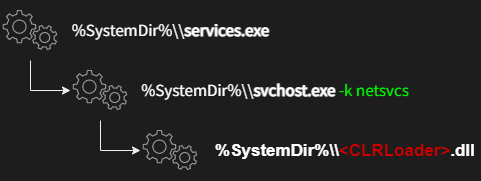
Avast experts shed the light on the compromise chain detailing how attackers initially deployed the first-stage malware., tracked as CLRLoader, which loads the next-state payload PNGLoader.
“PNGLoader is a loader that extracts bytes from PNGs files and reconstructs them into an executable code. PNGLoader is a .NET DLL file obfuscated utilizing .NET Reactor; the file description provides information that mimics legitimate software such as Jscript Profiler or Transfer Service Proxy.” reads the report published by Avast. “The deobfuscated PNGLoader code includes the entry point (Setfilter) invoked by CLRLoader.”
The malicious code is supposedly deployed by threat actors by exploiting Proxyshell vulnerabilities. Then attackers used publicly available exploit tools to deploy their custom malicious tools.
The experts found two variants of PNGLoad, both used to decode the malicious code hidden in the image and run a PowerShell script or a .NET C#-based payload.
The PowerShell script has continued to be elusive, although the cybersecurity company noted it was able to flag a few PNG files belonging to the second category that dispensed a steganographically embedded C# malware.
“At first glance, the PNG pictures look innocent, like a fluffy cloud,” Avast said.
Avast extends the compromise chain detailed by ESET with the discovery of a .NET C# payload that they tracked as DropBoxControl, which represents a third stage.
DropboxControl is an information-stealing backdoor that communicates abuses the DropBox service for C2 communication.
“Noteworthy, the C&C server is a DropBox account, and whole communications, such as commands, uploads, and downloads, are performed using regular files in specific folders. Therefore, the backdoor commands are represented as files with a defined extension. DropBoxControl periodically checks the DropBox folder and executes commands based on the request files.” continues the report. “The response for each command is also uploaded to the DropBox folder as the result file.”
The backdoor can run arbitrary executables, download and upload data, delete and rename files, capture file information, sniff network communications, and exfiltrate metadata.
According to Avast, DropboxControl was not developed by the author of CLRLoad and PNGLoad due to important differences into the source code and its quality.
“The key finding of this research is the interception of the PNG files, as predicted by ESET. The stenographically embedded C# payload (DropBoxControl) confirms Worok as the cyberespionage group. They steal data via the DropBox account registered on active Google emails.” concludes AVAST. “The prevalence of Worok’s tools in the wild is low, so it can indicate that the toolset is an APT project focusing on high-profile entities in private and public sectors in Asia, Africa, and North America.”
The Worok threat infects victims’ computers with information-stealing malware by concealing malware within PNG images with the help of the Steganography technique, which makes it very difficult to detect by malware scanners.
The finding has substantiated one of the most crucial links in the chain of infection of the threat actor as claimed by the experts at Avast. These malicious PNG images are used by threat actors to conceal a payload that facilitates information theft under the guise of being an image.
In the past couple of months, ESET has been revealing details of attacks that Worok has been launching against several high-profile companies and local government agencies in the following regions:-
Middle East
Southeast Asia
South Africa
There are tactical overlaps between Worok and a Chinese threat actor known as TA428 that is believed to be sharing similar tactics.
Compromise Chain
Steganography is a technique that hides scripts within PNG images, such as the compromise series of Worok, which utilizes a C++-based loader which is known as “CLRLoad.”
As of right now, we do not know what vector was used in the initial attack. As part of certain intrusions, the malware was also deployed on Microsoft Exchange Server by exploiting the ProxyShell vulnerability.
A custom malicious kit was then deployed by the attackers using publicly available exploit tools that were available for free. Therefore, the final compromise chain can be summarized as follows:-
First, CLRLoader is implemented, where simple code is implemented to load the PNGLoader, which is the second stage in the process.
In order to decode the malicious code possessed within the image, the PNGLoad comes in two different variants. While doing so, they launch either the following payloads:-
PowerShell script
.NET C#-based
It has been difficult for PowerShell to find the script and they have recently discovered a new malware called DropboxControl, which is spyware that steals information from the system. Provide the threat actor with the ability to upload, download, and run commands contained in specific files.
Malware in PNG Files
When a viewer of an image is opened to view the steganographic code within it, it appears as if the image file is normal.
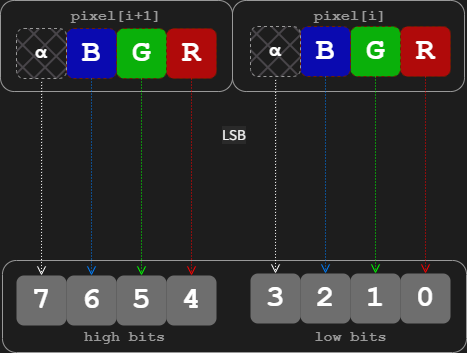
An image was encoded in a way that allows malicious code to be embedded in the least significant bits of each pixel in the image using a technique known as “least significant bit” (LSB) encoding.
No matter how the third-stage implant is deployed, it is clear that Worok has intelligence-gathering objectives that go beyond simply harvesting files of interest.
Worok attacks have been prompted by tools that are not circulating in the wild. Therefore, it’s likely that these tools are used by the group themselves exclusively to conduct attacks.
Indicators of Compromise
PNG file with steganographically embedded C# payload
Here are eight top security threats that IT is likely to see in 2023.
Top 8 security threats for next year
1. Malware
Malware is malicious software that is injected into networks and systems with the intention of causing disruption to computers, servers, workstations and networks. Malware can extract confidential information, deny service and gain access to systems.
IT departments use security software and firewalls to monitor and intercept malware before it gains entry to networks and systems, but malware bad actors continue to evolve ways to elude these defenses. That makes maintaining current updates to security software and firewalls essential.
2. Ransomware
Ransomware is a type of malware. It blocks access to a system or threatens to publish proprietary information. Ransomware perpetrators demand that their victim companies pay them cash ransoms to unlock systems or return information.
So far in 2022, ransomware attacks on companies are 33% higher than they were in 2021. Many companies agree to pay ransoms to get their systems back, only to be hit again by the same ransomware perpetrators.
Ransomware attacks are costly. They can damage company reputations. Many times ransomware can enter a corporate network through a channel that is open with a vendor or a supplier that has weaker security on its network.
One step companies can take is to audit the security measures that their suppliers and vendors use to ensure that the end-to-end supply chain is secure.
3. Phishing
Almost everyone has received a suspicious email, or worse yet, an email that appears to be legitimate and from a trusted party but isn’t. This email trickery is known as phishing.
Phishing is a major threat to companies because it is easy for unsuspecting employees to open bogus emails and unleash viruses. Employee training on how to recognize phony emails, report them and never open them can really help. IT should team with HR to ensure that sound email habits are taught.
4. IoT
In 2020, 61% of companies were using IoT, and this percentage only continues to increase. With the expansion of IoT, security risks also grow. IoT vendors are notorious for implementing little to no security on their devices. IT can combat this threat by vetting IoT vendors upfront in the RFP process for security and by resetting IoT security defaults on devices so they conform to corporate standards.
If your organization is looking for more guidance on IoT security, the experts at TechRepublic Premium have put together an ebook for IT leaders that is filled with what to look out for and strategies to deal with threats.
5. Internal employees
Disgruntled employees can sabotage networks or make off with intellectual property and proprietary information, and employees who practice poor security habits can inadvertently share passwords and leave equipment unprotected. This is why there has been an uptick in the number of companies that use social engineering audits to check how well employee security policies and procedures are working. In 2023, social engineering audits will continue to be used so IT can check the robustness of its workforce security policies and practices.
6. Data poisoning
An IBM 2022 study found that 35% of companies were using AI in their business and 42% were exploring it. Artificial intelligence is going to open up new possibilities for companies in every industry. Unfortunately, the bad actors know this, too.
Cases of data poisoning in AI systems have started to appear. In a data poisoning, a malicious actor finds a way to inject corrupted data into an AI system that will skew the results of an AI inquiry, potentially returning an AI result to company decision makers that is false.
Data poisoning is a new attack vector into corporate systems. One way to protect against it is to continuously monitor your AI results. If you suddenly see a system trending significantly away from what it has revealed in the past, it’s time to look at the integrity of the data.
7. New technology
Organizations are adopting new technology like biometrics. These technologies yield enormous benefits, but they also introduce new security risks since IT has limited experience with them. One step IT can take is to carefully vet each new technology and its vendors before signing a purchase agreement.
8. Multi-layer security
How much security is enough? If you’ve firewalled your network, installed security monitoring and interception software, secured your servers, issued multi-factor identification sign-ons to employees and implemented data encryption, but you forgot to lock physical facilities containing servers or to install the latest security updates on smartphones, are you covered?
There are many layers of security that IT must batten down and monitor. IT can tighten up security by creating a checklist for every security breach point in a workflow.
Social engineering – also known as human hacking – is an expression that encompasses a number of methods and vectors attackers use to manipulate targets into giving away or providing access to sensitive information, or generally performing actions that are against their best interest.
To effectively perform social engineering attacks, attackers exploit vulnerabilities in how humans react to specific situations.
The most important thing to keep in mind is that the overwhelming majority of humans have exploitable traits (to a lesser or higher degree), which means that anybody and everybody can be manipulated by social engineers.
This Help Net Security video talks about what social engineering is, how can it be performed, and how can you fight against it.
Data-deletion service’s patent covers removing personal information such as geolocation, biometrics, and phone records from a vehicle by using a user-computing device
— Privacy4Cars, the first privacy-tech company focused on solving the privacy and security issues posed by vehicle data to protect consumers and automotive businesses, announced today that it has secured a new patent, further expanding its patent coverage for removing privacy information from a vehicle by using a user computing device. This patent grant marks the fourth patent that the U.S. Patent & Trademark Office has awarded to Privacy4Cars in the past three years and provides further evidence that the company is the leading innovator in the vehicle data privacy and security field.
Since its launch in 2018, Privacy4Cars has emerged as the industry standard across auto finance companies (including captives, national and regional banks, auto lenders, and credit unions), fleets and fleet management companies, and franchised and independent dealerships. Many of today’s top companies in the automotive space — including the three largest OEM’s captives — have adopted the data-deletion service powered by the Privacy4Cars platform, and a growing number of industry associations have begun speaking out about the need to clear personal information from cars, and tapping Privacy4Cars as a resource to educate members.
“Used vehicles are akin to large, unencrypted hard drives full of consumers’ sensitive Personal Information, including identifiers, geolocation, biometrics, and phone records,” said Andrea Amico, CEO and founder of Privacy4Cars. “This creates service, reputation, and increasingly major regulatory challenges, including the obligations companies face under the new Safeguards Rule (coming into effect on Dec. 9, 2022) and a host of existing and new state laws. At the same time, federal and local agencies are increasingly concerned about the personal information vehicles capture and store — which is driving more and more auto businesses to look for reliable solutions to simply and effectively delete data from vehicles while creating by design detailed compliance logs that prove their efforts,” he continued. “This new patent demonstrates Privacy4Cars’ commitment to meet the growing compliance and service needs of our partners. Privacy4Cars has established itself as the clear leader in the vehicle privacy space and companies increasingly recognize the superior efficiency, effectiveness, and compliance outcomes our proprietary solution offers, making Privacy4Cars the only obvious choice”.
Privacy4Cars’ newly awarded U.S. Patent No. 11,494,514 expands the scope of patent protection for the vehicle data privacy and security innovations of Privacy4Cars’ U.S. Patent No. 11,256,827, U.S. Patent No. 11,157,648 and U.S. Patent No. 11,113,415. The new patent covers the use of a user computing device to remove privacy information from a vehicle and to create feedback about the information removal activity, including deletion logs for use in legal compliance applications.
Privacy4Cars is currently available in the US, Canada, UK, EU, Middle East, India, and Australia, and plans to further expand its geographical reach to address the growing number of countries that have comprehensive privacy and data security laws. Privacy4Cars is available to consumers as a free-to-download app, and to businesses as a subscription service. Businesses can use Privacy4Cars’ stand-alone app or choose to integrate Privacy4Cars’ Software Development Kit to easily embed its patented data deletion solution as a feature inside their own apps.
For more information about Privacy4Cars, please visit: https://privacy4cars.com.ABOUT PRIVACY4CARS
Privacy4Cars is the first and only technology company focused on identifying and resolving data privacy issues across the automotive ecosystem. Our mission, Driving Privacy, means offering a suite of services to expand protections for individuals and companies alike, by focusing on privacy, safety, security, and compliance. Privacy4Cars’ patented solution helps users quickly and confidently clear vehicle users’ personal information (phone numbers, call logs, location history, garage door codes, and more) while building compliance records. For more information, please visit: https://privacy4cars.com/
A new version of ISO 27001 was published this week, introducing several significant changes in the way organisations are expected to manage information security.
The Standard was last revised almost a decade ago (although a new iteration of the supplementary standard ISO 27002 was published in February 2022), meaning that the release of ISO 27001:2022 has been much needed and highly anticipated.
What’s changing?
The good news for organisations is that ISO 27001:2022 doesn’t drastically overhaul their compliance requirements. There are new requirements on planned changes and how your organisation should deal with them, as well as a greater focus on how you must deal with the needs and expectations of interested parties.
Annex A of ISO 27001 now refers to the updated information security controls in ISO 27002:2022, and the Standard requires organisations to document and monitor objectives.
It also aligns its terminology with that used across other ISO management system standards.
Another notable aspect of its terminology is that ISO 27002:2022 no longer refers to itself as a “code of practice”. This better reflects its purpose as a reference set of information security controls.
However, the most significant changes with the 2022 version of ISO 27002 are in its structure. It is no longer divided into 14 control categories, and is instead split into four ‘themes’: organisational, people, physical and technological.
Meanwhile, although the 2022 version of ISO 27002 is significantly longer than its predecessor, the total number of controls has decreased from 114 to 93.
This is because many of its controls have been reordered and merged. Only 35 controls are unchanged, while 11 completely new requirements have been added. These are:
Threat intelligence
Information security for use of cloud services
ICT readiness for business continuity
Physical security monitoring
Configuration management
Information deletion
Data masking
Data leakage prevention
Monitoring activities
Web filtering
Secure coding
The new and amended controls are also categorised according to five types of ‘attribute’: control type, operational capabilities, security domains, cybersecurity concepts and information security properties.
This change is intended to make it easier to highlight and view all controls of a certain type, such as all preventive controls, or all controls related to confidentiality.
How will this affect organisations implementing ISO 27001?
The introduction of ISO 27001:2022 won’t have an immediate effect on organisations that are currently certified to ISO 27001:2013 or are in the process of achieving certification.
For the time being, organisations should continue to follow the 2013 version of the Standard. This means, for example, that the SoA (Statement of Applicability) should refer to the controls listed in Annex A of ISO 27001:2013, while the 2022 version of the Standard should be used only as a reference.
Indeed, the reason that the updated version is being published now is to give organisations time to familiarise themselves with the new controls before embarking on an implementation project.
The controls listed in ISO 27002:2022 can be considered an alternative control set that you will have to compare with the existing Annex A – just as you would with any other alternative control set.
ISO 27002:2022 has an annex that compares its controls with the 2013 iteration of the Standard, so this should be relatively straightforward.
What next?
There is a three-year transition period for certified organisations to revise their management system to conform to a new version of a standard, so there will be plenty of time to make the necessary changes.
However, it’s never wise to put off the planning process until the last minute. Implementation will take several months, and it’s worth knowing what’s expected of you as soon as possible.
You can begin by reading the Standard for yourself. You can purchase a digital copy of ISO 27001:2022 from our website, and we recommend comparing the updated version to the 2013 edition and your current compliance practices to determine what adjustments you’ll have to make.
If you’re unsure how to proceed, our team of experts are here to help. Having led the world’s first ISO 27001 certification project, we understand what it takes to implement the Standard.
Speak to one of our experts for more information on how we can support you.
A bug bounty hunter called David Schütz has just published a detailed report describing how he crossed swords with Google for several months over what he considered a dangerous Android security hole.
According to Schütz, he stumbled on a total Android lockscreen bypass bug entirely by accident in June 2022, under real-life conditions that could easily have happened to anyone.
In other words, it was reasonable to assume that other people might find out about the flaw without deliberately setting out to look for bugs, making its discovery and public disclosure (or private abuse) as a zero-day hole much more likely than usual.
Unfortunately, it didn’t get patched until November 2022, which is why he’s only disclosed it now.
A serenditious battery outage
Simply put, he found the bug because he forgot to turn off or to charge his phone before setting off on a lengthy journey, leaving the device to run low on juice unnoticed while he was on the road.
According to Schütz, he was rushing to send some messages after getting home (we’re guessing he’d been on a plane) with the tiny amount of power still left in the battery…
…when the phone died.
We’ve all been there, scrabbling for a charger or a backup battery pack to get the phone rebooted to let people know we have arrived safely, are waiting at baggage reclaim, have reached the train station, expect to get home in 45 minutes, could stop at the shops if anyone urgently needs anything, or whatever we’ve got to say.
And we’ve all struggled with passwords and PINs when we’re in a rush, especially if they’re codes that we rarely use and never developed “muscle memory” for typing in.
In Schütz’s case, it was the humble PIN on his SIM card that stumped him, and because SIM PINs can be as short as four digits, they’re protected by a hardware lockout that limits you to three guesses at most. (We’ve been there, done that, locked ourselves out.)
After that, you need to enter a 10-digit “master PIN” known as the PUK, short for personal unblocking key, which is usually printed inside the packaging in which the SIM gets sold, which makes it largely tamper-proof.
And to protect against PUK guessing attacks, the SIM automatically fries itself after 10 wrong attempts, and needs to be replaced, which typically means fronting up to a mobile phone shop with identification.
What did I do with that packaging?
Fortunately, because he wouldn’t have found the bug without it, Schütz located the original SIM packaging stashed somewhere in a cupboard, scratched off the protective strip that obscures the PUK, and typed it in.
At this point, given that he was in the process of starting up the phone after it ran out of power, he should have seen the phone’s lockscreen demanding him to type in the phone’s unlock code…
…but, instead, he realised he was at the wrong sort of lockscreen, because it was offering him a chance to unlock the device using only his fingerprint.
That’s only supposed to happen if your phone locks while in regular use, and isn’t supposed to happen after a power-off-and-reboot, when a full passcode reauthentication (or one of those swipe-to-unlock “pattern codes”) should be enforced.
Is there really a “lock” in your lockscreen?
As you probably know from the many times we’ve written about lockscreen bugs over the years on Naked Security, the problem with the word “lock” in lockscreen is that it’s simply not a good metaphor to represent just how complex the code is that manages the process of “locking” and “unlocking” modern phones.
A modern mobile lockscreen is a bit like a house front door that has a decent quality deadbolt lock fitted…
…but also has a letterbox (mail slot), glass panels to let in light, a cat flap, a loidable spring lock that you’ve learned to rely on because the deadbolt is a bit of a hassle, and an external wireless doorbell/security camera that’s easy to steal even though it contains your Wi-Fi password in plaintext and the last 60 minutes of video footage it recorded.
Oh, and, in some cases, even a secure-looking front door will have the keys “hidden” under the doormat anyway, which is pretty much the situation that Schütz found himself in on his Android phone.
A map of twisty passageways
Modern phone lockscreens aren’t so much about locking your phone as restricting your apps to limited modes of operation.
This typically leaves you, and your apps, with lockscreen access to a plentiful array of “special case” features, such as activating the camera without unlokcking, or popping up a curated set of notification mesaages or email subject lines where anyone could see them without the passcode.
What Schütz had come across, in a perfectly unexceptionable sequence of operations, was a fault in what’s known in the jargon as the lockscreen state machine.
A state machine is a sort of graph, or map, of the conditions that a program can be in, along with the legal ways that the program can move from one state to another, such as a network connection switching from “listening” to “connected”, and then from “connected” to “verified”, or a phone screen switching from “locked” either to “unlockable with fingerprint” or to “unlockable but only with a passcode”.
As you can imagine, state machines for complex tasks quickly get complicated themselves, and the map of different legal paths from one state to another can end up full of twists, and turns…
…and, sometimes, exotic secret passageways that no one noticed during testing.
Indeed, Schütz was able to parlay his inadvertent PUK discovery into a generic lockscreen bypass by which anyone who picked up (or stole, or otherwise had brief access to) a locked Android device could trick it into the unlocked state armed with nothing more than a new SIM card of their own and a paper clip.
In case you’re wondering, the paper clip is to eject the SIM already in the phone so that you can insert the new SIM and trick the phone into the “I need to request the PIN for this new SIM for security reasons” state. Schütz admits that when he went to Google’s offices to demonstrate the hack, no one had a proper SIM ejector, so they first tried a needle, with which Schütz managed to stab himself, before succeeding with a borrowed earring. We suspect that poking the needle in point first didn’t work (it’s hard to hit the ejector pin with a tiny point) so he decided to risk using it point outwards while “being really careful”, thus turning a hacking attempt into a literal hack. (We’ve been there, done that, pronged ourselves in the fingertip.)
Gaming the system with a new SIM
Given that the attacker knows both the PIN and the PUK of the new SIM, they can deliberately get the PIN wrong three times and then immediately get the PUK right, thus deliberately forcing the lockscreen state machine into the insecure condition that Schütz discovered accidentally.
With the right timing, Schütz found that he could not only land on the fingerprint unlock page when it wasn’t supposed to appear, but also trick the phone into accepting the successful PUK unlock as a signal to dismiss the fingerprint screen and “validate” the entire unlock process as if he’d typed in the phone’s full lock code.
Unlock bypass!
Unfortunately, much of Schütz’s article describes the length of time that Google took to react to and to fix this vulnerability, even after the company’s own engineers had decided that the bug was indeed repeatable and exploitable.
As Schütz himself put it:
This was the most impactful vulnerability that I have found yet, and it crossed a line for me where I really started to worry about the fix timeline and even just about keeping it as a “secret” myself. I might be overreacting, but I mean not so long ago the FBI was fighting with Apple for almost the same thing.
Disclosure delays
Given Google’s attitude to bug disclosures, with its own Project Zero team notoriously firm about the need to set strict disclosure times and stickto them, you might have expected the company to stick to its 90-days-plus-14-extra-in-special-cases rules.
But, according to Schütz, Google couldn’t manage it in this case.
Apparently, he’d agreed a date in October 2022 by which he planned to disclose the bug publicly, as he’s now done, which seems like plenty of time for a bug he discovered back in June 2022.
But Google missed that October deadline.
The patch for the flaw, designated bug number CVE-2022-20465, finally appeared in Android’s November 2022 security patches, dated 2022-11-05, with Google describing the fix as: “Do not dismiss keyguard after SIM PUK unlock.”
In technical terms, the bug was what’s known a race condition, where the part of the operating system that was watching the PUK entry process to keep track of the “is it safe to unlock the SIM now?” state ended up producing a success signal that trumped the code that was simultaneously keeping track of “is is safe to unlock the entire device?”
Still, Schütz is now significantly richer thanks to Google’s bug bounty payout (his report makes it clear he was hoping for $100,000, but he had to settle for $70,000 in the end).
And he did hold off on disclosing the bug after the 15 October 2022 deadline, accepting that discretion is the sometimes better part of valour, saying:
I [was] too scared to actually put out the live bug and since the fix was less than a month away, it was not really worth it anyway. I decided to wait for the fix.
What to do?
Check that your Android is up to date: go to Settings > Security > Security update > Check for update.
Note that when we visited the Security update screen, having not used our Pixel phone for a while, Android boldly proclaimed Your system is up to date, showing that it had checked automatically a minute or so earlier, but still told us we were on the October 5, 2022 security update.
We forced a new update check manually and were immediately told Preparing system update…, followed by a short download, a lengthy preparatory stage, and then a reboot request.
After rebooting we haad reached the November 5, 2022 patch level.
We then went back and did one more Check for update to confirm that there were no fixes still outstanding.
Vulnerability management has always been as much art as science. However, the rapid changes in both IT networks and the external threat landscape over the last decade have made it exponentially more difficult to identify and remediate the vulnerabilities with the greatest potential impact on the enterprise.
With a record of 18,378 vulnerabilities reported by the National Vulnerability Database in 2021 and an influx of new attack techniques targeting increasingly complex and distributed environments, how can CISOs know where to start?
Why has maintaining network visibility become such a challenge?
Heavy investments into digital transformation and cloud migration have rendered significant, foundational changes to the enterprise IT environment. Gartner predicts end-user spending on public cloud services will reach almost 600 billion in 2023, up from an estimated $494.7 billion this year and $410.9 in 2021.
Long gone are the days when security teams could concern themselves only with connections to and from the data center; now they must establish effective visibility and control of a sprawling, complex network that includes multiple public clouds, SaaS services, legacy infrastructure, the home networks of remote users, etc. Corporate assets are no longer limited to servers, workstations, and a few printers; teams must now secure virtual machines on premise and in the cloud, IoT devices, mobile devices, microservices, cloud data stores, and much more – making visibility and monitoring infinitely more complex and challenging.
In many cases, security investments have not kept up with the rapid increase in network scope and complexity. In other cases, agile processes have outpaced security controls. This results in security teams struggling to achieve effective visibility and control of their networks, resulting in misconfigurations, compliance violations, unnecessary risk, and improperly prioritized vulnerabilities that provide threat actors with easy attack paths.
Adversaries are specifically targeting these blind spots and security gaps to breach the network and evade detection.
What are the most common mistakes being made in attempting to keep up with threats?
With the average cost of a data breach climbing to $4.35 million in 2022, CISOs and their teams are under extraordinary pressure to reduce cyber risk as much as possible. But many are hindered by a lack of comprehensive visibility or pressure to deliver agility beyond what can be delivered without compromising security. One of the most common issues we encounter is an inability to accurately prioritize vulnerabilities based on the actual risk they pose to the enterprise. With thousands of vulnerabilities discovered every year, determining which vulnerabilities need to be patched and which can be accepted as incremental risk is a critical process.
The Common Vulnerability Scoring System (CVSS) has become a useful guidepost, providing security teams with generalized information for each vulnerability. Prioritizing the vulnerabilities with the highest CVSS score may seem like a logical and productive approach. However, every CISO should recognize that CVSS scores alone are not an accurate way to measure the risk a vulnerability poses to their individual enterprise.
To accurately measure risk, more contextual information is required. Security teams need to understand how a vulnerability relates to their specific environment. While high-profile threats like Heartbleed may seem like an obvious priority, a less public vulnerability with a lower CVSS score exposed to the Internet in the DMZ may expose the enterprise to greater actual risk.
These challenges are exacerbated by the fact that IT and security teams often lose track of assets and applications as ownership is pushed to new enterprise teams and the cloud makes it easier than ever for anyone in the enterprise to spin up new resources. As a result, many enterprises are riddled with assets that are unmonitored and remain dangerously behind on security updates.
Why context is critical
With resources like the National Vulnerability Database at their fingertips, no CISO lacks for data on vulnerabilities. In fact, most enterprises do not lack for contextual data either. Enterprise security, IT, and GRC stacks provide a continuous stream of data which can be leveraged in vulnerability management processes. However, these raw streams of data must be carefully curated and combined with vulnerability information to be turned into actionable context – and it is this in this process where many enterprises falter.
Unfortunately, most enterprises do not have the resources to patch every vulnerability. In some circumstances, there may be a business case for not patching a vulnerability immediately, or at all. Context from information sources across the enterprise enables standardized risk decisions to be made, allowing CISOs to allocate their limited resources where they will have the greatest impact on the security of the enterprise.
Making the most of limited resources with automation
There was a time when a seasoned security professional could instinctively assess the contextual risk of a threat based on their experience and familiarity with the organisation’s infrastructure. However, this approach cannot scale with the rapid expansion of the enterprise network and the growing number of vulnerabilities that must be managed. Even before the ongoing global security skills shortage, no organization had the resources to manually aggregate and correlate thousands of fragments of data to create actionable context.
In today’s constantly evolving threat landscape, automation offers the best chance for keeping up with vulnerabilities and threats. An automated approach can pull relevant data from the security, IT, and GRC stacks and correlate it into contextualized information which can be used as the basis for automated or manual risk decisions.
Nearly a third of CISOs or IT security leaders in the United States and the United Kingdom are considering leaving their current role, according to research by BlackFog.
Of those considering leaving their current role, a third of those would do so within the next six months, according to the survey, which polled more than 500 IT security leaders.
The report also found that, among the top issues security pros have with their current role, the lack of work-life balance is the most troublesome—cited by three in 10 survey respondents.
More than a quarter (27%) of respondents said that too much time was spent on firefighting rather than focusing on strategic issues.
Twenty percent said they felt that keeping their teams’ skill levels in line with new frameworks and models such as zero-trust was a “serious challenge”, while 43% of respondents said they found it difficult to keep pace with the newest innovations in the cybersecurity market.
Using Automation to Ease the Pressure
Phil Neray, vice president of cyber defense strategy at CardinalOps, a detection posture management company, said both CISOs and security operations center (SOC) personnel take pride in being cybersecurity defenders for their organizations and both groups feel the pain of information overload and constantly being on call to respond to the latest emergencies.
“What needs to change? The CISO’s peers in the business need to understand that cybersecurity risk is a top business risk, not just an IT issue, and they need to allocate higher budgets to support a higher level of staffing in the SOC,” he said.
In addition, Neray said by investing in more automation for the SOC, CISOs and their teams will be freed from performing mundane tasks.
“This way, they can direct their human creativity and innovation toward proactive activities like threat hunting and remediating gaps in their defensive posture, rather than always being reactive,” he explained.
Darren Guccione, CEO and co-founder at Keeper Security, a provider of zero-trust and zero-knowledge cybersecurity software, added that there is “absolutely no denying” that being a CISO is one of the most difficult and demanding roles in any company.
“The board of directors and fellow business leaders must support their CISO’s priorities and needs, particularly when they’re faced with a cyberattack or data breach,” he said. “Without that support, talented CISOs won’t stick around as there are plenty of other job opportunities awaiting them.”
Indeed, the BlackFog report noted recruiting is a challenge globally and with stiff competition to attract the best talent, organizations need to address the well-being and work-life balance issues that have persisted across the industry.
Acknowledging CISO Burnout
Sounil Yu, CISO at JupiterOne, a provider of cybersecurity asset management and governance solutions, noted that CISOs face an uncommonly high risk of burnout due to the nature of security work.
“Burnout is more common than most realize,” he said. “Acknowledging burnout risks is an important way to be supportive and to let team members know that they are not alone.”
Yu pointed out that CISOs cannot personally shoulder the burden of mitigating burnout.
“Instead, CISOs should educate their company’s board and fellow executive leaders on security burnout risks and collaborate with HR to improve resources such as employee resource programs, flexible working arrangements and systems of reward and recognition,” he said.
John Bambenek, principal threat hunter at Netenrich, a security and operations analytics SaaS company, said CISOs are facing the same burnout risk as cybersecurity professionals with one key difference–the CISO is the designated ‘throat to choke’ when things go awry.
“One of the biggest changes to be made in the C-suite to improve the situation for security leaders would be focusing on freeing the CISO to work on strategic issues,” he says. “Constant firefighting burns out everyone up and down the ladder. You can handle that with line staff with job rotation, but the CISO needs to have the resources to make their life better overall.”
Bambenek added that mandatory PTO that involves someone else tending to the fires while the CISO is gone would help, too.
“PTO where you are still on call isn’t PTO,” he noted. “It’s just working from home.”
He explained that organizations that are well-funded should have emerging technology labs where they can explore both new technology and new security tools to help address the challenges CISOs are facing.
“A big part of this problem is threats evolve with rapid changes in technology—security is playing catch-up behind both,” Bambenek said.
CrowdStrike achieved 99% detection coverage by conclusively reporting 75 of the 76 adversary techniques during the MITRE ATT&CK evaluation.
Leveraging the power of the CrowdStrike Falcon® platform with integrated threat intelligence and patented tooling, the CrowdStrike Falcon® Complete and CrowdStrike® Falcon OverWatch™ managed threat hunting teams identified the adversary and associated tradecraft within minutes.
Closed-book evaluations such as this provide the most realistic reflection of how a security vendor would perform in a customer environment. CrowdStrike’s combination of market-leading technology and elite human expertise led the evaluation, which is the gold standard in managed detection and response testing.
MITRE does not rank or rate participants; the following is CrowdStrike’s analysis of the results provided by MITRE Engenuity.