InfoSec and Compliance – With 20 years of blogging experience, DISC InfoSec blog is dedicated to providing trusted insights and practical solutions for professionals and organizations navigating the evolving cybersecurity landscape. From cutting-edge threats to compliance strategies, this blog is your reliable resource for staying informed and secure. Dive into the content, connect with the community, and elevate your InfoSec expertise!
Red Siege has developed and made available many open-source tools to help with your penetration testing work.
The company plans to continue to support the tools listed below, whether in the form of bug fixes or new features. Give them a try, they’re all available on GitHub for free.
“I find joy in writing code, turning it into a logic puzzle to create powerful software tools. The satisfaction of seeing my creations in action, like EyeWitness, brings a sense of pride and saves valuable time. Motivated by the possibility of filling a software gap, I open source my creations, hoping they’ll benefit others as they did for me,” Chris Truncer, Senior Security Consultant & Director of Training, Red Siege, told Help Net Security.
AutoFunkt
AutoFunkt is a Python script for automating the creation of serverless cloud redirectors from Cobalt Strike malleable C2 profiles.
C2concealer
C2concealer is a command line tool that generates randomized C2 malleable profiles for use in Cobalt Strike.
DigDug
Dig Dug works by appending words from a dictionary to an executable. This dictionary is appended repeatedly until the final desired size of the executable is reached. Some AV & EDR engines may measure entropy to determine if an executable is trustworthy for execution. Other vendors inspect executables for signs of null byte padding.
dumpCake
dumpCake will dump password authentication attempts to the SSH daemon. Every SSHD child process will get attached to and at the completetion of the process, the attempted passwords and connection logs will be dumped to the script.
EyeWitness
EyeWitness takes screenshots of websites, collects server header info, and identifies default credentials if possible. Saves a lot of time triaging web sites on large tests. This tool is very commonly used by penetration testers looking to sift through a long list of websites.
EDD – Enumerate Domain Data
Enumerate Domain Data is designed to be similar to PowerView but in .NET. PowerView is essentially the ultimate domain enumeration tool. This tool was largely put together by viewing implementations of different functionality across a wide range of existing projects and combining them into EDD.
GPPDeception
This script generates a groups.xml file that mimics a real GPP to create a new user on domain-joined computers. Blue teams can use this file as a honeyfile. By monitoring for access to the file, Blue Teams can detect pen testers or malicious actors scanning for GPP files containing usernames and cpasswords for lateral movment.
Just-Metadata
Just-Metadata is a tool that gathers and analyzes metadata about IP addresses. It attempts to find relationships between systems within a large dataset. It is used to gather intelligence information passively about a large number of IP addresses, and attempt to extrapolate relationships that might not otherwise be seen.
ProxmarkWrapper
ProxmarkWrapper is a wrapper around the Proxmark3 client that will send a text alert (and/or email if warranted) if a RFID card is captured.
Wappybird
Wappybird is a ultithreaded Wappalyzer CLI tool to find web technologies, with optional CSV output. You can also provide a directory and all scraped data will be saved with a subfolder per host.
WMImplant
WMImplant is a PowerShell based tool that leverages WMI to both perform actions against targeted machines, but also as the C2 channel for issuing commands and receiving results. WMImplant requires local administrator permissions on the targeted machine.
WMIOps
WMIOps is a powershell script that uses WMI to perform a variety of actions on hosts, local or remote, within a Windows environment. It’s designed primarily for use on penetration tests or red team engagements.
How do you solve privacy issues with AI? It’s all about the blockchain
Data is the lifeblood of artificial intelligence (AI), and the power that AI brings to the business world — to unearth fresh insights, increase speed and efficiency, and multiply effectiveness — flows from its ability to analyze and learn from data. The more data AI has to work with, the more reliable its results will be.
Feeding AI’s need for data means collecting it from a wide variety of sources, which has raised concerns about AI gathering, processing, and storing personal data. The fear is that the ocean of data flowing into AI engines is not properly safeguarded.
Are you donating your personal data to generative AI platforms?
While protecting the data that AI tools like ChatGPT is collecting against breaches is a valid concern, it is actually only the tip of the iceberg when it comes to AI-related privacy issues. A more poignant issue is data ownership. Once you share information with a generative AI tool like Bard, who owns it?
Those who are simply using generative AI platforms to help craft better social posts may not understand the connection between the services they offer and personal data security. But consider the person who is using an AI-driven chatbot to explore treatment for a medical condition, learn about remedies for a financial crisis, or find a lawyer. In the course of the exchange, those users will most likely share some personal and sensitive information.
Every query posed to an AI platform becomes part of that platform’s data set without regard to whether or not it is personal or sensitive. ChatGPT’s privacy policy makes it clear: “When you use our Services, we collect Personal Information that is included in the input, file uploads, or feedback that you provide to our Services.” It also says: “In certain circumstances we may provide your Personal Information to third parties without further notice to you, unless required by the law…”
Looking to blockchain for data privacy solutions
While the US government has called for an “AI Bill of Rights” designed to protect sensitive data, it has yet to provide the type of regulations that protect its ownership. Consequently, Google and Microsoft have full ownership over the data that their users provide as they comb the web with generative AI platforms. That data empowers them to train their AI models, but also to get to understand you better.
Those looking for a way to gain control of their data in the age of AI can find a solution in blockchain technology. Commonly known as the foundation of cryptocurrency, blockchain can also be used to allow users to keep their personal data safe. By empowering a new type of digital identity management — known as a universal identity layer — blockchain allows you to decide how and when your personal data is shared.
Blockchain technology brings a number of factors into play that boost the security of personal data. First, it is decentralized, meaning that data is not stored in a centralized database and is not subject to its vulnerabilities with blockchain.
Blockchain also supports smart contracts, which are self-executing contracts that have the terms of an agreement written into their code. If the terms aren’t met, the contract does not execute, allowing for data stored on the blockchain to be utilized only in the way in which the owner stipulates.
Enhanced security is another factor that blockchain brings to data security efforts. The cryptographic techniques it utilizes allow users to authenticate their identity without revealing sensitive data.
Leveraging these factors to create a new type of identification framework gives users full control of who can use and view their information, for what purposes, and for how long. Once in place, this type of identity system could even be used to allow users to monetize their data, charging large language models (LLMs) like OpenAI and Google Bard to benefit from the use of personal data.
Ultimately, AI’s ongoing needs may lead to the creation of platforms where users offer their data to LLMs for a fee. A blockchain-based universal identity layer would allow the user to choose who gets to use it, toggling access on and off at will. If you decide you don’t like the business practices Google has been employing over the past two months, you can cut them off at the source.
That type of AI model illustrates the power that comes from securing data on a decentralized network. It also reveals the killer use case of blockchain that is on the horizon.
Aaron Rafferty is the CEO of Standard DAO and Co-Founder of BattlePACs, a subsidiary of Standard DAO. BattlePACs is a technology platform that transforms how citizens engage in politics and civil discourse. BattlePACs believes participation and conversations are critical to moving America toward a future that works for everyone.
Reverse email lookup can be a handy tool for various tasks, ranging from verifying the sender’s identity, and investigating suspicious emails, to blocking unwanted communication. In this discussion, let’s dive into the ins and outs of this valuable tool.
Reverse email lookup is a fundamental tool in the realm of cybersecurity, empowering individuals and organizations to bolster their digital defences. It enables users to investigate the true identities of unknown email senders, a critical step in identifying potential threats.
Using specialized databases and search algorithms, reverse email lookup unveils valuable information about the sender’s identity, verifying their legitimacy and intent. Preventing cyberattacks, data breaches and other online threats requires understanding this tool.
Reverse email search lookup may be used to protect sensitive data, strengthen the digital presence and secure online environments. To ensure optimal protection, it is crucial to compare the best email lookup tools available in the market and select the most effective and reliable solution for enhanced online safety.
How does reverse email lookup enhance cyber threat detection
Finding possible hazards in the always-changing world of cyber threats is essential to preserving online security. In this procedure, reverse email search is vital since it sheds light on the reliability of email correspondence.
Users may assess the legitimacy and purpose of receiving emails by examining the sender information obtained via a reverse email search. The early identification of dubious activity, such as phishing attempts or fake emails, is made possible by this proactive strategy.
Reverse email lookup may improve cyber threat detection so that people and organizations can act quickly and intelligently to defend themselves against criminal actors and assaults.
Unveiling the sender’s identity: The Role of reverse email lookup in verifying unknown senders
Discovering an anonymous sender’s true identity is one of the primary benefits of doing a reverse email search. Users can distinguish between acceptable communication and potentially hazardous situations with the assistance of this vital feature.
Users can gain essential information about the sender by using a tool for doing a reverse email search. This information includes the sender’s name, location and online presence. Because of this verification process, determining whether or not the sender’s identity is genuine and up to date is much less complicated.
After a reverse email search reveals a sender’s identity, consumers may better protect themselves online. They can also handle unknown correspondents wisely.
Preventing phishing attacks: Leveraging reverse email lookup to detect and thwart phishing attempts
Phishing attacks continue to be a substantial menace to cybersecurity because cybercriminals employ deceptive tactics to trick users into divulging sensitive information to further their illicit goals.
A robust defence mechanism against these attacks, reverse email lookup equips users with the knowledge and tools to identify and foil phishing scams. By comparing email addresses to various databases and public records, reverse email lookup can establish whether or not the sender has a history of being involved in fraudulent activity.
With this information, customers should be able to recognize suspicious emails and refrain from clicking on potentially hazardous links or disclosing sensitive information. To increase cybersecurity measures and secure private and sensitive data, reverse email lookup phishing attack prevention should be used.
Safeguarding sensitive information: Using reverse email lookup to protect personal and professional data
Protecting sensitive information is of the highest importance in this day and age due to the potential consequences that may result from data breaches caused by cyberattacks. The protection of this kind of information is significantly aided by the use of reverse email lookup, which allows users to verify the credibility of email senders.
Verifying the validity of unexpected correspondents is one way for individuals and organizations to avoid inadvertently sharing sensitive information with potentially dangerous actors.
A proactive approach to securing sensitive data, reverse email search helps maintain the privacy of personal and professional information while shielding it from unauthorized access and potential misuse.
Strengthening defence mechanisms: How reverse email lookup supports cybersecurity measures
As a component of cybersecurity strategies, a reverse email search may help strengthen overall defences against online threats. Individuals and organizations may increase their ability to spot and stop cyberattacks by incorporating this technology into their cybersecurity practices.
Reverse email search enables users to find potential risks, validate senders’ integrity and lessen phishing attempts. By taking such a preventative stance toward cybersecurity, the digital perimeter can be bolstered and the organization’s propensity to fall victim to cyberattacks may be reduced.
People and organizations may benefit from reverse email lookup since it may strengthen their defensive systems, enabling them to maintain a robust and resilient cybersecurity posture.
Empowering individuals and organizations: Promoting personal and professional safety with reverse email lookup
A key objective of reverse email lookup is empowering individuals and organizations to take charge of their online safety. This tool fosters a sense of control and confidence in navigating the digital landscape by providing valuable insights into unknown senders’ identities and detecting potential threats.
Empowered with the knowledge and capabilities of reverse email lookup, users can make informed decisions about their digital interactions. They can also safeguard sensitive information and prevent cyberattacks.
Promoting personal and professional safety with reverse email lookup enables individuals and organizations to proactively protect themselves from online risks. Thus this promotes a secure and trustworthy digital environment.
In today’s evolving digital landscape, the role of a chief information security officer (CISO) is critical. These professionals defend against the rising tide of daily cyberthreats. Yet we’re seeing a trend: Many CISOs are leaving or considering leaving their jobs, a phenomenon coined the “Great CISO Resignation.”
This trend seems to reflect the intense pressure CISOs endure. They face a constant stream of complex cyberthreats, manage compliance issues and struggle with a talent deficit in cybersecurity. Paired with high expectations, many reconsider their roles, which can lead to a leadership gap.
However, this situation opens a strategic opportunity for innovation. As the founder and president of a company that offers virtual chief information security officer (vCISO) services, I’ve seen this model gaining momentum.
Understanding The vCISO Model
A vCISO is an outsourced security practitioner or provider who offers their expertise to businesses on a part-time or contractual basis.These professionals provide many of the same services as a traditional CISO, such as developing and implementing security strategies, ensuring compliance with regulations, training staff and managing a company’s cybersecurity posture. The key difference is that vCISOs offer these services remotely and often to multiple companies at once.
This model brings flexibility and scalability, allowing businesses to tailor cybersecurity leadership to their specific needs. It also provides access to a breadth of expertise that is often unaffordable in a full-time, in-house CISO.
Leveraging The vCISO Model Amid The CISO Exodus
With the current trend of CISOs leaving their positions, the vCISO model offers a practical solution to maintain cybersecurity leadership. Here are some ways businesses can take advantage of this model:
Plug Leadership Gaps Quickly
When a CISO departs, they leave a leadership void that’s hard to fill quickly, especially considering the shortage of cybersecurity talent. By leveraging a vCISO, businesses can plug this gap swiftly, ensuring continued oversight and direction in their cybersecurity efforts.
Access A Broader Skill Set
vCISOs, often being part of a larger team, can bring a wide range of experiences and skills. They are exposed to diverse security landscapes across industries, which can provide a fresh perspective and innovative solutions to your security challenges.
Cost Efficiency
Hiring a full-time CISO can be prohibitively expensive for some companies. vCISO services, on the other hand, can be scaled to fit budgetary constraints, giving businesses access to top-tier security leadership without as much of a hefty price tag.
Flexibility And Scalability
As your business grows and evolves, so too can your cybersecurity needs. A vCISO’s flexible engagement model means you can scale cybersecurity leadership to match your changing requirements.
Deciphering The vCISO Selection: A Strategic Perspective
Selecting the right virtual chief information security officer is pivotal to the success of your cybersecurity strategy, especially in the wake of the “Great CISO Resignation.” You’re essentially recruiting an outsourced leader who can help guide your organization’s information security infrastructure and strategy, so you need to ensure that they not only have the expertise but that they also align with your organization’s culture and values. Here are some strategic suggestions for identifying the perfect vCISO for your business:
Evaluate Their Background And Experience
Start by examining the vCISO’s professional background. This includes their level of experience in your specific industry, as well as their familiarity with the size and type of businesses like yours. Their past roles and achievements can provide valuable insight into their ability to handle the unique cybersecurity threats and risks your business may face. Don’t hesitate to ask for a detailed track record of their experience and successes.
Assess Their Expertise
Probe into their knowledge of current cybersecurity trends, their ability to create a cybersecurity strategy, their understanding of regulatory requirements that are relevant to your industry and their experience in managing security incidents. You should also ask about their experience with various cybersecurity tools and technologies. A vCISO’s expertise should encompass not only tactical but also strategic thinking and planning.
Understand Their Approach
Get a sense of their management style, communication skills and approach to problem-solving. Cybersecurity is a team effort, so the vCISO needs to effectively work with and guide your in-house team. Are they able to communicate complex security concepts in a way that everyone in your organization can understand? Can they foster a security-first culture within the company?
Determine Alignment With Business Goals
The right vCISO should understand your business strategy and align security strategies to business objectives. They should be able to strike a balance between the necessary security measures and the operational needs of your company.
We’d love to hear from you! If you have any questions, comments, or feedback, please don’t hesitate to contact us. Our team is here to help and we’re always looking for ways to improve our services. You can reach us by email (info@deurainfosec.com), or through our website’s contact form.
The Cybersecurity & Infrastructure Security Agency (CISA) has released a list of free tools for organizations to secure themselves in cloud environments.
The post from CISA stated that these tools will help incident response analysts and network defenders to mitigate, identify and detect threats, known vulnerabilities, and anomalies in the cloud or hybrid environments.
Threat actors have traditionally targeted internal servers during an attack. However, the rapid growth of cloud migration has attracted several threat actors to target cloud environments as the attack vector is massive when it comes to the cloud.
The tools provided by CISA will aid organizations that lack the necessary tools to defend against cloud threats. These tools can help in protecting their cloud resources from information theft, data theft, and information exposure.
Tools + Pre-built Security features
CISA also mentioned that organizations should use the security features provided by the Cloud Service Providers and combine them with the free tools suggested by the CISA for protecting against these threats. The tools provided by the CISA are,
The Cybersecurity Evaluation Tool (CSET) (CISA)
SCuBAGear (CISA)
The Untitled Goose Tool (CISA)
Decider (CISA)
Memory Forensic on Cloud (JPCERT/CC)
The Cyber Security Evaluation Tool (CSET)
This tool was developed by the CISA that uses industry-recognized standards, frameworks, and recommendations to assist organizations in their cybersecurity posture evaluation. The tool asks multiple questions about system components, architecture, and operational policies and procedures.
This information is then used to generate a report that provides a complete insight into the strengths and weaknesses of the organizations including the recommendations to fix them. The CSET version 11.5 includes Cross-Sector Cyber Performance Goals (CPG) which was developed by the CISA and the NIST (National Institute of Standards and Technology).
CPG can provide best practices and guidance that all organizations should follow. This tool can help against common and impactful TTPs.
SCuBAGear is a tool that was a part of the SCuBA (Secure Cloud Business Applications) project that was initiated in response to the Supply Chain compromise of SolarWinds Orion Software. SCuBA is an automated script that compares the Federal Civilian Executive Branch (FECB) against M365 Secure configurations of the CISA.
In collaboration with SCuBAGear, CISA created multiple documents that can guide cloud security that can help all organizations. Three documents were created as part of this tool,
SCuBA Technical Reference Architecture (TRA) – Provides essential components for hardening cloud security. The scope of TRA adds cloud business applications (for SaaS models) and the security services used to secure and monitor them.
Hybrid Identity Solutions Architecture – Provides best approaches for addressing identity management in a Cloud environment.
M365 security configuration baseline (SCB) – provides basic security configurations for Microsoft Defender 365, OneDrive, AAD, Exchange Online etc.
This tool provides an HTML report highlighting policy deviations described in the M365 SCB guides.
Untitled Goose Tool
This tool was developed alongside Sandia National Laboratories which can help network defenders identify malicious activities in Microsoft Azure, AAD, and M365. It can also help query, export, and investigate audit logs.
This tool is extremely useful for organizations that do not ingest these kinds of logs into their Security Incident and Event Management (SIEM) tool. It was developed as an alternative to PowerShell tools since they did not have data collection capacity for Azure, AAD, and M365.
Network Defenders can use this tool to,
Cloud artifacts extraction from AAD, Azure, and M365
Perform time bounding of the Unified Audit Logs (UAL)
Extra data within time bound
Collect data using the capability of time bounding for MDE(Microsoft Defender Endpoint) data
Decider Tool
This tool can help incident response analysts to map malicious activities with the MITRE ATT&CK framework. It also provides an easier approach to their techniques and provides guidance for mapping the activities accordingly.
Just like CSET, this tool also asks several questions to provide relevant user queries for determining the best possible identification method. With this information, the users can now,
Export ATT&CK Navigator heatmaps
Publish Threat Intelligence reports
Identify and execute mitigation procedures
Prevent Exploitation
The CISA has also provided a link on how to use the Decider tool.
Memory Forensic on Cloud (JPCERT/CC)
It was developed for building and analyzing the Windows Memory Image on AWS using Volatility 3. Furthermore, Memory Forensics is required when it comes to the newly trending LOTL (Living-Off-the-Land) attacks which are otherwise called fileless malware.
A memory image analysis can help during incident response engagements that usually require high-specification machines, time, and resources to prepare a sufficient environment.
In this Help Net Security interview, Charles Brooks, Adjunct Professor at Georgetown University’s Applied Intelligence Program and graduate Cybersecurity Programs, talks about how zero trust principles, identity access management, and managed security services are crucial for effective cybersecurity, and how implementation of new technologies like AI, machine learning, and tracking tools can enhance supply chain security.
CISOs believe they have adequate data protection measures, yet many have dealt with the loss of sensitive data over the past year. How do you reconcile this apparent contradiction?
The loss of data despite protection measures is not that surprising. We are all playing catchup in cybersecurity. The internet was invented in a government laboratory and later commercialized in the private sector. The hardware, software, and networks were originally designed for open communication. Cybersecurity initially was not a major consideration. That mindset has surely changed due to the explosion of connectivity and commerce on the internet and CISOs are playing a big game of catch up too.
There are a multitude of causes that can account for the exfiltration of sensitive data. The first being that hacker adversaries have become more sophisticated and capable of breaching. The basic tools and tactics hackers use for exploitation include malware, social engineering, phishing (the easiest most common, especially spear-phishing aimed at corporate executives), ransomware, insider threats, and DDOS attacks. Also, they often use advanced and automated hacking tools shared on the dark web, including AI and ML tools that are used to attack and explore victims’ networks. That evolving chest of hacker weaponry is not so easy for CISOs to defend against.
Another big factor is the reality is that exponential digital connectivity propelled by the COVID-19 pandemic has changed the security paradigm. Many employees now work from hybrid and remote offices. There is more attack surface area to protect with less visibility and controls in place for the CISO. Therefore, it is logical to conclude that more sensitive data has and will be exposed to hackers.
The notion of adequate protection is a misnomer as threats are constantly morphing. All it takes is one crafty phish, a misconfiguration, or a failure to do a timely patch for a gap to provide an opportunity for a breach. Finally, many CISOs have had to operate with limited budgets and qualified cyber personnel. Perhaps they have lower expectations of the level of security they can achieve under the circumstances.
As the economic downturn pressures security budgets, how can CISOs optimize their resources to manage cybersecurity risks effectively?
CISOs must enact a prudent risk management strategy according to their industry and size that they can follow to allow them to best optimize resources. A good risk management strategy will devise a vulnerability framework that Identifies digital assets and data to be protected. A risk assessment can quickly identify and prioritize cyber vulnerabilities so that you can immediately deploy solutions to protect critical assets from malicious cyber actors while immediately improving overall operational cybersecurity. This includes protecting and backing up business enterprise systems such as: financial systems, email exchange servers, HR, and procurement systems with new security tools (encryption, threat intel & detection, firewalls, etc.) and policies.
There are measures in a vulnerability framework that are not cost prohibitive. Those measures can include mandating strong passwords for employees and requiring multi-factor authentication. Firewalls can be set up and CISOs can make plans to segment their most sensitive data. Encryption software can also be affordable. The use of the cloud and hybrid clouds enables implementation of dynamic policies, faster encryption, drives down costs, and provides more transparency for access control (reducing insider threats). A good cloud provider can provide some of those security controls for a reasonable cost. Clouds are not inherently risky, but CISOs and companies will need to recognize that they must thoroughly evaluate provider policies and capabilities to protect their vital data.
And if a CISO is responsible for protecting a small or medium business without a deep IT and cybersecurity team below them, and are wary of cloud costs and management, they can also consider outside managed security services.
How can organizations better safeguard their sensitive information during high employee turnover?
This goes to the essence of the strategy of zero trust. Zero trust (ZT) is the term for an evolving set of cybersecurity paradigms that move defenses from static, network-based perimeters to focus on users, assets, and resources. Organizations need to know everything that is connected to the network, devices & people.
Identity access management or IAM, is very important. IAM the label used for the set of technologies and policies that control who accesses what resources inside a system. A CISO must determine and know who has access to what data and why. If an employee leaves, they need to immediately revoke privileges and ensure that nothing sensitive was removed from the organization. There are many good IAM tools available from vendors on the market.
Certainly, with employee turnover, there are ethical and trust elements involved. Employee insider threats are difficult to detect and manage. Some of that can be addressed upfront in employment contracts with an employee understanding of the legal parameters involved, it is less likely that they will run off with sensitive data.
We’ve seen increased CISO burnout and concerns about personal liability.
Yes, the burnout is a direct result of CISOs having too many responsibilities, too little budget, and too few workers to run operations and help mitigate growing cyber-threats. Now the personal liability factors exemplified by as the class action suit against Solar’s Wind’s CISO, and the suit against Uber’s CISO for obscuring ransomware payments, has heightened the risk. In an industry that is already lacking in required numbers of cybersecurity leaders and technicians, CISOs need to be given not only the tools, but the protections necessary for them to excel in their roles. If not, the burnout and liability issues will put more companies and organizations at greater risk.
How are these challenges impacting the overall efficacy of CISOs in their roles, and what measures can be taken to address them?
Despite the trends of greater frequency, sophistication, lethality, and liabilities associated with incursions, industry management has been mostly unprepared and slow to act at becoming more cyber secure. A Gartner survey found that 88% of Boards of Directors (BoDs) view cybersecurity as a business risk, as opposed to a technology risk, according to a new survey, and that only 12% of BoDs have a dedicated board-level cybersecurity committee.
“It’s time for executives outside of IT to take responsibility for securing the enterprise,” said Paul Proctor, Chief of Research for Risk and Security. “The influx of ransomware and supply chain attacks seen throughout 2021, many of which targeted operation- and mission-critical environments, should be a wake-up call that security is a business issue, and not just another problem for IT to solve.”
CISOs not only need a seat at the table in the C-Suite, but they also need insurance protections comparable to other executive management that limits their personal liability. There is no panacea for perfect cybersecurity. Breaches can happen to any company or person in our precarious digital landscape. It is not fair or good business to have CISO go at it alone. In a similar context, cybersecurity should no longer be viewed as a cost item for businesses or organizations. It has become an ROI that can ensure continuity of operations and protect reputation. Investment in both the company and the CISO’s compensation and portfolio of required duties need to be a priority going forward.
As supply chain risk continues to be a recurring priority, how can CISOs better manage this aspect of their cybersecurity strategies, especially under constrained budgets?
Ensuring that the supply chain is not breached including the design, manufacturing, production, distribution, installation, operation, and maintenance elements is a challenge to all companies. Cyber-attackers will always look for the weakest point of entry and mitigating third-party risk is critical for cybersecurity. Supply chain cyber-attacks can be perpetrated from nation-state adversaries, espionage operators, criminals, or hacktivists.
CISOs require visibility of all vendors in the supply chain along with set policies and monitoring. NIST, a non-regulatory agency of the US Department of Commerce has a suggested framework for supply chain security that provides sound guidelines from both government and industry.
NIST recommends:
Identify, establish, and assess cyber supply chain risk management processes and gain stakeholder agreement
Identify, prioritize, and assess suppliers and third-party supplier partners
Develop contracts with suppliers and third-party partners to address your organization’s supply chain risk management goals
Routinely assess suppliers and third-party partners using audits, test results, and other forms of evaluation
Complete testing to ensure suppliers and third-party providers are able to respond to and recover from service disruption
Other mitigation efforts can be done with the acquisition of new technologies that monitor, alert, and analyze activities in the supply chain. Artificial intelligence and machine learning tools can provide visibility and predictive analytics, and stenographic and watermark technologies can provide tracking of products and software.
ChatGPT is one of the biggest and most sophisticated language models ever made, with a massive neural network of over 175 billion parameters.
Recent research has revealed how ChatGPT for penetration testing can enable testers to achieve greater success.
ChatGPT was launched by OpenAI in November 2022, causing significant disruption in the AI/ML community.
Sophisticated email attacks are on the rise, thanks to threat actors leveraging the power of Artificial Intelligence.
However, researchers are staying one step ahead by utilizing ChatGPT for threat analysis and penetration testing.
A recently published research paper by Sheetal Tamara from the University of the Cumberlands highlights the effective use of ChatGPT in Reconnaissance.
Recently an automated penetration testing tool PentestGPT released;
The ChatGPT can be used in the initial reconnaissance phase, where the penetration tester is collection detailed data about the scope of assessment.
With the help of ChatGPT, pen-testers able to obtain reconnaissance data such as Internet Protocol (IP) address ranges, domain names, network topology, vendor technologies, SSL/TLS ciphers, ports & services, and operating systems.
This research highlights how artificial intelligence language models can be used in cybersecurity and contributes to advancing penetration testing techniques.
Pentesters can obtain the organization’s IP address using the prompt (“What IP address range related information do you have on [insert organization name here] in your knowledge base?”).
This prompt would deliver the possible IP addresses used by the organization.
“What type of domain name information can you gather on [insert target website here]?”
ChatGPT could provide the list of domain names used by the organization, such as primary domains, subdomains, other domains, international domains, generic top-level domains (gTLDs), and subsidiary domains.
“What vendor technologies does [insert target website fqdn here] make use of on its website?”
Answering this question, ChatGPT will provide various technologies, such as content delivery networks (CDNs), web servers, advertising engines, analytics engines, customer relationship management (CRM), and other technologies organizations use.
“Provide a comprehensive list of SSL ciphers based on your research used by [insert target website fqdn] in pursuant to your large corpus of text data present in your knowledge base.”
ChatGPT could provide the ciphers, SSL/TLS versions, and types of TLS certificates used, also, with this question, ChatGPT above to check the encryption standard used.
“Please list the partner websites including FQDN based on your research that [insert target website here] has direct links to according to your knowledge base.”
In response to the question, ChatGPT is able to provide a list of partner websites that are directly linked.
“Provide a vendor technology stack based on your research that is used by [insert organization name here].“
This prompt would extract the include application server type, database type, operating systems, big data technologies, logging and monitoring software, and other infrastructure-related information specific to the organization.
“Provide a list of network protocols related information that is available on [insert organization name here].”
ChatGPT will return a list of network protocols the target organization uses, including HTTPS, SMTP, NTP, SSH, SNMP, and others.
The research determined that “ChatGPT has the ability to provide valuable insight into the deployment of the target organization’s technology stack as well as specific information about web applications deployed by the target organization,” reads the paper published.
“The research performed on ChatGPT required trial and error in the prompting as certain requests can either be outright rejected or may result in responses that do not contain usable data for the reconnaissance phase of a penetration test.”
ISO 27701 is an international standard that provides guidelines for implementing a privacy information management system (PIMS) based on the requirements of the General Data Protection Regulation (GDPR) and other relevant privacy regulations. It was published by the International Organization for Standardization (ISO) in August 2019.
ISO 27701 is an extension of ISO 27001, which is a widely recognized international standard for information security management. It introduces additional controls and requirements specific to the management of privacy information within an organization.
The standard outlines the framework for establishing, implementing, maintaining, and continually improving a privacy information management system. It helps organizations to identify and manage privacy risks, implement privacy controls, and demonstrate compliance with applicable privacy laws and regulations.
ISO 27701 focuses on protecting individuals’ privacy rights and ensuring responsible handling of personal information. It provides guidance on various aspects of privacy management, including privacy policy development, privacy risk assessment, privacy impact assessments, consent management, data subject rights, data breach management, and vendor management.
By implementing ISO 27701, organizations can enhance their privacy practices, build trust with customers and partners, and demonstrate their commitment to protecting personal information. It is especially relevant for organizations that process large amounts of personal data or handle sensitive information, as it helps them establish a systematic approach to privacy management.
It’s important to note that ISO 27701 is not a certification itself but an extension to ISO 27001. Organizations can seek certification against ISO 27001 and include ISO 27701 requirements as part of their certification process to demonstrate compliance with privacy regulations.
in what situation ISO 27701 certification may be appropriate?
ISO 27701 certification may be appropriate for organizations that handle personal data and are subject to privacy regulations such as the General Data Protection Regulation (GDPR) in the European Union or other similar privacy laws worldwide. Here are some situations where ISO 27701 certification may be relevant:
Data Controllers and Processors: Organizations that act as data controllers or processors and handle personal data on a significant scale can benefit from ISO 27701 certification. This includes organizations in sectors such as healthcare, finance, e-commerce, technology, and marketing that process large volumes of personal information.
Legal and Regulatory Compliance: ISO 27701 certification helps organizations demonstrate compliance with privacy regulations. If an organization operates in jurisdictions with strict privacy laws or serves customers from regions with robust privacy requirements, certification can provide assurance to stakeholders that the organization has implemented appropriate privacy controls.
Third-Party Assurance: Organizations that act as vendors or service providers for other companies may pursue ISO 27701 certification to demonstrate their commitment to privacy management. This can be particularly relevant for organizations providing cloud services, data processing, or other services involving personal data, as it helps build trust and confidence with customers.
Competitive Advantage: ISO 27701 certification can serve as a competitive differentiator for organizations. It showcases their dedication to privacy protection and can attract customers who prioritize strong privacy practices and compliance when selecting vendors or partners.
Data Breach Prevention and Response: ISO 27701 provides guidelines for managing data breaches and responding to privacy incidents effectively. Organizations that want to establish robust incident response procedures and enhance their ability to prevent and manage data breaches can benefit from implementing ISO 27701.
Privacy-Driven Culture: ISO 27701 certification promotes a privacy-centric culture within an organization. It helps organizations establish clear policies, procedures, and training programs to educate employees about privacy responsibilities and foster a privacy-aware mindset throughout the organization.
Ultimately, the decision to pursue ISO 27701 certification depends on the specific needs, risk profile, and regulatory environment of the organization. Conducting a thorough assessment of privacy risks, legal requirements, and business objectives can help determine whether certification is appropriate and beneficial for the organization.
Achieve full compliance with ISO 27701:2019
The ISO 27701 Gap Analysis Tool has been created to help organizations identify whether they are meeting the requirements of the Standard and where they are falling short. Note that this tool assumes that you have a complete and functioning ISO 27001:2013 ISMS (information security management system).
It helps organizations prioritise work areas in order to expand an existing ISMS to take account of privacy. It also gives organizations direction, helping project managers identify where to start.
This standard is ideal for organizations wishing to implement a PIMS that supports their ISMS objectives and helps meet their data privacy compliance requirements, such as those stipulated by the EU’s GDPR (General Data Protection Regulation) and the UK’s DPA (Data Protection Act) 2018.
We’d love to hear from you! If you have any questions, comments, or feedback, please don’t hesitate to contact us. Our team is here to help and we’re always looking for ways to improve our services. You can reach us by email (info@deurainfosec.com), or through our website’s contact form.
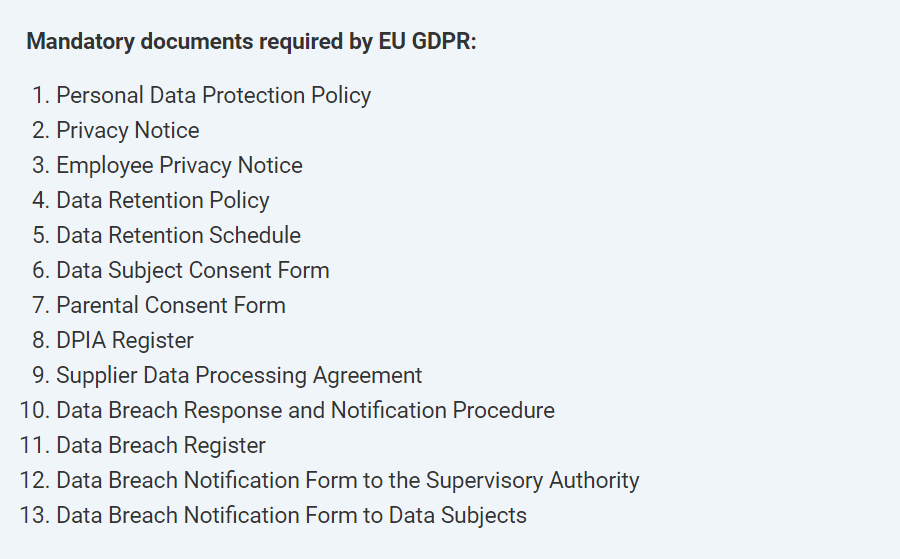
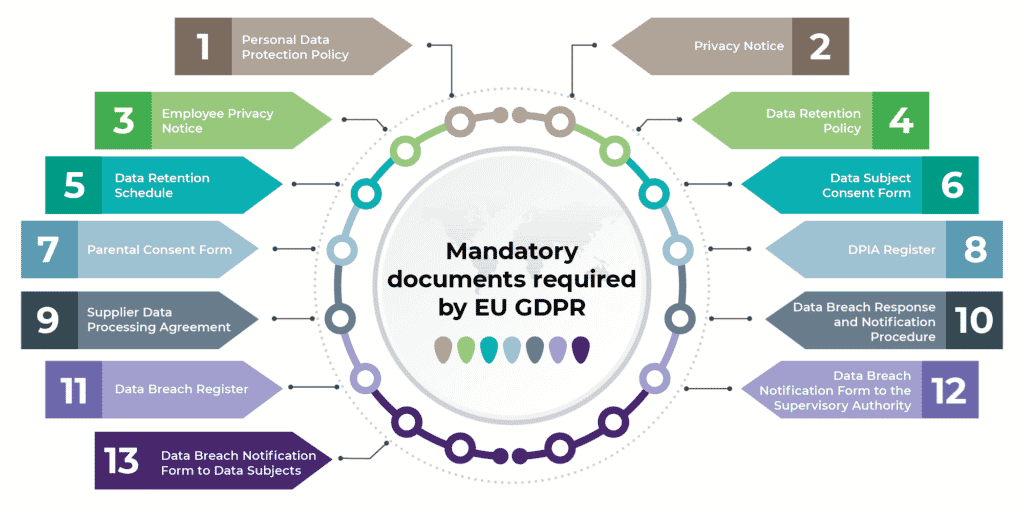
The General Data Protection Regulation (GDPR) has already raised many controversies, and one of the biggest ones is certainly which documents are required. For example, often you see companies who think having a privacy policy and a consent form on their website is enough; however, this is only a small part of the documents that are required to be fully compliant with this new privacy regulation.
Therefore, we created a list of GDPR documentation requirements to help you find all mandatory documents at one place . Please note that the names of the documents are not prescribed by the GDPR, so you may use some other titles; you also have a possibility to merge some of these documents.
Mandatory documents and records required by EU GDPR
Here are the documents that you must have if you want to be fully GDPR compliant:
Privacy Notice (Articles 12, 13, and 14) – this document (which can also be published on your website) explains in simple words how you will process personal data of your customers, website visitors, and others.
Employee Privacy Notice (Articles 12, 13 and 14) – explains how your company is going to process personal data of your employees (which could include health records, criminal records, etc.).
Data Retention Policy (Articles 5, 13, 17, and 30) – describes the process of deciding how long a particular type of personal data will be kept, and how it will be securely destroyed.
Data Retention Schedule (Article 30) – lists all of your personal data and describes how long each type of data will be kept.
Parental Consent Form (Article 8) – if the data subject is below the age of 16 years, then a parent needs to provide the consent for processing personal data.
Supplier Data Processing Agreement (Articles 28, 32, and 82) – you need this document to regulate data protection with a processor or any other supplier.
Data Breach Register (Article 33) – this is where you’ll record all of your data breaches. (Hopefully, it will be very short.)
Data Breach Notification Form to the Supervisory Authority (Article 33) – in case you do have a data breach, you’ll need to notify the Supervisory Authority in a formal way.
Data Breach Notification Form to Data Subjects (Article 34) – again, in case of a data breach, you’ll have the unpleasant duty to notify data subjects in a formal way.
Police are already using self-driving car footage as video evidence:
While security cameras are commonplace in American cities, self-driving cars represent a new level of access for law enforcement and a new method for encroachment on privacy, advocates say. Crisscrossing the city on their routes, self-driving cars capture a wider swath of footage. And it’s easier for law enforcement to turn to one company with a large repository of videos and a dedicated response team than to reach out to all the businesses in a neighborhood with security systems.
“We’ve known for a long time that they are essentially surveillance cameras on wheels,” said Chris Gilliard, a fellow at the Social Science Research Council. “We’re supposed to be able to go about our business in our day-to-day lives without being surveilled unless we are suspected of a crime, and each little bit of this technology strips away that ability.”
[…]
While self-driving services like Waymo and Cruise have yet to achieve the same level of market penetration as Ring, the wide range of video they capture while completing their routes presents other opportunities. In addition to the San Francisco homicide, Bloomberg’s review of court documents shows police have sought footage from Waymo and Cruise to help solve hit-and-runs, burglaries, aggravated assaults, a fatal collision and an attempted kidnapping.
In all cases reviewed by Bloomberg, court records show that police collected footage from Cruise and Waymo shortly after obtaining a warrant. In several cases, Bloomberg could not determine whether the recordings had been used in the resulting prosecutions; in a few of the cases, law enforcement and attorneys said the footage had not played a part, or was only a formality. However, video evidence has become a lynchpin of criminal cases, meaning it’s likely only a matter of time.
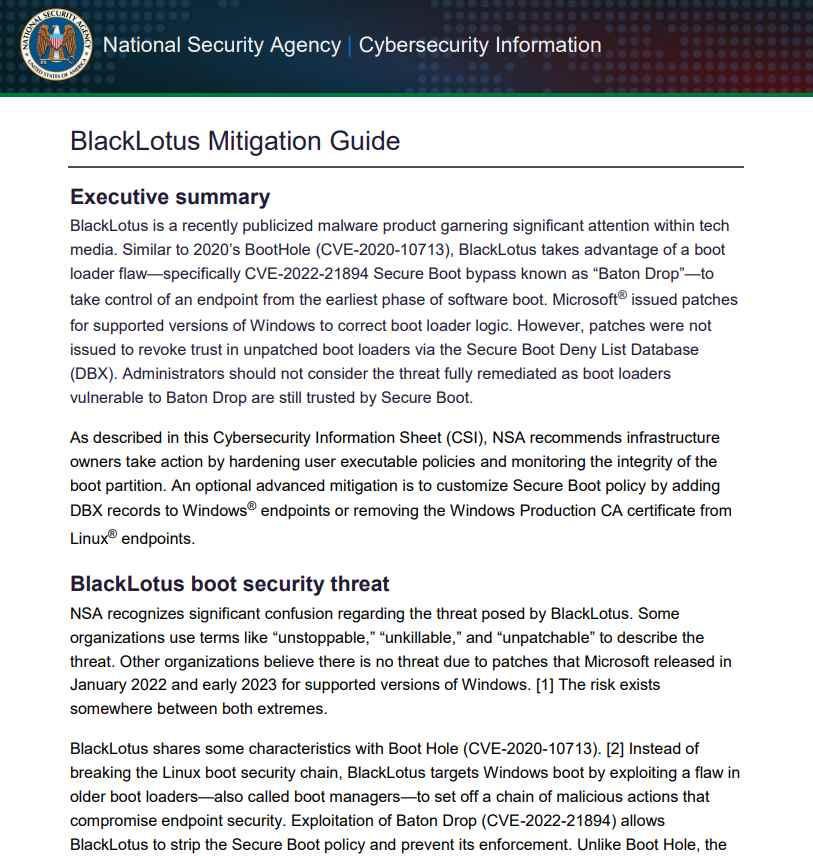
The Blacklotus bootkit was developed expressly for Windows, and it first appeared on hacker forums in October of the previous year. It was described as having APT-level capabilities, including the ability to circumvent secure boot and user access control (UAC), as well as the capacity to deactivate security software and defensive mechanisms on victim computers. Threat actors of various skill levels were able to purchase BlackLotus when it was first offered for sale on hacker forums for as little as $5,000, giving them access to malware that is often associated with state-sponsored hacking operations. However, the threat actor concealed the source code and charged clients $200 for rebuilds if they wished to modify the bootkit in any way.c Microsoft published a set of resources in April that are intended to assist threat hunters in recognizing BlackLotus infections. The National Security Agency (NSA) released some guidelines in June to assist firms in strengthening their defenses against the threat.
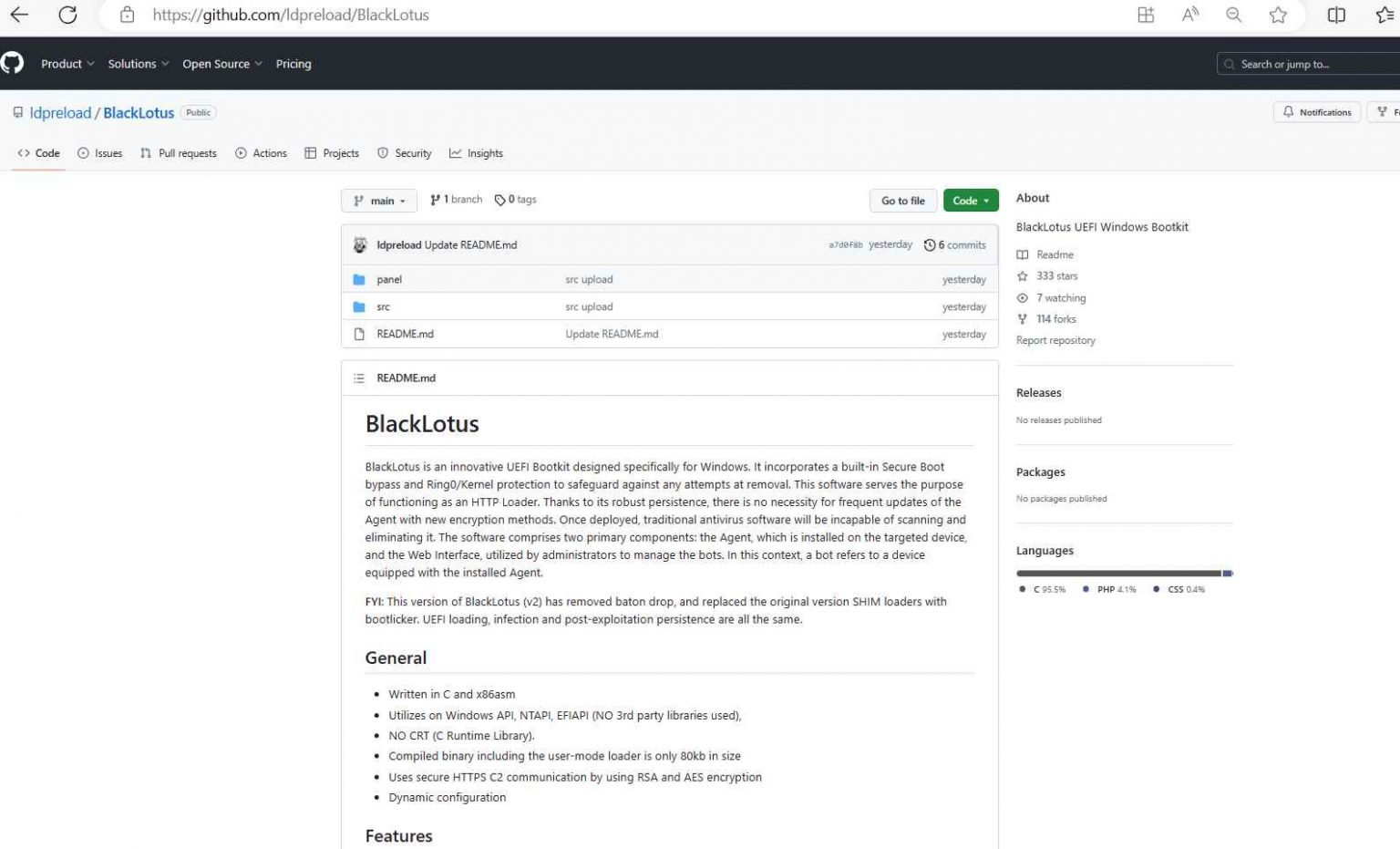
Although it has a number of alterations in comparison to the malware’s initial form, the BlackLotus UEFI bootkit’s original source code has been made available to the public on GitHub.
The ‘Baton Drop’ exploit that targets CVE-2022-21894 has been removed from the BlackLotus source code that was released on GitHub on Wednesday. Additionally, the BlackLotus source code now employs the bootlicker UEFI firmware rootkit, although it still retains the majority of the original code.
The fact that the bootkit’s source code is available to the public poses a considerable danger, primarily because it may be paired with newly discovered vulnerabilities to open up previously undiscovered entry points for attacks. BlackLotus was able to utilize the attack despite the fact that CVE-2022-21894 had been fixed the previous year. This was possible because the vulnerable binaries had not been put to the UEFI revocation list. This demonstrates how even vulnerabilities that have been patched may still present long-term, industry-wide supply chain impact.
However, since the source code was leaked, it is now very easy for threat actors to combine the bootkit with new bootloader vulnerabilities, whether they are known or undiscovered. The methods used by the bootkit are no longer cutting edge.
Be careful to adhere to the extensive mitigation guidance that the NSA issued a month ago in order to protect your computers against the BlackLotus UEFI bootkit attack.
Because the source code of the bootkit is now freely accessible, it is feasible that skilled malware writers may design more powerful variations that are able to circumvent both currently available countermeasures and those that will be developed in the future.
Due to their distinct perspectives, board members and CISOs often have differing views on cyber attack risks. The discrepancy arises when boards need cybersecurity expertise, need help comprehending technical jargon, or when CISOs need to communicate in business language.
In this Help Net Security interview, David Christensen, CISO of PlanSource, proposes strategies to understand and acknowledge the broader organizational and strategic implications of cybersecurity risk management, strategy, and governance.
Board members and CISOs often do not see eye-to-eye on the risk of cyber attacks. In your opinion, what is the primary cause of this discrepancy?
A difference in perspective is a fundamental reason board members and CISO are not always aligned. Board members typically have a much broader view of the organization’s goals, strategies, and overall risk landscape, where CISOs are responsible for assessing and mitigating cybersecurity risk. These differences in perspectives lead to contrasting priorities and risk assessments. However, when board members and CISOs do not see eye-to-eye on the risk of cyber attacks, it’s often a result of the board lacking cybersecurity expertise among its members, the complexity with understanding the topic and CISOs who focus too heavily on technical language during their discussions with the board.
Communicating cyber risk to the board requires the CISO to understand the audience, translating technical jargon into business language, allowing the board to see the CISO as a strategic partner. Becoming the strategic partner also requires CISOs to view their cybersecurity investments in terms of ROI to help the board understand the importance of an investment against competing priorities and spend.
CISOs need to also understand that board members often have a shorter time horizon for decision-making, focusing on quarterly or annual performance, in contrast to CISOs being more attuned to the potential long-term impacts of cyber attacks and advocating for proactive measures. This misalignment in time horizons can contribute to disparities in risk perceptions.
How can a CISO effectively translate technical jargon into business language that board members can understand and engage with? Do you have any specific strategies or approaches in mind?
A CISO needs to understand the knowledge and background of the board members to be able to translate technical jargon into business language and something familiar with the target audience. I approach this by relating technical jargon to everyday situations or business scenarios, something the board can easily grasp.
To be effective at this style of communication, I collaborate with other business leaders outside of the technology groups to optimize business alignment. Focusing on the potential business impact of cybersecurity risk also allows a CISO to frame technical issues in terms of their consequences such as financial loss or damage to the company’s brand.
It is equally important to be concise and avoid over-embellishing cyber-risks, while still focusing on the strategic objectives you are asking the board to weigh in on. To bridge the gap between board members and CISOs to promote the mitigation of cyber-risk, it is essential that a CISO enhance communication, educate board members about cybersecurity risks and promote a collaborative approach to decision making.
Many boards still see cybersecurity as a purely technical issue. What strategies can they employ to understand and acknowledge the broader organizational and strategic implications of cybersecurity?
For boards to better understand and acknowledge the broader organizational and strategic implications of cybersecurity, there needs to be a shift in how cyber-risk is viewed and approached. Boards can start by overcoming the common CISO-board disconnect that exists, developing a direct and strategic relationship with the CISO that continues outside of board meetings. Boards should also allocate more of their time to the topic of cybersecurity and allow the CISO to communicate risk to the board beyond just a handful of quarterly slides. Cybersecurity expertise also needs to be a part of a board’s composition, by including directors with a blend of business and cyber experience.
How do you envision the proposed amendments by the SEC changing the way boards approach cybersecurity risk management, strategy, and governance?
When the proposed amendments by the SEC become a reality, I envision boards putting more attention on cybersecurity issues. The hope is that these changes will lead boards to dedicate more resources, time, and expertise to assessing, managing and mitigating cybersecurity risk before they are impacted by an incident.
I would then expect this to result in boards establishing or enhancing governance structures related to cybersecurity, leading to them defining clear roles and responsibilities for cybersecurity oversight, and ultimately the presence of cybersecurity expertise at the board level. These amendments are also going to encourage boards to integrate cybersecurity considerations into their overall business strategy.
In your view, what concrete steps can board members take to improve their understanding of cybersecurity-induced risks and evaluate plans to manage them effectively?
Boards members should actively educate themselves about cybersecurity, attending training, workshops and conferences on the topic that can help them stay updated on emerging threats and latest trends. Boards should also establish a dedicated cybersecurity committee made up of members with relevant expertise to help assess and oversee cybersecurity initiatives within an organization.
The board should also engage with cybersecurity experts and consultants to gain insights into the specific risks and challenges facing their organization. In addition, boards should require their organizations conduct regular risk assessments, as well as reviewing cybersecurity reports, which will provide an overview of the organization’s cybersecurity posture.
Microsoft reported a previously unknown vulnerability known as a zero-day flaw that was present in many versions of Windows and Office and was being actively exploited in the wild. The vulnerability, which was tracked and given the identifier CVE-2023-36884, was used by nation-state actors and cybercriminals to acquire remote code execution by using infected Office documents. The massive information technology company is looking into allegations of many vulnerabilities that allow remote code execution and affect Windows and Office products. The firm said that it is aware of high-targeted attacks that aim to exploit these weaknesses using specially created Office documents. These attacks were exposed by the corporation. Microsoft is attempting to remedy the issue, and security researchers have suggested that it may be remedied with an out-of-band patch that can be sent prior to the August Patch Tuesday update.
Customers that make use of Microsoft Defender for Office are safeguarded against attachments that make an effort to take advantage of this vulnerability.
The adoption of the Block all Office programs from starting child processes Attack Surface Reduction Rule will prevent the vulnerability from being used in the present attack chains. This rule will reduce the attack surface.
In order to avoid being exploited, organizations that are unable to make use of these precautions may prevent themselves from being exploited by setting the FEATURE_BLOCK_CROSS_PROTOCOL_FILE_NAVIGATION registry entry. Please be aware that despite the fact that the aforementioned registry adjustments would prevent the problem from being exploited, they could disrupt the normally operating functionality of specific use cases that are linked to these apps. In this registry entry, add the names of the applications in the following list as values of type REG_DWORD with data 1:
ISO 27001 is an internationally recognized Information Security Standard that is widely acclaimed. It is published by the International Organization for Standardization (ISO) and provides a certifiable framework comprising security policies and procedures. The standard aims to assist organizations in safeguarding their data by implementing an Information Security Management System (ISMS).
To obtain ISO 27001 certification, organizations must fulfill the requirements for establishing, implementing, maintaining, and continuously improving an Information Security Management System (ISMS) that aligns with their specific business needs. The ISO 27001 standard consists of two distinct parts: Clauses and Annex A. The Clauses outline the general requirements for an ISMS, while Annex A provides a set of controls and objectives that organizations can choose to implement based on their risk assessment and security requirements.
Clauses 4-10 in ISO 27001 consist of mandatory requirements that all organizations seeking certification must fulfill. Each clause includes several sub-requirements. Here is a brief overview of each clause:
Clause 4: Context of the Organization – Organizations must determine the scope of their ISMS, identify internal and external issues relevant to information security, and define the interested parties.
Clause 5: Leadership – Top management should demonstrate leadership and commitment to the ISMS by establishing policies, assigning responsibilities, and promoting awareness.
Clause 6: Planning – This clause emphasizes the importance of risk assessment and treatment, setting objectives, and planning to achieve them.
Clause 7: Support – Organizations must provide the necessary resources, competence, awareness, communication, and documented information to support the ISMS.
Clause 8: Operation – This clause covers the implementation of risk treatment plans, management of changes, and effective operation of controls and processes.
Clause 9: Performance Evaluation – Organizations need to monitor, measure, analyze, and evaluate the performance of the ISMS and conduct internal audits.
Clause 10: Improvement – This clause focuses on nonconformities, corrective actions, continual improvement, and the management of incidents and improvements.
Meeting these mandatory requirements is crucial for organizations seeking ISO 27001 certification.
Annex A of ISO 27001 comprises a collection of security controls that are not obligatory but can be selectively implemented based on the specific needs of an organization. By conducting a risk assessment, organizations can identify the security controls that align with their security program and effectively address their risks and vulnerabilities. This approach allows organizations to tailor the implementation of controls to their unique requirements and enhance their overall information security posture.
After establishing the necessary policies, procedures, and documentation for ISO 27001 compliance and ISMS is operational, organizations can engage an accredited certification body to perform an audit. This audit assesses the implementation and effectiveness of the Information Security Management System (ISMS) against the ISO 27001 requirements. If the audit is successful and the organization meets all the necessary criteria, an ISO 27001 certificate will be issued, validating the organization’s adherence to the standard and their commitment to information security.
By adhering to ISO 27001 standards, organizations can establish robust policies, procedures, and technology measures that effectively safeguard their data, regardless of its location. This comprehensive approach significantly reduces the risk of cyber-attacks and fosters a culture of information security within the organization.
Obtaining ISO 27001 certification serves as a notable competitive advantage for businesses, irrespective of their industry or size. The certification acts as concrete evidence to customers that the organization is dedicated to protecting their data and fulfilling contractual security obligations. Moreover, ISO 27001 certification holds international recognition, making it instrumental in expanding global business opportunities and establishing trust with partners worldwide.
DISC LLC offers the expertise of a team comprised of former ISO auditors and experienced practitioners who can assist in preparing your organization for a successful ISO 27001 audit. Their services aim to guide you towards certification by identifying and addressing any gaps that may exist within your current security program. They provide support in implementing the required policies, procedures, and technologies to meet the ISO 27001 standards. With their knowledge and experience, DISC LLC can help your organization navigate the certification process and ensure a solid foundation for information security.
Following the attainment of ISO 27001 certification, we offer services to manage and maintain your Information Security Management System (ISMS). Our expert team will diligently oversee and guide your ISMS to ensure ongoing compliance with ISO 27001 requirements, thereby facilitating future certifications. By entrusting us with the management of your ISMS, you can focus on your core business activities while maintaining the necessary level of information security and sustaining your commitment to ISO 27001 standards.
We’d love to hear from you! If you have any questions, comments, or feedback, please don’t hesitate to contact us. Our team is here to help and we’re always looking for ways to improve our services. You can reach us by email (info@deurainfosec.com), or through our website’s contact form.
In the first half of 2023, Mandiant Managed Defense has observed a threefold increase in the number of attacks using infected USB drives to steal secrets. Mandiant tracked all of the cases and found that the majority of the incidents could be attributed to several active USB-based operation campaigns affecting both the public and private sectors globally.
Previously, we covered one of the campaigns that leverages USB flash drives as an initial infection vector and concentrates on the Philippines. In this blog post, we are covering two additional USB-based cyber espionage campaigns that have been observed by Managed Defense:
SOGU Malware Infection via USB Flash Drives Across Industries and Geographies
This is the most prevalent USB-based cyber espionage attack using USB flash drives and one of the most aggressive cyber espionage campaigns targeting both public and private sector organizations globally across industry verticals. It uses USB flash drives to load the SOGU malware to steal sensitive information from a host.
Mandiant attributes this campaign to TEMP.Hex, a China-linked cyber espionage actor. TEMP.Hex likely conducted these attacks to collect information in support of Chinese national security and economic interests. These operations pose a risk to a variety of industries, including construction and engineering, business services, government, health, transportation, and retail in Europe, Asia, and the United States.
SNOWYDRIVE Malware Infection via USB Flash Drives, Targets Oil and Gas Organizations in Asia
This campaign uses USB flash drives to deliver the SNOWYDRIVE malware. Once SNOWYDRIVE is loaded, it creates a backdoor on the host system, giving attackers the ability to remotely issue system commands. It also spreads to other USB flash drives and propagates throughout the network.
Mandiant attributes this campaign to UNC4698, a threat actor that has targeted oil and gas organizations in Asia. Once the actor has gained access to the system, they execute arbitrary payloads using the Windows Command Prompt, use removable media devices, create local staging directories, and modify the Windows registry.
SOGU Malware Infection via USB Flash Drives Across Industries and Geographies
Third parties (vendors of products or services) are responsible for a significant portion of cybersecurity incidents or data breaches at customer organizations.
Amid all the focus on third parties, what is often not discussed is that customers themselves might be in a position to possibly detect or contain the damage from certain security incidents on their own, regardless of the third party’s association with the cause of the incident.
The concept or principle of shared responsibilities between customers and their third parties was originally conceived and popularized in the context of public cloud service providers and their customers.
I don’t think the shared responsibilities principle should be limited to public cloud services. It could apply just as well as a core tenet to the security of any product or service that customers source from their third parties. This discipline of information security—of customers managing security risks in the product or services sourced from third parties—is commonly referred to as third-party risk management (TPRM). Terms such as “vendor risk management” or “supply chain risk management” are also used synonymously.
The shared responsibilities tenet of TPRM is illustrated well in the MOVEit breach that has been in the news over the past month.
It is clear from the vendor’s own account that the breach resulted from security vulnerabilities in the vendor’s product, MOVEit Transfer. What might be missed on the vendor’s page, however, is that the vendor did not detect the vulnerability on their own.
It appears they might have learned about the vulnerability from the calls they received from their customers indicating suspicious activity on May 28, 2023. This was likely within a day of when the adversary started exploiting the vulnerability, as reported by Mandiant.
The customers who detected the adversary’s activity had likely done a diligent job of implementing the vendor-suggested security best practices, especially the practice related to reviewing audit logs for anomalous behavior.
By having such effective detection mechanisms in place, as well as implementing the other security best practices suggested by the vendor, it wouldn’t be far-fetched to say that these customers might have been in a position to act in a timely manner and prevent significant impact from the adversary’s actions.
On the other hand, there are likely many other customers who may not have undertaken the due diligence to implement the vendor-suggested best practices and operate those practices effectively. Such customers may not have discovered the exploit in time, which could have resulted in sensitive data being stolen by the adversary.
In my view and experience, the shared responsibilities tenet often does not get due recognition or necessary focus at customer organizations. TPRM programs at the organizations are usually focused on assessing risks posed by vendors (i.e., the vendor portion of the shared responsibilities). They may not “close the loop” by evaluating how well their own organizations have implemented their part of the shared responsibilities.
I believe the ecosystem of customers and third parties could implement and operationalize shared responsibilities in their TPRM programs through several means, including but not limited to:
• Contracts: Emphasize each party’s portion of the shared responsibilities in contract documents.
• Transparency And Communication: Vendors should provide necessary and actionable details regarding customers’ part of the shared responsibilities in their self-assessment reports, as well as communicate the responsibilities to customers in a proactive manner, especially when new features require updates to shared responsibilities.
• Program Charters: Customer TPRM programs should update their program charters and governance to emphasize that the program’s objective is not limited to assessing risks posed by the vendor, but that it should also assess and mitigate risks associated with how their own organizations use the goods or services provided by the vendors.
• Governance And Ownership: Customer TPRM programs should clarify the roles and responsibilities of internal sponsors and other stakeholder teams that use vendor services.
Discover all the ways MITRE ATT&CK can help you defend your organization. Build your security strategy and policies by making the most of this important framework
What is the MITRE ATT&CK Framework?
MITRE ATT&CK (Adversarial Tactics, Techniques, and Common Knowledge) is a widely adopted framework and knowledge base that outlines and categorizes the tactics, techniques, and procedures (TTPs) used in cyberattacks. Created by the nonprofit organization MITRE, this framework provides security professionals with insights and context that can help them comprehend, identify, and mitigate cyber threats effectively.
The techniques and tactics in the framework are organized in a dynamic matrix. This makes navigation easy and also provides a holistic view of the entire spectrum of adversary behaviors. As a result, the framework is more actionable and usable than if it were a static list.
According to Etay Maor, Senior Director of Security Strategy at Cato Networks, “The knowledge provided in the MITRE ATT&CK framework is derived from real-world evidence of attackers’ behaviors. This makes it susceptible to certain biases that security professionals should be aware of. It’s important to understand these limitations.”
Novelty Bias – Techniques or actors that are new or interesting are reported, while techniques that are being used over and over are not.
Visibility Bias – Intel report publishers have visibility biases that are based on how they gather data, resulting in visibility for some techniques and not others. Additionally, techniques are also viewed differently during incidents and afterward.
Producer Bias – Reports published by some organizations may not reflect the broader industry or world as a whole.
Victim Bias – Some victim organizations are more likely to report, or to be reported on, than others.
Availability Bias – Report authors often include techniques that quickly come to mind in their reports.
MITRE ATT&CK Defender Use Cases
The MITRE ATT&CK framework helps security professionals research and analyze various attacks and procedures. This can help with threat intelligence, detection and analytics, simulations, and assessment and engineering. The MITRE ATT&CK Navigator is a tool that can help explore and visualize the matrix, enhancing the analysis for defensive coverage, security planning, technique frequency, and more.
Etay Maor adds, “The framework can go as deep as you want it to be or it can be as high level as you want it to be. It can be used as a tool to show the mapping and if we’re good or bad at certain areas, but it could go as deep as understanding the very specific procedure and even the line of code that was used in a specific attack.”
Here are a few examples of how the framework and the Navigator can be used:
Threat Actor Analysis
Security professionals can leverage MITRE ATT&CK to investigate specific threat actors. For example, they can drill down into the matrix and learn which techniques are used by different actors, how they are executed, which tools they use, etc. This information helps investigate certain attacks. It also expands the researchers’ knowledge and way of thinking by introducing them to additional modes of operation attackers take.
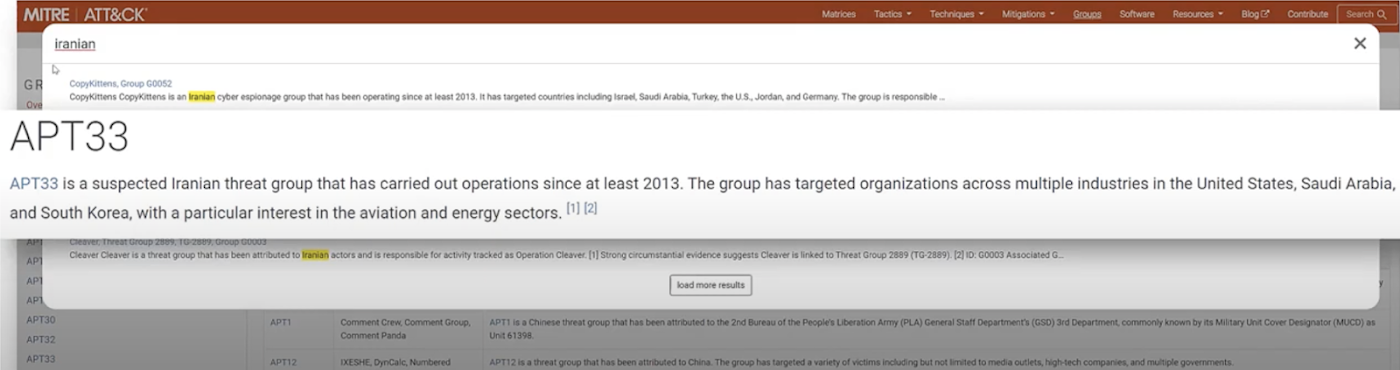
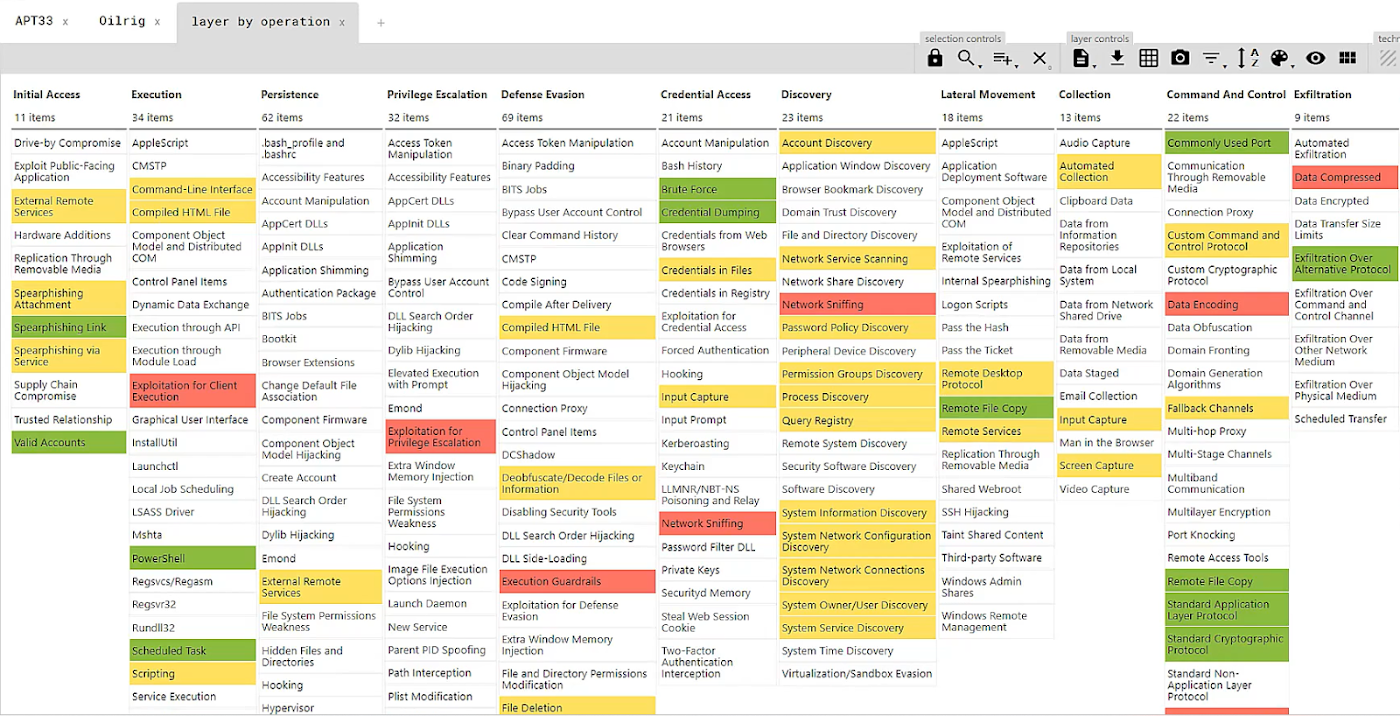
At a higher level, the framework can be used to answer C-level questions about breaches or threat actors. For example, if asked- “We think we might be a target for Iranian nation state threat actors.” The framework enables drilling down into Iranian threat actors like APT33, showing which techniques they use, attack IDs, and more.
Multiple Threat Actor Analysis
Apart from researching specific actors, the MITRE ATT&CK framework also allows analyzing multiple threat actors. For example, if a concern is raised that “Due to recent political and military events in Iran we believe there will be a retaliation in the form of a cyber attack. What are the common attack tactics of Iranian threat actors?”, the framework can be used to identify common tactics used by a number of nation-state actors.
Here’s what a visualized multiple threat actor analysis could look like, with red and yellow representing techniques used by different actors and green representing an overlap.
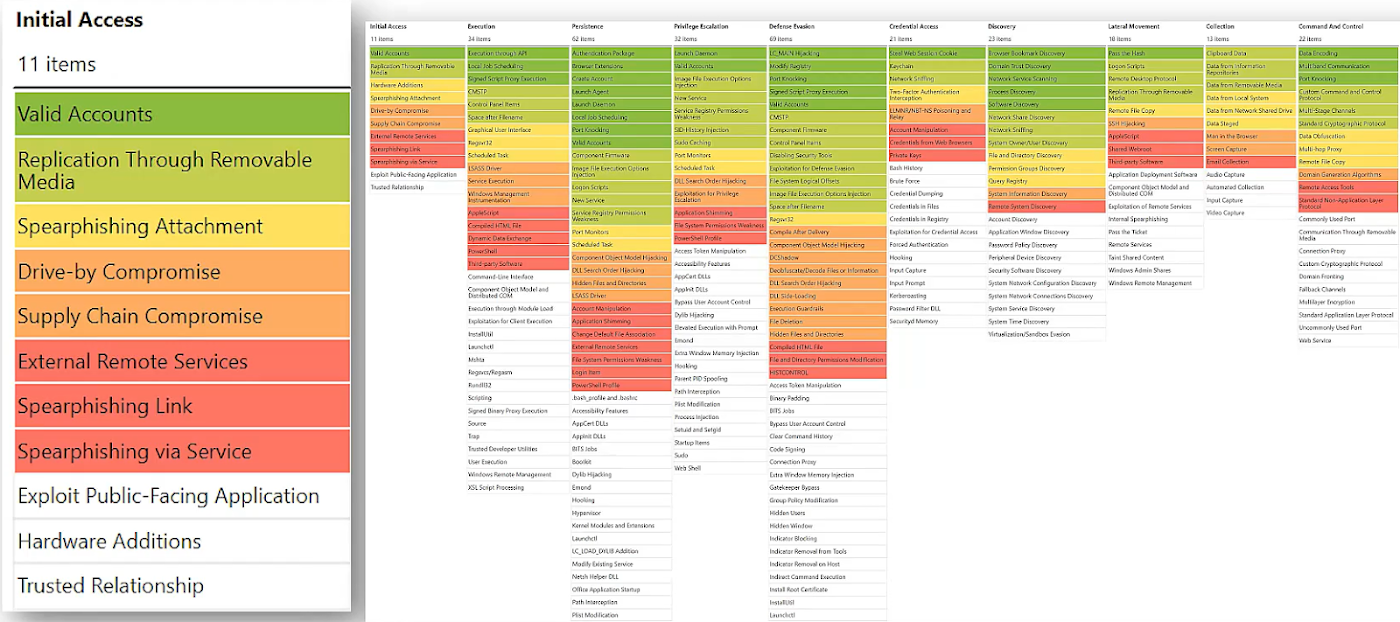
Gap Analysis
The MITRE ATT&CK framework also helps analyze existing gaps in defenses. This enables defenders to identify, visualize and sort which ones the organization does not have coverage for.
Here’s what it could look like, with colors used for prioritization.
Atomic Testing
Finally, the Atomic Red Team is an open source library of tests mapped to the MITRE ATT&CK framework. These tests can be used for testing your infrastructure and systems based on the framework, to help identify and mitigate coverage gaps.
The MITRE CTID (Center for Threat-Informed Defense)
The MITRE CTID (Center for Threat-Informed Defense) is an R&D center, funded by private entities, that collaborates with both private sector organizations and nonprofits. Their objective is to revolutionize the approach to adversaries through resource pooling and emphasizing proactive incident response rather than reactive measures. This mission is driven by the belief, inspired by John Lambert, that defenders must shift from thinking in lists to thinking in graphs if they want to overcome attackers’ advantages.
Etay Maor comments, “This is very important. We need to facilitate collaboration between the Defenders across different levels. We’re very passionate about this.”
A significant initiative within this context is the “Attack Flow” project. Attack Flow tackles the challenge faced by defenders, who often focus on individual, atomic attacker behaviors. Instead, Attack Flow uses a new language and tools to describe the flow of ATT&CK techniques. These techniques are then combined into patterns of behavior. This approach enables defenders and leaders to gain a deeper understanding of how adversaries operate, so they can refine their strategies accordingly.
Unless you really are superhuman, you can’t expect to do all those things (and more) exceptionally well … so a more pragmatic approach starts with self-awareness and a personal/career strategy. One possibility is to run a SWOT analysis on yourself:
What are your Strengths as a person – not just the areas where you clearly shine and the achievements you are most proud of, but the things likely to be brought up in your eulogy?
In what areas are you comparatively Weak? What causes you the most stress or grief? What parts of the job would you prefer to shy away from, given the choice?
Where are your Opportunities to grow, develop, mature and flourish? In career terms, what would take you to “the next level”? Are there things you can plan and prepare for?
What about the Threats, the things (or people or situations …) that might derail you from your path to ultimate success?
Hinson tip: if you find this process confusing and awkward, discreetly seek the assistance and guidance of close colleagues, friends and family members. Google for HR tools and techniques such as the Myers-Briggs approach. Take a cold, hard, dispassionate look at your own CV: if you were tasked to appoint your own replacement before leaving the organisation, would your CV pass muster? What might raise concerns among the interview panel? Which aspects beg questions? Issues from your past will naturally dissolve over time, but perhaps you can address them more proactively to speed-up the dissipation, for example through self-study, training or seeking out chances to make and demonstrate progress. Making a genuine effort will highlight matters to bring up (or avoid!) at annual bonus appraisal or interview time so there’s a pay-off to aim for. Literally.
As career advice goes, that’s all very well … but in essence it applies to almost any management position, so what’s different about the pragmatic CISO?
Pragmatism in this area involves acknowledging that, with the best will in the world, we cannot all reach and stay at the very top of our game all the time. When the going gets hard, we may struggle, stumble, perhaps even fall … which is when the value of preparation, resilience and contingency thinking comes into play. Being sacked or made redundant, for instance, is as much an opportunity to seize as an issue to overcome.
Optimism is another aspect. Pragmatism typically involves tolerating higher information risks in the interest of not overly constraining the business. Keep your natural paranoia in check by cutting some slack for information risk owners who elect to accept risks that you, personally, would not. As a competent professional advisor, your job is simply to make sure the risk owners are well informed and understand the risks – and for that you are accountable. If they decide to overrule your advice for business reasons, they are accountable for their decisions – and fair enough: they understand the business context better than you. Maybe, in fact, they are correct.
Teamwork is another part of the solution. If you admit to being comparatively weak in, say, constantly scanning the horizon for emerging risks, it might just be the very thing that someone in your team, a colleague elsewhere in the organisation, or an external advisor might excel at – so work with them. If they are junior to you, taking on the additional responsibility may be an excellent opportunity for them, and a chance to deepen your relationship.
For too long the cybersecurity world focused exclusively on information technology (IT), leaving operational technology (OT) to fend for itself. Traditionally, few industrial enterprises had dedicated cybersecurity leaders. Any security decisions that arose fell to the plant and factory managers, who are highly skilled technical experts in other areas but often lack cybersecurity training or knowledge.
In more recent years, an uptick in cyberattacks against industrial facilities and the trend of IT/OT convergence driven by Industry 4.0 have highlighted the vacuum of ownership around OT security. According to a new Fortinet report, most organizations are looking to Chief Information Security Officers (CISOs) to solve the problem.
Fortunately, CISOs are no strangers to change or difficult challenges. The position itself is less than 20 years old, yet in those two decades CISOs have navigated some of the most disruptive cybersecurity events that were truly watershed moments in technology.
Still, most CISOs have made their mark securing IT environments — and IT security strategies and tools rarely translate to an OT context. While the soft skills of collaboration and team-building will certainly help CISOs as they bring the factory floor into their realm of responsibility, they must also make a concentrated effort to understand the OT landscape’s unique topography and distinctive security challenges.
Safety over everything
The CIA triad — Confidentiality, Integrity & Availability — is a key concept in cybersecurity. Critically, IT and OT prioritize the elements of the triad differently — although safety is always the common denominator.
Image 1: The CIA triad of IT security is reversed in the OT world, where availability is the highest priority.
In IT, safety means that data is protected through confidentiality. People get hurt when their sensitive, private data is compromised. For the enterprise, securing data saves them from breaches, fines, and reputational damage.
In OT, safety means that cyber-physical systems are reliable and responsive. People get hurt when a blast furnace or an industrial boiler does not function properly. For the enterprise, availability keeps systems running on time down to the millisecond, which ensures productivity and profitability.
Somewhat ironically, the AIC triad of the OT world has resulted in systems and tools that prioritize physical safety but often come with few or no cybersecurity features at all. It will be the CISO’s responsibility to identify and implement security solutions that protect OT systems from cyberthreats without disrupting their operations.
Levels of segmentation
In both OT and IT, segmentation limits the network’s attack surface. In OT, the Purdue Model serves as a framework for how and why systems can and should communicate with each other.
In a highly simplified nutshell, the Purdue Model comprises five layers.
Levels 4 and 5 are the outermost layers that include web and email servers, IT infrastructure, and users firewalling in remotely.
Levels 2 and 3 are the operational layers that operate the software and applications that run OT environments.
Levels 0 and 1 hold the devices, sensors, programmable logic controllers (PLCs), and distributed control systems (DCS) that do the actual work and must be protected from outside interference.
The purpose of these layers is to create both logical and physical separation between process levels. The closer you get to the cyber-physical operation of industrial systems like injectors, robotic arms, and industrial presses, the more checks and balances are in place to protect them.
While the concept of segmentation will not be new to CISOs, they will need to understand that the separation of zones is much stricter in OT environments and must be enforced at all times. Industrial enterprises adhere to the Purdue model or other similar frameworks to ensure safety and security and to meet many regulatory compliance mandates.
Downtime is not an option
In IT, downtime for upgrades and patches is no big deal, especially in a Software-as-a-Service (SaaS) world where new updates are released practically in real time.
Whether for safety or profit, OT systems are always up and running. They cannot be stopped or paused to download a new operating system or apply even a critical patch. Any process that requires downtime is simply a non-starter for the vast majority of OT systems. For this reason, CISOs should not be surprised to discover decades-old systems (likely running on software that reached its end-of-life date long ago) that still serve as a crucial piece of the operation.
The challenge facing CISOs will be to identify security controls that will not interrupt or interfere with delicate OT processes. The right solutions will “wrap” the existing OT infrastructure in a layer of security that protects critical processes without changing, complicating, or crowding them.
All access is “remote” access
Traditionally, OT systems have been protected through isolation. Now that organizations are connecting these environments to capitalize on Industry 4.0 or to allow easier access for contractors, all access must be monitored, controlled, and recorded.
The IT environment is a digital place where business happens. Business users conduct their work and systems exchange data all within this space, day in and day out. To put it another way, humans are intended to actively participate in and make changes to the IT environment.
OT systems and environments are built to run without human intervention — “set it and forget it.” Humans are meant to set them up and then let them run. Users do not remain logged into an OT environment all day the way business users would in an IT system.
In this context, anyone accessing the OT environment is effectively an outsider. Whether it is a vendor connecting remotely, a business user coming in through the IT network, or even an OT operator accessing the environment on-site, every connection comes from the outside. Recognizing this key point will help CISOs to understand that industrial secure remote access (I-SRA) tools should be used for all access scenarios, not only those that IT would consider to be “remote.”
Basic functions like vulnerability scanning can interrupt OT processes and knock systems completely offline, and most devices do not have enough CPU/RAM to support endpoint security, anti-virus, or other agents.
Most IT tools route traffic through the cloud. In OT, this can compromise availability and cannot support the numerous unconnected components common to OT environments.
The life cycles of IT tools are typically much shorter than the life cycles of OT devices. Due to the always-up nature of OT environments, any tool that needs frequent patching, updates, or downtime is not applicable.
Forcing IT-designed tools into OT environments only adds complexity without addressing the fundamental security requirements and priorities of these environments. The sooner a CISO realizes that OT systems deserve security solutions designed for their distinctive needs, the faster they will be on their way to implementing the best tools and policies.
Soft skills are the keys to CISO success
Given that most cybersecurity leaders currently tend to come from IT security roles, it makes sense that many CISOs will have a (perhaps unconscious) bias toward IT philosophies, tools, and practices. To effectively secure OT environments, CISOs will need to become students again and lean on others to learn what they do not yet know.
The good news is that CISOs generally have a propensity to ask the right questions and seek support from the right experts while still pushing the envelope and demanding positive outcomes. At the end of the day, a CISO’s job is to lead people and teams of experts to accomplish the greater goal of securing the enterprise and enabling the business. Those willing to bridge the OT security divide through strong leadership and a willingness to learn should quickly find themselves on the road to success.