InfoSec and Compliance – With 20 years of blogging experience, DISC InfoSec blog is dedicated to providing trusted insights and practical solutions for professionals and organizations navigating the evolving cybersecurity landscape. From cutting-edge threats to compliance strategies, this blog is your reliable resource for staying informed and secure. Dive into the content, connect with the community, and elevate your InfoSec expertise!
CISA released a fact-sheet, listing some of the great tools that CISA offers for orgs to transition and secure their cloud environments?
Five tools are described in the fact-sheet, along with other guidance to “…provide network defenders and incident response/analysts open-source tools, methods, and guidance for identifying, detecting, and mitigating cyber threats, known vulnerabilities, and anomalies while operating a cloud or hybrid environment.”
1- The Cyber Security Evaluation Tool – CISA developed the Cyber Security Evaluation Tool (CSET) using industry-recognized standards, frameworks, and recommendations to assist organizations in evaluating their enterprise and asset cybersecurity posture.
2- Secure Cloud Business Applications (SCuBA) project – which provides guidance for FCEB agencies securing their cloud business application environments and protecting federal information created, accessed, shared, and stored in those environments.
3- Untitled Goose Tool – CISA, together with Sandia National Laboratories, developed the Untitled Goose Tool to assist network defenders with hunt and incident response activities in Microsoft Azure, AAD, and M365 environments.
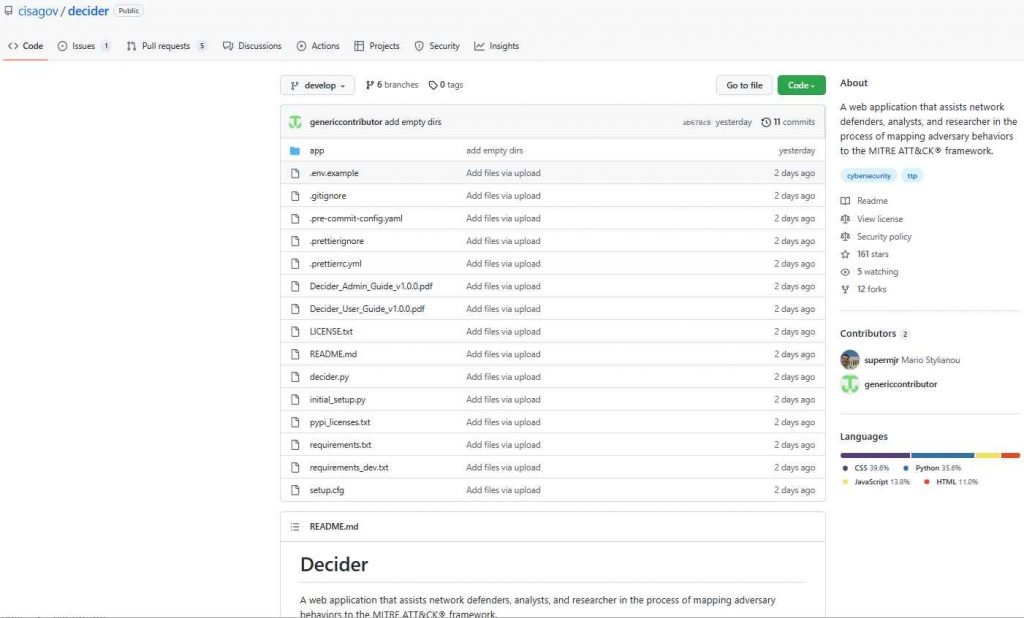
4- Decider – assists incident responders and analysts in mapping observed activity to the MITRE ATT&CK framework.
5- Memory Forensic on Cloud – Memory Forensic on Cloud, developed by JPCERT/CC, is a tool for building a memory forensic environment on Amazon Web Services.
The Cybersecurity and Infrastructure Security Agency (CISA) has come up with a list of free tools that businesses may use to protect themselves in cloud-based settings. According to the article published by CISA, these tools will assist incident response analysts and network defenders in mitigating, identifying, and detecting threats, known vulnerabilities, and abnormalities that occur in settings that are cloud-based or hybrid.During an attack, threat actors have generally focused their attention on servers located on the premises. However, several threat actors have been drawn in by the fast expansion of cloud migration in order to target cloud systems due to the vast number of attack vectors that are available when it comes to the cloud.
Organizations who do not have the essential capabilities to protect themselves against cloud-based attacks may benefit from the tools that are supplied by CISA. These technologies may assist users in securing their cloud resources from data theft, information exposure, and information theft respectively. The Cloud Industry Security Alliance (CISA) stated that companies should use the security features supplied by Cloud Service Providers and combine them with the free tools that were recommended by the CISA in order to defend themselves from these attacks. The following is a list of the tools that the CISA provides:
Cybersecurity Evaluation Tool (CSET).
The SCuBAGear tool.
The Untitled Goose Tool
Decider Tool
Memory Forensic on Cloud (JPCERT/CC) is an offering of Japan CERT.
THE CYBERSECURITY EVALUATION TOOL, ALSO KNOWN AS THE CSET.
For the purpose of assisting enterprises in the assessment of their cybersecurity posture, the CISA created this tool, which makes use of standards, guidelines, and recommendations that are widely accepted in the industry. Multiple questions about operational rules and procedures, as well as queries on the design of the system, are asked by the tool.This information is then utilized to develop a report that gives a comprehensive insight into the strengths and shortcomings of the businesses, along with suggestions to remedy them. The Cross-Sector Cyber Performance Goals (CPG) are included in the CSET version 11.5. These goals were established by the National Institute of Standards and Technology (NIST) in collaboration with the Computer Security Industry Association (CISA).
SCuBAGear is a tool that was developed as a part of the SCuBA (Secure Cloud Business Applications) project. This project was started as a direct reaction to the Supply Chain hack that occurred with SolarWinds Orion Software. SCuBA is a piece of automated software that does comparisons between the Federal Civilian Executive Branch (FECB) and the M365 Secure configurations of the CISA. CISA, in conjunction with SCuBAGear, has produced a number of materials that may serve as a guide for cloud security and are of use to all types of enterprises. This tool resulted in the creation of three different documents:
SCuBA Technical Reference Architecture (TRA) — Offers fundamental building blocks for bolstering the safety of cloud storage environments. Cloud-based business apps (for SaaS models) and the security services that are used to safeguard and monitor them are both included in the purview of TRA. The Hybrid Identity Solutions Architecture provides the best possible methods for tackling identity management in an environment that is hosted on the cloud. M365 security configuration baseline (SCB) — offers fundamental security settings for Microsoft Defender 365, OneDrive, Azure Active Directory, Exchange Online, and other services.This application generates an HTML report that details policy deviations outlined in the M365 SCB guidelines and presents them.
UNTITLED GOOSE TOOL
The tool, which was created in collaboration with Sandia National Laboratories, is designed to assist network defenders in locating harmful behaviors in Microsoft Azure, Active Directory, and Microsoft 365. Additionally, it enables the querying, exporting, and investigating of audit logs.Organizations who do not import these sorts of logs into their Security Incident and Event Management (SIEM) platform will find this application to be quite helpful. It was designed as an alternative to the PowerShell tools that were available at the time since those tools lacked the capability to gather data for Azure, AAD, and M365.
This is a tool that Network Defenders may use to,
Extraction of cloud artifacts from Active Directory, Microsoft Azure, and Microsoft 365 The Unified Audit Logs (UAL) should have time bounding performed on them. Collect data making use of the time-bounding feature of the MDE (Microsoft Defender Endpoint) data Decider Tool. Incident response analysts may find it useful to map malicious actions using this tool in conjunction with the MITRE ATT&CK methodology. In addition to this, it makes their methods more accessible and offers direction for laying out their actions in the appropriate manner.
DECIDER TOOL
This tool, much like the CSET, asks a number of questions in order to give relevant user inquiries for the purpose of selecting the most effective identification technique. Users now have the ability to, given all of this information:
Export heatmaps from the ATT&CK Navigator. Publish reports on the threat intelligence you have collected. Determine and put into effect the appropriate preventative measures. Prevent Exploitation In addition, the CISA has given a link that describes how to use the Decider tool.
MEMORY FORENSIC ON CLOUD (JPCERT/CC)
It was built for constructing and analyzing the Windows Memory Image on AWS using Volatility 3, which was the reason why it was developed. In addition, Memory Forensics is necessary when it comes to the recently popular LOTL (Living-Off-the-Land) attacks, which are also known as fileless malware. Memory image analysis may be helpful during incident response engagements, which often call for the use of high-specification equipment, a significant amount of time, and other resources in order to adequately prepare the environment.
Red Siege has developed and made available many open-source tools to help with your penetration testing work.
The company plans to continue to support the tools listed below, whether in the form of bug fixes or new features. Give them a try, they’re all available on GitHub for free.
“I find joy in writing code, turning it into a logic puzzle to create powerful software tools. The satisfaction of seeing my creations in action, like EyeWitness, brings a sense of pride and saves valuable time. Motivated by the possibility of filling a software gap, I open source my creations, hoping they’ll benefit others as they did for me,” Chris Truncer, Senior Security Consultant & Director of Training, Red Siege, told Help Net Security.
AutoFunkt
AutoFunkt is a Python script for automating the creation of serverless cloud redirectors from Cobalt Strike malleable C2 profiles.
C2concealer
C2concealer is a command line tool that generates randomized C2 malleable profiles for use in Cobalt Strike.
DigDug
Dig Dug works by appending words from a dictionary to an executable. This dictionary is appended repeatedly until the final desired size of the executable is reached. Some AV & EDR engines may measure entropy to determine if an executable is trustworthy for execution. Other vendors inspect executables for signs of null byte padding.
dumpCake
dumpCake will dump password authentication attempts to the SSH daemon. Every SSHD child process will get attached to and at the completetion of the process, the attempted passwords and connection logs will be dumped to the script.
EyeWitness
EyeWitness takes screenshots of websites, collects server header info, and identifies default credentials if possible. Saves a lot of time triaging web sites on large tests. This tool is very commonly used by penetration testers looking to sift through a long list of websites.
EDD – Enumerate Domain Data
Enumerate Domain Data is designed to be similar to PowerView but in .NET. PowerView is essentially the ultimate domain enumeration tool. This tool was largely put together by viewing implementations of different functionality across a wide range of existing projects and combining them into EDD.
GPPDeception
This script generates a groups.xml file that mimics a real GPP to create a new user on domain-joined computers. Blue teams can use this file as a honeyfile. By monitoring for access to the file, Blue Teams can detect pen testers or malicious actors scanning for GPP files containing usernames and cpasswords for lateral movment.
Just-Metadata
Just-Metadata is a tool that gathers and analyzes metadata about IP addresses. It attempts to find relationships between systems within a large dataset. It is used to gather intelligence information passively about a large number of IP addresses, and attempt to extrapolate relationships that might not otherwise be seen.
ProxmarkWrapper
ProxmarkWrapper is a wrapper around the Proxmark3 client that will send a text alert (and/or email if warranted) if a RFID card is captured.
Wappybird
Wappybird is a ultithreaded Wappalyzer CLI tool to find web technologies, with optional CSV output. You can also provide a directory and all scraped data will be saved with a subfolder per host.
WMImplant
WMImplant is a PowerShell based tool that leverages WMI to both perform actions against targeted machines, but also as the C2 channel for issuing commands and receiving results. WMImplant requires local administrator permissions on the targeted machine.
WMIOps
WMIOps is a powershell script that uses WMI to perform a variety of actions on hosts, local or remote, within a Windows environment. It’s designed primarily for use on penetration tests or red team engagements.
The Cybersecurity & Infrastructure Security Agency (CISA) has released a list of free tools for organizations to secure themselves in cloud environments.
The post from CISA stated that these tools will help incident response analysts and network defenders to mitigate, identify and detect threats, known vulnerabilities, and anomalies in the cloud or hybrid environments.
Threat actors have traditionally targeted internal servers during an attack. However, the rapid growth of cloud migration has attracted several threat actors to target cloud environments as the attack vector is massive when it comes to the cloud.
The tools provided by CISA will aid organizations that lack the necessary tools to defend against cloud threats. These tools can help in protecting their cloud resources from information theft, data theft, and information exposure.
Tools + Pre-built Security features
CISA also mentioned that organizations should use the security features provided by the Cloud Service Providers and combine them with the free tools suggested by the CISA for protecting against these threats. The tools provided by the CISA are,
The Cybersecurity Evaluation Tool (CSET) (CISA)
SCuBAGear (CISA)
The Untitled Goose Tool (CISA)
Decider (CISA)
Memory Forensic on Cloud (JPCERT/CC)
The Cyber Security Evaluation Tool (CSET)
This tool was developed by the CISA that uses industry-recognized standards, frameworks, and recommendations to assist organizations in their cybersecurity posture evaluation. The tool asks multiple questions about system components, architecture, and operational policies and procedures.
This information is then used to generate a report that provides a complete insight into the strengths and weaknesses of the organizations including the recommendations to fix them. The CSET version 11.5 includes Cross-Sector Cyber Performance Goals (CPG) which was developed by the CISA and the NIST (National Institute of Standards and Technology).
CPG can provide best practices and guidance that all organizations should follow. This tool can help against common and impactful TTPs.
SCuBAGear is a tool that was a part of the SCuBA (Secure Cloud Business Applications) project that was initiated in response to the Supply Chain compromise of SolarWinds Orion Software. SCuBA is an automated script that compares the Federal Civilian Executive Branch (FECB) against M365 Secure configurations of the CISA.
In collaboration with SCuBAGear, CISA created multiple documents that can guide cloud security that can help all organizations. Three documents were created as part of this tool,
SCuBA Technical Reference Architecture (TRA) – Provides essential components for hardening cloud security. The scope of TRA adds cloud business applications (for SaaS models) and the security services used to secure and monitor them.
Hybrid Identity Solutions Architecture – Provides best approaches for addressing identity management in a Cloud environment.
M365 security configuration baseline (SCB) – provides basic security configurations for Microsoft Defender 365, OneDrive, AAD, Exchange Online etc.
This tool provides an HTML report highlighting policy deviations described in the M365 SCB guides.
Untitled Goose Tool
This tool was developed alongside Sandia National Laboratories which can help network defenders identify malicious activities in Microsoft Azure, AAD, and M365. It can also help query, export, and investigate audit logs.
This tool is extremely useful for organizations that do not ingest these kinds of logs into their Security Incident and Event Management (SIEM) tool. It was developed as an alternative to PowerShell tools since they did not have data collection capacity for Azure, AAD, and M365.
Network Defenders can use this tool to,
Cloud artifacts extraction from AAD, Azure, and M365
Perform time bounding of the Unified Audit Logs (UAL)
Extra data within time bound
Collect data using the capability of time bounding for MDE(Microsoft Defender Endpoint) data
Decider Tool
This tool can help incident response analysts to map malicious activities with the MITRE ATT&CK framework. It also provides an easier approach to their techniques and provides guidance for mapping the activities accordingly.
Just like CSET, this tool also asks several questions to provide relevant user queries for determining the best possible identification method. With this information, the users can now,
Export ATT&CK Navigator heatmaps
Publish Threat Intelligence reports
Identify and execute mitigation procedures
Prevent Exploitation
The CISA has also provided a link on how to use the Decider tool.
Memory Forensic on Cloud (JPCERT/CC)
It was developed for building and analyzing the Windows Memory Image on AWS using Volatility 3. Furthermore, Memory Forensics is required when it comes to the newly trending LOTL (Living-Off-the-Land) attacks which are otherwise called fileless malware.
A memory image analysis can help during incident response engagements that usually require high-specification machines, time, and resources to prepare a sufficient environment.
Altdns is a DNS recon tool that allows for the discovery of subdomains that conform to patterns. Altdns takes in words that could be present in subdomains under a domain (such as test, dev, staging) and takes in a list of subdomains you know of.
From these two lists provided as input to Altdns, the tool then generates a massive output of “altered” or “mutated” potential subdomains that could be present. It saves this output so that it can then be used by your favorite DNS brute-forcing tool.
Amass
The OWASP Amass project performs network mapping of attack surfaces and external asset discovery using open-source information gathering and active reconnaissance techniques.
The high adoption rate of Amass potentially means better data consistency and integration with other tools. As such, it can constitute a trustworthy tool to use in proof of concepts and engagements, and it may be easier to convince your clients or manager to use it for periodic mapping of the organization’s attack surface.
Aquatone
Aquatone is a tool for the visual inspection of websites across a large number of hosts and is convenient for quickly gaining an overview of HTTP-based attack surface. Aquatone is started by piping the output of a command into the tool. It doesn’t really care how the piped data looks, as URLs, domains, and IP addresses will be extracted with regular expression pattern matching. This means you can give it the output of any tool you use for host discovery.
Assetfinder
Assetfinder lets you find domains and subdomains potentially related to a given domain. Implemented:
Gotator is a tool to generate DNS wordlists through permutations.
HTTPX
HTTPX is a fully featured HTTP client library for Python 3. It includes an integrated command line client, has support for both HTTP/1.1 and HTTP/2, and provides both sync and async APIs.
Naabu
Naabu is a port scanning tool written in Go that allows you to enumerate valid ports for hosts in a fast and reliable manner. It is a really simple tool that does fast SYN/CONNECT/UDP scans on the host/list of hosts and lists all ports that return a reply.
MASSCAN: Mass IP port scanner
MASSCAN is an Internet-scale port scanner. It can scan the entire Internet in under 5 minutes, transmitting 10 million packets per second, from a single machine. Its usage (parameters, output) is similar to Nmap, the most famous port scanner.
WhatWeb – Next generation web scanner
WhatWeb identifies websites. Its goal is to answer the question, “What is that Website?”. WhatWeb recognises web technologies including content management systems (CMS), blogging platforms, statistic/analytics packages, JavaScript libraries, web servers, and embedded devices. WhatWeb has over 1800 plugins, each to recognise something different. WhatWeb also identifies version numbers, email addresses, account IDs, web framework modules, SQL errors, and more.
A Vulnerability Scanner Tools is one of the essential tools in IT departments Since vulnerabilities pop up every day and thus leaving a loophole for the organization.
The Vulnerability scanning tools help detect security loopholes in the application, operating systems, hardware, and network systems.
Hackers are actively looking for these loopholes to use them to their advantage. Vulnerabilities inside a network need to be identified and fixed immediately to leave your attackers at bay.
What do Vulnerability Scanner Tools do?
Vulnerability scanners are one right way to do this. With their continuous and automated scanning procedures, they can scan the network for potential loopholes.
It is on your internet or any device, they would help the IT departments identify the vulnerability and fix it both manually and automatically.
Vulnerability scanning tools do have two different approaches for performing their routines, authenticated and unauthenticated scans.
In the latter case, a penetration tester will show the scan disguised as a hacker without him having trusted access to the corporate network.
What are the Three types of Vulnerability Scanners?
This type of scan will help organizations identify the loopholes which will allow hackers to penetrate the system without trusted permissions.
Following are the types of vulnerability scanners
Discovery Scanning
Full Scanning
Compliance Scanning
What is an example of a Vulnerability Scanner?
The best Web vulnerability scanner in the market should allow you to perform both authenticated and unauthenticated types of scans to nullify network vulnerabilities among other related vulnerability scanners online
In this article, we’ll take a look at the top 10 best vulnerability scanning tools available in the market.
The widespread adoption of remote and hybrid working practices in recent years has brought numerous benefits to various industries, but has also introduced new cyber threats, particularly in the critical infrastructure sector.
These threats extend not only to IT networks but also to operational technology (OT) and cyber-physical systems, which can directly influence crucial physical processes.
In response to these risks, the US government reinforced critical infrastructure security by introducing Cross-Sector Cybersecurity Performance Goals (CPGs) mandated by the US Cybersecurity Infrastructure & Security Agency (CISA).
Recently, CISA updated the CPGs to align with NIST’s standard cybersecurity framework, establishing each of the five goals as a prioritized subset of IT and OT cybersecurity practices.
In this article, we will look in more detail at CISA’s revamped CPGs and discuss the potential solutions available to help organizations achieve these critical goals.
CPG 1.0 Identify: Scoping out the vulnerabilities in the OT environment
CISA’s first CPG is “Identify”, which includes identifying the vulnerabilities in the IT and OT assets inventory, establishing supply chain incident reporting and vulnerability disclosure program, validating the effectiveness of third-party security controls across your IT and OT networks, establishing OT security leadership, and mitigating known vulnerabilities. Critical infrastructure organizations must address all these sub-categories exclusively to achieve the first CPG.
Addressing these responsibilities requires a dynamic effort. Firstly, organizations must strengthen their IT and OT relationship by fostering more effective collaboration between the security teams of both departments. But, most importantly, IT and OT teams must come together to understand the potential cyber threats and risks of each environment and how it affects the other. To achieve the first CPG, it is critical that these departments are not kept in isolation but rather collaborate and communicate frequently.
At the same time, organizations must establish OT leadership by clearly identifying a single leader who will be responsible and accountable for OT-specific cybersecurity. From there, organizations must create an asset inventory or glossary that clearly identifies and tracks all OT and IT assets across the entire ecosystem. These assets should be regularly audited based on their vulnerability management program. It’s also highly critical to have an open, public, and easily accessible communication channel where vendors, third parties, or employees can disclose any potential vulnerability in relation to the OT and IT assets.
CPG 2.0 Protect: Safeguarding privileged access to OT assets
CISA’s second CPG is “Protect”, which emphasizes the account security aspects of OT assets. To achieve this goal, critical infrastructure organizations are required to strengthen their password policies, change default credentials across OT remote access systems, apply network segmentation to segregate OT and IT networks, and separate general user and privileged accounts.
Addressing all these aspects of account security can be a chore for most organizations, but they can turn to unified secure remote access (SRA) solutions that can extend multiple account-level security controls to OT remote users via enforcement of multi-factor authentication (MFA), least privilege policies, and role-based access. Such solutions can also support advanced credential policies to further reduce the risk of unauthorized access and denial of service attacks.
It’s also important that organizations only leverage SRA solutions that are based on zero trust policies. This will help organizations establish effective network segmentation that eliminates direct, unfettered remote connectivity to OT assets, and to continuously monitor personnel activity during all remote OT connections.
CPG 3.0 Detect: Awareness of critical threats and potential attack vectors across your OT environment
CISA’s third CPG emphasizes the detection of relevant threats and knowledge of potential attack vectors and TTPs (tactics, techniques, and procedures) that can compromise OT security and potentially disrupt critical services.
Detecting relevant threats and TTPs across OT assets and networks requires a proactive approach that combines advanced monitoring and analysis. Real-time monitoring solution should be complemented with comprehensive network visibility, allowing for the swift detection of anomalies and unusual patterns.
A critical aspect of threat detection in OT environments — and meeting the CPG mandate — is the sharing of information and collaboration between various stakeholders. Threat intelligence platforms play an essential role in gathering and disseminating information about current and emerging threats. By leveraging this valuable data, organizations can stay ahead of potential risks, fine-tune their defenses, and ensure the safety and security of their OT assets. Additionally, conducting regular security assessments, penetration testing, and vulnerability scanning will help uncover any weaknesses in the infrastructure, allowing for timely remediation and improved resilience against cyberattacks.
CPG 4.0 and 5.0: Respond and Recover
The final two CISA’s CPGs stress the importance of incident reporting and planning. Regardless of how robust your OT security practices are, cyber threats are almost inevitable in today’s interconnected and increasingly remote networking era. So, while proactive security solutions are necessary, attacks still are unavoidable, especially in a highly targeted sector like critical infrastructure.
Therefore, CISA stresses that organizations must have a comprehensive plan and process outlined for reporting security incidents and effectively recovering their affected systems or services upon a breach.
Advanced SRA solutions can help organizations to achieve these goals through automated recording of user activities and asset-related data, as well as creating automated backups of critical data. More specifically, they can log all user sessions, encrypt all user- and asset-related data, and retain logs of OT remote user activity. These measures help to ensure that critical information is stored in accordance with all relevant regulatory requirements and backup and recovery needs.
Conclusion
Overall, the vulnerabilities of ageing OT assets and siloed OT and IT networks have created a significant threat to critical infrastructure entities, which has been further exacerbated by the prevalence of remote access.
CISA’s OT-specific goals and actions within the CPGs provide a much-needed set of guidelines for CNI organizations to strengthen their security posture and increase cyber resilience. By following CISA’s recommendations and employing innovative security technologies, organizations can minimize the risk of cyberattacks affecting the physical world and public safety.
Kimsuky is an advanced persistent threat (APT) organization that originates in North Korea and has a lengthy history of launching targeted attacks all around the globe. According to what is currently known about the organization, they have been mainly tasked with conducting information gathering and espionage activities in behalf of the North Korean government from at least the year 2012. Throughout the course of history, Kimsuky targets have been spread throughout several nations in North America, Asia, and Europe. In its most recent efforts, the organization has continued their strategy of worldwide targeting, which is centered on a variety of contemporary geopolitical concerns. The most recent Kimsuky ads, for instance, have been centered on nuclear agendas between China and North Korea; these agendas are pertinent to the continuing confrontation between Russia and Ukraine. In 2018, the gang was seen deploying a malware family known as BabyShark, and most recent observations show that the group has developed the malware with an enhanced capacity for reconnaissance. Experts call to this component of BabyShark as ReconShark.
During a recent campaign, Kimsuky targeted the employees of the Korea Risk Group (KRG), which is an information and analysis organization that specializes in subjects that have both direct and indirect effects on the Democratic People’s Republic of Korea (DPRK). Kimsuky continues to employ phishing emails that have been carefully designed by himself for the purpose of deploying ReconShark. Notably, spear-phishing emails are created with a degree of design quality customized for certain persons, which increases the possibility that the target would open the email. This involves using correct formatting, language, and visual signals so that the content seems authentic to readers who are not paying attention. Notably, both the targeted emails, which include links to download harmful papers, as well as the malicious documents themselves, exploit the names of genuine people whose knowledge is relevant to the subject matter of the bait, such as Political Scientists.
Kimsuky’s nefarious emails include a link that, when clicked, will direct the recipient to a file that requires a password in order to access it. Most recently, they started hosting the infected document for download on Microsoft OneDrive, which is a cloud storage service.Exfiltrating information about the infected platform is the primary function of ReconShark. This includes information about current processes, information about the battery that is attached to the device, and information about endpoint threat detection measures that have been implemented.
In a manner similar to those of earlier iterations of BabyShark, ReconShark depends on Windows Management Instrumentation (WMI) to query information on processes and batteries. ReconShark does more than just steal information; it also distributes additional payloads in a multi-stage process. These payloads may be built as scripts (VBS, HTA, and Windows Batch), macro-enabled Microsoft Office templates, or Windows DLL files. The types of detecting mechanism processes that are active on compromised computers are taken into consideration when ReconShark chooses which payloads to send out.
In order to avoid being detected by static analysis methods, some ReconShark sequences are encoded using a pretty simple encryption. Typically, the instructions or scripts that are included inside these strings are for downloading and/or running payloads. All of the infrastructure that has been spotted as part of this campaign is housed on a shared hosting server provided by NameCheap. LiteSpeed Web Server (LSWS) was often used by operators of the Kimsuky malware in order to manage the harmful functionality. The continual attacks by Kimsuky and their use of the innovative reconnaissance tool ReconShark provide insight on the ever-changing nature of the North Korean threat environment. Organizations and people need to be aware of the tactics, techniques, and procedures (TTPs) utilized by North Korea state-sponsored advanced persistent threats (APTs) and take the required steps to defend themselves against attacks of this kind.
Lynis is an open source security auditing tool. Its main goal is to audit and harden Unix and Linux based systems. It scans the system by performing many security control checks. Examples include searching for installed software and determine possible configuration flaws.
Many tests are part of common security guidelines and standards, with on top additional security tests. After the scan, a report will be displayed with all discovered findings. To provide you with initial guidance, a link is shared with the related Lynis control.
Lynis is one of the most trusted automated auditing tool for software patch management, malware scanning and vulnerability detecting in Unix/Linux based systems. This tool is useful for auditors, network and system administrators, security specialists and penetration testers.
Intended audience:
Lynis assists auditors in performing Basel II, GLBA, HIPAA, PCI DSS and SOX (Sarbanes-Oxley) compliance audits.
Security specialists, Penetration Testers, System auditors, System/network managers, Security Engineers.
Lynis is compatible with many Operating Systems, such as:
AIX
Arch Linux
BackTrack Linux
CentOS
Debian, DragonFlyBSD
Fedora Core, FreeBSD
Gentoo
HPUX
Kali, Knoppix
Linux Mint
MacOS X, Mageia, Mandriva
NetBSD
OpenBSD, OpenSolaris, openSUSE, Oracle Linux
PcBSD, PCLinuxOS
Red Hat Enterprise Linux (RHEL) and derivatives
Sabayon, Scientific Linux, Slackware, Solaris 10, SuSE
TrueOS
Ubuntu and derivatives
Lynis can alsobe auditing software such as :
Database servers: MySQL, Oracle, PostgreSQL
Time daemons: dntpd, ntpd, timed
Web servers: Apache, Nginx
Once lynis starts scanning your system, it will perform auditing in a number of categories:
System tools: system binaries
Boot and services: boot loaders, startup services
Kernel: run level, loaded modules, kernel configuration, core dumps
Memory and processes: zombie processes, IO waiting processes
Users, groups and authentication: group IDs, sudoers, PAM configuration, password aging, default mask
Shells
File systems: mount points, /tmp files, root file system
Storage: usb-storage, firewire ohci
NFS
Software: name services: DNS search domain, BIND
Ports and packages: vulnerable/upgradable packages, security repository
Security frameworks: AppArmor, SELinux, security status
Software: file integrity
Software: malware scanners
Home directories: shell history files
How Lynis works:
In this Kali Linux Tutorial , To run it for the first time, it is recommended to use -c paramater. -c parameter means doing all tests to check the systems. If you want to put the Auditor name, just add –auditor parameter there. Here’s some
Once Installed then Start with Auditor or Pentester name .
# lynis -c –auditor “BALAJI”
Figure 1. Initialize
Figure 2. System Tools
Figure 3. Boot & Services and Kernel
Figure 4. Users and Group
Figure 5. Shell and storage
Figure 6. Software, Ports and Packages
Figure 7. Networking and Printer
Figure 8. Email, Firewalls and Web Server
Figure 9. SSH, SNMP and Databases
Figure 10. PHP, Squid Proxy and Logging
Figure 11. Inetd, Banner and Cron
Figure 12. Accounting, NTP and Cryptography
Figure 13. Virtualization, Security Frameworks and File Integrity
Figure 14. Malware Scanners, System Tool and Home directory
Figure 15. Kernel Hardening
Figure 16. Hardening, Custom Tests and Result
Figure 17. Hardening Index
Run Lynis with Custom Tests
Your system may not need to run all the tests. If your server not running a web server, you don’t need to test it. For this purpose, we can use –tests parameter. The syntax is :
# lynis –tests “Test-IDs”
there are more than 100 tests that we can do. Here are some list of Lynis Tests-ID.
[04:57:04] Reason to skip: Test not in list of tests to perform
KRNL-5770 (Checking active kernel modules)
KRNL-5788 (Checking availability new kernel)
KRNL-5820 (Checking core dumps configuration)
Below is a sample command to run Check uptime of system and Checking core dumps configuration tests. If you want to add more tests, just add more Test-ID separated by space.
# ./lynis –tests “BOOT-5202 KRNL-5820”
To get more Tests-IDs, you can find it inside /var/log/lynis.log. Here’s a trick how to do it.
1. First, we need to run lynis with -c (check-all) parameter.
# ./lynis -c -Q
2. Then look at inside /var/log/lynis.log file. Use cat command and combine it with grep. Let say you want to search Test-ID which related to Kernel. Use keyword KRNL to find it.
# cat /var/log/lynis.log | grep KRNL
Below is a complete keywords of Test-IDs that available in Lynis.
If you feel that put a lot of Test-IDs is painful, you can use –test-category parameter. With this option, Lynis will run Test-IDs which are included inside a specific category. For example, you want to run Firewall and Kernel tests. Then you can do this :
# ./lynis –tests-category “firewalls kernel”
Run Lynis as Cronjob
Since security needs consistency, you can automate Lynis to run periodically. Let’s say you want to run it every month to see if there is any improvement since the last Lynis run. To do this, we can run Lynis as a cronjob. Here’s a sample cronjob to run it every month.
cd /usr/local/lynis ./lynis -c –auditor “${AUDITOR}” –cronjob > ${REPORT}
mv /var/log/lynis-report.dat ${DATA}
# End
Save the script into /etc/cron.monthly/lynis. Don’t forget to add related paths (/usr/local/lynis and /var/log/lynis), otherwise the script will not work properly.
Looking to enhance your Linux skills? Practical examples to build a strong foundation in Linux – credit: Ramesh Nararajan *******************************************
Decider is a new, free tool that was launched today by CISA. It is designed to assist the cybersecurity community in mapping the behavior of threat actors to the MITRE ATT&CK framework. Through the use of guided questions, a powerful search and filter function, and a cart functionality that allows users to export results to commonly used formats, Decider helps make mapping both quick and accurate. It was developed in collaboration with the Homeland Security Systems Engineering and Development Institute (HSSEDI) and MITRE.
To get started with Decider, network defenders, analysts, and researchers may get started by viewing the video, information sheet, and blog posted by CISA. CISA strongly recommends that users of the community make use of the tool in tandem with the newly revised Best Practices for MITRE ATT&CK Mapping guidance. The MITRE ATT&CK framework is a lens that network defenders can use to analyze the behavior of adversaries, and it directly supports “robust, contextual bi-directional sharing of information to help strengthen the security of our systems, networks, and data,” as CISA Executive Assistant Director Eric Goldstein noted in his June 2021 blog post on the framework. Since it offers a standardized vocabulary for the evaluation of threat actors, the CISA strongly recommends that the cybersecurity community make use of the framework.
This revision of the best practices was made in collaboration with the Homeland Security Systems Engineering and Development InstituteTM (HSSEDI), which is a research and development facility owned by the Department of Homeland Security and run by MITRE. Since CISA first released the best practices in June 2021, the update addresses the modifications that the MITRE ATT&CK team has made to the framework as a result of those improvements. Moreover, frequent analytical biases, mapping problems, and particular ATT&CK mapping guidelines for industrial control systems are included in this version (ICS).
This tool leads users through a mapping process by asking them a series of guided questions concerning enemy behavior. The purpose of these questions is to assist users in determining the appropriate strategy, technique, or sub-technique. In addition to the application itself, users are given access to a data sheet and a short film that will acquaint them with the most important capabilities and features that Decider offers.
Penetration testing, also known as pen testing, is a process of assessing the security of a computer system or network by simulating an attack from a malicious outsider or insider. The goal is to identify vulnerabilities and weaknesses that can be exploited by attackers to gain unauthorized access to the system.
There are many penetration testing tools available that can help security professionals and ethical hackers to perform effective tests. Here are some of the best penetration testing tools:
Metasploit Framework: It is an open-source penetration testing framework that provides a range of exploits, payloads, and auxiliary modules. It is widely used by penetration testers and security professionals to identify vulnerabilities and exploit them.
Nmap: It is a network exploration and security auditing tool that can be used to scan networks and identify hosts, ports, and services. It can also be used to detect operating systems and versions.
Wireshark: It is a network protocol analyzer that allows you to capture and analyze network traffic. It can be used to detect and analyze network attacks and vulnerabilities.
Burp Suite: It is an integrated platform for performing web application security testing. It includes a proxy server, a scanner, a spider, and other tools that can be used to identify vulnerabilities in web applications.
Aircrack-ng: It is a suite of tools that can be used to crack wireless network passwords. It includes tools for capturing and analyzing network traffic, as well as tools for cracking encryption keys.
John the Ripper: It is a password cracking tool that can be used to test the strength of passwords. It can be used to crack passwords for a range of operating systems and applications.
SQLmap: It is an open-source penetration testing tool that can be used to test the security of SQL-based web applications. It can be used to detect and exploit SQL injection vulnerabilities.
Hydra: It is a password cracking tool that can be used to test the strength of passwords for a range of protocols, including HTTP, FTP, and Telnet.
Nessus: It is a vulnerability scanner that can be used to scan networks and identify vulnerabilities. It can also be used to generate reports and prioritize vulnerabilities based on their severity.
OWASP Zap: The world’s most popular free web security tool, actively maintained by a dedicated international team of volunteers.
Kali Linux: It is a Linux distribution that is specifically designed for penetration testing and ethical hacking. It includes a range of tools for network analysis, vulnerability testing, password cracking, and more.
Latest Pen Testing Titles
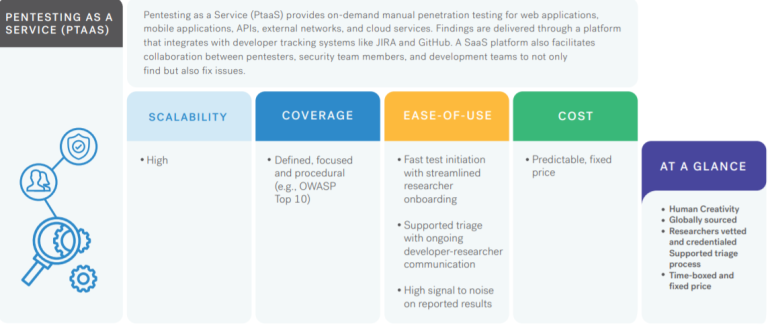
Cobalt’s Pentest as a Service (PtaaS) platform, coupled with an exclusive community of testers, delivers the real-time insights you need to remediate risk quickly and innovate securely.
We’d love to hear from you! If you have any questions, comments, or feedback, please don’t hesitate to contact us. Our team is here to help and we’re always looking for ways to improve our services. You can reach us by email (info@deurainfosec.com), or through our website’s contact form.
How does Burp Suite extensions help in Penetration Testing…
Burp Suite is a popular web application security testing tool that can be extended through the use of various plugins and extensions. These extensions provide additional functionality and capabilities that can assist in the penetration testing process. Here are some ways that Burp Suite extensions can help in penetration testing:
Automated vulnerability scanning: Burp Suite extensions can automate the process of scanning for vulnerabilities in web applications. These extensions can identify common vulnerabilities such as SQL injection, cross-site scripting (XSS), and file inclusion vulnerabilities.
Customized payloads: Some Burp Suite extensions allow for the creation of customized payloads that can be used in testing for specific vulnerabilities. These payloads can help identify vulnerabilities that may be missed by standard scanning tools.
Integration with other tools: Burp Suite extensions can integrate with other tools used in the penetration testing process, such as vulnerability scanners and exploit frameworks. This integration can streamline the testing process and make it more efficient.
Brute-force attacks: Burp Suite extensions can automate brute-force attacks against web applications. This can help identify weak passwords or authentication mechanisms that could be exploited by an attacker.
Fuzz testing: Burp Suite extensions can perform fuzz testing to identify vulnerabilities caused by unexpected or invalid input. This can help identify vulnerabilities such as buffer overflows or other memory-related issues.
In summary, Burp Suite extensions can greatly enhance the functionality and capabilities of the tool for penetration testing. These extensions can automate tasks, provide customized payloads, integrate with other tools, and help identify vulnerabilities that may be missed by standard scanning tools.
When it comes to assessing the security of computer systems, penetration testing tools are critical for identifying vulnerabilities that attackers may exploit. Among these tools, Burp Suite stands out as one of the most popular and widely used options among security professionals and enthusiasts alike.
Here’s a collection of Burp Suite extensions to make it even better.
Auth Analyzer
The Auth Analyzer extension helps you find authorization bugs. Navigate through the web application as a privileged user and let the Auth Analyzer repeat your requests for any defined non-privileged user. With the possibility to define parameters, the extension is able to extract and replace parameter values automatically.
Autowasp
Autowasp is a Burp Suite extension that integrates Burp issues logging with the OWASP Web Security Testing Guide (WSTG) to provide a web security testing flow. This tool will guide new penetration testers to understand the best practices of web application security and automate OWASP WSTG checks.
Burp_bug_finder
Burp_bug_finder is a Burp Suite plugin (written in Python) that makes the discovery of web vulnerabilities accessible. This version focuses only on XSS, and error-based SQLi. There’s no need to send XSS payload either for reflected or stored payload manually. You need to browse the pages where you want to check XSS vulnerability or error-based SQL injection.
Nuclei
Nuclei is a simple extension that allows you to run Nuclei scanner directly from Burp Suite and transforms JSON results into the issues.
Pentest Mapper
Pentest Mapper is a Burp Suite extension that integrates the Burp Suite request logging with a custom application testing checklist. The extension provides a straightforward flow for application penetration testing. The extension includes functionalities allowing users to map the application flow for pentesting to analyze the application and its vulnerabilities better. The API calls from each flow can be connected with the function or flow name. The extension allows users to map or connect each flow or API to vulnerability with the custom checklist.
We’d love to hear from you! If you have any questions, comments, or feedback, please don’t hesitate to contact us. Our team is here to help and we’re always looking for ways to improve our services. You can reach us by email (info@deurainfosec.com), or through our website’s contact form.
Hackers Use Open Source Tools to Attack Shipping Companies & Medical Laboratories
Unfortunately, it is not uncommon for hackers to use open source tools to attack organizations. Open source tools are freely available and can be used for both legitimate and malicious purposes.
In the case of shipping companies and medical laboratories, there are a number of open source tools that hackers could potentially use to launch attacks. For example, they may use network scanning tools such as Nmap or Wireshark to identify vulnerabilities in the organization’s network. They may also use tools such as Metasploit or Cobalt Strike to exploit these vulnerabilities and gain unauthorized access to systems and data.
Once they have access to a system, hackers may use open source tools like Mimikatz to steal passwords and other credentials. They may also use open source malware like DarkComet or Meterpreter to maintain access to compromised systems and exfiltrate sensitive data.
To protect against these types of attacks, it’s important for organizations to take a number of steps, including:
Implementing strong access controls and authentication mechanisms to prevent unauthorized access to systems and data.
Regularly patching and updating software and systems to address known vulnerabilities.
Using security monitoring tools to detect and respond to potential security incidents.
Providing regular security awareness training to employees to help them identify and respond to security threats.
Conducting regular security assessments to identify and address vulnerabilities in the organization’s network and systems.
There has been an emergence of a new security threat that has been causing havoc among the Asian shipping and medical laboratory industries.
It’s a never-before-seen threat group dubbed Hydrochasma, actively targeting the shipping and medical organizations that are engaged in research and treatment of the COVID-19 vaccine.
Symantec, a company under Broadcom, has been monitoring the activities of cybercriminals since October of last year. Their ultimate aim seems to be the acquisition of valuable information.
Modus Operandiof Attack
Hydrochasma’s modus operandi is unique in that they employ open-source tools and LotL techniques during their attacks. This enables them to carry out their malicious activities without leaving behind any traces that could potentially expose their identity.
This method of operation poses a challenge to those attempting to track and attribute the attacks to specific threat actors.
The origin and affiliation of this threat actor have not been determined, nor has any evidence yet been collected as to its origin.
The utilization of pre-existing tools seems to serve a dual purpose for Hydrochasma:-
To evade attribution efforts
To enhance the stealthiness of their attacks
By leveraging these tools, they can mask their activity and blend in with legitimate network traffic, making it more challenging for security experts to detect and respond to their malicious activities.
Attack Chain
Most likely, Hydrochasma infected its host with a phishing email in order to spread its infection. Initial signs of Hydrochasma’s presence on a targeted system are often indicated by the appearance of a lure document, with a file name that is crafted to appear as if it were an email attachment written in the native language of the victim organization.
This is an attempt to deceive the target into thinking that the document is legitimate and relevant to their work. Here below we have mentioned those attachment names:-
Product Specification-Freight-Company Qualification Information wps-pdf Export.pdf[.]exe
University-Development Engineer[.]exe
Once the attacker gains access to a machine, they utilize this access to deploy a Fast Reverse Proxy (FRP), which has the potential to expose servers that are located behind a firewall to the public web.
Tools Used
Here below we have mentioned all the tools that are dropped by the intruder on the affected system:-
Gogo scanning tool
Process Dumper (lsass.exe)
Cobalt Strike Beacon
AlliN scanning tool
Fscan
Dogz proxy tool
SoftEtherVPN
Procdump
BrowserGhost
Gost proxy
Ntlmrelay
Task Scheduler
Go-strip
HackBrowserData
It is extremely difficult to relate the activity to any specific threat group when a large number of publicly available tools are used.
There was no evidence that any data was taken from any of the targeted computers by Hydrochasma according to researchers from Symantec. Hydrochasma on the other hand utilizes certain tools that allow remote access to the system, which could result in data being extracted from the system.
This attack appears to have been motivated by a mission to gather intelligence, as indicated by the sectors targeted.
In this article, I will explain how to use Nikto on Kali Linux .
Firstly we will install the Nikto tool from Github or Using apt install command on terminal.
Using help manual of Nikto we can see various options or parameters on how we can use this tool very efficiently.
Firstly we will use the basic syntax to check the vulnerability of the website.
However, Nikto is capable of doing a scan that can go after SSL and port 443, the port that HTTPS websites use (HTTP uses port 80 by default). So we’re not just limited to scanning old sites, we can do vulnerability assessments on sites that use SSL, which is pretty much a requirement these days to be indexed in search results.
If we know it’s an SSL site that we’re targeting, we can specify it in Nikto to save some time on the scan by adding -ssl to the end of the command.
So by using this tool we can analyze the vulnerability of the website.
Android penetration testing tools are more often used by security industries to test the vulnerabilities in Android applications.
Here you can find the Comprehensive mobile penetration testing tools and resource list that covers Performing Penetration testing Operations in Android Mobiles.
Android is the biggest organized base of any mobile platform and developing fast—every day. Besides, Android is rising as the most extended operating system in this viewpoint because of different reasons.
Online Analyzers
Following are the online analyzers used to pentest the android applications.
Mobile Security Framework is an intelligent, all-in-one open-source mobile application (Android/iOS) automated pen-testing framework capable of performing static, dynamic analysis, and web API testing.
Appie is a software package that has been pre-configured to function as an Android Pentesting Environment.It is completely portable and can be carried on USB stick or smartphone.This is a one-stop answer for all the tools needed in Android Application Security Assessment and an awesome alternative to existing virtual machines.
A system supporting security app analysis in the presence of dynamic code update features (dynamic class loading and reflection). This tool combines static and dynamic analysis of Android applications in order to reveal the hidden/updated behavior and extend static analysis results with this information.
Computer Forensics tools are more often used by security industries to test the vulnerabilities in networks and applications by collecting the evidence to find an indicator of compromise and take appropriate mitigation Steps.
Here you can find the Comprehensive Computer Forensics tools list that covers Performing Forensics analysis and responding to incidents in all Environments.
Digitial Forensics analysis includes preservation, collection, Validation, Identification, Analysis, Interpretation, Documentation, and Presentation of digital evidence derived from digital sources for the purpose of facilitating or furthering the reconstruction of events found to be criminal.
Collections of Computer Forensics Tools
DFIR – The definitive compendium project – Collection of forensic resources for learning and research. Offers lists of certifications, books, blogs, challenges, and more
dfir.training – Database of forensic resources focused on events, tools, and more
The European Union Agency for Cybersecurity (ENISA) has made available Awareness Raising in a Box (AR-in-a-BOX), a “do it yourself” toolbox to help organizations in their quest to create and implement a custom security awareness raising program
The package includes:
A guideline on how to build an internal cyber-awareness raising program tailored to employees’ needs
A guideline on creating an awareness campaign targeted at external stakeholders
A how-to guide on how to select the appropriate tools and channels to best reach the target audience and tips for effective communication in social media
Instructions on selecting the right metrics and developing key performance indicators (KPIs) to evaluate the effectiveness of a program or campaign
A guide for the development of a communication strategy
An awareness raising game, in different versions and styles, for a generic audience and for an audience in the energy sector. It also comes with a guide on how it should be played
An awareness raising quiz to test comprehension and retention of key information (e.g., how to create good passwords)
Why security awareness matters
People have become cyber-attackers’ primary attack vector, which means that programs for raising cyber awareness are crucial for an organization’s cybersecurity strategy. The goal of these programs is to promote good cybersecurity practices of employees, managers and executives and improve their cybersecurity behavior.
AR-in-a-BOX can help them wrap their head around the task and push them towards realization.
“AR-in-a-Box is offered by ENISA to public bodies, operators of essential services, large private companies as well as small and medium ones (SMEs). [It] is dynamic and will be regularly updated and enriched,” the agency noted.