InfoSec Compliance & AI Governance For over 20 years, DISC InfoSec has been a trusted voice for cybersecurity professionals—sharing practical insights, compliance strategies, and AI governance guidance to help you stay informed, connected, and secure in a rapidly evolving landscape.
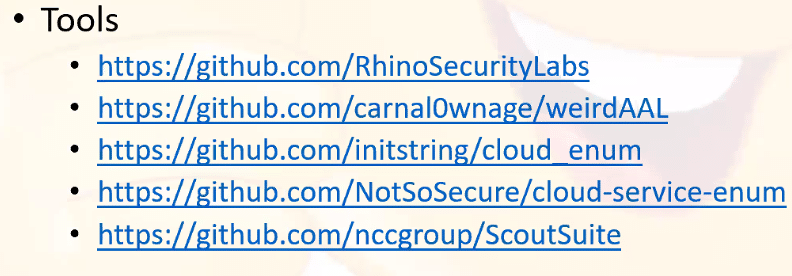
Red Siege has developed and made available many open-source tools to help with your penetration testing work.
The company plans to continue to support the tools listed below, whether in the form of bug fixes or new features. Give them a try, they’re all available on GitHub for free.
“I find joy in writing code, turning it into a logic puzzle to create powerful software tools. The satisfaction of seeing my creations in action, like EyeWitness, brings a sense of pride and saves valuable time. Motivated by the possibility of filling a software gap, I open source my creations, hoping they’ll benefit others as they did for me,” Chris Truncer, Senior Security Consultant & Director of Training, Red Siege, told Help Net Security.
AutoFunkt
AutoFunkt is a Python script for automating the creation of serverless cloud redirectors from Cobalt Strike malleable C2 profiles.
C2concealer
C2concealer is a command line tool that generates randomized C2 malleable profiles for use in Cobalt Strike.
DigDug
Dig Dug works by appending words from a dictionary to an executable. This dictionary is appended repeatedly until the final desired size of the executable is reached. Some AV & EDR engines may measure entropy to determine if an executable is trustworthy for execution. Other vendors inspect executables for signs of null byte padding.
dumpCake
dumpCake will dump password authentication attempts to the SSH daemon. Every SSHD child process will get attached to and at the completetion of the process, the attempted passwords and connection logs will be dumped to the script.
EyeWitness
EyeWitness takes screenshots of websites, collects server header info, and identifies default credentials if possible. Saves a lot of time triaging web sites on large tests. This tool is very commonly used by penetration testers looking to sift through a long list of websites.
EDD – Enumerate Domain Data
Enumerate Domain Data is designed to be similar to PowerView but in .NET. PowerView is essentially the ultimate domain enumeration tool. This tool was largely put together by viewing implementations of different functionality across a wide range of existing projects and combining them into EDD.
GPPDeception
This script generates a groups.xml file that mimics a real GPP to create a new user on domain-joined computers. Blue teams can use this file as a honeyfile. By monitoring for access to the file, Blue Teams can detect pen testers or malicious actors scanning for GPP files containing usernames and cpasswords for lateral movment.
Just-Metadata
Just-Metadata is a tool that gathers and analyzes metadata about IP addresses. It attempts to find relationships between systems within a large dataset. It is used to gather intelligence information passively about a large number of IP addresses, and attempt to extrapolate relationships that might not otherwise be seen.
ProxmarkWrapper
ProxmarkWrapper is a wrapper around the Proxmark3 client that will send a text alert (and/or email if warranted) if a RFID card is captured.
Wappybird
Wappybird is a ultithreaded Wappalyzer CLI tool to find web technologies, with optional CSV output. You can also provide a directory and all scraped data will be saved with a subfolder per host.
WMImplant
WMImplant is a PowerShell based tool that leverages WMI to both perform actions against targeted machines, but also as the C2 channel for issuing commands and receiving results. WMImplant requires local administrator permissions on the targeted machine.
WMIOps
WMIOps is a powershell script that uses WMI to perform a variety of actions on hosts, local or remote, within a Windows environment. It’s designed primarily for use on penetration tests or red team engagements.
ChatGPT is one of the biggest and most sophisticated language models ever made, with a massive neural network of over 175 billion parameters.
Recent research has revealed how ChatGPT for penetration testing can enable testers to achieve greater success.
ChatGPT was launched by OpenAI in November 2022, causing significant disruption in the AI/ML community.
Sophisticated email attacks are on the rise, thanks to threat actors leveraging the power of Artificial Intelligence.
However, researchers are staying one step ahead by utilizing ChatGPT for threat analysis and penetration testing.
A recently published research paper by Sheetal Tamara from the University of the Cumberlands highlights the effective use of ChatGPT in Reconnaissance.
Recently an automated penetration testing tool PentestGPT released;
The ChatGPT can be used in the initial reconnaissance phase, where the penetration tester is collection detailed data about the scope of assessment.
With the help of ChatGPT, pen-testers able to obtain reconnaissance data such as Internet Protocol (IP) address ranges, domain names, network topology, vendor technologies, SSL/TLS ciphers, ports & services, and operating systems.
This research highlights how artificial intelligence language models can be used in cybersecurity and contributes to advancing penetration testing techniques.
Pentesters can obtain the organization’s IP address using the prompt (“What IP address range related information do you have on [insert organization name here] in your knowledge base?”).
This prompt would deliver the possible IP addresses used by the organization.
“What type of domain name information can you gather on [insert target website here]?”
ChatGPT could provide the list of domain names used by the organization, such as primary domains, subdomains, other domains, international domains, generic top-level domains (gTLDs), and subsidiary domains.
“What vendor technologies does [insert target website fqdn here] make use of on its website?”
Answering this question, ChatGPT will provide various technologies, such as content delivery networks (CDNs), web servers, advertising engines, analytics engines, customer relationship management (CRM), and other technologies organizations use.
“Provide a comprehensive list of SSL ciphers based on your research used by [insert target website fqdn] in pursuant to your large corpus of text data present in your knowledge base.”
ChatGPT could provide the ciphers, SSL/TLS versions, and types of TLS certificates used, also, with this question, ChatGPT above to check the encryption standard used.
“Please list the partner websites including FQDN based on your research that [insert target website here] has direct links to according to your knowledge base.”
In response to the question, ChatGPT is able to provide a list of partner websites that are directly linked.
“Provide a vendor technology stack based on your research that is used by [insert organization name here].“
This prompt would extract the include application server type, database type, operating systems, big data technologies, logging and monitoring software, and other infrastructure-related information specific to the organization.
“Provide a list of network protocols related information that is available on [insert organization name here].”
ChatGPT will return a list of network protocols the target organization uses, including HTTPS, SMTP, NTP, SSH, SNMP, and others.
The research determined that “ChatGPT has the ability to provide valuable insight into the deployment of the target organization’s technology stack as well as specific information about web applications deployed by the target organization,” reads the paper published.
“The research performed on ChatGPT required trial and error in the prompting as certain requests can either be outright rejected or may result in responses that do not contain usable data for the reconnaissance phase of a penetration test.”
A Vulnerability Scanner Tools is one of the essential tools in IT departments Since vulnerabilities pop up every day and thus leaving a loophole for the organization.
The Vulnerability scanning tools help detect security loopholes in the application, operating systems, hardware, and network systems.
Hackers are actively looking for these loopholes to use them to their advantage. Vulnerabilities inside a network need to be identified and fixed immediately to leave your attackers at bay.
What do Vulnerability Scanner Tools do?
Vulnerability scanners are one right way to do this. With their continuous and automated scanning procedures, they can scan the network for potential loopholes.
It is on your internet or any device, they would help the IT departments identify the vulnerability and fix it both manually and automatically.
Vulnerability scanning tools do have two different approaches for performing their routines, authenticated and unauthenticated scans.
In the latter case, a penetration tester will show the scan disguised as a hacker without him having trusted access to the corporate network.
What are the Three types of Vulnerability Scanners?
This type of scan will help organizations identify the loopholes which will allow hackers to penetrate the system without trusted permissions.
Following are the types of vulnerability scanners
Discovery Scanning
Full Scanning
Compliance Scanning
What is an example of a Vulnerability Scanner?
The best Web vulnerability scanner in the market should allow you to perform both authenticated and unauthenticated types of scans to nullify network vulnerabilities among other related vulnerability scanners online
In this article, we’ll take a look at the top 10 best vulnerability scanning tools available in the market.
Lynis is an open source security auditing tool. Its main goal is to audit and harden Unix and Linux based systems. It scans the system by performing many security control checks. Examples include searching for installed software and determine possible configuration flaws.
Many tests are part of common security guidelines and standards, with on top additional security tests. After the scan, a report will be displayed with all discovered findings. To provide you with initial guidance, a link is shared with the related Lynis control.
Lynis is one of the most trusted automated auditing tool for software patch management, malware scanning and vulnerability detecting in Unix/Linux based systems. This tool is useful for auditors, network and system administrators, security specialists and penetration testers.
Intended audience:
Lynis assists auditors in performing Basel II, GLBA, HIPAA, PCI DSS and SOX (Sarbanes-Oxley) compliance audits.
Security specialists, Penetration Testers, System auditors, System/network managers, Security Engineers.
Lynis is compatible with many Operating Systems, such as:
AIX
Arch Linux
BackTrack Linux
CentOS
Debian, DragonFlyBSD
Fedora Core, FreeBSD
Gentoo
HPUX
Kali, Knoppix
Linux Mint
MacOS X, Mageia, Mandriva
NetBSD
OpenBSD, OpenSolaris, openSUSE, Oracle Linux
PcBSD, PCLinuxOS
Red Hat Enterprise Linux (RHEL) and derivatives
Sabayon, Scientific Linux, Slackware, Solaris 10, SuSE
TrueOS
Ubuntu and derivatives
Lynis can alsobe auditing software such as :
Database servers: MySQL, Oracle, PostgreSQL
Time daemons: dntpd, ntpd, timed
Web servers: Apache, Nginx
Once lynis starts scanning your system, it will perform auditing in a number of categories:
System tools: system binaries
Boot and services: boot loaders, startup services
Kernel: run level, loaded modules, kernel configuration, core dumps
Memory and processes: zombie processes, IO waiting processes
Users, groups and authentication: group IDs, sudoers, PAM configuration, password aging, default mask
Shells
File systems: mount points, /tmp files, root file system
Storage: usb-storage, firewire ohci
NFS
Software: name services: DNS search domain, BIND
Ports and packages: vulnerable/upgradable packages, security repository
Security frameworks: AppArmor, SELinux, security status
Software: file integrity
Software: malware scanners
Home directories: shell history files
How Lynis works:
In this Kali Linux Tutorial , To run it for the first time, it is recommended to use -c paramater. -c parameter means doing all tests to check the systems. If you want to put the Auditor name, just add –auditor parameter there. Here’s some
Once Installed then Start with Auditor or Pentester name .
# lynis -c –auditor “BALAJI”
Figure 1. Initialize
Figure 2. System Tools
Figure 3. Boot & Services and Kernel
Figure 4. Users and Group
Figure 5. Shell and storage
Figure 6. Software, Ports and Packages
Figure 7. Networking and Printer
Figure 8. Email, Firewalls and Web Server
Figure 9. SSH, SNMP and Databases
Figure 10. PHP, Squid Proxy and Logging
Figure 11. Inetd, Banner and Cron
Figure 12. Accounting, NTP and Cryptography
Figure 13. Virtualization, Security Frameworks and File Integrity
Figure 14. Malware Scanners, System Tool and Home directory
Figure 15. Kernel Hardening
Figure 16. Hardening, Custom Tests and Result
Figure 17. Hardening Index
Run Lynis with Custom Tests
Your system may not need to run all the tests. If your server not running a web server, you don’t need to test it. For this purpose, we can use –tests parameter. The syntax is :
# lynis –tests “Test-IDs”
there are more than 100 tests that we can do. Here are some list of Lynis Tests-ID.
[04:57:04] Reason to skip: Test not in list of tests to perform
KRNL-5770 (Checking active kernel modules)
KRNL-5788 (Checking availability new kernel)
KRNL-5820 (Checking core dumps configuration)
Below is a sample command to run Check uptime of system and Checking core dumps configuration tests. If you want to add more tests, just add more Test-ID separated by space.
# ./lynis –tests “BOOT-5202 KRNL-5820”
To get more Tests-IDs, you can find it inside /var/log/lynis.log. Here’s a trick how to do it.
1. First, we need to run lynis with -c (check-all) parameter.
# ./lynis -c -Q
2. Then look at inside /var/log/lynis.log file. Use cat command and combine it with grep. Let say you want to search Test-ID which related to Kernel. Use keyword KRNL to find it.
# cat /var/log/lynis.log | grep KRNL
Below is a complete keywords of Test-IDs that available in Lynis.
If you feel that put a lot of Test-IDs is painful, you can use –test-category parameter. With this option, Lynis will run Test-IDs which are included inside a specific category. For example, you want to run Firewall and Kernel tests. Then you can do this :
# ./lynis –tests-category “firewalls kernel”
Run Lynis as Cronjob
Since security needs consistency, you can automate Lynis to run periodically. Let’s say you want to run it every month to see if there is any improvement since the last Lynis run. To do this, we can run Lynis as a cronjob. Here’s a sample cronjob to run it every month.
cd /usr/local/lynis ./lynis -c –auditor “${AUDITOR}” –cronjob > ${REPORT}
mv /var/log/lynis-report.dat ${DATA}
# End
Save the script into /etc/cron.monthly/lynis. Don’t forget to add related paths (/usr/local/lynis and /var/log/lynis), otherwise the script will not work properly.
Penetration testing, also known as pen testing, is a process of assessing the security of a computer system or network by simulating an attack from a malicious outsider or insider. The goal is to identify vulnerabilities and weaknesses that can be exploited by attackers to gain unauthorized access to the system.
There are many penetration testing tools available that can help security professionals and ethical hackers to perform effective tests. Here are some of the best penetration testing tools:
Metasploit Framework: It is an open-source penetration testing framework that provides a range of exploits, payloads, and auxiliary modules. It is widely used by penetration testers and security professionals to identify vulnerabilities and exploit them.
Nmap: It is a network exploration and security auditing tool that can be used to scan networks and identify hosts, ports, and services. It can also be used to detect operating systems and versions.
Wireshark: It is a network protocol analyzer that allows you to capture and analyze network traffic. It can be used to detect and analyze network attacks and vulnerabilities.
Burp Suite: It is an integrated platform for performing web application security testing. It includes a proxy server, a scanner, a spider, and other tools that can be used to identify vulnerabilities in web applications.
Aircrack-ng: It is a suite of tools that can be used to crack wireless network passwords. It includes tools for capturing and analyzing network traffic, as well as tools for cracking encryption keys.
John the Ripper: It is a password cracking tool that can be used to test the strength of passwords. It can be used to crack passwords for a range of operating systems and applications.
SQLmap: It is an open-source penetration testing tool that can be used to test the security of SQL-based web applications. It can be used to detect and exploit SQL injection vulnerabilities.
Hydra: It is a password cracking tool that can be used to test the strength of passwords for a range of protocols, including HTTP, FTP, and Telnet.
Nessus: It is a vulnerability scanner that can be used to scan networks and identify vulnerabilities. It can also be used to generate reports and prioritize vulnerabilities based on their severity.
OWASP Zap: The world’s most popular free web security tool, actively maintained by a dedicated international team of volunteers.
Kali Linux: It is a Linux distribution that is specifically designed for penetration testing and ethical hacking. It includes a range of tools for network analysis, vulnerability testing, password cracking, and more.
Latest Pen Testing Titles
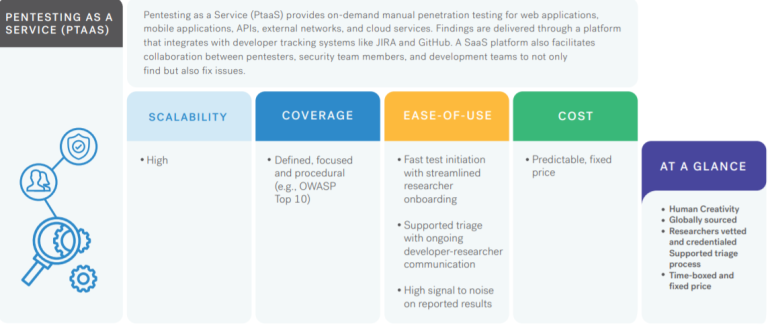
Cobalt’s Pentest as a Service (PtaaS) platform, coupled with an exclusive community of testers, delivers the real-time insights you need to remediate risk quickly and innovate securely.
We’d love to hear from you! If you have any questions, comments, or feedback, please don’t hesitate to contact us. Our team is here to help and we’re always looking for ways to improve our services. You can reach us by email (info@deurainfosec.com), or through our website’s contact form.
API security is an undervalued but crucial aspect of information security. Some of the most common cyber attacks exploit APIs and web applications, and if organisations are to stay secure, they must test their systems to identify and eradicate weaknesses.
Organisations can achieve this with API penetration tests. An ethical hacker (or ‘penetration tester’) will examine your applications using the same techniques that a cyber criminal would use. This gives you a real-world insight into the way someone might compromise your systems.
Web application and API tests look specifically at security vulnerabilities introduced during the development or implementation of software or websites. There is no single checklist of how exactly the test should be conducted, but there are general guidelines.
Benefits of API penetration testing
The primary purpose of an API penetration test is to protect your organisation from data breaches. This is crucial given the increased risk of cyber attacks in recent years; according to a UK government report, 39% of surveyed organisations said they suffered a security breach in the past year.
By conducting an API penetration test, you will gain a real-world overview of one of the biggest security threats that organisations face. The tester will use their experience to provide guidance on specific risks and advise you on how to address them.
But penetration tests aren’t only about closing security vulnerabilities. Mitigating the risk of security incidents has several other benefits. For instance, you protect brand loyalty and corporate image by reducing the likelihood of a costly and potentially embarrassing incident.
Penetration testing also helps you demonstrate to clients and potential partners that you take cyber security seriously. This gives you a competitive advantage and could help you land higher-value contracts.
Perhaps most notably, penetration testing is a requirement for several laws and regulations. Article 32 of the GDPR (General Data Protection Regulation), for example, mandates that organisations regularly test and evaluate the effectiveness of their technical and organisational measures employed to protect personal data.
Likewise, if your organisation is subject to the PCI DSS (Payment Card Industry Data Security Standard), you must conduct external penetration tests at least once per year and after any significant changes are made to your systems.
API penetration testing checklist
IT Governance has its own proprietary checklist when conducting API and web application penetration tests.
The system is modelled on the OSSTMM (Open Source Security Testing Methodology Manual) and the OWASP (Open Web Application Security Project) methodologies.
A high-level overview of our process is outlined below, with a brief description of what is assessed during each section.
1. Authentication
The penetration tester ensures that appropriate mechanisms are in place to confirm a user’s identity. They then review how the authentication process works, using that information to circumvent the authentication mechanism.
2. Authorisation
The tester verifies that access to resources is provided only to those permitted to use them.
Once roles and privileges are understood, the tester attempts to bypass the authorisation schema, finding path-traversal vulnerabilities and ways to escalate the privileges assigned to the tester’s user role.
3. Session management
The tester ensures that effective session management configurations are implemented. This broadly covers anything from how user authentication is performed to what happens when logging out.
4. Input validation and sanitisation
The tester checks that the application appropriately validates and sanitises all input from the user or the environment before using it.
This includes checking common input validation vulnerabilities such as cross-site scripting and SQL injection, as well as other checks such as file uploads, antivirus detection and file download weaknesses.
5. Server configuration
The tester analyses the deployed configuration of the server that hosts the web application. They then verify that the application server has gone through an appropriate hardening process.
6. Encryption
The tester assesses encryption security around the transmission of communication. This includes checking for common weaknesses in SSL/TLS configurations and verifying that all sensitive data is being securely transferred.
7. Information leakage
The tester reviews the application configuration to ensure that information is not being leaked.
This is assessed by reviewing configurations and examining how the application communicates to discover any information disclosure that could cause a security risk.
8. Application workflow
The tester determines whether the application processes and workflows can be bypassed.
Tests are conducted to ensure that application workflows cannot be bypassed by either tampering with the parameters or forcefully browsing. This ensures the integrity of the data.
9. Application logic
The tester analyses how the application uses, stores and maintains data. They do this by checking the underlying technology and any mitigating controls that may affect the risk to the application.
10. Report
The tester documents their findings. Their reports contains an executive summary, which provides a high-level, non-technical summary of any identified vulnerabilities, alongside a summary of the organisation’s business risks and an overall risk rating.
It also contains a comprehensive review of testing details, such as the scope of the assessment, descriptions of the vulnerabilities identified and their impact, plus proofs of concept that support the findings.
Finally, the report provides the tester’s commentary, where they discuss the issues identified and how the vulnerabilities could be linked within an attack chain. This is supplemented with remediation advice and supporting references.
Android penetration testing tools are more often used by security industries to test the vulnerabilities in Android applications.
Here you can find the Comprehensive mobile penetration testing tools and resource list that covers Performing Penetration testing Operations in Android Mobiles.
Android is the biggest organized base of any mobile platform and developing fast—every day. Besides, Android is rising as the most extended operating system in this viewpoint because of different reasons.
Online Analyzers
Following are the online analyzers used to pentest the android applications.
Mobile Security Framework is an intelligent, all-in-one open-source mobile application (Android/iOS) automated pen-testing framework capable of performing static, dynamic analysis, and web API testing.
Appie is a software package that has been pre-configured to function as an Android Pentesting Environment.It is completely portable and can be carried on USB stick or smartphone.This is a one-stop answer for all the tools needed in Android Application Security Assessment and an awesome alternative to existing virtual machines.
A system supporting security app analysis in the presence of dynamic code update features (dynamic class loading and reflection). This tool combines static and dynamic analysis of Android applications in order to reveal the hidden/updated behavior and extend static analysis results with this information.
Wireless Penetration testing actively examines the process of Information security Measures which is Placed in WiFi Networks and also analyses the Weakness, technical flows, and Critical wireless Vulnerabilities.
The most important countermeasures we should focus on are Threat Assessment, Data theft Detection, security control auditing, Risk prevention and Detection, information system Management, and Upgrade infrastructure and a Detailed report should be prepared.What is Wireless Penetration Testing?
Wireless Penetration Testing is aimed to test wireless infrastructure to find vulnerabilities in the network. Testing involves both manual testing techniques and automated scans to simulate a real-world attack and identify risks.Why is wireless penetration testing important?
Usage of Wi-Fi access dramatically increased nowadays, and the quality of Wi-Fi security is in question. By using Wi-Fi access thousands of transaction processing every minute. If the network is vulnerable it allows hackers to launch various attacks and intercept the data.
Let’s take a detailed look at the Wireless Penetration TestingChecklist and the steps to be followed.
Framework for Wireless Penetration Testing
Discover the Devices connected with Wireless Networks.
Document all the findings if Wireless Device is Found.
If a wireless Device is found using Wifi Networks, then perform common wifi Attacks and check the devices using WEP Encryption.
If you found WLAN using WEP Encryption then Perform WEP Encryption Pentesting.
Check whether WLAN Using WPA/WPA2 Encryption. If yes then perform WPA/WPA2 pen-testing.
Check Whether WLAN using LEAP Encryption. If yes then perform LEAP Pentesting.
No other Encryption Method was used which I mentioned above, Then Check whether WLAN using unencrypted.
If WLAN is unencrypted then perform common wifi network attacks, check the vulnerability which is placed in the unencrypted method and generate a report.
Before generating a Report make sure no damage has been caused to the pentesting assets.
Wireless Pentesting with WEP Encrypted WLAN
Check the SSID and analyze whether SSID is Visible or Hidden.
Check for networks using WEP encryption.
If you find the SSID as visible mode then try to sniff the traffic and check the packet capturing status.
If the packet has been successfully captured and injected then it’s time to break the WEP key by using a WiFi cracking tool such as Aircrack-ng, or WEPcrack.
If packets are not reliably captured then sniff the traffic again and capture the Packet.
If you find SSID is the Hidden mode, then do Deauthentication for the target client by using some deauthentication tools such as Commview and Airplay-ng.
Once successfully Authenticated with the client and Discovered the SSID is, then again follow the Above Procedure which is already used for discovering SSID in earlier steps.
Check if the Authentication method used is OPN (Open Authentication) or SKA (Shared Key Authentication). If SKA is used, then bypassing mechanism needs to be performed.
Check if the STA (stations/clients) are connected to AP (Access Point) or not. This information is necessary to perform the attack accordingly.
If clients are connected to the AP, an Interactive packet replay or ARP replay attack needs to be performed to gather IV packets which can be then used to crack the WEP key.
If there’s no client connected to the AP, Fragmentation Attack or Korex Chop Chop attack needs to be performed to generate the keystream which will be further used to reply to ARP packets.
10. Once the WEP key is cracked, try to connect to the network using WPA-supplicant and check if the AP is allotting any IP address or not.”EAPOL handshake“.
WirelessPenetration Testing with WPA/WPA2 Encrypted WLAN
Start and Deauthenticate with WPA/WPA2 Protected WLAN client by using WLAN tools Such as Hotspotter, Airsnarf, Karma, etc.
If the Client is Deaauthenticated, then sniff the traffic and check the status of captured EAPOL Handshake.
If the client is not Deauthenticate then do it again.
Check whether the EAPOL handshake is captured or Not.
Once you captured the EAPOL handshake, then perform a PSK Dictionary attack using coWPAtty, Aircrack-ng to gain confidential information.
Add Time-memory trade-off method (Rainbow tables) also known as WPA-PSK Precomputation attack for cracking WPA/2 passphrase. Genpmk can be used to generate pre-computed hashes.
If it’s Failed then Deauthenticate again and try to capture again and redo the above steps.
LEAP Encrypted WLAN
Check and Confirm whether WLAN is protected by LEAP Encryption or not.
De-authenticate the LEAP Protected Client using tools such as karma, hotspotter, etc.
If the client is De authenticated then break the LEAP Encryption using a tool such as asleapto steal the confidential information
If the process dropped then de-authenticate again
Wireless Penetration Testing with Unencrypted WLAN
Check whether SSID is Visible or not
Sniff for IP range if SSID is visible then check the status of MAC Filtering.
If MAC filtering is enabled then spoof the MAC Address by using tools such as SMAC
Try to connect to AP using IP within the discovered range.
If SSID is hidden then discover the SSID using Aircrack-ng and follow the procedure of visible SSID which I Declared above.
Network Penetration Testing determines vulnerabilities in the network posture by discovering Open ports, Troubleshooting live systems, services and grabbing system banners.
The pen-testing helps administrator to close unused ports, additional services, Hide or Customize banners, Troubleshooting services and to calibrate firewall rules.You should test in all ways to guarantee there is no security loophole.
Let’s see how we conduct a step by step Network penetration testing by using some famous network scanners.
1.HOST DISCOVERY
Footprinting is the first and important phase were one gather information about their target system.
DNS footprinting helps to enumerate DNS records like (A, MX, NS, SRV, PTR, SOA, CNAME) resolving to the target domain.
A – A record is used to point the domain name such as gbhackers.com to the IP address of it’s hosting server.
MX – Records responsible for Email exchange.
NS – NS records are to identify DNS servers responsible for the domain.
SRV – Records to distinguish the service hosted on specific servers.
PTR – Reverse DNS lookup, with the help of IP you can get domain’s associated with it.
SOA – Start of record, it is nothing but the information in the DNS system about DNS Zone and other DNS records.
CNAME – Cname record maps a domain name to another domain name.
We can detect live hosts, accessible hosts in the target network by using network scanning tools such as Advanced IP scanner, NMAP, HPING3, NESSUS.
Perform port scanning using tools such as Nmap, Hping3, Netscan tools, Network monitor. These tools help us to probe a server or host on the target network for open ports.
Scan the network using Vulnerabilities using GIFLanguard, Nessus, Ratina CS, SAINT.
These tools help us in finding vulnerabilities with the target system and operating systems.With this steps, you can find loopholes in the target network system.
GFILanguard
It acts as a security consultant and offers patch Management, Vulnerability assessment, and network auditing services.
Nessus
Nessus a vulnerability scanner tool that searches bug in the software and finds a specific way to violate the security of a software product.
Data gathering.
Host identification.
Port scan.
Plug-in selection.
Reporting of data.
5.Draw Network Diagrams
Draw a network diagram about the organization that helps you to understand logical connection path to the target host in the network.
The network diagram can be drawn by LANmanager, LANstate, Friendly pinger, Network view.
6.Prepare Proxies
Proxies act as an intermediary between two networking devices. A proxy can protect the local network from outside access.
With proxy servers, we can anonymize web browsing and filter unwanted contents such as ads and many other.
Proxies such as Proxifier, SSL Proxy, Proxy Finder..etc, to hide yourself from being caught.
6.Document all Findings
The last and the very important step is to document all the Findings from Penetration testing.
This document will help you in finding potential vulnerabilities in your network. Once you determine the Vulnerabilities you can plan counteractions accordingly.
You can download rules and scope Worksheet here – Rules and Scope sheet
Thus, penetration testing helps in assessing your network before it gets into real trouble that may cause severe loss in terms of value and finance.
enetration Testing Companies are pillars when it comes to information security, nothing is more important than ensuring your systems and data are safe from unauthorized access, Many organizations have a flawed security culture, with employees motivated to protect their own information rather than the organization.
This sets up an opportunity for attackers seeking ways into a company to exploit it and get access to critical data and secrets.
In this article, we will see the 10 best penetration testing companies and understand what penetration testing is. We will also discuss its importance, different types of tests, and how they are conducted.
What Is Penetration Testing?
The term “penetration testing” refers to the process of checking an application’s or network’s security by exploiting any known vulnerabilities.
These security flaws might be found in a variety of places, such as system configuration settings, authentication methods, and even end-user risky behaviors.
Apart from assessing security, pentesting is also used to assess the effectiveness of defensive systems and security tactics.
The cyber security condition is shifting at a breakneck speed. New vulnerabilities are discovered and exploited all of the time, some of them are publicly recognized, and others are not.
Being aware is the greatest defence you can have. A penetration test uncovers security flaws in your system that might lead to data theft and denial of service.
Best Penetration Testing Companies: Key Features and Services
Automated Vulnerability Scans, Continuous Scanning, CI/CD Integration, Zero false positives, Pentest Report, Customer Support, and Theories on How to Report to Regulators.
Proof-Based Scanning, Full HTML5 Support, Web Services Scanning, Built-in Tools, SDLC Integration
Integration with JIRA and Github, OWASP Top 10, PCI, HIPAA, and other compliance report templates customer Reports API for building personalized security reports test vulnerabilities functionality
Certified ethical hackers on the team33 years of overall experience in ITIBM Business Partner in Security Operations & Response, Recognized with 8 Gold Microsoft Competencies
If you’re interested in penetration testing and digital forensics, you know that Kali Linux is worth a try. And if you’re already doing it, chances are good you are already using it.
We talked to Jim O’Gorman, Chief Content and Strategy Officer at Offensive Security (OffSec), about the direction in which the development of the open-source distro is headed.
[The answers have been edited for clarity.]
Kali Linux keeps growing and improving. How much does user feedback influence where you want to go next? What do users want the most?
Two questions drive Kali’s development:
1. What needs to be done to ensure that Kali Linux is the best possible platform for professional and hobbyist information security work? 2. What needs to be done to ensure that Kali is the best possible platform for information security training?
There is a lot of overlap between those two questions, but realistically they are separate and distinct items. However, by getting them both right on a single platform, we create an environment where people can train, study, and learn, but also use the same platform for real-world efforts. In essence, it means that you train like you fight.
The answer to the first question is driven by input from the Kali and OffSec teams. As infosec professionals ourselves, what are the things we run into on a day-to-day basis and how do we make our life easier by ensuring the toolset is of the highest quality possible? We also work closely with OffSec’s pentesting team.
We also listen to input from other Kali users. Kali is a totally open-source project and anyone and everyone can pitch in and contribute. And they do! If you wish a tool to be included in Kali, package it and submit it! If you wish a configuration worked a certain way out of the box, modify the package and submit the change. It’s very direct and easy to do, and it is in our documentation. Anyone – regardless of their background – can play a part.
The second way users influence development is through bug reports, feature requests, and conversations on OffSec’s Discord and other social media. The Kali team is out there as part of the infosec community – talk to us and let us know what you are seeing. Also, when possible, we will set up private conversations with large organizations that use Kali to get a feel for their unique needs.
The answer the second question – How to make Kali the best possible platform for training? – we work very closely with the OffSec content development team to find out what tools they are using for training, what sort of default environment works best for learners, and what we can do in Kali to support general education efforts.
Surprisingly, even though Kali is built for advanced information security work, it is often the first Linux many users ever use. So we are careful with the design of Kali to ensure that it is approachable. We want to ensure that you don’t have to be a Linux professional to utilize Kali successfully in OffSec courses.
What’s your vision for Kali Linux in the next 12 months? What areas need polishing?
The changing of attack techniques over time does not impact Kali as much as you might think, as techniques are more often than not implemented in tools and scripts. While the tools and scripts change, Kali Linux as a platform to launch them does not have to change much. The closest item to this is expanding Kali to run everywhere. Our goal is to put the Kali toolset as close as possible to you no matter where you are.
Kali installed on bare metal, Kali in a VM, Kali in containers (Docker & LXC), Kali on WSL, Kali on various ARM devices such as Raspberry Pi, Kali in a cloud instance such as AWS and Azure, Kali on your Android phone or tablet – we even have Kali running on a watch! No matter where you are or what your needs are, we want Kali to be easy to access and run.
Kali is primarily gered towards pentesting and red teaming, but we are looking at expanding into other areas of information security as well.
Kali Linux comes with a myriad of tools. What’s the process for including or removing a piece of software? What tools are used the most?
What tools run in Kali is really a matter of input from the team, community, and OffSec. Our goal is to have the most frequently used and important tools installed and working out of the box. Other common tools are installed quickly and easily with a single command.
We add new tools based on the answers to a number of questions: What functionality does the tool provide and is it unique or different enough from functionalities of other tools? Is the tool going to be maintained and updated over a reasonable period of time? How functional is the tool? It is a wrapper for another tool? Does the developer have a positive reputation?
If a tool stops being updated and stops working, we’ll try to work with the author. If they are unresponsive and the effort of maintaining the tool becomes too complex, we document this and then often remove it.
We get a lot of input from the OffSec pentesting team on what tools they are using in the field today, as well as the OffSec content developers on what tools are being used as part of the courseware. The idea is to have all the tools used in OffSec coursework out of the box to keep things easy for students.
Do major software development trends influence your approach to enhancing Kali Linux? How do you prioritize features?
When prioritizing features, we look at what is needed at the current time. We release Kali in quarterly updates so that dictates our development cycle. Each cycle we look at what is happening in the industry, where the gaps are, and determine what to prioritize.
On this front, there is a lot to balance. Everything from the distribution of Kali, installation, user experience, tools, stability, so on and so forth. It’s a full operating system and a small team so we have to pick and choose what goes into it, we can’t do everything each cycle. Again, input from the community and OffSec sets the priorities.
There’s been a lot of buzz around AI lately. Do you expect AI to play a role in future Kali Linux versions?
As Kali is a base OS, not right now. For tools that run in Kali, perhaps in time. As soon as the tools are there we will add them into Kali if they are any good. But there are also always fad trends so we tend not to get over-excited about them until they start to actually deliver results.
We have seen demonstrations of tools being developed with some of the PoC which have been creating some buzz, but as they are not ready to be released we are a ways off from this yet.
John Jackson has been working in cybersecurity for less than five years, but already has several significant wins under his belt.
After five years as an engineer in the Marine Corps he founded white-hat hacker collective Sakura Samurai, which last year discovered git directories and credential files within United Nations infrastructure that exposed more than 100,000 private employee records.
On a roll, the group soon after publicly disclosed vulnerabilities within the Indian government that allowed them to access personal records, police reports, and other hugely sensitive data, along with session hijacking and arbitrary code execution flaws on finance-related governmental systems.
Jackson’s other notable successes have included the discovery of a vulnerability in the Talkspace mental health app and two serious bugs in Chinese-made TCL brand televisions.
In a follow-up to the first part of our two-part feature on becoming a pen tester, we asked Jackson, now senior offensive security consultant at Trustwave, about his achievements, his love for pen testing, and the skills that would-be penetration testers need to succeed.
Daily Swig: How did you get into pen testing?
John Jackson: My story’s a little non-traditional. I didn’t grow up as a computer nerd. I was actually going to college for philosophy at CU Denver when I got a phone call from a recruiter and he asked me, hey, do you want to be a hacker?
I went through a boot camp and by the time I got to certified ethical hacker level I was actually helping class members learn, because I had done so much self-study on my own as I was just so excited.
I got recruited by TEKsystems as a contractor to go and work for Staples, initially as a cybersecurity engineer, and after the first six months there, they switched me to endpoint detection response. I went from application security engineer to senior applications security engineer for Shutterstock and after that, I went to Trustwave.
I was still hacking on my own time doing ethical hacking, and I established a group at the time called Sakura Samurai.
JJ: There’s not a linear path. When I was getting into it, they [the industry] didn’t have as many certifications as they do now, and they also didn’t have as many materials, but nowadays they have things like Hack the Box, which can be a good way in.
I think there is no definitive skill that makes you a good hacker – it’s not so much a skill but a mindset. It’s endless curiosity.
If you’re not the type of person that likes spending a lot of your free time learning then it’s not the best field for you, because you’re always going to have to improve, and it’s very difficult to improve if you’re not continually learning, and a lot of the time that’s on your own time.
DS: What are your favourite things about your job?
JJ: One of my favourite things is the ability to hack so many different things. I’ve done ATM hacking, I’ve done phishing and social engineering, and then I moved into red teaming where the scope is a lot larger, and you have a lot more control over how you hack the organizations because you emulate advanced persistent threat actors.
Pen testing is amazing because I’m always learning – it really keeps me going and keeps my brain fresh. I don’t get bored because every day is new.
DS: And the worst?
JJ: A lot of non-technical people are sometimes involved in setting up and arranging pen tests and red teams, and sometimes they under-scope the assessments and take a very check-in-the-box approach to pen testing.
I think that that’s bad for everyone involved – it’s bad for the pen testers because you’re limited to such a narrow scope of what you can and can’t do, and it’s bad for security because in reality it’s just not realistic. A criminal hacker is not going to stop and say “you know what, this domain’s out of scope, this technology’s out of scope, I’m not going to mess with that”.
Pen testers are highly technical and sometimes you’re dealing with people that are more salesy or C-level, and you have to explain why it matters – and that can be tough.
DS: What’s the most enjoyable project you’ve ever worked on?
JJ: I think my favourite project was a bank that wanted a red team with a scope of pretty much everything. That was a lot of fun, because I got to use the expertise I had to think outside of the box and use some of their own platforms to abuse their company.
They were blown away because they didn’t expect to see this or that service get abused, so I felt kind of proud doing that. [It felt like] finally someone appreciates that outside of the box thinking.
DS: And the most serious?
JJ: With the UN, with my group Sakura Samurai, we found GitHub credentials. We used the GitHub credentials to download the organization’s internal GitHub code and then, going through the code, we found over 100,000 lines of employee information. It was insane. That was definitely pretty scary.
The Indian government hack was crazy too – that was on another level. We found a lot of vulnerabilities – credentials, remote code execution, you name it. We were just going in and gave them a very extensive report, and actually coordinated it with DC3 [Department of Defense Cyber Crime Center] to help us disclose, because we were so worried about how much we found.
DS: What are your thoughts about bug bounties?
JJ: I’ve got a lot of complaints [about] bug bounty [programs], the biggest one being that you have to sign non-disclosure agreements when you submit these bugs, and sometimes that’s a moral conflict because you’ll discover things that are really bad. I was a blue teamer for half of my career, so when I find these certain types of bugs in bug bounty programs it’s unnerving because I know they’re not going to handle this how they need to handle this, they’re going to try and sweep this under the rug.
I moved towards vulnerability disclosure programs because you give them time to fix it and then you can disclose the bug that you found. I think that all hackers should try some vulnerability disclosure because it really just gives you a chance to get your hands on hacking a lot of things at once and then go through the process.
JJ: Right now, I’m working on another red team engagement. We’re on the internal phase, so the phase of just being inside the organization and looking for security vulnerabilities to see what we can and can’t do, how far we can go.
It’s always exciting. I love doing it, as this just really combines a lot of elements of hacking – network hacking, web hacking, and then the social aspects like what type of technologies do people use, and how can you abuse that internally?
A good example that I can say on record because it’s very obvious is Office 365, using Microsoft products to get more passwords or access to the organization, so that’s what I’m dealing with right now.
DS: What careers could pen testing lead on to?
JJ: I definitely have moved towards red teaming more, which is just a different form of pen testing. But I’d say for me red teaming and pen testing is the end of the line.
You could spend your entire life as a pen tester, absolutely, but I think a lot of people in the different client environments have shifted into a model of wanting pen testers to do more threat emulation – specific goals like ‘steal our credit card data, steal our employee accounts’.
The reality is it’s just endless, and there’s always something bigger you can aspire to. So if you’re a pen tester maybe [the next step is] senior pen tester, if you’re a senior pen tester maybe it’s to go to offensive security consultant, moving into red teaming. I think shifting into red teaming is the end goal for a lot of people.
Network Penetration Testing determines vulnerabilities on the network posture by discovering Open ports, Troubleshooting live systems, services, port scans and grabbing system banners.
Port Scanner is an application used to perform an open port scan with server or hosts. Open ports are the gateway for attackers to enter in and to install malicious backdoor applications.
It is Command-line utility for exploitation websites which will perform Open port scan on your behalf. This tool helps early stages of a penetration testing to run an open port scanner on a bunch and have it not come back from your IP address.
Port Scanners Supported
yougetsignal
viewdns
hackertarget
ipfingerprints
pingeu
spiderip
portcheckers
t1shopper
Open Port Scanner
It is simple and easy to use the tool, can get results in minutes and also it to stay Anonymous. you can download the tool from github.
Cobalt’s has announced a new offering, Agile Pentesting! With Agile Pentesting, conduct a pentest that has a targeted scope focused on a specific area of an asset, or a specific vulnerability across an asset. Agile Penesting is flexible in nature, and aligns pentesting to DevSecOps workflows in a way that’s friction-free.
Leverage Agile Pentesting to level up your security program for:
* New Release Testing: pentest a new release before or shortly after it reaches production
* Delta Testing: pentest for incremental improvements based on code differences since date or version
* Single OWASP Category Testing: pentest a single vulnerability or small subset of vulnerabilities across an asset to validate fixes
* Microservice Testing: pentest Kubernetes within AWS, Azure, or GCP, as well as hosted network devicesReady to ship code securely with Cobalt’s Agile Pentesting?
Ready to ship code securely with Cobalt’s Agile Pentesting?
Enter to Win a Free Cobalt Agile Pentest!Sometimes the best things in life actually are free! Click here to enter your information to be one of the three lucky winners to receive a free Agile Pentest from Cobalt, worth $6,600 in value! The drawing will take place on September 22nd.
If you’re a car owner, it can be tempting to put off an oil change, tire rotation or other recommended vehicle tune-up. But reality becomes all too clear when you’re sitting on the side of the highway waiting for AAA. And it’s even more painful when you’re hit with a massive repair bill a few days later that far exceeds any short-lived savings.
Like many frustrated drivers, businesses are currently learning this lesson the hard way with cybersecurity. Last year, data breaches at organizations increased by 68% to reach their highest volume ever, according to Identity Theft Resource Center’s 2021 Data Breach Report.
Even as data breaches become more prevalent and costly, many organizations continue to hold off on vital cybersecurity measures, as well as neglect routine pentesting and provisioning maintenance. This short-sighted approach costs organizations more in the long run.
In order to prevent hacks and breaches, businesses must act quickly and treat cybersecurity as a long-term investment; learning how to drive the most value from security testing instead of waiting for a cyberattack to occur.
Pentesting: A Proactive Approach to Cybersecurity
One of the most effective ways to increase your cybersecurity readiness is penetration testing (pentesting, for short)—a simulated cyberattack designed to discover vulnerabilities in an organization’s IT systems.
Pentesting involves stepping into hackers’ shoes to identify weak spots. By role-playing how a hacker might breach your security configurations, this process helps identify potential vulnerabilities and threats, test security responses and capabilities and measure ongoing improvements to your cybersecurity system.
Your pentesters can come from either your internal security experts or from a third-party team. They dig into your security systems one by one, starting with a set of objectives to carry out an attack. Most teams combine black-box and white-box testing: For black, the pentester acts as a true external hacker with little or no knowledge of the IT landscape; for white, the pentester acts as an internal developer with complete knowledge of the landscape.
Here’s what the process typically looks like:
Pentesters begin with low-privilege identity credentials from someone in a network, but they also look for vulnerabilities from any unauthenticated perspectives. After gaining remote access, pentesters explore your system and search for exploitable security gaps.
Based on what they find, pentesters develop and carry out a cyberattack. The aim is to gain escalating privileges and a greater ability to modify your systems, which packs a bigger punch than stealing data alone.
Once an attack commences, pentesters report their findings, rank vulnerabilities in terms of severity and advise you on remedies. After changes are implemented, pentesters test again to ensure you’ve properly closed all gaps.
How to Get the Most out of Pentesting
For most organizations, reservations about pentesting aren’t rooted in a lack of understanding about the strategy’s benefits; instead, it comes down to time and money. In fact, 74% of IT professionals and security leaders said they would test their systems more frequently if it wasn’t so cumbersome, while 71% said it was too expensive.
So, how can you ensure your investment pays off?
Here are three ways to achieve greater ROI on pentesting that are worth your resources:
Don’t skimp on scope or substance. On average, a high-quality pentest costs between $30,000 and $60,000 depending on the size and complexity of your organization. Large enterprises, for example, may spend closer to $100,000. While it’s tempting to choose the cheapest option available on the market, low-cost alternatives often sacrifice test quality and deliver results that are far too narrow to provide meaningful remedies. Pay for a test that looks at your cybersecurity system comprehensively and is capable of producing results that benefit your security team in the long term.
Set clear objectives and test cases. Most CISOs have a laundry list of security concerns that keeps them up at night. Pentesting is a great way to put those scenarios to rest. You can assemble a detailed list of top security concerns for pentesters to target first, which ensures that testing is specific to your industry, your company and your security framework.
Incorporate testing (and retesting) as part of your cybersecurity routine. Security systems—and threats that aim to compromise them—are constantly changing. Routine testing on an annual or semiannual basis ensures your cybersecurity remains up-to-date and provides a metric for constant improvement. In fact, 85% of cybersecurity pros reported conducting such tests at least once a year. Retesting verifies that issues you’ve identified in the past have been fixed.
The consequences of a cyberattack are more devastating than ever: In 2021, the average cost of a data breach reached a record $4.24 million, according to IBM’s annual Cost of a Data Breach Report.
Yet the average cybersecurity budget only constitutes 15% of a business’s overall IT budget. It often takes a catastrophe to galvanize organizations to update and improve cybersecurity measures. But by that time, the damage is done—loss of business, broken trust with customers, damage to your reputation and even regulatory fines.
Rather than waiting for a security incident, incorporate routine pentesting to ensure your cybersecurity defenses are ready for a potential attack. For cars, every 5,000 miles is a good rule of thumb for an oil change or tire rotation. For cybersecurity teams, an annual pentest is a solid start to boost your organization’s cybersecurity maintenance and drive sustained improvements that are well worth the cost.