InfoSec and Compliance – With 20 years of blogging experience, DISC InfoSec blog is dedicated to providing trusted insights and practical solutions for professionals and organizations navigating the evolving cybersecurity landscape. From cutting-edge threats to compliance strategies, this blog is your reliable resource for staying informed and secure. Dive into the content, connect with the community, and elevate your InfoSec expertise!
A virtual Chief Information Security Officer (vCISO) service or (CISOaaS) may be appropriate for a variety of scenarios, including:
Your clients, collaborators (partners) and some regulatory requirements anticipate the presence of an individual fulfilling the position of Chief Information Security Officer (CISO).
Companies without an in-house CISO: Small and medium-sized companies may not have the budget or need for a full-time CISO. A vCISO service can provide these companies with access to a seasoned cybersecurity professional without having to hire a full-time employee.
Companies experiencing rapid growth or change: Companies that are growing quickly or undergoing significant changes, such as mergers or acquisitions, may benefit from the expertise of a vCISO to help them navigate the cybersecurity implications of these changes.
Companies with limited cybersecurity resources: Some companies may have an IT team but lack dedicated cybersecurity resources. A vCISO can help fill this gap by providing strategic guidance and oversight of the company’s cybersecurity program.
Compliance requirements: Companies in regulated industries, such as healthcare or financial services, may require a CISO to meet regulatory requirements. A vCISO can help these companies meet compliance requirements with standards (ISO 27001) and regulations (PCI, HIPAA, NIST CSF, etc.) without having to hire a full-time CISO.
Cybersecurity incident response: In the event of a cybersecurity incident, a vCISO can provide expertise and guidance to help the company respond effectively and minimize the impact of the incident.
Overall, a vCISO service can be a cost-effective way for companies to gain access to the expertise of a seasoned cybersecurity professional without having to hire a full-time employee.
CISOaaS
Organizations committed to prioritizing security encounter the difficulty of locating a Chief Information Security Officer (CISO) possessing the appropriate skills and knowledge. It becomes necessary for someone to take charge of the security and compliance strategy, but this requirement often surpasses the expertise possessed by operational IT/CIO.
What is CISOaaS? Chief Information Security Officer-as-a-Service (CISOaaS) provides information security leadership from an appropriate pool of expertise. CISOaaS provides security guidance to senior management and drives the organization’s information security program.
Scoping -> Assessment (business, legal and contractual reqs) -> Gap analysis (based on stds and regulations) -> provide a roadmap to-be state -> implementation of roadmap -> Evaluation and Continual improvement (of security program)
The benefits of our CISOaaS
Gain access to a diverse pool of highly experienced and specialized senior cyber security professionals.
Rapidly access valuable resources and eliminate the necessity of retaining talent.
Reduce your expenses by paying solely for the necessary support, effectively minimizing costs.
Based on CISOaaS being engaged for four days a month annually at current prices. ($37,000 per year)
Based on your requirements, you can hire a vCISO 5-10 hours a week or per month. ($125 per hour)
Mitigate your risk by strengthening your cyber and information strategy through the implementation of a clearly defined roadmap, thereby enhancing your overall security posture.
Acquire valuable experience in effectively educating and presenting to board members, and non-technical senior staff across functional diverse backgrounds.
Leverage our independent perspective and established credibility to secure comprehensive cross-business support and successfully accomplish your information security objectives.
We’d love to hear from you! If you have any questions, comments, or feedback, please don’t hesitate to contact us. Our team is here to help and we’re always looking for ways to improve our services. You can reach us by email (info@deurainfosec.com), or through our website’s contact form.
GRC (Governance, Risk, and Compliance) online tools are designed to help organizations manage their internal processes, risk assessments, compliance, and audits. Here are some of the best GRC online tools available:
ZenGRC: ZenGRC is a cloud-based GRC tool that offers risk management, compliance management, and vendor management solutions. It allows users to streamline compliance tasks, track risks, and manage third-party vendors.
LogicManager: LogicManager is a GRC platform that helps businesses identify, assess, and manage risks. It offers a variety of modules, including regulatory compliance, vendor risk management, and incident management.
RSA Archer: RSA Archer is an enterprise GRC platform that helps businesses manage risk, compliance, and audit processes. It offers a variety of modules, including risk management, compliance management, and policy management.
SAP GRC: SAP GRC is a suite of GRC tools that helps businesses manage risk, compliance, and audit processes. It offers a variety of modules, including access control, process control, and risk management.
MetricStream: MetricStream is a cloud-based GRC platform that helps businesses manage compliance, risk, and audit processes. It offers a variety of modules, including regulatory compliance, risk management, and quality management.
NAVEX Global: NAVEX Global is a GRC platform that helps businesses manage compliance, risk, and ethics. It offers a variety of modules, including policy management, incident management, and third-party risk management.
Compliance 360: Compliance 360 is a GRC platform that helps businesses manage compliance, risk, and audit processes. It offers a variety of modules, including risk management, compliance management, and incident management.
Each of these tools offers unique features and benefits, so it’s important to evaluate your organization’s specific needs before choosing the best GRC tool for your business.
How does Burp Suite extensions help in Penetration Testing…
Burp Suite is a popular web application security testing tool that can be extended through the use of various plugins and extensions. These extensions provide additional functionality and capabilities that can assist in the penetration testing process. Here are some ways that Burp Suite extensions can help in penetration testing:
Automated vulnerability scanning: Burp Suite extensions can automate the process of scanning for vulnerabilities in web applications. These extensions can identify common vulnerabilities such as SQL injection, cross-site scripting (XSS), and file inclusion vulnerabilities.
Customized payloads: Some Burp Suite extensions allow for the creation of customized payloads that can be used in testing for specific vulnerabilities. These payloads can help identify vulnerabilities that may be missed by standard scanning tools.
Integration with other tools: Burp Suite extensions can integrate with other tools used in the penetration testing process, such as vulnerability scanners and exploit frameworks. This integration can streamline the testing process and make it more efficient.
Brute-force attacks: Burp Suite extensions can automate brute-force attacks against web applications. This can help identify weak passwords or authentication mechanisms that could be exploited by an attacker.
Fuzz testing: Burp Suite extensions can perform fuzz testing to identify vulnerabilities caused by unexpected or invalid input. This can help identify vulnerabilities such as buffer overflows or other memory-related issues.
In summary, Burp Suite extensions can greatly enhance the functionality and capabilities of the tool for penetration testing. These extensions can automate tasks, provide customized payloads, integrate with other tools, and help identify vulnerabilities that may be missed by standard scanning tools.
When it comes to assessing the security of computer systems, penetration testing tools are critical for identifying vulnerabilities that attackers may exploit. Among these tools, Burp Suite stands out as one of the most popular and widely used options among security professionals and enthusiasts alike.
Here’s a collection of Burp Suite extensions to make it even better.
Auth Analyzer
The Auth Analyzer extension helps you find authorization bugs. Navigate through the web application as a privileged user and let the Auth Analyzer repeat your requests for any defined non-privileged user. With the possibility to define parameters, the extension is able to extract and replace parameter values automatically.
Autowasp
Autowasp is a Burp Suite extension that integrates Burp issues logging with the OWASP Web Security Testing Guide (WSTG) to provide a web security testing flow. This tool will guide new penetration testers to understand the best practices of web application security and automate OWASP WSTG checks.
Burp_bug_finder
Burp_bug_finder is a Burp Suite plugin (written in Python) that makes the discovery of web vulnerabilities accessible. This version focuses only on XSS, and error-based SQLi. There’s no need to send XSS payload either for reflected or stored payload manually. You need to browse the pages where you want to check XSS vulnerability or error-based SQL injection.
Nuclei
Nuclei is a simple extension that allows you to run Nuclei scanner directly from Burp Suite and transforms JSON results into the issues.
Pentest Mapper
Pentest Mapper is a Burp Suite extension that integrates the Burp Suite request logging with a custom application testing checklist. The extension provides a straightforward flow for application penetration testing. The extension includes functionalities allowing users to map the application flow for pentesting to analyze the application and its vulnerabilities better. The API calls from each flow can be connected with the function or flow name. The extension allows users to map or connect each flow or API to vulnerability with the custom checklist.
We’d love to hear from you! If you have any questions, comments, or feedback, please don’t hesitate to contact us. Our team is here to help and we’re always looking for ways to improve our services. You can reach us by email (info@deurainfosec.com), or through our website’s contact form.
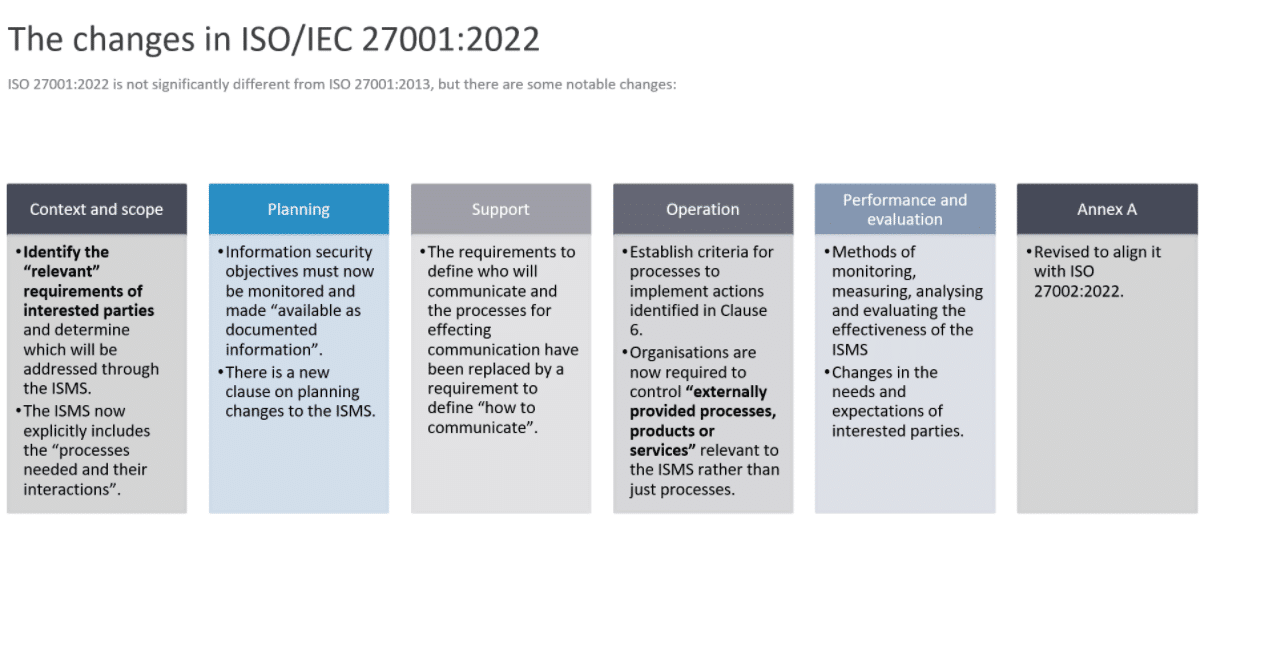
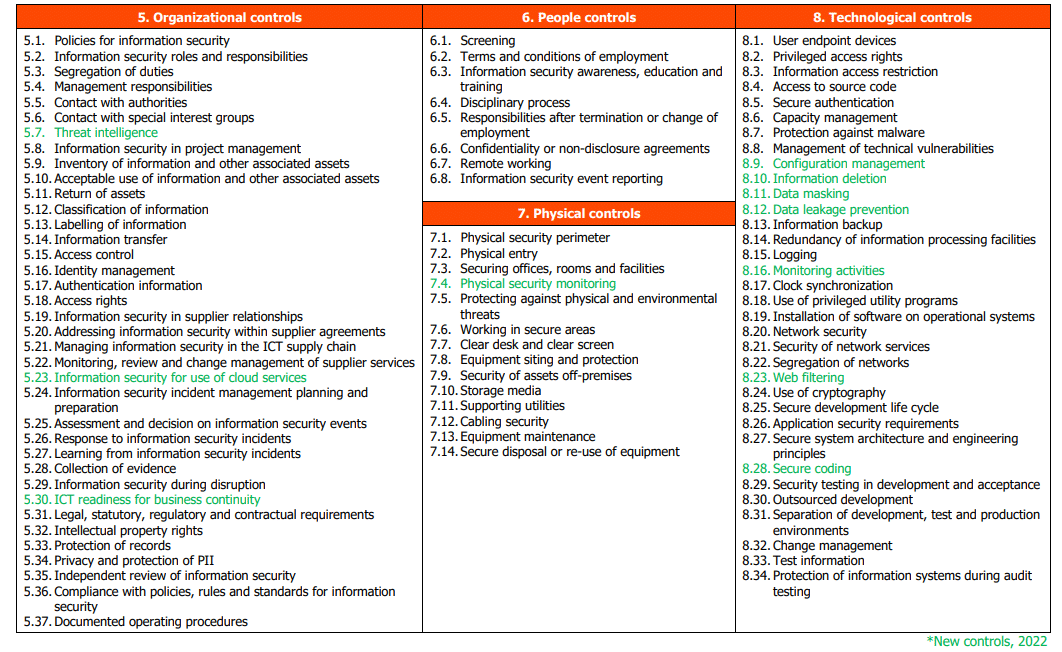
How to create a transition plan from ISO 27001 2013 to ISO 27001 2022
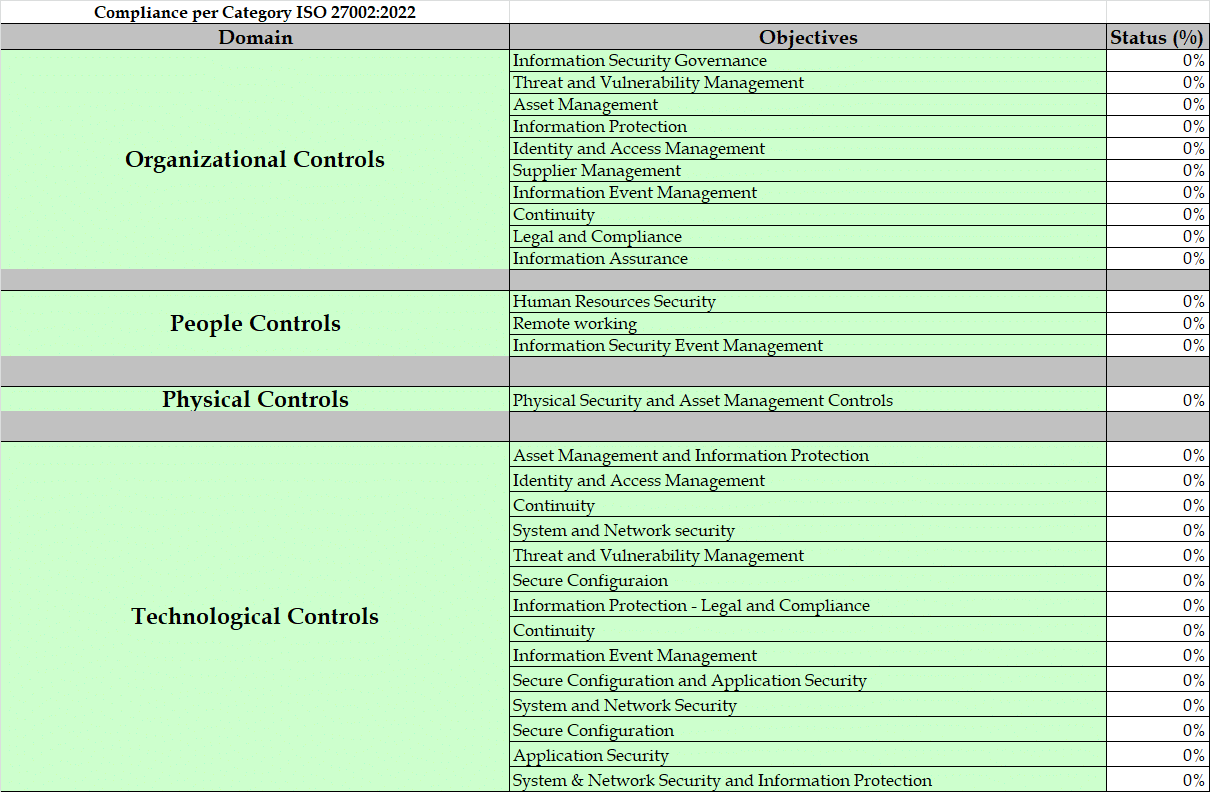
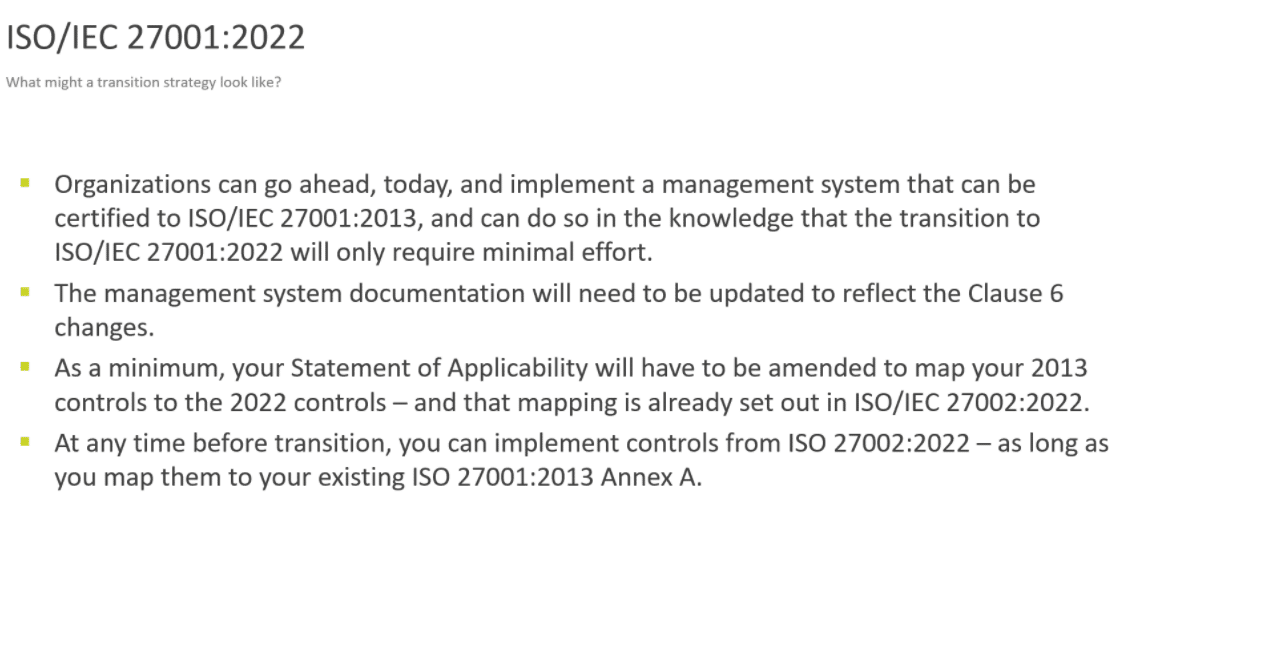
Transitioning from ISO 27001:2013 to ISO 27001:2022 involves updating your Information Security Management System (ISMS) to meet the new requirements specified in the latest version. Here are some steps you can take to help ensure a smooth transition:
Review the changes: The first step is to familiarize yourself with the changes made in the 2022 version. Some of the key changes include a more risk-based approach, more emphasis on leadership, and greater alignment with other ISO management system standards. You can find a detailed list of changes on the ISO website.
Identify gaps: Once you have reviewed the changes, identify any gaps between your current ISMS and the new requirements. This may involve reviewing your policies, procedures, and controls to ensure they align with the new standard.
Develop an action plan: Based on the gaps you identified, develop an action plan to address them. This may involve updating policies and procedures, implementing new controls, or conducting additional training.
Train staff: It is important to ensure that all relevant staff members are trained on the new requirements and how they impact their roles and responsibilities.
Conduct internal audits: Conduct internal audits to ensure that your updated ISMS is effectively implemented and meets the new requirements.
Seek certification: Once you are confident that your updated ISMS meets the new requirements, seek certification from an accredited certification body.
Monitor and continually improve: Finally, monitor your ISMS and continually improve it to ensure that it remains effective and aligned with the latest best practices.
Overall, transitioning to the new version of ISO 27001 requires careful planning and execution. By following these steps, you can help ensure a successful transition and maintain the security of your organization’s information assets.
We’d love to hear from you! If you have any questions, comments, or feedback, please don’t hesitate to contact us. Our team is here to help and we’re always looking for ways to improve our services. You can reach us by email (info@deurainfosec.com), or through our website’s contact form.
Contact DISC InfoSec if you need further assistance in your ISO 27001 2022 transition Plan
Rapid7 XDR (Extended Detection and Response) is a security solution designed to help organizations detect, investigate, and respond to advanced cyber threats. It offers a range of features and capabilities that differentiate it from its competitors. Here are some key differences between Rapid7 XDR and its competitors:
Platform Coverage: Rapid7 XDR provides coverage across multiple platforms, including endpoints, networks, cloud environments, and SaaS applications. This comprehensive coverage allows for more effective detection and response to threats across the entire IT environment.
Automated Threat Detection and Response: Rapid7 XDR uses machine learning and behavioral analytics to automate threat detection and response. This allows for faster and more accurate detection and response to threats.
Integrations: Rapid7 XDR integrates with a wide range of security technologies and tools, including SIEMs, firewalls, and endpoint protection solutions. This allows for a more cohesive security ecosystem and faster threat response.
User and Entity Behavior Analytics (UEBA): Rapid7 XDR includes UEBA capabilities that can detect anomalous user behavior and help prevent insider threats.
Threat Intelligence: Rapid7 XDR includes threat intelligence capabilities that can provide context around threats and help identify their source and potential impact.
Some of the competitors of Rapid7 XDR include CrowdStrike, Palo Alto Networks, Symantec, McAfee, and Cisco. While these solutions may offer similar features and capabilities, the key differentiators between them will depend on the specific needs and requirements of the organization.
94% of CISOs report being stressed at work, with 65% admitting work-related stress issues are compromising their ability to protect their organization, according to Cynet.
CISOs (Chief Information Security Officers) often face high levels of stress due to the nature of their role. Here are some reasons why CISOs may struggle with stress:
High-stakes responsibility: CISOs are responsible for protecting their organization’s sensitive information and ensuring that the organization’s systems and data are secure from cyber threats. The stakes are high, as a breach could have severe financial, legal, and reputational consequences for the organization. This level of responsibility can create significant stress for CISOs.
Constantly evolving threats: Cyber threats are constantly evolving, which means that CISOs need to stay up-to-date with the latest security trends and technologies. This can be challenging and stressful, as they need to stay one step ahead of cybercriminals.
Budget constraints: CISOs often struggle with limited budgets for their security programs, which can create stress as they need to make tough decisions about where to allocate resources and how to prioritize their security efforts.
Talent shortages: There is a shortage of skilled cybersecurity professionals, which means that CISOs often struggle to find and retain talented staff. This can create stress as they need to find ways to manage their workload and keep their security programs running effectively.
Balancing business needs and security: CISOs need to balance the needs of the business with the need for security, which can create stress as they need to find ways to enable business initiatives while still maintaining a secure environment.
All of these factors can contribute to the high levels of stress that CISOs often experience. To cope with this stress, CISOs may need to develop strong coping strategies such as seeking support from colleagues, practicing self-care, and prioritizing their workload. Additionally, organizations can help by providing their CISOs with adequate resources and support to help them manage their responsibilities effectively.
Among the CISOs surveyed, 100% said they needed additional resources to adequately cope with current IT security challenges.
Stress issues
The lack of bandwidth and resources is not only impacting CISOs, but their teams as well. According to the report, 74% say they are losing team members because of work-related stress issues, with 47% of these CISOs having more than one team member exit their role over the last 12 months.
Relentless stress levels are also affecting recruitment efforts with 83% of CISOs admitting they have had to compromise on the staff they hire to fill gaps left by employees who have quit their job. More than a third of the CISOs surveyed said they are either actively looking for or considering a new role.
“The results from our mental health survey are devastating but it’s not all doom and gloom. Our research found that CISOs know exactly what they need to reduce stress levels: more automated tools to manage repetitive tasks, better training, and the ability to outsource some work responsibilities,” said Eyal Gruner, CEO, Cynet.
“One of the most eye-opening insights from the report was the fact that more than 50% of the CISOs we surveyed said consolidating multiple security technologies on a single platform would decrease their work-related stress levels,” Gruner added.
Key findings from the report include:
77% of CISOs believe that their limited bandwidth and lack of resources has led to important security initiatives falling to the wayside, with 79% of these CISOs claiming they have received complaints from board members, colleagues or employees that security tasks are not being handled effectively.
93% of CISOs believe they are spending too much time on tactical tasks instead of performing strategic, high-value work and management responsibilities. Among the CISOs who believe they are overly invested in tactical tasks, more than a quarter report spending their workday almost exclusively on tactical/operational tasks.
84% of CISOs say they have had to cancel a vacation due to an urgent work matter and 64% report they’ve missed a private event because of work fatigue. More than 90% consistently work 40+ hours per week with no break.
The impact of work-related stress on everyday life
The major takeaway from the survey is that CISOs – and their teams – are suffering from overwhelming amounts of stress and it’s affecting everything from the security of their company to their day-to-day work routines and, ultimately, their life outside of work.
In fact, 77% of CISOs said that work-related stress was directly impacting their physical health, mental health, and sleep patterns.
The company surveyed chief information security officers (CISO) at small to midsize businesses with security teams of five employees or less to better understand their levels of work-related stress and how their mental health is impacting their work life and personal life.
it is not uncommon for large organizations to face cyber attacks or data breaches, and it is important for them to have strong cybersecurity measures in place to prevent such incidents and mitigate their impact if they do occur. However, If such an incident did occur, the affected companies would likely conduct a thorough investigation and take appropriate steps to address the situation and prevent similar incidents from happening in the future.
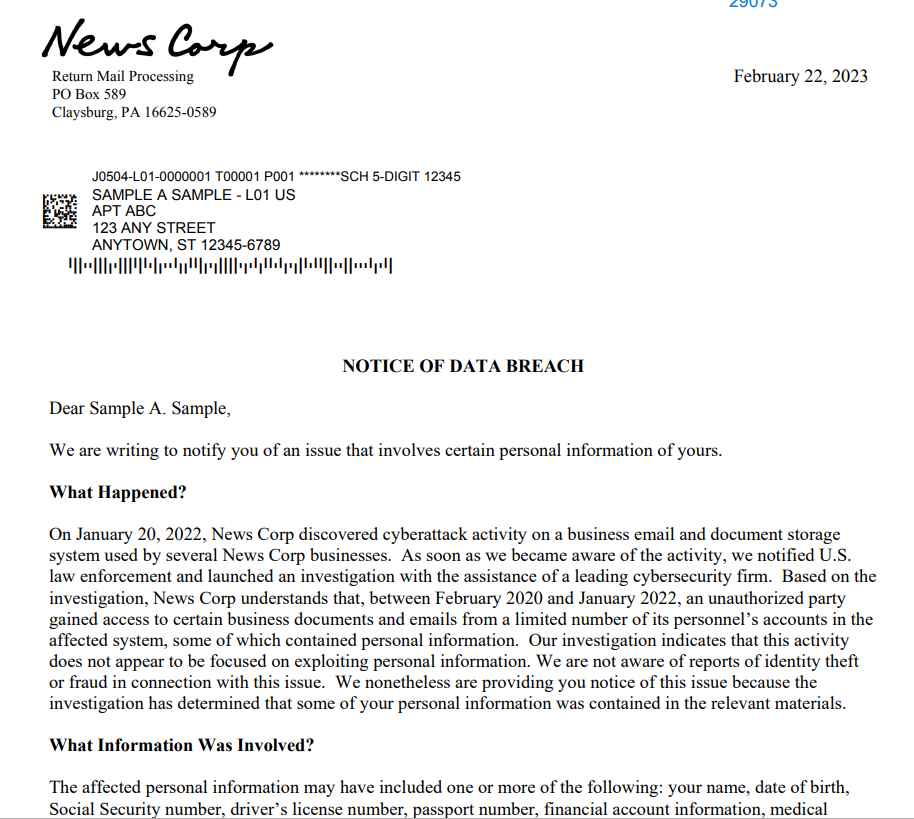
The massive media and publishing business News Corp reported a data breach in February 2022, disclosing that its journalists had been the focus of an attack on a software supply chain. The breach revealed that the journalists had been hacked. The assets owned by News Corp. include a variety of prominent news sources, such as Dow Jones, FOX News, The Sun, and MarketWatch, amongst others. It is important to note that in March of 2019, the Dow Jones made news for disclosing a “screening list” that included critical information on terrorists, criminals, and shady enterprises. This information included names, addresses, and phone numbers.
The leak of thirteen million data took place on the FOX News website in April of 2022. The fifty-eight terabytes’ worth of information consisted of a variety of different things, including the company’s internal documents, the personally identifiable information (PII) of its workers, and many other things. Prior to the time when the firm was made aware of the occurrence, these documents continued to be accessible to the general public.
Today, the business has disclosed new information saying that the security breach really took place in February of 2020. This indicates that the hackers were present on the network for a period of two years before being discovered. Mandiant, which is now owned by Google, was the cybersecurity company that helped News Corp. back then. Because the perpetrators had access to the system for two years before they were discovered, it is highly likely that they were able to get away with stealing more information than was initially thought. Since no one knew it had been stolen, they would not have been on heightened alert for any potential attacks during that time.
The firm disclosed in a breach notice that the threat actors responsible for the incident gained access to its email and document storage system. This system is used by a variety of News Corp companies. The impacted workers’ personal and health information was obtained; nevertheless, the corporation has said that it does not seem that the activity was centered on exploiting personal information in any way. The Wall Street Journal, the New York Post, and its news operations in the United Kingdom were among the News Corp publications that were compromised as a result of the security hack. Names, birth dates, social security numbers, driver’s license numbers, passport numbers, information about bank accounts, as well as information on medical and health insurance, were some of the pieces of personally identifiable information that were accessed.
News Corporation has indicated in the past that the assailants had links to China and were probably engaged in espionage operations to gather information for the benefit of China’s objectives.
The New York Post admitted that it had been hacked in October 2022, after discovering that its website and Twitter account had been exploited to distribute inappropriate information that targeted a number of different politicians in the United States. The newspaper eventually disclosed that one of its own workers was responsible for the incident, and that individual was terminated once their role in the scandal was uncovered.
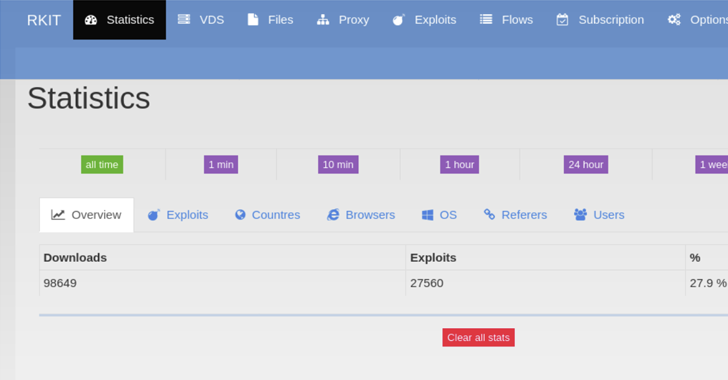
The RIG exploit kit (EK) touched an all-time high successful exploitation rate of nearly 30% in 2022, new findings reveal.
“RIG EK is a financially-motivated program that has been active since 2014,” Swiss cybersecurity company PRODAFT said in an exhaustive report shared with The Hacker News.
“Although it has yet to substantially change its exploits in its more recent activity, the type and version of the malware they distribute constantly change. The frequency of updating samples ranges from weekly to daily updates.”
Exploit kits are programs used to distribute malware to large numbers of victims by taking advantage of known security flaws in commonly-used software such as web browsers.
The fact that RIG EK runs as a service model means threat actors can financially compensate the RIG EK administrator for installing malware of their choice on victim machines. The RIG EK operators primarily employ malvertising to ensure a high infection rate and large-scale coverage.
As a result, visitors using a vulnerable version of a browser to access an actor-controlled web page or a compromised-but-legitimate website are redirected using malicious JavaScript code to a proxy server, which, in turn, communicates with an exploit server to deliver the appropriate browser exploit.
The exploit server, for its part, detects the user’s browser by parsing the User-Agent string and returns the exploit that “matches the pre-defined vulnerable browser versions.”
“The artful design of the Exploit Kit allows it to infect devices with little to no interaction from the end user,” the researchers said. “Meanwhile, its use of proxy servers makes infections harder to detect.”
Since arriving on the scene in 2014, RIG EK has been observed delivering a wide range of financial trojans, stealers, and ransomware such as AZORult, CryptoBit, Dridex, Raccoon Stealer, and WastedLoader. The operation was dealt a huge blow in 2017 following a coordinated action that dismantled its infrastructure.
From Jack Jones, Chairman of the FAIR Institute and creator of the FAIR model for cyber risk quantification (CRQ) — the definitive guide to understanding CRQ: What it is (and isn’t), its value proposition and limitations, and facts regarding the misperceptions that are commonplace.
If you’re considering or are actively shopping for an analysis solution that treats cyber risk in financially-based business terms, Jack’s extensive, jargon-free guide — including an evaluation checklist — will give you the objective and practical advice you need.
And just in time. There’s never been more interest or, frankly, confusion in the marketplace over what exactly is cyber risk quantification. As you’ll read in this buyer guide, many solutions may count vulnerabilities, provide ordinal values, or deliver numeric “maturity” scores but don’t measure risk, let alone put a financial value on it to help make business decisions.
This paper answers questions such as:
What does CRQ provide that I’m not already getting from other cyber risk-related measurements?
What makes CRQ reliable? Why should I believe the numbers?
Do I have enough data to run an analysis?
Jack also provides red flags to look out for in CRQ solutions, such as:
Mis-identification of risks.
Mis-use of control frameworks as risk measurement tools.
Over-simplification that can result in poorly-informed decisions, especially when performed at scale.
The ‘Understanding Cyber Risk Quantification’ guide is designed to be of use to security and risk executives, industry analysts, consultants, auditors, investors, and regulators–essentially anyone who has a stake in how well cyber risk is managed.
Telus, a Canadian national telecommunications company is looking into whether employees’ data as well as the source code for the system were stolen and then sold on a dark web marketplace.
Subsequently, the threat actor published screenshots that appear to depict the company’s payroll data and private source code repositories.
“We are investigating claims that a small amount of data related to internal Telus source code and select Telus team members’ information has appeared on the dark web,” Richard Gilhooley, director of public affairs at Telus said in an email.
“We can confirm that to this point our investigation, which we launched as soon as we were made aware of the incident, has not identified any corporate or retail customer data.”
Source Code, Employee Data Stolen
A threat actor offered what they claimed to be TELUS’ employee list (including names and email addresses) for sale on a data breach forum on February 17.
“Today we’re selling email lists of Telus employees from a very recent breach. We have over 76k unique emails and on top of this have internal information associated with each employee scraped from Telus’ API”, the forum post says.
The post provides what looks to be a list of email addresses for Telus employees as proof. “It isn’t known if these are the current or former staff — or even real”.
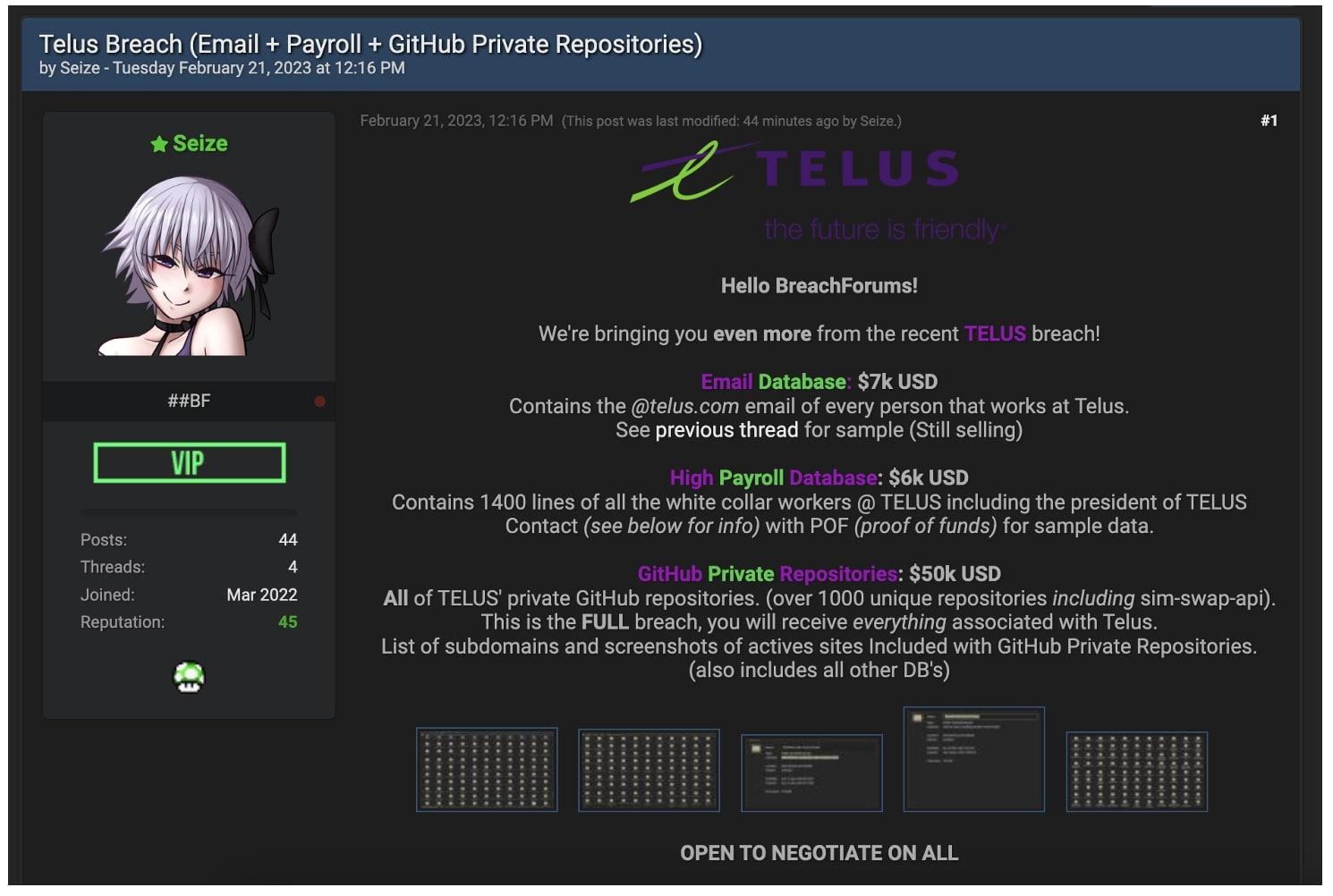
Later on Tuesday, February 21, the same threat actor published a new forum post with an offer to sell TELUS’ private GitHub repositories, source code, and payroll data.
“In the repositories are the backend, frontend, middleware [information,] AWS keys, Google auth keys, Source Code, Testing Apps, Staging/Prod/testing, and more!” says the seller’s latest post.
The claimed TELUS data and source code are posted in a second forum post
The seller also stated that the company’s “sim-swap-api,” which is supposed to allow attackers to conduct SIM swap attacks, was included in the stolen source code.
Despite the malicious attacker calling this a “Full breach” and stating that they will sell “anything related to Telus,” it is still too soon to say whether an event actually happened at TELUS or whether a breach at a third-party vendor actually occurred.
“It’s important to note that it’s not clear whether the data being sold is real”, commented Brett Callow, a British Columbia-based threat analyst for Emsisoft.
“If it is real, this is a potentially serious incident which exposes Telus’ employees to increased risk of phishing and social engineering and, by extension, exposes the company’s customers to risk”.
“The alleged exposure of the private Github repositories, supposedly including a sim-swap API, represents an additional tier of potentially significant risk.”
Krebs on Security – Brian Krebs’ blog is a top resource for in-depth investigative reporting on cybersecurity news, data breaches, and the latest threats.
Schneier on Security – Bruce Schneier is a renowned cybersecurity expert, and his blog offers a deep dive into the latest industry developments, policy issues, and encryption technologies.
Dark Reading – This is a top online news source for cybersecurity professionals, covering a wide range of topics such as threat intelligence, vulnerability management, and cybersecurity trends.
The Hacker News – A leading cybersecurity news website that delivers breaking news and analysis on hacking, cybercrime, and cybersecurity issues.
Threatpost – Another popular cybersecurity news and analysis website that covers a broad range of topics, including malware, phishing, data breaches, and more.
SecurityWeek – This website offers the latest information on cybersecurity news, analysis, and research, with a focus on enterprise security, vulnerability management, and threat intelligence.
Graham Cluley – Graham Cluley is a well-known cybersecurity expert who shares his insights and opinions on his blog, covering everything from security news to privacy concerns and cybersecurity culture.
Naked Security by Sophos – This blog by the Sophos cybersecurity company covers a wide range of cybersecurity topics, including malware, phishing, social engineering, and other cyber threats.
SANS Institute – SANS is a trusted cybersecurity training organization, and their blog covers a wide range of cybersecurity topics, including threat intelligence, incident response, and security awareness.
InfoSec Resources – A popular cybersecurity blog that covers a wide range of topics, including cybersecurity news, best practices, and career development.
Hackers Use Open Source Tools to Attack Shipping Companies & Medical Laboratories
Unfortunately, it is not uncommon for hackers to use open source tools to attack organizations. Open source tools are freely available and can be used for both legitimate and malicious purposes.
In the case of shipping companies and medical laboratories, there are a number of open source tools that hackers could potentially use to launch attacks. For example, they may use network scanning tools such as Nmap or Wireshark to identify vulnerabilities in the organization’s network. They may also use tools such as Metasploit or Cobalt Strike to exploit these vulnerabilities and gain unauthorized access to systems and data.
Once they have access to a system, hackers may use open source tools like Mimikatz to steal passwords and other credentials. They may also use open source malware like DarkComet or Meterpreter to maintain access to compromised systems and exfiltrate sensitive data.
To protect against these types of attacks, it’s important for organizations to take a number of steps, including:
Implementing strong access controls and authentication mechanisms to prevent unauthorized access to systems and data.
Regularly patching and updating software and systems to address known vulnerabilities.
Using security monitoring tools to detect and respond to potential security incidents.
Providing regular security awareness training to employees to help them identify and respond to security threats.
Conducting regular security assessments to identify and address vulnerabilities in the organization’s network and systems.
There has been an emergence of a new security threat that has been causing havoc among the Asian shipping and medical laboratory industries.
It’s a never-before-seen threat group dubbed Hydrochasma, actively targeting the shipping and medical organizations that are engaged in research and treatment of the COVID-19 vaccine.
Symantec, a company under Broadcom, has been monitoring the activities of cybercriminals since October of last year. Their ultimate aim seems to be the acquisition of valuable information.
Modus Operandiof Attack
Hydrochasma’s modus operandi is unique in that they employ open-source tools and LotL techniques during their attacks. This enables them to carry out their malicious activities without leaving behind any traces that could potentially expose their identity.
This method of operation poses a challenge to those attempting to track and attribute the attacks to specific threat actors.
The origin and affiliation of this threat actor have not been determined, nor has any evidence yet been collected as to its origin.
The utilization of pre-existing tools seems to serve a dual purpose for Hydrochasma:-
To evade attribution efforts
To enhance the stealthiness of their attacks
By leveraging these tools, they can mask their activity and blend in with legitimate network traffic, making it more challenging for security experts to detect and respond to their malicious activities.
Attack Chain
Most likely, Hydrochasma infected its host with a phishing email in order to spread its infection. Initial signs of Hydrochasma’s presence on a targeted system are often indicated by the appearance of a lure document, with a file name that is crafted to appear as if it were an email attachment written in the native language of the victim organization.
This is an attempt to deceive the target into thinking that the document is legitimate and relevant to their work. Here below we have mentioned those attachment names:-
Product Specification-Freight-Company Qualification Information wps-pdf Export.pdf[.]exe
University-Development Engineer[.]exe
Once the attacker gains access to a machine, they utilize this access to deploy a Fast Reverse Proxy (FRP), which has the potential to expose servers that are located behind a firewall to the public web.
Tools Used
Here below we have mentioned all the tools that are dropped by the intruder on the affected system:-
Gogo scanning tool
Process Dumper (lsass.exe)
Cobalt Strike Beacon
AlliN scanning tool
Fscan
Dogz proxy tool
SoftEtherVPN
Procdump
BrowserGhost
Gost proxy
Ntlmrelay
Task Scheduler
Go-strip
HackBrowserData
It is extremely difficult to relate the activity to any specific threat group when a large number of publicly available tools are used.
There was no evidence that any data was taken from any of the targeted computers by Hydrochasma according to researchers from Symantec. Hydrochasma on the other hand utilizes certain tools that allow remote access to the system, which could result in data being extracted from the system.
This attack appears to have been motivated by a mission to gather intelligence, as indicated by the sectors targeted.
Following these best practices, you can increase the cloud security and protection of your cloud-based data and applications.
As cloud computing has revolutionized how we store and process data, it has also introduced new security risks. Your data must be secure as more and more businesses turn to the cloud.
Here are some steps you can take to ensure that your cloud environment is secure:
It would help if you chose a reputable cloud provider: Not all cloud providers provide the same level of security. You should select a provider with a positive security track record that implements strict security controls.
Secure your data in transit and at rest: Ensure that your data is encrypted both in transit and at rest. Keeping your data secure and accessible only to authorized users can help protect against data breaches. To prevent unauthorized access, implement strong access controls, including limiting access to cloud resources only to authorized users and implementing multi-factor authentication.
Monitoring your cloud environment regularly: Implement tools to monitor your cloud environment for unusual activity or signs of a breach. By doing so, you can identify potential security threats early on and mitigate their effect.
Plan for a disaster recovery scenario by implementing a disaster recovery plan. This backup will allow you to recover your data and applications in case of a security breach or other catastrophe.
You should educate your employees regarding the risks associated with cloud computing and provide them with training on protecting their data.
With these steps, you can protect your business from cyber threats and ensure the security of your cloud-based data. Take action today to protect your valuable assets by ensuring your business is secure.
What are the three categories of cloud security?
With the advancement of cloud computing, businesses can now store, process, and share massive amounts of data more easily and efficiently than ever before. Cloud computing, like any technology, carries inherent security risks.
Three categories of cloud security can assist in mitigating these risks: physical security, operational security, and data security.
Physical Security
Physical security refers to the measures the cloud service provider takes to protect its physical infrastructure. These actions include access controls, surveillance, and environmental controls, and those used in data centers play a crucial role in preventing unauthorized access.
Operational Security
A cloud service provider’s operational security refers to the processes and policies to manage their business operations. This process includes several measures, such as change management, incident response, and business continuity planning. Your cloud services must be protected against active cyber threats to ensure reliability and availability.
Data Security
Data Security refers A cloud security measure is a means of protecting your data. These include measures such as encryption, access controls, and data backups. To ensure the integrity and availability of your sensitive data, it is essential to implement effective data security measures.
In the cloud, each of these categories of security is essential for protecting your business from cyber threats and ensuring the safety and security of your data.
When you work with a reputable cloud service provider and implement best practices for physical, operational, and data security, you can minimize the risks of cloud computing and take advantage of the benefits of this revolutionary technology. Take advantage of the cloud with confidence and peace of mind by embracing security concerns.
Cybersecurity and the Cloud: What You Need to Know
Cloud computing has become increasingly important as more and more businesses move their data and applications to the cloud.
Cybersecurity and the cloud have some key considerations.
Understand your responsibilities:
When you use cloud services, you typically share security responsibility with the cloud provider. Ensure that you are aware of which security aspects are your responsibility and which are the service provider’s responsibility.
When it comes to security, not all cloud providers are equal. You should research the provider and choose one with a good security record.
Provide strong authentication to all cloud users, such as multi-factor authentication.Encrypt your data:
Your data must be encrypted in transit and at rest. It helps prevent data breaches and ensures only authorized persons can access your data.Monitor your data:
Use security tools to monitor your data for unusual activity or signs of a breach. By detecting potential security issues early, you can mitigate their impact.
Cloud Security: How to Protecting Your Data in The Cloud.
The increasing amount of data stored online in cloud-based systems has made cloud security a growing concern for businesses and individuals. You will learn cloud security basics, from recognizing potential cyber threats to protecting your data.
Cloud security risks.
Data breaches and denial of service (DOS) attacks are some risks associated with cloud security. Protecting yourself requires an understanding of common types of threats.
It is common for cloud security threats to include malicious outsiders such as hackers, insider threats from employees and contractors with access to your data, misconfigurations that leave your data vulnerable, and disasters that may cause data loss. When you understand the risks associated with storing your data in the cloud, you can develop effective strategies for mitigating them.
Set up Multi-Factor Authentication.
A multi-factor authentication (MFA) system is one of the best ways to protect your cloud environment. The authentication adds a layer of security by requiring users to use two or more credentials, such as a password and a one-time code sent by email or text message. It ensures that only authorized people can access your data and makes it much harder for attackers to compromise your system by guessing passwords or using stolen credentials.
Update security software and patches regularly.
Cyber Threat Intelligence programs should permanently be installed and maintained. It is also highly recommended that you patch your system regularly to ensure that there are no vulnerabilities attackers could exploit. If your systems do not receive regular updates, they may be vulnerable to attack. Additionally, other users on the system must keep up-to-date, so make sure everyone understands the importance of patching and security maintenance.
Create rules for permissions and user access.
Cloud services should be protected from unauthorized access. Establish specific user access and permission settings rules by creating or purchasing a policy. The policy should define what data users can access and edit and set boundaries for authorized users and applications. It would help if you also considered creating logins with distinct roles for each employee — this way, each user can only view information relevant to their job.
Prepare a Breach and Attack Recovery Plan.
Any business operating in the cloud needs a disaster recovery plan. Specifically, the goal should outline how the team should respond to a data breach or cyber attack, how to contact potential victims, how to recover files and systems, and how to mitigate risks.
Cloud Security Protecting Your Data?
Cloud security is the practice of protecting your data and applications that are stored in the cloud. As more and more businesses move their data to the cloud, ensuring the security of that data has become increasingly important.
Here are some steps you can take to protect your data in the cloud:
Use strong passwords and two-factor authentication: It’s important to use strong, unique passwords for all of your accounts and enable two-factor authentication wherever possible. This will help prevent unauthorized access to your accounts.
Encrypt your data: Encryption is a process of converting your data into a secret code that can only be accessed with the right encryption key. This is an effective way to protect your data from unauthorized access.
Choose a reputable cloud provider: When choosing a cloud provider, look for one that has a strong track record of security and compliance. Make sure they have proper encryption, backup and disaster recovery plans in place.
Keep your software up to date: Make sure to keep all of your software, including your cloud applications, up to date with the latest security patches.
Limit access to your data: Only give access to your cloud data to those who need it. You can use access controls to limit who can view, edit, or delete your data.
Backup your data: Make sure to regularly back up your cloud data. This will ensure that you can still access your data even if there is a security breach or outage.
By taking these steps, you can help protect your data in the cloud and ensure that your business stays secure.
According to a recent security report, Chinese government has decided to resort to hacking, cyberwarfare and corporate espionage tactics to boost its ambitious defense program, compromising the systems of firms like Lockheed Martin in order to access classified information useful for their own purposes.
Peter Suciu, a renowned researcher, says China is an actor that should be taken seriously, especially on military issues. This is not the first such report, as since 2019 the Pentagon had accused the Chinese military of resorting to what they defined as “cyber theft” and other methods to achieve great improvements in military terms.
It all went back to 2007, when the firm Lockheed Martin discovered that a Chinese hacking group had been stealing technical documents related to the F-35 program, while a similar theft occurred when cybercriminals working for Beijing managed to compromise a network of an Australian subcontractor to the F-35.
These reports lead experts to believe that the Chinese have acquired a wealth of crucial information and data for these programs, including the development of the Chinese J-20 fighter jet, also known as “Mighty Dragon.” Suciu himself claims that the creation of these aircraft would have been impossible without the information stolen from Lockheed Martin.
In connection with these reports, Business Insider published a report detailing the clear similarities in appearance and engineering between American aircraft and those created by the Chinese government. In addition, the report not only emphasizes the similarity of these aircraft, but also states that the sensor systems used by the Chinese government are virtually identical to the electro-optical guidance employed by Lockheed Martin in the Lightning II model, further evidence of espionage against the company.
To learn more about information security risks, malware variants, vulnerabilities and information technologies, feel free to access the International Institute of Cyber Security (IICS) websites.
In 2007, Chinese Advanced Persistent Threat (APT) hackers targeted the computer networks of defense contractor Lockheed Martin, which was working on the development of the F-35 Lightning II fighter jet. The APT hackers gained access to the networks by using spear-phishing attacks to trick employees into downloading malware or providing their login credentials. Once inside the network, the hackers used various techniques to move laterally and gain access to sensitive data.
The hackers were able to steal large amounts of data related to the F-35 program, including design plans, testing results, and software source code. The stolen data allowed China to gain a significant advantage in its own stealth fighter program, the J-20.
The J-20 first flew in 2011, and it bears striking similarities to the F-35. Both aircraft are designed to be stealthy, with angular shapes and features that minimize their radar signature. The J-20 also features advanced avionics and sensor systems, which are similar to those used in the F-35.
The theft of the F-35 data was part of a larger campaign by Chinese APT hackers to steal sensitive information from Western companies and governments. The campaign, which has been ongoing for many years, is believed to be part of China’s broader efforts to modernize its military and develop advanced technologies.
The theft of the F-35 data was a significant blow to U.S. national security, as it gave China valuable insights into one of the most advanced fighter jets in the world. It also highlighted the need for stronger cybersecurity measures and better protection of sensitive data.
The ongoing cybersecurity skills shortage is a critical issue plaguing organizations and causing serious problems. The lack of trained and qualified professionals in the field has resulted in numerous security breaches, leading to the loss of large amounts of money.
In this Help Net Security video, José-Marie Griffiths, President of Dakota State University, discusses how this shortage is not just a mere inconvenience but a major threat compromising the safety and security of companies and putting the sensitive information of their clients and customers at risk.
With each passing day, the consequences of this shortage become more and more severe, making it imperative for organizations to take immediate action and find ways to address this critical challenge.
Advancing cyber education can help fill workforce gaps in several ways:
Meeting the growing demand for cybersecurity professionals: With the increasing number of cyber threats and attacks, there is a growing demand for cybersecurity professionals. Advancing cyber education can help produce more skilled professionals to fill the gap.
Increasing the number of qualified candidates: Cybersecurity positions often require specific skills and certifications. Advancing cyber education can help increase the number of qualified candidates by providing them with the necessary skills and certifications.
Addressing the skills gap: The skills gap in cybersecurity is a major challenge for employers. Advancing cyber education can help address the skills gap by providing education and training programs that are tailored to the needs of the industry.
Encouraging diversity: Cybersecurity has historically been a male-dominated field, and there is a lack of diversity in the workforce. Advancing cyber education can help encourage diversity by providing opportunities for underrepresented groups to enter the field.
Preparing for future threats: Cyber threats are constantly evolving, and it is essential to have a workforce that is prepared to face new challenges. Advancing cyber education can help prepare the workforce to address future threats by providing them with the necessary knowledge and skills.
Overall, advancing cyber education is crucial to fill workforce gaps in cybersecurity and to ensure that the workforce is prepared to address current and future threats.
The leaked data includes email addresses, password hashes, names, phone numbers, and more.
Hackers obtained login credentials for several mainstream corporate giants, including Microsoft, Samsung, Uber and Apple, etc. and gained remote access to the entities’ surveillance cameras after attacking two data centers in Asia.
A screenshot from the leaked data shows login credentials for Samsung, Amazon, Uber, Alibaba and more. (Credit: Hackread.com)
This was revealed by the cyber security firm Resecurity. The company originally identified the data breach in September 2021; however, details of it were only revealed to the media now as on February 20th, 2023, hackers leaked the stolen login credentials online.
It is worth noting that these credentials were leaked on Breachforums by a threat actor going by the handle of “Minimalman.” For your information, Breachforums is a hacker and cybercrime forum that surfaced as an alternative to the popular and now-seized Raidforums.
According to Resecurity, hackers accessed two of the largest data center operators in Asia that were being used by several mainstream companies and technology giants. From there, the hackers could obtain customer support logins for high-profile companies, including Amazon and Apple, BMW, Microsoft, Alibaba, Walmart, Goldman Sachs, etc.
As seen by Hackread.com on the hacker forum, the threat actors managed to obtain and leak credentials from over 2,000 firms and a Chinese foreign-exchange platform.
The data centers have been identified as Shanghai-based GDS Holdings and Singapore-based ST Telemedia Global. Both data centers reportedly forced all customers to change their passwords in January 2023.
Dangers
The dangers of hackers obtaining login credentials of tech giants such as Apple, Amazon, Microsoft, Samsung and others are numerous and severe. Firstly, such credentials allow hackers to access sensitive customer data, including payment information and personal details, which can lead to identity theft and financial fraud.
Secondly, hackers can use these credentials to gain access to the company’s networks, potentially compromising intellectual property and trade secrets. Additionally, with access to company accounts, hackers can launch cyber attacks against other organizations, amplifying the damage caused by their actions.
Furthermore, a breach of a tech giant’s login credentials can have far-reaching consequences, impacting not only the company and its customers but the wider economy and society as a whole. For instance, if a company like Amazon were to suffer a significant data breach, it could lead to a loss of consumer trust, which could in turn affect the confidence of investors and the stock market.
Moreover, a successful hack of a tech giant’s credentials could inspire copycat attacks, leading to an escalation in cybercrime and potentially destabilizing the digital infrastructure that underpins much of our daily lives.
To mitigate these risks, tech giants must remain vigilant in their cybersecurity measures, ensuring that their systems are regularly updated and that their employees are trained to detect and prevent security breaches.
Companies must also invest in advanced technologies such as machine learning and artificial intelligence to detect and respond to cyber threats in real time. Finally, companies must ensure that they comply with industry standards and regulations related to cybersecurity, such as the General Data Protection Regulation (GDPR), to protect the privacy and security of their customers.
How to protect from Data Breach?
There are several steps you can take to protect yourself from a data breach:
Use strong, unique passwords: Use different passwords for each of your accounts and make sure they are strong and difficult to guess. Consider using a password manager to keep track of your passwords.
Enable two-factor authentication: Two-factor authentication adds an extra layer of security to your accounts by requiring you to provide a second form of identification, such as a code sent to your phone, in addition to your password.
Keep your software up to date: Keep your operating system, web browser, and antivirus software up to date to ensure that they have the latest security updates.
Be cautious of suspicious emails: Be wary of emails from unknown senders or emails that contain suspicious links or attachments. These could be phishing emails designed to trick you into giving away your personal information.
Limit your personal information online: Be cautious about sharing personal information online, and only provide it when necessary. Consider using privacy settings on social media to limit who can see your information.
Monitor your accounts: Keep an eye on your accounts for any suspicious activity and report anything out of the ordinary to the appropriate authorities or financial institutions.
By taking these steps, you can help protect yourself from a data breach and minimize the impact if one occurs.
Europol has dismantled a gang linked to a $40 million CEO scam. Find out more about how this international criminal syndicate was uncovered and who was involved.
The email scam gang behind France’s largest-ever CEO scam has been dismantled after a coordinated police operation across multiple countries was successful in arresting six people in France and two in Israel.
The Europe-wide operation to track down the Franco-Israeli criminal organization involved the Croatian National Police, the Croatian Anti Money Laundering Office, the French National Police, the French Gendarmerie, the Hungarian Budapest Metropolitan Police, the Israel Police, the Portuguese Judicial Police, and the Spanish National Police.
Law enforcement authorities involved in the operation (Image: Europol)
In early December 2021, one of the gang members, now arrested as a suspect, impersonated the CEO of a metallurgy company in northeastern France and tricked the accountant into making an urgent and confidential transfer of €500,000 ($530,000) which was subsequently spotted and blocked.
In late December 2021, according to Europol’s press release, Sefri-Cime, a real-estate developer, fell victim to the same group after its members impersonated lawyers working for a well-known French accounting firm. According to Europol, they persuaded the Chief Financial Officer (CFO) to transfer almost €38 million ($40 million) altogether.
The criminal network, consisting of French and Israeli nationals, used a pre-existing money laundering scheme that laundered the funds via European countries, China, and then Israel. An investigation that followed revealed the money mules working for the gang in Croatia, Portugal, and Hungary.
The police were able to seize electronic equipment and vehicles, €3 million from Portuguese bank accounts, €1.1 million from Hungarian bank accounts, €600,000 from Croatian bank accounts, €EUR 400,000 from Spanish bank accounts and €350,000 in virtual currencies.
The operation continued for five days between January 2022 and 2023 in France and Israel, leading to eight house searches and eight arrests, including the alleged Israeli gang leader, according to Europol.
Social engineering techniques are becoming increasingly sophisticated and are exploiting multiple emerging means, such as deep fakes.
The increasing use of videoconferencing platforms and the various forms of remote work also adopted in the post-emergency covid make interpersonal collaborations increasingly virtual. This scenario must undoubtedly force organizations to prepare adequately to be able to recognize impersonation attempts based on social engineering attacks, which are also proving increasingly sophisticated due to the rapid advancement of deepfake technology.
Deepfake technology, what’s it?
The word deepfake, which originates from a combination of the terms “deep learning” and “fake,” refers to digital audio/video products created through artificial intelligence (AI) that could allow one to impersonate an individual with likeness and voice during a video conversation. This is done through deep learning methodologies such as the Generative Adversarial Network (GAN) i.e., a group of neural network models for machine learning, deputed to teach computers how to process information by emulating the human brain.
Deepfake and phishing
The accessibility and effectiveness of deepfake technology have led cybercrime to use it for sophisticated social engineering attacks for the purpose of extortion, fraud, or to cause reputational damage. Consider the impact of a voice phishing attack that replicates the voices of a company’s stakeholders to persuade employees to take a series of actions that could harm security and privacy, or the effectiveness of a phone call with simulated voices for the purpose of convincing an employee to send funds to an offshore bank account.
Aggravating factors
Further aggravating the situation is also the availability of both deepfake tools, made available as a service on clandestine web forums, which make it easier and more convenient for criminal actors with limited technical skills to set up these fraud schemes, and a large number of images and videos posted by users of social media platforms that can be processed by deep learning algorithms to generate precisely deepfake content.
Mitigation
Although there is still no simple and secure way to detect deepfakes, there are still some best practices that can be adopted:
Add additional security and protection processes. Having secondary verification methods, such as a dual approval process for financial transactions, correspondence monitoring, and 2FA, should always be considered an indispensable prevention solution;
Use artificial intelligence itself to recognize deepfakes. An artificial intelligence system might be able to recognize whether an audio/video content has been manipulated by quickly comparing it with known original reference samples or converting an audio track to text to recognize possible malfeasance and decide whether or not to approve a payment transaction;
Integrate the concept of deepfake into the risk assessment process and planning for possible crisis scenarios;
Outlook
Although technology will continue to evolve and it will become increasingly difficult to detect deepfakes, fortunately detection technologies will also improve. But the task for insiders to better protect themselves and their organizations from a variety of cyberattacks will have to be not only to keep abreast of evolving counter techniques and implement them in a timely manner, but also, and most importantly, to raise awareness in their organizations by focusing on training employees of all ranks. The human factor must always be considered as the first bastion of defense, even and especially against the most sophisticated cyber attacks.
About the author: Salvatore Lombardo
Electronics engineer and Clusit member, for some time now, espousing the principle of conscious education, he has been writing for several online magazine on information security. He is also the author of the book “La Gestione della Cyber Security nella Pubblica Amministrazione”. “Education improves awareness” is his slogan.