Why CIOs Should Report to CISOs – If the CISO is responsible for the security of the organization, then that same person also should be responsible for both security and IT infrastructure.
CISO Desk Reference Guide: A Practical Guide for CISOs

InfoSec and Compliance – With 20 years of blogging experience, DISC InfoSec blog is dedicated to providing trusted insights and practical solutions for professionals and organizations navigating the evolving cybersecurity landscape. From cutting-edge threats to compliance strategies, this blog is your reliable resource for staying informed and secure. Dive into the content, connect with the community, and elevate your InfoSec expertise!

Jan 05 2022
CISO Desk Reference Guide: A Practical Guide for CISOs
Jan 05 2022
Fortunately, there is an alternative way for procuring security expertise: by retaining the services of managed security service providers (MSSPs) and managed detection and response (MDR) providers.
MSSPs usually assist organizations’ IT departments in managing the IT infrastructure and keeping it secure by managing security equipment/systems, monitoring security logs, supervising patch management, and similar preventative security measures. MDR providers concentrate on monitoring network traffic and data, providing threat hunting/detection services and responding to discovered threats – capabilities that are difficult for most SMBs to cultivate in-house due to resource limitations.
For example, when the existence of the Log4Shell vulnerability and a PoC for it was revealed, Milton Security, a California-based MDR provider, has been inundated with concerns and requests from customers, prospects, and the public asking to help make sense of the situation, provide credible and timely updates, and monitor networks for any suspicious activity that might be related to Log4j exploitation.
But they have also been getting a lot of requests for their application security testing, penetration testing, incident response, and even their vCISO service.
Winning the perpetual fight against crime by building a modern Security Operations Center (SOC)

Jan 05 2022
A team of academics (Duy-Phuc Pham, Damien Marion, Matthieu Mastio and Annelie Heuser) from the Research Institute of Computer Science and Random Systems (IRISA) have devised a new approach that analyzes electromagnetic field emanations from the Internet of Things (IoT) devices to detect highly evasive malware.
The team of experts presented their technique at the Annual Computer Security Applications Conference (ACSAC) that took place in December.
The Internet of Things (IoT) devices are privileged targets of threat actors due to the lack of security requirements and the numerous customized firmware and hardware that make it difficult to propose a standardized approach to cyber security.
The researchers proposed a novel approach of using side channel information to identify malware targeting IoT systems. The technique could allow analysts to determine malware type and identity, even when the malicious code is heavily obfuscated to prevent static or symbolic binary analysis.
“In this paper, we concentrate on the ElectroMagnetic (EM) field of an embedded device as a source for malware analysis, which offers several advantages. In fact, EM emanation that is measured from the device is practically undetectable by the malware. Therefore, malware evasion techniques cannot be straightforwardly applied unlike for dynamic software monitoring.” reads a research paper published by the experts. “Also, since a malware does not have control on outside hardware-level events (e.g. on EM emanation, heat dissipation), a protection system relying on hardware features cannot be taken down, even if the malware owns the maximum privilege on the machine. Therefore, with EM emanation it becomes possible to detect stealthy malware (e.g. kernel-level rootkits), which are able to prevent software-based analysis methods.”
Experts pointed out that the approach does not require modifications on the target devices.
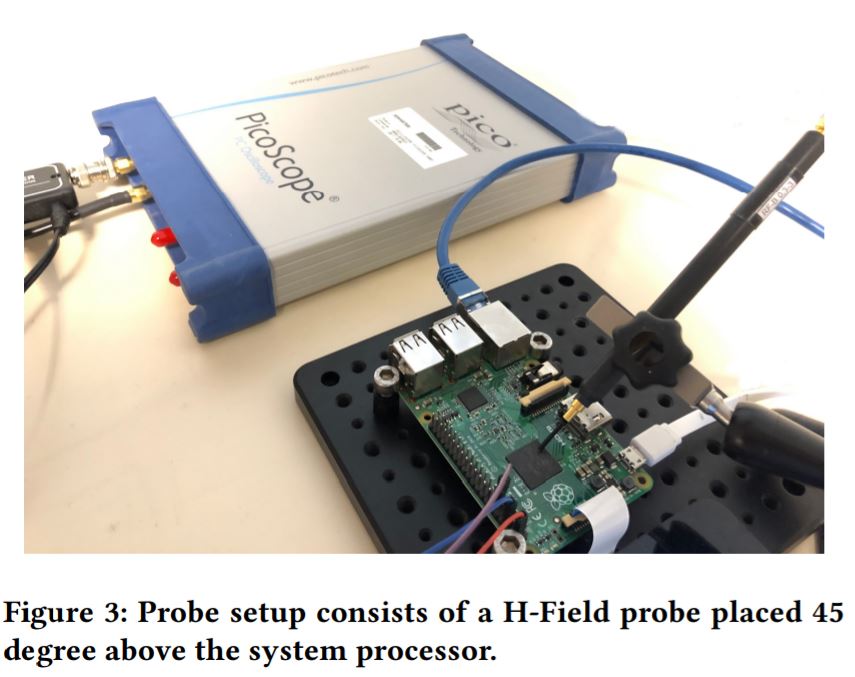
“We monitor the Raspberry Pi under the execution of benign and malicious dataset using a low to mid-range measurement setup. It consists of an oscilloscope with 1GHz bandwidth (Picoscope 6407) connected to a H-Field Probe (Langer RF-R 0.3-3), where the EM signal is amplified using a Langer PA-303 +30dB.” continues the paper. “To capture long-time execution of malware in the wild, the signals were sampled at 2MHz sampling rate.”
The team analyzed power side-channel signals using Convolution Neural Networks (CNN) to detect malicious activities on IoT devices.
The collected data is very noisy for this reason the researchers needed a preprocessing step to isolate relevant informative signals. This relevant data was used to train neural network models and machine learning algorithms to classify malware types, binaries, obfuscation methods, and detect the use of packers.
The academics collected 3 000 traces each for 30 malware binaries and 10 000 traces for benign activity. They recorded 100,000 measurement traces from an IoT device that was infected by various strains of malware and realistic benign activity.
The test conducted by the researchers demonstrated that they were able to predict three generic malware types (and one benign class) with an accuracy of 99.82%.
“We have demonstrated in this paper that by using simple neural network models, it is possible to gain considerable information about the state of a monitored device, by observing solely its EM emanations. We were indeed able to not only detect, but also determine the type of real-world malware infecting a Raspberry Pi running a full Linux OS, with an accuracy of 99.89% on a test dataset including 20 000 traces from 30 different malware samples (and five different benign activities).” concludes the paper.” We demonstrated that software obfuscation techniques do not hinder our classification approach, even if the obfuscation technique was not known to the analyst before.”
Feature Hierarchy Mining for Malware Classification

Jan 04 2022
Jan 04 2022
Jan 04 2022
Luke Irwin 4th January 2022
2021 was a difficult year many of us, and with the hope that COVID-19 will dissipate in the spring, this is a new year more than any other where we want to look forwards, not backwards.
But before we turn our attention to 2022, we must first round out 2021 with our final monthly review of data breaches and cyber attacks. December saw 74 publicly disclosed security incidents, which accounted for 219,310,808 breached records.
You can find the full list of incidents below, with those affecting UK-based organisations listed in bold.
Additionally, we’ll also soon be publishing our latest quarterly review of security incidents, in which you can discover the latest trends and take a look back at the year as a whole.
Contents
Big Breaches: Cybersecurity Lessons for Everyone

Jan 04 2022
Threat actors used an unnamed cloud video platform to install an e-skimmer on more than 100 real estate websites belonging to the same parent company.
In e-skimming attacks, attackers inject malicious JavaScript code into e-stores to financial data while visitors are purchasing products. Researchers from Palo Alto Networks documented a supply chain attack in which the attackers abused a cloud video platform to inject an e-skimmer hidden into video.
Every website importing the video from the platform was compromised due to the presence of the e-skimmer.
“With Palo Alto Networks proactive monitoring and detection services, we detected over 100 real estate sites that were compromised by the same skimmer attack.” reads the analysis published by Palo Alto Networks. “After analysis of the sites we identified, we found that all the compromised sites belong to one parent company. All these compromised sites are importing the same video (accompanied by malicious scripts) from a cloud video platform.”
The security firm helped the cloud video platform and the real estate firm in removing the e-skimmer.
The researchers have discovered that the cloud video platform allows users to create their players that could be customized by adding JavaScript code. The JavaScript customizations could be included in a file that is uploaded to the platform.
“In this specific instance, the user uploaded a script that could be modified upstream to include malicious content.We infer that the attacker altered the static script at its hosted location by attaching skimmer code. Upon the next player update, the video platform re-ingested the compromised file and served it along with the impacted player.” continues the analysis.
The attackers were able to modify the static script at its hosted location by attaching e-skimmer code. By updating the player update, the video platform provided the compromised file and served it along with the customized player.
The software skimmer is highly polymorphic and elusive, experts pointed out that it is continuously updated by the authors.

The e-skimmer allows attackers to gather sensitive and financial information, including names, emails, phone numbers, and credit cards data.
Stolen data were uploaded to the server https://cdn-imgcloud[.]com/img.
The researchers shared Indicators of Compromise (IoCs) for these attacks.
“The skimmer itself is highly polymorphic, elusive and continuously evolving. When combined with cloud distribution platforms, the impact of a skimmer of this type could be very large,” Palo Alto Networks concludes.
RFID Blocking Sleeves, Set With Color Coding. Identity Theft Prevention RFID Credit Card Holders by Boxiki Travel (Set of 12 Credit Card Protectors + 3 Passport Holders)

Jan 03 2022
To get the assets needed for CISOs to properly do their jobs, business leaders need to invest time, attention, and money in cybersecurity. Here are helpful ways that CISOs can discuss cybersecurity with their C-suite and board members.
As a newer role within organizations, CISOs may not yet be understood by leadership teams or have a seat at the executive table. Some CISOs may also be managed by other IT leaders such as a CIO and CTO, making it difficult to build trust among the rest of the C-suite and board. Even if you have a good relationship with your supervisors, some of the messaging might change as it goes through the chain of command.
It’s frustrating to not have a seat at the table, but there are other ways to be heard.
One way is to start building relationships with other members of leadership. You can try meeting one-on-one with business shareholders to share ideas, enjoy informal conversations or identify an ally.
In my own companies, I encourage these types of meetings. When team members want to run ideas by me, I’m happy to listen — regardless of their titles. If they bring in some good thoughts, I usually think them over and may follow up if the employees present compelling ideas. Building this trust may lead to me bringing these ideas to the board or even inviting the employees to present themselves.
Of course, it’s ideal to always have a seat at the table, but if that’s not possible, work your way up. Anyone can make an impact, but you must put yourself out there and build trust with your leadership.
When you get a chance to speak with executives, you typically don’t have much time to discuss details. And frankly, that’s not what executives are looking for, anyway. It’s important to phrase cybersecurity conversations in a way that resonates with the leaders.
Messaging starts with understanding the C-suite and boards’ priorities. Usually, they are interested in big picture initiatives, so explain why cyber investment is critical to the success of these initiatives. For example, if the CEO wants to increase total revenue by 5% in the next year, explain how they can prevent major unnecessary losses from a cyber attack with an investment in cybersecurity.
Once you know the executive team and board’s goals, look to specific members, and identify a potential ally. Has one team recently had a workplace security breach? Does one leader have a difficult time getting his or her team to understand the makings of a phishing scheme? These interests and experiences can help guide the explanation of the security solution.
If you’re a CISO, you’re well-versed in cybersecurity, but remember that not everyone is as involved in the subject as you are, and business leaders probably will not understand technical jargon. Conversations leading with highly technical terms are unlikely to kindle and keep a C-suite or board member’s attention.
CISOs are the translators that explain cybersecurity needs to leadership in a way they understand — through real-life examples and business metrics outlining risk. If you speak their language, executive leaders will be more willing to consider a proposal.
There’s more to being a CISO than keeping track of evolving risks and staying up to date on technological advancements. You are also an advocate for cybersecurity initiatives that protect the company, convincing executives to invest in cybersecurity. Working up to the board room might not be easy, but with clear and relevant messaging, you can be a champion for a strong cybersecurity strategy.
Information Security Governance: Framework and Toolset for CISOs and Decision Makers

Jan 03 2022
Critical Log Review Checklist For Security Incidents – by SANS Institute

Guide to Computer Security Log Management : Recommendations of the National Institute of Standards and Technology

Jan 03 2022
At the end of the year, gaming giant SEGA Europe inadvertently left users’ personal information publicly accessible on Amazon Web Services (AWS) S3 bucket, cybersecurity firm VPN Overview reported.
The unsecured S3 bucket contained multiple sets of AWS keys that could have allowed threat actors to access many of SEGA Europe’s cloud services along withMailChimp and Steam keys that allowed access to those services. in SEGA’s name.
“Researchers found compromised SNS notification queues and were able to run scripts and upload files on domains owned by SEGA Europe. Several popular SEGA websites and CDNs were affected.” reads the report published by VPN Overview.

The unsecured S3 bucket could potentially also grant access to user data, including information on hundreds of thousands of users of the Football Manager forums at community.sigames.com.
Below is the list of bugs in SEGA Europe’s Amazon cloud reported by the company:
| FINDING | SEVERITY |
|---|---|
| Steam developer key | Moderate |
| RSA keys | Serious |
| PII and hashed passwords | Serious |
| MailChimp API key | Critical |
| Amazon Web Services credentials | Critical |
Set up a virtual lab and pentest major AWS services, including EC2, S3, Lambda, and CloudFormation

Jan 02 2022
* Achieve scaled privacy compliance quickly
* Remain one step ahead of legislative developments with affordable advice and support
* Reduce privacy risks with one simple subscription service
* Enjoy peace of mind with your own dedicated data privacy manager

![NIST Cybersecurity Framework: A pocket guide by [Alan Calder]](https://m.media-amazon.com/images/I/31zbdJvBpPL.jpg)
Jan 02 2022
North Korea-linked APT groups are suspected to be behind some of the largest cyberattacks against cryptocurrency exchanges. According to South Korean media outlet Chosun, North Korean threat actors have stolen around $1.7 billion (2 trillion won) worth of cryptocurrency from multiple exchanges during the past five years.
According to local media, US federal prosecutors believe that North Korea’s government considers cryptocurrency a long-term investment and it is amassing crypto funds through illegal activities.
In a classified report cited by Chosun, the US National Intelligence Service (DNI) found that North Korea was financing its ‘priority policies’, such as nuclear and missile development, through cybercrime. Government experts noticed that nation-state actors are not immediately cashing out all the stolen crypto to create a crypto fund reserve.
“Citing the U.S. Cybersecurity and Infrastructure Security Agency (CISA), the media reported that all banks in the world are being targeted by North Korea’s cyberattacks. It also reported that North Korea is committing cybercriminals such as stealing defense secrets from major powers, using ransomware to steal funds, hijacking cryptocurrencies, and “laundering” criminal proceeds into cryptocurrencies.” reads a post published by Chosun.
“Then, citing the results of investigations by the United States and the UN Security Council, it was estimated that the Kim Jong-un regime’s fraudulent profits from cyber crimes have already reached $2.3 billion (about 2.7 trillion won).”
The report states that North Korea-linked attacks employed the AppleJeus malware to steal cryptocurrency. According to Bloomberg, multiple versions of Apple Zeus have been used in attacks against entities in 30 countries since 2018, and according to a UN and US investigation, between 2019 and November 2020, North Korean hackers stole $316.4 million in cryptocurrency through this program. 380 billion.
According to Chosun, North Korea’s dependence on cybercrime will increase due to international sanctions that limit the amount of money that North Korea can earn from coal exports to $400 million (about 480 billion won) per year.
The Infinite Machine: How an Army of Crypto-hackers Is Building the Next Internet with Ethereum

Jan 01 2022
Jan 01 2022
Researcher Sylvain Pelissier has discovered that the DataVault encryption software made by ENC Security and used by multiple vendors is affected by a couple of key derivation function issues. An attacker can exploit the flaws to obtain user passwords.
This week Pelissier detailed the vulnerabilities at the Chaos Computer Club’s Remote Chaos Experience (rC3) virtual conference.
DataVault is an advanced encryption software to protect user data, it provides comprehensive military grade data protection and security features to multiple systems.
Multiple vendors, including WD, Sony and Lexar use the DataVault software.
Pelissier discovered the issues through the reverse engineering of the software.
“It turned out that the key derivation function was PBKDF2 using 1000 iteration of MD5 to derive the encryption key. The salt used to derive the keys is constant and hardcoded in all the solutions and all the vendors. This makes it easier for an attacker to guess the user password of a vault using time/memory tradeoff attack techniques such as rainbow tables and to re-use the tables to retrieve passwords for all users using the software. The implementation itself was incorrect and even with a randomly generated unique salt, it would be effortless to recover the password of a user. Other flaws of the key derivation function will be discussed and compared with nowadays good practices.” reads the presentation of the speech published on the rc3 website.
“The data encryption method was also found to be malleable, allowing malicious modifications of files in a vault without any detection. No data integrity mechanism was set up.”
The vulnerabilities have been tracked as CVE-2021-36750 and CVE-2021-36751.
“DataVault and its derivatives were using a one-way cryptographic hash with a predictable salt making it vulnerable to dictionary attacks by a malicious user. The software also made use of a password hash with insufficient computational effort that would allow an attacker to brute force user passwords leading to unauthorized access to user data.” reads the security advisory published by ENC. “Both the key derivation function issues described above have been resolved in the updated version DataVault 7.2.”

Dec 31 2021
Korean researchers devised a series of attacks against solid-state drives (SSDs) that could allow to implant malware in specific memory locations bypassing security solutions.
The attacks work against drives with flex capacity features and allow to implant a malicious code in a hidden area of SSDs called over-provisioning. This memory location is used for performance optimization on NAND flash-based storage systems.
“The Micron Flex Capacity feature is designed to unleash the true capabilities of storage media by giving IT administrators the ability to tune their SSDs to meet specific workload characteristics such as performance, capacity and endurance.”
The operating system and any applications running on it have no visibility on the over-provisioning, this means that security software is not able to inspect their content looking for a malicious code.
Many storage devices can vary the size of the OP area in real-time to optimize performance. A larger size of the OP area can ensure better performance. The OP area can be set for example by a maximum of 50%. An invalidation data region is created by varying the OP area that can be changed by the user or by the firmware manager. However, a threat actor can reduce the size of the OP area using the firmware manager generating an invalid data area. This attack could lead to an information-disclosing attack.
“Assuming that the hacker can access the management table of the storage device, the hacker can access this invalid data area without any restrictions.” reads the research paper. “Without the need for special forensic equipment, as a computer user, a hacker can access these invalid data areas of the NAND flash memory. Depending on sensitive information is stored in the invalid data area, computer users can feel more or less alarmed by this”


Dec 30 2021
The AvosLocker ransomware operation provided a free decryptor after they encrypted the systems of a US government agency.
According to BleepingComputer, the gang hit a police department but fearing the reaction of US law enforcement opted to release a free decryptor to the government entity.
The incident is casual, one of the affiliates of the RaaS service hit the government agency and AvosLocker discovered the name of the victim only after their malware encrypted its systems.
Recently major ransomware operations were targeted by international operations conducted by law enforcement. In recent months, the police identified and arrested members and affiliated with several gangs, including REvil, Egregor, and Clop ransomware gangs.
Despite the success of the police operations, ransomware gangs continue to target organizations worldwide, in 2021 several groups rebranded as new operations to evade sanctions.
BleepingComputer, which has reached AvosLocker gang, said that its operators are “not worried about law enforcement as they have no jurisdiction in the motherland.”
This is another problem, the fight against ransomware gangs needs the collaboration of law enforcement agencies of any country, especially Russia where many ransomware groups have their origin.
Dec 29 2021
Cybersecurity Program Development for Business: The Essential Planning Guide

Dec 29 2021
The Apache Software Foundation released Log4j 2.17.1 version to address a recently discovered arbitrary code execution flaw, tracked as CVE-2021-44832, affecting Log4j 2.17.0.
CVE-2021-44832 is the fifth vulnerability discovered in the popular library in the last weeks. Like the previous issues affecting the library, this one could be exploited by threat actors to execute malicious code on affected systems.
“Apache Log4j2 versions 2.0-beta7 through 2.17.0 (excluding security fix releases 2.3.2 and 2.12.4) are vulnerable to a remote code execution (RCE) attack where an attacker with permission to modify the logging configuration file can construct a malicious configuration using a JDBC Appender with a data source referencing a JNDI URI which can execute remote code. This issue is fixed by limiting JNDI data source names to the java protocol in Log4j2 versions 2.17.1, 2.12.4, and 2.3.2.” reads the advisory.
The flaw received a CVSS score of 6.6 and impacts all log4j versions from 2.0-alpha7 to 2.17.0. Versions 2.3.2 and 2.12.4. are not impacted.
The vulnerability was discovered by Checkmarx security researcher Yaniv Nizry who reported it to Apache on December 27.
Nizry also published details of the CVE-2021-44832 flaw in a blog post, he speculates that the exploitation of this issue is more complex than the CVE-2021-44228 one.
“This vulnerability doesn’t use the disabled lookup feature. The complexity of this vulnerability is higher than the original CVE-2021-44228 since it requires the attacker to have control over the configuration,” states Nizry. “Unlike Logback, in Log4j there is a feature to load a remote configuration file or to configure the logger through the code, so an arbitrary code execution could be achieved with [an] MitM attack, user input ending up in a vulnerable configuration variable, or modifying the config file.”




![Log4Shell You can experience the vulnerability of log4j within two hours: Recommended for Java Engineers (Japanese Edition) by [MORINO SERI]](https://m.media-amazon.com/images/I/51ekitcpa5L.jpg)




