InfoSec Threats | InfoSec books | InfoSec tools | InfoSec services

InfoSec and Compliance – With 20 years of blogging experience, DISC InfoSec blog is dedicated to providing trusted insights and practical solutions for professionals and organizations navigating the evolving cybersecurity landscape. From cutting-edge threats to compliance strategies, this blog is your reliable resource for staying informed and secure. Dive into the content, connect with the community, and elevate your InfoSec expertise!

Apr 10 2023
Apr 03 2023
The Tor browser guarantees that your communication remains operational through a decentralized network of transfers maintained by volunteers located worldwide.
It safeguards your internet connection from prying eyes by preventing any individual from monitoring the websites you visit, shields your physical location from being disclosed to the websites you browse, and enables access to blocked websites.
Numerous reasons exist for why individuals may seek to share files anonymously, with the most prominent being the case of whistleblowers or political activists striving to avoid persecution.
When a user initiates Tor, it initially passes through the first node in the circuit chosen from a pool of 2500 out of 7000 computers referred to as the “Entry Guard.” These nodes are known for their high uptime and availability.
A new browser was launched today, featuring an alternative infrastructure that includes a layer of VPN support in place of the Tor network.
With the new Mullvad Browser, anyone can fully utilize the privacy features developed by the Tor Project.
“Mullvad Browser, a free, privacy-preserving web browser to challenge the all-too-prevalent business model of exploiting people’s data for profit,” Torproject said.
This could be another privacy-focused browser that does not require extensions or plugins to bolster its privacy features.
“Our goal was to give users the privacy protections of Tor Browser without Tor. For instance, the Mullvad Browser applies a “hide-in-the-crowd” approach to online privacy by creating a similar fingerprint for all of its users.”
The Mullvad Browser has a default private mode that obstructs third-party trackers and cookies while providing convenient cookie deletion options.
Mullvad aims to handle all of that for you, allowing you to open the browser with the assurance that you are not easily traceable.
“Our mission at the Tor Project is to advance human rights by building technology that protects people’s privacy, provides anonymity and helps them bypass censorship.”
“We want to free the internet from mass surveillance and a VPN alone is not enough to achieve privacy. From our perspective there has been a gap in the market for those who want to run a privacy-focused browser as good as the Tor Project’s but with a VPN instead of the Tor Network,” says Jan Jonsson, CEO at Mullvad VPN.
The Tor Project has released a statement affirming that the Tor Browser will continue to evolve and enhance its capabilities.

Dark Web Onion Sites For Anonymous Online Activities: Browse The Dark Web Safely And Anonymously
InfoSec Threats | InfoSec books | InfoSec tools | InfoSec services
Mar 23 2023
One of the most popular and widely used web servers for Java is Apache Tomcat. It is small, simple to install, and highly pleasant for constructing Java web applications. It can also be used to create applications that are a bit more sophisticated than the conventional JSP application online since it can include JSF implementations like MyFaces, Primefaces, RichFaces, and others (standard library, defined in J2EE for the development of dynamic web applications using Java).
All of this is very beneficial, and in fact, many web application developers use it on their computers in order to be able to develop quickly and to be able to focus on what really interests them: ensuring that the logic of their Java pages and classes works as it should. All of this is very beneficial. It really is that straightforward… a software developer typically does not worry about the safety of the Tomcat server that he has installed on the computer that his employer has provided for him. In fact, the concept of security is so foreign to him that it does not even enter his mind very often. “pure Java” HTTP web server environments are made available by the Apache Tomcat server, which incorporates the technologies of Jakarta Servlet, Jakarta Expression Language, and WebSocket. These technologies allow Java code to be executed in these environments. Because of this, it is a frequently chosen option among developers who want to use Java to build online apps.
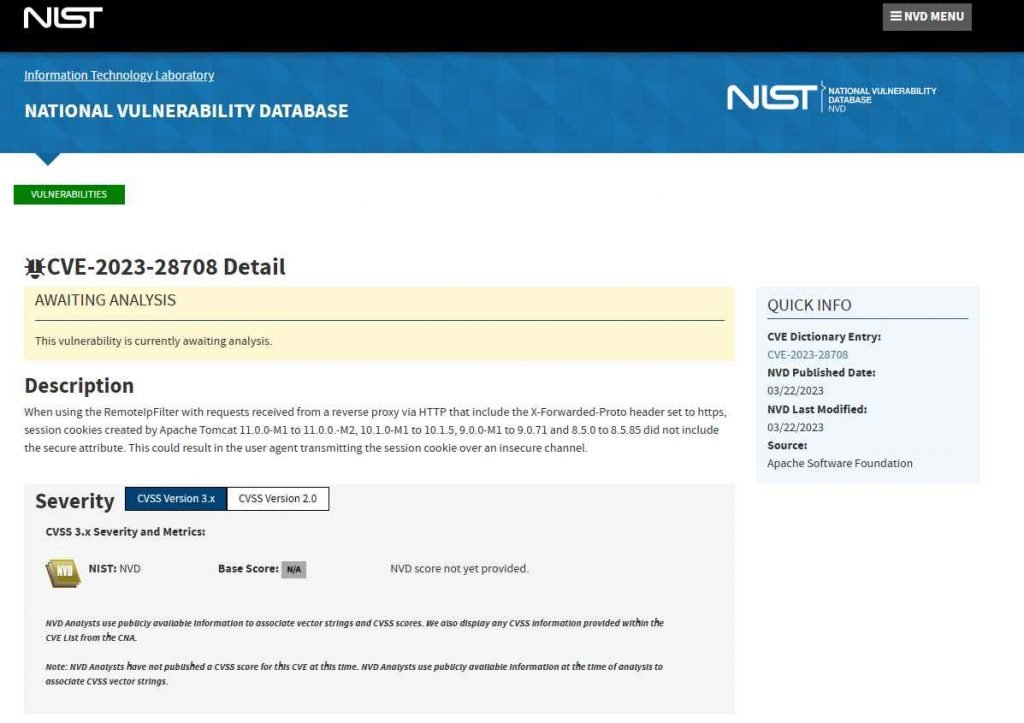
Up to and including versions 8.5.85/9.0.71/10.1.5/11.0.0-M2 of Apache Tomcat have been determined to have a vulnerability that has been rated as problematic (Application Server Software). An unidentified feature of the component known as RemoteIpFilter Handler is broken as a result of this bug. The manipulation using an unknown input results in a vulnerability involving the unsecured transmission of credentials. The user name and password are not adequately protected when they are being sent from the client to the server via the login pages, which are not using suitable security measures.
Session cookies generated by Apache Tomcat versions 11.0.0-M1 to 11.0.0.-M2, 10.1.0-M1 to 10.1.5, 9.0.0-M1 to 9.0.71 and 8.5.0 to 8.5.85 did not include the secure attribute when used in conjunction with requests received from a reverse proxy over HTTP and which had the X-Forwarded-Proto header set to https. Because of this, the user agent could send the session cookie through an unsecured connection. Hence, this might be dangerous.
The vulnerability was disclosed on March 22nd, 2023. The advisory is now available for download at lists.apache.org, where it is also shared. Since March 21st, 2023, this vulnerability has been assigned the identifier CVE-2023-28708. There is neither a technical description nor an exploit that is readily accessible to the public. The attack method has been given the designation of T1557 by the MITRE ATT&CK project.
This vulnerability may be remedied by upgrading to version 8.5.86, 9.0.72, 10.1.6, or 11.0.0-M3 respectively.
Mar 14 2023
Apache HTTP Server is one of the web servers that is used the most often throughout the globe. It is responsible for providing power to millions of websites and apps. Recent vulnerabilities found in the server, on the other hand, have the ability to disclose sensitive information and make it easier for attackers to carry out further attacks. The Apache HTTP Server has recently been found to contain two significant vulnerabilities, both of which are detailed below. It is imperative that you rapidly upgrade Apache HTTP Server to the most recent version in order to protect your system against the vulnerabilities described.
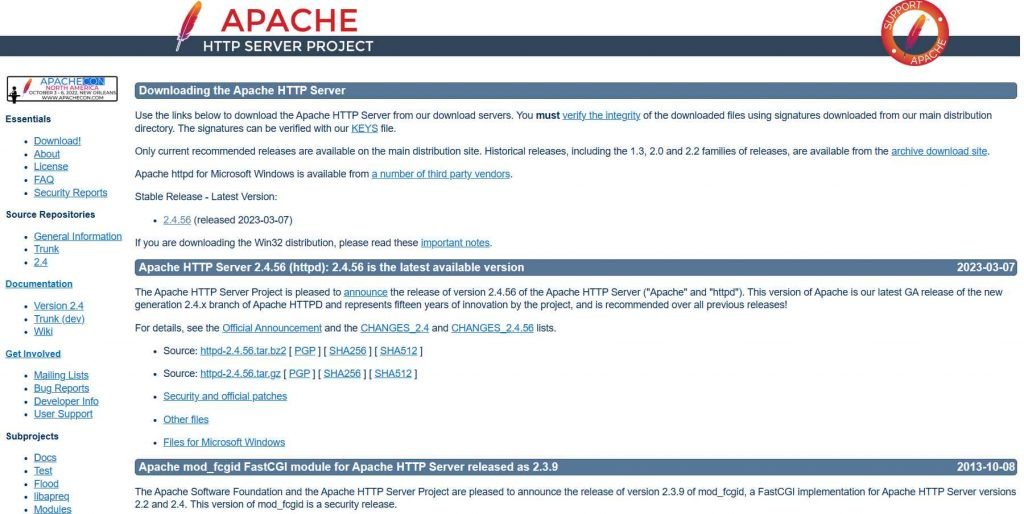
Apache HTTP Server request splitting vulnerability, CVE-2023-25690. This vulnerability is brought about by an issue that occurs in mod proxy whenever it is activated with a RewriteRule or ProxyPassMatch of some kind. This vulnerability might be used by a remote attacker to overcome access constraints in the proxy server, route undesired URLs to existing origin servers, and poison cache. Attacks using HTTP Request Smuggling are possible on Apache HTTP Server versions 2.4.0 through 2.4.55, if the server is configured with certain mod proxy settings. It occurs when mod proxy is enabled along with some form of RewriteRule or ProxyPassMatch. In these configurations, a non-specific pattern matches some portion of the user-supplied request-target (URL) data, and the matched data is then re-inserted into the proxied request-target utilizing variable substitution. This causes CVE-2023-25690 to be triggered. This might result in requests being split or smuggled, access rules being bypassed, and unwanted URLs being proxied to existing origin servers, all of which could lead to cache poisoning.
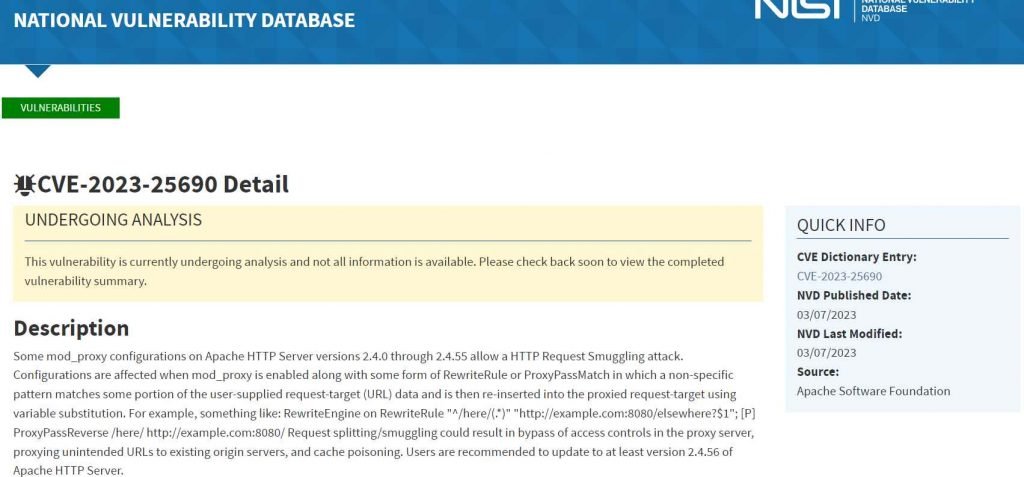
Versions of the Apache HTTP Server ranging from 2.4.30 to 2.4.55 are impacted by the problem. This attack is carried out by introducing unusual characters into the header of the origin response, which has the potential to either truncate or divide the response that is sent to the client. An attacker might take use of this vulnerability to inject their own headers into the request, causing the server to produce a split response.
Mar 14 2023
Guardio Labs discovered a Chrome Extension that promotes rapid access to fake ChatGPT functionality capable of stealing Facebook accounts and establishing hidden account backdoors.
Using a maliciously imposed Facebook app “backdoor” that grants the threat actors super-admin powers stands out.
“By hijacking high-profile Facebook business accounts, the threat actor creates an elite army of Facebook bots and a malicious paid media apparatus,” Guardio Labs reports.
“This allows it to push Facebook paid ads at the expense of its victims in a self-propagating worm-like manner.”
The Guardio Labs research team discovered a new version of the malicious fake ChatGPT browser extension. This time, it has been updated with a frightening method to take control of your Facebook accounts and a sophisticated worm-like way for spreading.
On Facebook-sponsored posts, the malicious stealer extension dubbed “Quick access to Chat GPT” is advertised as a fast way to launch ChatGPT straight from your browser.
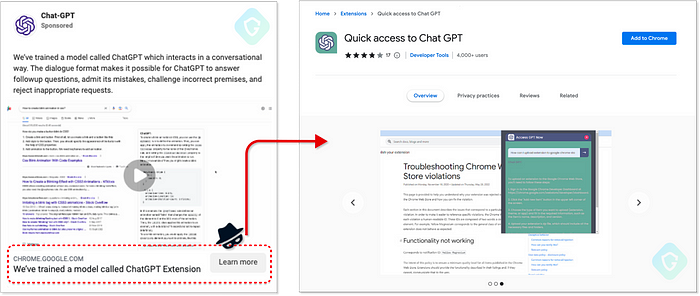
Reports say although the extension gives you that (by merely connecting to the official ChatGPT’s API), it also gathers all the data it can from your browser, steals cookies from allowed active sessions to any service you have, and uses targeted methods to take over your Facebook account.
Using two fake Facebook applications, portal and msg kig, backdoor access is maintained, and complete control of the target profiles is attained. Adding apps to Facebook accounts is a fully automated procedure.
Mar 07 2023
There are many web vulnerability scanners available on the market and their performance varies widely. Here we show you how you can quickly and objectively evaluate web vulnerability scanners, to help you find the best product for detecting security issues in your web applications.
Evaluating a web vulnerability scanner can be a complex task, but here are some key factors to consider:
It’s also important to test the scanner against known vulnerabilities to see how it performs in real-world scenarios. Additionally, comparing multiple scanners against the same web application can help identify strengths and weaknesses of each scanner.
1. Choose a web app that will make testing easy
2. Select web vulnerability scanners and scan your apps
3. Determine how well the scanners performed
https://portswigger.net/burp/enterprise/resources/how-to-evaluate-a-web-vulnerability-scanner
Previous posts on Web Security

InfoSec Threats | InfoSec books | InfoSec tools | InfoSec services
Mar 06 2023
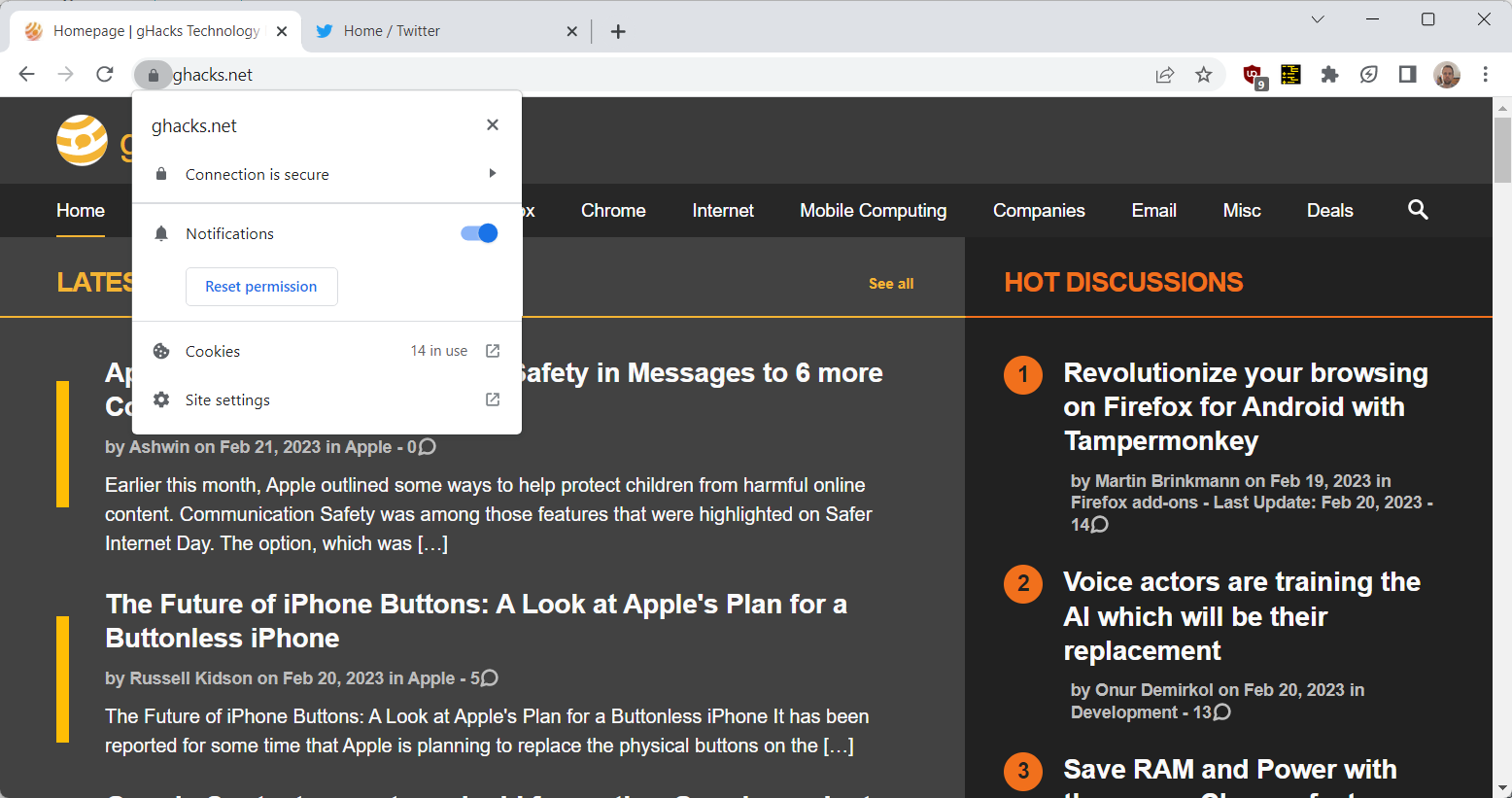
LayerX has published its annual browser security report in which the company highlights the most prominent browser security risks of 2022. The report includes predictions and recommendations for 2023 as well.
The report focuses on Enterprise environments, but several of its key takeaways apply to small business and home environments as well. The browser security threats of 2022 make up the largest part of the document, but users find predictions, recommendations and an interesting monthly overview of major security events in the report as well.
The nine major threats that LayerX identified in 2022 were the following ones:
Some of these are quite clear, others may require explanation. For phishing attacks, the researchers discovered that threat actors are hosting phishing URLs on legitimate SaaS platforms at an alarming rate. The rate of phishing attacks that use these legitimate platforms has increased by 1100% when compared to 2021, according to a Palo Alto Networks study.
LayerX conducted tests on how well browsers and network security tools protected against 1-day phishing sites. According to the test, the best performing browser had a catch rate of just 36%. Network security software blocked 48% of threats.
Similarly, malware is distributed via sanctioned services such as Google Drive and Microsoft OneDrive, to overcome blocks that may be in place for lesser known services and sites.
An analysis of data leakage in browsers concluded that 29% of users connected work browsers to personal profiles, and that 5.8% of identities were exposed in data breaches.
Outdated browsers are another threat to security, according to LayerX’s report. Ana analysis of 500 Chrome browsers revealed that a good number was either critically outdated or vulnerable to 1-day attacks.
Weak passwords and the reuse of passwords continue to be major issues. According to LayerX’s report, 29% of users use weak or medium strength passwords, and 11% of users reuse passwords regularly. The company noticed that 29% browser profiles were personal and set to sync.
Web browser extensions are another attack vector, as they “can grant excessive permissions once installed”. A recent Incogni study found that almost half of the analysed browser extensions posted either a high security or privacy risk.
The report includes an overview of browser security highlights of the year 2022. It is an interesting account that lists major security events in 2022. Some of these involved attacks, like the January 2022 video player attack that stole credit card information from over a hundred sites. Others highlight security advances, like the passwordless logins announcement by major tech companies in May, or the end of Internet Explorer in June.
The report ends with four predictions and recommendations. Predictions include that browsers will become “the main attack surface”, that attacks will “be increasingly SaaS-based and less file-based”, and that malicious web pages “will become more sophisticated”.
Closing Words
The report offers insights on the browser threat landscape of 2022, and how threats will evolve in 2023 and beyond. While most of it is aimed at Enterprise and large business environments, it may still be of interest to home users and small businesses alike.
The recommendations focus on SaaS and Enterprise-grade protections, but all users may use the listed threats to improve security. For example, outdated browsers may be updated more frequently, and weak or reused passwords may be replaced with unique strong passwords.
The report is available for download here, but a short form needs to be filled out before the download link is made available.
Source:
Previous posts on Web Security
InfoSec Threats | InfoSec books | InfoSec tools | InfoSec services
Web App Security

Feb 16 2023
Nikto is an open source web server vulnerabilities scanner, written in Perl languages. It function is to scan your web server for vulnerabilities.
Nikto scan for over 6700 items to detect misconfiguration, risky files, etc. and some of the features include:
This can be installed on Kali Linux or other OS (Windows, Mac OSX, Redhat, Debian, Ubuntu, BackTrack, CentOS, etc.), which support Perl.
Also Read- Kali Linux Commands Cheatsheet
In this article, I will explain how to use Nikto on Kali Linux .
Firstly we will install the Nikto tool from Github or Using apt install command on terminal.

Using help manual of Nikto we can see various options or parameters on how we can use this tool very efficiently.

Firstly we will use the basic syntax to check the vulnerability of the website.

However, Nikto is capable of doing a scan that can go after SSL and port 443, the port that HTTPS websites use (HTTP uses port 80 by default). So we’re not just limited to scanning old sites, we can do vulnerability assessments on sites that use SSL, which is pretty much a requirement these days to be indexed in search results.
If we know it’s an SSL site that we’re targeting, we can specify it in Nikto to save some time on the scan by adding -ssl to the end of the command.

So by using this tool we can analyze the vulnerability of the website.
Previous posts on Security Tools
InfoSec Threats | InfoSec books | InfoSec tools | InfoSec services
Jan 21 2023
is this website safe ? In this digital world, Check website safety is most important concern since there are countless malicious websites available everywhere over the Internet, it is very difficult to find a trustworthy website. We need tobrowse smart and need to make sure the site is not dangerous by using Multiple approaches.
In general, it is good to type the website URL instead of copy-paste or clicking an URL. Also, check to see the website working with HTTP OR HTTPS.

In order to find, is this website safe , we need to figure it out if the URL received from an unknown source and we would recommend cross-checking the URL before clicking on it. Copy the URL to analyzers that available over the Internet and ensure it’s Integrity.
If it is a shortened URL you can unshorten itwith the siteand then analyze the actual URL.
To check website safety, the first and the most recommended method is to check online page scanners, which uses the latest fingerprinting technology to show web applications are up to date or infected by malware.
Like this number of scanners available
Website reputation check needs to be done to find the trustworthiness of website with WOT .

In order to check website safety, Ensure the website availability with https before entering the payment card details. We can audit the HTTPS availability with the SSL analyzer URL’s available over the internet.
Also, there is a range of certificates available over the Internet from low assured (domain validation) to the Most trusted Extended validation certificates, you can refer the URL for more details.
Moreover, we can verify their prompt installation with various popular checkers available
According to Google, in order to check, is this website Safe, Browsing is a service that Google’s security team built to identify unsafe websites across the web and notify users and webmasters of potential harm.
In this Transparency Report, Google discloses details about the threats we detect and the warnings we show to users.
We share this information to increase awareness about unsafe websites, and we hope to encourage progress toward a safer and more secure web.
Safe Browsing also notifies webmasters when their websites are compromised by malicious actors and helps them diagnose and resolve the problem so that their visitors stay safer.
Safe Browsing protections work across Google products and power safer browsing experiences across the Internet.
Check the Browsing Website have Any unsafe Content or not – Google Safe Browsing
Please report the dangerous URL to the services mentioned below. They are arranged in categories which should make it relatively easy to decide which services you should report the site to.
Services which blacklist Dangerous sites
There are some awesome tools to Check the website IP Address has been listed in the Global Blacklist Database.
Multirblis a free multiple DNSBL (DNS BlackList aka RBL) lookup and FCrDNS (Forward Confirmed reverse DNS aka iprev) check tool to confirm, is this website Safe.
analyzes a website through multiple blacklist engines and online reputation tools to facilitate the detection of fraudulent and malicious websites. This service helps you identify websites involved in malware incidents, fraudulent activities, and phishing websites.
Important tools for Check the Website Reputation and confirm is this website Safe
Cyber criminals are using various sophisticated techniques to fool online users to drop malware and other cyber threats to cause unbearable damages. so beware of the malicious website, don’t blindly open the website and check the website safety before open it.
Web Application Security: Exploitation and Countermeasures for Modern Web Applications
Checkout our previous posts on Web Security
InfoSec books | InfoSec tools | InfoSec services
Jan 17 2023
From a detailed report – compiled by security researcher Sam Curry – the findings are an alarming indication that in its haste to roll out digital and online features, the automotive industry is doing a sloppy job of securing its online ecosystem. https://lnkd.in/gdAXGjaN

The web applications and APIs of major car manufacturers, telematics (vehicle tracking and logging technology) vendors, and fleet operators were riddled with security holes, security researchers warn.
In a detailed report, security researcher Sam Curry laid out vulnerabilities that run the gamut from information theft to account takeover, remote code execution (RCE), and even hijacking physical commands such as starting and stopping the engines of cars. The findings are an alarming indication that in its haste to roll out digital and online features, the automotive industry is doing a sloppy job of securing its online ecosystem.
Around six months ago, Curry and a few friends stumbled on a vulnerability in the mobile app of a scouter fleet at the University of Maryland, which caused the horns and headlights on all the scooters in the campus to turn on and stay on for 15 minutes. Curry subsequently became interested in doing further investigation along with researchers Neiko Rivera, Brett Buerhaus, Maik Robert, Ian Carroll, Justin Rhinehart, and Shubham Shah.
“We thought it’d be awesome to dump a ton of time into hacking different car companies to see how many ‘horns we could honk’, but it quickly turned into hacking telematics infrastructure and things outside of the telematics APIs,” Curry told The Daily Swig.
The researchers’ findings, detailed on Curry’s blog, highlight an alarming number of critical vulnerabilities across different systems. For example, a poorly configured API endpoint for generating one-time passwords for the web portals of BMW and Rolls Royce potentially enabled attackers to take over the accounts of any employee and contractor, thereby gaining access to sensitive customer and vehicle information.
A misconfiguration in the Mercedes-Benz single sign-on (SSO) system enabled the researchers to gain access to several internal company assets, including private GitHub repositories and internal communication tools. Attackers could pose as employees, allowing them to access sensitive information, send commands to customer vehicles, perform RCE attacks, and use social engineering to escalate their privileges across the Mercedes-Benz infrastructure.
Elsewhere a vulnerability in Kia’s web portal for dealers could have allowed attackers to create a fake session, register an account, associate it with any arbitrary vehicle VIN number, and gain access to lock, unlock, and remote start/stop mechanisms, as well as vehicle locations and vehicle camera feeds.
A poorly implemented SSO functionality in Ferrari’s web applications allowed the researchers to gain unrestricted access to the JavaScript code of several internal applications. The source code contained internal API keys and usage patterns, allowing potential attackers to create and modify users or (worse yet) give themselves super-user permissions. The vulnerabilities effectively allowed attackers to take ownership of Ferrari cars.
Other vulnerabilities granted full remote control over the locks, engine, horn, headlights, and trunk of Hyundai and Genesis vehicles made after 2012. The researchers were also able to obtain full remote access to Honda, Nissan, Infiniti, and Acura vehicles.
Curry and his colleagues found a SQL injection vulnerability in the admin portal of Spireon, the parent company of several car telematics and fleet management vendors that collectively service 15 million vehicles. Curry described this as their “most alarming finding” because the vulnerability allowed them to gain administrator access to the company’s platform.
“Using our access, we could access all user accounts, devices (vehicles), and fleets,” he said. “Some of the fleets on the website included ambulances, police cruisers, and large trucks. Using the Spireon access, we could send fully arbitrary commands and update device configurations.”
The researchers found they were able to lock starters, unlock vehicles, track vehicles, and send rogue dispatch addresses to vehicles like police cars and ambulances. The researchers further suspect the security shortcomings made it possible to install backdoors and run arbitrary commands on Spireon devices.
“There were some car companies where you’d own one, then copy the exact same methodology to another car company and get in with the same vulnerability,” Curry said.
The researchers found that some flaws existed across the platforms of several companies, including tons of exposed actuators (vehicle component control), debug endpoints, and administrative functionality for managing vehicles, purchase contracts, and telematic devices.
“From what it seems, car companies really rushed to install these devices,” Curry said. “Currently, these installations mostly have limited functionality so you can only do things like track, unlock, and start the vehicle, but with companies like Tesla and Rivian building more connected vehicles which can actually be controlled remotely, I’m worried that market pressure will force these companies to build half-baked solutions which are open to attack.”
Checkout our latest posts on API security…

Contact DISC InfoSec
InfoSec books | InfoSec tools | InfoSec services
Jan 13 2023
The vulnerability (CVE-2022-3656), allowed remote attackers to steal sensitive user data like cloud service provider credentials and crypto wallet details.
The cyber security researchers at Imperva Red Team have shared details of a recently discovered and patched vulnerability that impacted over 2.5 billion Google Chrome users and all Chromium-based browsers, including Opera and Edge.
The vulnerability is tracked as CVE-2022-3656, allowing remote attackers to steal sensitive user data like cloud service provider credentials and crypto wallet details. Further probe revealed that the issue emerged due to how the Chrome browser interacted with symlinks while processing directories and files.
As per Imperva’s researcher Ron Masas, the browser didn’t check whether the symlink pointed to a location that wasn’t accessible, encouraging the stealing of sensitive files. Google characterized it as a medium-severity vulnerability caused due to inadequate data validation in File System. The company released a fix in the Chromium versions 107 and 108 released in Oct and Nov 2022, respectively.
In their report, Imperva researchers named the flaw SymStealer. The issue occurs when the attacker exploits the File System to evade program restrictions and access unauthorized files. Imperva’s analysis revealed that when a user drags and drops a folder directly onto a file input element, the browser recursively resolves all symlinks without displaying a warning.
For your information, a symlink is also called a symbolic link. It is a file that points to a directory or file and lets the OS treat it as if it was stored at the symlink’s location. Usually, this feature helps users in creating shortcuts, file organisation, and redirect file paths.
But Imperva’s research revealed that this feature could be exploited to introduce vulnerabilities such as this one that emerged due to how browsers interacted with symlinks for file/directories processing. This issue is also called symbolic link following.
Through this weakness, the attacker can trick a victim into accessing a compromised website and download a ZIP archive file that contains the symlink to a valuable folder or file present on the device e.g. wallet keys. When this file is uploaded back to this site as an infection chain component like a crypto wallet service, the user is prompted to upload their recovery keys.
The attacker can now traverse the symbolic link and access the original file storing the key phrase. Imperva researchers devised a proof-of-concept using CSS trickery to modify the file input element’s size so that the file uploads regardless of where the folder drops on the page and information is stolen successfully.
It is important to always keep your software up to date in order to protect against the latest vulnerabilities and ensure that your personal and financial information remains secure.
Imperva
Information Assurance Directorate: Deploying and Securitign Google Chrome in a Windows Enterprise
Dec 23 2022

Web Pentesting Checklist Cyber Security News
PenTesting Titles


Pentesting Training
Penetration Testing – Exploitation
Penetration Testing – Post Exploitation
Infosec books | InfoSec tools | InfoSec services
Dec 19 2022
is this website safe ? In this digital world, Check website safety is most important concern since there are countless malicious websites available everywhere over the Internet, it is very difficult to find a trustworthy website. We need tobrowse smart and need to make sure the site is not dangerous by using Multiple approaches.
In general, it is good to type the website URL instead of copy-paste or clicking an URL. Also, check to see the website working with HTTP OR HTTPS.
In order to find, is this website safe , we need to figure it out if the URL received from an unknown source and we would recommend cross-checking the URL before clicking on it. Copy the URL to analyzers that available over the Internet and ensure it’s Integrity.
If it is a shortened URL you can unshorten itwith the siteand then analyze the actual URL.
To check website safety, the first and the most recommended method is to check online page scanners, which uses the latest fingerprinting technology to show web applications are up to date or infected by malware.
Like this number of scanners available
Website reputation check needs to be done to find the trustworthiness of website with WOT .
In order to check website safety, Ensure the website availability with https before entering the payment card details. We can audit the HTTPS availability with the SSL analyzer URL’s available over the internet.
Also, there is a range of certificates available over the Internet from low assured (domain validation) to the Most trusted Extended validation certificates, you can refer the URL for more details.
Moreover, we can verify their prompt installation with various popular checkers available
According to Google, in order to check, is this website Safe, Browsing is a service that Google’s security team built to identify unsafe websites across the web and notify users and webmasters of potential harm.
In this Transparency Report, Google discloses details about the threats we detect and the warnings we show to users.
We share this information to increase awareness about unsafe websites, and we hope to encourage progress toward a safer and more secure web.
Safe Browsing also notifies webmasters when their websites are compromised by malicious actors and helps them diagnose and resolve the problem so that their visitors stay safer.
Safe Browsing protections work across Google products and power safer browsing experiences across the Internet.
Check the Browsing Website have Any unsafe Content or not – Google Safe Browsing
Please report the dangerous URL to the services mentioned below. They are arranged in categories which should make it relatively easy to decide which services you should report the site to.
Services which blacklist Dangerous sites
There are some awesome tools to Check the website IP Address has been listed in the Global Blacklist Database.
Multirblis a free multiple DNSBL (DNS BlackList aka RBL) lookup and FCrDNS (Forward Confirmed reverse DNS aka iprev) check tool to confirm, is this website Safe.
analyzes a website through multiple blacklist engines and online reputation tools to facilitate the detection of fraudulent and malicious websites. This service helps you identify websites involved in malware incidents, fraudulent activities, and phishing websites.
Important tools for Check the Website Reputation and confirm is this website Safe
Cyber criminals are using various sophisticated techniques to fool online users to drop malware and other cyber threats to cause unbearable damages. so beware of the malicious website, don’t blindly open the website and check the website safety before open it.
Web Application Security: Exploitation and Countermeasures for Modern Web Applications
Security Analysis with search engines:

Nov 10 2022
Researchers at Zimperium zLabs recently identified a new Chrome browser botnet called ‘Cloud9’ that is intent on stealing the following information using malicious extensions:-
This method is becoming increasingly attractive for malware developers to target web browsers as they contain the most valuable information about a user.
In the course of everyday activities, we can find out a lot about ourselves through our keystrokes or session cookies. A breach of security or a violation of privacy can be caused by having access to such information.
Cloud9 botnet is a RAT that affects all Chromium-based web browsers, which are popular among consumers like Chrome and Microsoft Edge. Moreover, threat actors could exploit this RAT to remotely execute arbitrary commands.
The official Chrome web store doesn’t host this malicious Chrome extension, so it cannot be downloaded from there.
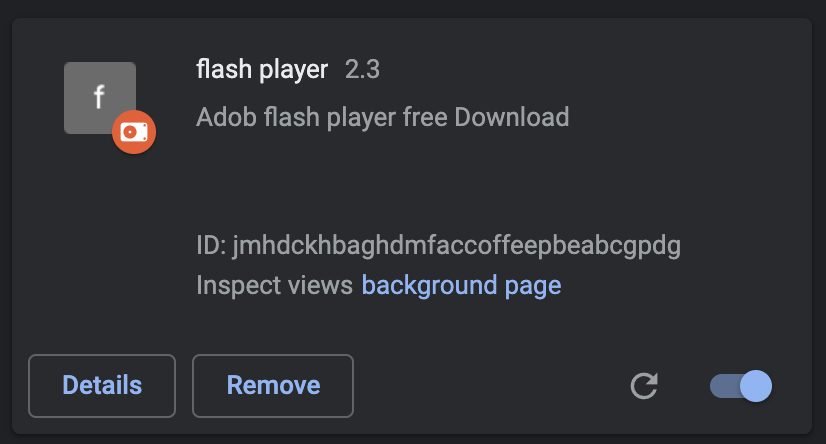
The distribution channel of this malware relies on communities that are operated by threat actors, wherein the malware will be hidden by users of the tool before it gets delivered to the victims by the tool itself.
In terms of the Javascript files that make up the extension, there are only three. While the primary functionality of the extension can be located in a file called “campaign.js” which contains most of its functionality.
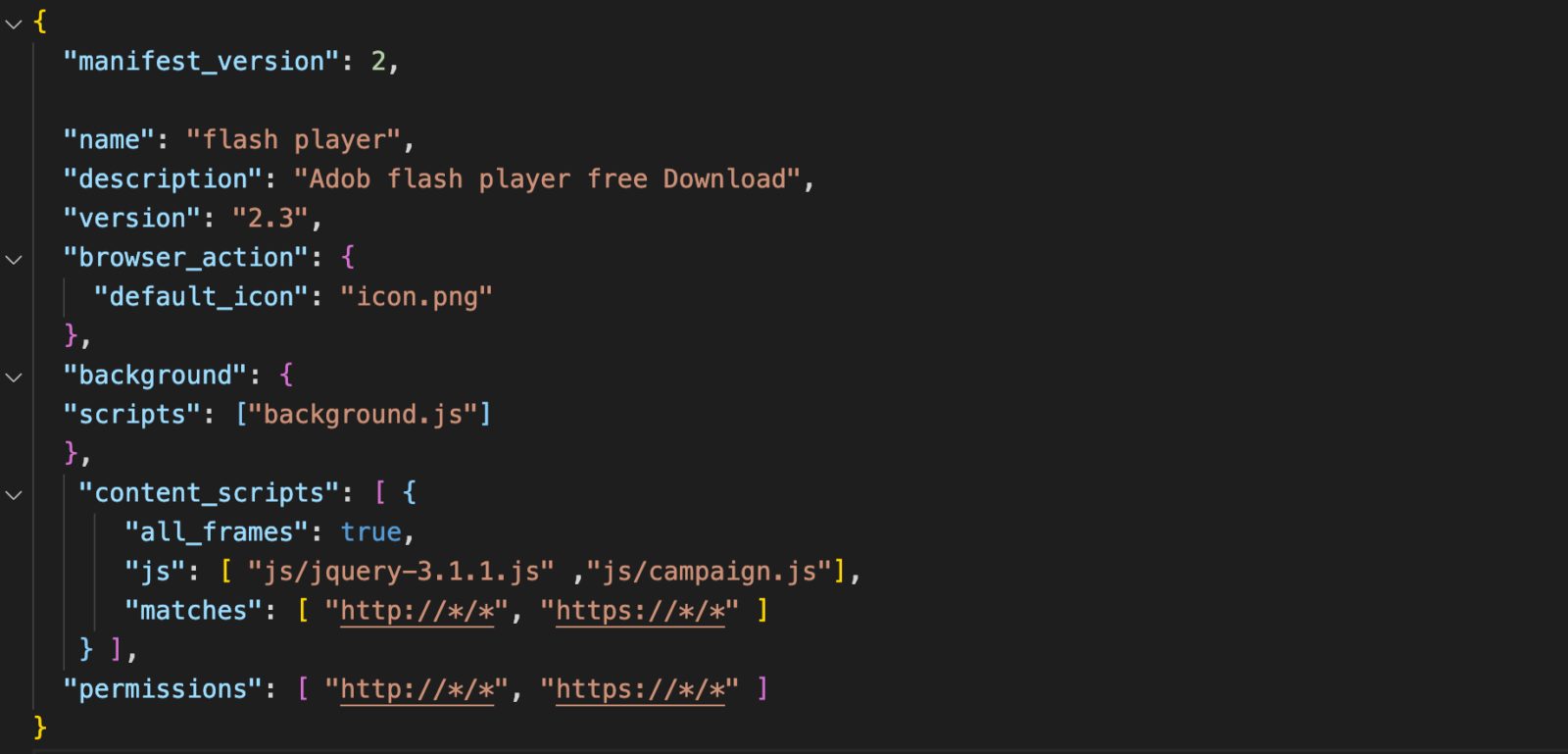
According to the report, During the initialization of campaign.js, the window.navigator API is used to identify the system’s operating system. Once the target has been identified, a Javascript file is injected into the victim’s computer system as a method to mine cryptocurrency using the resources of the victim’s computer system.
Next, for further proceedings, it injects another script known as cthulhu.js which comprises a full-chain exploit for the following flaws:-
As soon as the vulnerabilities are exploited, Windows malware is automatically installed on the host machine and executed. This gives attackers even more opportunities to compromise systems and carry out even more severe malware attacks.
While one of the sophisticated inclusion of this malware is “Clipper,” a module that keeps scanning the clipboard of the system for copied data like:-
In addition to injecting ads into webpages silently, Cloud9 is also capable of generating revenue for its operators by generating ad impressions.

Nov 08 2022
Researchers from Positive Security uncovered a website scanner called “Urlscan” that unintentionally leaking sensitive URLs and data due to misconfiguration.
It appears that a third party accidentally leaked the GitHub Pages URLs, and this incident happened while a metadata analysis was being conducted.
“This information could be used by spammers to collect email addresses and other personal information,” Bräunlein, Co Founder Positive security said. “It could be used by cyber criminals to take over accounts and run believable phishing campaigns.”
The URLscan.io service is described as a sandbox for the web and has been referred to as a web scanner. Several security solutions integrate with its API in order to make their solutions more secure and feature-rich.
The idea behind it is to allow users to identify possible malicious websites with ease and confidence using a simple, straightforward tool. A wide range of open-source projects and enterprise customers are supported by the engine.
It was discovered that users who enabled Github Pages as a hosting method for a private repository leaked the name of the repository. There does not seem to have been any public official acknowledgment of this breach as of yet.
There is a possibility that an anonymous user could easily search for and retrieve a vast amount and variety of sensitive data within the API integration.
This is because the API is equipped with several varieties of security tools that run scans on incoming emails and conduct Urlscans on every link that is received.
Several types of information are provided with each scan result that is returned by the service, including:-
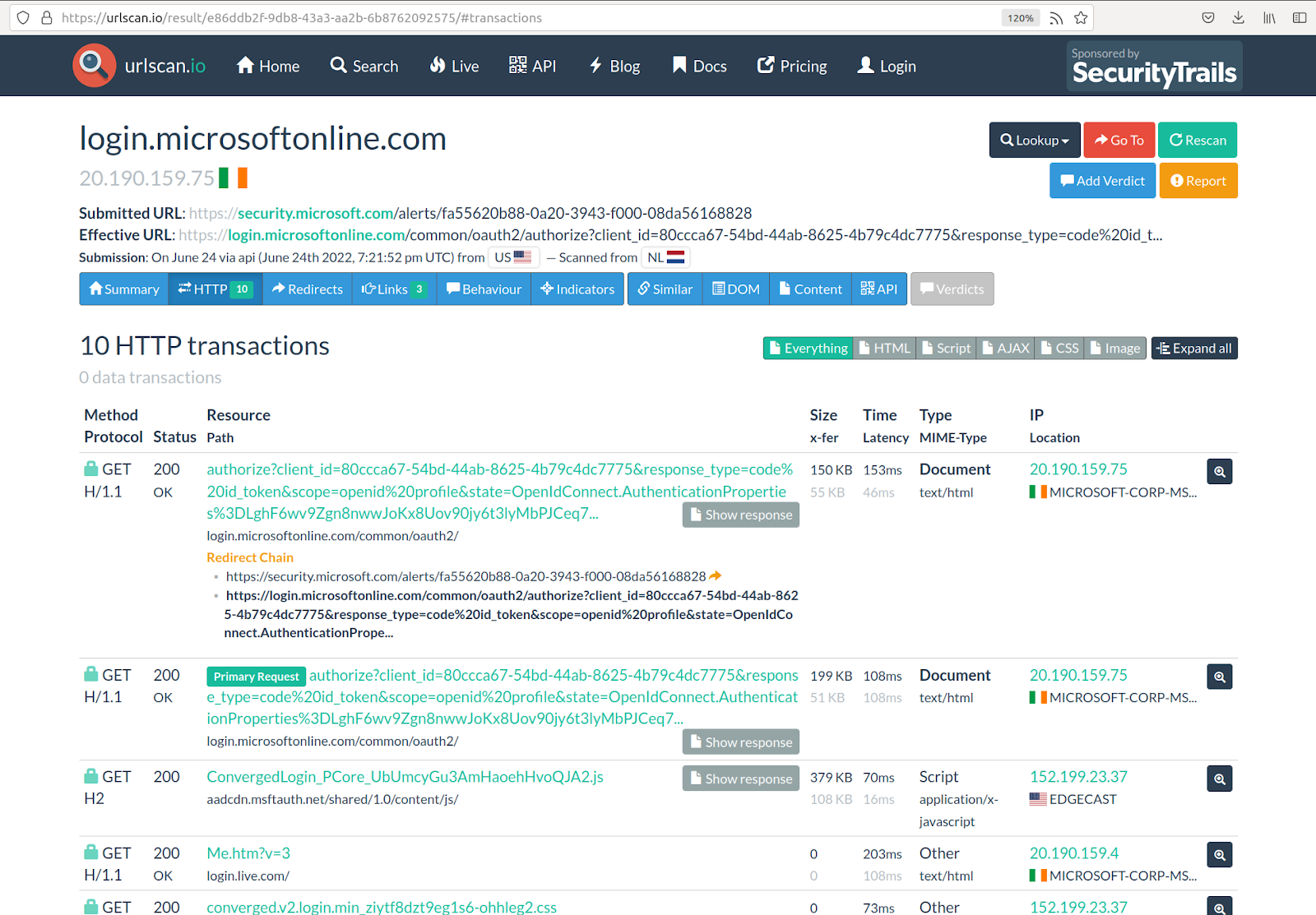
It has been noted that some API integrations use generic Python requests that use the python-requests/2.X.Y module. This would lead to scans being mistakenly submitted as public if user agents ignored account visibility settings.
Oct 04 2022
The Chrome web browser was recently updated to a new stable version released by Google. Google Chrome’s updated version Chrome 106 offers a number of brand-new features and improvements, and it also includes a number of security updates.
The new version of Chrome 106 has been already released by Google to the stable channel for all the major platforms:-
In the course of hours, days, or even weeks, the update will be rolled out to all devices throughout the world in phases.
This update contains 20 security fixes that have been applied to Chrome 106 Stable so far. As usual, the official release notes only include a list of security issues that were reported externally to the developers.
There are different levels of security ratings, the highest being high. There have been at least five security issues that have been publicly disclosed. These five flaws were rated as high, while the remaining have been rated between medium and low.
Here below we have mentioned those five high severity security vulnerabilities:-
There seem to be no exploits in the wild that take advantage of any of the issues. The release notes for this version do not mention anything about that.
To speed up the installation of the Chrome 106 update, Chrome users can load the following URL in the address bar of the browser:-
Whenever you open this webpage in Chrome, it will display the current version and automatically check for any updates that have been released.

Sep 28 2022
The OWASP Top 10 security risks point out the common vulnerabilities seen in web applications. But it does not list the set of attack vectors that WAFs (Web Application Firewalls) can simply block. This is but a myth often propagated by many a security vendor. OWASP Top 10 protection is the joint responsibility of the security vendor and the application developers.
There is a lot that an effective security solution and WAF can do to secure OWASP vulnerabilities. But in some cases, the security solution may not be able to give complete coverage against it and requires the developers/ organizations to take preventive action.
In this article, we help you understand how a comprehensive, intelligent, and fully managed WAF can augment OWASP Top 10 protection.
WAF is the first line of defense between the web application and the web traffic, filtering out malicious requests and bad traffic at the network edge. The best WAFs are part of larger security solutions that combine deep, intelligent scanning, bot management, API protection, etc., with OWASP protection. They also leverage self-learning AI, behavioral and pattern analysis, security analytics, global threat feeds, and cloud computing in combination with human expertise.
To effectively prevent this OWASP vulnerability, organizations must fix their access control model. WAFs can help organizations by
The encryption of everything, in rest and transit, is necessary for OWASP Top 10 protection against cryptographic failures. WAFs, augment protection by testing for weak SSL/TLS ciphers, insufficient transport layer protection, crypto agility, sensitive information sent via unencrypted channels, credentials transmitted over encrypted channels, etc. Organizations can then fix any issues that are identified.
User input sanitization, validation, and parameterized queries are critical to prevent this risk. For OWASP protection against injections, WAFs use a combination of whitelist and blacklist models to identify all types of injection – command, SQL, code, etc.
WAFs leverage behavior, pattern, and heuristic analytics and client reputation monitoring to proactively detect anomalous behavior and prevent malicious requests from reaching and being executed by servers. They use virtual patching to instantly secure injection flaws and prevent attackers’ exploitation.
Also, Download Your Copy of OWASP Top 10 2022 Playbook
By integrating the WAF and the security solution right into the early stages of software development, organizations can continuously monitor and test for security weaknesses. For instance, organizations can identify insecure codes, components with known vulnerabilities, flawed business logic, etc., in the early SDLC stages by deploying a WAF and fixing them. This helps build secure-by-design websites and apps.
For OWASP Top 10 protection against security misconfigurations, WAFs use a combination of fingerprinting analysis and testing. They fingerprint web servers, web frameworks, and the application itself and test error codes, HTTP methods, stack traces, and RIA cross-domain policies to look for security misconfigurations.
WAFs use automated workflows to intelligently detect misconfigurations, including default passwords, configurations, unused features, verbose error messages, etc. They virtually patch these misconfigurations to prevent exploitation by threat actors. They offer real-time visibility into the security posture and insightful reports, enabling organizations to keep hardening their security posture.
The intelligent scanning capabilities of WAFs enable organizations to continuously detect vulnerable and outdated components. Here, again instantaneous virtual patching helps secure these OWASP vulnerabilities until fixed by developers.
Organizations must implement effective session management policies, strong password policies, and multi-factor authentication for OWASP Top 10 protection against identification and authentication failures. Intelligent WAFs leverage their strong technological capabilities to accurately identify these failures.
They leverage their bot detection capabilities – workflow validation, fingerprinting, and behavioral analysis – to prevent brute force attacks, credential stuffing, and other bot attacks resulting from the exploitation of broken authentication and session management.
WAFs are equipped to detect these OWASP security risks effectively using their continuous scanning and pen-testing capabilities. They use a combination of negative and positive security models to prevent this risk.
The best WAFs offer ongoing logging and monitoring features and complete visibility into the security posture. They offer cohesive dashboards that can be used to generate customizable and visual reports, gain critical insights and recommendations to improve security, etc.
For protection against SSRF, implementation of positive rules, user input validation, etc., by the organizations is critical. WAFs, on their end, can be configured to block unwanted website traffic by default, encrypting responses, preventing HTTP redirections, etc.

Web Application Firewall WAF A Complete Guide
Sep 16 2022
Researchers at threat intelligence company Group-IB just wrote an intriguing real-life story about an annoyingly simple but surprisingly effective phishing trick known as BitB, short for browser-in-the-browser.
You’ve probably heard of several types of X-in-the-Y attack before, notably MitM and MitB, short for manipulator-in-the-middle and manipulator-in-the-browser.
In a MitM attack, the attackers who want to trick you position themselves somewhere “in the middle” of the network, between your computer and the server you’re trying to reach.
(They might not literally be in the middle, either geographically or hop-wise, but MitM attackers are somewhere along the route, not right at either end.)
The idea is that instead of having to break into your computer, or into the server at the other end, they lure you into connecting to them instead (or deliberately manipulate your network path, which you can’t easily control once your packets exit from your own router), and then they pretend to be the other end – a malevolent proxy, if you like.
They pass your packets on to the official destination, snooping on them and perhaps fiddling with them on the way, then receive the official replies, which they can snoop on and tweak for a second time, and pass them back to you as though you’d connected end-to-end just as you expected.
If you’re not using end-to-end encryption such as HTTPS in order to protect both the confidentiality (no snooping!) and integrity (no tampering!) of the traffic, you are unlikely to notice, or even to be able to detect, that someone else has been steaming open your digital letters in transit, and then sealing them again up afterwards.
more details: Serious Security: Browser-in-the-browser attacks – watch out for windows that aren’t!

Web Security for Developers: Real Threats, Practical Defense
Browser Security A Complete Guide
Aug 31 2022
Google’s latest Chrome browser, version 105, is out, though the full version number is annoyingly different depending on whether you are on Windows, Mac or Linux.
On Unix-like systems (Mac and Linux), you want 105.0.5195.52, but on Windows, you’re looking for 105.0.5195.54.
According to Google, this new version includes 24 security fixes, though none of them are reported as “in-the-wild”, which means that there weren’t any zero-days patched this time.
Nevertheless, there’s one vulnerability dubbed Critical, and a further eight rated High.
Of the flaws that were fixed, just over half of them are down to memory mismanagement, with nine listed as use-after-free bugs, and four as heap buffer overflows.
A use-after-free is exactly what it says: you hand back memory to free it up for another part of the program, but carry on using it anyway, thus potentially interfering with the correct operation of your app.
Imagine, for instance, that the part of the program that thinks it has now sole access to the offending block of memory receives some untrusted input, and carefully verifies that the new data is safe to use…
…but then, in the instant before it starts using that validated input, your buggy “use-after-free” code interferes, and injects stale, unsafe data into the very same part of memory.
Suddenly, bug-free code elsewhere in the program behaves as if it were buggy itself, thanks to the flaw in your code that just invalidated what was in memory.
Attackers who can figure out a way to manipulate the timing of your code’s unexpected intervention may be able not only to crash the program at will, but also to wrest control from it, thus causing what’s known as remote code execution.
And a heap buffer overflow refers to a bug where you write more data to memory than will fit in the space that was originally allocated to you. (Heap is the jargon term for the collection of memory
blocks that are currently being managed by the system.)
If some other part of the program has a memory block just happens to be near to or next to yours in the heap, then the superfluous data that you just wrote out won’t overflow harmlessly into unused space.
Instead, it will corrupt data that’s in active use somewhere else, which similar consequences to what we just described for a use-after-free bug.
Happily, as well as fixing misfeatures that weren’t supposed to be there at all, Google has announced the arrival of a new feature that adds protection against a class of browser flaws known as cross-site scripting (XSS).
XSS bugs are caused by the browser inserting untrusted data, say from a web form submitted by a remote user, directly into the current web page, without checking for (and removing) risky content first.
Imagine, for instance, that you have a web page that offers to show me what a text string of my choice looks like in your funky new font.
If I type in the sample text Cwm fjord bank glyphs vext quiz (a contrived but vaguely meaningful mashup of English and Welsh that contains all 26 letters of the alphabet in just 26 letters, in case you were wondering), then it’s safe for you to put that exact text into the web page you create.
In JavaScript, for example, you could rewrite the body of the web page like this, inserting the text that I supplied without any modification:
In JavaScript, for example, you could rewrite the body of the web page like this, inserting the text that I supplied without any modification:
document.body.innerHTML = "<p style='font-family:funky;'>Cwm fjord bank glyphs vext quiz"
But if I cheated, and asked you to “display” the text string Cwm fjord<script>alert(42)</script> instead, then it would be reckless for you to do this…
document.body.innerHTML = "<p style='font-family:funky;'>Cwm fjord<script>alert(42)</script>"
…because you would be allowing me to inject untrusted JavaScript code of my choosing directly into your web page, where my code could read your cookies and access data that would otherwise be off-limits.
So, to make what’s known as sanitising thine inputs easier, Chrome has now officially enabled support for a new browser function called setHTML().
This can be used to push new HTML content through a feature called the Sanitizer first, so that if you use this code instead…
document.body.setHTML("<p style='font-family:funky;'>Cwm fjord<script>alert(42)</script>")
…then Chrome will scan the proposed new HTML string for security problems first, and automatically remove any text that could pose a risk.
You can see this in action via the Developer tools by running the above setHTML() code at the Console prompt, and then retrieving the actual HTML that was injected into the document.body variable, as we did here:
Even though we explicitly put a <script> tag in the input that we passed to the setHTML() function, the script code was automatically purged from the output that was created.
If you genuinely need to add potentially dangerous text into an HTML element, you can add a second argument to the setHTML() function that specifies various types of risky content to block or allow.
By default, if this second argument is omitted as above, then the Sanitizer operates at its maximum security level and automatically purges all dangerous content that it knows about.
chrome://settings/help.Sanitizer and setHTML() functionality by reading advice from Google and the MDN Web Docs.
Aug 17 2022
The latest update to Google’s Chrome browser is out, bumping the four-part version number to 104.0.5112.101 (Mac and Linux), or to 104.0.5112.102 (Windows).
According to Google, the new version includes 11 security fixes, one of which is annotated with the remark that “an exploit [for this vulnerability] exists in the wild”, making it a zero-day hole.
The name zero-day is a reminder that there were zero days on which even the most well-informed and proactive user or sysadmin could have been patched ahead of the Bad Guys.

Details about the updates are scant, given that Google, in common with many other vendors these days, restricts access to bug details “until a majority of users are updated with a fix”.
But Google’s release bulletin explicitly enumerates 10 of the 11 bugs, as follows:
As you can see, seven of these bugs were caused by memory mismanagement.
A use-after-free vulnerability means that one part of Chrome handed back a memory block that it wasn’t planning to use any more, so that it could be reallocated for use elsewhere in the software…
…only to carry on using that memory anyway, thus potentially causing one part of Chrome to rely on data it thought it could trust, without realising that another part of the software might still be tampering with that data.
Often, bugs of this sort will cause the software to crash completely, by messing up calculations or memory access in an unrecoverable way.
Sometimes, however, use-after-free bugs can be triggered deliberately in order to misdirect the software so that it misbehaves (for example by skipping a security check, or trusting the wrong block of input data) and provokes unauthorised behaviour.
A heap buffer overflow means asking for a block of memory, but writing out more data than will fit safely into it.
This overflows the officially-allocated buffer and overwrites data in the next block of memory along, even though that memory might already be in use by some other part of the program.
Buffer overflows therefore typically produce similar side-effects to use-after-free bugs: mostly, the vulnerable program will crash; sometimes, however, the program can be tricked into running untrusted code without warning.
The zero-day bug CVE-2022-2856 is presented with no more detail than you see above: “Insufficient validation of untrusted input in Intents.”
A Chrome Intent is a mechanism for triggering apps directly from a web page, in which data on the web page is fed into an external app that’s launched to process that data.
Google hasn’t provided any details of which apps, or what sort of data, could be maliciously manipulated by this bug…
…but the danger seems rather obvious if the known exploit involves silently feeding a local app with the sort of risky data that would normally be blocked on security grounds.
Chrome will probably update itself, but we always recommend checking anyway.
On Windows and Mac, use More > Help > About Google Chrome > Update Google Chrome.
There’s a separate release bulletin for Chrome for iOS, which goes to version 104.0.5112.99, but no bulletin yet [2022-08-17T12:00Z] that mentions Chrome for Android.
On iOS, check that your App Store apps are up-to-date. (Use the App Store app itself to do this.)
You can watch for any forthcoming update announcement about Android on Google’s Chrome Releases blog
The open-source Chromium variant of the proprietary Chrome browser is also currently at version 104.0.5112.101.
Microsoft Edge security notes, however, currently [2022-08-17T12:00Z] say:
August 16, 2022
Microsoft is aware of the recent exploit existing in the wild. We are actively working on releasing a security patch as reported by the Chromium team.
You can keep your eye out for an Edge update on Microsoft’s official Edge Security Updates page.
Web Security for Developers: Real Threats, Practical Defense






